
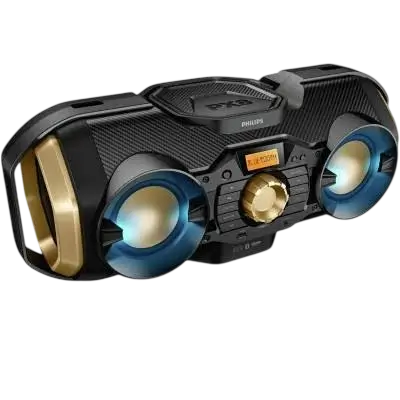
The Philips PX840T is a portable CD Soundmachine that plays CDs, USB storage devices, Bluetooth audio, and external sources such as MP3 players. It also has an FM/AM radio. Two 4-inch full-range speakers deliver up to 50 W of maximum output, and Dynamic Bass Boost (DBB) and Digital Sound Control (DSC) let you shape the sound. A decorative light, an adjustable display, and built-in pins for a shoulder strap complete the design. It runs from the AC adapter or from eight D batteries.
What’s in the Box
- Main unit
- Power adaptor
- Printed materials, including a Quick Start Guide
Batteries, a shoulder strap, and a 3.5 mm audio cable are not supplied.
Parts and Controls
The top and front controls are labeled on the unit.
- Power button: turns the unit on or puts it in standby.
- Stop button: stops playback. Pressing it twice erases a programmed list.
- Previous/next buttons: skip tracks. Hold them to fast-forward or reverse, or to tune radio stations.
- MODE/DIM: selects repeat or shuffle. Hold it for two seconds to change display brightness.
- DBB: turns dynamic bass enhancement on or off.
- DSC: selects a preset sound effect.
- PROG: programs tracks or radio stations.
- -ALB/PRE and ALB/PRE+: skip albums or select radio presets.
- Play/Pause (PAIRING): starts or pauses playback. In Bluetooth mode, hold it for two seconds to enter pairing mode.
- LIGHT: turns the decorative light on or off and selects an effect.
- SOURCE: switches between sources.
The USB port and AUDIO IN socket are on the unit, and the DC IN socket and telescopic antenna are at the back and top. The disc compartment opens from the top.
Power Setup
AC Power
Make sure your outlet voltage matches the voltage printed on the back or underside of the product (p. 6).
- Plug one end of the AC adapter into the DC IN socket on the back.
- Plug the other end into a wall outlet.
When disconnecting, pull the plug, never the cord. Two adapters are listed: Philips HB40-1203000SPA and GME36A120300FGR. Both accept 100–240 V and output 12 V DC at 3 A. Use only power supplies listed in the manual.
Battery Power
- Open the battery compartment on the bottom.
- Insert 8 D (R20/UM1) batteries, matching the + and – markings.
- Close the compartment.
Don’t mix old and new batteries or different types. Keep batteries away from heat, and remove them if you won’t use the unit for a long time.
Turning On
Press the power button. “POWER ON” scrolls across the display, and the unit returns to the last source you used. Press SOURCE repeatedly to change sources. Press the power button again for standby.
Playing Your Music
CD
- Press SOURCE until [CD] appears.
- Press down on the lid to open the compartment.
- Insert a disc with the printed side up and close the lid. Playback starts automatically.
USB
Select [USB], then insert the device. Playback should start automatically. If it doesn’t, press play.
Bluetooth
- Press SOURCE until [BLUETOOTH] appears. [PAIRING] flashes.
- Turn on Bluetooth on your device and make it visible.
- Select Philips PX8. If a password is requested, enter 0000.
- A double beep and [Connected] confirm the pairing.
The unit remembers up to four paired devices, and a fifth replaces the first. Range is about 10 meters (30 feet) in open space, and obstacles or nearby electronics can reduce it. If you can’t find the unit, hold the pairing button for two seconds and search again. To disconnect, hold the pairing button for two seconds, turn off Bluetooth on your device, or move out of range. To switch to another device, enter pairing mode and connect it.
External Devices
Select [AUDIO-IN], connect a 3.5 mm cable between the AUDIO IN socket and your device’s headphone socket, and start playback on that device.
Play Options
In CD or USB mode, press MODE to cycle through these options:
- REP ONE: repeats the current track.
- REP ALBUM: repeats the current album (MP3 only).
- REP ALL: repeats all tracks.
- SHUFFLE: plays tracks randomly.
- OFF: returns to normal play.
Program Tracks
You can program up to 20 tracks.
- Press stop.
- Press PROG.
- For MP3 tracks, choose an album with -ALB/PRE or ALB/PRE+.
- Choose a track with the skip buttons and press PROG to confirm.
- Repeat steps 3–4 for more tracks.
- Press play.
Sound Effects
During playback, press DSC to cycle through ROCK, TECHNO, JAZZ, POP, and SAMBA. Press DBB to switch bass enhancement on or off.
Listening to FM/AM Radio
Select the FM/AM source, fully extend the telescopic antenna, and keep it away from other electrical appliances.
- Hold the previous or next button for two seconds to auto-tune to a strong station.
- Repeat to find more stations, or tap the buttons repeatedly to tune manually.
To store stations automatically, hold PROG for two seconds in tuner mode. To store one manually, tune to it, press PROG, choose a number from 1 to 20 with -ALB/PRE or ALB/PRE+, and press PROG to confirm. You can store up to 20 stations. To replace a preset, store a different station in its place. To recall a preset, press -ALB/PRE or ALB/PRE+.
Display, Light, and Carrying
- Display brightness: hold DIM for two seconds, then press it repeatedly to cycle LOW, MEDIUM, HIGH, and OFF.
- Decorative light: press LIGHT to choose Powerful (fast, random color changes), Peace (slow, random color changes), or Light Off.
- Shoulder strap: attach a strap, sold separately, to the built-in pins on both sides of the top. The pins are 5 mm in diameter and 12.5 mm long.
Product Specifications
| Category | Detail |
| Total output power | Max. 50 W |
| Speakers | 2 x 4″ full range, 4 Ω |
| Frequency response (amplifier) | 50–20000 Hz, ±3 dB |
| Disc types | CD-DA, CD-R, CD-RW, MP3-CD (12 cm / 8 cm) |
| Bluetooth | V2.1+EDR; A2DP, AVRCP; about 10 m |
| FM tuning range | 87.5–108 MHz (50 kHz grid) |
| AM tuning range | 530–1700 kHz (9 kHz grid) |
| Batteries | 8 x 1.5 V D/R20/UM1 (not supplied) |
| Operating power consumption | 20 W |
| Eco standby power | Under 0.5 W |
| Dimensions (W x H x D) | 523 x 208 x 223 mm |
| Weight | 3.8 kg |
Supported File Formats
For MP3 discs, the unit supports ISO9660 and Joliet formats, up to 512 titles and 255 albums, at 32, 44.1, and 48 kHz sampling rates and 32–256 kbps.
For USB, it supports USB 2.0 or 1.1 flash drives and players. Memory cards need a separate card reader. Drives must use FAT12, FAT16, or FAT32. MP3 bit rates of 32–320 kbps are supported, with up to 99 folders, 999 tracks, and 8 directory levels. AAC, WAV, PCM, DRM-protected files, and lossless WMA won’t play, and unsupported files are skipped (p. 14).
Safety Instructions
- Never remove the casing, and never lubricate any part.
- Don’t place the unit on other electrical equipment, in direct sunlight, or near flames or heat.
- Leave at least 10 cm of clear space around it for ventilation.
- Keep it from dripping or splashing, and don’t put liquid-filled objects or lit candles on it.
- Use only manufacturer-specified accessories.
- Unplug it during lightning storms or when unused for long periods.
- Have a qualified technician service it if it is damaged, has been exposed to rain or moisture, was dropped, or doesn’t work normally.
- Using controls or procedures other than those described may cause hazardous laser exposure (p. 2).
The type plate with the model and serial number is on the bottom of the unit.
Cleaning and Maintenance
- Cabinet: wipe with a soft cloth slightly dampened with mild detergent. Avoid alcohol, spirits, ammonia, or abrasives.
- Discs: wipe from the center outward with a cleaning cloth. Don’t use benzene, thinner, commercial cleaners, or anti-static spray made for vinyl records.
- Disc lens: after long use, dust can build up. Clean it with Philips CD lens cleaner or a similar product, following that product’s instructions.
Troubleshooting
| Problem | What to try |
| No power | Check that the AC plug is seated and the outlet is live. |
| No sound or poor sound | Adjust the volume. |
| No response | Unplug and reconnect AC power, then turn the unit on. |
| Unit switched off by itself | It shuts off 15 minutes after the end of play when no control is used. |
| USB not supported | The device is incompatible. Try another one. |
| No disc detected | Insert a disc, check that it isn’t upside down, wait for lens condensation to clear, clean or replace the disc, and use a finalized CD or a supported format. |
| Poor radio reception | Move the unit away from other appliances, fully extend and reposition the antenna, or reposition the unit. |
| Poor Bluetooth quality | Move the device closer and remove obstacles. |
| Can’t connect via Bluetooth | Enable Bluetooth on the device, disconnect any other connected device, enter pairing mode (hold PAIRING for two seconds), or hold PAIRING for ten seconds to clear pairing history. |
| Bluetooth keeps dropping | Improve reception. Some devices also disable Bluetooth automatically to save power, which isn’t a fault. |
Don’t open the casing to attempt repairs, because doing so can void the warranty (p. 15). If the problem persists, visit www.philips.com/support. Have the model and serial number ready when you contact Philips.
Frequently Asked Questions
Can the PX840T run on batteries?
Yes. It takes eight D (R20/UM1) batteries, which are not included. Insert them with the correct polarity in the compartment on the bottom.
How do I pair my phone over Bluetooth?
Select the Bluetooth source, then search from your phone and choose “Philips PX8.” Enter 0000 if asked. Two beeps and [Connected] confirm the pairing.
What should I do if my phone can’t find the speaker?
Hold the pairing button for two seconds to enter pairing mode, then search again. If that fails, hold it for ten seconds to clear the pairing history.
How many radio stations can I save?
You can store up to 20 FM/AM presets, either automatically with a two-second press of PROG or one at a time.
Which USB files will play?
MP3 files on FAT12, FAT16, or FAT32 drives will play. AAC, WAV, PCM, DRM-protected, and lossless WMA files are not supported.
Why did the unit turn off by itself?
It shuts off automatically 15 minutes after playback ends if no control is pressed. This is a power-saving feature.
Why won’t my disc play?
Check that the disc is right side up and finalized. If the unit was just moved from a cold place, wait for condensation on the lens to clear. A dirty disc can also cause this, so clean it or try another.
Does it have a headphone jack?
The manual doesn’t list a headphone output. The only audio connection it describes is AUDIO IN, for playing an external device through the unit.