
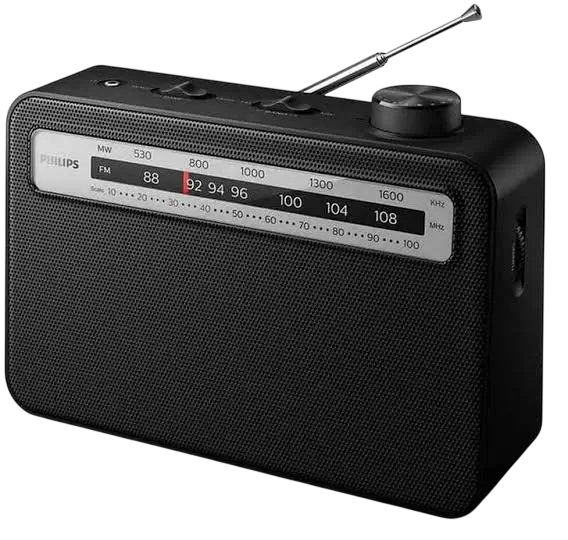
The Philips Portable Radio from the 2000 Series (R2506, model TAR2506YW/37) is a compact FM/AM radio that runs on two D batteries or plugs into a wall outlet. It has a telescopic antenna for FM, a rotary tuning dial, a combined volume and on/off knob, a NEWS/MUSIC tone switch, and a 3.5 mm headphone socket. Radio is its only listed function, so there are no other sources, wireless features, or menus to set up. Setup takes a few minutes: add batteries or connect the power cord, switch on, pick a band, and tune.
Product Specifications
| Feature | Detail |
| Tuner bands | FM 88–108 MHz; AM 520–1700 kHz |
| Sound system | Mono |
| Output power | 300 mW RMS |
| Volume control | Rotary (analog) |
| Audio output | Headphones (3.5 mm) |
| Battery type | D size (LR20), 1.5 V |
| Number of batteries | 2 (not included) |
| AC input | 110–120 V, 50/60 Hz |
| Dimensions (W x H x D) | 210 x 149 x 67 mm |
| Weight (main unit) | 668.4 g |
Specifications can change without notice. The supplied power cord and connector must be the MM-013B model from DONGGUAN MEIMENG ELECTRONIC Co., Ltd. that comes with the product.
What’s in the Box
- Main unit
- Power cord
- Quick start guide
- Warranty
The batteries are not included.
Parts and Controls
- Telescopic antenna: improves FM reception.
- TUNING: fine-tunes a station in FM or AM mode.
- Volume / On-off: switches the radio on and adjusts the sound level.
- TONE: selects NEWS or MUSIC mode.
- Headphone socket: 3.5 mm.
- Band selector: switches between FM and AM.
- Battery compartment
- AC IN: 110–120 V, 50/60 Hz.
The type plate is on the bottom of the radio.
Installation and Setup
Complete the setup steps in order. You can power the radio with batteries, the AC cord, or both.
Install the Batteries
Insert two 1.5 V R20/UM1/D batteries, matching the polarity (+/–) shown in the compartment. Use two batteries of the same type. Never mix types, such as alkaline with carbon zinc.
Keep batteries away from heat, direct sunlight, and fire, and never throw them into a fire, because they can explode. Dispose of used batteries properly, since they contain chemical substances. Remove them if you won’t use the radio for a long time, to prevent leakage (p. 2).
Connect the AC Power Cord
- Plug the supplied power cord into the AC MAINS jack on the main unit.
- Plug the other end into a wall outlet.
Before you plug in, check that your outlet’s voltage matches the voltage printed on the back or underside of the radio. A mismatch can damage the product. To unplug, pull the plug from the socket and never pull the cord, to avoid electric shock.
How to Use the Radio
Tune to a Station
- Turn the Volume/On-off control to switch the radio on.
- Set the band selector to FM or AM.
- Turn the TUNING control to find your station.
- To switch off, turn the Volume/On-off control to OFF.
Use the same knob to adjust the volume. Set the TONE switch to NEWS or MUSIC to suit what you’re listening to.
Get Better Reception
Extend the telescopic antenna fully and adjust its position. Keep the radio away from other electronic devices, which can cause radio interference.
Use Headphones
Plug headphones into the 3.5 mm socket. The speaker switches off while headphones are connected.
Safety Instructions
- Don’t block any ventilation openings, and don’t place the radio near radiators, heat registers, stoves, or other heat-producing equipment, including amplifiers.
- Protect the power cord from being walked on or pinched, especially at the plug and where it leaves the radio.
- Use only attachments and accessories specified by the manufacturer.
- Keep the radio away from dripping or splashing liquid. Don’t put liquid-filled objects or lit candles on it.
- Unplug the radio during lightning storms or when it will be unused for a long time.
- Leave all servicing to qualified personnel. Service is needed if the cord or plug is damaged, liquid or objects get inside, the radio has been exposed to rain or moisture, it doesn’t work normally, or it has been dropped.
- Never remove the casing. Don’t try to repair the radio yourself, because that can void the warranty.
Radio Interference Notes
The radio is rated as a Class B digital device under Part 15 of the FCC rules (IC Canada: CAN ICES-003(B)/NMB-003(B)). If it interferes with radio or TV reception, you can try these steps:
- Reorient or relocate the receiving antenna.
- Increase the distance between the radio and the receiver.
- Plug the radio into an outlet on a different circuit from the receiver.
- Ask a dealer or an experienced radio/TV technician for help.
Troubleshooting
Check the points below before requesting service. If the problem continues, visit www.philips.com/support. Have the radio nearby, with the model number and serial number ready.
| Problem | What to check |
| No power | Make sure the AC plug is connected properly and the wall outlet has power. The batteries may be dead or inserted incorrectly, so insert fresh batteries correctly. |
| No sound | Turn up the volume. If headphones are plugged in, disconnect them. |
| Poor radio reception | Fully extend the antenna and adjust its position. |
Frequently Asked Questions
What batteries does the radio use?
It takes two 1.5 V D-size (LR20/R20/UM1) batteries, which are not supplied. Install them with the polarity shown in the compartment and use the same type for both.
Can I run it from a wall outlet instead of batteries?
Yes. The supplied power cord connects to the AC input and accepts 110–120 V, 50/60 Hz. Check that your outlet voltage matches the rating printed on the radio before plugging in.
Which radio bands does it receive?
FM from 88 to 108 MHz and AM from 520 to 1700 kHz. Switch between them with the band selector. FM and AM radio is the only function listed.
Why is the FM signal weak or noisy?
Fully extend the telescopic antenna and move it around until reception improves. Keep the radio away from other electronic devices, which can cause interference.
Why is there no sound when the radio is on?
First turn up the volume. Then check the headphone socket, because the speaker is switched off while headphones are connected.
What does the TONE switch do?
It selects NEWS or MUSIC mode. The manual doesn’t describe the sound difference between the two.
Can I open the radio and repair it myself?
No. Never remove the casing. Opening it or attempting a repair can void the warranty, and servicing should be done by qualified personnel.
Where do I find the model and serial number?
The type plate is on the bottom of the radio. Keep these numbers handy when you contact Philips support.