
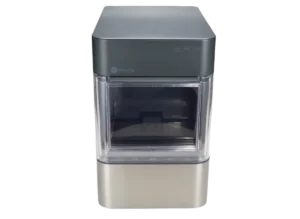
| Document Detail | Information |
| Document Title | Opal 2.0 Ice Maker Owner’s Manual |
| Document Type | Owner’s Manual |
| Brand Name | GE Appliances |
| Product Name | Opal 2.0 Ice Maker |
| Model Number(s) | XPIO13BCBT, XPIO13SCSS, XPIO23BCBT, XPIO23SCSS |
| PDF File Size | 4 MB |
| Number of Pages | 56 |
| Languages | English, French, Spanish |
GE Opal 2.0 Ice Maker XPIO13BCBT
The GE Appliances Opal 2.0 Ice Maker is a portable countertop nugget ice maker designed for indoor household use. It produces up to 24 pounds of nugget ice per day, with an ice storage capacity of 3 pounds. The appliance includes a built-in water reservoir, removable ice bin, control buttons, status indicators, and WiFi connectivity through the SmartHQ application.
The Opal 2.0 begins producing ice approximately 15–30 minutes after startup. It continues operating until the ice bin is full or additional water is required. The appliance also includes an automatic defrosting function, three ice-bin lighting settings, and a cleaning cycle for maintaining the internal water system.
Before the first use, the Opal must be placed on a level surface, given adequate ventilation space, and cleaned and rinsed according to the instructions.
Product Overview
The GE Opal 2.0 produces nugget ice using an internal water circulation and refrigeration system. Water is added manually to the reservoir, and the machine automatically produces ice while sufficient water is available.
The control panel provides buttons for starting and stopping ice production, changing the bin lighting, and activating cleaning. Status lights indicate when the machine is making ice, needs water, is defrosting, or is completing a cleaning cycle.
Main Features
- Nugget ice production: Produces up to 24 pounds of ice per day under suitable operating conditions.
- 3-pound ice bin capacity: Holds produced ice for convenient access.
- Automatic ice making: Continues producing ice until the bin is full or the water supply is insufficient.
- 15–30 minute startup: Begins producing ice approximately 15–30 minutes after activation.
- Removable ice bin: Allows easy removal of ice and access to the water reservoir.
- Built-in water reservoir: Holds the potable water used for ice production.
- Optional water filter: Supports the compatible Opal Water Filter.
- Side tank accessory: Provides an additional water supply on models supplied with the side tank.
- Automatic defrosting: Manages ice buildup around internal components.
- Integrated cleaning cycle: Circulates water or a cleaning solution through the internal system.
- Three lighting modes: Switches between On, Dim, and Off.
- SmartHQ WiFi connectivity: Supports remote monitoring, control, and notifications.
- Status indicator lights: Displays the current operating condition.
Compatible Models
The owner’s manual applies to four GE Opal 2.0 Ice Maker models.
| Model Number | Product | Side Tank Included |
| XPIO13BCBT | Opal 2.0 Ice Maker | Yes |
| XPIO13SCSS | Opal 2.0 Ice Maker | Yes |
| XPIO23BCBT | Opal 2.0 Ice Maker | No |
| XPIO23SCSS | Opal 2.0 Ice Maker | No |
The side tank installation instructions apply to units equipped with the compatible Opal Side Tank accessory.
Technical Specifications
| Specification | Details |
| Brand | GE Appliances |
| Product Name | Opal 2.0 Ice Maker |
| Product Type | Portable Nugget Ice Maker |
| Model Numbers | XPIO13BCBT, XPIO13SCSS, XPIO23BCBT, XPIO23SCSS |
| Rated Voltage | 120V AC |
| Frequency | 60 Hz |
| Current | 3.0 A |
| Ice Production Rate | 24 lb per Day |
| Hourly Ice Production | 1 lb per Hour |
| Ice Storage Capacity | 3.0 lb |
| Dimensions (W × D × H) | 13.43 × 17.5 × 16.5 Inches |
| Empty Weight | 38.6 lb |
| Minimum Installation Clearance | 3 Inches on Sides and Back |
| Operating Temperature | 55°F–90°F |
| Water Requirement | Potable Water |
| Maximum Water Hardness | Less Than 12 Grains per Gallon |
| Initial Ice Production | Approximately 15–30 Minutes |
| Automatic Defrost Duration | Approximately 30–45 Minutes |
| Bin Lighting Modes | On, Dim, Off |
| WiFi Connectivity | Supported |
| Mobile Application | SmartHQ |
| Refrigerant | R600a (Isobutane) |
| Recommended Cleaning Frequency | Weekly |
| Warranty | One-Year Limited Warranty |
| Intended Use | Indoor Household Use |
Note: Actual ice production varies with environmental conditions. The rating label on the appliance provides the most accurate specifications for the individual unit.
What’s Included in the Box
The GE Opal 2.0 package includes the ice maker and its operating accessories.
| Item | Description |
| Opal Ice Maker | Main ice-making appliance |
| Ice Bin | Removable container for collecting ice |
| Ice Scoop | Used to remove ice from the bin |
| Drip Tray | Positioned beneath the front of the ice maker |
| Side Tank Clip | Attachment used to position the side tank |
| Quick Start Guide | Provides initial setup and cleaning instructions |
| Side Tank and Base | Included with XPIO13BCBT and XPIO13SCSS |
Side Tank Package Difference
The side tank is included with models XPIO13BCBT and XPIO13SCSS.
It is not listed as an included accessory for XPIO23BCBT or XPIO23SCSS.
Parts and Components
The Opal 2.0 includes a water reservoir, ice storage compartment, control panel, drain tubes, and refrigeration components.
| Part | Function |
| Ice Maker Body | Contains the refrigeration and ice production system |
| Ice Bin | Collects and holds produced nugget ice |
| Ice Scoop | Removes ice from the bin |
| Water Reservoir | Holds water for ice production |
| Max Fill Line | Indicates the maximum reservoir water level |
| Control Panel | Provides Power, Light, and Clean controls |
| Status Indicators | Display operating conditions |
| Drain Tubes | Allow water to be drained from the machine |
| Drain Plugs | Seal the drain tubes |
| Drip Tray | Collects water at the front of the appliance |
| Screened Intake Cap | Covers the reservoir water intake |
| Water Filter | Optional compatible filtration accessory |
| Side Tank | Provides an external water supply when installed |
| Side Tank Base | Supports the side tank reservoir |
| Side Tank Clip | Attaches the side tank to the ice maker |
| Side Tank Cap and Valve | Control water release from the side tank |
| Ice Chute | Directs produced ice toward the bin |
Removable Ice Bin
The ice bin slides out from the front of the appliance.
Removing the bin provides access to the water reservoir underneath.
Water Reservoir
The water reservoir is filled manually with potable water.
The reservoir includes a maximum fill line to indicate the correct filling level.
Rear Drain Tubes
Two drain tubes are located at the back of the ice maker.
They are used to empty the internal water system during cleaning, maintenance, storage, and relocation.
When connecting the side tank, the tubes are identified as A and B.
Side Tank Components
The optional side tank assembly includes:
- Side tank reservoir.
- Side tank base.
- Cap.
- Rubber valve.
- Connecting drain tube.
- Attachment clip.
Control Panel and Display Guide
The GE Opal 2.0 has three primary control buttons and four operating status indicators.
Control Button Functions
| Control | Function |
| Power | Starts or stops ice production |
| Light | Changes bin lighting between On, Dim, and Off |
| Clean | Starts the cleaning cycle when held for 3 seconds |
Power Button
Press the Power button to begin making ice.
When the machine is operating, pressing Power again turns the ice maker off.
Light Button
The ice-bin lighting has three settings:
- On.
- Dim.
- Off.
Press the Light button repeatedly until the preferred setting is selected.
Clean Button
Press and hold Clean for 3 seconds to start the cleaning cycle.
Water circulates through the machine while the Cleaning indicator is illuminated.
Status Indicator Lights
| Indicator | Meaning |
| Making Ice | The appliance is operating in ice-making mode |
| Add Water | More water is needed before ice making or cleaning can continue |
| Defrosting | The appliance is performing its automatic defrost cycle |
| Cleaning | The internal cleaning cycle is operating |
| WiFi Indicator | Confirms a successful wireless connection |
Add Water Indicator
When Add Water is highlighted, the appliance requires more water before it can continue making ice or perform a cleaning cycle.
Defrosting Indicator
The Defrosting status indicates that the appliance is clearing ice buildup from its internal mechanisms.
Automatic defrosting may take approximately 30–45 minutes.
Important Safety Instructions
The GE Opal 2.0 contains electrical components, a UV lamp, and a refrigeration system using flammable refrigerant.
Improper installation, operation, or repair may cause fire, explosion, electric shock, UV exposure, or personal injury.
Electrical Safety
- Connect the ice maker to a properly grounded electrical outlet.
- Never remove or modify the third grounding prong.
- Do not exceed electrical outlet ratings.
- Use a properly grounded standard 115V, 60Hz electrical supply as directed in the safety instructions.
- A dedicated electrical circuit is recommended.
- Do not plug in or unplug the appliance with wet hands.
- Keep the power cord away from hot surfaces.
- Position the cord where children cannot pull it.
- Keep the power cord out of walking paths.
- Do not operate the appliance if the plug, cord, or other components are damaged.
- Unplug the appliance before cleaning by hand.
- Unplug the appliance when it is not in use.
Extension Cord Precautions
The manufacturer strongly advises against using an extension cord.
If an extension cord must be used, it must be:
- UL-listed.
- A three-wire grounded appliance extension cord.
- Equipped with a grounding-type plug.
- Rated for at least 15 amperes and 120 volts.
UV Lamp Warning
Warning: Risk of ultraviolet radiation exposure.
The ice maker contains a UV lamp.
- Never look directly at the operating UV lamp.
- UV radiation can seriously damage the eyes and burn exposed skin.
- Disconnect electrical power before removing any external covers.
- Do not attempt to repair or replace the UV lamp.
Servicing must be performed by authorized personnel.
Flammable Refrigerant Warning
Warning: Fire or explosion hazard.
The appliance contains R600a isobutane refrigerant, which is combustible.
- Do not damage the refrigerant tubing.
- Keep all ventilation openings unobstructed.
- Do not attempt unauthorized refrigeration repairs.
- Do not use electrical devices to accelerate defrosting.
- Do not use sharp metal instruments or ice picks to remove frost.
- If frost removal is necessary, use a plastic or wooden scraper.
- Only authorized service personnel may repair the refrigeration system.
- Use manufacturer-authorized replacement components.
The appliance and its refrigerant must be disposed of according to applicable federal and local requirements.
Water Safety
- Use only potable water.
- Do not use water that is microbiologically unsafe.
- Do not use water of unknown quality.
- Do not fill the ice-making reservoir with liquids other than water.
- Use water with hardness below 12 grains per gallon.
Using liquids other than potable water for ice production is considered misuse and voids the warranty.
General Safety
- Use the appliance indoors only.
- Do not operate the ice maker outdoors.
- Keep flammable liquids and vapors away from the appliance.
- Do not allow children to climb, stand on, or hang from the machine.
- Do not remove product or warning labels.
- Do not immerse the appliance in water.
- Do not install accessories that are not recommended by the manufacturer.
- Do not attempt to disassemble, modify, or replace internal components.
Lifting Precautions
The ice maker weighs 38.6 pounds when empty.
Two people are recommended for moving and installing the appliance to reduce the risk of injury.
Installation Requirements
The GE Opal 2.0 must be placed in a suitable indoor location before operation.
Installation Conditions
| Requirement | Details |
| Installation Location | Indoors |
| Surface | Flat and Level |
| Minimum Side Clearance | 3 Inches |
| Minimum Rear Clearance | 3 Inches |
| Ambient Temperature | 55°F–90°F |
| Ventilation | Well-Ventilated Area |
| Electrical Connection | Grounded Outlet |
| Surface Strength | Must Support the Machine When Filled With Water |
Where to Place the Ice Maker
Choose a location that:
- Provides adequate ventilation.
- Has a flat, stable surface.
- Supports the filled weight of the machine.
- Is away from direct sunlight.
- Is not close to ovens or cooktops.
- Allows access to a properly grounded outlet.
- Provides at least 3 inches of clearance along the sides and back.
Notice: Some under-cabinet lights can produce enough heat to damage the appearance of the ice maker’s top surface.
Before First Use
The ice maker must be prepared, cleaned, and rinsed before ice is produced for consumption.
Step 1: Unpack the Ice Maker
- Remove the packaging carefully.
- Avoid using sharp tools that could damage the appliance or accessories.
- Remove the included components.
- Check that all required items are present.
If an included item is missing, contact GE Appliances at 1-866-907-6718.
Step 2: Position the Appliance
- Place the ice maker upright.
- Make sure the surface is flat and level.
- Leave at least 3 inches of clearance around the sides and back.
- Keep the appliance away from heat sources and direct sunlight.
Step 3: Install the Drip Tray
- Locate the drip tray.
- Slide the tray beneath the front edge of the Opal.
- Align the tray slots with the front feet of the ice maker.
Step 4: Clean the Ice Bin
- Remove the ice bin.
- Wash it using warm, soapy water.
- Rinse thoroughly.
- Dry it with a soft cloth.
Step 5: Prepare the Water Reservoir
Use a damp sponge or soft cloth to wipe the water reservoir beneath the ice bin.
Important: Do not use soap inside the ice maker’s water reservoir.
Step 6: Rinse the Internal System
The startup instructions call for sanitizing and rinsing the ice maker with clean water for five minutes before first use.
- Fill the reservoir with clean water to the upper fill line.
- Plug in the appliance.
- Press Power.
- Hold Clean for 3 seconds.
- Allow water to circulate through the cleaning system.
- When the Cleaning indicator turns off, drain the appliance using the rear tubes.
- Complete the initial rinsing process before making ice.
The full weekly sanitizing procedure is described in the cleaning section below.
How to Make Ice With the GE Opal 2.0
Once the appliance has been cleaned and positioned correctly, ice production can begin.
Starting the Ice Maker
- Remove the ice bin.
- Locate the water reservoir.
- Fill the reservoir with potable water to the Max Fill line.
- Check that the water hardness is less than 12 grains per gallon.
- Reinstall the ice bin.
- Plug the ice maker into a grounded electrical outlet.
- Press the Power button.
- Check that the Making Ice indicator is illuminated.
- Allow the appliance to begin producing nugget ice.
The Opal should begin producing ice within approximately 15–30 minutes.
Automatic Ice Production
The ice maker continues producing ice until:
- The ice bin becomes full.
- The water reservoir requires additional water.
To continue making ice after the water supply becomes low, add more potable water.
How Much Ice Does the Opal 2.0 Make?
The stated production rate is:
| Production Measurement | Capacity |
| Ice Produced Per Hour | Up to 1 lb |
| Ice Produced Per Day | Up to 24 lb |
| Ice Bin Storage Capacity | 3 lb |
| Time Until Ice Production Begins | Approximately 15–30 Minutes |
Actual production depends on operating conditions.
Turning Off the Ice Maker
Press Power while the machine is operating.
The appliance will stop ice production.
How to Drain the GE Opal 2.0
Draining removes water from the internal system.
When to Drain the Ice Maker
GE Appliances recommends draining the Opal when:
- The appliance is being stored.
- The appliance is being relocated.
- It will remain off for more than a few days.
- Only small amounts of ice are being used.
Continuous recirculation of melted ice water may affect the taste of the ice.
Draining Instructions
- Turn off the ice maker.
- Unplug it from the electrical outlet.
- Locate the drain tubes on the back of the appliance.
- Unhook the tops of the drain tubes.
- Position the tubes over a sink or bucket below the level of the machine.
- Remove the drain plugs.
- Allow the water to drain completely.
- Reinsert the drain plugs once the water stops flowing.
- Secure the drain tubes back into their original positions.
Important: Keep the sink or bucket below the level of the appliance so that water can drain properly.
Cleaning and Sanitizing Instructions
GE Appliances recommends cleaning and sanitizing the Opal once per week.
Regular maintenance helps maintain fresh-tasting ice and keeps the appliance clean.
Cleaning Frequency
| Task | Recommended Frequency |
| Clean and Sanitize Internal System | Once Per Week |
| Clean Ice Bin | As Needed |
| Wipe Water Reservoir | As Needed |
| Clean Drip Tray | As Needed |
| Remove Mineral Deposits | When Buildup Is Present |
| Drain Before Storage | Before Putting Away |
| Drain During Long Periods of Nonuse | When Off for More Than a Few Days |
Cleaning Safety
Warning: Chemical exposure hazard.
When cleaning with bleach:
- Work in a well-ventilated area.
- Never mix bleach with other household cleaning products.
- Follow the specified cleaning solution quantities.
- Rinse the system thoroughly.
Unplug the appliance before cleaning its surfaces or removable parts by hand.
How to Run the Opal Cleaning Cycle
Step 1: Prepare the Ice Maker
- Unplug the Opal.
- Remove the water filter if one is installed.
- Reinstall the screened intake cap.
- Drain the appliance completely.
Step 2: Prepare the Cleaning Solution
Mix:
| Ingredient | Quantity |
| Water | 5 Cups |
| Household Bleach | 1 Teaspoon |
Use the mixture for the specified sanitizing cycle only.
Do not combine bleach with other household cleaners.
Step 3: Add the Cleaning Solution
- Pour the prepared solution into the reservoir.
- Fill only to the indicated fill line.
Step 4: Start Cleaning
- Plug in the Opal.
- Press and hold Clean for 3 seconds.
- Wait for the Cleaning indicator to illuminate.
Water begins circulating through the internal components.
Step 5: Allow the Cycle to Finish
The cleaning cycle runs for approximately 3 minutes.
Once the cycle is complete:
- Water circulation stops.
- The Cleaning indicator turns off.
Step 6: Drain the Solution
- Unhook the rear drain tubes.
- Lower them over a sink or bucket.
- Remove the plugs.
- Drain the cleaning solution completely.
- Reinsert the plugs.
Step 7: Rinse the Internal System
- Add 5 cups of fresh water to the reservoir.
- Press Clean to begin another cycle.
- Allow the rinse cycle to finish.
- Drain the water.
Repeat the rinse procedure two more times, using fresh water for each cycle.
A minimum of three fresh-water rinse cycles is specified after the sanitizing solution has been drained.
Additional rinse cycles may be performed.
Step 8: Return to Ice-Making Mode
- Reinstall the drain tubes at the back.
- Fill the reservoir with fresh potable water.
- Press Power to begin making ice.
How to Stop a Cleaning Cycle
Press and hold Clean for 3 seconds to exit the cleaning cycle.
How to Remove Mineral Deposits
Mineral deposits can accumulate inside the ice maker over time.
The manual provides a white vinegar cleaning procedure for removing this buildup.
Descaling With White Vinegar
- Fill the water reservoir with white vinegar up to the maximum fill line.
- Run up to three cleaning cycles.
- Leave the vinegar in the appliance for 18 hours.
- Place a towel soaked in vinegar on the ice chute overnight to help dissolve mineral deposits.
- Clean the sensors with vinegar.
- Wipe the sensors clean using water.
- Drain the vinegar completely.
- Run three rinse cycles using fresh water for each rinse.
The Opal Cleaning Kit may be used instead, following its included instructions.
When Mineral Cleaning May Be Needed
More frequent squeaking during operation can indicate mineral scale buildup.
The troubleshooting instructions identify white vinegar cleaning as a maintenance step when squeaking becomes more frequent.
Cleaning the Ice Bin
The removable ice bin should be cleaned using mild soapy water.
Cleaning Steps
- Remove the ice bin from the appliance.
- Use a soft cloth dampened with soapy water.
- Wipe the bin thoroughly.
- Rinse it completely.
- Dry it with a soft cloth.
- Reinstall the bin.
Do not use solvents or harsh chemicals.
Cleaning the Water Reservoir
- Remove the ice bin to access the reservoir.
- Use a soft cloth dampened with water.
- Wipe the reservoir surfaces.
- Remove any remaining residue using clean water.
Important: Do not use soap inside the water reservoir.
Cleaning the Exterior
General Exterior Cleaning
- Unplug the appliance.
- Dampen a soft cloth with soapy water.
- Gently wipe the exterior surfaces.
- Dry with a soft cloth.
Stainless Steel Exterior
For stainless steel surfaces:
- Use a commercially available stainless steel cleaner when needed.
- Use a liquid cleaner without abrasive particles.
- Wipe in the direction of the brushed finish.
- Use a soft, damp sponge.
- Do not use appliance wax, polish, solvents, or harsh chemicals.
Cleaning the Drip Tray
Water left in the drip tray can create mineral deposits.
Drip Tray Cleaning Steps
- Remove the drip tray from the front of the appliance.
- Wipe it using a soft cloth dampened with mild soapy water.
- Remove remaining moisture.
- Dry completely.
- Reinstall the tray.
Do not use solvents or harsh chemicals.
Opal Water Filter
The Opal Water Filter is an optional accessory available through GE Appliances.
It is the only water filter identified as compatible with Opal in this owner’s manual.
Installing the Water Filter
The water filter snaps into place at the reservoir intake.
Follow the installation instructions supplied with the filter.
Important Filter Cleaning Precaution
Before running the internal cleaning cycle:
- Remove the installed water filter.
- Replace it with the screened intake cap.
- Complete the cleaning procedure.
- Reinstall the filter when the appliance has been cleaned and rinsed.
Side Tank Installation Instructions
The Opal Side Tank provides an external water reservoir connected to the main ice maker.
Applicable included models: XPIO13BCBT and XPIO13SCSS.
The side tank may be installed on either the left or right side of the appliance.
Before Installing the Side Tank
- Unplug the ice maker.
- Drain the main reservoir.
- Check that the side tank, base, cap, rubber valve, and clip are available.
- Choose a flat, stable location beside the ice maker.
Step 1: Wash the Side Tank
- Remove the side tank cap.
- Wash the tank using warm water and mild dish soap.
- Wash the cap and rubber valve.
- Clean the base using mild soapy water if needed.
- Rinse all components thoroughly.
Warning: Do not wash the side tank in a dishwasher. Hand wash only.
Step 2: Identify the Rear Drain Tubes
There are two drain tubes at the back of the Opal.
They are labeled:
- Tube A.
- Tube B.
Step 3: Connect Tube B
- Locate drain tube B.
- Disconnect tube B from its black hanger.
- Connect tube B to the back of the side tank base.
- Keep tube A secured on the black hanger.
Important: Tube B must always connect to the side tank, regardless of whether the tank is installed on the left or right side.
Step 4: Position the Connecting Tube
Make sure tube B lies flat on the countertop.
A tube that does not lie flat may prevent water from flowing into the ice maker.
Step 5: Install the Side Tank Clip
- Place the side tank on the preferred side of the appliance.
- Position the shorter end of the attachment beneath the front area of the ice maker.
- Slide the attachment into the slot on the bottom of the appliance.
- Slide the side tank onto the opposite side of the attachment.
Step 6: Fill the Side Tank
- Remove the clear side tank reservoir from its base.
- Unscrew the reservoir cap.
- Fill the reservoir with water.
- Reinstall the cap.
- Check that the cap is clean and securely fitted.
Step 7: Reinstall the Reservoir
- Carefully turn the filled reservoir upside down.
- Place it into the side tank base.
- Allow water to begin flowing toward the main ice maker.
Bubbles may appear periodically in the side tank while water is being transferred.
Step 8: Start Ice Production
- Fill the main Opal reservoir if desired.
- Plug the ice maker into the grounded outlet.
- Press Power.
- Begin normal ice-making operation.
Side Tank Installation Precautions
- The ice maker must be unplugged while installing the side tank.
- Use only water in the side tank.
- Do not let children fill or install the tank.
- Position the tank on a flat, stable surface.
- Keep the tank on the same level as the ice maker.
- Do not elevate the side tank.
- Install the tank flush with the front of the appliance.
- Do not obstruct the ice maker’s ventilation openings.
- Keep the cap clean during filling and operation.
- Wash hands before opening or closing the cap.
Warning: Elevating the side tank above the ice maker may cause the Opal to overflow.
Side Tank Not Feeding Water
If water is not flowing from the side tank into the ice maker, check the connecting tube.
Troubleshooting Steps
- Check that tube B is connected to the side tank.
- Confirm that the tube lies flat on the countertop.
- Check for trapped air bubbles.
- Adjust tube B to restore water flow.
Once the water begins flowing normally, further adjustment is generally unnecessary.
How to Clean the Side Tank
General Cleaning
- Remove the side tank reservoir.
- Drain the remaining water.
- Empty any residual water from the side tank base.
- Remove the cap and rubber valve.
- Wash the components by hand using warm water and mild dish soap.
- Rinse thoroughly.
- Reassemble after cleaning.
Only disconnect drain tubes near a sink or bucket because water may drain from the tubing.
Removing Side Tank Mineral Deposits
Prepare the following solution:
| Ingredient | Quantity |
| Water | 2 Quarts |
| White Vinegar | 2 Quarts |
Cleaning Procedure
- Mix the water and white vinegar.
- Clean visible mineral deposits with the solution.
- If deposits are inside the tank, fill the tank with the prepared solution.
- Allow the deposits to soak.
- Drain the solution completely.
- Rinse the tank thoroughly.
Stubborn deposits may require additional treatments.
The Opal Cleaning Kit may also be used.
SmartHQ WiFi Setup and Controls
The GE Opal 2.0 includes a built-in WiFi communication card.
The appliance can connect to a compatible smartphone through the SmartHQ mobile application.
SmartHQ Features
The application supports:
- Remote monitoring.
- Remote appliance control.
- Notifications.
- Connected appliance functions.
Connecting to SmartHQ
- Prepare a compatible Android smartphone or iPhone.
- Access the SmartHQ mobile application.
- Follow the app’s connection instructions for the Opal 2.0.
- Complete the wireless connection process.
- Check the appliance’s WiFi status indicator.
A successful wireless connection is confirmed by the WiFi indicator on the left side of the appliance.
Additional connected appliance information is available at https://www.geappliances.com/ge/connected-appliances/.
Automatic Defrosting
The Opal 2.0 includes automatic defrosting to manage ice buildup inside the machine.
How Defrosting Works
When internal ice accumulation requires removal, the appliance enters a defrost cycle automatically.
During defrosting:
- The Defrosting indicator may illuminate.
- Ice production is interrupted.
- The cycle may take approximately 30–45 minutes.
- The front button may not respond during this period.
Squeaking During Defrosting
Squeaking may occur as ice builds up around the internal mechanisms.
The automatic defrost cycle removes the buildup.
If squeaking becomes more frequent, mineral scale may be present and the white vinegar cleaning procedure should be performed.
Normal Operating Sounds
The GE Opal 2.0 produces several sounds during normal operation.
| Sound | Possible Source | Explanation |
| Whirring | Condenser Fan | May occur when the appliance first starts |
| Buzzing | Water Pump | May occur when the pump initially runs dry |
| Rattling | Refrigerant Flow | May decrease after the refrigeration system stabilizes |
| Gurgling | Refrigerant System | May occur briefly when refrigerant flow stops |
| Humming | Compressor | Normal low-pitched motor sound |
| Clicking | Ice Nuggets Dropping | Usually louder when the ice bin is empty |
| Squeaking | Ice Buildup | May occur before automatic defrosting |
Whirring Sound
A whirring noise may be heard when the condenser fan begins spinning.
Buzzing Sound
The water pump can be slightly noisy when it first starts without water.
The sound should decrease as the pump fills.
Rattling Sound
Refrigerant circulation can produce rattling noises.
These typically decrease after the refrigeration system stabilizes.
Gurgling Sound
A brief gurgling noise may occur when the refrigerant system shuts off.
Humming Sound
The compressor produces a low-pitched humming sound while operating.
Clicking Sound
New ice nuggets drop into the ice bin during production.
The sound is often louder when the bin is empty and becomes quieter as ice accumulates.
Squeaking Sound
Squeaking can occur when ice builds up around the internal mechanisms.
Automatic defrosting may resolve the sound.
If squeaking occurs more frequently, clean the internal system with white vinegar.
Troubleshooting Guide
| Problem or Condition | Possible Cause | Recommended Action |
| Ice maker is not producing ice | Water reservoir is low | Add potable water to the reservoir |
| Add Water indicator is on | Insufficient water for ice making or cleaning | Refill the reservoir |
| Ice production stops | Ice bin is full | Remove ice from the bin |
| Ice production has not started immediately | Normal startup interval | Allow approximately 15–30 minutes |
| Power button does not respond during defrost | Automatic defrost cycle is running | Allow approximately 30–45 minutes for the cycle |
| Ice maker squeaks frequently | Mineral buildup may be present | Perform the white vinegar cleaning procedure |
| Buzzing occurs at startup | Water pump is initially dry | Noise should decrease when the pump fills with water |
| Clicking is loud | Ice nuggets are falling into an empty bin | Noise typically decreases as the bin fills |
| Side tank does not feed water | Tube B may contain air or may not lie flat | Adjust tube B |
| Ice taste is affected during low use | Meltwater is being continuously recirculated | Drain the appliance |
| Radio or TV interference occurs | Radio-frequency interference | Reposition equipment or use separate outlets |
GE Opal 2.0 Not Making Ice
If the ice maker is not producing ice:
- Check the water reservoir.
- Add potable water if the Add Water indicator is illuminated.
- Check whether the ice bin is full.
- Confirm that the appliance has been started using Power.
- Allow the normal 15–30 minute startup period.
GE Opal Add Water Light Is On
The Add Water indicator means the appliance needs more water before it can make ice or complete a cleaning cycle.
- Remove the ice bin.
- Locate the reservoir.
- Add potable water up to the Max Fill line.
- Allow the appliance to continue its operation.
GE Opal 2.0 Not Responding
When the Opal is performing automatic defrosting, the front button may not respond.
The defrost cycle normally lasts approximately 30–45 minutes.
Allow the cycle to finish.
GE Opal Making Squeaking Sounds
Squeaking can occur when ice builds up inside the machine.
The appliance includes automatic defrosting.
If squeaking becomes more frequent, use the white vinegar cleaning procedure to remove mineral deposits.
GE Opal Making a Buzzing Sound
A buzzing noise may occur when the water pump first starts.
The noise typically decreases significantly once the pump fills with water.
GE Opal Ice Tastes Different
If the appliance is used infrequently, recirculated melted ice water may affect taste.
GE Appliances recommends draining the machine when only small amounts of ice are being used.
GE Opal Side Tank Not Working
If the side tank is not supplying water:
- Check the connection to tube B.
- Make sure the tube is flat on the countertop.
- Check whether air bubbles may be preventing water flow.
- Adjust the tube.
Radio Frequency Interference
The Opal 2.0 complies with Part 15 requirements for radio-frequency devices.
If the appliance interferes with radio or television reception:
- Reorient or relocate the radio or television antenna.
- Increase the distance between the appliance and the affected receiver.
- Connect the Opal to an outlet separate from the radio or television equipment.
The transmitter must not be operated together with another antenna or transmitter in a co-located configuration.
Storage and Long-Term Nonuse
The appliance should be drained when it will not be used for more than a few days.
Preparing the Opal for Storage
- Turn off the ice maker.
- Unplug the appliance.
- Drain the internal water system.
- Clean the ice bin.
- Clean the reservoir as needed.
- Dry accessible surfaces.
- Reinstall the drain plugs and secure the drain tubes.
- Store the appliance in a suitable indoor location.
Drain the appliance before moving it to another location.
Maintenance Instructions
Regular maintenance includes cleaning, sanitizing, removing mineral deposits, draining water, and inspecting the supplied accessories.
Maintenance Schedule
| Maintenance Task | When to Perform | Instructions |
| Clean Internal System | Weekly | Use the specified sanitizing procedure |
| Rinse After Sanitizing | After Each Sanitizing Cycle | Run at least 3 fresh-water rinse cycles |
| Clean Ice Bin | As Needed | Wash with mild soapy water |
| Clean Drip Tray | As Needed | Wipe with mild soapy water and dry |
| Wipe Reservoir | As Needed | Use a damp cloth without soap |
| Remove Mineral Deposits | When Buildup Appears | Use the white vinegar procedure |
| Drain Appliance | Before Storage or Relocation | Empty through rear drain tubes |
| Clean Side Tank | As Needed | Hand wash and rinse thoroughly |
| Check Side Tank Tube | When Water Flow Is Interrupted | Adjust tube B |
| Inspect Power Cord | Before Use | Do not operate with damaged components |
Repair Restrictions
Do not attempt to disassemble, modify, or repair the ice maker.
Any internal repairs must be completed by authorized service personnel using manufacturer-authorized replacement components.
Replacement Parts and Accessories
GE Appliances identifies the following accessories and service components.
| Accessory or Component | Information |
| Opal Water Filter | Compatible filtration accessory |
| Opal Cleaning Kit | Used for cleaning and removing mineral deposits |
| Side Tank | External water supply accessory |
| Side Tank Clip | Secures the side tank assembly |
| Side Tank Cap and Valve | Components of the side tank |
| Ice Bin | Removable ice collection container |
| Ice Scoop | Used to remove nugget ice |
| Drip Tray | Removable front tray |
UV Lamp Replacement
Warning: Do not attempt to repair or replace the UV lamp.
Disconnect power before any external covers are removed. Servicing must be performed by authorized personnel.
Refrigeration System Repairs
The refrigeration system contains flammable R600a refrigerant.
Only authorized service personnel may perform repairs or replace refrigeration components.
Warranty Information
The GE Opal 2.0 Ice Maker includes a one-year limited warranty from the original purchase date.
Warranty Coverage
| Warranty Detail | Information |
| Warranty Provider | GE Appliances, a Haier Company |
| Warranty Period | 1 Year |
| Warranty Starts | Original Purchase Date |
| Covered Defects | Materials or Workmanship |
| Available Remedy | Product Replacement or Refund |
| Proof of Purchase | Required |
| Service Phone | 1-866-907-6718 |
If the ice maker fails because of a covered defect in materials or workmanship during the one-year period, GE Appliances may, at its discretion:
- Replace the product with a new unit.
- Replace it with a remanufactured unit.
- Refund the purchase price.
Warranty Exclusions
The warranty does not cover:
- Service visits to the home.
- Improper installation, delivery, or maintenance.
- Product damage caused by abuse or misuse.
- Commercial use or use outside the intended household purpose.
- Replacement of household fuses.
- Resetting household circuit breakers.
- Damage occurring after delivery.
- Light bulb replacement, if applicable.
- Damage caused by accidents, fires, floods, or natural disasters.
- Incidental or consequential damage arising from possible product defects.
- Software problems that can be corrected through SmartHQ updates.
- Labor and other charges for installing or removing the appliance.
Warranty Eligibility
For customers in the United States, the limited warranty applies to the original purchaser of a product purchased for household use in the USA.
The warranty is stated for products sold in the 50 United States and the District of Columbia.
In Alaska and Hawaii, shipping costs are not included in the limited warranty.
Specific legal rights may vary by state.
How to Request Warranty Service
- Locate the model number and serial number.
- Keep the original purchase receipt available.
- Contact GE Appliances at 1-866-907-6718.
- Explain the product problem.
- Follow the service instructions provided.
The model and serial number can be found on the label at the back of the unit.
Customer Support Information
GE Appliances provides product registration, service requests, and customer support.
| Contact Detail | Information |
| Brand | GE Appliances |
| Warranty Provider | GE Appliances, a Haier Company |
| Service Phone | 1-866-907-6718 |
| Official Website | https://www.geappliances.com |
| Product Registration | https://www.geappliances.com/register |
| Opal Service Requests | https://myopalservice.com |
| U.S. Contact Page | https://www.geappliances.com/contact |
| Canada Contact Page | https://www.geappliances.ca/en/contact-us |
| Connected Appliance Information | https://www.geappliances.com/ge/connected-appliances/ |
United States Customer Relations
General Manager, Customer Relations
GE Appliances, Appliance Park
Louisville, KY 40225
Canada Customer Relations
Director, Consumer Relations
MC Commercial Inc.
Suite 310, 1 Factory Lane
Moncton, New Brunswick E1C 9M3
Product Registration
Register the appliance at GE Appliances Registration.
Registration allows GE Appliances to provide product information and communicate warranty-related details when needed.
Frequently Asked Questions
How do I set up the GE Opal 2.0 Ice Maker?
Place the Opal on a flat, level indoor surface with at least 3 inches of clearance around the sides and back. Install the drip tray, clean the ice bin, and rinse the internal system before first use. Fill the reservoir with potable water to the Max Fill line, connect the appliance to a grounded outlet, and press Power to begin ice production.
How long does the GE Opal 2.0 take to make ice?
The GE Opal 2.0 begins producing nugget ice approximately 15–30 minutes after startup. It has a stated production capacity of up to 1 pound per hour or 24 pounds per day, although actual production varies with operating conditions.
How do I clean the GE Opal 2.0 Ice Maker?
GE Appliances recommends weekly cleaning and sanitizing. Prepare a solution of five cups of water and one teaspoon of household bleach, fill the reservoir, and hold Clean for 3 seconds. After the approximately 3-minute cleaning cycle, drain the solution and complete at least three fresh-water rinse cycles. Never mix bleach with other cleaners.
How do I descale my GE Opal 2.0 with vinegar?
Fill the reservoir with white vinegar to the maximum fill line and run up to three cleaning cycles. Leave the vinegar inside the appliance for 18 hours, place a vinegar-soaked towel on the ice chute overnight, and clean the sensors with vinegar. Drain the vinegar and run three fresh-water rinse cycles before returning the machine to service.
Why is my GE Opal 2.0 not making ice?
Check whether the Add Water indicator is illuminated or the ice bin is full. Refill the reservoir with potable water if necessary. The appliance normally begins producing ice within 15–30 minutes after startup. If the machine is defrosting, allow approximately 30–45 minutes for the automatic cycle to finish.
How do I connect the GE Opal 2.0 Ice Maker to WiFi?
The Opal 2.0 has built-in WiFi connectivity and works with the SmartHQ mobile application. Use SmartHQ on a compatible Android phone or iPhone and follow the app’s connection instructions. The WiFi indicator on the appliance confirms a successful connection.
How do I install the GE Opal 2.0 side tank?
Unplug and drain the Opal, then connect rear drain tube B to the side tank base while keeping tube A secured to its hanger. Make sure tube B lies flat on the countertop, install the side tank clip, fill the side tank reservoir with water, and place it in its base. The side tank is included with models XPIO13BCBT and XPIO13SCSS.