| Brand Name | onn. |
| Product Name | Wireless Earphones |
| Model Number | 100005529 |
| File Size | 471 KB |
| Number of Pages | 2 |
| Languages Covered | English |
onn. Wireless Earphones 100005529 Quick Start Guide
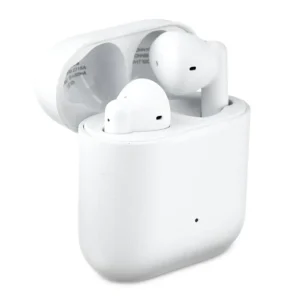
The onn. Wireless Earphones model 100005529 are true wireless Bluetooth earphones supplied with a charging case and Micro-USB charging cable. The earbuds automatically power on when removed from the charging case and can reconnect to the last paired device. Returning them to the case powers them off and disconnects them from the paired device.
The earphones provide up to 12 hours of total playtime, use 10 mm speaker drivers, and carry an IPX4 water-resistance rating. The IPX4 rating applies to the earphones only, not the charging case.
Quick Facts
| Feature | Specification |
| Speaker diameter | 10 mm |
| Speaker impedance | 16Ω ±15% |
| Sensitivity | 103 ±4 dB at 1 kHz / -10 dBFS |
| Speaker driver rated power | 3 mW |
| Charging cable length | 25 cm |
| Total playtime | 12 hours |
| Water resistance | IPX4 for earphones only |
| Bluetooth pairing name | Onn TWS Earphones |
| Earbud charging time | Around 1.5 hours when empty |
| Charging case charging time | Around 2 hours |
| Charging input shown in guide | 5V 0.5A |
| Earbud charge indicator | Red while charging; off when fully charged |
| Case battery indicator | Four LEDs when fully charged |
These values appear in the specifications and charging diagrams on page 1 of the Quick Start Guide.
What’s Included in the Box
The package includes:
- 1 pair of wireless earphones
- 1 charging case
- 1 Micro-USB charging cable
- 1 manual/warranty card
Getting Started
The earbuds are designed to handle most power and reconnection tasks automatically when they are used with the charging case.
Automatic Power On
Remove both earbuds from the charging case.
The earbuds will:
- Power on automatically.
- Attempt to connect to the last paired Bluetooth device.
For first-time use, removing both earbuds from the case also places them into pairing mode automatically.
Automatic Power Off
Place both earbuds back into the charging case.
They will:
- Power off automatically.
- Disconnect from the paired Bluetooth device.
How to Turn onn. Earbuds On or Off Without the Case
The earbuds can also be controlled manually.
Press and hold either earbud for approximately 4 seconds to power the earbuds on or off.
This is useful when the charging case is not immediately available.
How to Pair onn. Wireless Earbuds for the First Time
The first Bluetooth setup is automatic.
- Make sure the charging case and earbuds have power.
- Remove both earbuds from the charging case.
- Do not press the earbud buttons during the initial startup.
- Wait for the earbuds to enter pairing mode automatically.
- Open the Bluetooth settings on the phone, tablet, computer, or other compatible device.
- Find Onn TWS Earphones in the available Bluetooth device list.
- Select Onn TWS Earphones to connect.
After the first successful pairing, the earbuds automatically attempt to reconnect to the most recently paired device whenever they are removed from the charging case.
How to Pair the Earbuds With a Different Device
If the earbuds need to connect to another Bluetooth device:
- Disconnect Bluetooth on the previously paired device if it is nearby.
- Remove both earbuds from the charging case.
- Power both earbuds off.
- With the earbuds off, press and hold the right earbud for approximately 5 seconds.
- Use the new device’s Bluetooth menu to connect.
- Power on the left earbud as well.
The Quick Start Guide uses the right earbud as the starting point when changing to another paired device.
onn. Earbud Controls
The touch/button controls are divided between music, voice-assistant, and phone-call functions.
Music Controls
| Action | Earbud Control |
| Play / Pause | Click either earbud once |
| Previous track | Press and hold the left earbud for 1 second |
| Next track | Press and hold the right earbud for 1 second |
| Siri / Google Assistant | Double-click either earbud |
The control diagram on page 1 shows the left earbud for Previous Track, the right earbud for Next Track, and either earbud for Play/Pause and voice-assistant access.
How to Skip Songs With onn. Wireless Earbuds
To move to the next track, press and hold the right earbud for about 1 second.
To return to the previous track, press and hold the left earbud for about 1 second.
Using Siri or Google Assistant
Double-click either the left or right earbud to activate the supported phone voice assistant.
The guide specifically identifies:
- Siri
- Google Assistant
Phone Call Controls
Both earbuds can control incoming calls.
| Call Function | Control |
| Answer incoming call | Click either earbud once |
| Hang up | Click either earbud once |
| Reject incoming call | Press and hold either earbud for 2 seconds |
The same single-click command is used to answer an incoming call and end an active call.
How to Charge onn. Wireless Earbuds
The earbuds charge when placed inside the charging case.
Charging the Earbuds
- Place the left and right earbuds into their matching positions inside the case.
- Make sure they are properly seated.
- Leave them in the case while charging.
The earbud lights indicate charging status:
| Earbud Light | Meaning |
| Red light on | Earbud is charging |
| Light off | Earbud is fully charged |
An earbud with an empty battery takes approximately 1.5 hours to charge according to the diagram.
How to Charge the onn. Earbud Case
The charging case uses the included Micro-USB cable.
- Connect the Micro-USB end of the cable to the charging case.
- Connect the USB end to a suitable USB power source.
- The guide illustrates a 5V 0.5A USB supply or USB computer connection.
- Allow the case to charge.
A full charging cycle takes approximately 2 hours.
Charging Case Lights Meaning
The charging case uses four LED indicators to show charge status.
When the charging case is fully charged, all four LEDs are illuminated.
The diagram represents increasing charge with the four indicator lights, ending with all four lights on at 100%.
Battery Life
The specifications list 12 hours of total playtime for the wireless earphones.
The guide separately lists:
- Approximately 1.5 hours to recharge empty earbuds.
- Approximately 2 hours to fully recharge the charging case.
Water Resistance
The earphones have an IPX4 water-resistance rating.
This rating applies specifically to the earphones. It does not apply to the charging case.
The charging case should therefore not be treated as having the same water-protection rating as the earbuds.
Technical Specifications
| Specification | Value |
| Brand | onn. |
| Model | 100005529 |
| Speaker diameter | 10 mm |
| Speaker impedance | 16Ω ±15% |
| Sensitivity | 103 ±4 dB at 1 kHz / -10 dBFS |
| Speaker driver rating power | 3 mW |
| Charging cable | 25 cm Micro-USB cable |
| Total playtime | 12 hours |
| Water-resistance rating | IPX4, earphones only |
| Bluetooth device name | Onn TWS Earphones |
| Earbud recharge time | Around 1.5 hours when empty |
| Charging-case recharge time | Around 2 hours |
| Charging supply shown | 5V 0.5A |
| FCC ID | 2ADZH-ONN5529 |
| FCC ID | 2ADZH-ONN5530 |
The product specifications and operating diagrams appear on page 1, while the two FCC IDs are printed on page 2.
FCC Compliance
The wireless earphones are identified as a Class B digital device tested under Part 15 of the FCC Rules.
Operation is subject to two conditions:
- The device may not cause harmful interference.
- The device must accept interference received, including interference that may cause undesired operation.
If radio or television interference occurs, the guide recommends measures such as:
- Reorienting or relocating the receiving antenna.
- Increasing the distance between the equipment and receiver.
- Connecting the equipment to an outlet on a different circuit.
- Consulting a dealer or experienced radio/TV technician.
Changes or modifications that are not expressly approved by the responsible party may void the user’s authority to operate the equipment.
The document identifies the product as produced for Walmart Inc., Bentonville, AR 72716 and lists FCC IDs 2ADZH-ONN5529 and 2ADZH-ONN5530.
Frequently Asked Questions
How do you pair onn. wireless earbuds?
Remove both earbuds from the charging case. During first-time use, they automatically power on and enter pairing mode without requiring any button presses. Open Bluetooth settings on the phone or other device and select Onn TWS Earphones.
How do you turn on onn. earbuds without the charging case?
Press and hold either earbud for approximately 4 seconds to power the earbuds on manually. The same long-press action can be used for manual power off.
What do the onn. earbud charging lights mean?
A red light on an earbud means it is charging. When the earbud is fully charged, its light turns off.
How long do onn. wireless earbuds take to charge?
The guide shows approximately 1.5 hours for an empty earbud battery. The charging case takes approximately 2 hours to reach full charge.
How do you skip a song on onn. earbuds?
Press and hold the right earbud for 1 second to go to the next track. Press and hold the left earbud for 1 second to return to the previous track.
How do you answer or reject a call with onn. earbuds?
Click either earbud once to answer an incoming call. A single click also hangs up an active call. To reject an incoming call, press and hold either earbud for 2 seconds.
How long is the battery life on onn. wireless earbuds model 100005529?
The specifications list 12 hours of total playtime.
Are onn. wireless earbuds waterproof?
Model 100005529 carries an IPX4 water-resistance rating for the earphones. The manual specifically states that this rating does not apply to the charging case.