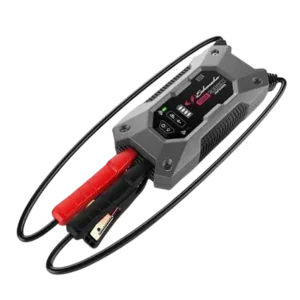
| Field | Details |
| Document Title | Jump Starter/Power Pack |
| Document Type | Owner’s Manual |
| Brand Name | Schumacher |
| Product Name | Jump Starter/Power Pack |
| Model Number(s) | SL1489, SL1566 |
| Primary Model | SL1566 |
| PDF File Size | 230.0 KB |
| Total Number of Pages | 33 |
| Languages Covered in the Document | English, Spanish, French |
Schumacher Jump Starter/Power Pack SL1566
The Schumacher SL1566 Jump Starter/Power Pack is a portable lithium-ion battery device designed to provide starting assistance for vehicles with 12V battery systems. It delivers up to 1500 peak amps and includes a rechargeable 37Wh lithium-ion polymer battery.
The power pack combines vehicle jump-starting with USB charging, 10W Qi wireless charging, and a built-in LED light. Its LCD display shows the internal battery percentage, charging status, and other operating information.
The SL1566 uses a detachable SA900 smart jump cable with battery clamps. The cable includes LED indicators, audible warnings, and protection functions that help identify incorrect connections, low voltage, short circuits, and temperature conditions.
The power pack supports standard USB charging at 5V/2.4A and fast charging at 5V/3A, 9V/2A, or 12V/1.5A. Its built-in LED light provides steady illumination, SOS signaling, and a strobe mode.
Product Features
The Schumacher SL1566 includes the following features:
- 1500A peak jump-starting capability.
- Internal 37Wh lithium-ion polymer battery.
- Jump-starting assistance for compatible 12V vehicle batteries.
- Detachable SA900 smart jump cable.
- Positive and negative battery clamps.
- LCD battery percentage display.
- USB charging input rated at 2A.
- Standard USB output rated at 5V DC, 2.4A.
- USB fast-charging output with multiple voltage settings.
- 10W Qi wireless charging pad.
- Built-in LED light.
- Steady, SOS, and strobe lighting modes.
- Smart cable LED indicators and audible warnings.
- Reverse-polarity protection.
- Short-circuit protection.
- Low-voltage protection.
- Reverse-charging protection.
- Temperature protection.
- Automatic smart cable shutoff after inactivity.
- Carrying bag.
Technical Specifications
| Specification | Details |
| Brand | Schumacher |
| Primary Model | SL1566 |
| Additional Model | SL1489 |
| Product Type | Jump Starter/Power Pack |
| Internal Battery Type | Lithium-ion polymer |
| Battery Capacity | 37Wh |
| Jump-Starting Output | 1500A peak |
| Vehicle Battery System | 12V |
| USB Charging Input | 2A |
| Standard USB Output | 5V DC, 2.4A |
| USB Fast-Charging Output | 5V/3A, 9V/2A, 12V/1.5A |
| Wireless Charging | Qi, 10W |
| Recommended USB Charger | 2A USB charger |
| Internal Battery Charging Time | Approximately 4–5 hours |
| Minimum Charge for Jump-Starting | 40% |
| Recommended Recharge Level | Below 85% |
| Maximum Engine Cranking Time | 5–8 seconds |
| Minimum Wait Between Starting Attempts | 1 minute |
| Maximum Consecutive Jump-Starting Attempts | 3 |
| Smart Cable Inactivity Shutoff | 90 seconds |
| USB Output Inactivity Shutoff | 30 seconds |
| Charging Temperature | 32°F–122°F (0°C–50°C) |
| Storage Temperature | -4°F–140°F (-20°C–60°C) |
| Warranty | One-year limited warranty |
What’s Included in the Box
The product’s parts illustration identifies the following items.
| Item | Description |
| Schumacher Jump Starter/Power Pack | Main rechargeable power pack |
| Battery Clamps/Smart Cable | Detachable jump-starting cable assembly |
| USB Charging Cable | Used to recharge the internal battery |
| Carrying Bag | Used to carry and store the power pack and accessories |
A separate 2A USB charger is not included.
Parts and Components
The SL1566 includes charging connections, a display, a wireless charging pad, and a detachable battery clamp cable.
Component Identification
| No. | Component | Function |
| 1 | Display Button | Activates the LCD display and controls the LED light |
| 2 | LCD Display | Shows battery percentage and charging information |
| 3 | Jump Start Output Socket | Connects the detachable battery clamps/smart cable |
| 4 | LED Light | Provides steady, SOS, and strobe lighting |
| 5 | 2A USB Input Port | Recharges the internal battery |
| 6 | 2.4A USB Output Port | Charges compatible USB devices |
| 7 | 3A USB Output Port | Provides USB fast-charging capability |
| 8 | Wireless Charging Pad | Charges compatible Qi-enabled devices |
| 9 | Battery Clamps/Smart Cable | Connects the power pack to a vehicle battery |
| 10 | USB Charging Cable | Connects the power pack to a USB charging source |
| 11 | Carrying Bag | Holds the power pack and accessories |
LCD Display
The LCD screen shows the internal battery charge percentage.
When charging begins, the display illuminates and shows IN with flashing digits.
A fully charged internal battery displays 100%.
Display Button
The Display button performs two main functions:
- Activates the LCD battery status display.
- Controls the built-in LED light.
Holding the button for two seconds turns on the LED light. Short presses then change its lighting mode.
Smart Jump Cable
The detachable smart jump cable connects to the Jump Start output socket.
It includes:
- Red positive clamp.
- Black negative clamp.
- Green status LED.
- Red warning LED.
- Audible warning buzzer.
The cable monitors connection status and several electrical protection conditions.
USB Charging Ports
The power pack has a 2A USB input and two USB outputs.
| Port | Function |
| 2A USB Input | Charges the power pack’s internal battery |
| 2.4A USB Output | Provides standard USB device charging |
| 3A USB Output | Provides supported fast-charging voltage and current combinations |
Wireless Charging Pad
The wireless charging pad is located on the power pack’s outer surface.
It provides up to 10W of power for compatible Qi wireless-charging devices.
Important Safety Instructions
Warning: Risk of explosive gases, electrical shock, fire, and serious personal injury.
Lead-acid batteries produce explosive gases during normal operation. Sparks near the battery can cause an explosion.
The power pack must be operated according to the product instructions and the vehicle battery manufacturer’s safety precautions.
General Safety Precautions
- Read the operating instructions before using the power pack.
- Keep the unit out of reach of children.
- Never insert fingers or hands into any of the output sockets.
- Do not expose the power pack to rain or snow.
- Use only recommended attachments, including the SA900 jump cable.
- Do not operate the unit with damaged cables or battery clamps.
- Do not use the power pack if it has been dropped, struck, or damaged.
- Never disassemble the power pack.
- Have servicing performed by a qualified technician.
- Disconnect charging cables by holding the adapter or connector rather than pulling the cord.
- Do not place the power pack on flammable materials such as carpet, upholstery, paper, or cardboard.
- Never place the unit directly above the vehicle battery.
- Never attempt to jump start a vehicle while the internal battery is charging.
Battery Connection Safety
- Never allow the battery clamps to touch each other.
- Never allow both clamps to contact the same metal surface.
- Keep the cables away from moving or hot engine components.
- Confirm the vehicle battery voltage before connecting the power pack.
- Make sure all clamp connections are secure.
- Do not charge a frozen battery.
Personal Safety Precautions
When working near lead-acid batteries:
- Wear protective clothing and safety goggles.
- Remove metal jewelry, including rings, watches, necklaces, and bracelets.
- Keep sparks, cigarettes, and flames away from the battery.
- Avoid dropping metal tools onto the battery.
- Keep another person nearby who can provide assistance.
- Keep clean water, soap, and baking soda available.
- Avoid touching the eyes while working near the battery.
Lead-acid batteries can produce enough short-circuit current to heat metal jewelry and cause severe burns.
Battery Acid Safety
Battery electrolyte contains corrosive sulfuric acid.
If battery acid contacts skin or clothing, wash the affected area immediately with soap and water.
If acid enters the eyes, flush with cold running water for at least 10 minutes and obtain immediate medical attention.
If battery acid is swallowed, do not induce vomiting. Obtain immediate medical attention.
Battery acid spills should be neutralized thoroughly with baking soda before cleanup.
Lithium-Ion Battery Fire Precautions
The SL1566 contains a lithium-ion battery.
The manual identifies the following extinguishing agents for a lithium-ion battery fire:
- Water.
- Foam extinguisher.
- Halon.
- Carbon dioxide (CO₂).
- ABC dry chemical.
- Powdered graphite.
- Copper powder.
- Sodium carbonate.
After extinguishing the fire, cool the product using water or another suitable water-based, nonalcoholic extinguishing agent to help prevent reignition.
Warning: Never attempt to pick up or move a power pack that is hot, smoking, or burning.
Before First Use
The internal battery must be charged before the power pack is used.
Preparing the Power Pack
- Remove the power pack and accessories from the packaging.
- Inspect the power pack, USB cable, and smart jump cable for visible damage.
- Charge the internal battery fully.
- Press the Display button.
- Check the battery percentage shown on the LCD screen.
- Confirm that the vehicle uses a 12V battery system before jump-starting.
Preparing the Vehicle Battery
- Park the vehicle and turn off the ignition.
- Turn off vehicle lights and electrical accessories.
- Confirm the battery voltage using the vehicle owner’s manual.
- Make sure the area around the battery is well ventilated.
- Clean the battery terminals before connecting the clamps.
- Keep battery corrosion away from the eyes, nose, and mouth.
- Check the vehicle’s battery grounding arrangement.
- Make sure the battery clamp connections can be attached securely.
Checking the Internal Battery Charge Level
The SL1566 displays the internal battery percentage on its LCD screen.
How to Check the Battery Percentage
- Press the Display button.
- Read the battery charge percentage on the LCD screen.
- Recharge the unit if the percentage is below 85%.
Battery Charge Level Requirements
| Battery Level | Instruction |
| 100% | Internal battery is fully charged |
| 85% or higher | Battery is above the manual’s recommended recharge threshold |
| Below 85% | Recharge the internal battery |
| Below 40% | Recharge before attempting to jump start a vehicle |
Important: The internal battery must be charged to at least 40% before jump-starting.
For battery maintenance, the manufacturer recommends recharging whenever the charge level falls below 85%.
How to Charge the Schumacher SL1566
The internal lithium-ion polymer battery is recharged through the USB input.
Charging Requirements
| Requirement | Details |
| Recommended Charger | 2A USB charger |
| Charging Input | USB, 2A |
| Approximate Full Charging Time | 4–5 hours |
| Charging Temperature | 32°F–122°F (0°C–50°C) |
| Full-Charge Display | 100% |
Internal Battery Charging Instructions
- Connect the supplied USB charging cable to the power pack’s USB input port.
- Connect the opposite end to a suitable USB charger.
- Connect the charger to an active AC or DC power source.
- Check the LCD screen.
- The screen illuminates, the digits begin flashing, and IN appears.
- Allow the internal battery to charge.
- When charging is complete, the display shows 100%.
- Disconnect the charger from the power source.
- Remove the USB charging cable from the charger and power pack.
Charging Time
The SL1566 takes approximately 4–5 hours to recharge fully with a suitable 2A USB charger.
Charging Display Messages
| Display | Meaning |
| IN | Charging has started |
| Flashing percentage digits | Battery charging is in progress |
| 100% | Internal battery is fully charged |
Battery Charging Maintenance
The manufacturer recommends charging:
- Immediately after purchase.
- After every use.
- At least every 30 days.
- Whenever the battery level drops below 85%.
The internal battery should not be allowed to discharge completely.
Charging Safety
- Charge the unit in a well-ventilated area.
- Do not restrict ventilation while charging.
- Do not jump start a vehicle while the power pack is charging.
- Disconnect the USB charging cable before cleaning or maintenance.
- Do not operate the power pack if the charging cable or unit is damaged.
Connecting the SL1566 to a Vehicle Battery
The SA900 smart cable must be connected to the power pack before attaching its clamps to the vehicle battery.
Battery Terminal Identification
| Terminal | Marking | Clamp |
| Positive | POS, P, + | Red |
| Negative | NEG, N, – | Black |
The positive battery terminal generally has a larger diameter than the negative terminal.
Connecting to a Negative-Ground Vehicle
Most vehicles have a negative-ground electrical system.
- Turn off the vehicle ignition.
- Connect the SA900 smart cable to the jump starter’s output socket.
- Keep the cables away from moving and hot engine parts.
- Connect the red positive (+) clamp to the battery’s positive terminal.
- Connect the black negative (-) clamp to a heavy-gauge metal section of the vehicle chassis or engine block, away from the battery.
- Check that the clamps are securely connected.
Do not attach the chassis clamp to the carburetor, fuel lines, or thin sheet-metal body parts.
Connecting to a Positive-Ground Vehicle
For a positive-ground vehicle:
- Turn off the vehicle ignition.
- Connect the smart cable to the power pack.
- Connect the black negative (-) clamp to the battery’s negative terminal.
- Connect the red positive (+) clamp to a heavy-gauge metal section of the vehicle chassis or engine block, away from the battery.
- Make sure both connections are secure.
Do not connect the chassis clamp to fuel lines, the carburetor, or thin sheet-metal components.
Cable Positioning Precautions
The battery cables must remain clear of:
- Engine cooling fans.
- Drive belts.
- Pulleys.
- Hot engine parts.
- Moving mechanical components.
- Vehicle doors and hood edges that could damage the cable insulation.
If the vehicle hood must be closed during jump-starting, it must not touch the metal battery clamps or damage the cable insulation.
How to Jump Start a Vehicle with the SL1566
The SL1566 provides up to 1500 peak amps of jump-starting output.
Important: The internal battery must have at least 40% charge. A vehicle battery must remain installed during jump-starting, and the power pack must not be connected to its charger.
Step-by-Step Jump-Starting Instructions
- Turn off the ignition. Make sure the vehicle’s electrical accessories are also turned off.
- Connect the smart cable. Insert the SA900 battery clamp cable into the power pack’s Jump Start output socket.
- Position the cables. Keep the clamps and cables away from moving or hot engine components.
- Connect the battery clamps. Follow the correct procedure for the vehicle’s grounding system.
- Check the smart cable LED. When the cable is properly connected and ready, its green LED should illuminate.
- Crank the engine. Attempt to start the vehicle. If the engine does not start within 5–8 seconds, stop cranking.
- Wait before retrying. Allow at least 1 minute before making another attempt.
- Check the smart cable if necessary. If the vehicle fails to crank again, inspect the smart cable’s LED and buzzer indicators.
- Limit starting attempts. Do not attempt to jump start the vehicle more than three consecutive times.
- Disconnect after starting. When the engine starts, unplug the smart cable from the jump starter’s output socket.
- Remove the battery clamps. For the standard negative-ground connection, remove the black chassis clamp first, followed by the red positive battery clamp.
- Recharge the power pack. Recharge the internal battery as soon as possible after use.
Jump-Starting Time Limits
| Operation | Requirement |
| Minimum Internal Battery Charge | 40% |
| Engine Cranking Duration | Stop if the engine does not start within 5–8 seconds |
| Minimum Wait Between Attempts | 1 minute |
| Maximum Consecutive Attempts | 3 |
| Smart Cable Automatic Shutoff | After 90 seconds without activity |
If the Engine Does Not Start
If the engine fails to start during the first attempt:
- Stop cranking after 5–8 seconds.
- Wait at least 1 minute.
- Check the green smart cable LED.
- Inspect the cable for warning lights or beeping.
- Correct any indicated connection or protection condition before retrying.
Warning: Do not attempt more than three consecutive starts. If the engine still does not start, consult a qualified service technician.
Jump-Starting in Cold Weather
Cold weather can reduce the performance of the jump starter’s lithium battery.
If the starter produces only a clicking sound and the engine does not turn over, the manual provides a battery-warming procedure.
Cold-Weather Jump-Starting Procedure
- Connect the jump starter to the vehicle battery using the correct procedure.
- Confirm that the smart cable’s green LED is illuminated.
- Turn on the vehicle lights and electrical accessories.
- Leave them on for approximately 1 minute.
- This draws current from the power pack and warms its internal battery.
- Attempt to start the engine.
- If the engine still does not turn over, repeat the warming procedure as needed.
The manual notes that extremely cold weather may require two or three warming cycles.
The maximum limit of three consecutive jump-starting attempts still applies.
Smart Cable Automatic Shutoff
The SA900 smart cable includes automatic shutdown after inactivity.
How Automatic Shutoff Works
If the smart cable detects no activity for approximately 90 seconds:
- The cable shuts off automatically.
- The red and green LEDs illuminate solid.
How to Reset the Smart Cable
- Disconnect the battery clamps from the vehicle battery.
- Reconnect the clamps using the correct connection sequence.
- Check the cable’s status indicators.
The smart cable also resets automatically when the condition responsible for a protection warning is corrected.
Using the USB Charging Ports
The SL1566 includes two USB outputs for charging compatible mobile devices.
USB Output Specifications
| Port | Output |
| Standard USB | 5V DC, up to 2.4A |
| USB Fast Charging | 5V/3A |
| USB Fast Charging | 9V/2A |
| USB Fast Charging | 12V/1.5A |
The actual charging output depends on the connected device and supported charging arrangement.
How to Charge a Mobile Device Using USB
- Check the mobile device manufacturer’s charging power requirements.
- Select the appropriate USB output port.
- Connect the mobile device using a compatible charging cable.
- Charging should begin automatically.
- Check the power pack’s LCD display to identify the USB port being used.
- Allow the mobile device to charge.
- When finished, disconnect the cable from the mobile device.
- Disconnect the cable from the power pack.
- Recharge the power pack as soon as possible after use.
USB Fast-Charging Requirements
The USB Fast Charging port requires a specific compatible charging cable, which is not included.
Most compatible USB devices can charge through either output port, although charging speed may vary.
USB Automatic Shutoff
When no USB device is connected, power to the USB output ports automatically turns off after approximately 30 seconds.
Using Qi Wireless Charging
The SL1566 includes a built-in Qi wireless charging pad rated at 10W.
The pad is intended for compatible mobile devices that support Qi wireless charging.
Wireless Charging Specifications
| Specification | Details |
| Charging Technology | Qi wireless charging |
| Wireless Charging Power | 10W |
| Compatible Devices | Qi-enabled mobile devices |
| Charging Start | Automatic after compatible device placement |
How to Charge a Device Wirelessly
- Check that the mobile device supports Qi wireless charging.
- Locate the wireless charging pad on the power pack.
- Place the compatible mobile device face-up on the charging pad.
- Charging should begin automatically.
- Allow the device to charge.
- Remove the mobile device when charging is complete.
- Recharge the power pack as soon as possible after use.
Using the Built-In LED Light
The Schumacher SL1566 includes an LED light with three operating modes.
LED Light Modes
| Mode | Function |
| Steady Glow | Continuous illumination |
| SOS | Flashing SOS signal |
| Strobe | Flashing strobe light |
Turning On the LED Light
- Locate the Display button.
- Press and hold the button for approximately 2 seconds.
- The LED light turns on.
Changing the Lighting Mode
With the LED light operating:
- Press and release the Display button.
- The light switches to another mode.
- Continue pressing and releasing the button to cycle through steady, SOS, and strobe lighting.
Turning Off the LED Light
- Press and hold the Display button.
- Continue holding until the LED light turns off.
- Recharge the power pack after use.
LCD Display Indicators and Messages
The power pack’s LCD screen provides information about battery charging and operating conditions.
LCD Display Guide
| Display or Symbol | Meaning |
| Battery percentage | Remaining internal battery charge |
| 100% | Internal battery fully charged |
| IN | Internal battery charging has started |
| Flashing digits during charging | Charging is in progress |
| USB port information | Indicates the USB output being used |
| Flashing thermometer symbol | Power pack is too hot or too cold |
Flashing Thermometer Symbol
A flashing thermometer symbol indicates that the unit is outside its acceptable operating temperature condition.
The symbol disappears when the temperature condition is corrected.
Smart Cable LED and Buzzer Indicators
The SA900 smart cable uses green and red LEDs and an audible buzzer.
These indicators identify connection status and several protection conditions.
Smart Cable Warning Indicator Table
| LED and Buzzer Behavior | Meaning |
| Green LED flashing, red LED off, no beep | Cable connected to the battery only or to the jump starter only |
| Green LED solid, red LED off, no beep | Cable correctly connected to both the battery and jump starter |
| Red LED solid, green LED off, one beep per second | Low-voltage protection |
| Red LED solid, green LED off, two beeps per second | Reverse-polarity protection |
| Red and green LEDs flashing alternately, no beep | Reverse-charging protection |
| Red LED solid, green LED off, rapid beeping | Short-circuit protection |
| Red and green LEDs solid, no beep | Automatic shutoff due to inactivity |
| Red and green LEDs solid, one beep per second | Temperature protection |
Solid Green LED
A solid green LED with the red LED off and no buzzer indicates a correct connection between the vehicle battery, smart cable, and power pack.
Solid Red LED with One Beep per Second
This indicates low-voltage protection.
Solid Red LED with Two Beeps per Second
This indicates reverse-polarity protection.
The battery clamp connections must be checked and corrected.
Alternating Red and Green LEDs
Red and green LEDs flashing alternately without a beep indicate reverse-charging protection.
Solid Red LED with Rapid Beeping
This indicates short-circuit protection.
The connection must be checked before another jump-starting attempt.
Solid Red and Green LEDs Without Beeping
This indicates automatic shutoff due to inactivity.
Disconnect the battery clamps from the vehicle and reconnect them to reset the smart cable.
Solid Red and Green LEDs with One Beep per Second
This indicates temperature protection.
The temperature condition must be corrected before operation can continue.
Smart Cable Protection Reset
After the condition responsible for a protection warning is corrected, the smart cable automatically resets.
Troubleshooting Guide
The following troubleshooting procedures address battery charging problems, jump-starting failures, smart cable warnings, and LCD display conditions.
Schumacher SL1566 Troubleshooting Table
| Problem | Possible Condition | Recommended Solution |
| LCD display will not turn on | Internal battery may be discharged | Charge the power pack |
| LCD display will not turn on | Unit may need resetting | Connect the unit to a power source |
| Thermometer symbol flashing | Unit is too hot or too cold | Allow the temperature condition to correct |
| Power pack will not recharge | Charging source may not be powered | Check that the power source is active |
| Power pack turns on but will not jump start | Incorrect or poor connections | Check the smart cable and battery clamps |
| Power pack turns on but will not jump start | Internal charge may be below 40% | Recharge the power pack |
| Vehicle will not start after repeated attempts | Problem may require professional diagnosis | Stop after three attempts and consult a qualified technician |
| Smart cable beeps once per second with red LED | Low-voltage protection | Check the indicated low-voltage condition |
| Smart cable beeps twice per second with red LED | Reverse-polarity protection | Correct the battery clamp connections |
| Smart cable beeps rapidly with red LED | Short-circuit protection | Check and correct the connection problem |
| Red and green LEDs alternate | Reverse-charging protection | Correct the indicated protection condition |
| Red and green LEDs stay solid without beeping | Smart cable inactivity shutoff | Disconnect and reconnect the battery clamps |
| Red and green LEDs stay solid with one beep per second | Temperature protection | Allow the temperature condition to correct |
LCD Display Will Not Turn On
If the LCD screen does not illuminate:
- Check whether the internal battery is charged.
- Connect the power pack to a suitable power source to reset it.
- Check the LCD screen again.
Power Pack Will Not Recharge
If the internal battery does not charge:
- Check that the USB charging source is connected.
- Confirm that the charging source has power.
- Observe the LCD display for charging activity.
Power Pack Turns On but Will Not Jump Start
If the power pack operates but does not start the vehicle:
- Check the battery clamp connections.
- Confirm that the clamps are connected according to the vehicle grounding arrangement.
- Press the Display button and check the internal battery charge.
- Make sure the charge level is at least 40%.
- Check the smart cable LED indicators.
- Follow the applicable protection warning instructions.
- Stop after three consecutive starting attempts if the engine still does not start.
A qualified service technician should inspect the vehicle if the problem continues.
Solid Red Smart Cable LED with Green LED Off
Cable Connected Only to the Battery
When the smart cable is attached only to the vehicle battery and the red LED is solid while the green LED is off, the manual identifies vehicle battery voltage below 10.5V as the condition.
The manual permits connecting the smart cable to the jump starter and attempting to start the vehicle according to the normal operating instructions.
Green LED Blinking After Correct Connection
The manual also describes a condition where the cable is correctly connected to the battery and jump starter, but the green LED blinks, the red LED remains off, and there is no beep.
This condition may indicate that an artificially high battery voltage has been detected without activating reverse-charging protection.
The manual permits a starting attempt under this indicated condition.
Temperature Protection Warning
If the LCD thermometer symbol flashes, the power pack is too hot or too cold.
The symbol disappears when the temperature condition is corrected.
The internal battery must be charged only within the specified charging temperature range of 32°F–122°F (0°C–50°C).
Maintenance and Cleaning Instructions
The SL1566 requires basic cleaning and battery maintenance.
Cleaning the Power Pack
- Disconnect the power pack from charging equipment.
- Disconnect the smart jump cable and battery clamps.
- Use a dry cloth to wipe battery corrosion and other contamination from the clamps.
- Clean dirt or oil from the cables.
- Wipe the outer case with a dry cloth.
Maintenance Precautions
- Disconnect the unit before performing maintenance.
- Do not open the power pack.
- Do not attempt to service internal components.
- Have repairs performed by qualified service personnel.
The power pack contains no user-serviceable internal parts.
Storage Instructions
The Schumacher SL1566 should be stored with its internal battery fully charged.
Storage Requirements
| Requirement | Instruction |
| Storage Temperature | -4°F–140°F (-20°C–60°C) |
| Battery Charge Before Storage | 100% |
| Recharge After Use | Required |
| Maintenance Charging | At least once every month |
| Complete Battery Discharge | Must be avoided |
Storage Procedure
- Fully charge the internal battery.
- Disconnect the USB charging cable and smart jump cable.
- Place the power pack and accessories in the carrying bag.
- Store the unit within the recommended temperature range.
- Recharge the internal battery after each use.
- Recharge at least once every month when the power pack is not used frequently.
Important: Never allow the internal lithium-ion battery to discharge completely.
Replacement Parts and Accessories
The manual identifies the following replacement parts.
| Replacement Part | Part Number |
| Battery Clamps/Smart Cable | 94500900Z |
| USB Charging Cable — English Section | 3899004188Z |
| USB Charging Cable — Spanish and French Sections | 3899003781Z |
The English and translated sections of this manual list different USB charging cable part numbers. The correct replacement cable number should be confirmed with Schumacher before ordering.
Recommended Jump Cable
The approved jump-starting cable is SA900.
Only recommended compatible attachments should be used.
Limited Warranty
The Schumacher SL1566 is covered by a one-year limited warranty.
The manufacturer provides full warranty information through its website and customer support number.
Warranty Details
| Item | Details |
| Manufacturer | Schumacher Electric Corporation |
| Warranty Type | Limited Warranty |
| Warranty Period | One Year |
| Warranty Information | batterychargers.com |
| Customer Support Phone | 1-800-621-5485 |
| Product Registration | batterychargers.com |
Customer Support and Repairs
Schumacher provides support for replacement parts, repairs, returns, and warranty requests.
Customer Support Information
| Support Service | Contact |
| Manufacturer | Schumacher Electric Corporation |
| Customer Support | 1-800-621-5485 |
| Replacement Parts | batterychargers.com |
| Repairs and Returns | 365rma.com |
| Product Registration | batterychargers.com |
For repairs or returns, use 365rma.com.
For replacement parts and warranty information, visit batterychargers.com.
Frequently Asked Questions
1. How do I charge the Schumacher SL1566 jump starter?
Connect the USB charging cable to the power pack’s 2A USB input and a suitable USB charger. The LCD displays IN and flashing digits when charging begins. A full charge takes approximately 4–5 hours, and the screen shows 100% when charging is complete.
2. How much charge does the SL1566 need to jump start a vehicle?
The Schumacher SL1566 must have at least 40% internal battery charge before jump-starting. The manufacturer also recommends recharging the power pack whenever its battery level drops below 85%.
3. How many times can the Schumacher SL1566 attempt to start a vehicle?
Do not attempt more than three consecutive jump starts. Each cranking attempt should stop if the engine does not start within 5–8 seconds. Wait at least one minute between attempts. If the vehicle still does not start after three attempts, consult a qualified service technician.
4. What does a solid red light and beeping mean on the SL1566 smart cable?
A solid red LED with one beep per second indicates low-voltage protection. Two beeps per second indicate reverse-polarity protection, while rapid beeping indicates short-circuit protection. The relevant condition must be corrected before operation continues.
5. Can the Schumacher SL1566 charge a phone wirelessly?
Yes. The SL1566 includes a 10W Qi wireless charging pad. Place a compatible Qi-enabled device face-up on the pad. Charging should begin automatically.
6. How do I turn on the Schumacher SL1566 LED flashlight?
Press and hold the Display button for approximately two seconds to turn on the LED light. Briefly press the button to switch between steady illumination, SOS flashing, and strobe mode. Hold the button again to turn the light off.
7. Why does the Schumacher SL1566 show a flashing thermometer symbol?
The flashing thermometer symbol indicates that the power pack is too hot or too cold. The symbol disappears when the temperature condition is corrected. The specified internal battery charging temperature is 32°F–122°F (0°C–50°C).
8. How often should the Schumacher SL1566 be recharged?
Charge the power pack immediately after purchase, after every use, at least once every 30 days, or whenever the internal battery charge drops below 85%. Fully charge the unit before storage and never allow the battery to discharge completely.