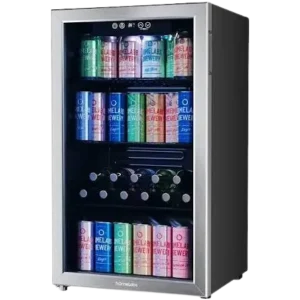
| Brand Name | hOmeLabs |
| Product Name | 3.2 Cubic Feet Beverage Cooler |
| Model / SKU | HME030065N |
| Manual Part Number | HME030065MNL |
| File Size | 126 KB |
| Number of Pages | 12 |
| Languages Covered | English |
hOmeLabs 3.2 Cu. Ft. Beverage Cooler HME030065N
The hOmeLabs HME030065N Beverage Cooler is a 3.2-cubic-foot household refrigeration appliance designed specifically for chilling beverages. It uses an electronic temperature control system with an adjustable range of 34°F to 50°F, interior lighting, standby mode, memory for saved settings and fault-code indicators for sensor problems. hOmeLabs-120-Can-Beverage-Coole… hOmeLabs-120-Can-Beverage-Coole… hOmeLabs-120-Can-Beverage-Coole…
The cooler must remain upright for 24 hours before its first power-up. Proper airflow around the appliance, correct electrical grounding and adequate spacing between beverages and the interior walls are also required for reliable cooling. hOmeLabs-120-Can-Beverage-Coole…
Product Overview
This beverage cooler is intended for household beverage storage only. According to the official manual, it should not be used for fresh foods such as meat, vegetables or fruit, nor for medical or biological storage. hOmeLabs-120-Can-Beverage-Coole…
The appliance includes:
- Adjustable digital temperature control
- Interior lighting
- Standby mode
- Power-loss settings memory
- Adjustable shelves
- Glass door
- Reversible door orientation
- Adjustable leveling foot
- E1 and E4 fault indicators
Its electrical rating is 115V, 60Hz, 75W AC only. hOmeLabs-120-Can-Beverage-Coole…
Parts and Components
The product diagram on page 7 identifies the primary components of the beverage cooler. hOmeLabs-120-Can-Beverage-Coole…
| Part | Purpose |
| Temperature Control | Sets and displays the cooling temperature |
| Fan | Circulates cooled air inside the cabinet |
| Shelves | Hold beverage cans and bottles |
| Glass Door | Provides access and visibility into the cooler |
| Adjustable Foot | Helps level the appliance on an uneven surface |
The page 7 illustration shows two internal shelves, the circulation fan near the upper rear section, the temperature control at the top of the cabinet and the leveling foot beneath the appliance.
Technical Specifications
| Specification | Official Manual Value |
| Model / SKU | HME030065N |
| Capacity | 3.2 cubic feet |
| Temperature Range | 34–50°F |
| Electrical Supply | 115V AC, 60Hz |
| Rated Current | 1.1A |
| Rated Power | 75W |
| Net Weight | 68.3 lb |
| Width | 18.9 in |
| Height | 33.3 in |
| Depth | 17.30 in |
| Use | Household beverage refrigeration |
| Manual Part Number | HME030065MNL |
hOmeLabs-120-Can-Beverage-Coole… hOmeLabs-120-Can-Beverage-Coole…
Important Safety Instructions
The beverage cooler should be operated only after all safety instructions have been read.
Important precautions include:
- Keep ventilation openings free of obstructions.
- Do not use unapproved mechanical methods to speed defrosting.
- Do not store aerosol cans containing flammable propellants.
- Do not use extension cords or ungrounded two-prong adapters.
- Use the cooler only for household or similar non-commercial applications.
- Pull the electrical plug itself when disconnecting the appliance rather than pulling the cord.
- Do not damage the power cord.
- Keep the plug accessible.
- Keep children supervised around the appliance.
- Keep the cooler away from damp or humid environments.
- Do not use the door or base as a step or support.
- Do not place heavy objects on top.
- Keep flammable, explosive, volatile and highly corrosive materials away from the appliance. hOmeLabs-120-Can-Beverage-Coole…
Electrical Safety
The appliance uses:
115V / 60Hz AC power
The manual calls for a dedicated three-hole grounded outlet rated at 15A or greater, and the outlet should not be shared with other electrical appliances. hOmeLabs-120-Can-Beverage-Coole…
Do not use:
- Extension cords
- Ungrounded two-prong adapters hOmeLabs-120-Can-Beverage-Coole…
If Gas Is Leaking Nearby
If a gas leak occurs:
- Shut off the leaking valve.
- Open doors and windows.
- Do not unplug the cooler yourself.
- Contact Customer Support. hOmeLabs-120-Can-Beverage-Coole…
What Can Be Stored in the Cooler?
The HME030065N is intended to chill beverages.
The manual specifically states that it should not be used to store:
- Meat
- Vegetables
- Fruit
- Blood
- Drugs
- Biological products
- Flammable substances
- Explosive materials
- Highly corrosive materials hOmeLabs-120-Can-Beverage-Coole…
Before First Use
Keep the Cooler Upright for 24 Hours
Before the first power-up, the cooler should remain:
upright and outside its shipping box for 24 hours.
This is intended to reduce the risk of internal damage following transportation. hOmeLabs-120-Can-Beverage-Coole…
The installation section repeats the instruction to keep the unit upright for 24 hours before initial power-up. hOmeLabs-120-Can-Beverage-Coole…
Remove Packaging
Before installation:
- Remove the bottom cushioning.
- Remove foam pads.
- Remove internal tape.
- Remove the protective film from the glass door and cooler body. hOmeLabs-120-Can-Beverage-Coole…
Position the Cooler Correctly
Place the appliance:
- Indoors
- On flat, sturdy ground
- In a well-ventilated area
- Away from direct sunlight
- Away from strong heat sources
- Away from wet or humid environments hOmeLabs-120-Can-Beverage-Coole…
Use the adjustable foot to level the unit if it is unstable. hOmeLabs-120-Can-Beverage-Coole…
Installation Clearance
Proper spacing around the appliance helps ventilation and cooling.
Side Clearance
Leave at least:
1.5 inches / 4 cm
of circulation space on both sides of the cooler. hOmeLabs-120-Can-Beverage-Coole…
Distance From Stove or Furnace
Keep at least:
11.8 inches / 30 cm
between the beverage cooler and a stove or furnace. hOmeLabs-120-Can-Beverage-Coole…
If avoiding a nearby heat source is not possible, the manual recommends using an insulation board.
Recommended Room Size
The manual advises operating the beverage cooler in a room of approximately:
133 cubic feet or larger. hOmeLabs-120-Can-Beverage-Coole…
Initial Cooling Setup
After the cooler has remained upright for 24 hours:
- Make sure the cabinet is empty.
- Plug the cooler in.
- Set the Temperature Control to maximum.
- Let the empty cooler operate for approximately 1 hour before loading beverages. hOmeLabs-120-Can-Beverage-Coole…
Loading Beverages
When beverages are placed inside, maintain approximately:
1.5 inches / 4 cm
between the drinks and the interior cabinet wall.
This spacing helps maintain proper airflow. hOmeLabs-120-Can-Beverage-Coole…
Avoid overfilling the cooler because excessive bottles or cans can reduce cooling performance. The troubleshooting table identifies an overly full cabinet as one reason the cooler may not become cold enough. hOmeLabs-120-Can-Beverage-Coole…
How to Reverse the Door
The cooler door can be changed from a left-hinge orientation to a right-hinge orientation.
The official procedure is:
- Use a screwdriver.
- Remove the upper left hinge.
- Remove the lower left hinge.
- Each triangular hinge is secured with three screws.
- Transfer the hinges to the right side of the cooler.
- Attach them to the right side of the door. hOmeLabs-120-Can-Beverage-Coole…
Control Panel and Display Guide
The operating section describes four primary control functions:
| Control | Purpose |
| Standby | Places the cooler into or out of standby mode |
| Lighting | Turns the interior light on or off |
| Increase Temperature | Raises the set temperature by one degree |
| Decrease Temperature | Lowers the set temperature by one degree |
The display also communicates normal operation and fault codes. hOmeLabs-120-Can-Beverage-Coole…
Display at Startup
When the cooler is powered on for the first time:
- The display illuminates fully for approximately 3 seconds.
- A startup tone sounds.
- The normal display then appears. hOmeLabs-120-Can-Beverage-Coole…
How to Use Standby Mode
Enter Standby
Press and hold the Standby button for 3 seconds.
The appliance:
- Sounds a beep.
- Turns off the display area. hOmeLabs-120-Can-Beverage-Coole…
Exit Standby
Press the Standby button again.
The cooler sounds another beep and the standard display returns. hOmeLabs-120-Can-Beverage-Coole…
How to Turn the Interior Light On or Off
Press the Lighting button once to switch the interior light on or off. hOmeLabs-120-Can-Beverage-Coole…
How to Set the Beverage Cooler Temperature
The cooler’s official temperature range is:
34°F to 50°F hOmeLabs-120-Can-Beverage-Coole…
To change the set temperature:
- Press Increase Temperature to raise it.
- Each press increases the setting by one degree.
- Press Decrease Temperature to lower it.
- Each press decreases the setting by one degree. hOmeLabs-120-Can-Beverage-Coole…
How to Switch Between Fahrenheit and Celsius
Press and hold the:
Increase Temperature + Decrease Temperature buttons
together for approximately 5 seconds.
The display switches between °F and °C. hOmeLabs-120-Can-Beverage-Coole…
Memory Function
If power is switched off, the beverage cooler remembers the settings that were active.
When power returns, it resumes operation using those stored settings. hOmeLabs-120-Can-Beverage-Coole…
Error Codes and Fault Indicators
The manual provides two fault codes.
| Fault Code | Meaning |
| E1 | Room sensor failure |
| E4 | Room defrost sensor failure |
hOmeLabs-120-Can-Beverage-Coole…
If either code appears, the official manual identifies it as a sensor-related fault rather than a normal operating indicator.
E1 Error Code
E1 indicates a room sensor failure. hOmeLabs-120-Can-Beverage-Coole…
Because the manual does not provide a user repair procedure for the sensor, Customer Support should be contacted rather than attempting internal repairs.
E4 Error Code
E4 indicates a room defrost sensor failure. hOmeLabs-120-Can-Beverage-Coole…
The document does not provide an internal sensor replacement procedure for owners.
Energy-Saving Tips
The manual recommends several practices to reduce power use and support cooling performance:
- Install the cooler in a dry, ventilated room.
- Keep it away from direct sunlight.
- Keep it away from radiators, stoves and similar heat sources.
- Use insulation between the cooler and an unavoidable nearby heat source.
- Keep door-opening time as short as possible.
- Avoid placing warm beverages directly into the cooler. hOmeLabs-120-Can-Beverage-Coole…
Normal Operating Sounds
Buzzing or gurgling sounds can occur during normal operation.
According to the official manual, these sounds can result from:
- Normal appliance operation.
- Refrigerant flowing through the internal pipeline. hOmeLabs-120-Can-Beverage-Coole…
These sounds by themselves do not necessarily indicate a malfunction.
How to Disconnect the Beverage Cooler
To disconnect the unit:
- Grasp the power plug.
- Pull the plug from the wall socket.
Do not pull on the power cord itself. hOmeLabs-120-Can-Beverage-Coole… hOmeLabs-120-Can-Beverage-Coole…
Cleaning the Beverage Cooler
Dust behind and underneath the appliance can reduce cooling efficiency, so these areas should be kept clean.
The cabinet interior should also be cleaned regularly to prevent odors. hOmeLabs-120-Can-Beverage-Coole…
Cleaning Steps
- Unplug the beverage cooler.
- Wipe the door seal with warm water.
- Clean the cooler with soap and warm water.
- Allow it to become clean and dry.
- Reconnect the power. hOmeLabs-120-Can-Beverage-Coole…
Cleaning Products to Avoid
Do not clean the unit with:
- Hard brushes
- Wire brushes
- Abrasives
- Organic solvents
- Boiling water
- Acidic cleaners
- Alkaline cleaners
These materials can damage the interior or exterior surfaces. hOmeLabs-120-Can-Beverage-Coole…
The beverage cooler itself must not be immersed in water. hOmeLabs-120-Can-Beverage-Coole…
How to Defrost the Beverage Cooler
The manual provides a manual defrosting process.
Defrosting Steps
- Unplug the beverage cooler.
- Remove all beverages and other cooler contents.
- Store removed beverages appropriately while the cooler defrosts.
- Let the appliance defrost naturally at room temperature.
- Wipe away remaining liquid with a clean, soft cloth.
- Power the appliance back on.
- Let it run for approximately 2–3 hours.
- Return the beverages to the cooler. hOmeLabs-120-Can-Beverage-Coole…
Do not attempt to speed the process with mechanical devices unless recommended by the manufacturer. hOmeLabs-120-Can-Beverage-Coole…
Troubleshooting Guide
| Problem | Possible Cause | Recommended Action |
| Cooler is not cold enough | Door is opened too frequently | Open the door less often and allow 4–5 hours for recovery |
| Cooler is not cold enough | Cabinet contains too many bottles or cans | Reduce the load and allow airflow around beverages |
| Cooler is not refrigerating | Power is out or the appliance is unplugged | Check electrical power and make sure the plug is connected |
| LED light is off | LED light is broken | Contact Customer Support |
| Condensation on glass door | Temperature is set too low or too high | Increase the temperature and wipe away water droplets |
The troubleshooting table appears on page 10 of the PDF. hOmeLabs-120-Can-Beverage-Coole…
Cooler Is Not Cold Enough
Two causes are highlighted in the official troubleshooting chart:
- The glass door is being opened too often.
- Too many bottles or cans have been placed inside. hOmeLabs-120-Can-Beverage-Coole…
Reduce unnecessary door opening and allow approximately 4–5 hours for the cooler to recover.
Food and beverages should also not block the airflow space inside the cabinet. The installation instructions recommend approximately 1.5 inches between beverages and the interior wall. hOmeLabs-120-Can-Beverage-Coole…
Beverage Cooler Is Not Refrigerating
If no cooling is taking place:
- Check whether household power is available.
- Confirm that the appliance is plugged in properly. hOmeLabs-120-Can-Beverage-Coole…
The unit requires a grounded 115V/60Hz electrical supply. hOmeLabs-120-Can-Beverage-Coole…
LED Light Is Not Working
If the interior LED does not illuminate and the light itself has failed, the troubleshooting guide instructs the owner to contact Customer Support. hOmeLabs-120-Can-Beverage-Coole…
Condensation on the Glass Door
Condensation can occur when the temperature setting is too low or too high.
The official troubleshooting guidance is to:
- Increase the temperature.
- Wipe away the water droplets with a cloth. hOmeLabs-120-Can-Beverage-Coole…
Cooler Makes Buzzing or Gurgling Sounds
Buzzing and gurgling can be normal.
The manual explains that these sounds may come from the unit operating or from refrigerant moving through its internal pipeline. hOmeLabs-120-Can-Beverage-Coole…
Product Registration
The manual recommends registering the appliance for updates, coupons and other product information.
Registration is not required to activate the warranty. hOmeLabs-120-Can-Beverage-Coole…
Limited One-Year Warranty
hOmeLabs provides a limited one-year warranty for products purchased new and unused from hOmeLabs Technologies, LLC or an authorized reseller, provided the purchaser has original proof of purchase. hOmeLabs-120-Can-Beverage-Coole…
The warranty applies to defects caused wholly or substantially by:
- Faulty manufacture
- Defective parts
- Defective workmanship hOmeLabs-120-Can-Beverage-Coole…
For a covered defect, the warranty covers the cost of restoring the product through repair or replacement of defective parts and required labor. hOmeLabs-120-Can-Beverage-Coole…
Warranty Exclusions
The warranty does not apply to damage caused by:
- Normal wear and tear
- Abuse
- Mishandling
- Accidents
- Failure to follow the operating instructions
- Exposure to liquids
- Foreign-particle infiltration
- Service or modification by parties other than hOmeLabs
- Commercial or non-household use hOmeLabs-120-Can-Beverage-Coole…
Repair attempts by unauthorized third parties or the use of replacement parts not provided by hOmeLabs can void warranty coverage. hOmeLabs-120-Can-Beverage-Coole…
Proof of Purchase
A receipt showing the purchase date is required for a warranty claim.
Product registration does not replace the need to retain the original proof of purchase. hOmeLabs-120-Can-Beverage-Coole…
Customer Support
The official manual provides the following support options:
Phone: 1-(800)-898-3002
Email: help@homelabs.com
Support: homelabs.com/help
Distributed by:
hOmeLabs, LLC
37 East 18 Street, 7th Floor
New York, NY 10003 hOmeLabs-120-Can-Beverage-Coole… hOmeLabs-120-Can-Beverage-Coole…
Frequently Asked Questions
What temperature should the hOmeLabs beverage cooler be set to?
The HME030065N supports a temperature range of 34°F to 50°F. Use the Increase or Decrease Temperature button to change the setting one degree at a time. hOmeLabs-120-Can-Beverage-Coole… hOmeLabs-120-Can-Beverage-Coole…
How long should the hOmeLabs beverage cooler sit before plugging it in?
The cooler should remain standing upright for 24 hours before the first power-up. hOmeLabs-120-Can-Beverage-Coole…
How long should the cooler run before beverages are added?
After the 24-hour upright period, the manual instructs owners to run the empty cooler at its maximum temperature-control setting for approximately 1 hour before loading beverages. hOmeLabs-120-Can-Beverage-Coole…
Why is the hOmeLabs beverage cooler not getting cold?
Frequent door opening and overloading the cabinet with cans or bottles can reduce cooling performance. Open the door less often, avoid overfilling and allow about 4–5 hours for the appliance to recover. hOmeLabs-120-Can-Beverage-Coole…
What does E1 mean on the hOmeLabs beverage cooler?
E1 means the cooler has detected a room sensor failure. The manual does not provide a user repair procedure for this fault. hOmeLabs-120-Can-Beverage-Coole…
What does E4 mean on the hOmeLabs beverage cooler?
E4 indicates a room defrost sensor failure. hOmeLabs-120-Can-Beverage-Coole…
How do you switch the hOmeLabs beverage cooler from Fahrenheit to Celsius?
Press and hold the Increase Temperature and Decrease Temperature buttons together for approximately 5 seconds. hOmeLabs-120-Can-Beverage-Coole…
How do you defrost the hOmeLabs beverage cooler?
Unplug the unit, remove the beverages and let it defrost naturally at room temperature. Wipe away remaining water, turn the cooler back on and let it run for 2–3 hours before returning the beverages. hOmeLabs-120-Can-Beverage-Coole…