| Field | Details |
| Document Title | Manual Battery Charger |
| Document Type | Owner’s Manual |
| Brand Name | Schumacher |
| Product Name | Manual Battery Charger |
| Model Number(s) | SC1574 |
| PDF File Size | 426.04 KB |
| Total Number of Pages | 33 |
| Languages Covered in the Document | English, Spanish, French |
Schumacher Manual Battery Charger SC1574
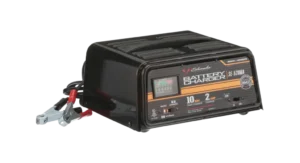
The Schumacher Manual Battery Charger is designed to charge compatible rechargeable lead-acid batteries and provide engine-starting assistance when a vehicle battery is weak or discharged.
The charger features a manual Charge Rate Selector Switch, an adjustable timer, and an analog ammeter. Its operating functions include Charge for normal battery charging, Boost for rapidly adding energy to a discharged battery, and Engine Start for providing additional current while cranking an engine.
The charger supports standard (STD), AGM, GEL, and deep-cycle lead-acid batteries. It operates from a nominal 120V AC electrical supply and uses color-coded battery clamps for connecting to a battery.
The timer allows the charging duration to be selected according to battery capacity, charging rate, and state of charge. The ammeter displays how much charging current the battery is drawing.
Important: The charger requires manual supervision. Charging must be monitored and stopped when the battery is fully charged. Failure to stop charging can damage the battery and cause injury or property damage.
Product Features
The Schumacher Manual Battery Charger includes the following features:
- Manual battery charging operation.
- Compatibility with rechargeable STD, AGM, GEL, and deep-cycle lead-acid batteries.
- Adjustable Charge Rate Selector Switch.
- Charge mode for regular battery charging.
- Boost mode for rapidly adding energy to discharged batteries.
- Engine Start function for starting assistance.
- Adjustable charging timer.
- Analog ammeter for monitoring charging current.
- Positive and negative color-coded battery clamps.
- Grounded 120V AC power connection.
- Internal cooling fan.
- Circuit breaker protection.
- Thermal protection.
- Metal housing with carrying handle.
Technical Specifications and Operating Information
| Specification | Details |
| Brand | Schumacher |
| Product | Manual Battery Charger |
| Operating Method | Manual charging |
| AC Supply Voltage | Nominal 120V AC |
| Electrical Connection | Grounded AC plug |
| Supported Battery Chemistry | Lead-acid |
| Supported Battery Types | STD, AGM, GEL, deep-cycle |
| Charging Controls | Charge Rate Selector Switch and Timer |
| Current Indicator | Analog ammeter |
| Operating Functions | Charge, Boost, Engine Start |
| Battery Connections | Red positive and black negative clamps |
| Charging Timer | Adjustable |
| Cooling System | Internal fan |
| Overload Protection | Circuit breaker |
| Overheating Protection | Thermal protector |
| Housing | Metal case |
| Warranty | Two-year limited warranty |
Parts and Components
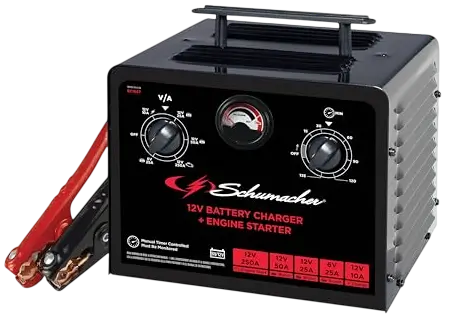
The Schumacher Manual Battery Charger includes a metal housing, adjustable controls, charging cables, and an analog current meter.
Component Identification
| Component | Function |
| Metal Case | Protects the charger’s internal electrical components |
| Carrying Handle | Allows the charger to be carried and positioned |
| Charge Rate Selector Switch | Selects the desired charging rate or Engine Start function |
| Timer | Controls the selected charging period |
| Ammeter | Displays the current drawn by the battery |
| Red Positive Clamp (+) | Connects to the battery’s positive terminal or designated connection point |
| Black Negative Clamp (-) | Connects to the negative terminal or suitable chassis connection |
| Grounded AC Power Cord | Connects the charger to a nominal 120V AC electrical outlet |
| Cooling Fan | Helps cool the charger during operation |
Battery Clamps
The charger uses color-coded clamps:
- Red clamp: Positive (+).
- Black clamp: Negative (-).
The connection arrangement depends on whether the vehicle has a negative-ground or positive-ground electrical system.
Battery clamps must only be attached or removed after the charger controls are turned off and the AC power cord is disconnected.
Metal Housing and Carrying Handle
The metal case protects the internal charger components.
The carrying handle can be extended into its operating position. The small silver release buttons may need to be pressed inward while extending the handle.
Control Panel and Functions
The charger has three primary operating controls:
- Charge Rate Selector Switch.
- Timer.
- Ammeter.
Charge Rate Selector Switch
The Charge Rate Selector Switch selects the charging rate or Engine Start setting.
| Setting | Function |
| Charge | Charges small and large lead-acid batteries |
| Boost | Quickly adds energy to a severely discharged or large-capacity battery |
| Engine Start | Supplies additional current for cranking an engine with a weak battery |
Charge Mode
Charge mode is used for charging compatible lead-acid batteries.
It can be used for automotive, marine, and deep-cycle batteries when the selected charge rate matches the battery manufacturer’s requirements.
Charge mode is not recommended for industrial applications.
Boost Mode
Boost mode quickly adds energy to a battery that is severely discharged or has a large capacity.
It can be used before attempting Engine Start.
The battery and charger must be monitored throughout the boosting process.
Engine Start Mode
Engine Start mode provides additional current to assist with cranking a vehicle engine.
Warning: Engine Start must always be used with a battery installed in the vehicle. Using this feature without a battery can damage the vehicle’s electrical system.
Using the Charging Timer
The timer determines how long the charger operates.
When the selected charging period expires, the timer stops charging.
How to Set the Timer
Before setting the timer, the following battery information is required:
- Battery capacity in ampere-hours (Ah).
- Battery reserve capacity (RC), when used to estimate Ah.
- Battery’s existing state of charge.
- Selected charging rate.
The charging duration should be calculated using the battery’s capacity, required charge, and selected charging current.
Timer Safety Precautions
The timer helps limit charging duration, but it does not determine the battery’s state of charge automatically.
During manual charging, the charging process must be monitored and stopped when the battery becomes fully charged.
Important: Continuing to charge a fully charged battery can damage the battery and may result in personal injury or property damage.
Reading the Ammeter
The ammeter measures the current being drawn by the connected battery.
The reading is displayed in amperes (A).
Understanding Ammeter Readings
| Ammeter Behavior | Meaning |
| Higher current reading | Battery is drawing a relatively large amount of charging current |
| Current gradually decreases | Battery is accepting charge |
| Current stops decreasing | Battery has reached its charged condition according to the manual |
| Needle moves to the far right of Start area | High current is being drawn during engine cranking |
| Very little needle movement at 2A | Current may be flowing, but the meter cannot accurately display such a low rate |
Why the Ammeter Reading Decreases
As a battery receives charge, it generally draws less current from the charger.
The ammeter needle moves toward a lower current reading.
The manual identifies the point where charging current stops decreasing as an indication that the battery is charged.
The charging process must still be monitored and stopped appropriately.
Important Safety Instructions
Warning: Risk of electric shock, fire, explosive gases, and serious personal injury.
Lead-acid batteries generate explosive gases during normal operation. A spark near the battery can cause an explosion.
General Safety Precautions
- Read the instructions before operating the charger.
- Keep the charger out of reach of children.
- Do not expose the charger to rain or snow.
- Use only attachments recommended by the manufacturer.
- Disconnect the AC cord by pulling the plug rather than the cable.
- Do not operate the charger with a damaged cord or plug.
- Do not use a charger that has been dropped, struck, or otherwise damaged.
- Do not disassemble the charger.
- Have repairs performed by qualified service personnel.
- Unplug the charger before cleaning or maintenance.
- Never allow the battery clamps to touch one another.
- Do not charge a frozen battery.
- Never attempt to charge an unsupported battery type.
Personal Safety Precautions
When working near lead-acid batteries:
- Wear complete eye protection and protective clothing.
- Remove rings, watches, necklaces, bracelets, and other metal jewelry.
- Keep another person nearby who can provide assistance.
- Have fresh water and soap available.
- Never smoke near the battery or engine.
- Keep sparks and open flames away from the battery.
- Avoid dropping metal tools onto the battery.
- Do not touch the eyes while handling batteries or cleaning terminals.
A lead-acid battery can produce enough short-circuit current to heat or weld metal jewelry, causing severe burns.
Battery Acid Safety
Battery electrolyte contains corrosive sulfuric acid.
If battery acid contacts skin or clothing, immediately wash the affected area with soap and water.
If battery acid enters the eyes, flush immediately with cold running water for at least 10 minutes and obtain medical attention.
Battery Compatibility
The charger is intended for the following rechargeable lead-acid battery types:
| Battery Type | Description |
| STD | Standard lead-acid battery |
| AGM | Absorbent Glass Mat lead-acid battery |
| GEL | Gel-cell lead-acid battery |
| Deep-Cycle | Lead-acid battery designed for repeated charging and discharging |
The charger must not be used to charge household dry-cell batteries. Such batteries may burst, causing personal injury or property damage.
Charging a Frozen Battery
Never charge a frozen battery.
Charging must not begin while the battery is frozen.
Preparing the Battery for Charging
The battery and charging area must be prepared before attaching the charging clamps.
Battery Preparation
- Turn off all vehicle accessories.
- Determine the battery voltage from the vehicle owner’s manual.
- Check the battery manufacturer’s charging instructions.
- Clean the battery terminals.
- Keep corrosion particles away from the eyes.
- For batteries with removable cell caps, add distilled water until the electrolyte reaches the manufacturer’s specified level.
- Do not overfill the battery.
- Follow the manufacturer’s instructions for batteries without removable caps.
Selecting the Charging Rate
Before charging:
- Identify the battery type.
- Confirm the required battery voltage.
- Check the manufacturer’s recommended charging rate.
- Select the matching charger output voltage.
- Begin at the lowest charging rate when an adjustable rate is available.
Choosing a Safe Charger Location
The charger must be positioned in a well-ventilated area.
Placement Precautions
- Position the charger as far from the battery as its DC cables permit.
- Never place the charger directly above the battery.
- Do not place the battery on top of the charger.
- Keep battery acid from dripping onto the charger.
- Do not operate the charger in an enclosed or poorly ventilated area.
- Do not block ventilation openings.
Battery gases and spilled electrolyte can corrode or damage the charger.
AC Power Connection and Grounding
The Schumacher Manual Battery Charger is designed for use with a nominal 120V AC electrical circuit.
The charger is equipped with a grounded plug.
Grounding Requirements
- Use a properly installed grounded electrical outlet.
- Verify that the plug matches the outlet.
- Do not modify the AC power cord or plug.
- Do not connect the charger to an ungrounded electrical system.
- If the plug does not fit, have an appropriate outlet installed by a qualified electrician.
An improper electrical connection can cause shock or electrocution.
Extension Cord Requirements
An extension cord should only be used when absolutely necessary.
If an extension cord is required:
- Its plug must have the same number, size, and shape of pins as the charger’s plug.
- The cord must be properly wired.
- The cord must be in good electrical condition.
- The wire size must be suitable for the charger’s AC input current.
Recommended Extension Cord Wire Sizes
The following table provides the minimum American Wire Gauge (AWG) size for different AC input current ratings and extension cord lengths.
| AC Input Current | 25 ft | 50 ft | 100 ft | 150 ft |
| 0–less than 2A | 18 AWG | 18 AWG | 18 AWG | 16 AWG |
| 2–less than 3A | 18 AWG | 18 AWG | 16 AWG | 14 AWG |
| 3–less than 4A | 18 AWG | 18 AWG | 16 AWG | 14 AWG |
| 4–less than 5A | 18 AWG | 18 AWG | 14 AWG | 12 AWG |
| 5–less than 6A | 18 AWG | 16 AWG | 14 AWG | 12 AWG |
| 6–less than 8A | 18 AWG | 16 AWG | 12 AWG | 10 AWG |
| 8–less than 10A | 18 AWG | 14 AWG | 12 AWG | 10 AWG |
| 10–less than 12A | 16 AWG | 14 AWG | 10 AWG | 8 AWG |
| 12–less than 14A | 16 AWG | 12 AWG | 10 AWG | 8 AWG |
| 14–less than 16A | 16 AWG | 12 AWG | 10 AWG | 8 AWG |
| 16–less than 18A | 14 AWG | 12 AWG | 8 AWG | 8 AWG |
| 18–less than 20A | 14 AWG | 12 AWG | 8 AWG | 6 AWG |
If the charger’s AC input rating is expressed in watts, divide the wattage by the rated voltage to determine the approximate input amperage.
For example:
1,200 watts ÷ 120 volts = 10 amperes.
Assembly Instructions
Before using the charger:
- Remove any cord wraps.
- Uncoil the AC and DC cables completely.
- Extend the carrying handle from its retracted position.
- Pull the handle upward until it locks into place.
- If necessary, press the small silver buttons inward while extending the handle.
The charger should be positioned securely before operation.
Connecting the Charger to a Battery Installed in a Vehicle
Warning: A spark near the vehicle battery can cause an explosion.
All charger switches must be turned off and the AC power cord disconnected before attaching the battery clamps.
Preparing the Connections
- Switch off the vehicle’s electrical accessories.
- Position the AC and DC cables away from the vehicle hood, doors, fans, belts, pulleys, and moving engine components.
- Identify the positive and negative battery terminals.
- Determine whether the vehicle uses a negative-ground or positive-ground electrical system.
Battery Terminal Identification
| Terminal | Marking | Clamp Color |
| Positive | POS, P, + | Red |
| Negative | NEG, N, – | Black |
The positive battery terminal generally has a larger diameter than the negative terminal.
Connecting to a Negative-Ground Vehicle
Most vehicles use a negative-ground electrical system.
- Connect the red positive (+) clamp to the battery’s positive terminal.
- Connect the black negative (-) clamp to a heavy-gauge metal section of the vehicle chassis or engine block, away from the battery.
- Confirm that both clamps are securely attached.
Do not attach the black clamp to fuel lines, the carburetor, or thin sheet-metal body components.
Connecting to a Positive-Ground Vehicle
For a positive-ground electrical system:
- Connect the black negative (-) clamp to the battery’s negative terminal.
- Connect the red positive (+) clamp to a heavy-gauge metal section of the vehicle chassis or engine block, away from the battery.
- Confirm that both clamps are securely attached.
Do not attach the chassis clamp to fuel lines, the carburetor, or thin sheet-metal body components.
Disconnecting the Charger from a Vehicle Battery
After charging:
- Set the charger switches to OFF.
- Disconnect the AC power cord.
- Remove the clamp connected to the vehicle chassis.
- Remove the clamp connected to the battery terminal.
Connecting the Charger to a Battery Outside the Vehicle
When charging a battery removed from a vehicle, an additional insulated battery cable is required.
Required Insulated Battery Cable
| Specification | Requirement |
| Minimum Cable Length | 24 inches |
| Cable Size | 6 AWG |
| Cable Type | Insulated battery cable |
Connecting an External Battery
- Place the battery in a well-ventilated area.
- Identify the positive and negative terminals.
- Attach an insulated 6-AWG cable, at least 24 inches long, to the negative battery terminal.
- Connect the charger’s red positive clamp to the positive battery terminal.
- Position the free end of the insulated cable as far from the battery as practical.
- Connect the charger’s black negative clamp to the free end of the insulated cable.
- Do not face the battery while making the final connection.
Disconnecting an External Battery
- Turn the charger switches to OFF.
- Disconnect AC power.
- Disconnect the negative clamp from the insulated cable while remaining away from the battery.
- Remove the positive clamp.
- Remove the insulated cable from the battery terminal.
Charging a Marine Battery
A marine battery must be removed from the boat and charged on shore.
Charging a battery while it remains onboard requires equipment specifically designed for marine use.
How to Charge a Battery in a Vehicle
The following procedure applies to a battery installed in a vehicle.
Step-by-Step Charging Instructions
- Switch off electrical accessories. Turn off the vehicle lights, radio, and other equipment.
- Keep the hood open. Allow ventilation around the battery and charging area.
- Clean the battery terminals. Remove corrosion and dirt from the connection points.
- Turn the charger off. Set the Charge Rate Selector Switch and Timer to OFF.
- Position the cables. Keep them away from engine fans, belts, pulleys, and other moving parts.
- Connect the battery clamps. Follow the correct connection sequence for the vehicle’s grounding system.
- Connect AC power. Plug the charger into a grounded electrical outlet.
- Select the charge rate. Choose the charging rate appropriate for the battery.
- Set the Timer. Select the calculated charging period.
- Monitor the charging process. Observe the charger, battery, and ammeter throughout charging.
- Stop charging when complete. Turn the Charge Rate Selector and Timer to OFF.
- Disconnect AC power. Remove the charger’s plug from the electrical outlet.
- Remove the clamps. Disconnect the chassis clamp first, followed by the battery terminal clamp.
Important: Charging must be monitored. Do not continue charging after the battery becomes fully charged.
How to Charge a Battery Outside the Vehicle
Step-by-Step Charging Instructions
- Place the battery in a well-ventilated area.
- Set the Charge Rate Selector and Timer to OFF.
- Clean the battery terminals.
- Connect the clamps using the external battery connection procedure.
- Plug the charger into a grounded electrical outlet.
- Select the appropriate charging rate.
- Set the Timer for the calculated charging period.
- Monitor the battery and charger during charging.
- When charging is complete, set the Charge Rate Selector and Timer to OFF.
- Disconnect AC power.
- Remove the negative clamp.
- Remove the positive clamp.
A marine battery must be charged on shore.
Using Manual Charge Mode
Manual Charge mode is used for normal battery charging.
Charging Procedure
- Check the battery type and voltage.
- Determine the recommended charging rate.
- Set the charger controls to OFF.
- Connect the battery clamps correctly.
- Connect the charger to AC power.
- Select the appropriate Charge setting.
- Set the required charging time.
- Monitor the battery and ammeter.
- Stop charging when the battery is fully charged.
Manual Charging Warning
During manual operation, charging can continue until stopped by the selected timing control or the operator.
The charger does not independently determine that the battery is fully charged.
Failure to stop charging can damage the battery and result in property damage or personal injury.
Using Boost Mode
Boost mode is used to quickly add energy to a severely discharged or large-capacity battery before Engine Start.
Boost Mode Procedure
- Set the charger controls to OFF.
- Connect the battery clamps according to the appropriate connection procedure.
- Connect AC power.
- Select the Boost setting.
- Allow the battery to receive the required charging current.
- Monitor the charger and battery throughout the process.
- Stop the boosting process when the intended charging period is complete.
Boost mode must not be used without monitoring the battery.
Using the Engine Start Feature
The Engine Start function can assist in starting a vehicle with a weak or discharged battery.
Warning: Engine Start must never be operated without a battery installed in the vehicle.
The vehicle battery must remain connected during starting assistance.
Engine Start Procedure
- Set the Charge Rate Selector Switch and Timer to OFF.
- Disconnect the charger from the AC electrical outlet.
- Connect the battery clamps according to the instructions for a battery installed in a vehicle.
- Plug the charger’s AC cord into the electrical outlet.
- Set the Charge Rate Selector Switch to Engine Start.
- Attempt to start the engine.
- Stop cranking when the engine starts or after 5 seconds, whichever occurs first.
- If the engine does not start, wait at least 3 minutes before another attempt.
- If the engine still does not start, charge the battery for an additional 5 minutes before trying again.
- Once the engine starts, turn the Charge Rate Selector and Timer to OFF.
- Unplug the AC power cord.
- Disconnect the battery clamps from the vehicle.
- Clean and store the charger in a dry location.
Engine Start Time Limits
| Operation | Requirement |
| Maximum Cranking Duration | 5 seconds |
| Minimum Wait Between Attempts | 3 minutes |
| Initial Charging in Extremely Cold Weather | 5 minutes |
| Initial Charging When Battery Is Below 2V | 5 minutes |
| Additional Charging Before Retrying | 5 minutes |
Engine Start in Cold Weather
During extremely cold weather, or when the battery voltage is below 2V:
- Connect the charger correctly.
- Charge the battery for approximately 5 minutes before cranking the engine.
- Attempt to start the engine.
- Stop after 5 seconds if the engine does not start.
- Wait at least 3 minutes before the next attempt.
When the Engine Cranks but Does Not Start
If the engine turns over but does not start, the problem may be elsewhere in the vehicle rather than the starting system.
Stop cranking until the underlying problem has been diagnosed and corrected.
Engine Start After Battery Charging
If the battery has already been charged but the vehicle still does not start, do not continue using Engine Start.
The battery should be checked because additional Engine Start attempts could damage the vehicle’s electrical system.
Cooling Fan Operation
The internal cooling fan may run while the Timer is operating.
This is normal.
Keep the area around the charger free from obstructions so the fan can operate efficiently.
If the charger overheats, its thermal protector may interrupt operation until the unit cools sufficiently.
Calculating Battery Charging Time
Charging time depends on the battery’s ampere-hour capacity, existing state of charge, and selected charging current.
Estimating Ampere-Hour Capacity
If the battery’s Reserve Capacity is known, the manual provides the following approximate formula:
Amp-hours (Ah) = (Reserve Capacity + 16) ÷ 2
Reserve Capacity can be found in the battery’s specifications or owner’s manual.
Charging Time Formula
Charging Time (hours) = Battery Ah × Charge Needed × 1.25 ÷ Charging Current (A)
The required charge is expressed as a decimal.
For example:
| Charge Required | Decimal Value |
| 25% | 0.25 |
| 50% | 0.50 |
| 75% | 0.75 |
Charging Time Example
For a 100Ah battery that requires 50% charge at a 20A charging rate:
100 × 0.50 × 1.25 ÷ 20 = 3.125 hours
The estimated charging time is approximately 3.125 hours, or slightly more than 3 hours.
Deep-Cycle Battery Adjustment
For deep-cycle batteries, add approximately one additional hour to the calculated charging time.
Battery Charging Time Chart
The following charging times are based on batteries that are approximately 50% charged before recharging.
The table is a reference chart for the indicated charging rates. The selected rate must be available on the charger and suitable for the connected battery.
CCA means Cold Cranking Amps. RC means Reserve Capacity. NR means Not Recommended.
| Battery Type | Battery Rating | 10A | 20A | 40A | 50A |
| Small Battery | 6–12Ah | NR | NR | NR | NR |
| Small Battery | 12–32Ah | NR | NR | NR | NR |
| Car/Truck | 200–315 CCA, 40–60 RC | 2¼–3 hr | 1–1½ hr | ½–¾ hr | 25–35 min |
| Car/Truck | 315–550 CCA, 60–85 RC | 3–3¾ hr | 1½–2 hr | ¾–1 hr | ½–¾ hr |
| Car/Truck | 550–1000 CCA, 85–190 RC | 3¾–7 hr | 2–3½ hr | 1–1¾ hr | ¾–1½ hr |
| Marine/Deep-Cycle | 80 RC | 3½ hr | 1¾ hr | NR | NR |
| Marine/Deep-Cycle | 140 RC | 5½ hr | 2¾ hr | NR | NR |
| Marine/Deep-Cycle | 160 RC | 6 hr | 3 hr | NR | NR |
| Marine/Deep-Cycle | 180 RC | 6½ hr | 3¼ hr | NR | NR |
Maintenance and Cleaning Instructions
Routine cleaning helps prevent corrosion and damage to the charger’s clamps and housing.
Cleaning the Battery Clamps
- Disconnect the charger from AC power.
- Disconnect the battery clamps.
- Clean the clamps after every charging session.
- Wipe away any battery fluid that may have contacted the clamps.
- Remove accessible corrosion and dirt.
Cleaning the Charger Housing
Occasionally wipe the exterior case with a soft cloth.
Regular cleaning helps maintain the finish and prevent corrosion.
Cable Maintenance
Inspect the AC and DC cables for damage before use.
Do not operate the charger with damaged plugs, cords, or clamps.
Have damaged components repaired or replaced by qualified service personnel.
Storage Instructions
The charger must be stored indoors in a cool, dry location.
Storage Procedure
- Set the charger controls to OFF.
- Unplug the AC power cord.
- Disconnect the battery clamps.
- Coil the input and output cables neatly.
- Store the charger upright.
- Place the charger indoors in a cool, dry location.
- Attach the clamps to the storage locations on the carrying handle.
Battery Clamp Storage Precautions
Never store the clamps:
- Clipped together.
- Attached to metal objects.
- Clipped onto the charging cables.
- In contact with conductive surfaces.
Proper storage helps prevent accidental cable damage and electrical contact.
Troubleshooting Guide
The following troubleshooting procedures address power problems, charging failures, circuit breaker cycling, abnormal sounds, and Engine Start difficulties.
Schumacher Manual Battery Charger Troubleshooting Table
| Problem | Possible Cause | Recommended Solution |
| Charger will not turn on | AC outlet has no power | Check the fuse or circuit breaker supplying the outlet |
| Charger will not turn on | Poor electrical connection | Check the power cord and extension cord for loose plugs |
| Charger is on but battery is not charging | Poor battery clamp connection | Clean the battery and chassis connection points; adjust the clamps for better contact |
| Charger makes a clicking sound | Circuit breaker is cycling | Check the charger settings |
| Charger makes a clicking sound | Defective battery | Have the battery checked |
| Charger makes a clicking sound | Shorted cables or clamps | Check for short circuits and replace damaged components |
| Charger makes a clicking sound | Battery is severely discharged | Allow recovery charging; stop after 20 minutes if the problem continues |
| Charger makes a clicking sound | Reversed battery connections | Switch off the charger and correct the clamp connections |
| Charger makes a loud buzz | Transformer laminations vibrate | Normal operating condition |
| Charger makes an abnormal hum | Shorted diode or rectifier assembly | Have the charger checked by a qualified technician |
| Engine Start cycle is short or unavailable | Excessive current draw | Cranking time may be shorter than 5 seconds |
| Engine Start cycle is short or unavailable | Less than 3 minutes between attempts | Wait the full 3-minute rest period |
| Engine Start cycle is short or unavailable | Poor battery clamp connection | Check the battery and chassis connections |
| Engine Start cycle is short or unavailable | Loose AC cord or extension cord | Check the electrical connections |
| Engine Start cycle is short or unavailable | No power at the outlet | Check the circuit fuse or breaker |
| Engine Start cycle is short or unavailable | Charger overheated | Clear ventilation openings and allow the thermal protector to reset |
| Engine Start cycle is short or unavailable | Severely discharged battery | Use Boost for 10–15 minutes before attempting another start |
Charger Will Not Turn On
If the charger does not operate when connected:
- Check whether the electrical outlet has power.
- Inspect the circuit fuse or breaker.
- Check the AC power cord.
- Inspect any extension cord being used.
- Confirm that all electrical plugs fit securely.
Do not operate the charger with damaged electrical cables.
Battery Is Connected but Not Charging
Poor electrical contact at the battery or chassis may prevent charging.
Troubleshooting Procedure
- Set the charger controls to OFF.
- Disconnect AC power.
- Inspect the battery clamp connections.
- Clean the battery and chassis connection points.
- Adjust the clamps slightly to obtain better contact.
- Reconnect the charger using the correct procedure.
Charger Makes a Clicking Sound
A repeated clicking noise may indicate that the charger’s internal circuit breaker is cycling.
Possible causes include:
- Incorrect charging settings.
- Defective battery.
- Shorted battery cables.
- Shorted clamps.
- Severely discharged battery.
- Reversed battery connections.
Troubleshooting a Clicking Charger
- Check the selected charging settings.
- Verify that the battery clamps are connected with correct polarity.
- Inspect the cables and clamps for short circuits.
- Have the battery checked if necessary.
A severely discharged battery may initially resist charging.
If the battery is otherwise in good condition, charging may be allowed to continue briefly while the battery recovers enough to accept current.
If this condition continues for more than 20 minutes, stop charging and have the battery checked.
Charger Makes a Buzzing or Humming Sound
Normal Transformer Buzzing
The transformer laminations may vibrate during operation.
The manual identifies this buzzing sound as a normal operating condition.
Abnormal Humming
An abnormal humming sound may indicate a shorted diode assembly or output rectifier assembly.
The charger should be inspected by a qualified technician.
Short or No Engine Start Cycle
The Engine Start cycle may be shortened or interrupted under certain conditions.
Excessive Starting Current
If the engine draws more current than the Engine Start rating, the available cranking time may be less than five seconds.
Insufficient Waiting Time
Wait at least three minutes between cranking attempts.
Poor Battery Connections
Check the battery and chassis clamp connections.
Loose Power Connection
Inspect the AC power cord and extension cord for loose plugs.
No AC Power
Check the fuse or circuit breaker supplying the outlet.
Charger Overheating
If the thermal protector has activated:
- Stop the starting attempt.
- Check that the ventilation openings are not blocked.
- Allow the charger to cool.
- Wait for the thermal protector to reset.
- Try again after the condition has cleared.
Severely Discharged Vehicle Battery
For a severely discharged battery, use the Boost setting for 10–15 minutes before another Engine Start attempt.
The charger and battery must be monitored during this process.
Customer Support and Repairs
Schumacher Electric Corporation provides customer assistance for troubleshooting, repairs, returns, and warranty claims.
Customer Support Information
| Contact Method | Details |
| Manufacturer | Schumacher Electric Corporation |
| Customer Support Phone | 1-800-621-5485 |
| Customer Support Email | services@schumacherelectric.com |
| Website | batterychargers.com |
| Product Registration | batterychargers.com |
Repair and Return Procedure
Before returning the charger for repair:
- Contact Schumacher Customer Service.
- Explain the problem.
- Follow the manufacturer’s troubleshooting instructions.
- Request a Return Merchandise Authorization (RMA) number when a return is required.
- Wait until an RMA number has been issued before shipping the charger.
Important: Do not ship the charger for repair until Schumacher Customer Service provides a Return Merchandise Authorization number.
Limited Warranty
The Schumacher Manual Battery Charger is covered by a two-year limited warranty.
The warranty applies to the original retail purchaser and covers defects in materials or workmanship under normal use and care.
Warranty Details
| Warranty Item | Details |
| Manufacturer | Schumacher Electric Corporation |
| Warranty Type | Limited Warranty |
| Warranty Period | Two years from the retail purchase date |
| Coverage | Defects in materials or workmanship under normal use and care |
| Eligible Purchaser | Original retail purchaser |
| Transferability | Not transferable or assignable |
| Warranty Service | Repair or replacement at the manufacturer’s discretion |
| Proof of Purchase | Required |
| Return Shipping | Purchaser must prepay applicable shipping charges |
Warranty Exclusions
The limited warranty may be void if the product is:
- Misused.
- Handled carelessly.
- Repaired or modified by someone other than the manufacturer.
- Resold through an unauthorized retailer.
Accessories not manufactured and approved by Schumacher Electric Corporation are not covered by the manufacturer’s warranty.
Warranty Registration
The product can be registered online at:
The manual also includes a mail-in warranty registration card for customers without internet access.
The warranty card should be submitted within 30 days of purchase.
The original purchase receipt must be retained for warranty claims.
Warranty Registration Mailing Address
Schumacher Electric Corporation
801 Business Center Drive
Mount Prospect, IL 60056-2179
This address is provided for warranty card registration. The charger must not be sent there for repair without following Schumacher’s return authorization instructions.
Frequently Asked Questions
1. How does the Schumacher SC1574 manual battery charger work?
The Schumacher Manual Battery Charger supplies charging current to compatible lead-acid batteries through its positive and negative battery clamps. The Charge Rate Selector controls the charging function, the Timer determines the charging duration, and the ammeter shows the current being drawn by the battery.
2. Does the Schumacher battery charger shut off automatically?
The Timer stops charging when the selected charging period expires. However, the charger requires manual supervision and does not independently determine the correct charging duration. The operator must monitor charging and stop when the battery becomes fully charged.
3. What is the difference between Charge, Boost, and Engine Start?
Charge mode is used for normal lead-acid battery charging. Boost mode quickly adds energy to a severely discharged or high-capacity battery. Engine Start supplies additional current to assist with starting a vehicle whose battery is weak or discharged.
4. How long can the charger be used in Engine Start mode?
The engine should be cranked for no longer than five seconds per attempt. If the engine does not start, wait at least three minutes before trying again. Additional charging may be required for severely discharged batteries.
5. Why does the ammeter reading decrease while charging?
As a battery receives charge, it generally draws less current from the charger. The ammeter needle therefore moves toward a lower current reading. The manual identifies a reading that has stopped decreasing as an indication that the battery is charged.
6. Why is the Schumacher battery charger clicking?
A repeated clicking sound may indicate that the internal circuit breaker is cycling. Possible causes include incorrect settings, reversed battery connections, shorted cables, a defective battery, or a severely discharged battery. The charging connections and settings should be checked.
7. Can the Schumacher SC1574 charge AGM and deep-cycle batteries?
The Schumacher Manual Battery Charger is intended for rechargeable lead-acid batteries, including STD, AGM, GEL, and deep-cycle types. The charging rate and voltage must be selected according to the battery manufacturer’s specifications.
8. What should be done if the charger will not charge a battery?
Check the AC electrical outlet, power cord, charging settings, and battery clamp connections. Clean the battery and chassis connection points if necessary. If the charger continues to cycle, fails to charge, or shows signs of an electrical fault, stop operation and have the battery or charger inspected by qualified service personnel.