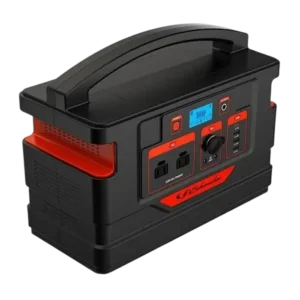
| Field | Details |
| Document Title | Portable Power Generator |
| Document Type | Owner’s Manual |
| Brand Name | Schumacher |
| Product Name | Portable Power Generator |
| Model Number(s) | SL1467 |
| PDF File Size | 241.9 KB |
| Total Number of Pages | 8 |
| Languages Covered in the Document | English, French |
Schumacher Portable Power Generator SL1467
The Schumacher SL1467 Portable Power Generator is a rechargeable power station designed to supply electricity to compatible electronic devices, small household appliances, and 12V DC equipment. It features an 888Wh lithium-polymer battery, a 1000W inverter, multiple AC and DC outputs, USB charging ports, and a built-in LED light.
The power generator provides two 110V AC outlets, three 12V DC outputs, and four USB charging ports. Its internal battery can be recharged using the supplied AC charger or a compatible 120W solar panel.
The SL1467 has an LCD screen that displays the internal battery capacity, charging status, active power outputs, and warning conditions. Separate buttons control the AC, DC, and USB outputs.
The integrated LED light provides normal illumination, an SOS signal, and an emergency flashing mode.
The power generator is intended for portable electrical power applications within its specified voltage, current, and wattage limits.
Product Features
The Schumacher SL1467 includes the following features:
- Rechargeable 888Wh lithium-polymer battery.
- 1000W continuous AC inverter.
- Up to 2000W momentary surge output for less than 0.1 second.
- Two 110V AC power outlets.
- Two 12V DC output ports.
- One 12V DC cigarette-lighter-style output socket.
- Three USB ports rated at 5V/2.4A.
- One USB port rated at 5V/3A.
- AC charging using the supplied charger.
- Optional 120W solar panel charging.
- LCD battery capacity indicator.
- Battery level display in 20% increments.
- Independent AC, DC, and USB output controls.
- Built-in 2W LED light.
- Normal, SOS, and emergency flashing light modes.
- Overload and short-circuit protection.
- Temperature protection.
- Automatic inverter shutdown during overload conditions.
- Integrated carrying handle.
Technical Specifications
| Specification | Details |
| Brand | Schumacher |
| Model Number | SL1467 |
| Product Type | Portable Power Generator |
| Internal Battery Type | Lithium Polymer |
| Battery Capacity | 888Wh |
| Battery Voltage | 22.2V |
| Battery Capacity Rating | 40Ah |
| AC Charging Input | 20V, 6A |
| Inverter Continuous Output | 1000W |
| Momentary Surge Output | Up to 2000W for less than 0.1 second |
| AC Output | 2 × 110V AC, 60Hz |
| Maximum Continuous AC Load | 1000W |
| DC Output | 3 × 12V DC, 10A Max. |
| Standard USB Output | 3 × 5V DC, 2.4A Max. |
| Additional USB Output | 1 × 5V DC, 3A Max. |
| LED Light | 2W |
| Battery Charging Time | Approximately 10.5 hours |
| Solar Charging | Compatible 120W solar panel |
| Solar Input Connector | 7.9mm |
| Battery Capacity Display | Five bars, in 20% increments |
| Recommended Recharge Level | Below 40% |
| Maximum Exposure Temperature | 104°F (40°C) |
| Minimum Ventilation Clearance | 3 inches (7.5 cm) on every side |
| Warranty | One-year limited warranty |
AC Inverter Waveform
The English specifications describe the 1000W inverter as a pure sine wave inverter. The French specifications describe it as a modified sine wave inverter.
The inverter’s documented continuous output remains 1000W. The waveform classification should be confirmed with Schumacher before connecting equipment that requires a particular AC waveform.
Parts and Components
The SL1467 includes a carrying handle, LCD screen, power controls, output connections, and charging input.
Component Identification
| No. | Component | Function |
| 1 | Handle | Used to carry the power generator |
| 2 | AC Charger Input Socket | Connects the supplied charger or compatible solar charging cable |
| 3 | LED Light | Provides normal and emergency illumination |
| 4 | Light Button | Controls the LED light modes |
| 5 | 2.4A USB Ports (3) | Charge compatible USB devices |
| 6 | 3A USB Port | Provides 5V/3A USB power |
| 7 | USB Output Button | Turns the USB outputs on or off |
| 8 | 12V DC Output Ports (2) | Supply power to compatible 12V devices |
| 9 | 12V DC Cigarette Outlet | Supplies power to compatible 12V cigarette-plug devices |
| 10 | DC Output Button | Activates or deactivates the 12V DC outputs |
| 11 | 110V AC Power Outlets (2) | Supply AC power to compatible equipment |
| 12 | AC Output Button | Activates the AC inverter outputs |
| 13 | Main Power Button | Turns the power generator on |
| 14 | LCD Display | Shows battery, charging, output, and warning information |
LCD Screen and Indicator Guide
The LCD screen displays the internal battery capacity, charging activity, selected outputs, and warning conditions.
LCD Display Indicators
| Indicator | Function |
| Charging Indicator | Shows when the internal battery is being charged |
| Battery Capacity Indicator | Displays the battery level using five bars |
| Warning Indicator | Shows a charging or output protection warning |
| Power Output Indicator | Indicates that an output is supplying power |
| USB Output Indicator | Shows USB output operation |
| 3A USB Output Indicator | Identifies the 3A USB output |
| 12V DC Output Indicator | Shows 12V DC output operation |
| 12V DC Cigarette Outlet Indicator | Shows the cigarette-style DC output |
| AC Output Indicator | Shows AC inverter output operation |
| Light Indicator | Shows LED light operation |
Battery Capacity Indicator
The internal battery capacity is represented by five bars.
Each bar represents approximately 20% of the battery’s capacity.
| Battery Bars | Approximate Capacity |
| 1 bar | 20% |
| 2 bars | 40% |
| 3 bars | 60% |
| 4 bars | 80% |
| 5 bars | 100% |
For best performance, the manufacturer recommends keeping the battery capacity at 20% or higher.
The internal battery should be recharged when its charge level falls below 40%.
Important Safety Instructions
Warning: Risk of electric shock, fire, overheating, and personal injury.
The SL1467 provides electrical power through its AC, DC, and USB outputs. The unit must be used within the specified operating limits.
General Safety Precautions
- Keep the power generator away from children.
- Make sure anyone using the unit has read and understands the operating instructions.
- Do not use the generator near flammable fumes or gases.
- Do not operate it near propane tanks or in the bilge of a gasoline-powered boat.
- Do not use the generator inside an enclosure containing automotive-type lead-acid batteries.
- Do not expose the unit to temperatures exceeding 104°F (40°C).
- Do not operate the unit with a damaged cord or plug.
- Replace damaged power cords or plugs immediately.
- Never recharge the generator using a damaged extension cord.
- Do not operate the unit after a severe impact, fall, or other damage.
- Do not disassemble the generator.
- Contact Customer Service if repairs are required.
- Unplug the unit before attempting maintenance or cleaning.
- Keep another person nearby when working on electrical equipment in case emergency assistance is needed.
Ventilation Requirements
The generator becomes warm during normal operation and requires adequate ventilation.
Maintain at least 3 inches (7.5 cm) of clearance on every side of the unit.
Keep the generator away from materials affected by heat, including:
- Blankets.
- Pillows.
- Sleeping bags.
- Upholstery.
- Paper.
- Cardboard.
- Carpeting.
Do not place the unit directly on flammable materials.
Restrictions on Use
Warning: The SL1467 must not be used to power life-support devices or systems.
A failure of the power generator could interrupt life-support equipment or affect its safety and effectiveness.
Electrical Shock Precautions
The generator’s AC outlets supply 110V AC.
Incorrect use can cause electric shock or electrocution, similar to an ordinary household electrical outlet.
Never connect an external AC power source to the generator’s AC output outlets.
Do not connect the unit’s own AC charging cord to its AC output outlets.
Before First Use
The internal battery should be charged immediately after purchase.
Preparing the Power Generator
- Remove the power generator from its packaging.
- Remove any cord wraps.
- Uncoil the supplied cables.
- Inspect the unit, power cord, and connections for visible damage.
- Position the generator on a suitable surface with adequate ventilation.
- Charge the internal battery before use.
- Check the battery capacity indicator.
- Select the appropriate output connection for the intended device.
Initial Battery Charging
The manufacturer recommends fully charging the internal battery before using the power generator.
The battery should also be recharged whenever its charge level drops below 40%.
How to Turn On the Schumacher SL1467
The main power button activates the generator.
Power-On Instructions
- Locate the Main Power button.
- Press the ON/OFF power switch.
- The power generator begins its initialization process.
- All LCD screen icons illuminate during initialization.
- If normal operation is detected, the screen returns to its regular display.
The LCD screen then shows the generator’s operating information.
How to Check the Internal Battery Level
The LCD screen includes a five-bar battery capacity indicator.
Checking Battery Capacity
- Turn on the power generator.
- Look at the battery icon on the LCD screen.
- Count the displayed capacity bars.
- Use the battery level table to determine the approximate remaining charge.
Battery Charging Recommendations
The manufacturer specifies two important battery levels:
| Battery Level | Recommendation |
| 20% or higher | Recommended minimum level for best performance |
| Below 40% | Recharge the internal battery |
The generator should be recharged after extended operation when its battery capacity drops below 40%.
How to Charge the Schumacher SL1467 Using AC Power
The SL1467 includes an AC charger for recharging its internal battery.
The supplied charger connects to the charging input socket on the front of the generator.
AC Charging Instructions
- Locate the charging input socket on the front of the unit.
- Connect the supplied AC charger’s output cable to the charging input.
- Plug the charger directly into a live, grounded 120V AC outlet.
- Charging begins automatically.
- The Charging Indicator and Battery Capacity Indicator begin flashing.
- Allow the battery to charge.
- When fully charged, all five battery capacity bars appear on the LCD screen.
- After approximately 10 seconds, the display turns off.
- Unplug the charger from the 120V outlet.
- Disconnect the charger from the generator.
AC Charging Time
A complete charging cycle takes approximately 10.5 hours.
Charging Display Behavior
| LCD Behavior | Meaning |
| Charging indicator flashing | Internal battery charging |
| Battery capacity indicator flashing | Charging in progress |
| All five battery bars displayed | Battery fully charged |
| Display turns off after 10 seconds | Full-charge display sequence completed |
AC Charging Input
The generator’s specified charging input is 20V, 6A through its compatible charger.
Use the supplied charger when recharging from an AC electrical outlet.
How to Charge the Schumacher SL1467 Using Solar Power
The SL1467 supports charging through a compatible 120W solar panel.
The solar panel is purchased separately.
Solar Charging Requirements
| Item | Requirement |
| Solar Panel | Compatible 120W panel |
| Solar Cable Connector | 7.9mm |
| Charging Connection | DC charging input |
| Approximate Full Charging Time | 10.5 hours |
| Solar Panel Included | No |
Solar Charging Instructions
- Position the solar panel in direct sunlight.
- Keep the power generator away from direct sunlight and wet conditions.
- Connect the solar panel’s 7.9mm output cable to the generator’s DC charging input.
- Charging starts automatically.
- The Charging Indicator and Battery Capacity Indicator flash.
- Continue charging until all five battery capacity bars appear.
- After approximately 10 seconds, the display turns off.
- Disconnect the solar panel from the generator when charging is complete.
Solar Charging Precautions
The solar panel should receive direct sunlight while the power generator remains protected from direct sunlight and moisture.
Use the recommended solar panel to avoid solar charging faults.
Using the 12V DC Output Ports
The SL1467 has two standard 12V DC output ports.
These ports are intended for compatible 12V DC devices.
12V DC Output Specifications
| Specification | Details |
| Output Voltage | 12V DC |
| Output Ports | Two standard DC ports |
| DC Output Rating | 10A Max., as specified for the three DC outputs |
| Control Button | DC Output button |
How to Power a 12V DC Device
- Connect the device to one of the 12V DC output ports.
- Turn on the connected device if required.
- Press the DC Output button.
- The 12V DC Output, 12V DC Cigarette Outlet, and Power Output indicators appear on the LCD screen.
- Operate the connected device.
Turning Off the DC Output
- Press the DC Output button.
- Turn off the connected device if required.
- Disconnect the device from the DC output port.
- Recharge the generator if the battery level is below 40%.
Using the 12V DC Cigarette Outlet
The generator also includes a 12V DC cigarette-lighter-style output socket.
This output allows compatible devices with cigarette-style power plugs to be connected.
Cigarette Outlet Operating Instructions
- Connect the device’s 12V DC plug to the cigarette outlet socket.
- Turn on the connected device if required.
- Press the DC Output button.
- Check the LCD screen for the 12V DC and Power Output indicators.
- Use the connected device.
Disconnecting the Device
- Press the DC Output button.
- Turn off the device if required.
- Remove the device plug from the cigarette outlet.
- Recharge the generator when battery capacity is below 40%.
Using the USB Charging Ports
The SL1467 provides four USB output ports.
Three ports provide up to 2.4A at 5V DC, while an additional USB port provides up to 3A at 5V DC.
USB Output Specifications
| USB Port | Output Rating | Quantity |
| Standard USB | 5V DC, 2.4A Max. | 3 |
| Additional USB | 5V DC, 3A Max. | 1 |
How to Charge a USB Device
- Connect the USB device to an appropriate USB output port on the front panel.
- Press the USB Output button.
- Turn on the connected device if required.
- The USB and Power Output indicators appear on the LCD screen.
- Allow the device to operate or charge.
Turning Off USB Power
- Press the USB Output button.
- Turn off the USB device if required.
- Disconnect the USB cable.
- Recharge the power generator if the battery level is below 40%.
Using the Built-In LED Light
The SL1467 includes a built-in 2W LED light.
The light offers three operating modes.
LED Light Modes
| Mode | Function |
| Normal | Continuous illumination |
| SOS | SOS signaling |
| Emergency Flash | Flashing emergency light |
How to Turn On the LED Light
- Locate the Light button on the side of the power generator.
- Press and hold the button for approximately 2 seconds.
- The LED light turns on.
- The Light indicator appears on the LCD screen.
How to Switch LED Light Modes
- Turn on the light using the two-second button press.
- Press the Light button again to select SOS mode.
- Press the button once more to activate Emergency Flash mode.
How to Turn Off the LED Light
Press and hold the Light button for approximately 2 seconds.
The LED light turns off.
Using the 110V AC Power Outlets
The Schumacher SL1467 includes two 110V AC power outlets.
The inverter supplies up to 1000W of continuous AC power.
AC Output Specifications
| Specification | Details |
| Number of AC Outlets | 2 |
| Output Voltage | 110V AC |
| Frequency | 60Hz |
| Maximum Continuous Load | 1000W |
| Momentary Surge Capability | Up to 2000W for less than 0.1 second |
| Control | AC Output button |
How to Power an AC Device
- Check the device’s continuous power requirement.
- Confirm that it does not exceed 1000W.
- Connect the AC device to one of the power generator’s 110V outlets.
- Press the AC Output button.
- The AC Output indicator appears on the LCD screen.
- The Power Output indicator also appears.
- The generator is ready to supply AC power.
Using Multiple AC Devices
When more than one device is connected, start the devices one at a time.
This reduces the possibility of simultaneous startup surges causing an inverter overload.
The combined continuous AC load must remain within the 1000W limit.
Understanding Startup Power
Some electrical appliances require additional power when starting.
These include devices with motors, such as fans and similar equipment.
The generator can provide a momentary surge of up to 2000W for less than one-tenth of a second.
However, some equipment rated below 1000W may still draw too much startup power and trigger an overload shutdown.
AC Overload Protection
The inverter includes an automatic shutdown function.
When excessive power demand is detected:
- The Warning icon flashes.
- The inverter automatically shuts down.
- The shutdown protects the inverter from overload-related damage.
The manufacturer recommends testing individual devices to determine whether they can operate within the inverter’s power limits.
AC Extension Cord Requirements
The manual recommends the following extension cord specifications for the inverter output.
| Requirement | Specification |
| Minimum Wire Size | 16 AWG (1.31mm²) |
| Maximum Recommended Length | 50 feet |
Important AC Outlet Precautions
Warning: The 110V AC outputs can cause electric shock or electrocution.
- Do not connect an external AC power supply to the generator’s output outlets.
- Do not plug the generator’s own AC charging cord into its output outlets.
- Do not connect appliances that require more than 1000W of continuous power.
- Test equipment to confirm compatibility with the inverter.
- Start connected appliances one at a time.
- Recharge the internal battery when its capacity falls below 40%.
Extended AC operation can cause excessive battery discharge.
Warning Indicators and Protection Modes
The SL1467 includes protection functions for charging faults and AC, DC, and USB output problems.
The LCD Warning icon flashes when a monitored protection condition is detected.
LCD Warning Indicator Table
| Warning Condition | Indicator Behavior | Possible Cause | Reset or Corrective Action |
| Charging Fault | Flashes once per second continuously | Battery temperature too high or too low | Wait until temperature returns to normal, then reconnect charger |
| DC Output Fault | Flashes once per second for 10 seconds, then turns off | Overcurrent or short circuit | Press the DC Output button to reset |
| USB Output Fault | Flashes once per second for 10 seconds, then turns off | Overcurrent or short circuit | Press the USB Output button to reset |
| AC Output Fault | Flashes once per second for 10 seconds, then turns off | High temperature, overload, or short circuit | Press the AC Output button to reset |
| Discharging Temperature Fault | Flashes once per second for 10 seconds, then turns off | High battery temperature during discharge | Wait until temperature returns to normal, then press Main Power to reset |
Charging Fault Warning
A charging fault occurs when the internal battery temperature is outside the permitted charging condition.
Charging Fault Reset Procedure
- Wait until the battery pack temperature returns to normal.
- Reconnect the charger.
- Resume charging.
The Warning icon continues flashing once per second while the charging fault condition remains active.
DC Output Fault Warning
The DC output protection activates when an overcurrent or short-circuit condition is detected.
DC Output Reset
Press the DC Output button to reset the output.
The Warning icon flashes once per second for approximately 10 seconds before turning off.
USB Output Fault Warning
USB output protection activates when excessive current or a short circuit is detected.
USB Output Reset
Press the USB Output button to reset the USB power output.
The Warning icon flashes once per second for 10 seconds before turning off.
AC Output Fault Warning
The AC inverter can enter protection mode because of:
- Excessive temperature.
- Overload.
- Short circuit.
AC Output Reset
Press the AC Output button to reset the inverter output.
The Warning icon flashes once per second for approximately 10 seconds before turning off.
High-Temperature Discharge Protection
When excessive battery temperature is detected during discharge, the unit activates high-temperature protection.
Temperature Protection Reset
- Wait until the battery pack temperature returns to normal.
- Press the Main Power button.
- The unit resets.
Troubleshooting Guide
The following troubleshooting procedures address power-on failures, charging faults, solar charging problems, AC output faults, and LCD display issues.
SL1467 Troubleshooting Table
| Problem | Possible Cause | Recommended Solution |
| Generator will not power on | Under-voltage protection | Recharge the unit |
| Generator will not power on | Abnormal load protection | Remove connected loads and recharge |
| Generator will not power on | Damaged unit | Contact Customer Service |
| AC charger fault | Incorrect or incompatible charger | Use only the supplied charger |
| AC charger fault | Damaged charger | Contact Customer Service for replacement |
| AC charger fault | Abnormal power supply or connection | Reconnect the charger; replace it if the problem continues |
| Solar charging fault | Overcurrent | Use only the recommended solar panel |
| Solar charging fault | Weak sunlight | Charge in a sunny location |
| Solar charging fault | Damaged solar panel | Replace the solar panel |
| Solar charging fault | Abnormal wiring connection | Reconnect the wiring harness; replace the solar panel if necessary |
| AC output fault | Low internal battery voltage | Charge the generator |
| AC output fault | Excessive discharge current | Keep the total load at or below 1000W |
| AC output fault | Over-temperature protection | Turn off the unit, allow it to cool, and restart |
| AC output fault | Damaged unit | Contact Customer Service |
| Abnormal icons displayed | Abnormal connected loads | Remove the loads |
| Abnormal icons displayed | Hardware fault | Contact Customer Service |
| Abnormal icons displayed | Damaged LCD screen | Contact Customer Service |
| LCD screen malfunction | Damaged LCD screen | Contact Customer Service |
Generator Will Not Turn On
If the generator fails to power on:
- Recharge the internal battery.
- Remove connected electrical loads.
- Recharge the unit again if abnormal load protection has activated.
- Contact Customer Service if the unit remains unresponsive.
AC Charger Not Working
If the generator does not charge using the AC charger:
- Confirm that the supplied charger is being used.
- Check its connection to the power generator.
- Check the electrical power source.
- Reconnect the charger.
- Replace the charger if the problem continues.
- Contact Customer Service for a replacement if the charger is damaged.
Solar Panel Not Charging the Generator
If solar charging fails:
- Make sure the recommended solar panel is being used.
- Position the panel where it receives sufficient sunlight.
- Check the solar panel for damage.
- Reconnect the solar wiring harness.
- Replace the solar panel if the problem continues and the panel is defective.
AC Outlets Not Supplying Power
If the AC output stops working:
- Check the internal battery level.
- Recharge the generator if the battery level is low.
- Confirm that the connected equipment does not exceed the 1000W maximum continuous load.
- If the unit has overheated, turn it off.
- Allow it to cool.
- Restart the unit.
- Contact Customer Service if the problem continues.
Abnormal LCD Screen Symbols
Abnormal LCD icons may be caused by connected electrical loads, a hardware fault, or a damaged LCD screen.
Remove connected loads first.
If the problem continues, contact Customer Service.
LCD Screen Not Working
A damaged LCD screen requires assistance from Customer Service.
Maintenance and Care
The manufacturer recommends keeping the internal battery charged to maintain performance.
Battery Maintenance
Recharge the generator:
- Immediately after purchase.
- Whenever the battery capacity falls below 40%.
Maintenance Safety
Before attempting any maintenance or cleaning:
- Disconnect the generator from the electrical outlet.
- Unplug the charging cable.
- Remove connected electrical devices.
- Make sure the unit is disconnected from the power source.
Turning off the controls does not eliminate the risk of electrical shock while the generator remains connected to a power supply.
Replacement Parts and Accessories
The manual identifies the following replacement part.
| Replacement Part | Part Number |
| AC Charger | 930261008Z |
Replacement parts can be obtained through Schumacher’s official website.
FCC Compliance Information
The SL1467 has been tested for compliance with the limits for a Class B digital device under Part 15 of the FCC Rules.
The equipment may generate, use, and radiate radio-frequency energy.
If interference occurs with radio or television reception, the following actions may help:
- Reorient or relocate the receiving antenna.
- Increase the distance between the generator and the receiving equipment.
- Connect the affected equipment to a different electrical circuit.
- Consult the dealer or an experienced radio/television technician.
Unauthorized changes or modifications may void the user’s authority to operate the equipment.
Limited Warranty
The Schumacher SL1467 is covered by a one-year limited warranty.
Detailed warranty information is available through Schumacher Electric Corporation.
Warranty Information
| Item | Details |
| Manufacturer | Schumacher Electric Corporation |
| Warranty Type | Limited Warranty |
| Warranty Period | One Year |
| Warranty Information | schumacherelectric.com |
| Warranty Support Phone | 1-800-621-5485 |
| Product Registration | schumacherelectric.com |
Customer Support and Repair Information
Schumacher provides assistance for repairs, returns, replacement parts, and warranty requests.
Customer Support Details
| Service | Contact |
| Manufacturer | Schumacher Electric Corporation |
| Repairs and Returns | 365rma.com |
| Replacement Parts | schumacherelectric.com |
| Warranty Information | schumacherelectric.com |
| Customer Support Phone | 1-800-621-5485 |
| Product Registration | schumacherelectric.com |
For repairs or product returns, visit 365rma.com.
For replacement parts and warranty information, visit schumacherelectric.com.
Frequently Asked Questions
1. How long does the Schumacher SL1467 take to charge?
The Schumacher SL1467 takes approximately 10.5 hours to charge fully using the supplied AC charger. The manual also specifies approximately 10.5 hours when charging with a compatible 120W solar panel.
2. What is the battery capacity of the Schumacher SL1467?
The SL1467 has an 888Wh lithium-polymer battery, rated at 22.2V and 40Ah. Its LCD screen shows the remaining battery capacity using five bars in 20% increments.
3. How many watts can the Schumacher SL1467 power generator supply?
The SL1467 provides up to 1000W of continuous AC power through its two 110V AC outlets. It also supports a momentary surge of up to 2000W for less than 0.1 second. Connected equipment must remain within the inverter’s operating limits.
4. Can the Schumacher SL1467 be charged with a solar panel?
Yes. The SL1467 supports charging from a compatible 120W solar panel using a 7.9mm output cable connected to the generator’s DC charging input. The solar panel must be purchased separately.
5. How do I use the USB charging ports on the Schumacher SL1467?
Connect a compatible USB device to one of the four ports and press the USB Output button. Three ports supply up to 5V/2.4A, and one supplies up to 5V/3A. Press the USB Output button again to turn off USB power after use.
6. Why does the Schumacher SL1467 AC inverter shut off?
The inverter can shut down if it detects excessive power demand, high temperature, or a short circuit. Check that the total connected load does not exceed 1000W, allow the unit to cool if necessary, and press the AC Output button to reset the output.
7. How do I turn on the emergency light on the Schumacher SL1467?
Press and hold the Light button for approximately 2 seconds to turn on the LED light. Press the button again for SOS mode and once more for emergency flashing. Hold the button for 2 seconds to turn the light off.
8. When should I recharge the Schumacher SL1467?
Recharge the internal battery immediately after purchase and whenever the capacity drops below 40%. For best operating performance, the manual recommends maintaining at least 20% battery capacity.