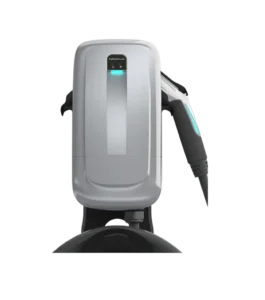
| Field | Details |
| Document Title | Level 2 EV Wall Charger |
| Document Type | Installation and User Guide |
| Brand Name | Schumacher |
| Product Name | Level 2 EV Wall Charger |
| Model Number(s) | SEV1600HW, SEV1600P1450, SEV1600P650 |
| PDF File Size | 938.32 KB |
| Total Number of Pages | 44 |
| Languages Covered in the Document | English, French |
Schumacher EV Wall Charger SEV1600HW
The Schumacher SEV1600HW Level 2 EV Wall Charger is a hardwired electric vehicle charging station designed for indoor and outdoor installation. It supports 208V/240V AC electrical systems and delivers up to 50A of charging current, with a rated output of 12.0kW.
The charger features a 25-foot charging cable with an SAE-J1772 connector, making it compatible with electric vehicles equipped with a suitable J1772 charging port. A separate adapter is available for Tesla vehicles.
The SEV1600HW includes Wi-Fi and Bluetooth connectivity, allowing charging status and charging history to be monitored through the SchuPower app. Its LED indicators display power connection, charging progress, network status, and fault conditions.
The charger has adjustable charging current settings ranging from 16A to 50A. These settings are configured through internal DIP switches during installation and must correspond to the dedicated electrical circuit breaker.
The SEV1600HW is permanently connected to the building’s electrical system. Installation, electrical wiring, and changes to charging current settings must be performed by a licensed electrician.
Product Features
The Schumacher Level 2 EV Wall Charger includes:
- Level 2 electric vehicle charging.
- Hardwired electrical connection on the SEV1600HW.
- Up to 50A charging current for the hardwired model.
- Up to 12.0kW rated charging output.
- 208V/240V AC, 60Hz operation.
- Adjustable charging current settings.
- Factory-default 32A charging current.
- 25-foot EV charging cable.
- Universal SAE-J1772 charging connector.
- Tesla adapter compatibility.
- Wi-Fi connectivity.
- Bluetooth connectivity.
- SchuPower app support.
- Charging history monitoring.
- LED power and charging status indicators.
- Charging gun LED indicator.
- Red LED fault indications.
- Cable management cradle.
- Charging connector dock.
- Lockable ergonomic charging gun.
- Durable raintight housing.
- IP66 enclosure rating.
- Indoor and outdoor installation.
- Three-year limited warranty.
Technical Specifications
| Specification | Details |
| Brand | Schumacher |
| Primary Model | SEV1600HW |
| Additional Models | SEV1600P1450, SEV1600P650 |
| Product Type | Level 2 EV Wall Charger |
| Input/Output Voltage | 208V/240V AC |
| Frequency | 60Hz |
| SEV1600HW Rated Current | 50A |
| SEV1600HW Rated Output Power | 12.0kW |
| SEV1600P1450 Rated Current | 40A |
| SEV1600P1450 Rated Output Power | 9.6kW |
| SEV1600P650 Rated Current | 40A |
| SEV1600P650 Rated Output Power | 9.6kW |
| Configurable Charging Current | 16A, 24A, 32A, 40A, 48A, 50A |
| Configurable Power | 3.8, 5.8, 7.7, 9.6, 11.5, 12.0kW |
| Factory Current Setting | 32A |
| Charging Connector | SAE-J1772 |
| Charging Cable Length | 25 feet (7.6m) |
| Installation Type | Indoor/Outdoor |
| Enclosure Rating | IP66 |
| Weather Resistance | 3R/Raintight |
| Operating Temperature | -22°F to 122°F (-30°C to 50°C) |
| Hardwired Model | SEV1600HW |
| NEMA 14-50P Plug Model | SEV1600P1450 |
| NEMA 6-50P Plug Model | SEV1600P650 |
| Wireless Connectivity | Wi-Fi and Bluetooth |
| Mobile Application | SchuPower |
| Warranty | Three-year limited warranty |
Differences Between SEV1600HW, SEV1600P1450, and SEV1600P650
The three charger models differ in electrical connection type and maximum output.
| Feature | SEV1600HW | SEV1600P1450 | SEV1600P650 |
| Connection Type | Hardwired | Plug-in | Plug-in |
| Plug Type | None | NEMA 14-50P | NEMA 6-50P |
| Rated Current | 50A | 40A | 40A |
| Rated Output Power | 12.0kW | 9.6kW | 9.6kW |
| Input Voltage | 208V/240V | 208V/240V | 208V/240V |
| Maximum Configurable Current | 50A | 40A | 40A |
| Factory Current Setting | 32A | 32A | 32A |
| Charging Connector | SAE-J1772 | SAE-J1772 | SAE-J1772 |
| Cable Length | 25 feet | 25 feet | 25 feet |
| Installation | Licensed electrician | Licensed electrician | Licensed electrician |
The plug-in models must not be configured above 40A.
What’s Included in the Box
The Schumacher EV Wall Charger package contains the charging station, EV charging cable, mounting components, and model-specific electrical accessories.
Package Contents
| Item | Description | Quantity |
| Charging Station | Main Level 2 EV wall charger | 1 |
| Output Cable with EV Connector | Charging cable with SAE-J1772 connector | 1 |
| Cord with NEMA 14-50 Plug | SEV1600P1450 only | 1 |
| Cord with NEMA 6-50 Plug | SEV1600P650 only | 1 |
| Mounting Template | Used to mark mounting locations | 1 |
| Cable Cradle | Holds the EV charging cable | 1 |
| Wall Mounting Lag Screws | 5.5mm × 50mm | 2 |
| Cable Cradle Self-Tapping Screws | 4mm × 16mm | 2 |
The SEV1600HW is the hardwired model and does not use the NEMA plug cord supplied with the plug-in versions.
If any required parts are missing, contact Schumacher Electric at 1-800-621-5485 or return the product to the retailer.
Parts and Components
The SEV1600HW includes a charging station housing, EV charging connector, LED indicators, and cable storage components.
Main Components
| Component | Function |
| Charging Station Housing | Contains the charging electronics |
| Power LED | Shows whether electrical power is connected |
| Charging Status LED | Displays charging, standby, and error status |
| Wi-Fi LED | Indicates wireless network connection status |
| Bluetooth Switch | Bluetooth-related control on the charging station |
| Charging Gun | Connects the charger to the electric vehicle |
| Charging Gun LED | Displays vehicle connection and charging status |
| SAE-J1772 Connector | Provides the EV charging connection |
| Charging Cable | 25-foot output cable |
| Cable Cradle | Holds the charging cable when not in use |
| Connector Dock | Stores the charging gun |
| Wiring Access Panel | Provides access to internal electrical connections |
| Lower Front Cover | Protects the wiring access area |
Charging Connector
The charger uses an SAE-J1772 connector.
The connector is designed for compatible electric vehicles. Tesla vehicles require a separate adapter.
The connector is attached to a 25-foot cable, allowing the charger to reach vehicles parked within the available cable length.
Charging Gun Dock
The charging gun can be stored in a dock on either side of the charging station.
The cable cradle supports organized storage of the output cable when charging is complete.
LED Indicators and Controls
The SEV1600HW uses separate LEDs to show power availability, charging activity, Wi-Fi status, and the condition of the charging connector.
Indicator Identification
| LED | Function |
| Power LED | Shows whether AC power is connected |
| Charging Status LED | Shows standby, active charging, completion, or fault status |
| Charging Gun LED | Indicates charging activity and connection status |
| Wi-Fi LED | Shows the status of the saved Wi-Fi network connection |
Bluetooth Switch
The charging station includes a Bluetooth switch identified on the housing.
Bluetooth connectivity is used with the SchuPower application for monitoring charging status and charging history.
Important Safety Instructions
Warning: Risk of electrical shock, fire, serious injury, or death.
The Schumacher Level 2 EV Wall Charger operates from a 208V/240V AC electrical supply. Electrical installation and changes to internal current settings must be performed by a licensed electrician.
General Safety Precautions
- Read all instructions before using the charger.
- Keep children under supervision when they are near the device.
- Never place fingers inside the EV connector.
- Do not use the charger if the electrical cord or charging cable is frayed.
- Do not use the charger if cable insulation is broken or damaged.
- Do not operate the charger if the housing or EV connector is cracked, broken, or open.
- Do not operate the charger after a severe impact, fall, or other damage.
- Do not operate the charger above 122°F (50°C).
- Do not disassemble the charger.
- Have servicing and repairs performed by qualified personnel.
- Use the charger only with compatible electric vehicles.
- Do not make unauthorized changes to the unit.
Electrical Wiring Safety
For safe installation, the manufacturer specifies 6 AWG copper wire rated for 90°C.
The installer must follow applicable electrical codes and confirm appropriate wiring, grounding, circuit protection, and charging current settings.
Grounding Requirements for SEV1600HW
The hardwired model must be connected to a grounded permanent wiring system.
A grounding conductor must be included with the electrical circuit conductors and connected to the equipment-grounding terminal or lead.
Grounding Requirements for Plug-In Models
The SEV1600P1450 and SEV1600P650 use grounded electrical plugs.
Their plugs must connect to properly installed and grounded outlets that comply with applicable local electrical requirements.
Warning: Incorrect grounding can result in electrical shock.
Do not modify the supplied plug. If the plug does not fit the available outlet, a licensed electrician must install a compatible outlet.
Before Installation
The Schumacher Level 2 EV Wall Charger requires a suitable mounting location, dedicated electrical circuit, and compatible electrical supply.
All installation and electrical configuration work must be performed by a licensed electrician.
Tools Required for Installation
| Tool | Purpose |
| Stud Finder | Locates a suitable wall stud |
| Pencil | Marks mounting points |
| Tape | Holds the mounting template in position |
| Level | Aligns the charging station |
| Drill | Creates mounting holes |
| Phillips Head Screwdriver | Removes and installs screws |
Installation Requirements
Before installation, the electrician must:
- Confirm that the electrical supply meets the charger’s voltage requirements.
- Identify the required dedicated circuit breaker.
- Verify the correct wire size.
- Select an appropriate mounting location.
- Confirm proper grounding.
- Check the charging cable’s reach.
- Determine the correct DIP switch current setting.
- Turn off power to the installation circuit.
Choosing an Installation Location
The SEV1600HW can be mounted indoors or outdoors.
The mounting location must permit safe routing of the power supply and charging cable.
Mounting Height Requirements
The connector storage location must be mounted between:
- 24 inches (600mm) above the ground.
- 48 inches (1.2m) above the ground.
The manual commonly places the top of the charging station approximately 50 inches above the finished floor.
Selecting the Wall Location
- Choose a location near the intended electrical supply connection.
- Make sure the charging cable can comfortably reach the vehicle’s charging port.
- Allow slack in the input wiring and output charging cable.
- Locate a suitable wall stud using a stud finder.
- Mark the stud location with a pencil.
- Use a level to mark the intended top position of the charger.
- Attach the mounting template with tape, aligning its top edge with the marked line.
The location should permit the charging gun to be stored properly and the cable to be placed in its cradle after use.
Assembling the Charging Station
The charging station must be prepared before the electrical connections and wall mounting are completed.
Removing the Lower Front Cover
- Place the charging station on a flat surface.
- Locate the M4 screw at the bottom of the unit.
- Remove the screw and retain it for reassembly.
- Slide the lower front cover downward.
- Lift the cover to release the upper retaining tabs.
- Set the cover aside.
Removing the Wiring Access Panel
- Locate the wiring access panel beneath the lower front cover.
- Remove the three M4 screws securing the panel.
- Keep the screws for reassembly.
- Lift the wiring access panel away from the charging station.
- Set it aside until the wiring connections are complete.
Installing the Cable Cradle
- Turn over the charging station.
- Align the cable cradle holes with the mounting holes on the rear of the charger.
- Use the two supplied 4mm × 16mm screws.
- Secure the cable cradle to the charging station.
The cable cradle may also be installed separately on the wall.
If mounted separately, it must be secured to a wall stud or installed using heavy-duty drywall anchors.
How to Hardwire the Schumacher SEV1600HW
The SEV1600HW is permanently connected to an electrical circuit.
Warning: The power supply must be turned off before installation and must remain off until the installation is complete. Failure to do so can result in injury or death.
The following wiring information is intended for a licensed electrician.
Step 1: Disconnect Electrical Power
Turn off the power to the dedicated circuit before working on the charging station.
Do not restore power while the wiring compartment is open or electrical work remains unfinished.
Step 2: Route the Electrical Supply
Schumacher recommends routing the AC supply conduit through the rear opening of the charging station.
- Remove the rear opening plug.
- Route the conduit and electrical conductors through the rear opening.
- Feed the conductors into the wiring compartment.
- Insert the conductors so that exposed conductor material is not visible outside the terminals.
Step 3: Connect the AC Supply Wires
The charging station contains two terminal blocks.
The incoming power supply is connected to the left-hand terminal block.
Hardwired Power Supply Terminal Connections
| Terminal | Wire Color | Function |
| L1 | Red | AC Line 1 |
| L2 | Black | AC Line 2 |
| PE | Green | Protective Earth/Ground |
The electrician must connect the conductors according to these terminal markings and the wiring diagram.
Step 4: Seal Outdoor Wiring Entry
If the charging station is installed outdoors and the rear conduit opening is used, apply suitable sealing material around the opening.
The manual specifies:
- Liquid sealant, or
- A gasket and nut.
The connection must prevent water from entering through the rear opening.
Installing the Power Cord on Plug-In Models
The SEV1600P1450 and SEV1600P650 connect to compatible NEMA electrical outlets.
These instructions apply only to the plug-in models.
Plug Type Requirements
| Model | Required Plug/Outlet Type |
| SEV1600P1450 | NEMA 14-50 |
| SEV1600P650 | NEMA 6-50 |
A licensed electrician must verify that the outlet and its dedicated breaker meet the requirements of the charger.
Connecting the Power Cord
- Verify that the installed outlet matches the charger model.
- Route the power cord through the left-hand bottom opening of the charging station.
- Connect the electrical conductors to the left terminal block.
- Feed the cord into the charging station.
- Tighten the outer plastic nut onto the threaded ring to secure the cord.
Plug-In Power Cord Wiring
| Terminal | Wire Color |
| L1 | Red |
| L2 | Black |
| PE | Green |
The power cord must be firmly secured before the charging station is energized.
Connecting the EV Output Cable
The EV output cable connects to the charging station through the right-hand bottom opening.
The output cable contains five conductors at the end opposite the EV connector.
Output Cable Wiring Connections
| Terminal/Signal | Wire Color |
| L1 | Red |
| L2 | Black |
| PE | Green and Yellow |
| CP | Blue |
| LED | Orange |
Output Cable Connection Instructions
- Feed the output cable wires through the right-hand bottom opening.
- Connect the red, black, and green/yellow conductors to their corresponding terminals on the right-hand terminal block.
- Insert the two-pin plug containing the blue and orange wires into the connector to the left of the right-hand terminal block.
- Feed the cable into the charging station.
- Secure the cable by tightening the outer plastic nut onto the threaded ring.
The cable retaining nut must be securely tightened.
Mounting the Charging Station to the Wall
The charger is secured to a wall stud using the supplied lag screws.
Wall Mounting Hardware
| Hardware | Specification |
| Drill Bit | 5.5mm or 7/32 inch |
| Upper Lag Screw | 5.5mm × 50mm |
| Lower Lag Screw | 5.5mm × 50mm with rubber washer |
| Upper Screw Head Clearance | 6–7mm |
Wall Mounting Instructions
- Position the mounting template over the selected wall stud.
- Drill two pilot holes where marked on the template.
- Install the upper lag screw without the rubber washer.
- Leave the screw head approximately 6–7mm above the wall surface.
- Lift the charging station.
- Place the rear mounting notch over the upper screw.
- Align the lower mounting hole with the lower pilot hole.
- Insert the second 5.5mm × 50mm lag screw with the rubber washer.
- Tighten the lower screw until the charging station is secure.
Charging Current and Circuit Breaker Settings
The SEV1600HW supports several charging current configurations.
The correct charging current must be selected according to the dedicated circuit breaker, supply wiring, and applicable electrical requirements.
Important: DIP switch adjustments must be performed by a licensed electrician.
Dedicated Breaker and Charging Current Table
| Dedicated Breaker | Charging Current | Configured Power | Voltage | Hardwired Model | Plug-In Models |
| 20A | 16A | 3.8kW | 208V/240V | Yes | Yes |
| 30A | 24A | 5.8kW | 208V/240V | Yes | Yes |
| 40A | 32A | 7.7kW | 208V/240V | Yes | Yes |
| 50A | 40A | 9.6kW | 208V/240V | Yes | Yes |
| 60A | 48A | 11.5kW | 208V/240V | Yes | No |
| 70A | 50A | 12.0kW | 208V/240V | Yes | No |
| 80A | 50A | 12.0kW | 208V/240V | Yes | No |
Factory-Default Charging Current
All three models are factory-configured to 32A.
The electrician must verify that this setting is appropriate for the installed electrical circuit before commissioning the charger.
Configuring the DIP Switches
The internal DIP switch assembly has eight numbered switches.
The manual illustrates the required switch configuration for each supported breaker setting.
| Dedicated Breaker | Charging Current | DIP Switch in ON Position |
| 20A | 16A | Switch 2 |
| 30A | 24A | Switch 3 |
| 40A | 32A | None (factory setting) |
| 50A | 40A | Switch 5 |
| 60A | 48A | Switch 6 |
| 70A | 50A | Switch 7 |
| 80A | 50A | Switch 8 |
All other switches are shown in their OFF positions in the corresponding diagrams.
The electrician must check the switch orientation against the markings on the installed charger and use the configuration appropriate for the dedicated circuit and model.
Maximum Current Settings by Model
| Model | Maximum Setting |
| SEV1600HW | 50A |
| SEV1600P1450 | 40A |
| SEV1600P650 | 40A |
Warning: The SEV1600P1450 and SEV1600P650 must not be configured for a charging current greater than 40A.
Completing the Installation
After electrical wiring, mounting, and DIP switch configuration are complete, the charger must be reassembled before restoring power.
Reinstalling the Wiring Access Panel
- Position the wiring access panel over the wiring compartment.
- Reinstall the three M4 screws.
- Tighten the panel securely.
- Position the lower front cover.
- Insert the cover tabs into their matching slots.
- Slide the cover upward into place.
- Reinstall the remaining M4 screw at the bottom.
Storing the EV Charging Cable
- Coil the charging cable around the cable cradle.
- Insert the charging gun into the dock on either side of the charging station.
Restoring Electrical Power
For the SEV1600HW, restore power using the dedicated circuit breaker.
For the SEV1600P1450 and SEV1600P650, insert the electrical plug into the matching powered NEMA outlet.
If the installation is correct, the Power LED illuminates solid green.
How to Charge an Electric Vehicle
After the charger has been installed and powered on, the charging process begins automatically when a compatible electric vehicle is connected.
EV Charging Instructions
- Check that the Power LED is illuminated solid green.
- Remove the charging gun from its dock.
- Connect the SAE-J1772 charging gun to the vehicle’s charging port.
- Charging begins automatically.
- The electric vehicle controls the charging process.
- Wait until charging is complete or has stopped.
- Disconnect the charging gun from the vehicle.
- Return the charging gun to the wall charger’s dock.
- Store the output cable neatly in the cable cradle.
SAE-J1772 Vehicle Compatibility
The charging gun uses an SAE-J1772 connector.
This connector is compatible with most electric vehicles equipped with a suitable J1772 charging port.
Tesla vehicles require a compatible adapter.
Charging Progress
The charging station provides power to the connected vehicle.
The vehicle manages the actual charging process, including charging progress and completion.
Scheduled Charging
The LED indicators also identify when the vehicle is in a scheduled charging state.
A connected vehicle may remain attached to the charging gun without actively drawing charging power.
SchuPower App and Wireless Connectivity
The Schumacher Level 2 EV Wall Charger supports Wi-Fi and Bluetooth connectivity through the SchuPower mobile application.
The app is used to monitor electric vehicle charging activity.
SchuPower App Features
The manual identifies the following app functions:
- Monitor EV charging status.
- View vehicle charging history.
- Configure the charger’s Wi-Fi connection.
Downloading the SchuPower App
- Locate the application QR code in the Getting Started section of the guide.
- Scan the code using a compatible mobile device.
- Open the provided application download link.
- Download the SchuPower app.
- Follow the instructions in the application.
Connecting the Charger Using Wi-Fi and Bluetooth
The charger includes wireless connectivity for communication with the SchuPower app.
The app provides the instructions needed for setup and network configuration.
Wi-Fi LED Status
| Wi-Fi LED Behavior | Meaning |
| Solid Blue | Connected to the saved Wi-Fi network |
| Flashing Blue | Wi-Fi configuration is required |
| Off | Unable to connect to the saved Wi-Fi network |
If the Wi-Fi LED flashes blue, configure the wireless connection using the SchuPower app.
Power, Charging, and Wi-Fi LED Indicators
The charger includes several LED indicators that identify its operating state.
Complete LED Indicator Table
| Indicator | LED Color or Behavior | Meaning |
| Power LED | Solid Green | AC power connected |
| Charging Gun LED | Green, fading in and out | Vehicle charging in progress |
| Charging Gun LED | Solid Green | Vehicle connected; charging complete, paused, or scheduled |
| Charging Status LED | Solid Blue | Charger powered on and in standby |
| Charging Status LED | Green, fading in and out | Charging in progress |
| Charging Status LED | Flashing Cyan | Charging complete or scheduled |
| Charging Status LED | Flashing Red | Error condition |
| Wi-Fi LED | Solid Blue | Connected to saved Wi-Fi network |
| Wi-Fi LED | Flashing Blue | Wi-Fi setup required |
| Wi-Fi LED | Off | Cannot connect to saved Wi-Fi network |
Solid Green Power LED
A solid green Power LED indicates that AC power is connected to the charging station.
Green Charging Gun LED Fading In and Out
A slowly fading green light on the charging gun indicates that the connected vehicle is charging.
Solid Green Charging Gun LED
A solid green charging gun LED means the charger is connected to the vehicle.
The charging process may be:
- Complete.
- Paused.
- Waiting for scheduled charging.
Solid Blue Charging Status LED
A solid blue Charging Status LED indicates that the wall charger is powered on and in standby mode.
Green Charging Status LED Fading In and Out
A green Charging Status LED that fades in and out indicates active charging.
Flashing Cyan Charging Status LED
A flashing cyan light indicates that charging has completed or is in scheduled charging mode.
Flashing Red Charging Status LED
A flashing red Charging Status LED identifies a fault condition.
The number of red flashes indicates the type of problem.
Troubleshooting Guide
The SEV1600HW uses the Charging Status LED to identify electrical faults and charging problems.
Warning: Electrical supply, grounding, wiring, and circuit-related faults must be inspected by a licensed electrician. Do not open or modify the charger to troubleshoot an electrical fault.
Schumacher EV Charger Troubleshooting Table
| LED Behavior | Problem | Recommended Solution |
| Power LED Off | No AC power | Check circuit breaker; have licensed electrician verify power connection |
| Red LED flashes 2 times | Leakage | Cycle the circuit breaker for SEV1600HW; contact electrician or support if fault remains |
| Red LED flashes 3 times | Overvoltage | Disconnect and reconnect charging gun; have electrician check AC supply if fault persists |
| Red LED flashes 4 times | Undervoltage | Disconnect and reconnect charging gun; have electrician check AC supply if fault persists |
| Red LED flashes 5 times | Overcurrent | Disconnect and reconnect the charging gun |
| Red LED flashes 6 times | Over-temperature | Reconnect charging gun; if fault remains, disconnect and allow unit to cool |
| Red LED flashes 7 times | Ground Fault | Reconnect charging gun; have electrician check ground if fault remains |
| Red LED flashes 8 times | Relay Fault | Reconnect charging gun; contact support if fault remains |
| Red LED flashes 9 times | Meter Chip Fault | Reconnect charging gun; contact support if fault remains |
Power LED Is Off
If the Power LED is not illuminated, the charger may not be receiving AC electrical power.
Troubleshooting Steps
- Check the dedicated circuit breaker.
- For plug-in models, confirm that the electrical plug is fully inserted.
- Have a licensed electrician verify the AC electrical supply and charger connection.
The Power LED should illuminate solid green when power is correctly connected.
Charging Status LED Flashes Red Twice
Two red flashes indicate a leakage fault.
SEV1600HW Reset Procedure
- Turn off the circuit breaker supplying the hardwired charger.
- Turn the breaker on again.
- Check whether the fault has cleared.
Plug-In Model Reset Procedure
For SEV1600P1450 and SEV1600P650:
- Unplug the charging station.
- Reconnect it to the appropriate outlet.
- Check the Charging Status LED.
If the fault continues, contact a licensed electrician or Schumacher support.
Charging Status LED Flashes Red Three Times
Three red flashes indicate an overvoltage fault.
Overvoltage Troubleshooting
- Disconnect the charging gun from the vehicle.
- Reinsert the charging gun into the vehicle’s charging port.
- Check whether charging resumes.
If the fault continues, a licensed electrician must check the AC power supply.
Charging Status LED Flashes Red Four Times
Four red flashes indicate an undervoltage fault.
Undervoltage Troubleshooting
- Remove the charging gun from the vehicle.
- Reconnect it to the charging port.
- Check the charger status.
If the error remains, have a licensed electrician check the AC power supply.
Charging Status LED Flashes Red Five Times
Five red flashes indicate an overcurrent fault.
Overcurrent Troubleshooting
- Unplug the charging gun from the electric vehicle.
- Reinsert the charging gun into the vehicle charging port.
Charging Status LED Flashes Red Six Times
Six red flashes indicate an over-temperature fault.
Over-Temperature Troubleshooting
- Disconnect the charging gun from the vehicle.
- Reinsert the charging gun into the charging port.
- Check whether the error has cleared.
- If the fault continues, disconnect the charging gun.
- Allow the unit to cool before attempting another charging session.
Charging Status LED Flashes Red Seven Times
Seven red flashes indicate a ground fault.
Ground Fault Troubleshooting
- Disconnect the charging gun from the vehicle.
- Reinsert it into the charging port.
- Check the Charging Status LED.
- If the fault continues, consult a licensed electrician to inspect the grounding connection.
Charging Status LED Flashes Red Eight Times
Eight red flashes indicate a relay fault.
Relay Fault Troubleshooting
- Disconnect the charging gun.
- Reinsert it into the charging port.
- Check whether the fault clears.
If the fault continues, contact Schumacher support.
Charging Status LED Flashes Red Nine Times
Nine red flashes indicate a meter chip fault.
Meter Chip Fault Troubleshooting
- Unplug the charging gun from the vehicle.
- Reinsert it into the charging port.
- Check whether normal operation resumes.
Contact Schumacher support if the error remains.
Wi-Fi Connection Troubleshooting
The Wi-Fi LED identifies whether the charger is connected to its saved wireless network.
Wi-Fi Troubleshooting Table
| Wi-Fi Indicator | Condition | Recommended Action |
| Solid Blue | Connected | Wireless connection established |
| Flashing Blue | Configuration required | Complete Wi-Fi setup in the SchuPower app |
| Off | Connection unavailable | Check the saved network connection using the SchuPower app |
Cleaning and Maintenance
The charger housing should be cleaned periodically to maintain its finish and help prevent corrosion.
Cleaning the Charger
Use a soft cloth to clean the outer case.
Regular cleaning helps maintain the appearance of the charging station and reduces surface contamination.
Maintenance Safety
- Never disassemble the charging station.
- Do not tamper with internal electrical components.
- Do not use the charger if the enclosure or EV connector is damaged.
- Have repairs performed by qualified service personnel.
- Have electrical configuration changes performed by a licensed electrician.
FCC Compliance Information
The Schumacher Level 2 EV Wall Charger has been tested for compliance with Class B digital device limits under FCC Part 15.
The equipment can generate, use, and radiate radio-frequency energy.
If interference occurs with radio or television reception, the following actions may help:
- Reorient or relocate the receiving antenna.
- Increase the distance between the charging station and the receiving equipment.
- Connect the affected equipment to another electrical circuit.
- Consult the dealer or an experienced radio/television technician.
Unauthorized changes or modifications may void the user’s authority to operate the equipment.
Three-Year Limited Warranty
The Schumacher Level 2 EV Wall Charger is covered by a three-year limited warranty from Schumacher Electric Corporation.
Warranty Coverage
The warranty covers defects in materials and workmanship under normal use and care during the warranty period.
Warranty Period
The warranty begins on the original purchase date and continues for three years.
Repair or replacement does not extend the original warranty period.
Warranty Eligibility
The warranty applies to the original consumer who purchased the product from an authorized retailer in the United States, its territories, or Canada.
It does not transfer to subsequent owners or purchasers from unauthorized resellers.
Warranty Exclusions
The limited warranty excludes damage caused by:
- Transportation.
- Storage.
- Improper use.
- Failure to follow product instructions.
- Failure to perform preventive maintenance.
- Product modifications.
- Unauthorized repairs.
- Normal wear and tear.
- Improper installation.
- Accidents or abuse.
- Theft.
- Weather or natural disasters.
- Other external events outside the manufacturer’s control.
- Accessories not manufactured or approved by Schumacher.
- Commercial use.
Warranty Remedies
During the warranty period, Schumacher may repair or replace a defective product or component.
The manufacturer determines whether repair or replacement is appropriate.
Repair or replacement is provided without charge, but the customer is responsible for prepaid shipping costs.
How to Request Warranty Service
- Retain the original purchase documentation.
- Prepare the product for the warranty service process.
- Include proof of purchase.
- Arrange prepaid shipping as required.
- Submit the product to Schumacher or an authorized representative.
Detailed repairs and returns information is available through 365rma.com.
Customer Support and Repair Information
Schumacher Electric Corporation provides product support, warranty service, and replacement parts information.
Contact Information
| Service | Details |
| Manufacturer | Schumacher Electric Corporation |
| Address | 14200 FAA Blvd., Fort Worth, TX 76155 |
| Customer Support Phone | 1-800-621-5485 |
| Official Website | schumacherelectric.com |
| Repairs and Returns | 365rma.com |
| Product Registration | schumacherelectric.com |
| Replacement Parts | schumacherelectric.com |
| Warranty | Three-Year Limited Warranty |
Frequently Asked Questions
1. How many amps does the Schumacher SEV1600HW Level 2 EV Charger support?
The Schumacher SEV1600HW supports up to 50A charging current and has a rated output of 12.0kW. The current can be configured to 16A, 24A, 32A, 40A, 48A, or 50A according to the dedicated circuit. The factory setting is 32A, and all electrical adjustments must be made by a licensed electrician.
2. What circuit breaker does the Schumacher SEV1600HW require?
The SEV1600HW supports dedicated breaker configurations from 20A to 80A, with corresponding charging currents from 16A to 50A. For example, a 40A breaker corresponds to the factory 32A setting, while a 70A or 80A breaker corresponds to a 50A charging setting. A licensed electrician must select the circuit and DIP switch configuration according to applicable electrical requirements.
3. How do I connect the Schumacher SEV1600HW to an electric vehicle?
Confirm that the Power LED is solid green, remove the charging gun from its dock, and connect the SAE-J1772 connector to the vehicle’s charging port. Charging begins automatically and is controlled by the electric vehicle. After charging stops, remove the connector and return it to the dock.
4. Does the Schumacher SEV1600HW work with Tesla vehicles?
The SEV1600HW has an SAE-J1772 charging connector. Tesla vehicles require a compatible adapter, which is available separately. The charger is not manufactured, approved, or endorsed by Tesla.
5. How do I connect the Schumacher EV Charger to Wi-Fi?
Download the SchuPower app using the QR code in the Getting Started section and follow the application’s setup instructions. A flashing blue Wi-Fi LED means configuration is required, while a solid blue LED indicates a successful connection to the saved Wi-Fi network.
6. What does a flashing red light mean on the Schumacher SEV1600HW?
A flashing red Charging Status LED indicates a fault. The number of flashes identifies the problem: two for leakage, three for overvoltage, four for undervoltage, five for overcurrent, six for overheating, seven for a ground fault, eight for a relay fault, and nine for a meter chip fault.
7. Can the Schumacher SEV1600HW be installed outdoors?
Yes. The SEV1600HW is designed for indoor or outdoor installation and has an IP66-rated enclosure with 3R raintight weather resistance. The operating temperature range is -22°F to 122°F (-30°C to 50°C). Outdoor installation must be completed by a licensed electrician, including the specified sealing of the rear wiring entry when used.
8. What is the warranty on the Schumacher SEV1600HW EV Charger?
The SEV1600HW includes a three-year limited warranty covering defects in materials and workmanship under normal use and care. Warranty coverage begins on the purchase date and applies to eligible original purchasers. Warranty repairs and returns are handled through Schumacher, with details available at 365rma.com.