| Document Detail | Information |
| Document Title | Small Rugged Speaker Quick Start Guide |
| Document Type | Quick Start Guide |
| Brand Name | onn. |
| Product Name | Small Rugged Speaker |
| Model Number(s) | BM1023 |
| PDF File Size | 456 KB |
| Number of Pages | 2 |
| Languages | English, Chinese |
onn. Small Rugged Speaker BM1023
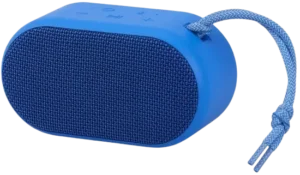
The onn. Small Rugged Speaker BM1023 is a portable Bluetooth speaker designed for wireless music playback, hands-free phone calls, and two-speaker stereo pairing. It features built-in playback controls, volume adjustment buttons, an AUX port, a charging port, and a carrying strap.
The speaker connects to Bluetooth-enabled devices using the pairing name onn. Rugged Speaker S. It also supports True Wireless Stereo (TWS) pairing, allowing two compatible speakers to play audio together with separate left and right audio channels.
The speaker uses a rechargeable battery and takes approximately 4 hours to charge fully. Its built-in controls allow users to play or pause music, skip tracks, manage calls, activate a voice assistant, clear Bluetooth pairing records, and reset the speaker.
Product Overview
The onn. BM1023 Small Rugged Speaker provides wireless audio playback through a Bluetooth connection with a compatible mobile device.
The speaker has a control panel with dedicated buttons for power, Bluetooth, broadcast pairing, volume adjustment, and music playback. The side of the unit includes an AUX port and charging port.
Two compatible speakers can also be paired in TWS mode for synchronized stereo audio.
Main Features
- Bluetooth connectivity: Connects to a mobile device using the Bluetooth pairing name onn. Rugged Speaker S.
- Portable design: Includes a carrying strap.
- Music playback controls: Supports play, pause, next track, and previous track functions.
- Volume adjustment: Dedicated buttons increase or decrease sound volume.
- Hands-free calling: Supports answering, ending, and rejecting incoming calls.
- Voice assistant activation: Provides a button shortcut for the connected device’s voice assistant.
- TWS stereo pairing: Allows two speakers to play together with left and right audio channels.
- Bluetooth pairing reset: Clears saved pairing records and restores the default volume.
- Speaker reset: Supports a reset using the Power button.
- AUX connection: Includes a port for connecting an external audio source.
- Rechargeable battery: Takes approximately 4 hours to charge fully.
- Charging indicator: Uses a red LED to indicate charging status.
What’s Included in the Box
The onn. Small Rugged Speaker package contains four listed items.
| Item | Quantity | Description |
| Bluetooth Speaker | 1 | Main portable speaker unit. |
| Strap | 1 | Carrying strap for the speaker. |
| Charging Cable | 1 | Cable supplied for charging the speaker. |
| Quick Start Guide | 1 | Printed operating instructions. |
Parts and Components
The speaker includes six control buttons and two connection ports.
| Part | Function |
| Power Button | Turns the speaker on or off and provides the reset function. |
| Bluetooth Button | Activates Bluetooth pairing and provides access to voice assistant activation. |
| Broadcast Button | Activates and disconnects two-speaker TWS pairing. |
| Volume Down (−) | Reduces volume or skips to the previous track. |
| Play/Pause Button | Controls music playback and manages phone calls. |
| Volume Up (+) | Increases volume or skips to the next track. |
| AUX Port | Provides an external audio connection. |
| Charging Port | Connects the supplied charging cable. |
| Strap | Provides a carrying attachment. |
| Charging LED | Indicates battery charging status. |
Speaker Control Panel
The six buttons are arranged on the top control panel.
The Power, Bluetooth, and Broadcast buttons form the upper row. The Volume Down, Play/Pause, and Volume Up buttons are positioned beneath them.
The AUX and charging ports are located on the side of the speaker.
Technical Specifications
| Specification | Details |
| Brand | onn. |
| Product Name | Small Rugged Speaker |
| Model Number | BM1023 |
| Product Type | Portable Bluetooth Speaker |
| Bluetooth Pairing Name | onn. Rugged Speaker S |
| Wireless Connection | Bluetooth |
| Additional Audio Connection | AUX |
| Speaker Pairing | True Wireless Stereo (TWS) |
| Music Controls | Play, Pause, Next Track, Previous Track |
| Call Controls | Answer, End, Reject |
| Voice Assistant Shortcut | Supported |
| Power Source | Rechargeable Battery |
| Charging Input | DC 5V |
| Full Charging Time | Approximately 4 Hours |
| Charging Indicator | Red LED |
| Battery Maintenance | Fully Charge at Least Once Every 45 Days |
| Power On/Off Button Hold | 2 Seconds |
| Bluetooth Pairing Reset | Power + Play/Pause for 3 Seconds |
| Speaker Reset | Power Button for 10 Seconds |
| Product Identifier | AABLSV100081918 |
| FCC Compliance | Part 15, Class B Digital Device |
Button Functions and Controls
The speaker uses short presses, double presses, and long presses for different functions.
Button Function Guide
| Button | Action | Function |
| Power | Press and hold for 2 seconds | Turn the speaker on or off. |
| Bluetooth | Short press | Activate Bluetooth pairing. |
| Bluetooth | Double press | Activate the voice assistant. |
| Broadcast | Press and hold for 3 seconds | Enter TWS pairing mode. |
| Broadcast | Double press | Disconnect TWS pairing. |
| Play/Pause | Short press during music playback | Play or pause music. |
| Play/Pause | Short press during incoming call | Answer the call. |
| Play/Pause | Short press during a call | End the call. |
| Play/Pause | Press and hold for 3 seconds during incoming call | Reject the call. |
| Volume Up (+) | Short press | Increase volume. |
| Volume Up (+) | Long press | Play the next track. |
| Volume Down (−) | Short press | Decrease volume. |
| Volume Down (−) | Long press | Play the previous track. |
| Power + Play/Pause | Press and hold together for 3 seconds | Clear pairing records and restore default volume. |
| Power | Press and hold for 10 seconds | Reset the speaker. |
Before First Use
Before using the speaker, identify its controls, charging port, and Bluetooth pairing name.
Initial Preparation
- Remove the speaker and accessories from the packaging.
- Identify the Power, Bluetooth, Broadcast, Play/Pause, and Volume buttons.
- Locate the charging port.
- Connect the supplied charging cable to charge the speaker.
- Allow approximately 4 hours for a full charge.
- Press and hold the Power button for 2 seconds to turn the speaker on.
- Prepare the mobile device for Bluetooth pairing.
How to Turn the Speaker On and Off
Turning On the Speaker
- Locate the Power button.
- Press and hold the button for 2 seconds.
- The speaker will turn on.
Turning Off the Speaker
- Locate the Power button.
- Press and hold it for 2 seconds.
- The speaker will turn off.
The same button is also used for the speaker reset function when held for a longer period.
Bluetooth Pairing Instructions
The speaker connects to a compatible phone or other Bluetooth-enabled device.
How to Pair the onn. BM1023 Speaker
- Press and hold the Power button for 2 seconds to turn on the speaker.
- Short press the Bluetooth button to activate Bluetooth pairing.
- Open the Bluetooth settings on the mobile device.
- Search for available Bluetooth devices.
- Locate onn. Rugged Speaker S in the available device list.
- Select the speaker’s pairing name.
- Complete the Bluetooth connection.
Once connected, audio can be played through the speaker using the mobile device.
Bluetooth Pairing Name
The speaker appears in the Bluetooth device list as:
onn. Rugged Speaker S
This is the name to select when establishing the wireless connection.
Music Playback Instructions
The speaker’s control panel allows users to manage music playback without operating the connected phone for every adjustment.
How to Play or Pause Music
- Connect the speaker to a Bluetooth device.
- Start music playback on the connected device.
- Short press the Play/Pause button to pause the music.
- Short press the button again to resume playback.
How to Increase Volume
Short press the Volume Up (+) button to increase the volume.
How to Decrease Volume
Short press the Volume Down (−) button to reduce the volume.
How to Skip to the Next Song
Press and hold the Volume Up (+) button to move to the next track.
How to Return to the Previous Song
Press and hold the Volume Down (−) button to return to the previous track.
Music Control Summary
| Desired Action | Button Operation |
| Play Music | Short press Play/Pause. |
| Pause Music | Short press Play/Pause. |
| Increase Volume | Short press Volume Up (+). |
| Decrease Volume | Short press Volume Down (−). |
| Next Song | Long press Volume Up (+). |
| Previous Song | Long press Volume Down (−). |
Hands-Free Calling Instructions
The onn. Small Rugged Speaker supports phone call management through the Play/Pause button while connected to a mobile phone.
How to Answer an Incoming Call
- Wait for an incoming call on the connected phone.
- Short press the Play/Pause button.
- The call will be answered.
How to End a Call
Short press the Play/Pause button during the call to end it.
How to Reject an Incoming Call
- Wait for an incoming call.
- Press and hold the Play/Pause button for 3 seconds.
- The incoming call will be rejected.
Call Control Summary
| Action | Button Operation |
| Answer Call | Short press Play/Pause. |
| End Call | Short press Play/Pause. |
| Reject Incoming Call | Hold Play/Pause for 3 seconds. |
Voice Assistant Activation
The speaker includes a shortcut for activating the connected device’s voice assistant.
How to Activate the Voice Assistant
- Connect the speaker to a Bluetooth device.
- Locate the Bluetooth button.
- Press the Bluetooth button twice.
This activates the voice assistant function.
Pairing Two onn. Speakers Together
The speaker supports True Wireless Stereo (TWS) pairing.
TWS allows two compatible speakers to play audio together using separate left and right channels.
How to Set Up TWS Pairing
- Turn on both speakers.
- Wait for both speakers to announce “Searching for connection.”
- Choose one speaker to act as the primary speaker.
- Press and hold the Broadcast button on the primary speaker for 3 seconds.
- The speaker will enter TWS pairing mode.
- Wait for the voice announcement “Left channel, right channel.”
- The two speakers are now paired.
- Open the Bluetooth settings on the mobile device.
- Select onn. Rugged Speaker S to connect to the primary speaker.
- Play audio from the mobile device.
Both speakers can now play audio together.
How to Disconnect TWS Pairing
- Locate the Broadcast button.
- Press the Broadcast button twice.
- The TWS connection will be disconnected.
TWS Pairing Summary
| Setting | Operation |
| Speakers Required | 2 |
| Primary Speaker Selection | Choose one of the powered-on speakers. |
| Enter TWS Mode | Hold Broadcast for 3 seconds. |
| Successful Pairing Announcement | “Left channel, right channel” |
| Mobile Bluetooth Connection | Connect to the primary speaker. |
| Disconnect TWS | Double press Broadcast. |
Listed Party Sync Compatible Models
The product’s accompanying regulatory information includes the following Party Sync compatible product identifiers.
| Compatible Product Identifier |
| AABLSV100081918 |
| AALAV100081918 |
| AALUN100081918 |
| AAORRA100081918 |
| AAGRY100081918 |
How to Clear Bluetooth Pairing Records
The speaker allows saved Bluetooth pairing records to be cleared.
This operation also restores the default volume setting.
Clear Pairing Records Procedure
- Locate the Power button.
- Locate the Play/Pause button.
- Press and hold Power and Play/Pause together for 3 seconds.
- All stored Bluetooth pairing records will be cleared.
- The volume setting will return to its default level.
After clearing the records, the Bluetooth pairing procedure can be performed again.
How to Reset the onn. Speaker
The speaker supports a reset using the Power button.
Speaker Reset Instructions
- Locate the Power button.
- Press and hold the button for 10 seconds.
- The speaker will reset.
The pairing-record clearing function uses a different button combination and restores the default volume.
Charging Instructions
The onn. Small Rugged Speaker uses a rechargeable battery and includes a charging cable.
How to Charge the Speaker
- Locate the charging port on the side of the speaker.
- Connect the supplied charging cable to the charging port.
- Connect the cable to a suitable DC 5V power source.
- Allow the battery to charge.
- Check the charging LED for its status.
A full charge takes approximately 4 hours.
Charging Indicator Guide
| Indicator Status | Meaning |
| Red LED On | Battery is charging. |
| Red LED Off | Battery is fully charged. |
Battery Maintenance
To help preserve battery lifespan, the speaker should be fully charged at least once every 45 days.
This charging recommendation also applies when the speaker is not being used regularly.
AUX Audio Connection
The speaker includes an AUX port for an external audio connection.
The AUX port is located on the side of the speaker near the charging port.
The AUX port provides another audio connection option in addition to Bluetooth.
Bluetooth Connection and Operating Checks
The following checks use the pairing, charging, and reset procedures provided for the speaker.
| Issue or Task | Action |
| Speaker needs to be turned on | Hold Power for 2 seconds. |
| Speaker does not appear in the Bluetooth device list | Short press Bluetooth to activate pairing and search for onn. Rugged Speaker S. |
| Bluetooth pairing records need to be cleared | Hold Power and Play/Pause together for 3 seconds. |
| Speaker needs to be reset | Hold Power for 10 seconds. |
| Two-speaker stereo connection needs to be established | Hold Broadcast for 3 seconds on the selected primary speaker. |
| TWS pairing needs to be disconnected | Double press Broadcast. |
| Speaker needs charging | Connect the supplied cable to a DC 5V power source. |
| Charging status needs to be checked | Red LED on indicates charging; red LED off indicates full charge. |
FCC Regulatory and Safety Information
The onn. Small Rugged Speaker is identified as a Class B digital device under Part 15 of the FCC Rules.
FCC Operating Conditions
The device operates under two conditions:
- It must not cause harmful interference.
- It must accept received interference, including interference that could cause unwanted operation.
Radio and Television Interference
The speaker generates and uses radio frequency energy.
If the equipment causes harmful interference with radio or television reception, the following actions may help:
- Reorient or relocate the receiving antenna.
- Increase the distance between the speaker and the affected receiver.
- Connect the equipment to an electrical outlet on a different circuit from the receiver.
- Consult the dealer or an experienced radio/television technician.
Unauthorized Modifications
Warning: Changes or modifications not expressly approved by the party responsible for compliance may void the user’s authority to operate the equipment.
Customer Support Information
onn. customer support is provided through Walmart.
| Contact Detail | Information |
| Brand | onn. |
| Brand Owner | Walmart |
| Customer Support Phone | 1-888-516-2630 |
| Support Days | Every Day |
| Support Hours | 7 AM–9 PM CST |
Customers needing assistance with the speaker can contact the listed support number during the stated hours.
Frequently Asked Questions
How do I pair the onn. BM1023 speaker with Bluetooth?
Turn on the speaker by holding the Power button for 2 seconds. Short press the Bluetooth button to activate pairing, then open the Bluetooth settings on the mobile device. Select onn. Rugged Speaker S from the available devices to complete the connection.
What is the Bluetooth pairing name for the onn. Small Rugged Speaker?
The Bluetooth pairing name is onn. Rugged Speaker S. This is the device name to select when connecting the speaker to a compatible phone or other Bluetooth-enabled device.
How do I reset the onn. BM1023 speaker?
Press and hold the Power button for 10 seconds to reset the speaker. To clear stored Bluetooth pairing records and restore the default volume, hold the Power and Play/Pause buttons together for 3 seconds.
How do I pair two onn. Rugged Speakers together?
Turn on both speakers and wait for the “Searching for connection” announcement. Select one as the primary speaker and hold its Broadcast button for 3 seconds. When “Left channel, right channel” is announced, connect the mobile device to the primary speaker through Bluetooth.
How do I answer phone calls using the onn. Rugged Speaker?
Short press the Play/Pause button to answer an incoming call. Press it again to end the call. To reject an incoming call, hold the Play/Pause button for 3 seconds.
How long does the onn. Small Rugged Speaker take to charge?
The speaker takes approximately 4 hours to charge fully. The red charging LED remains on while the battery is charging and turns off when charging is complete.
How often should I charge the onn. BM1023 speaker?
The speaker should be fully charged at least once every 45 days to help preserve battery lifespan, including during periods when it is not used regularly.
How do I skip songs and adjust the volume on the onn. Speaker?
Short press Volume Up (+) or Volume Down (−) to adjust the volume. Long press Volume Up to skip to the next song, or long press Volume Down to return to the previous song. Short press Play/Pause to pause or resume playback.