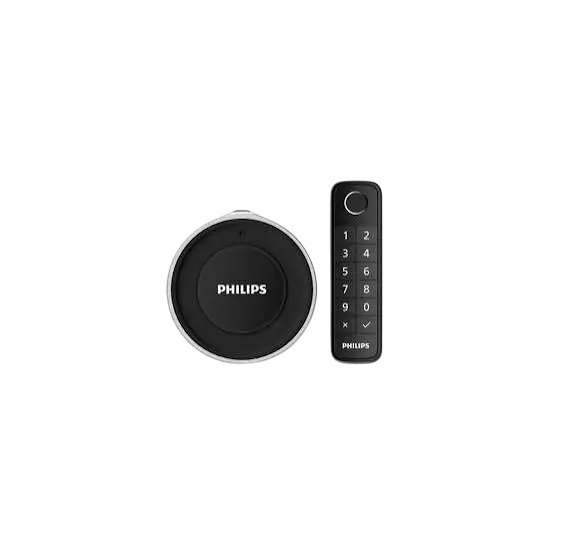
Philips Retrofit Lock with Keypad DDL230XI5KTK
The Philips 3000 series retrofit lock with keypad upgrades an existing deadbolt by replacing its interior portion, so your existing keys keep working. It adds built-in Wi-Fi, so you can check lock status and control the lock remotely without an extra Wi-Fi bridge. You can unlock with a PIN code, fingerprint, the Philips Home Access App or the included wireless keypad. It also offers auto-lock, a door position sensor and voice control through Amazon Alexa or Google Assistant.
Key Features
Works With Your Existing Deadbolt
The lock installs on the inside of the door and replaces the interior portion of your deadbolt. It is described as compatible with most standard deadbolts, and you keep your original keys. Installation needs only a screwdriver.
Ways to Unlock
- Fingerprint: stores up to 50 fingerprints.
- PIN code: stores up to 100 PIN codes. Users can choose either access method.
- Mechanical key: your existing keys remain usable.
- Wireless keypad: included in the package.
- Philips Home Access App: control the lock from your smartphone.
- Bluetooth: listed as an access solution.
Remote Control, Sharing and Notifications
Built-in Wi-Fi lets you control the lock remotely and manage user accounts in the Philips Home Access App. You can unlock remotely for family members, friends and visitors, and share access with anyone, anywhere, at any time. The app sends real-time notifications about who is coming and going.
Door Position Sensor
The door position sensor confirms that the door is securely closed, so you can check your door status without asking someone else.
Voice Control
You can control and check your lock status by voice command through Amazon Alexa or Google Assistant.
Specifications
| Category | Specification |
| Color | Silver |
| Handle | No handle |
| Main material | Perspex, Silica, Zinc alloy |
| Fingerprint sensor | Non-hidden |
| Access solutions | Fingerprint, Mechanical Key, Bluetooth, Mobile APP |
| Fingerprint capacity | Up to 50 |
| User PIN code capacity | Up to 100 |
| Battery type | CR123A, Alkaline Batteries |
| Time of use | 3 months*, 6 months* |
| Indicators | Fingerprint adding prompt, Low battery prompt, Pairing prompt, Tamper alarm |
| Operating mode | Auto mode |
| Door thickness | 35-50 mm |
| Door opening direction | Left inward opening, Left outward opening, Right inward opening, Right outward opening |
| Door type | Antitheft door, Copper door, Wooden door |
* Wireless keypad: Included in package.
Door Fit Checklist
Door Thickness
The lock is specified for doors 35-50 mm thick.
Door Opening Direction
All four configurations are listed: left inward, left outward, right inward and right outward opening.
Door Types
Antitheft doors, copper doors and wooden doors are listed. Compatibility with your existing deadbolt is described as “most standard deadbolts,” so confirm your deadbolt is a standard type before buying.
Power and Indicators
The lock uses CR123A or alkaline batteries. Time of use is listed as 3 months and 6 months, with a footnote referring to the included wireless keypad.
The lock gives four types of prompts: fingerprint adding, low battery, pairing and tamper alarm. Watch for the low battery prompt so you can replace the batteries before the lock stops working.
Frequently Asked Questions
Does this lock replace my entire deadbolt?
No. It replaces only the interior portion of your existing deadbolt, which is installed on the inside of the door. Because the rest of the deadbolt stays in place, your existing keys keep working.
What do I need to install the Philips DDL230XI5KTK?
A screwdriver is all that is listed. Philips describes the installation as taking minutes and says the lock is compatible with most standard deadbolts. Before you start, check that your door is 35-50 mm thick and is an antitheft, copper or wooden door.
How many fingerprints and PIN codes can I store?
You can store up to 50 fingerprints and up to 100 PIN codes. That is enough for family members, guests or tenants, and each user can choose either method to unlock.
Do I need a Wi-Fi bridge to control the lock remotely?
No. The lock has a built-in Wi-Fi module and does not need an extra bridge. You manage the lock and user accounts through the Philips Home Access App.
What are all the ways to unlock the door?
You can unlock with a fingerprint, a PIN code, the included wireless keypad, the Philips Home Access App on your phone, or your existing mechanical key. Bluetooth is also listed as an access solution. You can also unlock remotely for family, friends and visitors through the app.
Is the wireless keypad included?
Yes. The footnote on the specifications page states that the wireless keypad is included in the package. The model name, “Retrofit lock with keypad,” reflects this.
What batteries does the lock use, and how long do they last?
The lock uses CR123A or alkaline batteries. Time of use is listed as 3 months and 6 months, marked with an asterisk that refers to the included wireless keypad. The conditions behind those figures are not given. When the low battery prompt appears, plan to replace the batteries.
Which doors will it fit?
It is listed for doors 35-50 mm thick, in left inward, left outward, right inward or right outward opening. Listed door types are antitheft, copper and wooden doors. It is also described as compatible with most standard deadbolts.
Does it work with Alexa or Google Assistant?
Yes. You can control and check your lock status by voice command through Amazon Alexa or Google Assistant.
Can I check from my phone whether the door is closed?
Yes. The door position sensor confirms that the door is securely closed, and the Philips Home Access App lets you check lock status from anywhere.
What alerts does the lock give?
It gives four kinds of prompts: a fingerprint adding prompt, a low battery prompt, a pairing prompt and a tamper alarm. The app also sends real-time notifications about who is coming through the door, so you can see who is arriving and leaving.