| Brand Name | onn. |
| Product Name | Indoor Speaker / Bluetooth Speaker |
| Model / Product Identifier | AAAGRY100006897 |
| File Size | 103 KB |
| Number of Pages | 1 |
| Languages Covered | English |
onn. Indoor Speaker AAAGRY100006897
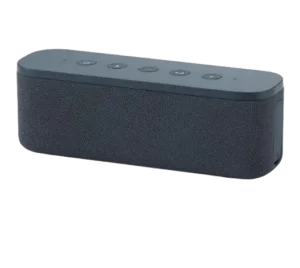
The onn. Indoor Speaker is a portable Bluetooth audio speaker that can connect wirelessly to a compatible phone or other Bluetooth device. It also supports a wired 3.5 mm AUX connection, hands-free call controls and a Party Sync Mode for linking two compatible onn. speakers together. Onn-Indoor-Speaker-User-Manual_… Onn-Indoor-Speaker-User-Manual_…
The official one-page foldout guide provides the basic setup information needed to identify the speaker controls, turn the unit on or off, pair it with Bluetooth, use an external audio source, answer or reject calls and connect a second speaker in Party Sync mode.
What’s Included in the Box
The package includes three items:
| Item | Included |
| Bluetooth Speaker | Yes |
| Charging Cable | Yes |
| Quick Start Guide | Yes |
The instructs the owner to check that all three items are present before using the speaker. Onn-Indoor-Speaker-User-Manual_…
Parts and Controls
The product diagram identifies ten controls, connections and indicators on the top and right side of the speaker. Onn-Indoor-Speaker-User-Manual_…
| No. | Part / Control | Purpose |
| 1 | LED Indicator | Provides speaker status indication |
| 2 | Power Switch | Turns the speaker on or off |
| 3 | Bluetooth Button | Used for Bluetooth and Party Sync functions |
| 4 | Volume Down | Lowers speaker volume |
| 5 | Play/Pause/Speakerphone | Controls playback and phone calls |
| 6 | Volume Up | Raises speaker volume |
| 7 | Microphone | Used for speakerphone calls |
| 8 | AUX In | Connects a wired 3.5 mm audio source |
| 9 | Reset | Reset control located on the right side |
| 10 | Charging Port | Connection point for the included charging cable |
The foldout illustration places the LED indicator and main buttons across the top of the speaker, while the AUX input, Reset control and charging port are positioned on the right side. Onn-Indoor-Speaker-User-Manual_…
How to Turn the onn. Indoor Speaker On or Off
The speaker uses a long-press action for power.
To turn it on:
- Locate the Power control.
- Press and hold it for more than approximately 2 seconds.
- Release it after the speaker powers on.
To turn the speaker off, press and hold the same control again for more than approximately 2 seconds. The power illustration in the guide labels this action as ON/OFF with a hold time greater than 2 seconds. Onn-Indoor-Speaker-User-Manual_…
How to Connect the onn. Indoor Speaker With Bluetooth
.
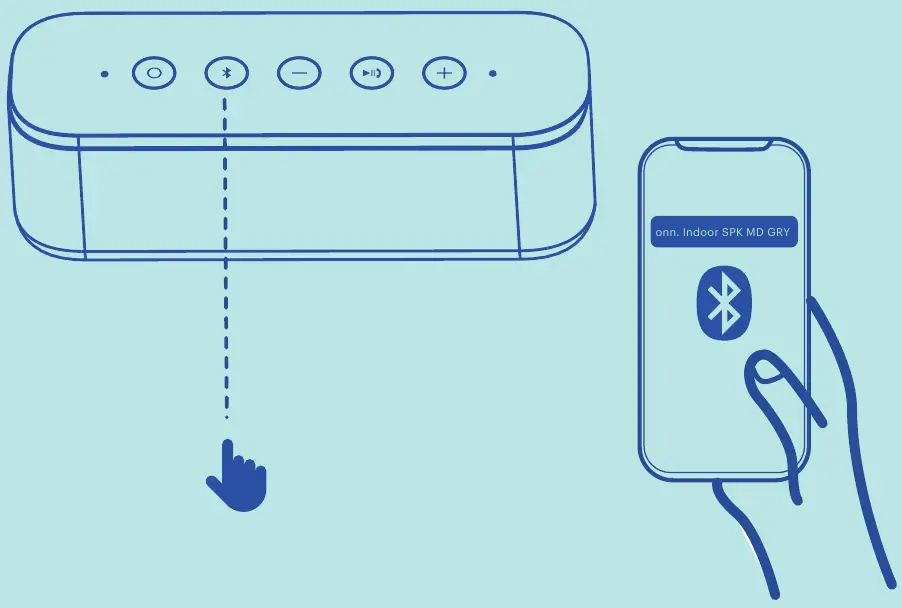
The Bluetooth name shown by this speaker is:
onn. Indoor SPK MD GRY
To pair the speaker:
- Turn the onn. Indoor Speaker on.
- Open the Bluetooth settings on the phone, tablet or other audio device.
- Activate Bluetooth if it is currently disabled.
- Search for nearby Bluetooth devices.
- Find onn. Indoor SPK MD GRY in the list.
- Select it to start the connection. Onn-Indoor-Speaker-User-Manual_…
Once connected, audio from the paired device can be played through the speaker.
Bluetooth Device Name
When searching for the speaker from a phone or tablet, look specifically for:
onn. Indoor SPK MD GRY Onn-Indoor-Speaker-User-Manual_…
This name is useful when several Bluetooth devices are visible in the same area.
How to Use the AUX Input
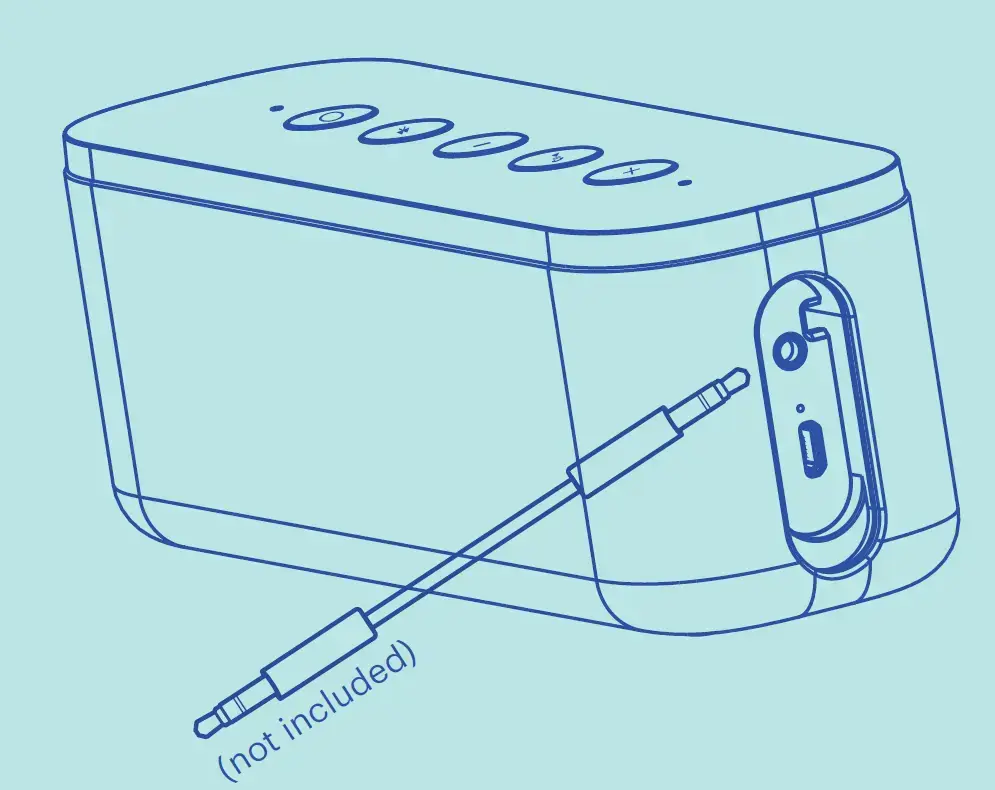
The speaker can also receive audio through its AUX In connection.
A 3.5 mm audio cable is required but is not included with the speaker. Onn-Indoor-Speaker-User-Manual_…
To use AUX audio:
- Connect one end of a 3.5 mm cable to the speaker’s AUX input.
- Connect the other end to the compatible audio source.
- Start playback on the connected device.
- Adjust the speaker volume until the preferred sound level is reached. Onn-Indoor-Speaker-User-Manual_…
Playback and Volume Controls
The top control panel includes dedicated buttons for:
- Volume down
- Play/Pause/Speakerphone
- Volume up
These controls allow playback and volume adjustment directly from the speaker. Onn-Indoor-Speaker-User-Manual_…
Play and Pause
The center multifunction control is labeled Play/Pause/Speakerphone.
It is used for normal playback control as well as incoming phone-call functions.
Volume Control
Use:
- Volume Down to reduce the sound level.
- Volume Up to increase it. Onn-Indoor-Speaker-User-Manual_…
How to Answer Calls
The built-in microphone and multifunction button allow the speaker to be used for phone calls when connected to a compatible phone.
Answer an Incoming Call
Short-press the Play/Pause/Speakerphone button to answer the call. Onn-Indoor-Speaker-User-Manual_…
The illustration indicates a short press of less than approximately 1 second.
Reject an Incoming Call
Press and hold the same button for more than approximately 3 seconds to reject the call. Onn-Indoor-Speaker-User-Manual_…
Party Sync Mode
Party Sync allows two compatible onn. speakers to work together.
The guide also labels this linked-speaker function TWS. Onn-Indoor-Speaker-User-Manual_…
How to Connect Two onn. Speakers
To set up Party Sync Mode:
- Turn on the first onn. speaker.
- Press and hold its Bluetooth button for 3 seconds.
- The first speaker enters the speaker-pairing mode and becomes the master speaker.
- Turn on the second compatible onn. speaker.
- The second speaker connects automatically to the master.
- After both speakers are linked to each other, open Bluetooth settings on the phone or other mobile device.
- Pair the mobile device with the master speaker using the normal Bluetooth procedure. Onn-Indoor-Speaker-User-Manual_…
The Party Sync instructions specifically state that this mode also applies to another compatible onn. speaker. Onn-Indoor-Speaker-User-Manual_…
Party Sync / TWS Quick Reference
| Step | Action |
| 1 | Power on the first speaker |
| 2 | Hold its Bluetooth button for 3 seconds |
| 3 | First speaker becomes the master |
| 4 | Turn on the second speaker |
| 5 | Second speaker connects to the master automatically |
| 6 | Pair the mobile device with the master speaker |
Onn-Indoor-Speaker-User-Manual_…
Reset Control Location
The guide identifies a Reset control on the right-hand side of the speaker between the AUX input and charging port. Onn-Indoor-Speaker-User-Manual_…
Charging Port Location
The charging port is also on the right side of the speaker.
The package includes a charging cable for use with this connection. Onn-Indoor-Speaker-User-Manual_… Onn-Indoor-Speaker-User-Manual_…
FCC Compliance Information
The speaker has been tested as a Class B digital device under Part 15 of the FCC Rules.
The guide explains that the equipment generates, uses and can radiate radio-frequency energy. Incorrect installation or use may cause interference with radio communications. Onn-Indoor-Speaker-User-Manual_…
If the speaker causes interference with radio or television reception, recommended measures include:
- Reorient or relocate the receiving antenna.
- Increase the distance between the speaker and receiver.
- Connect the equipment to an outlet on a different electrical circuit.
- Consult a dealer or experienced radio/TV technician. Onn-Indoor-Speaker-User-Manual_…
The guide also states that changes or modifications not expressly approved by the party responsible for compliance may void the user’s authority to operate the equipment. Onn-Indoor-Speaker-User-Manual_…
RF Exposure
The device was evaluated for general radio-frequency exposure requirements and may be used under portable exposure conditions without restriction. Onn-Indoor-Speaker-User-Manual_…
The product’s rating label is located on the bottom of the speaker. Onn-Indoor-Speaker-User-Manual_…
Customer Support
onn. provides telephone support for the Indoor Speaker.
Customer Support: 1-888-516-2630
Hours: 7:00 a.m. to 9:00 p.m. CST, every day Onn-Indoor-Speaker-User-Manual_…
Frequently Asked Questions
How do you connect the onn. Indoor Speaker to Bluetooth?
Turn the speaker on, activate Bluetooth on the phone or other device, search for nearby devices and select onn. Indoor SPK MD GRY. Onn-Indoor-Speaker-User-Manual_…
What is the Bluetooth name of the onn. Indoor Speaker?
The Bluetooth device name shown in the Quick Start Guide is onn. Indoor SPK MD GRY. Onn-Indoor-Speaker-User-Manual_…
How do you turn the onn. Indoor Speaker on and off?
Press and hold the Power control for more than approximately 2 seconds to power the speaker on or off. Onn-Indoor-Speaker-User-Manual_…
Can the onn. Indoor Speaker use an AUX cable?
Yes. The speaker has an AUX input and can be connected to another audio source using a 3.5 mm cable. The cable is not included. Onn-Indoor-Speaker-User-Manual_…
How do you answer a phone call on the onn. speaker?
Short-press the Play/Pause/Speakerphone button to answer an incoming call. Onn-Indoor-Speaker-User-Manual_…
How do you reject a call on the onn. Indoor Speaker?
Press and hold the Play/Pause/Speakerphone button for more than approximately 3 seconds. Onn-Indoor-Speaker-User-Manual_…
How do you connect two onn. speakers together?
Turn on the first speaker and hold its Bluetooth button for 3 seconds so it becomes the master. Turn on the second compatible speaker and let it connect automatically. Then pair the phone with the master speaker through Bluetooth. Onn-Indoor-Speaker-User-Manual_…
Where is the reset button on the onn. Indoor Speaker?
The product diagram places the Reset control on the right side of the speaker, between the AUX input and charging port. Onn-Indoor-Speaker-User-Manual_…