| Brand Name | Braun |
| Product Name | ThermoScan Ear Thermometer |
| Model Number | IRT6030CA |
| File Size | 1.62 MiB |
| Number of Pages | 14 |
| Languages Covered | English and French |
| Manual Number | A002988R1 |
Braun ThermoScan IRT6030CA Ear Thermometer
The Braun ThermoScan IRT6030CA is an infrared ear thermometer designed for intermittent measurement and monitoring of human body temperature in people of all ages. It is intended for household use and measures infrared heat produced by the eardrum and surrounding tissues.
The probe is shaped to reduce the chance of inserting it too far into the ear canal. Because accurate ear-temperature measurement depends heavily on positioning and technique, the official instructions emphasize correct probe placement and the use of a new, clean Braun ThermoScan lens filter for every measurement.
The thermometer also includes an ExacTemp indicator, last-reading memory, illuminated display for use in dim conditions, selectable Celsius or Fahrenheit display and automatic shutoff after inactivity.
Product Overview
Braun ThermoScan measures infrared energy continuously after the probe is placed inside the ear. The probe tip is warmed close to body temperature to help reduce measurement errors, and the thermometer ends the reading once it determines that an accurate temperature measurement has been obtained.
The manual explains that ear readings can closely reflect core body temperature because the eardrum shares blood supply with the hypothalamus, the part of the brain involved in temperature regulation. Ear temperature can therefore respond quickly to changes in body temperature.
Parts and Components
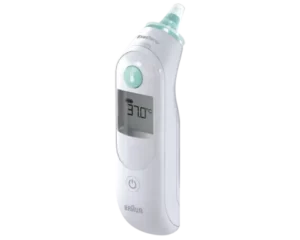
The product diagram identifies the following components.
| No. | Part | Purpose |
| 1 | Lens Filter | Disposable hygienic cover placed over the probe |
| 2 | Probe Tip | Temperature-sensing end inserted into the ear |
| 3 | Probe | Houses the sensing assembly |
| 4 | ExacTemp Light | Indicates measurement positioning and completion |
| 5 | Lens Filter Ejector | Removes the used lens filter |
| 6 | Display | Shows temperature readings, symbols and error messages |
| 7 | Power Button | Turns the thermometer on or off and changes temperature scale |
| 8 | Start Button | Starts a temperature measurement |
| 9 | Battery Door | Provides access to the battery compartment |
| 10 | Protective Cap | Protects the thermometer when stored |
The product description also identifies a package of ThermoScan lens filters, while replacement LF40 lens filters are specified for continued use.
Important Safety Information
The ThermoScan IRT6030CA is a temperature-screening device for household use. The manual specifically states that it is not intended to diagnose disease and does not replace consultation with a physician.
Important precautions include:
- Use the thermometer only within an ambient temperature of 10°C to 40°C (50°F to 104°F).
- Do not expose it to temperatures below -25°C (-13°F) or above 55°C (131°F).
- Do not expose it to excessive humidity above 95% RH.
- Use only genuine Braun ThermoScan LF40 lens filters.
- Install a new, clean lens filter before each reading.
- Keep lens filters and other small parts away from children.
- Do not modify the thermometer.
- Keep the thermometer out of children’s reach.
When Medical Attention May Be Needed
The manual instructs parents and caregivers not to rely only on temperature readings when symptoms are concerning. Symptoms such as unexplained irritability, vomiting, diarrhea, dehydration, seizure, changes in appetite or activity and other unusual signs can require medical attention even when fever is absent.
The manual also advises prompt professional guidance when an elevated temperature occurs in certain higher-risk groups, including newborns and young infants, older adults, people with weakened immune systems, bedridden individuals and transplant recipients. For infants younger than three months, it specifically directs users to consult a physician immediately if the temperature exceeds 37.4°C / 99.4°F.
Before Taking a Temperature
Correct preparation helps improve consistency.
The user should:
- Make sure a new, clean lens filter is fitted.
- Use the same ear for repeated measurements because left- and right-ear readings can differ.
- Check that the ear canal is not blocked by excessive earwax.
- Avoid using a dirty probe lens.
- Position the thermometer correctly and keep it stable during measurement.
When to Wait Before Measuring
The manual recommends waiting 20 minutes before taking an ear temperature after:
- Exposure to an extremely hot or cold room.
- Wearing a hearing aid.
- Lying with the ear against a pillow.
If ear drops or another ear medication have been placed in one ear, the untreated ear should be used instead.
How to Use the Braun ThermoScan IRT6030CA
Step 1: Remove the Protective Cap
Remove the protective cap from the thermometer before switching it on.
Step 2: Turn the Thermometer On
Press the Power button.
During startup:
- The display performs an internal self-check.
- All display segments appear.
- The most recent temperature reading is displayed for approximately 5 seconds.
Step 3: Attach a New Lens Filter
The lens-filter symbol flashes when a filter is required.
To install one:
- Push the thermometer probe straight into a new lens filter while the filter remains in its box.
- Pull the thermometer back out with the filter attached.
- Make sure the filter is seated correctly.
The thermometer will not operate unless a lens filter is installed.
Step 4: Position the Probe in the Ear
Fit the probe snugly into the ear canal.
Stable positioning is important because movement can cause a position error.
Step 5: Press the Start Button
Press and release the Start button.
The ExacTemp light pulses while the thermometer is measuring.
Step 6: Wait for Confirmation
A correctly positioned probe produces:
- A solid ExacTemp light for approximately 3 seconds.
- A long confirmation beep.
- A temperature result on the display.
If the probe is not held steadily in the ear:
- A series of short beeps sounds.
- The ExacTemp light goes out.
- POS appears on the display.
Step 7: Read the Temperature
Once the confirmation beep sounds, the temperature appears on the display.
Step 8: Replace the Lens Filter
Before the next measurement:
- Press the lens filter ejector.
- Dispose of the used filter.
- Install a new, clean filter.
A fresh filter should be used for every measurement for both hygiene and accuracy.
How to Turn Off the Braun ThermoScan
The thermometer turns itself off automatically after 60 seconds of inactivity.
It can also be switched off manually by holding the Power button for approximately 3 seconds. The display briefly shows OFF before going blank.
ExacTemp Light Meaning
The ExacTemp system helps confirm correct measurement technique.
| ExacTemp Behavior | Meaning |
| Pulsing light | Temperature measurement is in progress |
| Solid light for about 3 seconds | A successful temperature measurement has been completed |
| Light turns off with short beeps and POS | Probe position was unstable or incorrect |
Memory Mode
The IRT6030CA stores the most recent temperature measurement.
When the thermometer is switched on again, the last result appears automatically for approximately 5 seconds.
Night-Light Feature
The display has a built-in night light for use in dim environments.
Pressing any button turns on the light. It remains illuminated until the thermometer has been inactive for up to 15 seconds, including after a temperature has been taken.
How to Change Celsius to Fahrenheit
The English instructions state that the thermometer is shipped with Celsius (°C) activated.
To change the scale:
- Make sure the thermometer is turned off.
- Press and hold the Power button.
- After approximately 3 seconds, the display cycles through °C / SET / °F / SET.
- Release the Power button when the preferred scale appears.
- A short beep confirms the selection.
- The thermometer then switches off automatically.
The same procedure can be used to switch back to the other scale.
Temperature Measurement Tips
For more consistent readings:
- Measure temperature in the same ear each time.
- Use a new lens filter for every reading.
- Keep the probe lens clean.
- Make sure the probe is positioned securely.
- Do not take a reading immediately after conditions that can temporarily alter ear temperature.
- Use the untreated ear when ear medication has been placed in the other ear.
Normal body temperature is a range rather than a single fixed number. It varies by person, age, measurement site and time of day. The manual recommends becoming familiar with an individual’s usual ThermoScan ear-temperature range when healthy.
Cleaning and Care
The probe tip is the most delicate part of the thermometer and must remain clean and undamaged for accurate measurements.
Cleaning the Probe Tip
If the thermometer is accidentally used without a lens filter:
- Moisten a cotton swab or soft cloth with alcohol.
- Very gently wipe the probe-tip surface.
- Allow the alcohol to dry completely.
- Install a new lens filter before taking another measurement.
If the probe tip is damaged, the manual instructs the user to contact a service center.
Cleaning the Body and Display
Use a soft, dry cloth on the display and exterior.
Do not:
- Use abrasive cleaning products.
- Immerse the thermometer in water.
- Immerse it in any other liquid.
Storage Instructions
Store the thermometer and its lens filters:
- In a dry location.
- Away from dust and contamination.
- Away from direct sunlight.
- Within the specified storage temperature and humidity limits.
The stated storage-temperature range is -25°C to 55°C (-13°F to 131°F) with relative humidity from 10% to 95% non-condensing.
Replacing the Batteries
A battery symbol on the display indicates that replacement is required.
To replace the batteries:
- Open the battery compartment.
- Remove the old batteries.
- Install new batteries with the polarity positioned correctly.
- Snap the battery door back into place.
Only depleted batteries should be discarded. The manual recommends using appropriate retail or local battery-collection facilities according to applicable regulations.
The specified battery life is approximately 2 years or 350 measurements.
Calibration
The thermometer is calibrated during manufacturing.
When used according to the instructions, periodic recalibration is not required. If accuracy is questioned, an authorized service center should be contacted.
Reading the Manufacturing Date
The manufacturing date can be determined from the LOT number inside the battery compartment.
The manual explains that:
- The first three digits after LOT represent the Julian manufacturing day.
- The next two digits identify the final two digits of the manufacturing year.
- The remaining letters identify the manufacturer.
Its example, LOT 11614K, represents the 116th day of 2014.
Braun ThermoScan Error Messages and Troubleshooting
No Lens Filter Attached
Problem: The thermometer detects that no lens filter is installed.
Solution: Install a new, clean
POS Error
POS means the thermometer probe was not held securely enough in the ear to obtain an accurate measurement.
To correct it:
- Make sure the probe is positioned properly.
- Hold it in a stable position.
- Replace the lens filter.
- Reposition the probe.
- Press Start and take a new measurement.
Err Error
An Err indication can appear when the ambient temperature is outside the permitted operating range of 10°C to 40°C / 50°F to 104°F.
Leave the thermometer for approximately 30 minutes in a room within that permitted temperature range before trying again.
HI Error
HI means the measured temperature is above the thermometer’s normal displayed human-temperature range.
The displayed range is 34°C to 42.2°C (93.2°F to 108°F). The manual recommends checking that:
- The probe tip is clean.
- The lens is clean.
- A new lens filter is installed.
- The thermometer is inserted correctly.
A new measurement can then be taken.
LO Error
LO means the measured temperature is below the instrument’s normal displayed human-temperature range of 34°C / 93.2°F.
Check probe cleanliness, lens-filter condition and positioning, then take another reading.
System Error
When the self-check display flashes continuously and is not followed by the ready beep and ready symbol:
- Wait approximately 1 minute for the thermometer to switch off.
- Turn it on again.
- If the problem remains, remove the batteries and reinstall them to reset the thermometer.
- If the error continues, contact the local service center.
Low-Battery Indicators
The troubleshooting table distinguishes between two battery conditions.
| Battery Condition | Meaning | Action |
| Battery low | Thermometer can still operate correctly | Install new batteries |
| Battery too low | Reliable temperature measurement cannot be taken | Install new batteries before use |
Technical Specifications
| Specification | Value |
| Model | IRT6030CA |
| Measurement method | Infrared ear temperature |
| Displayed temperature range | 34°C-42.2°C / 93.2°F-108°F |
| Operating ambient temperature | 10°C-40°C / 50°F-104°F |
| Storage temperature | -25°C-55°C / -13°F-131°F |
| Operating/storage humidity | 10%-95% RH, non-condensing |
| Display resolution | 0.1°C or °F |
| Maximum laboratory error, 35°C-42°C | ±0.2°C / ±0.36°F |
| Maximum laboratory error outside that range | ±0.3°C / ±0.54°F |
| Clinical repeatability | ±0.14°C / ±0.26°F |
| Battery life | Approximately 2 years / 350 measurements |
| Service life | 5 years |
| Atmospheric pressure | 700-1060 hPa |
| Protection rating | IP22 |
| Applied part | Type BF |
These values are listed in the product-specification section of the official manual.
Standards and Electromagnetic Compatibility
The IRT6030CA is listed as conforming to several medical-device and clinical-thermometer standards, including:
- ISO 80601-2-56:2017
- IEC 60601-1:2012
- ISO 14971:2007
- EN ISO 10993-1:2009
- IEC 60601-1-2:2014
- IEC 60601-1-11:2010
The manual also states that portable and mobile radio-frequency communications equipment can affect medical electrical equipment. Braun-ThermoScan-Ear-Thermomete…
Replacement Lens Filters
The thermometer must be used with genuine Braun ThermoScan LF40 lens filters.
Additional LF40 filters are available from retailers carrying Braun ThermoScan products. A new filter should be installed before each measurement. Three-Year Limited Warranty
The IRT6030CA is covered by a three-year limited warranty for qualifying defects in material or workmanship.
The warranty applies to the original purchaser from the original purchase date.
Kaz may choose to repair or replace an eligible defective product. Warranty coverage does not apply to damage resulting from commercial use, abusive or unreasonable use, normal wear, unauthorized repair attempts or operation contrary to the instruction manual.
The manual warns users not to open the thermometer housing themselves because doing so can void warranty coverage and may damage the thermometer or cause injury.
Customer Support
The manual lists the following consumer-support information:
Consumer Relations Phone: 1-800-477-0457
Email: consumerrelations@kaz.com
The model number should be provided when contacting support.
The product is manufactured for:
Kaz USA, Inc., a Helen of Troy Company
400 Donald Lynch Blvd., Suite 300
Marlborough, MA 01752
For Canada, the document lists:
Kaz Canada, Inc., a Helen of Troy Company
6700 Century Avenue, Suite 210
Mississauga, Ontario L5N 6A4
Frequently Asked Questions
How do you use the Braun ThermoScan IRT6030CA?
Remove the protective cap, press Power, install a new lens filter, place the probe snugly in the ear canal and press Start. A solid ExacTemp light and long beep indicate a successful measurement. The temperature then appears on the display.
What does POS mean on a Braun ThermoScan thermometer?
POS is a position error. It means the probe was not kept in a sufficiently stable position in the ear to obtain an accurate reading. Reposition the thermometer, install a fresh lens filter and take another measurement.
Does the Braun IRT6030CA require a lens filter?
Yes. A new, clean Braun ThermoScan lens filter should be installed for each measurement, and the IRT6030CA will not operate without a filter attached. The compatible replacement is LF40.
How do you change a Braun ThermoScan from Celsius to Fahrenheit?
Turn the thermometer off, hold the Power button for approximately three seconds and wait for the °C / SET / °F / SET sequence. Release the button when the desired scale appears. A short beep confirms the change.
Why does the Braun thermometer show HI or LO?
HI or LO means the detected temperature falls outside the instrument’s normal displayed range of 34°C to 42.2°C / 93.2°F to 108°F. The probe, lens and lens filter should be checked before taking another measurement.
How should the Braun ThermoScan probe be cleaned?
If the thermometer has been used without a lens filter, the probe tip should be gently wiped with a cotton swab or soft cloth moistened with alcohol. The alcohol must dry completely before a new filter is installed and another measurement is taken.
Does the Braun ThermoScan remember previous temperatures?
The IRT6030CA stores the last temperature measurement and displays it automatically for approximately five seconds the next time the thermometer is switched on.
How long do the Braun ThermoScan batteries last?
The product specifications state an approximate battery life of two years or 350 measurements. When a low-battery symbol appears, the batteries should be replaced. Braun-ThermoScan-Ear-Thermomete…