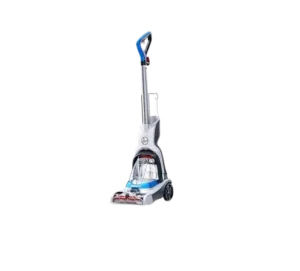
| Brand Name | Hoover |
| Product Name | PowerDash Carpet Cleaner |
| Model Number(s) | FH507 Series |
| File Size | 4.57 MB |
| Number of Pages | 6 |
| Languages Covered | English, French, Spanish |
Hoover PowerDash FH507 Carpet Cleaner
The Hoover PowerDash is a corded carpet cleaner designed for household carpet cleaning with water and Hoover carpet-cleaning solution. Its basic cleaning process uses a trigger-controlled wet stroke to apply cleaning solution, followed by a dry stroke with the trigger released to recover moisture from the carpet.
Before cleaning, Hoover recommends vacuuming the carpet thoroughly, checking upholstery cleaning codes when applicable, and testing fabric for colorfastness in a hidden area. The PowerDash should not be used as a regular dry vacuum or on hard floors.
The cleaner has separate clean- and dirty-water tanks, a powered brush roll, a removable nozzle cover, a replaceable belt, a handle-release pedal, a power pedal and a cleaning-solution trigger. The operating and maintenance diagrams on page 2 show the tank, pedals, brush roll, belt and underside service points.
Quick Facts
| Feature | Manual Information |
| Product | PowerDash Carpet Cleaner |
| Intended use | Household carpet cleaning |
| Electrical supply | Nominal 120V grounded circuit |
| Clean water | Warm water |
| Cleaning solution | Hoover carpet-cleaning solution |
| Wet cleaning control | Handle trigger |
| Power control | Foot-operated Power Pedal |
| Handle release | Foot-operated Handle Release Pedal |
| Dirty-water alert | Audible operating change when tank needs emptying |
| Brush roll | Removable and washable |
| Belt | Replaceable |
| Hard-floor use | No |
| Warranty | 1-year limited warranty for domestic use |
| Customer service | 1-800-944-9200 |
The product is intended only for household use; commercial use voids the warranty.
Main Parts and Controls
The operating diagrams identify the main user-accessible parts involved in setup, cleaning and maintenance.
| Part or Control | Function |
| Upper Handle | Main grip for moving and controlling the cleaner |
| Upper Handle Pole | Connects the upper handle to the cleaner base |
| Clean Water Tank | Holds warm water and Hoover cleaning solution |
| Dirty Water Tank | Collects extracted dirty water |
| Cleaning Trigger | Releases cleaning solution during a wet stroke |
| Handle Release Pedal | Reclines the cleaner into its cleaning position |
| Power Pedal | Turns the machine on |
| Quick Pour Spout | Allows the dirty-water tank to be emptied |
| Dirty Water Tank Filter | Traps debris and requires periodic cleaning |
| Nozzle Cover | Provides access to the front cleaning area |
| Brush Roll | Agitates carpet during cleaning |
| Belt | Drives the brush roll |
| Cord Hooks | Hold the power cord during storage |
The assembly, operating and maintenance illustrations on page 2 show how these parts are positioned and removed.
Important Safety Instructions
The PowerDash is an electrical appliance that combines electricity, water and moving parts. Hoover requires several basic precautions during use.
General safety rules
- Fully assemble the cleaner before operating it.
- Do not leave it plugged in while unattended.
- Unplug the cleaner when it is not in use and before servicing.
- Do not allow children age 12 or younger to use it.
- Keep children away from openings and moving parts.
- Use the cleaner only as described in the user manual.
- Use only Hoover-recommended attachments.
- Use only Hoover cleaning fluids intended for this appliance.
- Do not operate the cleaner with a damaged cord or plug.
- Do not use a unit that has been dropped, damaged, left outdoors or dropped into water.
- Do not pull or carry the appliance by its cord.
- Keep the cord away from heated surfaces and sharp edges.
- Do not unplug by pulling the cord; grasp the plug instead.
- Do not handle the appliance or plug with wet hands.
- Keep openings free of dust, lint, hair and other blockages.
- Keep hair, loose clothing, fingers and body parts away from moving parts.
- Turn off the controls before unplugging.
- Use extra care around stairs.
- Do not pick up gasoline or other flammable or combustible liquids.
- Connect the cleaner only to a properly grounded outlet.
Protecting floors and the cleaner
Hoover also advises:
- Do not pick up hard or sharp objects.
- Store the cleaner indoors in a dry location.
- Do not expose the machine to freezing temperatures.
- Keep the cleaned area well ventilated to help the carpet dry.
- Keep children and pets off carpet until it is completely dry.
- Do not store the cleaner with solution remaining in its tanks.
- Do not leave the cleaner stationary with the brushes operating for an extended period.
- Do not use the extractor on hard floors.
- Move the cleaner away from wood or laminate flooring after use because water can drip from the brushes and underside.
Grounding Instructions
The PowerDash must be connected to a grounded electrical outlet.
The appliance is designed for a nominal 120-volt circuit and uses a grounding plug. If the cleaner malfunctions, grounding provides a lower-resistance path for electrical current and helps reduce the risk of electric shock.
The grounding plug should not be modified.
If the plug does not fit the available outlet, Hoover instructs the owner to have an appropriate grounded outlet installed by a qualified electrician.
How to Assemble the Hoover PowerDash
The cleaner must be fully assembled before use.
Step 1: Install the handle
- Insert the Upper Handle into the Upper Handle Pole.
- Insert the Upper Handle Pole into the cleaner base.
- Push each section into place.
- Listen for a click at each connection, confirming that it has locked.
Step 2: Install the Clean Water Tank
- Position the Clean Water Tank over its mounting area.
- Slide it into place.
- Press firmly downward until it is properly seated.
When cleaning rugs or carpet over wood flooring, Hoover recommends placing waterproof material such as plastic underneath before cleaning to prevent moisture damage.
How to Fill the Clean Water Tank
The clean-water tank uses separate fill lines for warm water and cleaning solution.
- Lift the Clean Water Tank out of the cleaner.
- Remove its cap.
- Add warm water to the water fill line.
- Add Hoover cleaning solution to the solution fill line.
- Reinstall and secure the cap.
- Align the tank with the cleaner.
- Press it firmly into position.
The cap must be locked in place for correct operation and to help prevent leakage.
Hoover also instructs users to read the directions printed on the carpet-cleaning fluid before use.
Which Cleaning Solution Should Be Used?
Use Hoover cleaning fluids intended for use with this carpet cleaner.
The manual warns that using other cleaning fluids can increase the risk of internal component damage, fire or electric shock.
Hoover directs owners to its cleaning-solution guide or Hoover.com for compatible products.
Before Cleaning Carpet or Upholstery
A few preparation steps can improve cleaning performance and prevent damage.
Vacuum first
Vacuum carpet and upholstery thoroughly before using the PowerDash.
The carpet cleaner should not be used in place of a standard dry vacuum cleaner.
Check upholstery cleaning codes
Use the cleaner only on upholstery marked:
- W – suitable for wet cleaning
- S/W – suitable for solvent/dry or wet cleaning
Do not use it on upholstery marked:
- S – solvent/dry clean only
Test for colorfastness
Before cleaning a visible upholstery area:
- Choose a small hidden area.
- Rub it gently with a damp white cloth.
- Wait 10 minutes.
- Check with a white paper towel for color transfer or bleeding.
How to Use the Hoover PowerDash Carpet Cleaner
The PowerDash uses a simple wet-pass/dry-pass cleaning method.
Step 1: Recline the handle
Step on the Handle Release Pedal and lower the handle into its cleaning position.
Step 2: Turn the cleaner on
Step on the Power Pedal.
Step 3: Make a wet cleaning pass
Squeeze and hold the cleaning trigger.
Move the cleaner slowly forward and backward across the carpet.
Holding the trigger releases cleaning solution during this wet stroke.
Step 4: Make a dry pass
Release the trigger.
Move the cleaner slowly forward and backward over the same area again.
This dry stroke recovers additional moisture without dispensing more solution.
Step 5: Watch the Dirty Water Tank
Hoover instructs users to empty the Dirty Water Tank when an audible change in the cleaner is heard.
Make sure the tank is securely installed before continuing to clean.
How to Rinse Carpet With the PowerDash
The same cleaner can be used for a water-only rinse.
- Empty or prepare the Clean Water Tank.
- Fill it with warm water.
- Do not add cleaning solution.
- Clean the carpet using the normal wet- and dry-stroke procedure.
Drying the System After Cleaning
Before shutting down the cleaner after use, Hoover recommends running the system for 10 seconds without pressing the trigger.
This helps dry the system before the unit is turned off.
How to Empty and Clean the Dirty Water Tank
The Dirty Water Tank should be emptied when the cleaner’s sound changes or whenever it becomes full.
Step 1: Turn the cleaner off
Turn the power off and unplug the power cord.
Step 2: Empty the tank
Open the Quick Pour Spout and pour out the dirty water.
Rinse the tank and allow it to air dry.
Step 3: Check the filter
Before putting the tank back into the cleaner, inspect the filter.
Clean it when needed.
Step 4: Reinstall the tank
Tilt the Dirty Water Tank backward into position, then rock it forward until it snaps securely into place.
How to Remove and Clean the Brush Roll
Always unplug the machine before servicing the brush roll because it may restart unexpectedly.
Step 1: Remove the nozzle cover
Pull the nozzle-cover latch upward and forward.
Remove the cover, rinse it and allow it to air dry.
Step 2: Access the underside
Lay the cleaner down so its underside is accessible.
Use a Phillips screwdriver to remove the six screws shown in the manual’s page 2 diagram.
Step 3: Remove the brush roll
- Remove the underside belt cover.
- Pull out the brush roll.
- Leave the belt attached to the cleaner initially.
Step 4: Clean the brush roll
Rinse the brush roll and allow it to air dry completely.
Step 5: Remove the belt if needed
Slide the belt off its shaft.
If the existing belt needs replacing, install a new one.
How to Replace the Hoover PowerDash Belt
Step 1: Install the new belt
Place the new belt over the motor shaft.
Step 2: Install the brush roll
Slide the brush roll through the belt.
Step 3: Position the first end cap
Place the end cap on the side without the belt into its mounting pocket.
Step 4: Stretch the belt into position
Carefully stretch the belt enough to position the opposite brush-roll end cap into its pocket.
Step 5: Reassemble the cleaner
- Replace the belt cover.
- Reinstall all six screws.
- Rotate the brush roll manually.
- Make sure the belt is not twisted or pinched.
Lubrication
The motor bearings contain enough lubrication for their expected service life.
Hoover specifically instructs owners not to add lubricant to the motor bearings, because additional lubricant can cause damage.
Storage Instructions
Before storing the PowerDash:
- Wrap the power cord around the cord hooks.
- Attach the plug end to the cord.
- Allow the brushes to air dry completely.
- Allow the underside of the machine to dry completely.
- Only then store the cleaner on carpet or wood flooring.
The cleaner should be stored indoors in a dry area and protected from freezing temperatures. Do not store it with cleaning solution remaining in the tanks.
Hoover PowerDash Troubleshooting
Always unplug the carpet cleaner before cleaning or servicing areas around the brush roll or other moving components.
Cleaner Won’t Run
| Possible Cause | Solution |
| Cleaner is not firmly plugged in | Insert the plug securely |
| Wall outlet has no voltage | Check the household fuse or circuit breaker |
| Fuse is blown or circuit breaker has tripped | Replace the fuse or reset the breaker |
| Internal cleaner fuse has blown | Take the cleaner to a service center |
Low Suction
| Possible Cause | Solution |
| Dirty Water Tank is full / automatic shutoff has activated | Remove and empty the Dirty Water Tank |
| Dirty Water Tank cap or plug is not installed correctly | Tighten it |
| Dirty Water Tank debris filter is clogged | Clean the filter and tank |
| Nozzle is blocked | Inspect and clean the nozzle area |
| Dirty Water Tank is not properly secured | Reinstall it securely |
| Filter is clogged | Clean the filter |
Clean Water Won’t Dispense
Check these three items:
- Make sure the Clean Water Tank is firmly locked into position.
- Refill the Clean Water Tank or solution container if empty.
- Make sure the cleaning trigger is being pulled.
Brushes Won’t Rotate
A jam or broken belt can prevent the brush roll from turning.
- Turn the cleaner off.
- Unplug it from the electrical outlet.
- Check for debris blocking the brush roll.
- Remove the obstruction.
- Replace the belt if it is broken.
Replacement Parts and Accessories
Hoover states that replacement parts, cleaning solutions and accessories are available through hoover.com.
The warranty recommends genuine Hoover solutions, parts and accessories. Damage caused by incompatible products may not be covered under warranty.
When ordering parts or requesting service, use the complete model number printed on the back of the cleaner.
One-Year Limited Warranty
The Hoover PowerDash is covered by a 1-year limited warranty for domestic use.
The warranty applies to qualifying products used and maintained in normal household conditions and covers original defects in materials and workmanship for one year from the original purchase date.
Who is covered?
The limited warranty applies to the original retail purchaser with proof of purchase from Hoover or an authorized dealer in:
- United States
- U.S. territories and possessions
- U.S. Military Exchanges
- Canada
Warranty remedies
For an approved warranty claim, Hoover may choose to:
- Repair the product.
- Send a replacement product.
- Send a similar product of equal or greater value when an appropriate replacement is unavailable.
- In certain circumstances, provide a refund or store credit based on the original purchase price.
Common warranty exclusions
The warranty does not cover conditions including:
- Commercial use
- Improper maintenance
- Misuse or neglect
- Vandalism
- Incorrect voltage
- Accidents
- Unauthorized service
- Use outside the original country of purchase
- Resale by the original owner
- Alteration or modification
- Normal wear
- Damage from incompatible solutions, parts or accessories
Normal wear items can include belts, filters and brush rolls.
Customer Support
For questions, troubleshooting or service:
Hoover Customer Service: 1-800-944-9200
Hours: Monday–Friday, 9 a.m.–6 p.m. EST
Hoover advises owners with a malfunctioning, dropped, damaged, outdoor-exposed or water-damaged unit to contact customer service before continuing to use it.
The manual also directs owners to hoover.com for video instructions, FAQs, replacement parts, accessories and cleaning solutions.
Frequently Asked Questions
How do you use a Hoover PowerDash carpet cleaner?
Fill the Clean Water Tank with warm water to the water fill line and Hoover cleaning solution to the solution fill line. Install the tank, recline the handle with the Handle Release Pedal and turn the cleaner on with the Power Pedal. Hold the trigger during a slow forward-and-back wet stroke, then release the trigger and repeat the forward-and-back motion for a dry stroke.
How much cleaning solution goes in a Hoover PowerDash?
The Clean Water Tank has a dedicated solution fill line. Hoover instructs users to add warm water to the water fill line and Hoover cleaning solution to the solution fill line rather than using an unstated generic ratio.
Why isn’t my Hoover PowerDash dispensing water?
Check that the Clean Water Tank is firmly locked into place, make sure water and cleaning solution are available in the tank, and confirm that the cleaning trigger is being pulled.
Why does my Hoover PowerDash have low suction?
Possible causes include a full Dirty Water Tank, an incorrectly installed tank cap or plug, a clogged debris filter, a blocked nozzle, a loose Dirty Water Tank or a clogged filter.
Why aren’t the brushes spinning on my Hoover PowerDash?
The manual identifies a jammed brush roll or broken belt as the main causes. Unplug the cleaner, inspect the brush area for debris and replace the belt if it is damaged.
Can the Hoover PowerDash be used on hard floors?
No. Hoover specifically warns against using this carpet extractor on hard floors because it can scratch or damage them.
How do you rinse carpet after using Hoover solution?
Fill the Clean Water Tank with warm water but do not add cleaning solution. Then use the normal wet- and dry-stroke procedure to rinse the carpet.
How should the Hoover PowerDash be stored after use?
Empty the tanks, allow the brushes and underside to air dry completely, wrap the cord around the cord hooks and store the machine indoors in a dry location. Do not expose it to freezing temperatures or store it with solution in the tanks.