Brand Name | Crane |
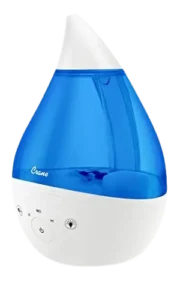
| Product Name | Drop Shape Ultrasonic Cool Mist Humidifier |
| Model Number(s) | EE-5301, EE-5301-BF, EE-5301G, EE-5301GW, EE-5301P, EE-5301P-BF, EE-5301TP, EE-5301W, EE-5301W-BF, EE-5301O, EE-5301B, EE-5301GR, EE-5301GR-BF, EE-5301BK, EE-5301RO, EE-5301PW, EE-5301T-BF, EE-5301TR, EE-5301CW, EE-5301CH, EE-5301GT, EE-5301TGR |
| File Size | 0.23 MiB |
| Number of Pages | 12 |
| Languages | English |
| Water Tank Capacity | Approx. 1 gallon / 3.78 liters |
Crane Drop Shape Ultrasonic Cool
The Crane Drop Shape Ultrasonic Cool Mist Humidifier EE-5301 series is a household ultrasonic humidifier with an approximately 1-gallon water tank, adjustable mist output, and coverage of up to 500 square feet. A full tank can provide up to 24 hours of operation, while the rated noise level is below 37 decibels when measured from 3 feet away.
Operation is controlled with a single dial. A green indicator means sufficient water is available and mist production can continue. When the water runs out, the indicator changes to red and mist production stops automatically to help protect the nebulizer from overheating.
The humidifier should be filled only with fresh, cool water. Medication, essential oils, salt, and hot water must not be placed directly into the tank or base.
Crane EE-5301 Humidifier Quick Facts
| Feature | Specification |
| Product type | Ultrasonic cool mist humidifier |
| Model family | EE-5301 Series |
| Rated voltage | 120V |
| Frequency | 60Hz |
| Power | 45W |
| Water tank capacity | Approx. 1 gallon / 3.78 L |
| Run time | Up to 24 hours per tank |
| Recommended room coverage | Up to 500 sq. ft. |
| Noise level | Less than 37 dB from 3 ft away |
| Mist control | Adjustable Control Dial |
| Low-water indication | Red indicator light |
| Normal operating indication | Green indicator light |
| Recommended water | Clean, cool tap water; filtered or distilled water for hard-water areas |
| Intended use | Indoor household use |
The technical-specification table appears on PDF page 7 of the manual.
Parts and Components
The product diagram on PDF page 6 identifies seven main components across the humidifier base, water tank, and mist lid.
| No. | Part | Function |
|---|---|---|
| 1 | Nebulizer | Produces the ultrasonic cool mist |
| 2 | Fan Outlet | Moves air through the unit |
| 3 | Control Dial | Turns the humidifier on and adjusts mist intensity |
| 4 | Water Level Sensor | Detects the water level in the base |
| 5 | Mist Outlet Channel | Carries mist upward through the tank |
| 6 | Water Tank Cap | Seals the water tank after filling |
| 7 | Mist Output Slot | Releases cool mist into the room |
The Water Level Sensor is especially important for low-water detection and should be correctly installed and unobstructed before operation.
Control Dial and Indicator Light Guide
The EE-5301 series does not use a digital display. Normal operation is handled by the Control Dial and a color-changing power indicator.
Control Dial
The dial performs two main functions:
- Turns the humidifier on.
- Adjusts mist-output intensity.
The mist level should be adjusted so the visible mist rises and disperses into the room rather than dropping quickly onto nearby surfaces. If mist falls downward instead of being absorbed into the room air, the dial should be turned down.
Green Indicator Light
A green power light means enough water is present in the humidifier base for normal operation. Mist should begin coming from the Mist Lid.
Red Indicator Light
A red indicator light normally appears when the humidifier runs out of water. Mist production stops automatically as a safety feature.
A red light that stays on even with a filled tank can also indicate a tank-cap, overfilled-base, or Water Level Sensor problem. These conditions are covered in the troubleshooting section below.
Important Safety Instructions
The humidifier is intended for indoor household use only and should be operated by an adult. Children should not be allowed to play with the appliance.
Important safety rules include:
- Keep water in the Water Tank whenever the humidifier is operating.
- Use only clean, cool water.
- Do not use hot water.
- Use a 110-120V AC outlet.
- Plug and unplug the humidifier only with dry hands.
- Never operate it with a damaged cord or plug.
- Keep the appliance on a flat, stable, waterproof, non-metallic surface.
- Keep the power cord away from heated surfaces and walking areas.
- Unplug the humidifier before filling, emptying, cleaning, moving, or servicing it.
- Do not cover openings or insert objects into them.
- Do not tilt, tip, fill, or empty the humidifier while it is running.
- Keep the mist directed away from children, walls, furniture, and electrical equipment.
- Do not leave the humidifier running unattended in a closed room where excessive moisture may accumulate.
Do Not Add Essential Oils, Medication, or Salt
The tank and water basin should contain water only.
The manual specifically instructs users not to add medication, essential oils, or salt to the Water Tank or base.
The warranty also identifies the direct use of essential oils in the tank or base as an example of use that can void warranty coverage.
Electrical Safety
The humidifier uses a polarized plug with one blade wider than the other.
If the plug does not fit into an outlet:
- Reverse the plug.
- Try the outlet again.
- If it still does not fit, contact a qualified electrician.
The plug should not be modified to bypass this safety design.
Extension Cord Requirements
A short power cord is used to reduce tripping and entanglement risks.
If an extension cord is necessary, the manual requires one rated for:
- 125V
- At least 13A
- At least 1625W
The cord should be positioned so it cannot be pulled by children or create a tripping hazard.
The humidifier should also be operated on a separate electrical circuit when possible, because an overloaded circuit may prevent the appliance from operating correctly.
Where to Place the Crane Humidifier
Proper placement helps mist disperse correctly and prevents moisture damage.
The humidifier should be placed on an:
- Elevated surface
- Non-metallic surface
- Lint-free surface
- Waterproof surface
- Level surface
The manual recommends placing it at least 2 feet above the floor.
Do Not Place the Humidifier on Carpet or a Towel
The fan vent is located on the bottom of the humidifier base.
Carpet, towels, and other soft materials can obstruct the fan vent and interfere with operation.
Do Not Place It Directly on Wood
The manual advises against positioning the humidifier directly on a wooden surface or close to furniture that could be damaged by moisture.
Before Each Use
Before turning on the Crane humidifier:
- Place it on a suitable elevated, waterproof, non-metallic, level surface.
- Make sure the bottom Fan Outlet is not blocked.
- Check that the Water Level Sensor is properly installed.
- Confirm that the sensor can move freely and is not obstructed.
- Make sure the unit is unplugged before filling it.
- Use only fresh, cool water.
How to Fill a Crane Humidifier With Water
The Drop Shape humidifier is a bottom-fill design.
Step 1: Remove the Water Tank
Lift the Water Tank from the humidifier base.
A full tank should always be handled with two hands.
Step 2: Turn the Tank Upside Down
Turn the Water Tank over to access the Water Tank Cap.
Step 3: Remove the Water Tank Cap
Unscrew the cap.
Step 4: Add Cool Water
Fill the tank with fresh, cool water.
Do not:
- Fill all the way to the rim.
- Use hot water.
- Add medication.
- Add essential oils.
- Add salt.
- Pour water into the Mist Lid.
Filtered or distilled water is recommended when local tap water is hard because mineral-rich water can cause white dust.
Step 5: Reinstall the Cap
Tighten the Water Tank Cap securely.
A loose or incorrectly fitted cap can prevent water from flowing correctly into the base and may cause the red indicator light to remain on.
Step 6: Return the Tank to the Base
Turn the tank upright and place it securely onto the Humidifier Base.
Once a full Water Tank is sitting on the base, the complete humidifier should not be moved. Moving it in this condition can cause leakage or overfill the base.
How to Use the Crane Cool Mist Humidifier
Once the tank has been filled and installed:
- Connect the power cord to a suitable wall outlet.
- Turn the Control Dial to switch the humidifier on.
- Confirm that the indicator light turns green.
- Wait for mist to begin flowing from the Mist Lid.
- Rotate the Control Dial to adjust mist intensity.
- Observe the mist and adjust the dial so it rises and disperses into the room air.
If the mist falls quickly and leaves moisture around the humidifier, the mist output should be reduced.
How to Set the Correct Mist Output
The manual advises adjusting the mist until it rises into the room and is absorbed by the surrounding air.
If mist immediately falls downward:
- Reduce the output using the Control Dial.
- Check whether the room is already very humid.
- Leave the room door partly open in a small room.
- Use a lower setting when condensation begins appearing.
Excess humidity can cause moisture buildup on walls, furniture, and other surfaces and may provide conditions where bacteria and fungi can grow.
What Happens When the Water Runs Out?
When the water supply is depleted:
- The indicator light turns red.
- Mist production stops.
- The automatic shutoff protects the nebulizer from possible overheating.
- The humidifier should be switched off and unplugged.
- The Water Tank can then be removed and refilled.
When water is emptied from the base, it should always be poured away from the Fan Outlet.
Crane Humidifier Cleaning Instructions
Regular cleaning and disinfection are important for keeping the humidifier operating correctly.
Water left in the tank or base during periods of non-use can encourage mineral buildup and bacterial growth. The manual warns that leaving water in the tank for more than a day or two can allow bacteria to grow.
Daily Maintenance
The manual recommends these steps every day:
- Turn the humidifier off.
- Unplug it.
- Empty all water from the tank.
- Empty the water from the base.
- Allow both the Water Tank and base to air-dry.
- Leave the Water Tank Cap off until the humidifier is ready to be used again.
Weekly Cleaning With White Vinegar
Cleaning the Water Tank
- Turn off and unplug the humidifier.
- Empty the tank and base.
- Fill the Water Tank halfway with warm water.
- Add 2 tablespoons of white vinegar.
- Shake the tank vigorously.
- Let the solution remain inside for 30 minutes.
- Empty the tank.
- Rinse thoroughly with plain water.
Cleaning the Humidifier Base
- Add warm water to the base.
- Add 1 tablespoon of white vinegar.
- Let the solution sit for 30 minutes.
- Empty the base.
- Pour the water away from the Fan Outlet.
- Rinse with plain water.
Cleaning the Nebulizer
After soaking the base, the nebulizer can be gently cleaned with:
- A damp cloth, or
- A cotton swab.
The Humidifier Base must never be immersed in water.
Why Detergent Should Not Be Used
The manual instructs owners not to use detergent on components that hold water.
Detergent residue can dissolve into the water during later operation and interfere with mist output. White vinegar mixed with water is the recommended cleaning method.
End-of-Season Cleaning and Storage
Before storing the humidifier for an extended period:
- Turn it off.
- Unplug it.
- Empty all water from the tank and base.
- Perform the weekly vinegar-cleaning procedure.
- Allow every component to dry completely.
- Store the humidifier in a cool, dry location.
Crane Humidifier Troubleshooting
Indicator Light Stays Red
A red light can indicate more than an empty tank.
Check the following:
- Make sure the Water Tank Cap is installed correctly so water can enter the base.
- Check whether the base has become overfilled.
- If it is overfilled, remove the tank and empty the base.
- Reinstall the filled tank onto the empty base.
- Inspect the Water Level Sensor.
- Remove the plastic cap from its peg.
- Remove the sensor float.
- Clean the float with warm, sudsy water.
- Put the float back on the peg.
- Reinstall the plastic cap.
Crane Humidifier Has No Power
If the humidifier will not turn on:
- Make sure the plug is fully inserted into the outlet.
- Try another electrical outlet.
- Check that the Control Dial is turned to the ON position.
- If the power indicator still does not illuminate, contact Crane Customer Care.
Crane Humidifier Has a Strange Odor
For an unusual odor:
- Clean the Water Tank using water and white vinegar.
- Rinse it with clean water.
- Leave the empty tank open in a cool place for approximately 12 hours.
- Keep the Water Tank Cap off during this airing period.
Green Light Is On but No Mist Comes Out
If the indicator is green but the Crane humidifier is not misting:
- Complete the weekly maintenance procedure.
- Make sure the unit is sitting on a hard, flat surface.
- Check that the bottom Fan Outlet is not blocked.
- Turn the Control Dial up to MAX.
- Let the humidifier operate at MAX for approximately 10 minutes.
If mist still does not appear after these checks, the manual directs owners to Crane Customer Care rather than attempting to repair the motor.
White Dust Appears Around the Humidifier
White dust generally indicates that the water contains a high mineral concentration.
The manual recommends switching to:
- Filtered water
- Distilled water
- A Crane Demineralization Filter cartridge.
Crane Humidifier Is Leaking
The recommended action depends on where the water is coming from.
| Leak Location | Action |
| Mist Lid | Reduce mist output using the Control Dial |
| Water Tank | Inspect the tank and tank seam for cracks |
| Humidifier Base | Contact Crane Customer Care |
Replacement Parts and Accessories
The manual states that spare parts can be purchased through Crane’s website. It also recommends a Crane Demineralization Filter cartridge when mineral-rich tap water causes white dust.
One-Year Limited Warranty
Crane provides a 1-year limited warranty against manufacturing defects under normal use and conditions.
A dated proof of purchase is required for warranty service.
Warranty Exclusions
The warranty can be voided when a defect results from:
- Accidental damage
- Misuse
- Abuse
- Neglect
- Improper repair
- Unauthorized alteration
- Failure to follow the operating instructions
- Putting essential oils directly into the Water Tank or base
Normal wear and tear and commercial use are also excluded.
The warranty described in this manual applies only in the 48 contiguous United States and the District of Columbia, excluding Puerto Rico and the Virgin Islands, and only when the product is purchased and operated in the United States.
Crane Customer Support
The manual lists the following customer-support information:
Crane USA, Inc.
1015 Hawthorn Dr.
Itasca, IL 60143
Phone: 1-888-599-0992
Hours: Monday-Friday, 9:00 a.m.-4:00 p.m. CST
Email: customer-service@crane-usa.com
Website: crane-usa.com
Owners experiencing an unresolved operating problem should contact Crane Customer Care rather than attempting to repair the motor.
Frequently Asked Questions
How do you use a Crane humidifier?
Fill the Water Tank with fresh, cool water, tighten the cap, place the tank securely on the base, connect the humidifier to a suitable outlet, and turn the Control Dial on. A green indicator confirms that water is available. The dial can then be adjusted until the mist rises and disperses into the room.
How do you fill a Crane Drop humidifier?
Remove the Water Tank, turn it upside down, unscrew the Water Tank Cap, and fill it with cool water without filling to the rim. Tighten the cap and return the tank to the base. Hot water, essential oils, medication, and salt should not be added.
What does the red light on a Crane humidifier mean?
The indicator normally turns red when the humidifier runs out of water, and mist production stops automatically. If the tank contains water but the light remains red, check the Water Tank Cap, an overfilled base, and the Water Level Sensor.
Why is the Crane humidifier green but not producing mist?
Complete the weekly cleaning procedure, place the humidifier on a hard and level surface, make sure the Fan Outlet is unobstructed, then turn the Control Dial to MAX and let the humidifier operate for approximately 10 minutes.
Can essential oils be added to the Crane humidifier?
No. The official instructions state that essential oils, medication, and salt should not be added to the Water Tank or base. Direct use of essential oils in these areas can also void warranty coverage.
How often should a Crane humidifier be cleaned?
Water should be emptied from the tank and base daily, and both components should be allowed to air-dry. A more complete white-vinegar cleaning procedure should be performed weekly.
Why does a Crane humidifier leave white dust?
White dust can occur when tap water contains a high level of minerals. The manual recommends filtered or distilled water, or a Crane Demineralization Filter cartridge.
How long can the Crane Drop humidifier run on one tank?
The technical specifications state that a full tank can provide up to 24 hours of run time. Actual operation can depend on mist-output setting and room conditions. The tank holds approximately 1 gallon / 3.78 liters.