| Document Detail | Information |
| Document Title | Automatic Trash Can 13 or 21 Gallon |
| Document Type | User Manual |
| Brand Name | hOmeLabs |
| Product Name | Automatic Trash Can |
| Model Number(s) | HME010231N, HME010233N |
| PDF File Size | 333 KB |
| Number of Pages | 36 |
| Languages | English, German, Spanish, French, Italian |
hOmeLabs Automatic Trash Can HME010231N
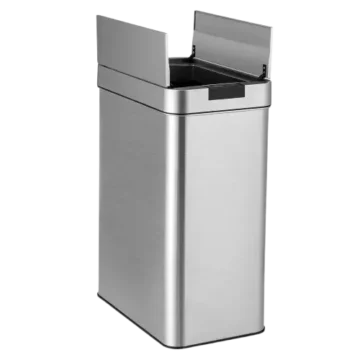
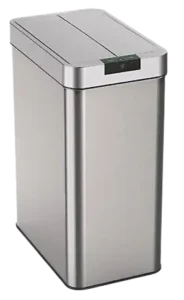
The hOmeLabs Automatic Trash Can is a touchless, infrared sensor-operated trash can available in 13-gallon and 21-gallon capacities. It automatically opens its lid when movement is detected within 15 cm (6 inches) of the sensor and closes approximately 6 seconds after movement stops.
This automatic trash can, covered under model numbers HME010231N and HME010233N, features a 90° swiveling sensor ball, manual open and close buttons, indicator lights, and a Smart Retainer Ring system that holds the garbage bag inside the container.
The trash can operates using four C (LR14/AM2) alkaline batteries or the specified hOmeLabs power adapter. Its electronic lid also provides a manual opening function that keeps the lid open for approximately 6 minutes.
Proper installation, sensor positioning, battery maintenance, and regular cleaning help maintain normal lid operation.
Product Overview
The hOmeLabs Automatic Trash Can uses infrared (IR) technology to detect movement near the lid. When a hand enters the sensor’s detection range, the lid opens without requiring direct contact.
The lid remains open while movement continues within the sensor area. After movement is no longer detected, the lid closes automatically after approximately 6 seconds.
The swiveling infrared sensor can be adjusted to face upward or sideways, allowing the sensing direction to be selected according to the trash can’s placement.
Main Features
- 13- or 21-gallon capacity: Available in two stated capacities for household waste disposal.
- Infrared sensor operation: Automatically opens the lid when movement is detected within 15 cm (6 inches).
- 90° swiveling sensor ball: Allows the infrared sensor to face upward or sideways.
- Automatic lid closing: Closes approximately 6 seconds after movement stops.
- Manual lid controls: Separate Open and Close buttons provide direct lid operation.
- 6-minute manual opening: Keeps the lid open for approximately 6 minutes when opened manually.
- Smart Retainer Ring system: Holds the garbage bag neatly inside the trash can.
- LED indicator lights: Display standby, lid operation, and low-battery conditions.
- Battery operation: Uses four C (LR14/AM2) alkaline batteries.
- Power adapter connection: Includes a power jack for use with the specified hOmeLabs adapter.
Technical Specifications
| Specification | Details |
| Brand | hOmeLabs |
| Product Name | Automatic Trash Can |
| Model Numbers | HME010231N, HME010233N |
| Product Type | Touchless Automatic Trash Can |
| Capacity Options | 13 Gallons, 21 Gallons |
| Sensor Technology | Infrared (IR) |
| Sensor Detection Range | 15 cm (6 inches) |
| Sensor Adjustment | 90° Swiveling Sensor Ball |
| Sensor Directions | TOP or SIDE |
| Automatic Closing Time | Approximately 6 Seconds After Movement Stops |
| Manual Opening Duration | Approximately 6 Minutes |
| Battery Requirement | 4 × C (LR14/AM2) Alkaline Batteries |
| Batteries Included | No |
| Estimated Battery Life | Approximately 3 Months, Depending on Battery Make and Capacity |
| Specified Power Adapter | hOmeLabs HME010246N |
| Power Adapter Output | 5.9 V / 500 mA |
| Lid Controls | Manual Open and Manual Close Buttons |
| Status Indicators | 6 Indicator Lights |
| Garbage Bag Retention | Smart Retainer Rings |
| Intended Use | Household Use Only |
| RoHS Compliance | Directive 2011/65/EU |
Parts and Components
The hOmeLabs Automatic Trash Can consists of the can body, electronic lid assembly, infrared sensor, battery compartment, power connection, and garbage bag retention system.
| Part | Description and Function |
| Top Lid and Covers | Electronic lid assembly that opens and closes automatically or manually. |
| 90° Swiveling Sensor Ball | Detects movement and allows the infrared sensor direction to be adjusted. |
| Manual Open Button | Opens the lid and keeps it open for approximately 6 minutes. |
| Manual Close Button | Closes the lid when pressed. |
| Indicator Lights | Display the operating status and battery replacement warning. |
| Can Body | Main container that holds the garbage bag. |
| Smart Retainer Rings | Hold the garbage bag securely inside the trash can. |
| Plastic Bracket | Fits over the can body and supports the Smart Retainer Rings. |
| Battery Compartment | Holds four C alkaline batteries. |
| Battery Cover | Protects the battery compartment and is released using two tabs. |
| Power Jack | Provides the connection for the specified hOmeLabs power adapter. |
| Power Switch | Turns on the electronic lid mechanism. |
Manual Open and Close Buttons
Two buttons on the front control area allow the lid to be operated without the infrared sensor.
The Open button raises the lid and keeps it open for approximately 6 minutes. The Close button closes the lid before that period ends.
90° Swiveling Sensor Ball
The infrared sensor is housed inside a swiveling ball on the front of the lid.
The ball can be rotated to change the sensor direction between:
- TOP: Sensor directed upward.
- SIDE: Sensor directed sideways.
The sensor must remain clean for normal operation.
Smart Retainer Ring System
The Smart Retainer Ring system consists of a plastic bracket and retaining rings.
The garbage bag is folded around the bracket and held in place by lowering the rings. This keeps the bag edges inside the trash can rather than hanging over the outside of the container.
Important Safety Instructions
The hOmeLabs Automatic Trash Can contains electronic components and uses batteries or an approved power adapter. Safety precautions must be followed to reduce the risk of injury, electrical shock, battery leakage, and product damage.
General Safety Precautions
- Allow sufficient space around the trash can so the lid can open and close without obstruction.
- Do not press down on or force the lid to close while it is open.
- Use the designated Close button when manual closing is required.
- Keep the infrared sensor ball away from direct sunlight.
- Keep the sensor ball clean to maintain normal operation.
- Do not immerse the electronic lid cover in water.
- Use a damp cloth to clean the lid cover.
- Do not use solvents or other chemicals for cleaning.
- Use the appliance only for its intended purpose.
- Keep all plastic bags away from children.
The appliance is intended for household use only.
Electrical Safety
When using an external power adapter, only the specified hOmeLabs adapter may be used.
Approved Adapter:
- Model: HME010246N
- Output: 5.9 V / 500 mA
Do not substitute an adapter with an unapproved model or electrical rating.
The lid contains electronic components and must not be immersed in water.
Battery Safety
Incorrect battery handling can cause leakage, damage, or an explosion.
- Use four C (LR14/AM2) alkaline batteries.
- Replace all four batteries at the same time.
- Do not mix old and new batteries.
- Do not mix alkaline, standard carbon-zinc, or rechargeable batteries.
- Do not attempt to recharge non-rechargeable batteries.
- Never short-circuit the battery terminals.
- Use only batteries of the same or equivalent type recommended for the appliance.
- Remove the batteries if the trash can will not be used for a long period.
Warning: Replacing the batteries with an incorrect type may cause an explosion.
Batteries must not be placed in fire or a hot oven, mechanically crushed, or cut.
Exposure to extremely high temperatures or extremely low air pressure may cause batteries to explode or release flammable liquids or gases.
Child Safety
The trash can is not intended for use by individuals, including children, with reduced physical, sensory, or mental capabilities or insufficient experience and knowledge unless appropriate supervision or instructions are provided by a person responsible for their safety.
Children must be supervised to prevent them from playing with the appliance.
All plastic bags must be kept away from children.
Before First Use
Before using the Automatic Trash Can, the lid assembly, battery compartment, garbage bag, Smart Retainer Rings, and sensor position must be prepared.
Initial Preparation
- Identify the can body, lid, sensor ball, manual buttons, and Smart Retainer Rings.
- Place the trash can where the lid has enough clearance to operate.
- Keep the sensor away from direct sunlight.
- Confirm that the necessary components are present.
- Prepare four new C (LR14/AM2) alkaline batteries.
- Install the garbage bag using the Smart Retainer Ring system.
- Position the electronic lid correctly on the can body.
- Adjust the infrared sensor direction.
- Turn on the power switch to activate the trash can.
Setup and Installation Instructions
Step 1: Install the Batteries
The hOmeLabs Automatic Trash Can requires four C alkaline batteries for battery-powered operation.
- Remove the electronic lid assembly from the can body.
- Locate the battery cover on the underside of the lid assembly.
- Press both battery cover tabs to release the cover.
- Remove the battery cover.
- Insert four new C (LR14/AM2) alkaline batteries.
- Follow the battery polarity markings inside the compartment.
- Replace the battery cover securely.
The batteries are not included with the appliance.
Note: Battery life depends on the battery manufacturer and capacity. Four new C alkaline batteries are estimated to last approximately 3 months.
Step 2: Install the Garbage Bag
The trash can uses a Smart Retainer Ring system to keep the garbage bag positioned inside the can body.
- Place an empty garbage bag inside the can body.
- Wrap the top of the garbage bag over the upper edge of the can body.
- Prepare the plastic bracket with its Smart Retainer Rings.
- Position the plastic bracket on top of the can body, over the garbage bag.
- Leave the retaining rings raised during installation.
- Pull up the edges of the garbage bag.
- Fold the bag edges inward over the plastic bracket and underneath the retaining rings.
- Lower the Smart Retainer Rings to secure the garbage bag.
- Check that the bag is positioned neatly inside the container.
The retaining rings hold the folded bag edges in place and keep them from hanging over the outside of the can.
Step 3: Install the Lid
After the garbage bag has been secured:
- Place the electronic lid assembly onto the can body.
- Position the lid so that the infrared sensor and manual buttons face the front of the trash can.
- Check that the lid is properly positioned.
- Make sure no object blocks the lid covers.
Step 4: Adjust the Infrared Sensor Direction
The trash can features a 90° swiveling infrared sensor ball.
- Locate the sensor ball on the front of the lid.
- Rotate the sensor ball to adjust its direction.
- Select either the TOP or SIDE position.
- Keep the sensor ball clean.
The sensor direction can be adjusted according to the intended sensing position.
Step 5: Turn On the Trash Can
Once the batteries, garbage bag, and lid are installed:
- Locate the power switch at the rear of the lid cover.
- Turn on the power switch.
- A red indicator light will flash once.
- The light will then flash once every 5 seconds.
- The trash can is now activated and operating in Standby Mode.
The lid can now be opened using the infrared sensor or the manual Open button.
Operating Instructions
The hOmeLabs Automatic Trash Can supports automatic touchless operation and manual lid control.
How to Open the Lid Automatically
The infrared sensor detects movement within a range of 15 cm (6 inches).
- Make sure the power switch is turned on.
- Position a hand near the infrared sensor.
- Move the hand within 15 cm (6 inches) of the sensor.
- The sensor will detect the movement.
- The lid will open automatically.
The lid remains open while movement continues within the sensor detection area.
How the Automatic Lid Closes
When movement is no longer detected:
- The infrared sensor stops detecting movement.
- The closing period begins.
- After approximately 6 seconds, the lid closes automatically.
If a hand remains within the sensor detection range, the lid stays open.
Important: Do not press down on the lid to close it. Allow the electronic mechanism to operate normally.
How to Open the Lid Manually
The manual opening feature allows the lid to remain open for approximately 6 minutes.
- Locate the Open button on the lid.
- Press the Open button.
- The lid will open.
- The lid will remain open for approximately 6 minutes.
- After the 6-minute period, the lid closes automatically.
This function allows the lid to remain open without continuous movement near the sensor.
How to Close the Lid Manually
The lid can be closed before the 6-minute manual opening period ends.
- Locate the Close button.
- Press the Close button.
- The lid will close.
- The trash can will return to Automatic Mode.
Warning: Do not push the lid closed by hand. Always use the Close button when manual closing is required.
Automatic vs. Manual Operation
| Feature | Automatic Operation | Manual Operation |
| Activation | Infrared Sensor | Open Button |
| Detection Range | 15 cm (6 inches) | Button Press |
| Lid Opening | Opens when movement is detected | Opens when the Open button is pressed |
| Open Duration | While movement remains in the sensor area | Approximately 6 Minutes |
| Closing | About 6 seconds after movement stops | After 6 minutes or when the Close button is pressed |
| Return to Automatic Mode | Normal sensor operation | After manual closing |
Infrared Sensor Settings
The trash can uses a swiveling infrared sensor ball to detect movement.
Adjusting the Sensor to TOP Position
- Locate the sensor ball on the front of the lid.
- Rotate the ball toward the TOP position.
- The sensor will face upward.
Adjusting the Sensor to SIDE Position
- Locate the swiveling sensor ball.
- Rotate it toward the SIDE position.
- The sensor will face sideways.
The sensor ball allows up to 90° of directional adjustment.
Maintaining Proper Sensor Operation
The infrared sensor must be kept clean for normal operation.
- Keep the sensor ball free of dirt.
- Avoid direct sunlight on the sensor.
- Keep the lid’s movement area clear.
- Allow the lid to open and close without interference.
Indicator Lights and Status Guide
The Automatic Trash Can includes six indicator lights that display operating conditions.
These lights help identify standby operation, lid activation, and when the batteries need replacement.
| Indicator Light Behavior | Meaning | Recommended Action |
| Red light flashes once when switched on | The electronic system has been activated. | The trash can can enter Standby Mode. |
| Indicator flashes once every 5 seconds | Standby Mode | Normal operation; no action required. |
| All 6 indicator lights turn red simultaneously | Manual or automatic lid opening | Normal lid operation. |
| All 6 indicator lights flash together every second | Batteries need replacement | Replace all four C alkaline batteries. |
Standby Mode
When the trash can is switched on, the red indicator flashes once and continues flashing every 5 seconds.
This indicates that the system is active and ready to detect movement.
Manual and Automatic Opening Indicators
During manual or automatic opening, all six indicator lights illuminate red simultaneously.
During automatic operation, the indicator sequence accompanies the approximately 6-second closing period. During the 6-minute manual opening period, the indicators progressively change as the closing time approaches.
Low Battery Warning
When all six indicator lights flash together repeatedly every second, the batteries need to be replaced.
All four batteries should be replaced at the same time with new C (LR14/AM2) alkaline batteries.
Replacing the Batteries
Battery replacement is necessary when the indicator lights display the low-battery warning.
Battery Replacement Procedure
- Locate the battery compartment on the underside of the lid assembly.
- Press both tabs on the battery cover.
- Remove the battery cover.
- Remove the used batteries.
- Dispose of the used batteries properly.
- Insert four new C (LR14/AM2) alkaline batteries.
- Follow the polarity markings inside the compartment.
- Replace the battery cover securely.
Battery Replacement Precautions
- Replace all four batteries together.
- Do not mix used and new batteries.
- Do not mix batteries of different chemical types.
- Do not recharge non-rechargeable batteries.
- Do not short-circuit battery terminals.
- Remove batteries during extended periods of non-use.
Four new C alkaline batteries are estimated to provide approximately 3 months of operation, depending on battery make and capacity.
Using the Power Adapter
The Automatic Trash Can has a power jack located at the rear of the lid assembly.
Only the specified hOmeLabs power adapter may be used.
| Adapter Specification | Details |
| Brand | hOmeLabs |
| Adapter Model | HME010246N |
| Output Voltage | 5.9 V |
| Output Current | 500 mA |
| Connection | Power Jack |
Important: Only the hOmeLabs HME010246N power adapter with a 5.9 V / 500 mA output is approved in the operating instructions.
Smart Retainer Ring Operation
The Smart Retainer Ring system is designed to secure the garbage bag inside the can body.
How to Secure a Garbage Bag
- Place the garbage bag inside the trash can.
- Fold the upper edge of the bag over the top of the can body.
- Position the plastic bracket over the top of the can.
- Keep the Smart Retainer Rings raised.
- Pull up the bag edges.
- Fold the bag edges inward over the plastic bracket.
- Position the folded edges underneath the retaining rings.
- Lower the rings to hold the bag securely.
- Place the electronic lid assembly on top of the can body.
The garbage bag should be positioned neatly inside the trash can once installation is complete.
Troubleshooting Guide
The following troubleshooting information covers the sensor, lid mechanism, indicator lights, and other operating conditions described in the instructions.
| Problem or Symptom | Possible Cause | Recommended Action |
| Only one lid cover opens | The gears controlling the opposite cover are out of sync. | Follow the lid cover synchronization instructions. |
| All 6 indicator lights flash together every second | Batteries need replacement. | Replace all four C alkaline batteries. |
| Sensor operation is affected | Sensor ball may be dirty. | Keep the sensor ball clean. |
| Sensor response is affected by its position | Sensor direction may need adjustment. | Rotate the sensor ball toward TOP or SIDE. |
| Lid movement is blocked | An obstruction may be preventing movement. | Keep the lid’s operating area clear. |
| Lid remains open during automatic operation | Movement is still detected within the sensor area. | The lid closes approximately 6 seconds after movement stops. |
| Lid stays open after pressing Open | The 6-minute manual opening function is active. | Wait for automatic closing or press Close. |
How to Synchronize the Lid Covers
If only one lid cover lifts while the other remains closed, the gears inside the lid mechanism may be out of sync.
The lid covers can be synchronized using the adjustment procedure provided for the appliance.
- Turn the lid assembly over to examine the gears.
- Check the gear alignment of the cover that is not lifting.
- If one gear tooth is displaced, click the mechanism into alignment and level the covers.
- If two gear teeth are displaced, push the upper plate twice. Two clicking sounds should be heard.
- Once the gears are synchronized, turn the lid assembly back over.
- Place the lid assembly on top of the trash can.
- Test the automatic opening function by waving a hand approximately 15 cm (6 inches) from the infrared sensor.
Only the adjustment steps described for the appliance should be performed. Unauthorized repairs or modifications must not be attempted.
Sensor Does Not Respond Normally
The infrared sensor depends on its detection range, direction, and cleanliness.
The following operating checks may help identify the issue:
- Confirm that the power switch is turned on.
- Check whether the standby indicator flashes every 5 seconds.
- Make sure the sensor ball is clean.
- Check the sensor direction.
- Rotate the sensor to the TOP or SIDE position as required.
- Move a hand within 15 cm (6 inches) of the sensor.
- Keep the sensor away from direct sunlight.
If the low-battery indicator is active, replace the batteries.
Lid Does Not Close Immediately
The lid has different closing times depending on its operating mode.
- Automatic Mode: The lid closes approximately 6 seconds after movement stops.
- Manual Mode: The lid remains open for approximately 6 minutes after pressing Open.
To close the lid earlier during manual operation, press the Close button.
Do not force the lid shut.
Indicator Lights Flash Repeatedly
If all six indicator lights flash together every second, the batteries need replacement.
Replace all four C alkaline batteries simultaneously and follow the polarity markings inside the battery compartment.
When to Contact Customer Support
If the trash can malfunctions or appears defective, contact hOmeLabs Customer Service.
The defective product should be kept while awaiting further instructions. It should be clearly marked or stored where it cannot be used accidentally.
Maintaining the product in its original condition can help hOmeLabs assess and address the reported problem.
Cleaning and Maintenance
The Automatic Trash Can includes electronic components in its lid assembly. Cleaning must be performed carefully to prevent damage.
Cleaning the Lid Cover
The electronic lid cover must not be immersed in water.
- Use a damp cloth to wipe the lid cover.
- Remove dirt from the surface.
- Keep water away from the internal electronic components.
- Do not use solvents or other cleaning chemicals.
Warning: Immersing the lid cover in water may damage its electronic components.
Cleaning the Infrared Sensor Ball
The sensor ball must remain clean for normal operation.
- Locate the infrared sensor ball on the front of the lid.
- Check the sensor surface for dirt.
- Wipe the sensor area with a damp cloth.
- Keep the sensor free of residue.
- Avoid direct sunlight on the sensor during operation.
Battery Maintenance
Batteries must be replaced when the low-battery indicator appears.
Replace all four batteries at the same time and use the recommended battery type.
For extended periods when the trash can will not be used, remove the batteries to reduce the risk of leakage and electronic component damage.
Storage Instructions
When storing the Automatic Trash Can for an extended period:
- Remove the batteries from the appliance.
- Keep the electronic lid cover away from water.
- Avoid exposing the batteries to excessive heat.
- Keep the appliance away from conditions that could damage its electronic components.
- Keep plastic bags away from children.
Removing the batteries before extended storage helps prevent battery leakage.
Product Disposal and Environmental Compliance
The hOmeLabs Automatic Trash Can contains electronic components and batteries that require appropriate disposal.
Electronic Waste Disposal
The disposal instructions reference EC Directive 2012/19/EU.
At the end of the appliance’s working life, it must not be disposed of with ordinary household waste or unsorted municipal waste.
Appropriate disposal options include:
- Taking the appliance to a designated local authority electronic waste collection center.
- Using an authorized dealer that provides an appliance collection service.
- Using an appropriate separate collection or recycling service.
The product is marked with a crossed-out wheeled bin symbol to indicate that separate waste collection is required.
Separate collection supports material recovery and helps reduce environmental harm from improper disposal.
Battery Disposal
Used batteries must be removed and disposed of properly.
Batteries must not be:
- Thrown into fire.
- Placed in hot ovens.
- Crushed or cut.
- Exposed to extremely high temperatures.
Improper battery disposal may cause explosions or leakage of flammable liquids or gases.
RoHS Compliance
The Automatic Trash Can is stated to comply with Directive 2011/65/EU, concerning restrictions on certain hazardous substances in electrical and electronic equipment.
Warranty Information
hOmeLabs provides a limited one-year warranty for qualifying products purchased new and unused from hOmeLabs Technologies, LLC or an authorized reseller.
The warranty applies to eligible defects caused wholly or substantially by faulty manufacture, defective parts, or workmanship during the one-year warranty period.
Warranty Coverage
For a proven eligible defect, the warranty may cover:
- Repair of defective components.
- Replacement of defective parts.
- Necessary labor required to restore the product to its original specifications.
- Replacement of the defective product instead of repair.
The manufacturer’s warranty obligation is limited to the applicable repair or replacement.
Warranty Exclusions
The warranty does not cover damage caused by:
- Normal wear and tear.
- Abuse or mishandling.
- Accidents.
- Failure to follow operating instructions.
- Exposure to liquids.
- Entry of foreign particles.
- Servicing or modifications performed by parties other than hOmeLabs.
- Commercial or non-household use.
The warranty becomes void if unauthorized third parties attempt repairs or if spare parts other than those provided by hOmeLabs are used.
Proof of Purchase Requirements
A purchase receipt showing the date of purchase is required for warranty claims.
The original proof of purchase should be retained in a safe place.
Product Registration
The Automatic Trash Can can be registered through the hOmeLabs website:
Registration provides access to product updates, coupons, and other relevant information.
Product registration is not required to activate warranty coverage.
Registration also does not replace the need for original proof of purchase when making a warranty claim.
Service After Warranty Expiration
Service may be arranged after the warranty period expires, subject to additional charges.
Customers may contact hOmeLabs Customer Service regarding product issues regardless of warranty status.
The limited warranty provides specific legal rights. Additional rights may vary by state, country, or province.
Customer Support Information
hOmeLabs Customer Service provides assistance with operating questions, product malfunctions, and warranty-related concerns.
| Contact Detail | Information |
| Brand | hOmeLabs |
| Support Website | https://homelabs.com/help |
| Support Email | help@homelabs.com |
| Product Registration | https://homelabs.com/reg |
| Distributor | hOmeLabs™, LLC |
| Distributor Address | 350 Springfield Avenue, Suite #200, Summit, NJ 07901 |
| Country of Manufacture | China |
Importer Information
| Contact Detail | Information |
| Importer | Xtava, LLC |
| Address | Unit 8, Shakespeare Industrial Eastate, Watford, Herts, WDR24 5RY |
If the appliance is believed to be defective, Customer Service should be contacted before further action is taken.
The defective product should be kept pending instructions and stored where it cannot be used accidentally.
Frequently Asked Questions
What batteries does the hOmeLabs Automatic Trash Can use?
The hOmeLabs Automatic Trash Can models HME010231N and HME010233N use four C (LR14/AM2) alkaline batteries. The batteries are not included. Four new batteries are estimated to last approximately 3 months, depending on their make and capacity.
How does the hOmeLabs touchless trash can sensor work?
The infrared sensor detects movement within 15 cm (6 inches) and automatically opens the lid. The lid remains open while movement is detected and closes approximately 6 seconds after movement stops.
How do I adjust the sensor on the hOmeLabs Automatic Trash Can?
The trash can has a 90° swiveling sensor ball. The ball can be rotated to direct the infrared sensor toward the TOP or SIDE position. The sensor should be kept clean and away from direct sunlight.
How long does the automatic trash can lid stay open?
During automatic operation, the lid closes approximately 6 seconds after movement stops. When the Open button is pressed manually, the lid stays open for approximately 6 minutes unless the Close button is pressed earlier.
Why is only one lid cover opening?
If only one lid cover opens, the internal gears may be out of sync. The lid covers can be realigned using the synchronization procedure. For a two-tooth displacement, the instructions specify pressing the upper plate twice until two clicks are heard.
What does it mean when all six indicator lights flash?
When all six indicator lights flash together repeatedly every second, the batteries need to be replaced. All four C alkaline batteries should be replaced at the same time.
Can the hOmeLabs Automatic Trash Can use a power adapter?
Yes. The trash can includes a power jack and specifies the hOmeLabs HME010246N power adapter with an output of 5.9 V / 500 mA. Only this specified adapter should be used.