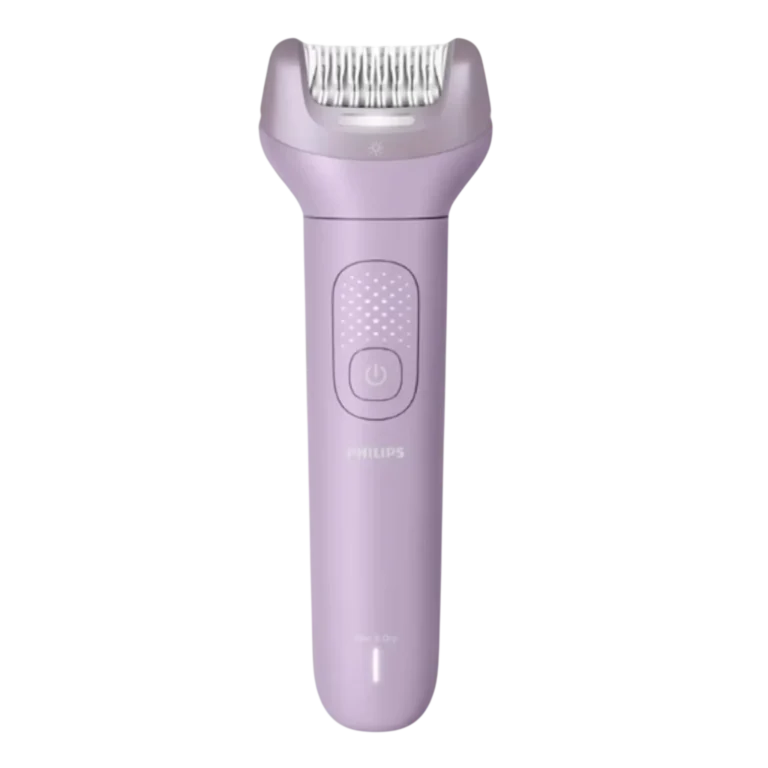
Philips Epilator BRE708
The Philips Epilator BRE708 is a cordless, rechargeable, waterproof hair-removal handle. It comes with an epilating head (with integrated light and a top cover) and a ProGuide attachment. The ProGuide helps stretch the skin, keeps the head at the correct 75° angle and adds a 360° LED light for seeing fine hairs. The handle has two speeds, charges through a USB cable and runs up to 60 minutes cordless after a 3-hour charge. It can be used on wet or dry skin, in the bath or shower, but only without the cord. The same handle system is shared by 13 BRE models. Heads and accessories differ by model, so check the supplied-items table below for yours.
Models covered and supplied items
The heads and accessories that come with the product vary by model number. This table follows the overview chart in Fig. 1 and uses the item numbers from the Features list. The chart covers items 1 to 13 only.
| Model | Supplied heads and accessories |
| BRE708 | Epilating head + top cover, ProGuide attachment, pouch |
| BRE709 | Epilating head + top cover, ProGuide attachment, shaving head + shaving comb, pouch |
| BRE711 | Epilating head + top cover, ProGuide attachment, bikini trimming head + comb, pouch |
| BRE717 | Epilating head + top cover, ProGuide attachment, shaving head + comb, bikini trimming head + comb, pouch, exfoliation glove |
| BRE718 | Epilating head + top cover, ProGuide attachment, shaving head + comb, coupling unit, body exfoliation brush + protection cap, pouch |
| BRE719 | Epilating head + top cover, ProGuide attachment, shaving head + comb, bikini trimming head + comb, coupling unit, body exfoliation brush + protection cap, pouch |
| BRE728 | Epilating head + top cover, ProGuide attachment, shaving head + comb, bikini trimming head + comb, coupling unit, pedicure disk + protection cap, body exfoliation brush + protection cap, pouch |
| BRE729 | Epilating head + top cover, ProGuide attachment, shaving head + comb, bikini trimming head + comb, coupling unit, body exfoliation brush + protection cap, pouch |
| BRE738 | Epilating head + top cover, ProGuide attachment, SkinLED attachment, coupling unit, facial cleansing brush + protection cap, body exfoliation brush + protection cap, luxury pouch |
| BRE739 | Epilating head + top cover, flexible shaving head + comb, bikini trimming head + comb, SkinLED attachment, coupling unit, pedicure disk + protection cap, facial cleansing brush + protection cap, body exfoliation brush + protection cap, luxury pouch |
| BRE748 | Flexible shaving head + comb, SkinLED attachment, coupling unit, pedicure disk + protection cap, facial cleansing brush + protection cap, body exfoliation brush + protection cap, luxury pouch (no epilating head) |
| BRE749 | Epilating head + top cover, ProGuide attachment, flexible shaving head + comb, bikini trimming head + comb, SkinLED attachment, coupling unit, pedicure disk + protection cap, facial cleansing brush + protection cap, body exfoliation brush + protection cap, luxury pouch |
| BRE750 | Epilating head + top cover, ProGuide attachment, flexible shaving head + comb, bikini trimming head + comb, SkinLED attachment, coupling unit, pedicure disk + protection cap, facial cleansing brush + protection cap, body exfoliation brush + protection cap, luxury pouch |
Replacement parts and accessories are listed at www.philips.com/parts-and-accessories.
Parts and controls
Handle and controls
| No. | Part |
| 14 | Handle |
| 15 | On/off button |
| 16 | Battery status indicator |
| 17 | Socket for small plug |
| 18 | USB cable |
| 19 | Release button (at the back of the handle) |
| 20 | Cleaning brush |
A suitable USB power source (for example, Philips HQ87) is available through www.philips.com/support. No USB power source is included.
Heads and attachments
| No. | Item |
| 1 | Epilating head with integrated light + top cover |
| 2 | ProGuide attachment |
| 3 | Flexible shaving head with integrated light + shaving comb |
| 4 | Shaving head + shaving comb |
| 5 | Bikini trimming head + bikini trimming comb |
| 6 | SkinLED attachment |
| 7 | Coupling unit |
| 8 | Pedicure disk + protection cap |
| 9 | Facial cleansing brush + protection cap |
| 10 | Body exfoliation brush + protection cap |
| 11 | Pouch |
| 12 | Luxury pouch |
| 13 | Exfoliation glove |
Charging and battery
Battery status indicator
| Battery status | Indicator mode |
| Almost empty | Flashing orange light |
| Charging | Flashing white light |
| Fully charged | Solid white light |
About 60 seconds after the battery is fully charged, the indicator switches off automatically. Charge the product before first use and whenever the indicator shows that the battery is almost empty. After 3 hours of charging, the cordless operating time is up to 60 minutes.
How to charge
Warning: Keep the USB cable and the USB power source dry.
- Make sure the product is switched off.
- Insert the small plug of the USB cable into the socket in the bottom of the product.
- Insert the USB plug into the USB power source (not included).
- Insert the USB power source into the power outlet.
- After charging, remove the USB power source from the power outlet and pull the small plug out of the product.
Power source and temperature requirements
- Use only a USB power source on a certified product with an output rating of 5 V, ≥ 1.5 A.
- For safe charging in a moist environment such as a bathroom, use only an IPX4 (splash-proof) power source.
- Plug the USB power source directly into a power outlet. Do not use an extension cord.
- Charge, use and store the product at a temperature between 50 °F / 10 °C and 95 °F / 35 °C.
- If you need help finding the right USB power source, call Philips support at 1-888-744-5477.
Before first use
Check the product
Always check the cutting units before use. They should be clean, in good condition and not damaged or worn. A damaged cutting unit can cause skin irritation and reduced performance. If a cutting unit is damaged, throw it away and start using a new one. You can order a new cutting unit from the Philips website or through Philips support at 1-888-744-5477.
Preparing and caring for your skin
Before hair removal:
- Exfoliate your skin one day before hair removal to remove dead skin cells around the follicles.
- Clean your skin first. If it is wet after cleaning, pat it dry instead of rubbing.
- Remove hair before going to bed so your skin can recover overnight.
- Keep the product moving slowly over the skin, and avoid going over the same spot too many times.
After hair removal:
- Gently apply an alcohol-free soothing cream or lotion.
- Give your skin time to recover between sessions.
- Some skin irritation is normal if you have not removed hair for a while. Your skin may need to readjust to the process.
Everyday operation
Switching on, off and changing speed
- To switch on, press the on/off button once. The epilator starts at the highest speed.
- To select the low speed setting, press the on/off button again.
- To switch off, press the on/off button once more.
Use the lower speed for areas with little hair growth, hard-to-reach places and areas where bones sit close to the skin’s surface, such as ankles and knees.
Integrated light
Some heads have an integrated light. It goes on automatically when you switch on the product, to give you a better view during hair removal. To switch the light off or back on, press the on/off button for 2 seconds while the product is switched off.
Wet and dry use
The product is suitable for both wet and dry use. For easy gliding and skin comfort, use it on completely wet skin or on completely dry skin. Do not use it on moist skin.
- Dry use: This gives the most efficient session, because dry hairs do not stick to the skin as much as wet hairs. Make sure your skin is clean and completely dry.
- Wet use: This feels comfortable and smooth, but hair removal may be less effective because wet hairs tend to stick to the skin. Rinse the attachment regularly to remove hairs and keep it gliding smoothly. Make sure your skin is completely wet with water, not just moist, and gently pat it dry afterward.
The product is waterproof. It is suitable for the bath or shower and for cleaning under the tap. For safety reasons it can only be used without the cord.
Detaching and attaching heads
- To detach a head, press the release button at the back of the handle and gently lift the head off.
- To attach a head, align it with the top of the handle and gently press it down until it clicks into place.
Using the coupling unit
The coupling unit attaches to and detaches from the handle the same way heads do. It must be used with the body exfoliation brush, facial cleansing brush or pedicure disk.
- Attach the coupling unit to the handle.
- Attach the accessory you want to the coupling unit.
Attaching and detaching combs
Shaving head comb
- To attach, align the indent in the comb with the notch on the back of the shaving head, then snap the comb on until it clicks.
- To detach, place a fingernail between the comb and the shaving head, to the left or right of the notch on the back. Pull the back of the comb upward with your fingernail.
Do not pull at the sides or teeth of the comb to remove it.
Bikini trimming head comb
- To attach, place the notch on one side of the comb in the indent of the trimming head. Press the comb on until the notch on the other side snaps into the indent on the other side.
- To detach, place a fingernail between the comb and the trimming head on one side of the comb. Pull with your nail until the comb comes off.
Do not pull at the back or teeth of the comb to remove it.
Epilating
Use the epilating head only on areas below the neck, such as legs, underarms and the bikini line. Never epilate the inner labia or the outer labia. Never use the epilating head without the top cover or the skin stretcher (ProGuide) attached.
Epilation is easier and more comfortable when the hair is 1/8 to 5/32 in (3 to 4 mm) long. If hairs are longer, pretrim them first, or shave first and epilate after 1 to 2 weeks.
- Make sure either the top cover or the skin stretcher is on the epilating head.
- Place the epilator on the skin at a 75° angle, with the on/off button pointing in the direction you are moving the epilator.
- On sensitive areas, stretch the skin with your free hand. For underarms, put your hand on the back of your head to stretch the skin.
- Press the on/off button. The epilator starts at the highest speed, and the built-in light comes on automatically. Press the button again for the lower speed.
- Gently press the epilating head onto the skin and move the epilator slowly over the skin, against the direction of hair growth.
- Afterward, you can apply a non-alcohol-based mild cream or body lotion to help reduce skin irritation.
- Clean the product and attachments after each use.
Using the ProGuide attachment
The ProGuide attachment helps stretch the skin and keeps the epilating head at the correct 75° angle. It has a 360° LED light for better visibility of hairs.
- Pull the top cover of the epilating head upward and lift it off the epilating disks.
- Attach the ProGuide attachment onto the epilating head.
- Place the epilator with the ProGuide flat on the skin and epilate as described above.
- If you want to use the epilating head without the ProGuide, always put the top cover back on first.
During epilation, keep the ProGuide flat on the skin to get the right angle. Do not tilt it upward.
Shaving and trimming
Never use any part of the product on the inner labia. To shave or trim the outer labia, always attach a comb to the head. For best results, use the product dry.
- Place the product on your skin so the cutting unit or comb is in full contact with the skin.
- On sensitive areas, stretch the skin with your free hand. For underarms, raise your arm and put your hand on the back of your head.
- Move the product slowly against the direction of hair growth. Moving it over the skin too fast may not give a smooth result.
Shaving head
On specific models only, the flexible shaving head has a contour-following feature for optimal skin contact. Use the shaving head on legs, arms, underarms and the bikini area, but not on your face. Place it flat on the skin to shave. To shave the outer labia, use the shaving head only with the shaving comb attached.
With the shaving comb attached, the shaving head trims hairs to a length of 0.12 inch / 3 mm.
Bikini trimming head
Use the trimming head for hard-to-reach areas and for styling and shaping in the bikini area. To trim the outer labia, use it only with the trimming comb attached. Place the trimming head flat on the skin to trim, or perpendicular to the skin to create different hair styles in the bikini area. With the comb attached, it trims hairs to 0.12 inch / 3 mm.
Brushes, SkinLED and pedicure disk
Do not exfoliate within 24 hours before or within 48 hours after hair removal. Do not use brush attachments if you take steroid-based medication.
Body exfoliation brush
The body exfoliation brush helps remove dead skin cells from your body. Do not use it on your face.
- Attach the brush to the coupling unit.
- Moisten your skin with water.
- Place the brush flat on the skin.
- Switch on the product.
- Move the brush across the skin in straight lines.
Facial cleansing brush
The facial cleansing brush gently cleanses facial skin and removes dead skin cells.
- Attach the brush to the coupling unit.
- Moisten your face with water.
- Moisten the brush with water. If you like, put a mild facial cleansing product on it.
- Switch on the product.
- Move the brush across your face in straight lines, starting in the center and moving outward.
- Rinse your face with water and dry it with a soft towel.
SkinLED attachment
The SkinLED attachment lights the skin and is meant to give refreshed, healthy-looking skin. You can target specific facial areas. Use it for 5 minutes once every 24 hours, only on clean facial skin. Never point its light at open or closed eyes, and do not use it on the eyes or the skin around them.
- Attach the SkinLED attachment to the handle.
- Switch on the product. The lights in the attachment flash to show it is heating up.
- After 60 seconds you hear a beep and the lights stay on continuously.
- Place the attachment on one of the 3 zones of your face: left cheek, right cheek or forehead.
- Move it over the zone in straight lines for 20 seconds.
- After 20 seconds a beep tells you to move to the next zone.
- Treat all 3 zones for 20 seconds each, then start at the first zone again and repeat this process 4 times. Do not exceed 20 seconds per zone.
- After the preprogrammed 5-minute session, the attachment switches off automatically.
Pedicure disk
The pedicure disk is for use on feet only. Attach it to the coupling unit, then choose how to use it:
- Large, flat areas: Use the entire disk, placed flat on the skin for good control.
- Smaller areas with good visibility: Use the top part of the disk that sticks out beyond the top of the head.
- Precision work and quickly buffing away hard skin: Use the narrow edge of that protruding top part.
Move the disk back and forth gently over the skin. Do not push too hard, because the disk might stop rotating.
Cleaning, lubrication and storage
Cleaning after each use
Switch the product off before removing or attaching attachments and before cleaning. Use only cold or lukewarm water. Never use scouring pads, abrasive cleaners, or aggressive liquids such as gasoline or acetone, and never use compressed air. Never dry cutting units with a towel or tissue, because it can get caught in the cutting unit and cause damage.
- Make sure the product is disconnected from the USB cable.
- Switch off the product.
- Remove the cutting unit from the shaving head and rinse it under the tap. Do not clean this cutting unit with the brush. Use the brush for all other parts and attachments.
- Clean the hair chamber with the brush and rinse it under the tap.
- Clean all other parts with the brush, then rinse them under the tap.
- Shake off excess water and let all parts air dry completely. Wipe the flat top surface of the SkinLED attachment dry with a soft cloth.
- Put the cutting unit back into the shaving head until it clicks.
For best performance, lubricate the trimmer teeth and foil of the cutting unit with a drop of sewing machine oil every six months.
Detaching and attaching the shaving head cutting unit
The cutting unit is a precision part, so handle it with care and hold it by its plastic housing only. To detach it, hold the housing on both sides and gently pull it out of the shaving head. To attach it, align it with the shaving head and snap it into place.
Storage
Before storing, make sure the product is switched off and the USB power source is removed from both the outlet and the product. Do not wrap the USB cable around the product.
- Put combs on heads that come with one.
- Put protection caps on attachments that come with one.
- Store the product, heads, attachments and accessories in the pouch (if supplied) or another safe, dry place where they will not be crushed or banged.
Make sure everything is dry before storing.
Replacement schedule
Replace parts that wear, such as cutting units, after a certain period, or sooner if they no longer give the results you expect. If a part is damaged, stop using it and replace it right away. Use only original Philips replacement parts.
| Replace every | Part |
| 6 months | Facial cleansing brush, pedicure disk, body exfoliation brush |
| 12 months | Cutting unit of shaving head |
When something seems wrong
The PDF does not include a troubleshooting table or error codes. It does document these situations:
- Smooth result not achieved: You may be moving the product over the skin too fast. Move it slowly.
- Pedicure disk stops rotating: You may be pushing too hard. Ease the pressure.
- Product does not run while plugged in: This is normal. It does not work while connected to the power outlet.
- Abnormal heat or smell, color change, or unusually long charging: Stop using and charging the product and contact Philips.
- Damaged cutting unit, attachment or accessory: Do not use it. Replace it.
- Product not working properly, dropped or damaged, or the product or USB power source dropped into water: Do not operate it. Call 1-888-744-5477.
- Unexpected side effects such as itching within 48 hours of the first SkinLED session: Seek medical advice before using the SkinLED attachment again.
Safety essentials
Read all safety instructions before using the product and keep them for later.
Electrical and water safety
- Keep the USB cable and USB power source dry.
- Do not reach for a corded product that has fallen into water. Unplug it from the outlet immediately.
- Do not place or store the product where it can fall or be pulled into a tub or sink, and do not place or drop it into water or other liquid.
- Except when charging, always unplug the product from the power outlet.
- Remove the USB power source from the outlet and the product before cleaning with water.
- Connect the USB cable to the USB power source and product first, then plug the power source into the outlet. To disconnect, switch the product off, then remove the power source from the outlet.
- Keep the USB cable and power source away from heated surfaces.
- Do not use the USB power source in or near an outlet that contains an electric air freshener.
- Do not use the product outdoors, where aerosol (spray) products are used, or where oxygen is being administered.
- Never drop or insert any object into any opening.
Use and skin safety
- The product is not intended for persons (including children) with reduced physical, sensory or mental capabilities, or without experience and knowledge, unless supervised or instructed by a person responsible for their safety. Supervise children so they do not play with it.
- Use it only for its intended household use. Do not use attachments not recommended by Philips North America LLC.
- Only one person should use the product, for hygiene.
- Never use any part of the product on the inner labia. Never epilate the inner or outer labia. You may shave or trim the outer labia only with a comb attached.
- Do not use it on damaged, inflamed, irritated or healing skin, on varicose veins, spots or moles (with hairs), or on skin affected by skin disease.
- For epilation, consult a doctor if you have diabetes mellitus, haemophilia, reduced immune response or immunodeficiency, if your skin lacks normal sensitivity, or if you feel abnormal pain during or after use.
- Keep the operating product away from scalp hair, eyebrows, eyelashes and clothes.
- Do not use bath or shower oils when epilating, because they may cause serious skin irritation.
- Hormone medication or recent pregnancy can change hair thickness, color or amount. This is caused by hormonal changes, not by the hair removal method.
- Do not use the SkinLED attachment if you have sunburn, are receiving medical care for a disease involving photosensitivity, or are taking photosensitizing medication. Use it only once a day during the 5-minute preprogrammed session, and do not keep it on one spot for more than 10 seconds.
Battery safety
The product contains a rechargeable lithium-ion battery that may present a fire or chemical burn hazard if mistreated.
- Do not disassemble, heat above 100 °C (212 °F), incinerate, open, modify, pierce or damage it.
- Keep it away from fire, direct sunlight and high temperatures. Do not place it in a microwave oven or on an induction cooker.
- Do not short-circuit, overcharge or reverse charge the battery.
- If a battery is damaged or leaking, avoid contact with skin or eyes. If contact happens, rinse well with water immediately and seek medical care.
- Keep hands, product and batteries dry when handling batteries.
- Use only original Philips accessories or consumables. The product has no other user-serviceable parts.
Warranty, support and disposal
For assistance, visit www.philips.com/support or call toll free 1-888-744-5477. Register the product at www.philips.com/welcome.
The product has a two-year warranty against defects in materials or workmanship from the date of purchase, with valid proof of purchase. In the USA the warrantor is Philips North America LLC, and in Canada it is Philips Electronics Ltd. Wear parts, accessories, replacement batteries and consumables such as blades and foils are not covered. The warranty is transferable. A 45-day money-back guarantee also applies, with the conditions and claim process described at www.PhilipsMoneyBack.com.
The rechargeable lithium-ion battery must be disposed of properly. Contact your local town or city officials. In the US you can call 1-800-822-8837 or visit www.call2recycle.org, and in Canada you can call 1-888-224-9764 or visit www.call2recycle.ca. For general recycling information, visit www.recycle.philips.com.
Frequently Asked Questions
How long should I charge my Philips epilator, and how long does a charge last?
Charge it before first use and any time the battery indicator shows that the battery is almost empty. A 3-hour charge gives up to 60 minutes of cordless operation. Switch the epilator off, plug the small end of the USB cable into the socket in the bottom of the handle, connect the USB end to a USB power source, then plug that power source into the outlet. When charging is done, remove the power source from the outlet first and then pull the small plug out of the epilator.
What do the battery indicator lights mean?
A flashing orange light means the battery is almost empty, a flashing white light means it is charging, and a solid white light means it is fully charged. About 60 seconds after a full charge, the indicator switches itself off, so a dark indicator on a charger does not necessarily mean a problem.
Can I use the epilator while it is plugged in?
No. The product does not work while it is connected to the power outlet. Because it is waterproof and meant for the bath or shower, it can only be used without the cord for safety reasons. Charge it fully, disconnect it, and then use it. Except when charging, keep it unplugged.
What kind of USB power source should I use to charge it?
Use a certified USB power source rated 5 V, ≥ 1.5 A. If you charge in a moist place such as a bathroom, choose an IPX4 (splash-proof) power source. Philips HQ87 is given as an example, and it is available through www.philips.com/support. Plug the power source directly into a wall outlet instead of an extension cord, and keep the cable and power source dry. A non-certified power source can cause hazards or serious injuries. If you are unsure which one to buy, call Philips support at 1-888-744-5477.
Can I use my Philips epilator in the shower or bath?
Yes. The product is waterproof and suitable for the bath or shower and for rinsing under the tap, as long as it is cordless. For skin comfort, use it either on completely wet skin or on completely dry skin, not on moist skin. Dry use is more efficient, since dry hairs stick to the skin less. If you use it wet, rinse the attachment regularly to clear hairs and pat your skin dry afterward. Never leave the product where it could fall or be pulled into a tub or sink.
How do I change the speed or turn the built-in light on and off?
Press the on/off button once to switch on at the highest speed, press it again for the lower speed, and press it once more to switch off. Use the lower speed for areas with little hair growth, hard-to-reach places and bony areas such as ankles and knees. To turn the integrated light off or back on, hold the on/off button for 2 seconds while the product is switched off. On heads with a light, it comes on automatically whenever the product is switched on.
How long should my hair be before I epilate?
Hair that is 1/8 to 5/32 in (3 to 4 mm) long is easiest and most comfortable to epilate. If it is longer, trim it first. Another option is to shave first and then epilate after 1 to 2 weeks. Move the epilator slowly against the direction of hair growth, and avoid passing over the same spot too many times.
How do I use the ProGuide attachment, and why is the 75° angle important?
The ProGuide stretches the skin and keeps the epilating head at the correct 75° angle, with a 360° LED light to help you see hairs. To fit it, pull the top cover of the epilating head upward and off the epilating disks, then attach the ProGuide. Keep it flat on the skin while you epilate, and do not tilt it upward. If you take it off, put the top cover back on first, because the epilating head must never be used without either the top cover or the skin stretcher. Without the ProGuide, hold the epilator at a 75° angle yourself, with the on/off button pointing the way you are moving. The ProGuide is supplied with BRE708, BRE709, BRE711, BRE717, BRE718, BRE719, BRE728, BRE729, BRE738, BRE749 and BRE750.
Can I use it on the bikini area?
Yes, with limits. The epilating head is for areas below the neck such as legs, underarms and the bikini line, but never epilate the inner or outer labia. No part of the product may be used on the inner labia. You may shave or trim the outer labia only with the matching comb attached to the shaving head or the bikini trimming head. For hair removal in the bikini area, the heads can be used without additional combs or caps. Do not use the shaving head on your face.
How do I use the SkinLED attachment safely?
Attach it to the handle and switch on the product. The lights flash while it heats up, and after 60 seconds you hear a beep and the lights stay on. Move it in straight lines over one of three zones (left cheek, right cheek, forehead) for 20 seconds, move to the next zone when you hear the beep, and repeat the full cycle 4 more times. It switches off automatically after the preprogrammed 5-minute session. Use it only on clean facial skin, once every 24 hours, and never point the light at open or closed eyes or use it on the skin around them. Do not leave it on one spot for more than 10 seconds. Skip it if you have sunburn or take photosensitizing medication. SkinLED comes with BRE738, BRE739, BRE748, BRE749 and BRE750.
How do I clean the epilator and how often should I lubricate it?
Clean the product and attachments after each use. With the product switched off and unplugged, remove the shaving head cutting unit and rinse it under the tap without using the brush on it. Clean the hair chamber and all other parts with the supplied cleaning brush and rinse them under the tap, using only cold or lukewarm water. Let everything air dry completely, and never dry cutting units with a towel or tissue. Put the cutting unit back until it clicks. Every six months, put one drop of sewing machine oil on the trimmer teeth and foil of the cutting unit.
When should I replace the brushes, pedicure disk or shaving cutting unit?
Replace the facial cleansing brush, pedicure disk and body exfoliation brush every six months, and replace the cutting unit of the shaving head every 12 months. Replace sooner if a part is damaged or stops giving the results you expect. A damaged part can cause injury or skin irritation, so stop using it right away. Use only original Philips replacement parts, available at www.philips.com/parts-and-accessories or through Philips support at 1-888-744-5477.