
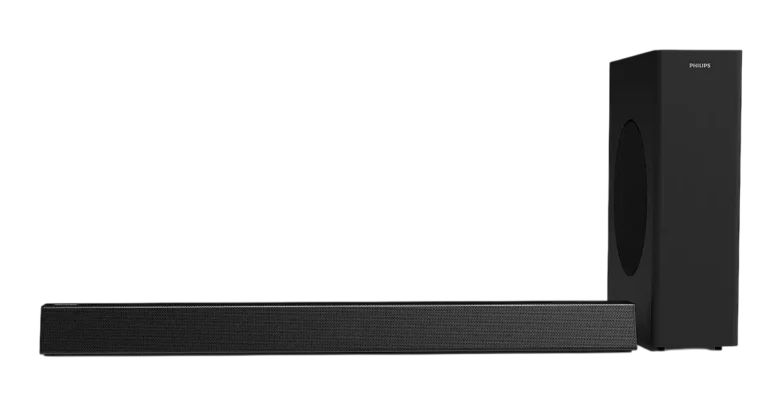
The Philips HTL3310 is a soundbar paired with a wireless subwoofer, designed to improve TV audio and play music from phones, USB drives, and other devices. The soundbar accepts HDMI ARC, optical, and 3.5 mm AUX connections, along with Bluetooth and USB playback. A small remote controls source selection, volume, and three EQ presets (Movie, Music, News). The soundbar can sit on a shelf or hang on a wall. The sections below cover connecting the system, pairing the subwoofer, daily use, and fixing common problems.
Product Specifications
| Item | Soundbar | Subwoofer |
| Power supply | 100–240 V~, 50/60 Hz | 100–240 V~, 50–60 Hz |
| Output power | 25 W x 4 (maximum, by speaker) | 60 W |
| Power consumption | 25 W | 20 W |
| Standby consumption | < 0.5 W | < 0.5 W |
| Frequency response | 120 Hz – 20 kHz | 40 Hz – 120 Hz |
| Impedance | 8 Ω x 2 | 4 Ω |
| Dimensions (W x H x D) | 800 x 67.3 x 81.7 mm | 120 x 403 x 300 mm |
| Weight | 1.6 kg | 4.1 kg |
| Operating temperature | 0°C – 45°C | 0°C – 45°C |
Other key figures (p. 15):
- Bluetooth: version 4.2 + EDR, profiles A2DP and AVRCP, 2402–2480 MHz, output ≤ 5 dBm.
- Subwoofer link: 2.4 GHz wireless, 2400–2483 MHz, maximum power 6 dBm.
- AUX input sensitivity: 500 mV.
- USB port: 5 V, 500 mA.
- Remote: 6 m range at 30°, CR2025 battery.
- Supported formats: Dolby Digital and LPCM 2ch over HDMI ARC and optical, SBC over Bluetooth, and MP3, WAV, and WMA over USB.
Parts and Controls
The front of the soundbar has the remote sensor, a standby indicator, and a source LED. Buttons for Source, Vol+/Vol-, and Standby-On are also on the unit. The source LED shows the active input:
- AUX/USB: lit for AUX, flashing for USB.
- BT: lit for Bluetooth.
- Optical: lit for optical.
- HDMI (ARC): lit for HDMI ARC.
The rear connectors are AC~ power, AUX, USB, HDMI ARC, and OPTICAL.
The remote has buttons for Standby-On, Mute, Previous/Next, Play/Pause, volume, EQ, and the source buttons (Aux, BT/Pair, Optical, HDMI ARC, USB). Previous/Next and Play/Pause work in USB and Bluetooth modes only.
The subwoofer has an AC~ socket, a PAIR button, and an indicator. The indicator lights when power is on. It blinks orange quickly while pairing, turns solid orange when pairing succeeds, and blinks orange slowly when pairing fails (p. 7).
Installation and Setup
Prepare the Remote
The remote ships with a CR2025 lithium battery already installed. Pull out the protective tab to activate it. To replace the battery:
- Push the tab on the side of the battery tray toward the tray.
- Slide the tray out of the remote.
- Remove the old battery and insert a new CR2025 with the polarity (+/-) matching the markings.
- Slide the tray back in.
Remove the battery if you won’t use the remote for more than a month, to prevent leakage.
Placement
Place the subwoofer at least 1 meter (3 feet) from the soundbar and 10 centimeters from the wall (p. 9). Leave at least four inches of open space around the soundbar for ventilation, and never let curtains or other objects cover the vents (p. 5).
Connect to Your TV
Disconnect all devices from the power outlet before making or changing connections. Choose one connection:
- HDMI ARC (preferred when your TV supports it): Use a High Speed HDMI cable from the soundbar’s HDMI OUT (ARC) – TO TV connector to the TV’s HDMI ARC input. Then turn on HDMI-CEC on the TV. The TV must support both HDMI-CEC and ARC, and both must be set to On. Only HDMI 1.4 compatible cables support ARC (p. 10).
- Optical: Connect an optical cable from the soundbar’s OPTICAL connector to the TV’s optical output. That output may be labeled SPDIF or SPDIF OUT.
- AUX: Use the included 3.5 mm to 3.5 mm cable from the TV’s headphone socket to the soundbar’s AUX socket. To use the TV’s red/white audio outputs instead, you need a 3.5 mm to RCA cable, which is not included.
Connect Power
Finish all other connections first. Check that your mains voltage matches the value printed on the back or bottom of each unit. Plug the soundbar and the subwoofer into the mains. Power cord quantity and plug type vary by region.
Pair the Subwoofer
Pairing is automatic. With both units plugged in, switch the soundbar on. The subwoofer indicator flashes quickly while pairing and turns solid when linked. Don’t press PAIR on the subwoofer unless you need manual pairing.
If the subwoofer is silent, pair it manually (p. 11):
- Unplug both units, then plug them back in after 3 minutes.
- Press and hold PAIR on the subwoofer for a few seconds. The indicator blinks rapidly.
- Switch the soundbar on. The indicator turns solid when pairing succeeds.
- If it keeps blinking, repeat steps 1–3.
Keep the subwoofer within 6 m of the soundbar in an open area, and clear any objects between them. If pairing fails again, look for strong interference from nearby electronics.
Using the Soundbar
Power and Standby
The soundbar starts in standby the first time it is plugged in. Press the Standby-On button on the unit or remote to turn it on or off. If a TV or external device is connected, the soundbar switches on automatically when that device does. It returns to standby after about 15 minutes if the connected TV or device is disconnected or switched off. To turn it off completely, pull the mains plug (p. 12).
Select a Source and Sound Mode
Press Source on the unit repeatedly, or press Aux, Optical, HDMI ARC, BT/Pair, or USB on the remote. Press EQ to cycle through the presets. All LEDs light for 0.5 seconds, then the LEDs show the current mode for 3 seconds: one LED for Movie, two for Music, three for News.
Volume
Use Vol+/Vol- to adjust the level, and Mute to silence or restore sound. The status LED flashes quickly while you adjust and slowly when you reach the minimum or maximum.
Bluetooth
You need a device that supports A2DP and AVRCP with Bluetooth 4.2 + EDR. The range is about 10 meters (30 feet).
- Switch to Bluetooth mode. The BT indicator flashes.
- On your phone, tablet, or laptop, turn on Bluetooth and select PHILIPS HTL3310.
- Wait for the voice prompt. The BT indicator turns solid when connected.
- Play audio on your device.
Music pauses during an incoming call and resumes when the call ends. To connect a different device, press and hold BT/Pair on the remote to disconnect the current one. The connection stays active when you leave Bluetooth mode and return to it.
USB Playback
Insert a USB storage device and select USB mode. The soundbar supports devices up to 32 GB and plays MP3, WAV, and WMA files. Use Play/Pause and Previous/Next on the remote.
AUX, Optical, and HDMI ARC
Select the matching source, then control playback on the connected device and set volume with Vol+/Vol-. If an optical or HDMI ARC source gives no sound and the status indicator flashes, switch the source device’s output to PCM or Dolby Digital (p. 14).
Wall Mounting
Poor mounting can cause accidents, injury, or damage. Confirm the wall can support the soundbar’s weight, and use only the supplied bracket if one is included (p. 4). Leave the four rubber feet on the soundbar, because they can’t be refitted once removed.
- Drill two holes in the wall.
- Secure the dowels and screws in the holes.
- Hang the soundbar on the screws.
The mounting illustration lists screw dimensions of more than 25 mm and 3.5–4 mm (p. 14). Refer to the quick start guide illustration for the full layout.
Safety and Care
- Keep the product away from rain, water, and liquid containers such as vases. If liquid spills in, unplug it and contact Consumer Care before use.
- Keep it away from open flames and heat sources, including direct sunlight.
- Never push objects into the vents.
- When unplugging, pull the plug, not the cable.
- If the product was transported below 5°C, let it reach room temperature before plugging it in.
- Parts may be made of glass, so handle with care.
- Clean only with a microfiber cloth.
- Keep coin or button batteries away from children. A swallowed battery can cause severe internal burns within two hours, so seek medical attention at once if one is suspected to be swallowed (p. 5).
- Never remove the casing, and don’t attempt repairs yourself, as that can void the warranty (p. 16).
Troubleshooting
| Problem | What to try |
| No power | Check the AC cord and the outlet, then press standby on the remote or unit. |
| No sound | Raise the volume, make sure Mute is off, and try a different source. For digital inputs, set the TV output to PCM or connect your source directly, since some TVs don’t pass digital audio through. Set the TV’s audio output to FIXED or STANDARD, not VARIABLE. For Bluetooth, turn up the volume on the source device. |
| Remote doesn’t work | Select the correct source first, move closer, aim at the front sensor, check battery polarity, or replace the battery. |
| Bluetooth name not found | Turn on Bluetooth on your device and re-pair it. |
| Unit shuts off after 15 minutes | The input signal is too low. Raise the volume of the external device. |
| Subwoofer idle or indicator off | Unplug it, wait 3 minutes, plug it back in. |
If problems continue, support is available at www.philips.com/welcome.
Frequently Asked Questions
How do I connect the HTL3310 to my TV?
Use HDMI ARC if your TV has an ARC input and supports HDMI-CEC. Otherwise use optical or the AUX cable. Make connections with everything unplugged, then plug in the soundbar and subwoofer.
Why is there no sound from the subwoofer?
Try manual pairing. Unplug both units for 3 minutes, hold PAIR on the subwoofer, then switch the soundbar on. A solid indicator means it is paired. Also keep the subwoofer within 6 m with nothing in between.
What is the Bluetooth name?
PHILIPS HTL3310. Select it from your device’s Bluetooth list while the soundbar is in Bluetooth mode.
Can I play music from a USB drive?
Yes. Use a drive up to 32 GB with MP3, WAV, or WMA files. The USB port provides 5 V and 500 mA.
Why does the soundbar turn itself off?
It enters standby after about 15 minutes when the connected TV or device is off or disconnected, or when the input signal is too low. Raise the external device’s volume if you want it to stay on.
Does it support Dolby Digital and DTS?
HDMI ARC and optical inputs support Dolby Digital and LPCM 2ch. DTS support isn’t listed.
What battery does the remote use?
A CR2025 3V lithium battery is pre-installed. Remove the protective tab before first use.