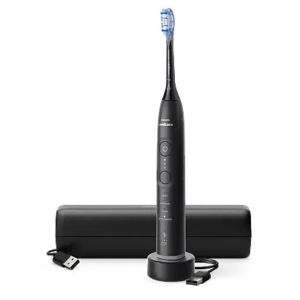
| Field | Details |
| Document Title | Philips Sonicare 6400–7400 User Manual |
| Document Type | User Manual |
| Brand Name | Philips |
| Product Name | Sonicare Rechargeable Electric Toothbrush |
| Model Number(s) | 6400–7400 Series |
| PDF File Size | 3 MB |
| Number of Pages | 74 |
| Languages | English, Spanish, French (Canada) |
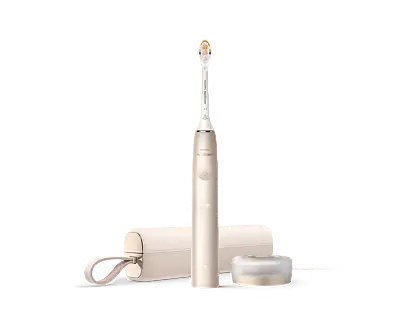
Philips Sonicare 7100 Series
The Philips Sonicare 7100 is a rechargeable electric toothbrush designed to remove plaque and food debris from teeth while supporting gum care and oral hygiene. It uses Sonicare brushing technology, multiple brushing modes, adjustable intensity settings, and smart sensors to guide daily brushing.
The toothbrush includes Bluetooth connectivity for use with the Sonicare app, which tracks brushing sessions, brushing duration, pressure, and brush head replacement needs. BrushSync technology allows compatible smart brush heads to communicate with the toothbrush handle and select an appropriate brushing mode and intensity.
The shared Philips Sonicare 6400–7400 instructions cover the product family that includes the 7100 Series. Available brushing modes and supplied accessories vary according to the toothbrush configuration.
These instructions explain initial setup, brush head installation, correct brushing technique, brushing modes, pressure sensor alerts, Bluetooth pairing, charging, battery indicator lights, cleaning, maintenance, storage, and warranty information.
Product Overview and Features
The Philips Sonicare electric toothbrush uses powered brush head movement and Sonicare fluid action to clean teeth and along the gumline.
The toothbrush includes an integrated pressure sensor to alert users when excessive brushing pressure is applied. Its built-in brushing timer and pacing system guide users through a complete brushing session.
Main Features
| Feature | Description |
| Sonicare brushing technology | Supports plaque removal and cleaning between teeth and along the gumline. |
| Multiple brushing modes | Up to four modes: Clean, Sensitive, White, and Gum Health. |
| Adjustable intensity | Three settings: Low, Medium, and High. |
| Pressure Sensor Feedback | Alerts users when excessive brushing pressure is applied. |
| BrushPacer | Divides the brushing cycle into timed sections. |
| SmarTimer | Automatically stops the toothbrush when the selected brushing cycle finishes. |
| EasyStart | Gradually increases brushing power over the first 14 sessions when activated. |
| BrushSync technology | Allows compatible smart brush heads to communicate with the handle. |
| Brush head replacement reminder | Indicates when a compatible brush head should be replaced. |
| Brush head mode pairing | Selects a recommended brushing mode and intensity for compatible heads. |
| Bluetooth connectivity | Connects the toothbrush to the Sonicare mobile app. |
| Sonicare app | Tracks brushing habits and provides personalized brushing feedback. |
| Rechargeable battery | Supports approximately 42 two-minute brushing sessions per full charge. |
| USB charging | Supports charging through the supplied USB charger. |
| Charging travel case | Available with certain configurations. |
Parts and Components
The Philips Sonicare toothbrush includes a rechargeable handle with integrated controls, indicator lights, and a removable brush head.
Toothbrush Components
| Part No. | Component | Function |
| 1 | Handle | Contains the rechargeable battery, motor, sensors, and electronic controls. |
| 2 | Power On/Off button | Starts, pauses, or switches off the toothbrush. |
| 3 | Intensity indicator | Displays the selected brushing intensity. |
| 4 | Mode/Intensity button | Changes the brushing mode or intensity. |
| 5 | Mode indicator | Shows the selected brushing mode. |
| 6 | Brush head replacement reminder | Indicates when a compatible brush head needs replacement. |
| 7 | Battery indicator | Displays charging and battery status. |
| 8 | Light ring | Provides visual feedback, including excessive brushing pressure alerts. |
Accessories
| Part No. | Accessory | Description |
| 9 | Brush head cap | Protective cap supplied for shipping. |
| 10 | Smart brush head | Removable brush head used for cleaning teeth and gums. |
| 11 | BrushSync symbol | Identifies a smart brush head that supports BrushSync technology. |
| 12 | USB charger | Charges the rechargeable toothbrush handle. |
| 13 | Travel case | Stores the toothbrush during travel. |
| 14 | Charging travel case | Holds and charges the toothbrush during travel. |
| 15 | USB cable | Connects the charging equipment to a compatible power source. |
Accessories vary according to the purchased model.
A wall adapter is not included. A compatible IPX4 splash-proof adapter may be used according to the electrical specifications and charging instructions.
Technical Specifications
| Specification | Details |
| Brand | Philips |
| Product family | Sonicare 6400–7400 |
| Product type | Rechargeable electric toothbrush |
| Intended use | Cleaning teeth, gums, and tongue |
| Brushing modes | Up to 4 |
| Available modes | Clean, Sensitive, White, Gum Health |
| Intensity settings | 3 |
| Default EasyStart setting | Disabled |
| Default pressure sensor setting | Enabled |
| BrushPacer | 6 timed sections |
| Clean mode duration | 2 minutes |
| Sensitive mode duration | 2 minutes |
| White mode duration | 2 minutes 40 seconds |
| Gum Health mode duration | 3 minutes 20 seconds |
| Battery type | Rechargeable lithium-ion |
| Estimated brushing sessions per charge | 42 two-minute sessions |
| Estimated battery use | 21 days when brushing twice daily |
| Initial full charging time | Up to 24 hours |
| Charging travel case charging time | Up to 48 hours |
| Wireless connectivity | Bluetooth |
| Smart brush head technology | BrushSync |
| USB charging supply | 5 V DC |
| Specified USB adapter output | 5 V DC, 2.5 W |
| Specified adapter input | 100–240 V AC, 50/60 Hz, 3.5 W |
| Operating and charging temperature | 0°C–40°C / 32°F–104°F |
| Storage and transportation temperature | −10°C–60°C / 14°F–140°F |
| Maximum operating altitude | 4500 meters |
| Recommended brush head replacement | Every 3 months or sooner if worn |
| Warranty | 2 years |
The battery-safety instructions also identify approved Philips HX6110 and HYTCxx charging equipment and safety-approved adapters with a 4.75–5.25 V DC, 1.5 W rating. Charging equipment must meet the applicable specifications provided with the product.
The exact HX model number is printed on the bottom of the toothbrush handle.
Important Safety Instructions
The Philips Sonicare toothbrush is an electrical personal care appliance containing a rechargeable lithium-ion battery.
Use it only for cleaning teeth, gums, and tongue.
Electrical and Charging Safety
- Use original Philips accessories and consumables.
- Use the original USB cable and power supply unit when supplied.
- Do not use the toothbrush if it is damaged.
- Stop using a damaged USB cable or power adapter.
- Keep the charger and charging travel case away from water.
- Make sure charging accessories are completely dry before connecting them to a power source.
- Do not use charging adapters outdoors or near heated surfaces.
- Do not clean any part of the product in a dishwasher.
- Do not attempt to open or repair the toothbrush.
The appliance contains no components intended for user servicing. Contact Philips Consumer Care if the toothbrush is damaged.
Battery Safety
- Keep the toothbrush and battery away from fire.
- Do not expose the product to direct sunlight or excessive heat.
- Do not place it in a microwave oven or on an induction cooktop.
- Do not open, puncture, modify, damage, or disassemble the rechargeable battery.
- Do not short-circuit, overcharge, or reverse-charge the battery.
- Stop using and charging the toothbrush if it becomes unusually hot, produces an unusual smell, changes color, or takes significantly longer than normal to charge.
- Contact Philips if an abnormal battery condition occurs.
The built-in lithium-ion battery is not user-replaceable.
Oral Health and Medical Precautions
The toothbrush is intended for individual use and should not be shared among multiple users.
Stop using it and consult a dentist or doctor if:
- Excessive bleeding occurs after brushing.
- Bleeding continues after one week of use.
- Brushing causes discomfort or pain.
Users with a pacemaker or another implanted medical device should consult their doctor or the device manufacturer before using the toothbrush.
Brush Head Safety
- Replace the brush head every three months or sooner if it becomes worn.
- Stop using a brush head with bent or crushed bristles.
- Avoid direct contact between the bristles and products containing essential oils or coconut oil, as these may cause bristles to become dislodged.
- Use genuine Philips Sonicare replacement brush heads.
Safety for Children
Children and people with reduced physical, sensory, or mental capabilities may use the toothbrush when they have received appropriate supervision or instructions and understand the associated risks.
Children must not clean or maintain the product without supervision.
Children should be supervised to prevent them from playing with the toothbrush.
Before First Use
Before using the Sonicare toothbrush for the first time, attach the brush head and charge the handle.
A full initial charge may take up to 24 hours. The toothbrush can be used before it reaches a full charge.
How to Attach the Brush Head
- Remove the toothbrush handle and brush head from the packaging.
- Align the brush head so its bristles face the same direction as the front of the handle.
- Position the brush head over the metal shaft.
- Push the brush head firmly downward until it will not move any further.
A small visible gap between the brush head and the handle is normal.
Initial Charging
- Connect the USB charger to a compatible power adapter.
- Plug the adapter into a wall outlet.
- Place the toothbrush handle on the charger.
- Check the battery indicator lights.
The handle emits two beeps when placed correctly for charging.
The battery lights flash while charging.
How to Use the Philips Sonicare Toothbrush
The toothbrush uses a powered brush head and a timed brushing cycle.
During brushing, gentle pressure should be applied while the brush head moves across the teeth.
Step-by-Step Brushing Instructions
- Wet the toothbrush bristles.
- Apply a small amount of toothpaste.
- Place the bristles against the teeth at approximately a 45-degree angle.
- Position the bristles so they reach the gumline or slightly beneath it.
- Keep the center of the brush head in contact with the teeth.
- Press the Power On/Off button to start brushing.
- Move the brush slowly with small back-and-forth movements.
- Allow the bristles to reach between the teeth.
- Continue following the timed brushing intervals.
- Move to the next section of the mouth when the BrushPacer signals.
- For the inside surfaces of the front teeth, tilt the handle into a semi-upright position.
- Use several overlapping vertical strokes on each front tooth.
- Continue brushing until the selected mode finishes.
- Allow the toothbrush to switch off automatically.
The bristles should flare slightly during brushing.
Do not scrub the teeth with the same force or movement used with a manual toothbrush.
Correct Brushing Pressure
Apply only gentle pressure.
If excessive pressure is detected:
- The handle changes its vibration.
- The brushing sound changes.
- The light ring at the bottom of the handle flashes purple.
Reduce pressure until the warning stops.
Using the Toothbrush for the First Time
New Sonicare users may notice stronger vibration compared with a manual toothbrush.
Philips recommends starting with a lower intensity setting for the first one to two weeks before moving to a higher setting.
Brushing Teeth with Braces or Dental Restorations
The toothbrush can be used on braces and dental restorations, including:
- Fillings.
- Crowns.
- Veneers.
Dental restorations must be properly attached and not compromised.
Brush heads may wear out sooner when used with braces.
Brushing Modes and Settings
The Philips Sonicare 6400–7400 family includes up to four brushing modes.
The modes available depend on the toothbrush configuration.
Brushing Mode Comparison
| Mode | Main Purpose | Recommended Intensity | Duration |
| Clean | Plaque removal | High | 2 minutes |
| Sensitive | Gentle brushing for sensitive teeth and gums | Low | 2 minutes |
| White | Plaque removal and surface stain cleaning | High | 2 minutes 40 seconds |
| Gum Health | Plaque removal and gum massage | High | 3 minutes 20 seconds |
Clean Mode
Clean mode is designed for regular plaque removal.
The brushing cycle lasts two minutes.
Use the BrushPacer to brush each of the six mouth sections for 20 seconds.
Sensitive Mode
Sensitive mode provides a gentler brushing experience for sensitive teeth and gums.
It uses a two-minute brushing cycle, with Low as the recommended intensity.
Brush each of the six sections for 20 seconds.
White Mode
White mode combines plaque removal with additional brushing for surface stains.
The cycle lasts two minutes and 40 seconds.
- Brush the six main mouth sections for 20 seconds each.
- Continue brushing the two additional sections for 20 seconds each.
The recommended intensity is High.
Gum Health Mode
Gum Health mode combines plaque removal with additional gum massage.
The cycle lasts three minutes and 20 seconds.
- Brush the six main sections for 20 seconds each.
- Continue with the four additional brushing sections.
- Spend 20 seconds on each additional section.
The recommended intensity is High.
How to Change the Brushing Mode
The brushing mode can be changed when the toothbrush is switched off.
- Make sure the toothbrush is off.
- Press the Mode/Intensity button.
- Continue pressing the button to move through the available modes.
- Stop when the desired mode is selected.
- Press Power On/Off to begin brushing.
All Philips Sonicare brush heads can operate with the available modes.
Compatible BrushSync smart brush heads can automatically select a recommended brushing mode.
Adjusting Brushing Intensity
The toothbrush provides three intensity settings.
| Intensity | Indicator Lights |
| Low | 1 light |
| Medium | 2 lights |
| High | 3 lights |
Philips recommends High intensity for optimal cleaning results.
How to Change Intensity
- Switch on the toothbrush.
- Press the Mode/Intensity button.
- Continue pressing until the required intensity is selected.
- Check the illuminated intensity indicator.
Important: Intensity can only be adjusted while the toothbrush is switched on.
Brushing mode selection and intensity adjustment use the same button but operate in different power states.
BrushPacer Brushing Timer
BrushPacer helps divide brushing time evenly across the mouth.
The standard brushing cycle is divided into six sections.
How BrushPacer Works
- Start brushing.
- Brush the first mouth section.
- After 20 seconds, the toothbrush briefly pauses its vibration.
- Move the brush head to the next section.
- Continue until all six sections have been brushed.
The six sections provide a total brushing time of two minutes.
Modes such as White and Gum Health add extra timed sections.
SmarTimer Function
SmarTimer controls the duration of each brushing session.
At the end of the selected brushing mode, the toothbrush automatically switches off.
Dental professionals recommend brushing for at least two minutes twice daily.
Pausing and Resuming Brushing
- Press Power On/Off while brushing.
- The toothbrush pauses.
- Press Power On/Off again within 30 seconds to continue the same brushing cycle.
If the pause lasts longer than 30 seconds, SmarTimer resets.
The next brushing session begins with a new timer cycle.
Pressure Sensor Feedback
The pressure sensor monitors how much force is applied during brushing.
It provides feedback when the pressure becomes excessive.
Purple Light Ring Meaning
When too much pressure is applied:
- The handle changes its vibration.
- The brushing sound changes.
- The light ring flashes purple.
- The warning continues until brushing pressure is reduced.
Pressure Sensor Feedback is enabled by default.
How to Turn Pressure Sensor Feedback On or Off
- Place the toothbrush on a plugged-in charger or charging travel case.
- Press and hold Power On/Off.
- Continue holding until the third group of beeps is heard, at approximately seven seconds.
- Release the button.
- Check the confirmation indicator.
A green confirmation indicates that the feature has been activated.
An amber confirmation indicates that the feature has been deactivated.
BrushSync Technology
BrushSync allows a compatible smart brush head to communicate with the toothbrush handle.
The technology uses a microchip in the brush head.
A BrushSync symbol near the bottom of a compatible brush head identifies this feature.
BrushSync Functions
BrushSync provides two main functions:
- Brush head replacement reminder.
- Automatic brush head mode pairing.
Automatic Mode Pairing
When a compatible smart brush head is attached, the toothbrush can automatically select the recommended mode and intensity.
| Smart Brush Head | Recommended Mode |
| Most BrushSync brush heads | Clean |
| S2 Sensitive | Sensitive |
| W3 Premium White | White |
| W DiamondClean (North America) | White |
| G3 Premium Gum Care | Gum Health |
If the user manually changes the mode or intensity, the selected smart brush head remembers the setting for future brushing sessions.
Brush Head Replacement Reminder
BrushSync tracks brush head wear using:
- Total brushing time.
- Pressure applied during brushing.
When the brush head replacement indicator turns amber, the brush head should be replaced.
The reminder only operates with compatible Philips Sonicare smart brush heads.
The replacement reminder is enabled by default on compatible smart brush heads.
EasyStart Function
EasyStart gradually increases brushing power over the first 14 brushing sessions.
This helps users become familiar with the Sonicare brushing sensation.
EasyStart works with all available brushing modes.
The feature is disabled by default.
How to Activate or Deactivate EasyStart
- Place the toothbrush handle on a plugged-in charger or charging travel case.
- Press and hold Power On/Off for approximately three seconds.
- Release the button after the first beep.
- Check the indicator confirmation.
The battery indicator confirms whether the feature has been activated or deactivated.
Activating and Deactivating Toothbrush Features
The following functions can be controlled directly from the toothbrush handle.
| Feature | Hold Power Button For | Release After |
| EasyStart | Up to 3 seconds | First beep |
| Brush Head Replacement Reminder | Up to 5 seconds | First beep followed by two beeps |
| Pressure Sensor Feedback | Up to 7 seconds | One beep, two beeps, then three beeps |
Feature Confirmation Lights
| Indicator Behavior | Meaning |
| Left battery LED flashes green twice and three tones rise from low to high | Feature activated |
| Left battery LED flashes amber once and three tones descend from high to low | Feature deactivated |
To change a feature:
- Place the handle on a powered charger or charging travel case.
- Hold Power On/Off for the required duration.
- Release the button after the corresponding beep sequence.
- Check the confirmation light and tones.
A compatible smart brush head must be attached when activating or deactivating the Brush Head Replacement Reminder.
Connecting the Toothbrush to the Sonicare App
The Sonicare app connects to the toothbrush using Bluetooth.
It provides brushing information and personalized recommendations based on data collected by the toothbrush’s smart sensors.
Sonicare App Features
The app can track:
- Daily brushing sessions.
- Duration of each brushing session.
- Brushing pressure.
- Brush head wear.
- Brush head replacement needs.
- Personalized brushing feedback.
How to Pair the Philips Sonicare Toothbrush with the App
- Download the Sonicare app to a compatible smartphone.
- Turn on Bluetooth on the phone.
- Pick up the toothbrush so its indicator lights illuminate.
- Open the Sonicare app.
- Follow the on-screen setup instructions.
- Pair the toothbrush with the app.
- Create a Sonicare app account.
- Complete any firmware update if prompted.
- Keep the phone close to the toothbrush for data transfer.
Manual Synchronization
To synchronize manually, connect the toothbrush to the Sonicare app approximately every two weeks.
Keep Bluetooth enabled during synchronization.
Automatic Synchronization
The app can automatically update brushing data when the phone is within the toothbrush’s connection range.
During app setup, location permission may be requested for automatic synchronization.
Allowing the permission enables the phone to recognize when it is within connection range and refresh brushing information.
The Sonicare Privacy Statement is available during app setup.
Charging the Philips Sonicare Toothbrush
The rechargeable battery can be charged through the USB charger or a compatible charging travel case.
A complete initial charge can take up to 24 hours.
Charging through the travel case may take up to 48 hours.
Charging with the USB Charger
- Connect the USB charging cable to a compatible wall adapter.
- Plug the adapter into a wall outlet.
- Connect the cable to the specified 5 V DC power supply.
- Place the toothbrush handle on the charger.
- Check the battery indicator.
When correctly placed:
- The handle emits two beeps.
- The battery indicator illuminates.
- The light ring illuminates.
- The handle lights illuminate upward from the bottom.
- The battery indicator flashes while charging.
Charging with the Travel Case
- Connect the USB cable to the charging travel case.
- Connect the cable to a compatible 5 V DC power supply.
- Place the toothbrush handle inside the charging case.
- Check the charging indicators.
The handle emits two short beeps when it is properly positioned.
The battery indicator flashes while charging.
When charging is complete, the indicator displays green for 30 seconds before switching off.
Battery Status and Indicator Lights
The battery indicator shows different signals depending on whether the toothbrush is connected to a charger.
Battery Status While Charging
| Battery Status | Indicator Lights | Color |
| Low | 1 flashing LED | Green |
| Partially charged | 2 flashing LEDs | Green |
| Full or nearly full | 3 flashing LEDs | Green |
| Charging complete | Green light remains on for 30 seconds, then switches off | Green |
Battery Status When Not Charging
| Battery Status | Indicator Lights | Sound |
| Full | 3 solid green LEDs | — |
| Partially full | 2 solid green LEDs | — |
| Medium low | 1 solid green LED | — |
| Low | 1 flashing amber LED | 3 beeps after brushing |
| Empty | 1 flashing amber LED | 2 sets of 5 beeps |
The battery indicator switches off when the toothbrush is not in use to conserve energy.
If the battery becomes completely empty, the toothbrush switches off.
Place the toothbrush on the charger to recharge it.
How Long Does the Battery Last?
The toothbrush is designed to provide an average of 42 two-minute brushing sessions on a full charge.
When used twice daily for two minutes, this corresponds to approximately 21 days of brushing.
The toothbrush may remain on its charger when not in use to keep the battery charged.
Cleaning Instructions
Regular cleaning helps remove toothpaste residue and keeps the brush head, handle, and charging accessories clean.
Important: Do not clean any part of the toothbrush or its accessories in a dishwasher.
Cleaning the Toothbrush Handle
- Remove the brush head.
- Rinse the metal shaft area and buttons using warm water.
- Gently remove toothpaste residue from the handle and around the buttons.
- Wipe the handle using a damp cloth.
- Dry the handle with a soft cloth or towel.
Clean the metal shaft area and buttons at least once per week, preferably after every use.
Do not use sharp objects around the rubber seal or buttons.
Do not tap the handle against the sink to remove excess water.
Cleaning the Brush Head
- Rinse the brush head and bristles after every use.
- Remove the brush head from the handle at least once a week.
- Rinse the brush head connection with warm water.
- Allow the brush head to dry.
The brush head cap supplied for shipping is not intended for continued use.
If cleaning the cap, rinse it when necessary and allow it to air-dry. Use it only on a dry brush head.
Cleaning the Charger
- Unplug the charger.
- Wipe its exterior using a damp cloth.
- Dry it with a soft cloth or towel.
- Make sure it is completely dry before reconnecting it to power.
Cleaning the Travel Case
- Rinse the travel case with warm water.
- Use a damp cloth to clean its surfaces.
- Allow the case to air-dry.
Cleaning the Charging Travel Case
- Disconnect the charging travel case from the electrical supply.
- Wipe the surface with a damp cloth.
- Allow it to air-dry completely before reconnecting it.
Maintenance Instructions
Regular maintenance includes replacing worn brush heads, cleaning toothpaste residues, monitoring the battery, and checking charging accessories.
Maintenance Schedule
| Maintenance Task | Frequency | Instructions |
| Rinse brush head | After every use | Rinse the bristles thoroughly. |
| Clean handle and metal shaft | At least weekly; preferably after each use | Rinse and wipe away toothpaste residue. |
| Clean brush head connection | At least weekly | Remove brush head and rinse with warm water. |
| Replace brush head | Every 3 months or sooner if worn | Use a genuine Philips Sonicare brush head. |
| Check brush head wear indicator | When illuminated | Replace the brush head if the indicator is amber. |
| Clean charger | As needed | Unplug, wipe with damp cloth, and dry. |
| Clean travel case | As needed | Rinse and air-dry. |
| Sync the Sonicare app manually | Approximately every 2 weeks | Connect through Bluetooth. |
Replacing the Brush Head
Philips recommends replacing the brush head every three months or earlier if visible wear develops.
To replace it:
- Remove the existing brush head from the handle.
- Align a genuine Philips Sonicare replacement brush head with the metal shaft.
- Push it down firmly until it stops.
- Check that the brush head is correctly attached.
For BrushSync-compatible heads, the toothbrush recognizes the replacement and begins tracking its usage.
Finding the Exact Toothbrush Model Number
The model number is located on the bottom of the toothbrush handle.
Philips Sonicare model numbers begin with the letters HX.
The manual uses HX123A as an example of the model-number format.
Use the model number printed on the handle when requesting service or looking for compatible accessories.
Storage Instructions
If the toothbrush will not be used for an extended period:
- Disconnect the charging equipment from the electrical outlet.
- Clean the toothbrush and its accessories.
- Make sure the brush head and handle are dry.
- Store the toothbrush in a cool, dry place.
- Keep it away from direct sunlight.
Storage and Transportation Temperature
The specified storage and transportation temperature range is:
−10°C to +60°C (14°F to 140°F).
The operating and charging temperature range is 0°C to 40°C (32°F to 104°F).
Indicator Lights and Troubleshooting
The Sonicare toothbrush communicates operating conditions through colored lights, sound signals, and changes in vibration.
Indicator and Troubleshooting Guide
| Indicator or Problem | Meaning | Recommended Action |
| Light ring flashes purple during brushing | Excessive brushing pressure | Reduce the pressure applied to the teeth and gums. |
| Brush head replacement indicator is amber | Brush head needs replacement | Install a genuine Philips Sonicare replacement brush head. |
| Battery indicator flashes amber with 3 beeps | Battery level is low | Place the toothbrush on the charger. |
| Battery indicator flashes amber with two sets of 5 beeps | Battery is empty | Recharge the toothbrush. |
| Battery indicator flashes green while on charger | Battery is charging | Continue charging. |
| Charging indicator becomes green for 30 seconds, then switches off | Charging is complete | The toothbrush is fully charged. |
| Toothbrush stops at the end of a brushing cycle | SmarTimer has completed the selected mode | The timed brushing session is finished. |
| Toothbrush timer starts a new session after a long pause | A pause exceeded 30 seconds | SmarTimer resets after a pause longer than 30 seconds. |
| BrushSync reminder does not operate with a brush head | Replacement reminder requires a compatible smart brush head | Use a Philips Sonicare smart brush head with BrushSync technology. |
| Brushing data needs updating in the app | Synchronization is required | Enable Bluetooth, keep the phone nearby, and sync with the Sonicare app. |
Why Is the Sonicare Light Ring Flashing Purple?
The purple light indicates that too much pressure is being applied during brushing.
The handle also changes its sound and vibration.
Reduce brushing pressure until the warning stops.
Why Is the Toothbrush Flashing Amber?
An amber battery light indicates either low or empty battery status.
- Three beeps after brushing indicate a low battery.
- Two sets of five beeps indicate an empty battery.
Place the toothbrush on the charger.
An amber light at the brush head replacement indicator has a different meaning: the brush head needs replacement.
Why Does the Sonicare Toothbrush Stop Automatically?
The SmarTimer switches off the toothbrush when the selected brushing cycle is complete.
The duration depends on the selected mode.
Clean and Sensitive run for two minutes, White for two minutes and 40 seconds, and Gum Health for three minutes and 20 seconds.
Why Is the Toothbrush Vibration Stronger Than Expected?
New Sonicare users may notice stronger vibration than with a manual toothbrush.
Philips recommends using a lower intensity setting for the first one to two weeks.
The intensity can be increased after becoming familiar with the toothbrush.
Why Is BrushSync Not Tracking the Brush Head?
BrushSync replacement tracking requires a compatible Philips Sonicare smart brush head.
Compatible heads have the BrushSync symbol.
The replacement reminder function is available only when a compatible smart brush head is attached.
Why Is Brushing Data Not Updating in the App?
The Sonicare app requires Bluetooth connectivity to exchange brushing data.
For synchronization:
- Turn on Bluetooth on the phone.
- Activate the toothbrush by picking it up.
- Open the Sonicare app.
- Keep the phone close to the toothbrush.
- Connect the toothbrush to the app.
Philips recommends manually syncing approximately every two weeks when automatic synchronization is not used.
Replacement Brush Heads and Accessories
Philips recommends using genuine Sonicare brush heads and charging accessories.
Compatible Brush Head Types
The manual identifies the following BrushSync-compatible smart brush heads.
| Brush Head | BrushSync Mode Pairing |
| S2 Sensitive | Sensitive |
| W3 Premium White | White |
| W DiamondClean (North America) | White |
| G3 Premium Gum Care | Gum Health |
Other smart brush heads generally pair with Clean mode.
Brush Head Replacement
Replace the brush head every three months or sooner if:
- The bristles become bent.
- The bristles are crushed.
- The brush head shows visible wear.
- The amber replacement reminder illuminates.
Original Philips Sonicare brush heads are recommended for optimal performance.
Official brush head information:
https://www.philips.com/toothbrush-heads
Battery Disposal and Recycling
The toothbrush contains a rechargeable lithium-ion battery.
Electrical products and rechargeable batteries must not be discarded with ordinary household waste.
Follow local regulations for electronic waste and battery recycling.
Battery Removal
The built-in rechargeable battery must be removed by a qualified professional when the toothbrush is discarded.
Before removal, the battery must be completely discharged.
Battery removal instructions are available through the Philips support website using the exact HX model number printed on the toothbrush handle.
Do not attempt to open or dismantle the battery during normal use.
Battery Recycling Information
| Service | Contact |
| Battery Recycling Program | https://www.call2recycle.org |
| Recycling Telephone | 1-800-822-8837 |
| Philips Recycling Information | https://www.recycle.philips.com |
| Philips Support | https://www.philips.com/support |
If a battery is damaged or leaking, avoid contact with skin and eyes.
If contact occurs, rinse immediately with water and seek medical care.
Warranty Information
Two-Year Limited Warranty
Philips provides a two-year warranty from the date of purchase.
Defects resulting from faulty materials or workmanship may be repaired or replaced by Philips when valid proof of purchase is provided during the warranty period.
Warranty Exclusions
The warranty does not cover:
- In-mouth attachments, including brush heads and nozzles.
- Damage caused by unauthorized replacement parts or brush heads.
- Damage caused by misuse, abuse, or neglect.
- Alterations or unauthorized repairs.
- Normal wear and tear, including chips, scratches, abrasions, discoloration, and fading.
Using non-genuine brush heads may damage the toothbrush and limit warranty protection.
Warranty Limitations
The warranty limits certain implied warranties to the duration of the express warranty, where allowed by law.
Philips also excludes liability for certain special, incidental, and consequential damages where permitted by applicable law.
Legal rights may vary according to the state or jurisdiction.
Customer Support Information
Philips provides toothbrush support, product information, and warranty assistance through its official customer service channels.
| Support Service | Contact |
| Official Support Website | https://www.philips.com/support |
| Philips Sonicare Website | https://www.philips.com/Sonicare |
| Canada Sonicare Website | https://www.philips.ca/sonicare |
| Replacement Brush Heads | https://www.philips.com/toothbrush-heads |
| North America Consumer Care | 1-800-682-7664 |
| Recycling Information | https://www.recycle.philips.com |
Manufacturer Information
Philips Oral Healthcare, LLC
22100 Bothell Everett Highway
Bothell, WA 98021
United States
When contacting support, use the exact HX model number printed on the bottom of the toothbrush handle.
Frequently Asked Questions
How do I use the Philips Sonicare 7100 toothbrush?
Attach the brush head, wet the bristles, and apply a small amount of toothpaste. Place the brush against the teeth at approximately 45 degrees and press Power On/Off. Move the brush gently along the teeth and gumline, following the BrushPacer intervals. The toothbrush automatically stops when the selected brushing cycle finishes.
How do I change the brushing mode on the Philips Sonicare 7100?
Switch off the toothbrush and press the Mode/Intensity button to move through the available brushing modes. Select the required mode before switching the toothbrush on. The shared manual describes Clean, Sensitive, White, and Gum Health modes, with availability depending on the configuration.
What does the purple light mean on the Philips Sonicare 7100?
A flashing purple light ring indicates excessive brushing pressure. The toothbrush also changes its sound and vibration. Reduce the pressure until the alert stops.
How long does it take to charge the Philips Sonicare 7100?
A full charge may take up to 24 hours using the USB charger. Charging with a compatible charging travel case may take up to 48 hours. The toothbrush can be used before the initial charge is complete.
How long does the Philips Sonicare 7100 battery last?
A fully charged battery is designed to provide approximately 42 two-minute brushing sessions, equivalent to about 21 days when used twice daily. Battery duration is based on the operating conditions described in the manual.
How do I connect the Philips Sonicare 7100 to my phone?
Download the Sonicare app, enable Bluetooth, and pick up the toothbrush to activate its indicators. Open the app, follow the pairing instructions, and create an account. Keep the phone near the toothbrush for data transfer and synchronize regularly.
How do I reset or change the EasyStart and pressure sensor settings?
Place the toothbrush on a powered charger. Hold Power On/Off for approximately three seconds to change EasyStart or seven seconds to change Pressure Sensor Feedback. Release the button after the corresponding beep sequence. Green confirmation indicates activation, while amber confirmation indicates deactivation.
How often should I replace the Philips Sonicare 7100 brush head?
Replace the brush head every three months or sooner if its bristles become bent, crushed, or visibly worn. With a compatible BrushSync smart brush head, an amber replacement indicator signals when a new brush head is needed.