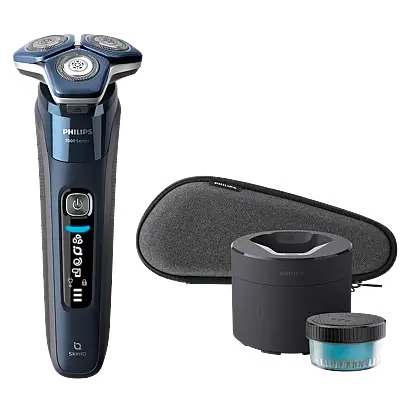
Philips Norelco Tripleheader Shaver S7885
The Philips Norelco S7000 Tripleheader Shaver is a rechargeable rotary electric shaver designed for wet and dry facial shaving. It features three shaving heads, SenseIQ technology, Bluetooth connectivity, a built-in pop-up trimmer, battery status indicators, and a travel lock.
The shaver can be used on dry skin or with shaving foam or gel. Its waterproof construction also allows cordless shaving in the bath or shower and cleaning under running water.
SenseIQ technology detects beard density and shaving technique. When paired with a compatible smartphone, the shaver can synchronize shaving data and provide personalized guidance through the Philips app. Its Motion Control sensor also provides feedback about circular shaving movements.
The Philips Norelco S7000 provides up to 60 minutes of cordless operation after approximately one hour of charging. A five-minute quick charge supplies enough power for one complete shave.
The S7000 product family includes models S7885, S7886, S7887, and S7889. Accessories vary by configuration. Models S7885 and S7886 include the Quick Clean Pod, while model S7887/92 includes a nose and ear trimmer attachment.
These operating instructions cover product setup, charging, shaving techniques, SenseIQ feedback, Bluetooth pairing, trimming, cleaning, Quick Clean Pod operation, SH71 shaving head replacement, maintenance, troubleshooting, and warranty service.
Product Overview and Features
The Philips Norelco S7000 uses three rotary shaving heads designed to follow the contours of the face while cutting hairs growing in different directions.
The shaver combines cordless operation with Bluetooth-enabled shaving guidance and maintenance reminders.
Main Features
| Feature | Description |
| Tripleheader rotary shaving system | Uses three rotary shaving heads for facial hair removal. |
| SenseIQ technology | Detects beard density and shaving technique. |
| Motion Control sensor | Evaluates shaving movements and provides feedback. |
| Bluetooth connectivity | Connects the shaver to a compatible smartphone. |
| Personalized shaving guidance | Provides guided shaving sessions and recommendations through the app. |
| Wet and dry shaving | Supports dry shaving or shaving with water, foam, or gel. |
| Waterproof construction | Allows use in the bath or shower and cleaning under running water. |
| Pop-up trimmer | Trims sideburns, moustache, and hair beneath the nose. |
| Battery status indicator | Uses three lights to display battery and charging status. |
| Quick charge | Five minutes of charging provides enough power for one shave. |
| Travel lock | Prevents accidental activation during storage or transportation. |
| Cleaning reminder | Indicates when the shaver should be cleaned. |
| Shaving head replacement reminder | Indicates when replacement shaving heads are required. |
| Quick Clean Pod | Automatic cleaning system included with S7885 and S7886. |
| Rechargeable battery | Provides up to 60 minutes of cordless operation. |
| Replaceable shaving heads | Uses original Philips Norelco SH71 shaving heads. |
Included Accessories by Model
The accessories supplied with the Philips Norelco S7000 depend on the specific model.
Model and Accessory Compatibility
| Accessory | Applicable Models |
| Charging stand | S7885, S7887/92, S7889/91 |
| Quick Clean Pod | S7885, S7886 |
| Quick Clean Pod cartridge | S7885, S7886 |
| Travel case | S7885, S7886, S7887/92, S7889/91 |
| Protective cap | S7887/82 |
| Nose and ear hair trimmer | S7887/92 |
| USB charging cable | Included in the product’s general component description |
| Cleaning brush | Identified in the product’s component diagram |
The nose and ear trimmer, Quick Clean Pod, and charging stand are model-specific accessories.
Parts and Components
The Philips Norelco S7000 includes a rechargeable handle, shaving unit, operating button, charging connection, and removable accessories.
Shaver Components
| Part No. | Component | Function |
| 1 | Pop-up trimmer | Trims sideburns, moustache, and facial hair edges. |
| 2 | Trimmer release slide | Opens the built-in pop-up trimmer. |
| 3 | Shaving unit | Contains the three rotary shaving heads. |
| 4 | Shaving unit release button | Opens the shaving unit for cleaning. |
| 5 | On/Off button | Switches the shaver on or off and controls the travel lock. |
| 6 | Handle | Contains the motor, battery, and electronic controls. |
| 7 | Socket for small plug | Connects the USB charging cable. |
| 8 | Charging stand | Holds the shaver while charging on supported models. |
| 9 | USB cable | Connects the shaver to a compatible USB power source. |
| 10 | Protection cap | Protects the shaving heads on model S7887/82. |
| 11 | Travel case | Stores the shaver on supported models. |
| 12 | Quick Clean Pod cartridge | Contains cleaning fluid for the Quick Clean Pod. |
| 13 | Quick Clean Pod | Provides automatic shaving head cleaning. |
| 14 | Cleaning brush | Removes hair and debris during maintenance. |
| 15 | Nose and ear hair trimmer | Trims nose and ear hair on model S7887/92. |
Internal Shaving Unit Components
| Component | Function |
| Shaving head holder | Holds the three shaving heads. |
| Cutters | Cut facial hair during operation. |
| Guards | Surround the cutters and guide hair into the cutting system. |
| Retaining rings | Secure the individual shaving heads. |
| Hair chamber | Collects hair removed during shaving. |
| Shaving unit hinge | Connects the shaving head holder to the shaving unit. |
Each cutter and guard forms a matching set. Keep the original pairs together when cleaning.
Technical Specifications
| Specification | Details |
| Brand | Philips Norelco |
| Product | S7000 Tripleheader Shaver |
| Models | S7885, S7886, S7887, S7889 |
| Product type | Rechargeable rotary electric shaver |
| Shaving heads | 3 |
| Shaving operation | Wet and dry |
| Waterproof | Yes |
| Shower use | Supported |
| Operating method | Cordless only |
| SenseIQ technology | Supported |
| Motion Control sensor | Supported |
| Bluetooth | Class 2 |
| Smartphone compatibility | Bluetooth 4.1 or higher |
| Bluetooth frequency | 2.4 GHz |
| Maximum radio frequency power | Less than 20 dBm |
| Battery type | Rechargeable lithium-ion |
| Full charging time | Approximately 1 hour |
| Quick charging time | Approximately 5 minutes |
| Quick charge capacity | Enough energy for 1 shave |
| Maximum cordless runtime | Up to 60 minutes |
| Battery indicator | 3 charging lights |
| USB charging voltage | 5 V |
| Minimum USB charging current | 1 A |
| Suitable power source example | Philips HQ87 |
| Charging power source protection for moist environments | IPX4 splash-proof |
| Charging, operating, and storage temperature | 10°C–35°C (50°F–95°F) |
| Travel lock | Supported |
| Quick Clean Pod cycle | Approximately 1 minute |
| Thorough shaving head cleaning | Once per month |
| Shaving head replacement interval | Every 24 months |
| Replacement shaving heads | Philips Norelco SH71 |
| Replacement cleaning cartridge | Philips Norelco CC12 |
| Product warranty | 2 years |
| Money-back guarantee | 45 days, subject to return conditions |
Important Safety Instructions
The Philips Norelco S7000 contains electrical components and a rechargeable lithium-ion battery.
Follow the safety instructions to reduce the risk of electric shock, fire, burns, and personal injury.
Electrical Safety
- Read all instructions before using the shaver.
- Use only a certified USB power source rated at 5 V and at least 1 A.
- When charging in a moist environment, use an IPX4 splash-proof USB power source.
- Keep the USB cable and power source dry.
- Do not place charging equipment where it could fall into a bathtub or sink.
- Do not immerse the charging stand or USB power source in water.
- If a connected product falls into water, disconnect it from the electrical outlet before attempting to retrieve it.
- Never use the shaver while connected to charging power.
- Disconnect the USB power source before cleaning.
- Do not use a damaged USB cable or power source.
- Keep charging equipment away from heated surfaces.
- Do not use an extension cord.
- Plug the USB power source directly into an electrical outlet.
- Do not use the power source near an electrical outlet containing an electric air freshener.
- Do not charge or connect the product outdoors.
- Do not operate the product where aerosol sprays are being used or oxygen is being administered.
Warning: The shaver is waterproof, but it must only be used without a charging cable connected.
General Safety Precautions
- Use the shaver only for its intended household purpose.
- Do not use attachments that Philips has not recommended.
- Check the cutters and guards before every use.
- Do not use damaged shaving heads, as they may cause injury.
- Do not insert objects into the product’s openings.
- Do not use the shaver if it has been dropped, damaged, or is not operating correctly.
- Use original Philips replacement parts and consumables.
- Do not share the shaver with multiple users for hygiene reasons.
- Avoid excessive pressure during shaving.
Battery Safety
The shaver contains a rechargeable lithium-ion battery.
- Do not open, puncture, modify, or dismantle the battery.
- Do not expose the battery to fire.
- Do not heat the battery above 100°C (212°F).
- Do not place the shaver or battery in a microwave oven or on an induction cooker.
- Do not short-circuit, overcharge, or reverse-charge the battery.
- Keep the shaver away from direct sunlight and excessive heat.
- Charge, use, and store the product between 10°C and 35°C (50°F and 95°F).
- Stop using and charging the shaver if it becomes abnormally hot, produces an unusual smell, changes color, or takes longer than normal to charge.
- Contact Philips if abnormal battery behavior occurs.
If a battery becomes damaged or leaks, avoid contact with the skin and eyes. If contact occurs, immediately rinse with water and seek medical attention.
Bluetooth and Medical Device Safety
The shaver contains Bluetooth wireless technology.
Bluetooth radio waves may interfere with pacemakers and other implanted medical devices.
Users with implanted medical devices should consult a physician and maintain a distance of at least 20 cm (8 inches) from the device.
Safety for Children
The shaver is not intended for use by children or people with reduced physical, sensory, or mental capabilities unless they have received appropriate supervision or instructions from a responsible person.
Children must be supervised to prevent them from playing with the product.
Quick Clean Pod Fluid Safety
The Quick Clean Pod cartridge contains cleaning fluid.
- Keep the cartridge out of reach of children.
- Do not swallow the cleaning fluid.
- Follow the instructions and warnings on the cartridge packaging.
- Seek medical assistance if necessary and show the cartridge packaging or label when possible.
- Store cleaning cartridges in closed packaging in a frost-free location.
Before First Use
Before using the shaver for the first time, inspect the product and charge the battery.
Initial Setup Instructions
- Remove the shaver and supplied accessories from the packaging.
- Check the shaving heads and attachments for visible damage.
- Make sure the shaver is switched off.
- Connect the USB charging cable to a suitable power source.
- Charge the battery until the indicator shows a full charge.
- Disconnect the charging cable before using the shaver.
- Switch on the shaver using the On/Off button.
A complete charge takes approximately one hour.
The shaver can also provide enough power for one shave after approximately five minutes of charging.
Initial Smartphone Setup
The shaver supports Bluetooth pairing with compatible smartphones.
To connect the shaver to the Philips app:
- Download the app using the QR code provided in the manual.
- Enable Bluetooth on the smartphone.
- Switch on the shaver.
- Open the app.
- Follow the on-screen pairing instructions.
The smartphone must support Bluetooth 4.1 or higher.
Charging the Philips Norelco S7000
The S7000 shaver uses USB charging.
The USB power source is not included.
A suitable source, such as Philips HQ87, must provide 5 V and at least 1 A.
How to Charge the Shaver
- Make sure the shaver is switched off.
- Insert the small plug of the USB cable into the socket at the bottom of the shaver.
- Connect the USB plug to a certified USB power source.
- Plug the USB power source into an electrical outlet.
- Check the battery indicator lights.
- Allow the shaver to charge.
- After charging, disconnect the USB power source from the outlet.
- Remove the small plug from the shaver.
Charging Time and Battery Life
| Charging Information | Details |
| Full charging time | Approximately 1 hour |
| Quick charging time | Approximately 5 minutes |
| Quick charge capacity | 1 full shave |
| Maximum cordless shaving time | Up to 60 minutes |
Five-Minute Quick Charge
When the battery is nearly empty:
- Connect the switched-off shaver to a suitable USB power source.
- Allow it to charge for approximately five minutes.
- Check the bottom battery indicator.
- When the bottom light begins flashing, enough power is available for one shave.
- Disconnect the charging cable before using the shaver.
Charging with the Stand
Applicable to S7885, S7887/92, and S7889/91.
- Make sure the shaver is switched off.
- Insert the small plug of the USB cable into the charging stand.
- Connect the USB cable to a suitable power source.
- Plug the power source into an electrical outlet.
- Place the shaver on the charging stand.
- Allow the battery to charge.
- After charging, disconnect the USB power source.
Important: Keep the USB cable, USB power source, and charging equipment dry.
Battery Charging Indicators
The shaver uses three battery indicator lights.
Charging Status
| Indicator | Meaning |
| Bottom light flashes | Charging has started. |
| Bottom light becomes solid and second light begins flashing | Battery charging is progressing. |
| Lights flash and become solid sequentially | Battery level is increasing. |
| All three lights remain solid | Battery is fully charged. |
| All charging lights switch off after approximately 30 minutes | Normal energy-saving behavior after full charging. |
| Bottom light flashes orange | Battery is almost empty. |
Low Battery Indicator
When the battery is almost empty, the bottom battery status light flashes orange.
Recharge the shaver when this indication appears.
Fully Charged Indicator
When the battery is fully charged, all three indicator lights illuminate continuously.
The lights automatically switch off after approximately 30 minutes.
Unplug-for-Use Symbol
If the shaver is connected to electrical power, the unplug-for-use symbol flashes when operation is attempted.
Disconnect the charging cable before switching on the shaver.
How to Use the Philips Norelco S7000
The Philips Norelco S7000 is designed for wet and dry facial shaving.
During shaving, move the three rotary heads across the skin using small circular movements.
Basic Shaving Instructions
- Make sure the shaver is disconnected from charging equipment.
- Check that the shaving heads are clean and undamaged.
- Press the On/Off button.
- Place the shaving heads against the skin.
- Move the shaver gently using circular movements.
- Keep all three shaving heads in contact with the skin.
- Apply gentle pressure.
- Continue until the required areas have been shaved.
- Switch off the shaver.
- Clean the shaving unit.
Important: Do not press excessively against the skin. Too much pressure may cause irritation.
Shaving Difficult-to-Reach Areas
Use the narrow sides of the shaving unit to shave areas such as:
- Along the jawline.
- Under the nose.
Move the shaving heads carefully while maintaining contact with the skin.
Dry Shaving Instructions
The Philips Norelco S7000 can be used without shaving foam, shaving gel, or water.
How to Dry Shave
- Make sure the shaving heads are clean.
- Disconnect the USB charging cable.
- Press On/Off to start the shaver.
- Place the shaving heads against the face.
- Move the shaver using small circular movements.
- Keep each shaving head in contact with the skin.
- Avoid excessive pressure.
- Continue until shaving is complete.
- Switch off and clean the shaver.
Wet Shaving Instructions
The waterproof Philips Norelco S7000 supports wet shaving with water, shaving foam, or shaving gel.
How to Wet Shave
- Disconnect the shaver from electrical power.
- Apply water to the face.
- Apply shaving foam or gel.
- Rinse the shaving heads under warm running water.
- Switch on the shaver.
- Move the shaving heads gently over the skin in circular movements.
- Keep all shaving heads in contact with the skin.
- Rinse the shaving unit regularly during shaving.
- Switch off the shaver when finished.
- Rinse away all remaining foam or shaving gel.
- Clean the shaving unit.
Shaving in the Shower
The S7000 is waterproof and suitable for use in the bath or shower.
Warning: Never use the shaver while connected to the USB charging cable.
SenseIQ Technology
The Philips Norelco S7000 includes SenseIQ technology.
SenseIQ detects beard density and shaving technique to provide information about shaving performance.
When connected to the Philips app, the shaver can provide personalized guidance based on shaving habits.
SenseIQ Functions
| Function | Description |
| Beard density detection | Detects beard density during shaving. |
| Shaving technique monitoring | Monitors shaving movements. |
| Motion Control feedback | Indicates whether circular shaving movements are being used. |
| Guided shaving | Provides real-time shaving guidance through the app. |
| Synchronized shaving | Stores shaving data for later synchronization. |
| Personalized programs | Provides recommendations based on shaving habits. |
Guided Shaving
Guided shaving provides real-time feedback through the app.
Philips recommends starting with guided shaving to become familiar with the recommended shaving technique.
Synchronized Shaving
The shaver can store shaving data without requiring the smartphone to be nearby during every shave.
When the app is opened near the paired shaver, the latest shaving data can be synchronized.
Motion Control Sensor and Color Indicators
The Motion Control sensor provides feedback about shaving movements.
After shaving, its icon displays a color indicating how the shaving technique was performed.
Motion Control Indicator Guide
| Indicator | Meaning | Recommended Action |
| Green Motion Control icon | Correct circular shaving movements were used. | Continue using circular movements. |
| Orange Motion Control icon | Shaving movement can be improved. | Open the app for personalized guidance. |
| SenseIQ indicator illuminated | SenseIQ is detecting shaving behavior. | Continue shaving normally. |
Correct Shaving Technique
Use small circular movements so the rotary shaving heads can capture hair growing in different directions.
Avoid using only long, straight strokes.
The green indicator confirms that the recommended circular movement was used.
21-Day Shaving Adaptation Period
The skin and beard may need time to adjust to a new Philips Norelco shaving system.
During the first few shaving sessions:
- The shave may not initially feel as close as expected.
- Mild facial irritation may occur.
- The skin may need time to become familiar with rotary shaving.
Philips recommends using the new shaver exclusively for three weeks.
Alternating between different shaving methods during this period may make adjustment more difficult.
If the shaving results remain unsatisfactory after 21 days, the product may qualify for the 45-day money-back guarantee, subject to its return conditions.
Using the Pop-Up Trimmer
The Philips Norelco S7000 includes a built-in pop-up trimmer.
The trimmer can be used to groom:
- Sideburns.
- Moustache.
- Hair beneath the nose.
Pop-Up Trimmer Instructions
- Push the trimmer release slide downward.
- Open the pop-up trimmer.
- Switch on the shaver.
- Hold the trimmer perpendicular to the skin.
- Move the trimmer downward using gentle pressure.
- Continue trimming the required area.
- Switch off the shaver.
- Clean the trimmer after use.
- Close the trimmer.
Using the Nose and Ear Trimmer
Applicable to model S7887/92 only.
The nose and ear trimmer attachment is designed to remove unwanted hair from the nose and outer ear.
How to Attach the Nose and Ear Trimmer
- Make sure the shaver is switched off.
- Twist the shaving head or installed attachment to remove it.
- Position the nose and ear trimmer above the handle.
- Press the attachment onto the handle.
- Switch on the shaver when ready to trim.
How to Trim Nose Hair
- Make sure the nostrils and trimmer attachment are clean.
- Switch on the shaver.
- Carefully insert the trimming head into one nostril.
- Move the trimming head slowly around the nostril.
- Keep the side of the trimming tip against the skin to reduce tickling.
- Repeat on the other nostril.
- Switch off the shaver.
- Clean the attachment.
Warning: Do not insert the trimming attachment more than 0.5 cm into the nostrils.
How to Trim Ear Hair
- Make sure the outer ear channels are clean and free from wax.
- Switch on the shaver.
- Slowly move the trimming head along the outer rim of the ear.
- Carefully insert the trimming head into the outer ear channel.
- Turn the trimming head slowly to remove unwanted hair.
- Switch off the shaver.
- Clean the attachment.
Warning: Do not insert the trimming head more than 0.5 cm into the ear canal. Deeper insertion may damage the eardrum.
Travel Lock Instructions
The Philips Norelco S7000 includes a travel lock to prevent accidental operation during transportation.
How to Activate the Travel Lock
- Make sure the shaver is switched off.
- Press and hold the On/Off button for three seconds.
- Wait for the travel lock symbol to flash.
- Release the button.
The travel lock is now active.
How to Deactivate the Travel Lock
- Press and hold On/Off for three seconds.
- The travel lock is deactivated.
- The shaver switches on automatically.
Automatic Travel Lock Release
Connecting the shaver to an electrical power source automatically releases the travel lock.
Note: Bluetooth is switched off while the travel lock is activated.
Connecting the Shaver to a Smartphone
The Philips Norelco S7000 supports Bluetooth connectivity with compatible smartphones.
The connected app can synchronize shaving data, adjust personal settings, and provide shaving guidance.
Smartphone Requirements
| Requirement | Details |
| Wireless connection | Bluetooth |
| Minimum Bluetooth version | 4.1 |
| Smartphone platforms | Compatible iPhone and Android smartphones |
| Pairing limit | One smartphone at a time |
| Shaving data synchronization | Supported |
| Guided shaving | Supported |
| Personalized shaving recommendations | Supported |
How to Pair the Shaver with a Smartphone
- Download the Philips app using the QR code in the manual.
- Enable Bluetooth on the smartphone.
- Switch on the shaver.
- Open the app.
- Follow the on-screen pairing instructions.
- Complete the connection process.
Once paired, the shaver connects automatically when the app is open and Bluetooth is enabled on the smartphone.
How to Synchronize Shaving Data
The shaver stores shaving data so the smartphone does not need to remain nearby during every shave.
To synchronize:
- Place the smartphone near the shaver.
- Enable Bluetooth.
- Open the app.
- Wait for the automatic connection.
- Allow the latest shaving data to synchronize.
Shaving Data Storage Warning
When the shaver’s data storage is almost full, the notification symbol flashes.
Open the app and synchronize the latest shaving data to prevent data loss.
How to Unpair the Shaver
To remove the connection between the shaver and app:
- Press and hold the On/Off button for approximately 10 seconds.
- Wait for the notification symbol to illuminate four times briefly.
- Release the button.
The shaver has been unpaired.
How to Remove the Shaver from Smartphone Bluetooth Settings
- Open the smartphone settings.
- Select Bluetooth.
- Locate the shaver in the device list.
- Select the shaver.
- Choose Forget or Unpair.
The exact procedure may vary depending on the smartphone.
Cleaning Instructions
Clean the Philips Norelco S7000 after every use.
Regular cleaning helps prevent clogged shaving heads and maintains shaving performance.
Cleaning the Shaver Under Running Water
- Switch on the shaver.
- Rinse the shaving unit under warm running water.
- Switch off the shaver.
- Press the shaving unit release button.
- Open the shaving unit.
- Rinse the hair chamber with warm water.
- Rinse the shaving head holder with warm water.
- Carefully shake off excess water.
- Allow the shaving head holder to air-dry completely.
- Close the shaving unit.
Important: Never dry the shaving unit using a towel or tissue. Doing so may damage the shaving heads.
Water may drip from the base of the shaver during rinsing. This is normal.
Thorough Monthly Shaving Head Cleaning
Philips recommends thoroughly cleaning the shaving heads once a month or when shaving performance decreases.
Each shaving head contains a cutter and matching guard.
How to Thoroughly Clean the Shaving Heads
- Make sure the shaver is switched off and disconnected from power.
- Press the shaving unit release button.
- Remove the shaving head holder.
- Rinse the hair chamber and shaving head holder under warm running water.
- Remove the shaving heads from the holder.
- Clean one cutter-and-guard pair at a time.
- Rinse the cutter and guard with warm water.
- Shake off excess water.
- Reinsert the cutter into its original guard.
- Repeat the cleaning procedure for the remaining shaving heads.
- Reinstall the shaving heads in the holder.
- Insert the shaving head holder hinge into the slot at the top of the shaving unit.
- Close the shaving unit.
Important: Do not mix cutters and guards. Each pair is matched, and mixing them may reduce shaving performance for several weeks.
Cleaning the Pop-Up Trimmer
Clean the built-in pop-up trimmer after every use.
Cleaning Instructions
- Make sure the shaver is switched off and disconnected from power.
- Push the trimmer release slide downward.
- Open the trimmer.
- Switch on the shaver.
- Rinse the trimmer under warm running water.
- Switch off the shaver.
- Carefully shake off excess water.
- Allow the trimmer to air-dry.
- Close the trimmer.
Caution: Do not dry the trimmer teeth with a towel or tissue.
Pop-Up Trimmer Lubrication
For optimal performance, Philips recommends applying one drop of mineral oil to the trimmer teeth every six months.
The oil is not included.
Cleaning the Nose and Ear Trimmer
Applicable to S7887/92.
Clean the nose and ear trimmer after every use.
Cleaning Instructions
- Switch off the shaver.
- Rinse the trimming head with hot water.
- Switch on the shaver.
- Rinse the trimming head again to remove remaining hair.
- Switch off the appliance.
- Shake off excess water.
- Allow the attachment to dry.
Removing Stubborn Hair Buildup
If running water does not remove accumulated hair:
- Immerse the trimming head in a glass of warm water for a few minutes.
- Switch on the shaver.
- Rinse the attachment under running water.
- Switch off the shaver.
- Allow the attachment to dry.
Nose Trimmer Lubrication
Philips recommends applying one drop of sewing machine oil to the trimming head every six months.
Using the Philips Norelco Quick Clean Pod
Applicable to models S7885 and S7886 only.
The Quick Clean Pod uses a replaceable cleaning cartridge to clean the shaving heads.
Each automatic cleaning program takes approximately one minute.
Quick Clean Pod Setup
- Turn the top of the Quick Clean Pod to unlock it.
- Remove the top.
- Unscrew the lid from the cleaning cartridge.
- Lift the cartridge seal tab.
- Pull the seal from the corner to remove it.
- Press the small circular section on the cartridge handle to release its snap hook.
- Insert the cleaning cartridge into the Quick Clean Pod.
- Reinstall the pod’s top.
- Turn the top clockwise until it clicks into place.
Important: Do not tilt the Quick Clean Pod, as cleaning fluid may leak.
How to Clean the Shaver with the Quick Clean Pod
- If shaving foam, gel, or pre-shave products were used, rinse the shaving heads thoroughly.
- Shake excess water from the shaver.
- Place the shaver upside down in the Quick Clean Pod.
- The shaver automatically detects the cleaning pod.
- Press the On/Off button to start the cleaning program.
- Allow the program to run for approximately one minute.
- Wait until the cleaning cycle finishes.
- Leave the shaver in the pod until it has air-dried completely.
During the cleaning program, the cleaning symbol remains illuminated and the blue icon pulses.
The handle vibrates twice quickly when the cleaning program finishes.
Interrupted Cleaning Cycle
If the shaver is removed from the pod during cleaning, the cleaning indicator flashes slowly.
If the shaver is returned within four seconds, the cleaning program resumes automatically.
If the cycle is stopped or interrupted for longer, return the shaver to the pod and press On/Off to restart the cleaning program.
Replacing the Quick Clean Pod Cartridge
The Quick Clean Pod cartridge should be replaced when its replacement indicator becomes visible.
The replacement interval depends on how frequently the pod is used.
Cartridge Replacement Schedule
| Cleaning Frequency | Approximate Cleaning Cycles | Replacement Interval |
| Daily | 30 | Every month |
| A few times per week | 20 | Every 2 months |
| Weekly | 13 | Every 3 months |
Replace the cartridge immediately when the replacement indicator appears, even if the normal replacement interval has not been reached.
How to Replace the Cartridge
- Turn and remove the top of the Quick Clean Pod.
- Lift the used cartridge out by its handle.
- Pour the remaining cleaning fluid down a drain.
- Recycle the empty cartridge according to local waste regulations.
- Prepare a new cleaning cartridge.
- Remove the cartridge lid and seal.
- Insert the new cartridge into the pod.
- Reattach the pod’s top.
- Turn clockwise until secured.
Replacement cartridges can be obtained through:
https://www.philips.com/cleaning-cartridge
Maintenance Schedule
| Maintenance Task | Frequency | Instructions |
| Inspect shaving heads | Before every use | Check cutters and guards for damage. |
| Clean shaving unit | After every shave | Rinse with warm water. |
| Clean hair chamber | After every shave | Remove accumulated hair. |
| Thoroughly clean shaving heads | Monthly | Clean each cutter-and-guard pair separately. |
| Clean pop-up trimmer | After every use | Rinse and air-dry. |
| Lubricate pop-up trimmer | Every 6 months | Apply one drop of mineral oil. |
| Clean nose and ear trimmer | After every use | Rinse and air-dry. |
| Lubricate nose and ear trimmer | Every 6 months | Apply one drop of sewing machine oil. |
| Quick Clean Pod cleaning | As needed | Run the one-minute program. |
| Replace Quick Clean Pod cartridge | According to usage or indicator | Follow the cartridge replacement schedule. |
| Replace shaving heads | Every 24 months | Use Philips Norelco SH71 replacement heads. |
Replacing the Shaving Heads
Philips recommends replacing the shaving heads every two years for maximum shaving performance.
Damaged shaving heads should be replaced immediately.
Use original Philips Norelco SH71 replacement shaving heads.
How to Replace the Shaving Heads
- Switch off the shaver.
- Press the shaving unit release button.
- Remove the shaving head holder.
- Turn the retaining rings counterclockwise.
- Remove the retaining rings and place them aside.
- Remove the old shaving heads.
- Discard the used shaving heads to avoid mixing them with the replacements.
- Insert the new SH71 shaving heads into the holder.
- Position the retaining rings over the new heads.
- Turn each ring clockwise until it clicks into place.
- Insert the hinge of the shaving head holder into the slot on the shaving unit.
- Close the shaving unit.
Installing the Retaining Rings Correctly
Each retaining ring contains two recesses that fit into matching projections on the shaving head holder.
Turn the ring clockwise until it clicks.
Important: Hold the shaving head holder in the hand while installing the shaving heads. Do not place it directly on a hard surface, as this may damage the shaving heads.
Display Icons and Indicator Lights
The Philips Norelco S7000 uses several icons to indicate cleaning, charging, shaving performance, Bluetooth connection, and replacement requirements.
Indicator Guide
| Indicator or Behavior | Meaning |
| Cleaning icon pulses | Cleaning program is running. |
| Cleaning icon flashes slowly after removal from Quick Clean Pod | Cleaning program was interrupted. |
| Cleaning icon flashes quickly | Cleaning program was stopped and must be restarted. |
| Cleaning reminder flashes after switching off | Shaver should be cleaned. |
| SenseIQ icon illuminates | SenseIQ is detecting shaving behavior. |
| Motion Control icon turns green | Correct circular shaving movements were used. |
| Motion Control icon turns orange | Shaving technique can be improved. |
| Notification symbol illuminates | Important app notification or synchronization reminder. |
| Bluetooth indicator flashes slowly | Smartphone connection has not been established. |
| Shaving head replacement icon flashes quickly | Shaving heads need replacement. |
| Unplug-for-use symbol flashes | Disconnect the charging cable before use. |
| Travel lock symbol flashes | Travel lock is active. |
| Battery indicator lights illuminate | Shows remaining battery charge. |
| Bottom battery light flashes orange | Battery is nearly empty. |
| Battery lights flash sequentially | Battery is charging. |
| All battery lights remain solid | Battery is fully charged. |
| Quick Clean Pod cartridge icon appears | Cleaning cartridge needs replacement. |
Troubleshooting Guide
The Philips Norelco S7000 provides operating feedback through indicator lights, maintenance reminders, and Bluetooth notifications.
Common Problems and Solutions
| Problem or Condition | Possible Cause | Recommended Solution |
| Shaver does not operate while charging | Cordless operation is required. | Disconnect the USB cable before use. |
| Shaver does not switch on | Travel lock may be active. | Hold On/Off for 3 seconds. |
| Bottom battery light flashes orange | Battery is nearly empty. | Recharge the shaver. |
| Shaving performance decreases | Shaving heads may need cleaning or replacement. | Perform thorough cleaning and replace worn heads. |
| Motion Control icon turns orange | Shaving movement can be improved. | Use circular movements and review app guidance. |
| Bluetooth indicator flashes slowly | Smartphone connection has not been established. | Open the app and complete pairing. |
| Notification symbol indicates synchronization | Stored shaving data needs synchronization. | Open the app near the shaver. |
| Shaving head replacement icon flashes quickly | Shaving heads require replacement. | Install original SH71 heads. |
| Quick Clean Pod cleaning icon flashes slowly | Cleaning was interrupted. | Return the shaver within 4 seconds to resume. |
| Quick Clean Pod cleaning icon flashes quickly | Cleaning program stopped. | Restart the cleaning cycle. |
| Cartridge replacement indicator appears | Cleaning cartridge needs replacement. | Install a new cartridge. |
| Nose trimmer does not operate correctly | Dried nasal mucus may block the cutting element. | Clean the trimming attachment. |
| Shaver becomes abnormally hot or produces an unusual smell | Abnormal battery or product condition. | Stop using and charging the product and contact Philips. |
Why Is the Philips Norelco S7000 Flashing Orange?
The meaning depends on the indicator.
A flashing orange bottom battery light indicates that the battery is nearly empty.
An orange Motion Control icon indicates that shaving movement can be improved.
Why Does the Shaver Not Work While Charging?
The shaver is designed for cordless use only.
It cannot operate while connected to a power outlet.
Disconnect the USB charging cable before shaving.
Why Is the Shaver Not Connecting to the App?
Check that:
- The smartphone supports Bluetooth 4.1 or higher.
- Bluetooth is enabled.
- The Philips app is open.
- The shaver is switched on.
- The pairing procedure has been completed.
- The travel lock is not active.
Follow the pairing instructions in the app.
Why Is the Shaving Head Replacement Icon Flashing?
A rapidly flashing shaving head replacement icon indicates that the shaving heads need replacement.
Use original Philips Norelco SH71 shaving heads.
Why Does the Shaver Stop Working with the Nose Trimmer?
Dried nasal mucus may block the cutting element.
Clean the attachment under running water or soak the trimming head briefly in warm water as instructed.
What Should Be Done If the Shaver Overheats?
If the shaver becomes abnormally hot, produces an unusual smell, changes color, or takes longer than usual to charge:
- Stop using the shaver.
- Disconnect charging equipment.
- Do not open or attempt to repair the battery.
- Contact Philips support.
Storage Instructions
The S7000 includes travel and storage options depending on the purchased model.
How to Store the Shaver
- Switch off the shaver.
- Disconnect the USB power source.
- Clean the shaving unit and accessories.
- Allow all components to dry.
- Store the shaver in a safe, dry location.
- Keep the USB cable and accessories protected from damage.
Do not wrap the charging cord around the shaver.
Using the Travel Case
Applicable to S7885, S7886, S7887/92, and S7889/91.
Allow the shaver and its accessories to dry completely before placing them inside the travel case.
Using the Protective Cap
Applicable to S7887/82.
Fit the protective cap over the shaving unit to protect the shaving heads.
Storage on the Charging Stand
Applicable to S7885, S7887/92, and S7889/91.
The shaver may also be stored on its charging stand.
Replacement Parts and Accessories
Philips identifies the following replacement accessories for the S7000.
| Accessory | Model or Part Number | Purpose |
| Replacement shaving heads | SH71 | Replaces the three rotary shaving heads. |
| Quick Clean Pod cartridges | CC12 | Replacement cleaning cartridges, available as a two-pack. |
| Suitable USB power source | Philips HQ87 | Example of a certified compatible charging supply. |
Replacement accessories are available through:
Battery Disposal and Recycling
The Philips Norelco S7000 contains a rechargeable lithium-ion battery.
The battery and electrical components must be recycled or disposed of according to applicable local regulations.
Do not discard the battery with ordinary household waste.
Battery Handling Precautions
- Do not puncture or dismantle the battery.
- Do not expose it to fire.
- Do not short-circuit the battery terminals.
- Do not allow battery terminals to contact metal objects.
- Do not wrap removed batteries in aluminum foil.
- Cover the terminals with tape or place the battery in a plastic bag before disposal.
Recycling Information
| Service | Contact |
| Battery Recycling | https://www.call2recycle.org |
| Battery Recycling Telephone | 1-800-822-8837 |
| Philips Recycling | https://www.recycle.philips.com |
| Philips Product Support | https://www.philips.com/support |
Regulatory Information
Bluetooth Specifications
The Philips Norelco S7000 uses Bluetooth wireless technology.
| Specification | Details |
| Bluetooth class | Class 2 |
| Operating frequency | 2.4 GHz |
| Maximum radio frequency power | Less than 20 dBm |
| Smartphone connection requirement | Bluetooth 4.1 or higher |
FCC Compliance
The shaver complies with Part 15 of the FCC Rules.
Operation is subject to two conditions:
- The device must not cause harmful interference.
- The device must accept received interference, including interference that may cause undesired operation.
The equipment has been tested against Class B digital device limits.
Changes or modifications not expressly approved by Philips may void authorization to operate the equipment.
Warranty Information
Full Two-Year Warranty
Philips provides a two-year warranty beginning on the original date of purchase.
For products purchased in the United States, the warranty is provided by Philips North America LLC.
For products purchased in Canada, the warranty is provided by Philips Electronics Ltd.
The warranty covers qualifying defects in materials or workmanship.
Philips may replace a defective product without charge when a valid proof of purchase is provided. If Philips cannot provide a replacement, it may refund the purchase price.
Warranty Exclusions
The warranty does not cover:
- Normal wear and tear.
- Accessories and consumables.
- Replacement batteries.
- Damage caused by accidents.
- Damage resulting from misuse or abuse.
- Damage caused by insufficient care.
- Damage caused by unauthorized attachments.
- Lost parts.
- Damage caused by incorrect voltage.
- Damage caused by incompatible equipment or accessories.
- Damage resulting from unauthorized use or environmental conditions.
The warranty also excludes certain indirect or consequential damages where permitted by law.
The warranty is transferable, and specific legal rights may vary by jurisdiction.
Warranty Service
For warranty assistance, visit:
https://www.philips.com/support
45-Day Money-Back Guarantee
Philips Norelco provides a 45-day money-back guarantee for eligible purchases.
Philips recommends using the shaver exclusively for three weeks to allow the skin and beard to adjust.
If the shaving results remain unsatisfactory after this adaptation period, the product may be returned according to the guarantee conditions.
Money-Back Guarantee Requirements
- Return the product with its original dated sales receipt.
- The receipt must show the purchase price and purchase date.
- Ship the product using prepaid, insured mail.
- Make sure the package is postmarked within 45 days of purchase.
- Philips may verify the original purchase price.
- Refunds cannot exceed the suggested retail price.
Philips does not accept responsibility for lost return shipments.
How to Request a Refund
Visit:
https://www.PhilipsMoneyBack.com
Follow the return instructions.
Refund checks are generally delivered within six to eight weeks after Philips receives the returned product.
Customer Support Information
Philips provides assistance with charging, Bluetooth connectivity, replacement shaving heads, cleaning accessories, warranty claims, and product operation.
Official Support Contacts
| Support Service | Contact |
| Philips Product Support | https://www.philips.com/support |
| Customer Support Telephone | 1-800-243-3050 |
| Product Registration | https://www.philips.com/welcome |
| Accessories and Replacement Parts | https://www.philips.com/store |
| Quick Clean Pod Cartridges | https://www.philips.com/cleaning-cartridge |
| Money-Back Guarantee | https://www.PhilipsMoneyBack.com |
| Battery Recycling | https://www.call2recycle.org |
| Battery Recycling Telephone | 1-800-822-8837 |
Manufacturer Information
Philips Personal Health
A division of Philips North America LLC
P.O. Box 10313
Stamford, CT 06904
United States
Frequently Asked Questions
How do I use the Philips Norelco S7000 shaver?
Disconnect the charging cable and switch on the shaver. Place the rotary shaving heads against the skin and move them in circular movements. Apply gentle pressure and keep all three shaving heads in contact with the skin. Switch off and clean the shaver after every use.
How long does the Philips Norelco S7000 take to charge?
A full charge takes approximately one hour and provides up to 60 minutes of cordless shaving time. A five-minute quick charge provides enough energy for one complete shave.
What does the orange light mean on the Philips Norelco S7000?
An orange Motion Control icon indicates that shaving movements can be improved. A flashing orange bottom battery indicator means the battery is nearly empty.
How do I connect the Philips Norelco S7000 to my phone?
Download the Philips app, enable Bluetooth on a compatible smartphone, switch on the shaver, and open the app. Follow the pairing instructions. The smartphone must support Bluetooth 4.1 or higher.
How do I unlock the Philips Norelco S7000 travel lock?
Press and hold the On/Off button for three seconds. The travel lock is deactivated and the shaver switches on automatically. Connecting the shaver to electrical power also releases the travel lock.
How do I clean the Philips Norelco S7000?
Switch on the cordless shaver and rinse the shaving unit under warm water. Switch it off, open the shaving unit, rinse the hair chamber and shaving head holder, and allow the components to air-dry. Thoroughly clean the individual shaving heads once a month.
Which replacement shaving heads fit the Philips Norelco S7000?
The specified replacement shaving heads are Philips Norelco SH71. Philips recommends replacing the shaving heads every two years or immediately if they become damaged.
How do I use the Philips Norelco S7000 Quick Clean Pod?
Models S7885 and S7886 include the Quick Clean Pod. Install a cleaning cartridge, rinse excess shaving foam or gel from the heads, and place the shaver upside down in the pod. Press On/Off to start the approximately one-minute cleaning cycle, then allow the shaver to air-dry completely.