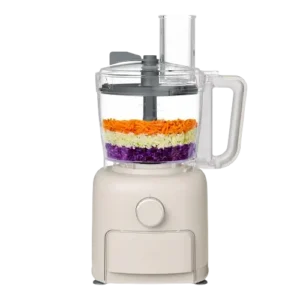
| Field | Details |
| Document Title | CHOP 10-Cup Food Processor Instruction Manual |
| Document Type | Instruction Manual |
| Brand Name | BELLA |
| Product Name | CHOP 10-Cup Food Processor |
| Model Number(s) | 35433, 35461 |
| PDF File Size | 6 MB |
| Number of Pages | 24 |
| Languages | English, Spanish |
BELLA CHOP 10-Cup Food Processor 35433
The BELLA CHOP 10-Cup Food Processor is a household kitchen appliance designed for chopping, slicing, shredding, mixing, pureeing, and preparing dough. It features a 10-cup processing bowl, a stainless steel Sabatier processing blade, five interchangeable slicing and shredding blades, and a built-in accessory storage drawer.
The food processor operates using a rotary speed control dial with PULSE, LOW, and HIGH settings. It includes a food pusher, feed chute, silicone-edged scraper, and safety interlock mechanisms that prevent operation unless the processing bowl and lid are correctly locked.
The 10-cup bowl provides space for food preparation, while the recommended processing quantities are up to 5 cups of solid ingredients or 4 cups of liquid for optimal performance.
Product Overview and Technical Specifications
The BELLA CHOP 10-Cup Food Processor combines several food preparation functions in one appliance. The stainless steel processing blade is used for chopping, mixing, blending, kneading, whisking, crumbing, and emulsifying, while the interchangeable blade inserts are used for slicing, shredding, and cutting French fries.
The appliance is designed exclusively for indoor household use and operates from a 120 V AC electrical outlet.
| Specification | Details |
| Brand | BELLA |
| Product Name | CHOP 10-Cup Food Processor |
| Product Type | Electric food processor |
| Processing Bowl Capacity | 10 cups |
| Recommended Solid Food Quantity | Up to 5 cups |
| Recommended Liquid Quantity | 4 cups / 1000 mL |
| Electrical Supply | 120 V AC |
| Plug Type | Polarized plug |
| Speed Settings | PULSE, LOW, HIGH |
| Main Processing Blade | Stainless steel Sabatier blade |
| Interchangeable Blade Inserts | 5 |
| Slicing Blades | Fine and coarse |
| Shredding Blades | Fine and coarse |
| French Fry Cutting Blade | Included |
| Food Pusher Cup Capacity | Up to 7 oz. of liquid |
| Scraper | Silicone-edged scraper |
| Accessory Storage | Built-in blade drawer |
| Safety System | Bowl and lid interlocks |
| Motor Protection | Automatic resettable thermal protector |
| Thermal Reset Time | Approximately 30 minutes |
| Intended Use | Indoor household use only |
Main Features
The food processor offers the following functions:
- Chopping and mincing: Processes vegetables, fruits, herbs, nuts, and meat.
- Slicing: Produces fine or coarse slices using interchangeable blade inserts.
- Shredding: Shreds vegetables and cheese using fine or coarse shredding blades.
- French fry cutting: Cuts potatoes and sweet potatoes with the French fry attachment.
- Mixing and blending: Combines ingredients for batters, sauces, dips, and other mixtures.
- Dough preparation: Uses the processing blade on LOW speed for dough and batter preparation.
- Pureeing: Processes cooked vegetables, fruits, and other suitable ingredients.
- Integrated scraping: A silicone-edged scraper helps remove residue from the sides of the bowl when processing appropriate mixtures.
- Accessory storage: Five blade inserts can be stored in the built-in blade drawer.
Parts and Components
The BELLA CHOP Food Processor includes the main motor base, processing bowl, removable blades, lid, feed chute, and accessories used for food preparation.
| Part | Description and Function |
| Blade Drawer | Built-in storage compartment for the five interchangeable blade inserts. |
| Main Body Base | Houses the motor and speed control mechanism. |
| 10-Cup Processing Bowl | Holds ingredients during food processing. |
| Stainless Steel Processing Blade | Sabatier blade used for chopping, mixing, blending, kneading, whisking, and pureeing. |
| Spindle | Supports the processing blade, slicing/shredding disc, or scraper during assembly. |
| Lid | Covers the processing bowl and engages the safety interlock. |
| Food Pusher | Moves food through the feed chute without placing hands near the blades. |
| Scraper | Silicone-edged accessory used to scrape residue from the bowl during suitable processing operations. |
| Plastic Blade Holder Disc | Holds the selected slicing, shredding, or French fry cutting insert. |
| Fine Slicing Blade | Produces thin slices of food. |
| Coarse Slicing Blade | Produces thicker slices. |
| Fine Shredding Blade | Produces finely shredded ingredients. |
| Coarse Shredding Blade | Produces coarsely shredded ingredients. |
| French Fry Cutting Blade | Cuts suitable potatoes and sweet potatoes into fries. |
| Speed Control Dial | Selects PULSE, LOW, HIGH, or OFF. |
| Nonslip Feet | Help keep the appliance stable during use. |
| Feed Chute | Opening used to introduce ingredients for slicing and shredding. |
| Scraper Handle | Allows the scraper accessory to be operated through the lid. |
| Work Bowl Handle | Used to install, lock, unlock, and remove the processing bowl. |
Stainless Steel Sabatier Processing Blade
The stainless steel processing blade is the main attachment for chopping and mixing ingredients.
It supports several food preparation tasks, including:
- Chopping raw and cooked meat.
- Chopping vegetables and herbs.
- Mixing cake and pastry ingredients.
- Preparing dough and batters.
- Processing dips and pâtés.
- Pureeing soups.
- Grating hard cheeses such as Parmesan.
- Crumbing and emulsifying ingredients.
The final texture of processed food depends on the selected speed and processing time.
Important: The scraper attachment must not be used when processing dough.
Plastic Disc With Five Blade Inserts
The plastic blade holder disc accepts five interchangeable cutting attachments.
These include fine and coarse slicing blades, fine and coarse shredding blades, and a French fry cutting blade.
The disc can be used to prepare vegetables such as potatoes, cabbage, cucumbers, zucchini, onions, beets, carrots, and radishes. It also supports shredding suitable cheeses.
Food Pusher Cup
The food pusher moves ingredients safely through the feed chute.
It also functions as a small measuring cup for pouring liquid ingredients into the processing bowl.
Up to 7 oz. of liquids, such as oil or water, can be added using the food pusher cup to thin a processed mixture.
When not in use, the pusher fits inside the feed chute.
Silicone-Edged Scraper
The scraper has silicone edges that help remove food residue from the sides of the processing bowl.
Its handle is accessible through the top of the lid.
When processing liquids or batters, the scraper can be moved from side to side using its handle.
Do not use the scraper when processing dough.
Spindle
The spindle supports the processing blade, plastic blade holder disc, and scraper assembly.
It must be installed correctly when assembling the selected processing attachment.
Important Safety Instructions
The BELLA CHOP 10-Cup Food Processor contains sharp blades and moving components. Incorrect assembly, handling, or operation may cause serious injury.
Electrical Safety
- Connect the appliance only to a 120 V AC electrical outlet.
- Never immerse the motor base, power cord, or plug in water or another liquid.
- Do not operate the appliance with wet hands.
- Keep the appliance away from water splashes and moisture.
- Always turn the food processor off and unplug it before installing or removing parts.
- Disconnect the appliance before cleaning and whenever it is not in use.
- Never pull the power cord to disconnect the appliance. Hold the plug instead.
- Do not use the appliance if the cord or plug is damaged.
- Do not operate the food processor after it malfunctions, falls, or becomes damaged.
- Keep the electrical cord away from hot surfaces.
- Do not allow the cord to hang over the edge of a table or countertop.
- Do not operate the appliance outdoors.
Warning: If the food processor falls into water, immediately unplug it without reaching into the water. Do not operate it afterward.
Blade and Cutting Safety
Warning: All processing blades and cutting discs are very sharp. Improper handling can cause serious personal injury.
- Keep hands and utensils away from moving blades and cutting discs.
- Never place fingers inside the processing bowl while the appliance is operating.
- Never insert fingers, forks, spoons, or other objects into the feed chute.
- Always use the supplied food pusher to move ingredients toward the cutting disc.
- Do not attempt to bypass the safety interlock mechanisms.
- Handle the stainless steel processing blade by its center hub or stem.
- Handle interchangeable cutting attachments carefully to avoid contact with the sharp edges.
- Turn off and unplug the appliance before removing cutting attachments.
- Never install the processing blade directly onto the motor base without first securing the processing bowl.
A separate spatula may be used to move food inside the bowl only when the food processor is not running.
Processing Bowl and Lid Safety
The processing bowl and lid must be correctly installed before the appliance can operate.
- Check the processing bowl for foreign objects before use.
- Make sure the bowl is securely locked onto the base.
- Confirm that the lid has engaged its safety interlock.
- Never operate the appliance with an improperly installed lid.
- Do not fill the bowl above its marked maximum capacity.
- Never attempt to defeat the interlock system.
- Disconnect the appliance before assembling or removing accessories.
Operating Safety
- Place the food processor on a stable, dry, level surface.
- Use only attachments designed or recommended for the appliance.
- Do not use the food processor for purposes other than its intended functions.
- Do not operate the appliance near children without appropriate supervision.
- The appliance is not intended for use by children or persons with reduced physical, sensory, or mental capabilities, or insufficient experience and knowledge.
- Avoid contact with moving parts.
- Do not apply excessive force when feeding ingredients into the slicing or shredding disc.
- If the appliance malfunctions, immediately turn it off and unplug it.
Motor Overheating Safety
The food processor includes an automatic thermal protection system.
If the motor shuts down unexpectedly, turn the speed control dial to OFF and allow the appliance to cool.
The thermal protector normally resets automatically after approximately 30 minutes.
If the problem continues, stop using the appliance and contact Customer Service. Continued operation may damage internal components.
Plug and Power Cord Safety
The food processor has a polarized electrical plug with one blade wider than the other.
This plug fits into a polarized outlet in only one direction.
If the plug does not fit:
- Remove the plug from the outlet.
- Reverse its orientation.
- Attempt to insert it again.
- If it still does not fit, contact a qualified electrician.
Never modify the polarized plug.
The appliance includes a short power cord to reduce the risk of entanglement and tripping.
If a longer extension cord is used, its marked electrical rating must be at least equal to that of the food processor. It must be positioned so that it cannot be pulled by children or accidentally tripped over. A grounded appliance requires a grounding-type three-wire extension cord.
An overloaded electrical circuit may prevent the appliance from operating properly. The food processor should be operated on a separate circuit from other appliances.
Before First Use
Before operating the BELLA CHOP 10-Cup Food Processor for the first time, all packaging materials must be removed and the food-contact components cleaned.
First-Time Preparation
- Carefully remove the food processor from its packaging.
- Remove all packaging materials.
- Take out the processing bowl, lid, food pusher, spindle, blades, plastic disc, scraper, and blade drawer.
- Wash the removable components in warm, soapy water.
- Wipe the motor base with a soft, damp cloth.
- Rinse the washed components thoroughly.
- Dry all parts completely before assembly.
- Place the motor base on a stable, dry, level work surface.
Warning: Never immerse the food processor motor base in water or any other liquid.
Handle all sharp blade attachments carefully during washing and drying.
Assembly and Installation Instructions
The food processor must be correctly assembled before operation.
The processing bowl and lid use locking mechanisms that prevent the motor from operating when either component is not securely installed.
How to Install the Processing Bowl
- Make sure the power cord is disconnected from the electrical outlet.
- Place the motor base on a dry, level surface with the controls facing forward.
- Position the processing bowl above the motor base.
- Align the bowl handle with the base/bowl interlock channel.
- Lower the bowl onto the base.
- Rotate the bowl handle counterclockwise.
- Continue rotating until the handle locks into position on the right side and the interlock engages.
Important: The food processor will not operate unless the bowl is correctly locked onto the base.
How to Install the Stainless Steel Processing Blade
Warning: The Sabatier processing blade is extremely sharp. Always hold it by its plastic center hub or stem.
- Make sure the food processor is unplugged.
- Install and lock the processing bowl onto the motor base.
- Carefully hold the plastic ring around the processing blade.
- Insert the spindle through the center opening.
- Push the blade down to lock it onto the spindle.
- Position the blade assembly inside the processing bowl.
- Turn the blade until it settles securely at the bottom of the bowl.
- Add the ingredients to be processed.
- If processing suitable liquid mixtures, install the scraper attachment over the spindle.
- Attach and lock the lid.
Do not use the scraper attachment when preparing dough.
How to Install a Slicing or Shredding Blade
The plastic disc must be fitted with the selected cutting insert before it is installed on the spindle.
- Disconnect the food processor from electricity.
- Select the appropriate slicing, shredding, or French fry cutting blade.
- Carefully hold the blade insert and align it with the plastic holder disc.
- Slide the blade into the disc until an audible locking click is heard.
- Position the disc’s center opening over the spindle.
- Rotate the disc until it settles securely onto the top of the spindle.
- Attach the lid and lock it into position.
Handle the blade inserts carefully throughout assembly to avoid contact with the cutting edges.
How to Install and Lock the Lid
- Position the lid above the processing bowl.
- Align the large lid tab slightly to the left of the bowl handle and over the lid/bowl interlock channel.
- Hold the work bowl handle with one hand.
- Hold the feed chute with the other hand.
- Rotate the lid counterclockwise.
- Continue rotating until an audible click confirms that the lid has locked.
- Insert the food pusher into the feed chute.
- Connect the power cord to a 120 V AC wall outlet when ready to begin processing.
Important: The food processor will not operate unless the lid safety interlock is correctly engaged.
Operating Instructions
The BELLA CHOP Food Processor operates using PULSE, LOW, and HIGH speed settings.
The selected blade and processing speed depend on the type of food and the desired result.
How to Use the Food Processor
- Install the processing bowl and selected attachment.
- Add the ingredients according to the applicable processing instructions.
- Secure the lid until it locks into place.
- Insert the food pusher into the feed chute.
- Connect the appliance to a 120 V AC electrical outlet.
- Turn the speed control dial to PULSE or LOW to begin operation.
- Select the appropriate speed for the ingredients.
- Process the food until the desired consistency is reached.
- Turn the speed control dial to OFF when finished.
- Unplug the appliance before removing the lid or attachments.
For optimal results, limit the amount of food to the recommended processing quantity rather than filling the entire 10-cup bowl.
Speed Control Settings
| Speed Setting | Recommended Use |
| PULSE | Controlled chopping and short processing bursts. |
| LOW | Dough, batters, and processing tasks that require lower speed. |
| HIGH | Most chopping, mixing, and general processing tasks. |
| LOW or HIGH | Slicing and shredding with the cutting discs. |
| OFF | Stops the motor before disassembly or cleaning. |
PULSE Function
PULSE allows food to be processed in short bursts.
Turn the dial to PULSE to operate the blade. The motor stops when the dial is released.
This setting is useful for ingredients that require controlled chopping rather than continuous processing.
LOW Speed
LOW speed is recommended for preparing dough and batters.
It can also be used for selected chopping, slicing, and shredding tasks.
HIGH Speed
HIGH speed is suitable for most chopping, mixing, and processing tasks.
The final texture depends on how long the ingredients are processed.
How to Chop and Mince Food
The stainless steel Sabatier blade is used for chopping vegetables, fruits, herbs, meat, and similar ingredients.
Chopping Instructions
- Install the processing bowl onto the base.
- Fit the stainless steel processing blade onto the spindle.
- Prepare the ingredients according to their recommended sizes.
- Add the food to the processing bowl.
- Lock the lid.
- Select the recommended speed.
- Continue processing until the desired texture is reached.
- Turn the dial to OFF and unplug the appliance before removing the lid.
Pre-cooked meat should be cut into approximately 1-inch cubes before processing.
Fruits and vegetables should be cleaned and cut into approximately 2 × 1-inch pieces.
Processing Multiple Ingredients
When preparing a recipe containing several ingredients, processing them in smaller batches helps prevent ingredients at the bottom of the bowl from becoming overprocessed.
The speed and duration of processing determine the final consistency.
How to Slice and Shred Food
The interchangeable cutting blades can be used to slice or shred vegetables, fruits, and cheese.
Slicing and Shredding Instructions
- Select the appropriate slicing or shredding blade.
- Install the blade into the plastic holder disc.
- Assemble the disc on the spindle inside the processing bowl.
- Secure the lid.
- Prepare the food so that it fits inside the feed chute.
- Insert the ingredients into the feed chute.
- Position the food pusher above the ingredients.
- Start processing using PULSE, LOW, or HIGH as appropriate.
- Apply steady, even pressure using the food pusher.
- Continue until the ingredients have been processed.
Caution: Never use fingers or utensils to push food through the feed chute. Always use the food pusher.
Preparing Ingredients for Slicing and Shredding
Cut ingredients to a size that fits comfortably inside the feed chute.
The manual recommends pieces no larger than approximately 2 × 1½ inches.
Pack the ingredients firmly enough that individual pieces support one another during processing.
Do not apply excessive force to the food pusher, as this can damage the appliance.
How to Make Long or Short Slices
Ingredient placement affects the shape of the finished slices.
| Slice Type | Ingredient Position |
| Long Slices | Place food items up to 2 inches wide horizontally in the feed chute. |
| Short Slices | Place food items vertically in the feed chute. |
A small portion of food may remain between the food pusher and processing disc after slicing or shredding. This is normal.
Processing Cheese
For better results:
- Soft or semi-soft cheese, including Cheddar, mozzarella, and Swiss, should be well chilled before processing.
- Hard cheese, including Parmesan and Romano, should be at room temperature before grating or shredding.
- Avoid excessive pressure on the food pusher when processing hard foods.
How to Mix Dough and Batters
The stainless steel processing blade can be used for dough and batter preparation.
LOW speed is recommended for these tasks.
Dough Preparation
- Install the processing bowl.
- Attach the stainless steel processing blade.
- Add the dry ingredients directly to the bowl.
- Add other ingredients according to the mixture being prepared.
- Lock the lid.
- Select LOW speed.
- Process the dough until the required consistency is reached.
- Turn the dial to OFF and unplug the appliance before removing the mixture.
Important: Do not use the scraper attachment when processing dough.
The processing guide recommends up to 2 cups of all-purpose or bread flour for white bread and pizza dough preparation.
Adding Liquid Ingredients
Liquid ingredients may be added through the feed chute during processing.
The food pusher cup can hold up to 7 oz. of liquid.
It is suitable for adding small amounts of oil or water to thin a mixture.
Adding Dry Ingredients
Dry ingredients such as flour can be placed directly into the processing bowl.
The manual states that sifting is not required before adding these ingredients.
Food Processing Capacity Guide
Although the processing bowl has a 10-cup capacity, the recommended working quantities vary depending on the food.
The following table provides the food processing quantities specified in the manual.
| Food or Preparation | Recommended Processing Quantity |
| Pureed or Chopped Meat, Fish, or Seafood | ¾ lb (12 oz.) |
| Sliced or Shredded Fruits, Vegetables, or Cheese | 4–5 cups |
| Chopped Fruits, Vegetables, or Cheese | 2 cups |
| Pureed Fruits, Vegetables, or Cheese | 3 cups cooked |
| Liquids, Soups, and Salad Dressings | 4 cups |
| Cake Batter | One 15.25 oz. boxed cake mix |
| Cookie Dough | Approximately 2½ dozen average-sized cookies |
| White Bread Dough | 2 cups all-purpose or bread flour |
| Pizza Dough | 2 cups all-purpose or bread flour |
| Nut Butter | 2 cups nuts |
For general processing, the manual recommends limiting solids to approximately 5 cups and liquids to 4 cups (1000 mL).
Ingredient density can affect how much food can be processed effectively.
Stainless Steel Processing Blade Speed Guide
The Sabatier blade can process different foods at various speeds.
| Food | Recommended Speed |
| Apple | PULSE or HIGH |
| Breadcrumbs | PULSE, then HIGH |
| Cabbage | PULSE or LOW |
| Carrots | PULSE or HIGH |
| Celery | PULSE or LOW |
| Crumbled Crackers | PULSE, then HIGH |
| Dough | LOW |
| Hard-Boiled Eggs | PULSE or LOW |
| Garlic | PULSE |
| Mushrooms | PULSE |
| Onions | PULSE |
| Parmesan or Romano Cheese | PULSE, then HIGH |
| Parsley or Other Herbs | PULSE or LOW |
| Peppers | PULSE |
| Potatoes | PULSE or HIGH |
| Walnuts | PULSE |
Grating ingredients such as hard cheese or vegetables with the processing blade is also possible.
The final consistency depends on the processing speed and duration.
Slicing and Shredding Blade Guide
The five interchangeable inserts support different cutting tasks.
For best results with slicing and shredding, the manual recommends beginning with PULSE and then using LOW speed.
| Food | Recommended Blade |
| Apples | Fine or Coarse Slicing Blade, or Coarse Shredding Blade |
| French Fries | French Fry Cutting Blade |
| Carrots | Fine or Coarse Slicing or Shredding Blades |
| Cheddar, Mozzarella, or Swiss Cheese | Fine or Coarse Shredding Blades |
| Mushrooms | Fine or Coarse Slicing Blade |
| Parmesan or Romano Cheese | Fine Shredding Blade |
| Sweet Potato Fries | French Fry Cutting Blade |
| Summer Squash or Zucchini | Fine or Coarse Slicing or Shredding Blades |
| Onions, Potatoes, Tomatoes, or Cucumbers | Fine or Coarse Slicing Blades |
| Cabbage | Coarse Shredding Blade |
French Fry Cutting Blade
The French fry blade is designed for cutting potatoes and sweet potatoes into fries.
Fit the blade into the plastic holder disc and install the disc securely on the spindle.
Prepare the potatoes to fit inside the feed chute and use the food pusher to move them through the cutting attachment.
Food Processing Tips
The following practices help maintain consistent results when chopping, slicing, shredding, and mixing.
Processing Smaller Batches
The manual recommends processing smaller quantities rather than filling the bowl to its maximum capacity.
For better performance:
- Limit solid ingredients to approximately 5 cups.
- Limit liquid ingredients to 4 cups.
- Process different ingredients separately when necessary.
- Avoid excessive processing of food at the bottom of the bowl.
Preparing Fruits and Vegetables
Fruits and vegetables should be cleaned and cut into approximately 2 × 1-inch pieces before processing with the chopping blade.
When slicing or shredding, cut ingredients to fit the feed chute comfortably.
Preparing Meat
Pre-cooked meat should be cut into approximately 1-inch cubes before chopping.
The food processing guide specifies a recommended quantity of ¾ lb (12 oz.) for pureeing or chopping meat, fish, or seafood.
Processing Sauces and Semi-Liquid Mixtures
When processing sauces or semi-liquid ingredients, residue may accumulate along the sides of the bowl.
The integrated scraper can be used for suitable liquids and batters by moving its handle from side to side.
A separate spatula may also be used to scrape the bowl, but only when the food processor is not running.
Preventing Bowl Discoloration
Certain foods, essences, and flavorings may discolor the plastic processing bowl.
The manual specifically cautions against allowing almond extract or similar flavorings to contact the bowl because permanent marks may occur.
Some discoloration does not damage the plastic or affect the flavor of food.
How to Stop and Disassemble the Food Processor
After processing is complete, the appliance must be turned off and disconnected before the lid or blades are removed.
Safe Disassembly Instructions
- Turn the speed control dial to OFF.
- Disconnect the power cord from the electrical outlet.
- Hold the feed chute and processing bowl handle.
- Rotate the lid clockwise to unlock it.
- Remove the lid.
- Hold the center hub of the processing blade or cutting disc.
- Carefully lift the attachment upward and off the spindle.
- Hold the work bowl handle firmly.
- Rotate the bowl clockwise to unlock it.
- Lift the processing bowl off the base.
- Remove the remaining spindle, scraper, or disc components.
- Use a spatula to carefully remove processed food from the bowl and blade area.
Keep fingers away from the sharp cutting edges during disassembly.
Automatic Thermal Protector
The BELLA CHOP Food Processor has an automatic resettable thermal protector that helps protect the motor from overheating.
If the motor becomes too hot, the thermal protection system may stop operation.
How to Reset the Motor After Overheating
- Turn the speed control dial to OFF.
- Allow the food processor to rest for approximately 30 minutes.
- Wait for the motor to cool sufficiently.
- After the thermal protector has reset, select the desired processing speed to resume operation.
The thermal protector resets automatically after sufficient cooling.
If the food processor continues to stop or fails to operate correctly, discontinue use and contact Customer Service.
Do not attempt to repair internal components.
Troubleshooting Guide
The following troubleshooting information covers operating conditions and corrective actions described in the food processor instructions.
| Problem or Situation | Possible Cause | Recommended Action |
| Food processor does not turn on | Processing bowl is not correctly locked onto the base. | Rotate and secure the bowl until the base/bowl interlock engages. |
| Food processor does not operate with the lid installed | Lid safety interlock is not engaged. | Reposition and lock the lid until an audible click is heard. |
| Motor stops during operation | Automatic thermal protector may have activated due to overheating. | Turn the dial to OFF and allow approximately 30 minutes for cooling and automatic reset. |
| Motor repeatedly stops or performance remains reduced | Internal components may have been affected by overheating. | Stop using the appliance and contact Customer Service. |
| Food processor operates improperly on a shared circuit | Electrical circuit may be overloaded. | Operate the appliance on a separate electrical circuit. |
| Food is processed unevenly | Quantity or processing duration may affect the result. | Process smaller batches and adjust processing time according to the food. |
| Small pieces remain after slicing or shredding | Some food naturally remains between the pusher and cutting disc. | This is normal. Turn off and unplug the processor before removing remaining food. |
| Ingredients are difficult to feed through the chute | Food pieces may be too large or poorly positioned. | Cut ingredients to the recommended size and apply steady pressure using the food pusher. |
| Processing bowl becomes discolored | Certain foods, extracts, or flavorings may stain the plastic. | Use a clean cloth with a small amount of vegetable oil as described in the cleaning instructions. |
Food Processor Not Turning On
The food processor includes bowl and lid interlocks.
If the appliance does not start:
- Turn the speed control dial to OFF.
- Unplug the food processor.
- Check that the processing bowl is correctly installed.
- Rotate the bowl counterclockwise until it locks.
- Check that the lid is correctly positioned.
- Rotate the lid counterclockwise until it clicks into place.
- Insert the food pusher.
- Reconnect power and select the required speed.
Do not attempt to bypass the safety interlocks.
Food Processor Stops During Operation
The automatic thermal protector may stop the motor when overheating occurs.
Turn the dial to OFF and allow approximately 30 minutes for the motor to cool.
Once the protector resets automatically, operation can resume.
If the problem continues, discontinue use and contact Customer Service.
Food Processor Not Slicing or Shredding Properly
Check that the selected cutting blade is correctly locked into the plastic disc and that the disc is securely installed on the spindle.
Prepare food in pieces that fit the feed chute.
Pack the ingredients so the pieces support one another and apply even pressure using the food pusher.
Do not use excessive force, as it can damage the food processor.
Food Processor Producing Uneven Results
Processing results depend on ingredient size, quantity, speed, and processing duration.
For more consistent results:
- Prepare ingredients in the recommended sizes.
- Follow the applicable processing capacity limits.
- Use the speed recommended for the food.
- Process ingredients in smaller batches when needed.
- Avoid processing food longer than necessary.
Cleaning and Maintenance Instructions
The BELLA CHOP Food Processor requires routine cleaning of the processing bowl, lid, cutting attachments, and accessories.
Warning: All blades and cutting discs are sharp. Handle them carefully during cleaning.
How to Clean the Food Processor
- Turn the speed control dial to OFF.
- Unplug the appliance from the electrical outlet.
- Remove the lid and processing attachments.
- Carefully lift the processing blade or disc by its center hub.
- Remove the processing bowl from the base.
- Wash the removable components using the approved cleaning method.
- Wipe the motor base with a soft, damp cloth.
- Rinse and dry the cleaned components thoroughly before the next use.
Never immerse the motor base in water or another liquid.
Dishwasher-Safe Parts
Several removable components can be cleaned in the top rack of a dishwasher.
| Component | Cleaning Method |
| Processing Bowl | Top-rack dishwasher or hot, soapy water |
| Lid | Top-rack dishwasher or hot, soapy water |
| Food Pusher | Top-rack dishwasher or hot, soapy water |
| Stainless Steel Processing Blade | Top-rack dishwasher or hot, soapy water |
| Five Blade Inserts | Top-rack dishwasher or hot, soapy water |
| Plastic Blade Holder Disc | Top-rack dishwasher or hot, soapy water |
| Scraper | Top-rack dishwasher or hot, soapy water |
| Main Motor Base | Wipe with a soft, damp cloth |
The blade drawer and spindle are included among the parts washed with warm, soapy water during first-time preparation.
Cleaning the Motor Base
The motor base contains the electrical components and must not be immersed.
To clean it:
- Make sure the appliance is unplugged.
- Use a soft, slightly damp cloth.
- Wipe the exterior surfaces.
- Allow the base to dry.
Do not allow water to enter the electrical components.
Removing Discoloration From the Processing Bowl
Certain foods and flavorings may discolor the plastic bowl.
To clean the affected area:
- Place a small amount of vegetable oil on a clean kitchen cloth.
- Rub the cloth over the discolored area.
- Clean the bowl using the normal washing method.
- Rinse and dry thoroughly.
The manual states that discoloration does not harm the plastic or affect food flavor.
Routine Maintenance
| Maintenance Task | Instructions |
| Clean processing bowl | Wash after use using an approved cleaning method. |
| Clean cutting blades | Handle carefully and wash after use. |
| Clean lid and food pusher | Wash in hot, soapy water or the top rack of a dishwasher. |
| Clean scraper | Remove food residue and wash after use. |
| Clean motor base | Wipe with a soft, damp cloth. |
| Check assembly | Confirm bowl and lid interlocks before operation. |
| Motor overheating | Allow approximately 30 minutes for cooling and reset. |
| Electrical servicing | Refer repairs requiring disassembly to a qualified appliance repair technician. |
The food processor contains no user-serviceable internal parts.
Repairs requiring disassembly, other than normal cleaning, must be performed by a qualified appliance repair technician.
Storage Instructions
The food processor includes a built-in blade drawer and allows accessories to be stored inside the processing bowl.
All components must be clean and dry before storage.
How to Store the Food Processor
- Turn the speed control dial to OFF.
- Unplug the appliance.
- Clean the processing bowl, blades, disc, lid, and accessories.
- Dry all components thoroughly.
- Carefully place the accessories inside the processing bowl for compact storage.
- Store the five interchangeable blade inserts inside the built-in blade drawer.
- Wind the power cord around the cord storage area at the base.
- Store the appliance in its original box or another clean, dry location.
Caution: Handle sharp blades carefully when placing them in storage.
Power Cord Storage
The power cord can be wrapped around the cord storage area underneath the appliance.
Do not pull or place excessive stress on the cord where it enters the motor base.
Excessive tension can cause the cord to fray or break.
Never store the food processor while its components are wet.
Warranty Information
The BELLA CHOP 10-Cup Food Processor includes a limited two-year warranty provided by Sensio Inc., doing business as Made by Gather.
The warranty begins on the date of delivery and applies to the original retail purchaser.
Warranty Coverage
| Warranty Detail | Coverage |
| Warranty Provider | Sensio Inc. dba Made by Gather |
| Mechanical Defects | 2 years from delivery |
| Non-Mechanical Parts | 90 days |
| Warranty Start Date | Original delivery date |
| Eligible Purchaser | Original retail purchaser |
| Transferability | Non-transferable |
| Proof of Purchase | Original sales receipt required |
| Available Remedies | Repair, replacement, or refund at the warranty provider’s discretion |
The limited warranty covers mechanical defects in materials and workmanship for two years.
Non-mechanical parts are covered for 90 days.
During the applicable warranty period, Sensio Inc. may repair or replace a defective product or issue a refund.
Warranty Exclusions
The limited warranty does not cover normal wear or damage caused by:
- Negligent use.
- Incorrect voltage or electrical current.
- Improper routine maintenance.
- Operation contrary to the instructions.
- Unauthorized disassembly.
- Repairs or modifications by anyone other than qualified Sensio Inc. personnel.
- Natural disasters, including fire, floods, hurricanes, and tornadoes.
The warranty also includes limitations relating to incidental and consequential damages and implied warranties.
Some states, provinces, and jurisdictions do not allow all such exclusions or limitations. Legal rights may vary according to applicable law.
How to Request Warranty Service
- Contact Customer Service at 1-866-832-4843.
- Describe the problem with the food processor.
- Follow the assistance provided by the customer service representative.
- If the issue cannot be resolved by telephone, obtain the case number and return instructions.
- Prepare a label containing the purchaser’s name, address, daytime telephone number, case number, and description of the problem.
- Include a copy of the original sales receipt.
- Carefully package the product with the required documentation.
- Return the appliance according to the instructions, with shipping and insurance prepaid.
Sensio Inc. does not accept responsibility or liability for the product while it is in transit to its customer service center.
Customer Support and Contact Information
For product questions, operating problems, or warranty assistance, BELLA provides the following contact details.
| Contact Type | Details |
| Brand | BELLA |
| Company | Sensio Inc. dba Made by Gather |
| Customer Service Phone | 1-866-832-4843 |
| Customer Service Email | help@bellahousewares.com |
| Website | https://bellakitchenware.com |
| Company Location | New York, NY 10016, USA |
Product Registration
The instruction manual provides product registration through the BELLA website.
Product registration can be accessed at https://bellakitchenware.com.
The original sales receipt should be retained because proof of purchase is required for warranty validation.
Frequently Asked Questions
How do you use the BELLA CHOP 10-Cup Food Processor?
Install the processing bowl onto the motor base and lock it by rotating the handle counterclockwise. Attach the appropriate blade, add the ingredients, and secure the lid until it clicks. Insert the food pusher, connect the appliance to a 120 V AC outlet, and select PULSE, LOW, or HIGH using the speed control dial. Turn the dial to OFF and unplug the appliance before disassembly.
What is the maximum processing capacity of the BELLA CHOP Food Processor?
The food processor has a 10-cup bowl. However, the manual recommends processing up to 5 cups of solid ingredients or 4 cups (1000 mL) of liquids for optimal performance. The recommended amount may be lower for certain foods, such as chopped meat or dough.
What blades come with the BELLA CHOP 10-Cup Food Processor?
The food processor includes a stainless steel Sabatier processing blade and five interchangeable cutting inserts: fine slicing, coarse slicing, fine shredding, coarse shredding, and French fry cutting. The cutting inserts fit into a plastic holder disc.
Why is the BELLA CHOP Food Processor not turning on?
The food processor will not operate unless both the processing bowl and lid are correctly locked. Check that the bowl is secured to the base and that the lid interlock has engaged. If the motor stopped during operation, the thermal protector may have activated. Turn the dial to OFF and allow approximately 30 minutes for cooling. Do not bypass the safety interlocks.
How do you use the slicing and shredding attachments?
Select the desired cutting blade and lock it into the plastic holder disc. Install the disc onto the spindle, secure the lid, and position ingredients in the feed chute. Operate the processor using the recommended speed and apply even pressure with the food pusher. Never place fingers or utensils inside the feed chute.
Can the BELLA CHOP Food Processor make dough?
Yes. The stainless steel Sabatier processing blade can prepare dough and batters using LOW speed. The manual recommends up to 2 cups of all-purpose or bread flour for white bread or pizza dough. The scraper attachment must not be used when processing dough.
Are the BELLA CHOP Food Processor parts dishwasher-safe?
The processing bowl, lid, food pusher, stainless steel processing blade, five cutting blade inserts, plastic holder disc, and scraper are top-rack dishwasher-safe. They can also be washed by hand using hot, soapy water. The motor base must be cleaned with a soft, damp cloth and must never be immersed in water.
What is the warranty on the BELLA CHOP 10-Cup Food Processor?
The food processor includes a limited two-year warranty covering mechanical defects in materials and workmanship and 90 days of coverage for non-mechanical parts. The warranty begins on the original delivery date, applies to the original retail purchaser, and requires proof of purchase. For assistance, contact Customer Service at 1-866-832-4843 or help@bellahousewares.com.