Bella Pro 6QT Multicooker with Sear Function
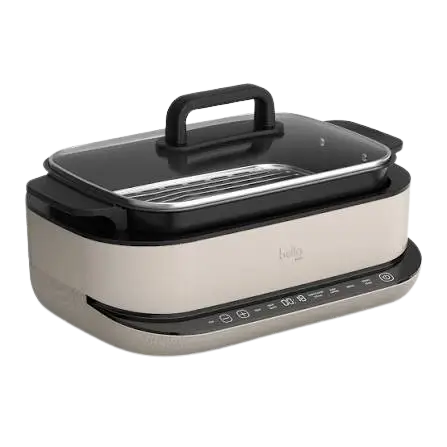
The Bella Pro 6QT Multicooker with Sear Function is a countertop appliance for household use. It combines five cooking functions in one unit: Sear, Sauté, Slow Cook, Steam and Keep Warm. Food cooks in a removable cook pot with a ceramic coating. The pot sits in a base unit that holds the heater and the control panel, and a glass lid covers it. A steamer tray is included for the Steam function.
Sear and Sauté let you set both temperature and time, from 150°F to 450°F. Slow Cook and Steam run on time only. After a Slow Cook cycle ends, the multicooker switches to Keep Warm on its own. The appliance runs on a 120V AC outlet and is intended for countertop use only.
The main owner tasks are first-time preparation, selecting a function with the MENU button, adjusting time and temperature, and cleaning after every use. The sections below cover each of these, along with the safety rules that apply to this appliance.
Important Safeguards
Basic safety precautions apply whenever you use an electrical appliance. Read all instructions before using the multicooker. Every user must read and understand the manual before operating or cleaning the appliance.
General Safety Rules
- Do not touch hot surfaces. Use handles or knobs.
- To protect against electrical shock, do not immerse the cord, plug or base unit in water or other liquid.
- Do not use the appliance outdoors. It is intended for countertop use only and for household use only.
- Do not place it on or near a hot gas or electric burner, or in a heated oven.
- Do not use it in an unstable position.
- Do not use it while standing in a damp area.
- Do not operate the appliance with a damaged cord or plug, or after it malfunctions or is damaged in any way.
- Do not use accessory attachments that the manufacturer does not recommend, because they may cause injuries.
- Do not use the appliance for anything other than its intended use.
- Do not leave the appliance unattended during use, to reduce the risk of fire.
- Allow the appliance to cool before cleaning or storing it.
Children and Supervision
This appliance is not intended for people with reduced physical, sensory or mental capabilities, or people who lack experience and knowledge, unless a person responsible for their safety supervises or instructs them in its use. Close supervision is necessary when children use the appliance or are near it. Keep the appliance and cord away from children.
Steam and Hot Contents
WARNING: Use caution when opening the lid. Steam escapes as soon as the lid is opened. Never place your face or hands over the Multi Cooker when opening the lid.
- Hold the cook pot handles whenever you move a hot cooking pot.
- Use oven mitts when handling the hot cooking pot.
- Use extreme caution when moving the appliance while it contains hot oil or other hot liquids.
- Stay clear of the steam vent during cooking, and avoid reaching over the steam valve while the appliance is in use.
- Do not place the multicooker directly under kitchen wall cabinets while it is in use, because it produces steam.
WARNING: Spilled food can cause serious burns. Keep the appliance and cord away from children. Never drape the cord over the edge of a counter, never use an outlet below the counter, and never use an extension cord.
The manual describes the unit as generating heat and escaping steam during use. Take precautions to prevent burns, fires, other injuries and property damage.
Placement and Air Space
Leave adequate air space above and on all sides for air circulation. Do not operate the multicooker while it touches or sits near curtains, wall coverings, clothing, dishtowels or other flammable materials.
Cooking Pot Safety
- Never operate the multicooker when the cooking pot is empty.
- Do not use a cooking pot that is dented, bent or damaged.
- Never use the cooking pot on a gas or electric cooktop or on an open flame.
- Do not leave plastic accessories in the cooking pot while the multicooker is in use.
- Never use sharp objects inside the cooking pot, because they will damage the ceramic coating.
- Cook only in the cooking pot. Do not pour liquid directly into the multicooker body.
Water and Electrical Hazards
- If the appliance falls or accidentally becomes immersed in water, unplug it from the wall outlet immediately. Do not reach into the water.
- Unplug the multicooker before washing it or adding water, and whenever it is not in use.
- Never immerse or rinse the appliance in water or any other liquid.
If the Appliance Malfunctions
If the appliance begins to malfunction during use, press POWER, then immediately unplug the cord. Do not use the malfunctioning appliance and do not try to repair it.
Disconnecting the Appliance
To disconnect, press POWER, then remove the plug from the wall outlet. Grasp the plug and pull. Never yank the cord to disconnect the appliance, because this can damage the cord.
Power Cord, Plug and Electrical Requirements
Cord
The appliance comes with a short power-supply cord (or a detachable one) to reduce the risk of becoming entangled in it or tripping over a longer cord. Do not use an extension cord with this product. Do not let the cord hang over the edge of a table or counter or touch hot surfaces. A hanging cord can cause a trip and fall, or can spill hot contents and cause burns or other injuries.
Plug
The plug is polarized, meaning one blade is wider than the other. It fits a polarized outlet only one way. If the plug does not fit fully into the outlet, reverse it. If it still does not fit, contact a qualified electrician. Do not modify the plug in any way.
Power Supply
Plug the cord only into a 120V AC electrical outlet. If the electrical circuit is overloaded with other appliances, the multicooker may not operate properly. Operate it on a separate electrical circuit from other appliances.
Protecting Countertop Finishes
CAUTION: To prevent plasticizers from migrating into the finish of a countertop, tabletop or other furniture, place non-plastic coasters or place mats between the appliance and the surface. Otherwise the finish may darken, permanent blemishes may occur, or stains can appear.
Parts and Features
The manual notes that the product may vary slightly from its illustration.
| No. | Part | Notes |
| 1 | Glass Lid | Covers the cook pot. Handle with care. |
| 2 | Steamer Tray | Used with the Steam function. Wash before first use. |
| 3 | Cook Pot | Removable pot with a ceramic coating. |
| 4 | Cook Pot Handle | Hold the handles when moving a hot cooking pot. |
| 5 | Multi Cooker Body | The base unit. Never immerse it in liquid. |
| 6 | Heater | Located inside the base unit. Keep food particles out of the base. |
| 7 | Control Panel | Touch controls and digital display along the front. |
Before Using for the First Time
- Remove all packaging from the multicooker and remove any labels from the outer surfaces.
- Remove and discard the packaging around the glass lid, and handle the lid carefully.
- Wash the cooking pot and steamer tray in warm, soapy water. Never use abrasive cleansers or scouring pads, because they can damage the finish of both the cooking pot and the base unit. Rinse and dry well.
- Place liquids only in the cooking pot. Never place liquid in the base unit.
- Never plug in the multicooker until the cooking pot is inside the base unit.
DO NOT IMMERSE THE BASE UNIT OF THE MULTI COOKER IN WATER OR ANY OTHER LIQUID.
IMPORTANT: Be careful not to dent the bottom of the cooking pot. For the multicooker to work properly and give the best results, the cooking pot must fit snugly on top of the thermostat.
NOTE: Do not use metal spatulas inside the pot. Use silicone or wooden spatulas to avoid damaging the ceramic coating.
Setting Up the Multicooker for Cooking
- Open the lid.
- Add ingredients to the cooking pot following your recipe directions. Make sure the cooking pot is well seated on the thermostat.
- Close the lid.
- Plug the multicooker into a 120V AC electrical outlet.
When the cooker is plugged in, it sounds one tone. The control panel indicator lights come on briefly and then darken. Four dashes (- – – -) and the power button then appear on the digital display and stay there until you take further action.
Control Panel Functions
The control panel has these labeled controls: TIME, minus (−), plus (+), TEMP, SEAR/SAUTE, SLOW COOK/STEAM, KEEP WARM, MENU, START/STOP and a power button. A digital display sits in the middle.
| Control | Function | Notes |
| POWER | Turns the display and controls on and off | Press it to turn off power at any time. |
| MENU | Selects the cooking function | Cycles SEAR → SAUTE → SLOW COOK → STEAM. |
| START/STOP | Starts the selected function | Hold for 2 seconds to cancel. |
| KEEP WARM | Selects the Keep Warm function | The button flashes when selected. |
| TIME | Lets you adjust cooking time | The display flashes while time can be adjusted. |
| TEMP | Lets you adjust temperature | Works with SEAR and SAUTE. |
| + (Plus) | Increases time or temperature | Used while adjusting either value. |
| − (Minus) | Decreases time or temperature | Used while adjusting either value. |
Power Button
- When you plug the cooker in, it beeps and the display shows – – – -. The menu buttons light for 1 second, then everything turns off except the power button and the display.
- Press the power button. The menu and keep warm buttons light, and the display shows – – – -.
- Press the power button again to turn off all other functions. You can press POWER to turn off power at any time.
MENU Button
- Press MENU to select a function.
- SEAR flashes by default while the other functions stay lit. Press MENU repeatedly to cycle through SEAR, SAUTE, SLOW COOK and STEAM, then back to SEAR.
- If you make no selection or take no action for 2 minutes while selecting a mode, the appliance goes to sleep.
START/STOP Button
After you select a function with MENU, press START/STOP to confirm and begin. Hold the button for 2 seconds to cancel.
TIME Button
Press TIME. The display flashes and shows the time, which you can change with the + and − buttons. You can also change the cooking time while cooking. The cooker accepts the new time after the display flashes 5 times and the cooker beeps.
TEMP Button
Press TEMP. The display shows the temperature and starts flashing, and you can then change it with the + and − buttons. You can change the temperature during cooking in SEAR and SAUTE modes. The cooker accepts the new temperature after the display flashes 5 times and the cooker beeps.
Adjusting Time and Temperature
| Setting | Adjustment step | Limits |
| Time | 1 minute per press within 1 hour; 10 minutes per press over 1 hour | Longest adjustable time is 12 hours |
| Temperature | 10°F per press of + or − | 150°F to 450°F (SEAR and SAUTE) |
You can change time and temperature at any point during the cooking process.
Cooking Modes
Sear and Sauté require preheating. When the cooker reaches the preset temperature, it sounds 5 beeps and begins counting down the cooking time.
Searing
- Press MENU to select SEAR.
- Set the temperature and time you want.
- Press START. The display shows PRE while the unit preheats.
- To change the temperature, press TEMP, then press + or − (10°F per press). To change the time, press TIME.
- After the cooker preheats and beeps 5 times, the timer starts counting down.
Sear time can be set from 10 minutes to 3 hours, and sear temperature from 150°F to 450°F. The default is 1 hour at 400°F.
Sautéing
- Press MENU to select SAUTE.
- Press START. The display shows PRE while the unit preheats.
- To change the temperature, press TEMP, then press + or − (10°F per press). To change the time, press TIME.
- After the cooker preheats and beeps 5 times, the timer starts counting down.
Sauté time can be set from 10 minutes to 2 hours 30 minutes, and temperature from 150°F to 450°F. The default is 1 hour 30 minutes at 400°F.
Steaming
IMPORTANT: When you use the Steam function, the water volume must not exceed 1.2 L.
- Press MENU to select STEAM.
- Press START. The display shows RUNNING.
- To change the time, press TIME.
- The cooker preheats first. The timer starts counting down once the cooker reaches its default temperature, and the cooker sounds 5 beeps at that point.
Steam time can be set from 10 minutes to 1 hour. The default is 45 minutes.
Slow Cooking
- Press MENU to select the slow cook function. The display shows the default time of 04:00.
- To change the time, press TIME.
- Press START. The timer begins counting down.
- When slow cooking finishes, the buzzer beeps 5 times and the cooker switches to Keep Warm automatically for 4 hours. The KEEP WARM light comes on and the display counts down from 04:00.
Slow cook time can be set from 30 minutes to 12 hours. To cancel the automatic Keep Warm after slow cooking, press and hold the STOP button for 2 seconds.
Using Keep Warm Directly
- Press KEEP WARM to enter the function directly. The KEEP WARM light flashes and the other functions stay lit.
- To change the time, press TIME.
- Press START. The timer begins counting down.
Keep Warm time can be set from 30 minutes to 12 hours. The display counts down from 02:00 by default. The maximum Keep Warm time is 12 hours. If the time exceeds 12 hours, the cooker goes into standby. To cancel Keep Warm, hold START/STOP for 2 seconds.
Function Time and Temperature Reference
| Function | Default Time | Default Temperature | Temperature Adjustable Range | Adjustable Time |
| SEAR | 1 hour | 400°F | 150–450°F | 00:10–03:00 |
| SAUTE | 1 hour 30 minutes | 400°F | 150–450°F | 00:10–02:30 |
| SLOW COOK | 4 hours | Not adjustable | Not adjustable | 00:30–12:00 |
| STEAM | 45 minutes | Not adjustable | Not adjustable | 00:10–01:00 |
| KEEP WARM | Countdown from 02:00 | Not adjustable | Not adjustable | 00:30–12:00 |
Care and Maintenance
The multicooker needs little maintenance and has no user-serviceable parts. Do not try to repair it yourself. Any servicing that requires disassembly, other than cleaning, must be done by a qualified appliance repair technician.
Protecting the Pot and Base
- Do not dent the cooking pot, especially the bottom. The pot must fit snugly on top of the thermostat for proper operation and the best cooking results.
- Do not let food particles fall into the bottom of the base unit. They can keep the thermostat from fitting tightly against the bottom of the cooking pot and cause inadequate cooking.
- Stir and remove food with a plastic rice paddle or wooden spoon. Never use metal utensils.
- Never use abrasive cleansers or scouring pads, because they can damage the finish of both the cooking pot and the base unit.
- Never pour liquid into the base unit or immerse it in water.
Cleaning After Each Use
CAUTION: Never immerse the multicooker body or cord in water or other liquid.
- Unplug the multicooker from the wall outlet. Let the unit cool before cleaning or storing it.
- Clean the multicooker after every use. Never immerse the base unit or power cord in water.
- Fill the cooking pot with warm water and let it soak. Wash the cooking pot and steamer tray in warm, soapy water.
- Rinse and dry well.
- Wipe the base unit with a soft, slightly damp cloth or sponge.
Registration, Warranty and Customer Service
Product Registration
Register the product at bellakitchenware.com. The cover of the manual also provides a QR code for registration.
Limited Two-Year Warranty
SENSIO Inc. warrants the product for two years from the date of purchase against mechanical defects in material and workmanship, and for 90 days in respect to non-mechanical parts. At its sole discretion, SENSIO Inc. will repair or replace a defective product, or issue a refund during the warranty period.
- The warranty is valid only for the original retail purchaser, from the date of initial retail purchase, and is not transferable.
- Keep the original sales receipt, because proof of purchase is required for warranty validation.
- Retail stores that sell the product cannot alter or revise the warranty terms.
Exclusions. The warranty does not cover normal wear of parts, or damage resulting from any of the following:
- negligent use of the product
- use of improper voltage or current
- improper routine maintenance
- use contrary to the operating instructions
- disassembly, repair or alteration by anyone other than qualified SENSIO Inc. personnel
It also does not cover Acts of God such as fire, floods, hurricanes or tornadoes.
SENSIO Inc. is not liable for incidental or consequential damages caused by the breach of any express or implied warranty. Some states, provinces or jurisdictions do not allow these exclusions or limitations, so they may not apply to you. The warranty gives specific legal rights, which may vary by state, province or jurisdiction.
How to Obtain Warranty Service
- Contact Customer Service at the toll-free number 1-866-832-4843. A representative will try to resolve the issue by phone.
- If the issue cannot be resolved by phone, you will receive a case number and be asked to return the product to SENSIO Inc.
- Attach a tag to the product that shows your name, address, daytime contact telephone number, case number and a description of the problem.
- Include a copy of the original sales receipt.
- Package the tagged product and receipt carefully, and send it with shipping and insurance prepaid to SENSIO Inc.’s address.
SENSIO Inc. is not responsible or liable for the returned product while it is in transit to its Customer Service Center.
Customer Service Contact
For customer service questions or comments, call 1-866-832-4843 or email help@bellahousewares.com. The manufacturer is listed as Sensio Inc., dba Made by Gather, New York, NY 10016, USA.
Frequently Asked Questions
Why does the display show PRE when I start Sear or Sauté?
PRE means the multicooker is preheating. Sear and Sauté both need to reach the preset temperature before cooking begins. When the cooker reaches that temperature, it sounds 5 beeps and the timer starts counting down. If you want a different temperature while it preheats, press TEMP and use the + or − buttons to change it in 10°F steps.
How do I cancel a cooking function?
Hold the START/STOP button for 2 seconds. To cancel the automatic Keep Warm that follows Slow Cook, press and hold STOP for 2 seconds. To turn the multicooker off completely, press the POWER button, which works at any time.
What temperature and time can I set for searing and sautéing?
Both functions accept 150°F to 450°F, and the default temperature is 400°F. Sear time runs from 10 minutes to 3 hours, with a default of 1 hour. Sauté time runs from 10 minutes to 2 hours 30 minutes, with a default of 1 hour 30 minutes. Temperature changes in 10°F steps. Time changes in 1-minute steps up to 1 hour and in 10-minute steps beyond that.
How much water can I use with the Steam function?
Do not use more than 1.2 L of water. The default steam time is 45 minutes, and you can set anything from 10 minutes to 1 hour. The display shows RUNNING while the function operates. The timer begins counting down only after the cooker reaches its default temperature and sounds 5 beeps.
What happens when slow cooking finishes?
The buzzer beeps 5 times and the multicooker switches to Keep Warm automatically for 4 hours. The KEEP WARM light comes on, and the display counts down from 04:00. If you do not want Keep Warm to run, press and hold STOP for 2 seconds. Slow Cook itself defaults to 4 hours and can be set from 30 minutes to 12 hours.
Can I change the time or temperature while the multicooker is cooking?
Yes. Press TIME to change the time, and use the + or − buttons. Temperature can be changed during cooking in SEAR and SAUTE only: press TEMP, then use + or −. The cooker accepts the new setting after the display flashes 5 times and the cooker beeps.
Can I use metal utensils in the cooking pot?
No. Metal utensils and sharp objects can damage the pot’s ceramic coating. Use silicone or wooden spatulas, a plastic rice paddle or a wooden spoon to stir and remove food. Avoid abrasive cleansers and scouring pads as well, because they can damage the finish of the pot and the base unit.
Can I wash the whole multicooker in water?
No. You can wash the cooking pot and steamer tray in warm, soapy water, but you must never immerse the base unit or power cord in water or any other liquid. Unplug the unit and let it cool first. Wipe the base unit with a soft, slightly damp cloth or sponge, and rinse and dry the pot and tray well.