
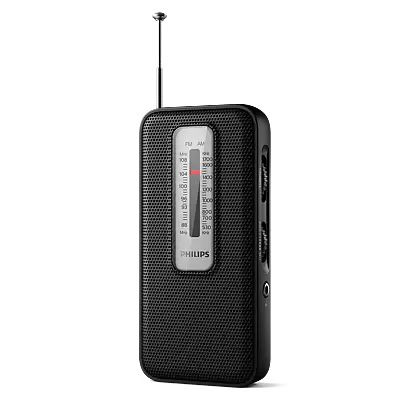
The Philips Portable Radio R1506, part of the 1000 Series, is a compact radio for listening to FM and AM stations. It runs on two AAA batteries and uses a telescopic antenna for FM reception and a built-in antenna for AM. It has a single rotary control for power and volume, a TUNING dial, a band selector, and a 3.5 mm headphone socket. The speaker is mono. The unit weighs 88 g and measures 56 x 116.2 x 22 mm, so it is easy to carry or keep in a drawer for power outages.
Product Specifications
| Feature | Detail |
| Battery type | AAA (LR3), 1.5 V |
| Number of batteries | 2 (not included) |
| FM tuner band | 88–108 MHz |
| AM tuner band | 530–1700 kHz |
| Sound system | Mono |
| Output power | 100 mW RMS |
| Volume control | Rotary (analog) |
| Audio output | Headphones, 3.5 mm |
| Dimensions (W x H x D) | 56 x 116.2 x 22 mm |
| Weight (main unit) | 88 g |
Specifications can change without notice (PDF p. 7).
What’s in the Box
- Main unit
- Quick start guide
- Warranty card
The two AAA batteries are not supplied, so have them ready before you set the radio up.
Parts and Controls
The radio has six main parts (PDF p. 4):
- Telescopic antenna: Improves FM reception.
- TUNING control: Fine-tunes a station in FM or AM mode.
- Power/volume control: Switches the radio on and off and adjusts the sound level.
- Headphone socket: A 3.5 mm socket for headphones.
- Band selector: Switches between the FM and AM wavebands.
- Battery compartment: Holds the two AAA batteries.
Installing the Batteries
Follow the setup steps in order. The radio takes two AAA batteries with the plus and minus ends matching the markings in the battery compartment (PDF p. 5).
- Open the battery compartment.
- Insert two AAA batteries, matching the polarity (+/–) shown inside the compartment.
- Close the compartment.
Keep these battery cautions in mind:
- There is a risk of explosion if batteries are exposed to heat, sunshine, or fire. Never throw batteries into a fire.
- Batteries contain chemical substances, so dispose of them properly.
- Do not mix battery types, such as alkaline with carbon zinc. Use batteries of the same type only.
- Do not mix old and new batteries when replacing them.
How to Listen to the Radio
Turn On and Tune a Station
- Turn the power/volume control to switch the radio on.
- Set the band selector to FM or AM.
- Use the TUNING control to find your station.
- To switch off, turn the power/volume control back to OFF.
Adjust the Volume
Use the same rotary control to raise or lower the sound. The same control also switches the radio on and off.
Use Headphones
Plug your headphones into the 3.5 mm socket. The built-in speaker switches off automatically while headphones are connected.
Get Better Reception
Keep the radio away from other electronic devices to avoid interference. For FM, fully extend the telescopic antenna and adjust its position. If the FM signal is too strong, shorten the antenna. For AM, the radio uses a built-in antenna, so turn the whole radio to find the best direction.
Safety Instructions
The safety notes on PDF page 3 cover the following points:
- Read and follow all instructions and heed all warnings.
- Do not block any ventilation openings.
- Keep the radio away from heat sources such as radiators, heat registers, stoves, or other heat-producing devices, including amplifiers.
- Do not expose the radio to dripping or splashing, and do not place anything hazardous on it, such as liquid-filled objects or lit candles.
- Install batteries with correct polarity, and remove them if you will not use the radio for a long time. Do not expose batteries to excessive heat such as sunshine or fire.
- Have all servicing done by qualified personnel. Servicing is needed if the radio has been damaged, liquid or objects have got inside, it has been exposed to rain or moisture, it does not work normally, or it has been dropped.
- Never remove the casing. Trying to repair the device yourself can void the warranty (PDF p. 7).
Radio Interference and Regulatory Notes
The radio has been tested and complies with the limits for a Class B digital device under Part 15 of the FCC Rules. If it causes interference with radio or TV reception, which you can confirm by switching it off and on, try these steps:
- Reorient or relocate the receiving antenna.
- Increase the distance between the radio and the receiver.
- Plug the equipment into an outlet on a different circuit from the receiver.
- Ask the dealer or an experienced radio/TV technician for help.
The device meets Part 15 conditions: it may not cause harmful interference, and it must accept any interference it receives, including interference that may cause undesired operation. For Canada, it is marked CAN ICES-003(B)/NMB-003(B).
Troubleshooting
Check these points before asking for service (PDF p. 7).
| Problem | Likely cause | What to do |
| No sound or power | Volume turned down | Adjust the volume. |
| Batteries dead or inserted wrongly | Insert fresh batteries with correct polarity. | |
| Headphones connected | Disconnect the headphones. | |
| Poor radio reception (FM) | Weak signal | Extend, tilt, and turn the telescopic antenna. Shorten it if the signal is too strong. |
| Poor radio reception (AM) | Weak signal | Turn the whole radio to point the built-in antenna in the best direction. |
| Poor reception after changing batteries | Old and new batteries mixed | Do not mix old and new batteries. |
If the problem is still there, visit the Philips support page at www.philips.com/support. Keep the radio nearby and have the model number and serial number ready when you contact Philips.
Frequently Asked Questions
What batteries does the Philips R1506 use?
It uses two AAA (LR3) 1.5 V batteries. They are not included in the box. Use the same type for both, and do not mix old and new ones.
Does this radio have a charger or AC adapter?
The manual lists only battery power. It does not describe a charger or an AC adapter.
Which radio bands does it receive?
It receives FM from 88 to 108 MHz and AM from 530 to 1700 kHz. Use the band selector to switch between them.
Why is there no sound from the speaker?
First check that the volume is turned up and the batteries are fresh and installed correctly. Then make sure headphones are not plugged in, because the speaker switches off while they are connected.
How do I improve FM and AM reception?
For FM, extend the telescopic antenna fully and adjust its angle. If the signal is too strong, shorten it. For AM, turn the whole radio, since the AM antenna is built in. Keeping the radio away from other electronic devices also helps.
Can I use headphones with the R1506?
Yes. Plug them into the 3.5 mm headphone socket. The built-in speaker switches off while headphones are connected.
Is the sound mono or stereo?
The sound system is mono, with 100 mW RMS output power.
Should I leave batteries in if I won’t use the radio for a while?
No. Remove them if you will not use the radio for a long time, because leaking batteries can cause injury or damage the radio.