| Document Detail | Information |
| Document Title | Smart Doorbell Camera Start Here |
| Document Type | Quick Start Guide |
| Brand Name | ecobee |
| Product Name | Smart Doorbell Camera |
| Model Number(s) | EB-CAMSDB-01 |
| PDF File Size | 2 MB |
| Number of Pages | 4 |
| Languages | English |
ecobee Smart Doorbell Camera EB-CAMSDB-01
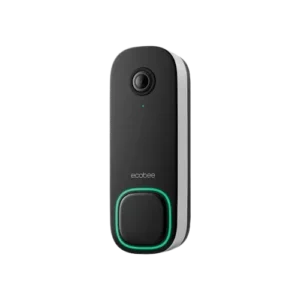
The ecobee Smart Doorbell Camera EB-CAMSDB-01 is an outdoor video doorbell with a 1080p HD camera, night vision lights, built-in microphones, a speaker, and an illuminated doorbell button. It works with the ecobee mobile app, which provides step-by-step installation instructions and device setup.
The camera includes a light sensor, camera indicator, and light loop around the doorbell button. Its supplied installation accessories include a wedge, backplate with a pre-attached security screw, hardware envelope, and chime adapter.
Installation begins in the ecobee app. Users sign in or create an account, add the Smart Doorbell Camera, and follow the instructions displayed on their mobile device. The device can also be added as an Apple HomeKit accessory using the Apple Home app and its HomeKit code.
Important: The Smart Doorbell Camera is designed for outdoor use. Improper installation may void the warranty. Follow the ecobee app’s installation instructions before mounting or connecting the device.
Product Overview
The ecobee Smart Doorbell Camera combines a video camera with a doorbell button and built-in audio components.
The front of the device contains the camera lens, night vision lights, microphones, camera indicator, light sensor, and illuminated button. A speaker and security screw are also identified in the product diagram.
The ecobee app guides users through installing the camera and adding it to their account.
Main Features
- 1080p HD camera: Provides high-definition video capture.
- Night vision lights: Integrated lights associated with the camera’s night vision system.
- Built-in microphones: Located on the front of the device.
- Speaker: Integrated into the doorbell camera.
- Camera indicator: Located below the camera lens.
- Light sensor: Detects surrounding light conditions.
- Light loop: Illuminated ring surrounding the doorbell button.
- Doorbell button: Main button on the front of the device.
- Security screw: Helps secure the doorbell camera assembly.
- ecobee app installation: Provides guided device installation.
- Apple HomeKit support: Allows the camera to be added to the Apple Home app.
- Outdoor design: Intended for outdoor installation.
What’s Included in the Box
The ecobee Smart Doorbell Camera package contains the camera and installation accessories.
| Item | Description |
| Smart Doorbell Camera | Main video doorbell device |
| Wedge | Installation accessory |
| Backplate | Mounting component for the camera |
| Security Screw | Pre-attached to the backplate |
| Hardware Envelope | Contains installation hardware |
| Chime Adapter | Accessory supplied with the doorbell camera |
Wedge
The wedge is included as part of the camera’s installation hardware.
The ecobee app provides the instructions for installing the camera and its mounting accessories.
Backplate and Security Screw
The supplied backplate includes a pre-attached security screw.
These components form part of the doorbell camera mounting assembly.
Chime Adapter
The package includes a chime adapter containing a lithium-polymer battery.
Warning: A damaged chime adapter battery can cause injury. Do not attempt to remove, open, crush, puncture, heat, or burn the battery.
Parts and Components
The Smart Doorbell Camera has several components identified in the product diagram.
| Component | Description |
| 1080p HD Video Camera | Captures high-definition video |
| Night Vision Lights | Lights used by the camera’s night vision system |
| Microphones | Built-in audio input components |
| Camera Indicator | Indicator located beneath the camera lens |
| Light Sensor | Detects surrounding light conditions |
| Light Loop | Illuminated ring around the doorbell button |
| Doorbell Button | Button pressed by visitors |
| Speaker | Built-in audio output component |
| Security Screw | Secures the doorbell assembly |
1080p HD Video Camera
The camera lens is located near the top of the device.
The camera supports 1080p HD video resolution.
Night Vision Lights
The night vision lights are positioned near the camera lens.
They form part of the camera’s night vision hardware.
Microphones
The camera contains built-in microphones.
These are located on the front of the device, near the camera assembly.
Camera Indicator
The camera indicator is positioned below the camera lens.
Light Sensor
The light sensor is located on the front of the doorbell camera.
Light Loop
The light loop surrounds the main doorbell button.
It forms a visible ring around the button on the front of the camera.
Doorbell Button
The doorbell button is positioned near the bottom of the front panel.
Visitors press this button to use the doorbell.
Speaker
The speaker is integrated into the doorbell camera assembly.
Security Screw
The security screw is positioned at the bottom of the doorbell assembly.
Technical Specifications
| Specification | Details |
| Brand | ecobee |
| Product Name | Smart Doorbell Camera |
| Model Number | EB-CAMSDB-01 |
| Product Type | Smart Video Doorbell |
| Video Resolution | 1080p HD |
| Night Vision Lights | Included |
| Microphones | Built-In |
| Speaker | Built-In |
| Light Sensor | Included |
| Camera Indicator | Included |
| Light Loop | Included |
| Doorbell Button | Included |
| Installation Application | ecobee App |
| Apple HomeKit | Supported |
| Installation Location | Outdoor |
| Chime Adapter Battery | Lithium-Polymer |
| FCC ID | WR932181716523 |
| IC ID | 7981A-32181716523 |
| FCC Classification | Class B Digital Device |
| FCC Compliance | Part 15 |
| RoHS Compliance | Directive 2011/65/EC |
Important Safety Instructions
The Smart Doorbell Camera and its accessories must be handled and installed according to the manufacturer’s safety precautions.
Chime Adapter Battery Safety
Warning: A damaged lithium-polymer battery can cause injury.
The chime adapter contains a lithium-polymer battery.
Do not attempt to:
- Remove the battery.
- Open the battery.
- Crush the battery.
- Puncture the battery.
- Heat the battery.
- Burn the battery.
These precautions apply to the battery contained inside the chime adapter.
Installation Safety
- Follow the installation instructions provided through the ecobee app.
- Do not make unauthorized modifications to the camera.
- Use the device according to its intended outdoor application.
- Maintain the required radio-frequency separation distance.
- Keep the product away from children under three years of age.
Important: Improper installation may void the product warranty.
Radio Frequency Exposure
The device must be installed and operated with a minimum separation distance of 8 inches (approximately 20 cm) between the antenna and people.
The transmitter must not be operated together with another antenna or transmitter in a co-located arrangement.
Unauthorized Modifications
Changes or modifications not expressly approved by ecobee Inc. may void the user’s authority to operate the equipment.
Before Installation
The installation process begins with the ecobee mobile application.
Preparing for Setup
- Remove the Smart Doorbell Camera and supplied accessories from the packaging.
- Identify the camera, wedge, backplate, hardware envelope, and chime adapter.
- Locate the backplate and its pre-attached security screw.
- Prepare a compatible mobile device.
- Open or download the ecobee app.
- Sign in or create an ecobee account.
- Follow the in-app installation procedure.
ecobee Mobile App
The ecobee app is available through:
- Apple App Store.
- Google Play.
The app contains the guided installation instructions for the Smart Doorbell Camera.
How to Install the ecobee Smart Doorbell Camera
The Smart Doorbell Camera uses an app-guided installation process.
Step 1: Download or Open the ecobee App
- Open the Apple App Store or Google Play on the mobile device.
- Find the ecobee app.
- Download and install the application.
- Open the ecobee app.
Users who already have the app installed can open it directly.
Step 2: Sign In or Create an Account
- Open the ecobee app.
- Sign in using an existing ecobee account.
- If an account has not been created, select the account creation option.
- Follow the instructions to complete account registration.
Step 3: Add the Smart Doorbell Camera
- Open the ecobee app.
- Locate the + icon in the top corner.
- Select the icon to add a device.
- Follow the installation instructions displayed in the app.
The app guides users through the remaining installation procedure.
Step 4: Complete the In-App Installation
Continue following the ecobee app’s instructions until the Smart Doorbell Camera installation is complete.
The app provides the steps required for the camera and its installation accessories.
Adding the Smart Doorbell Camera to Apple HomeKit
The ecobee Smart Doorbell Camera supports Apple HomeKit.
The device can be added to the Apple Home app using its HomeKit code.
How to Add the Camera to Apple Home
- Open the Apple Home app.
- Begin the process of adding a new accessory.
- Select the Smart Doorbell Camera when prompted.
- Scan the device’s HomeKit code.
- Follow the Apple Home app instructions to complete setup.
The HomeKit setup process uses the code provided for the device.
ecobee App Support
The ecobee app provides access to installation guidance and support.
How to Find Support in the App
- Open the ecobee app.
- Sign in to the account.
- Open the account section in the top corner.
- Select the support option.
Additional installation assistance is available through the ecobee help website.
Radio and Television Interference
The Smart Doorbell Camera complies with FCC Class B digital device requirements.
Radio-frequency equipment may cause interference with radio or television reception under certain conditions.
Correcting Radio or TV Interference
If interference occurs:
- Reorient or relocate the receiving antenna.
- Increase the distance between the doorbell camera and the affected receiver.
- Connect the affected equipment to an outlet on a different electrical circuit.
- Consult the dealer or an experienced radio or television technician for assistance.
FCC and Regulatory Information
The ecobee Smart Doorbell Camera complies with applicable United States and Canadian radio-frequency regulations.
FCC Compliance
The device complies with Part 15 of the FCC Rules.
Operation is subject to two conditions:
- The device must not cause harmful interference.
- The device must accept received interference, including interference that may cause undesired operation.
FCC and ISED Identifiers
| Regulatory Detail | Information |
| Model Number | EB-CAMSDB-01 |
| FCC ID | WR932181716523 |
| IC ID | 7981A-32181716523 |
| FCC Classification | Class B Digital Device |
| FCC Rules | Part 15 |
| Canadian Compliance | ISED Licence-Exempt RSS |
| Canadian RF Standard | IC RSS-102 |
| Minimum RF Separation | 8 Inches |
Canadian ISED Compliance
The camera contains licence-exempt radio transmitters or receivers that comply with applicable Innovation, Science and Economic Development Canada requirements.
Under these requirements:
- The device must not cause interference.
- The device must accept interference, including interference that may affect its operation.
RoHS Compliance
The Smart Doorbell Camera was designed and built in accordance with RoHS Directive 2011/65/EC.
Apple HomeKit Certification
The Works with Apple designation indicates that the accessory was designed to work with the identified Apple technology and certified by the developer to meet Apple’s performance standards.
Apple is not responsible for the accessory’s operation or compliance with applicable safety and regulatory standards.
Customer Support Information
ecobee provides setup and installation assistance through its support website and mobile application.
| Contact Detail | Information |
| Brand | ecobee |
| Manufacturer | ecobee Inc. |
| Support Website | https://www.ecobee.com/get-help |
| Mobile Application | ecobee App |
| App Availability | Apple App Store, Google Play |
| In-App Support | ecobee App → Account → Support |
How to Get Installation Assistance
For assistance with the Smart Doorbell Camera:
- Visit ecobee Support.
- Open the ecobee app.
- Access support through the account section.
- Follow the available instructions for the Smart Doorbell Camera.
Frequently Asked Questions
How do I install the ecobee Smart Doorbell Camera?
Download or open the ecobee app, sign in or create an account, and select the + icon in the top corner to add a device. Follow the app’s step-by-step installation instructions to complete the Smart Doorbell Camera setup.
What is the model number of the ecobee Smart Doorbell Camera?
The model number is EB-CAMSDB-01. It is identified in the product’s regulatory information.
Does the ecobee Smart Doorbell Camera support 1080p video?
Yes. The Smart Doorbell Camera includes a 1080p HD video camera. It also has night vision lights, built-in microphones, a speaker, and a light sensor.
What accessories come with the ecobee Smart Doorbell Camera?
The package includes a wedge, a backplate with a pre-attached security screw, a hardware envelope, and a chime adapter.
Can I connect the ecobee Smart Doorbell Camera to Apple HomeKit?
Yes. The Smart Doorbell Camera supports Apple HomeKit. Open the Apple Home app, add a new accessory, and scan the device’s HomeKit code when prompted.
Does the ecobee Smart Doorbell Camera work outdoors?
Yes. The Smart Doorbell Camera is designed for outdoor use. It must be installed according to the instructions provided through the ecobee app.
Is the ecobee Smart Doorbell Camera chime adapter battery removable?
The chime adapter contains a lithium-polymer battery. The safety instructions specifically warn users not to attempt to remove, open, crush, puncture, heat, or burn the battery because damage can cause injury.
Where can I get help installing the ecobee Smart Doorbell Camera?
Installation assistance is available at https://support.ecobee.com/. Support can also be accessed through the account section of the ecobee mobile app.