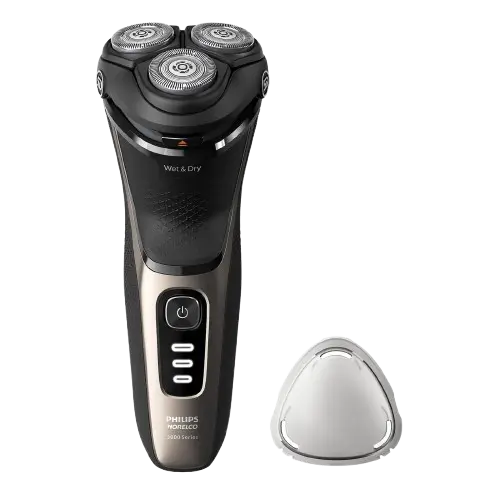
Philips Norelco Tripleheader Shaver X3001
The Philips Norelco Tripleheader Shaver is a rechargeable rotary electric shaver designed for facial and scalp shaving. Models S1143, X3001, and X3052 feature three rotary shaving heads, a built-in pop-up trimmer, a charging indicator light, and a protective cap.
The shaver uses a rechargeable nickel-metal hydride (NiMH) battery and operates without a charging cable connected. Its waterproof construction allows cleaning under running water. Models X3001 and X3052 also have wet and dry shaving instructions, including shaving with foam or gel and use in the shower.
Charging time and battery runtime vary by model. The S1143 takes approximately eight hours to charge and provides up to 40 minutes of shaving. The X3001 charges in approximately one hour and provides up to 40 minutes of operation. The X3052 provides up to 50 minutes of runtime and requires an uninterrupted three-hour charge before first use, followed by approximately one-hour charging sessions.
The shaver can also be used for scalp shaving when the hair is shorter than 1.5 mm. Its pop-up trimmer allows users to groom sideburns and moustaches.
These instructions cover product components, charging, battery indicators, facial shaving, scalp shaving, trimming, cleaning, maintenance, SH30 replacement heads, storage, troubleshooting, warranty information, and customer support.
Product Overview and Features
The Philips Norelco Tripleheader Shaver uses three rotary shaving heads to cut facial and scalp hair. The heads are designed to remain in contact with the skin while the shaver moves in circular motions.
The product is intended for personal household grooming and uses a single On/Off button for operation.
Main Features
| Feature | Description |
| Tripleheader shaving system | Three rotary shaving heads for facial and scalp shaving. |
| Cordless operation | Operates without being connected to charging equipment. |
| Waterproof construction | Suitable for cleaning under running water and cordless use in the bath or shower. |
| Wet and dry shaving | Wet shaving with water, foam, or gel is described for X3001 and X3052. |
| Scalp shaving | Suitable for scalp hair shorter than 1.5 mm. |
| Pop-up trimmer | Trims sideburns and moustaches. |
| Rechargeable battery | Built-in nickel-metal hydride battery. |
| USB charging | Uses a certified 5 V USB power source rated at 1 A or higher. |
| Quick charge | Available on X3001 and X3052. |
| Charging indicator light | Displays charging, full charge, low battery, and quick-charge status. |
| Protective cap | Protects the shaving heads during storage and travel. |
| Travel pouch | Included with X3052 only. |
| Replaceable shaving heads | Compatible with original Philips Norelco SH30 shaving heads. |
Model Comparison: S1143, X3001, and X3052
The three models share the same basic rotary shaving system but have different charging times and operating durations.
Charging and Battery Runtime
| Specification | S1143 | X3001 | X3052 |
| Full charging time | Approx. 8 hours | Approx. 1 hour | Approx. 1 hour after initial charge |
| Initial charge | Approx. 8 hours | Approx. 1 hour | 3 hours uninterrupted |
| Quick charge | — | Approx. 5 minutes | Approx. 5 minutes |
| Maximum shaving time | Up to 40 minutes | Up to 40 minutes | Up to 50 minutes |
| Wet shaving instructions | — | Yes | Yes |
| Pop-up trimmer | Yes | Yes | Yes |
| Travel pouch | — | — | Yes |
| Replacement shaving heads | SH30 | SH30 | SH30 |
Important: The X3052 should be charged for three hours without interruption before its first use to make maximum use of the battery capacity. Subsequent charges take approximately one hour.
Parts and Components
The Philips Norelco Tripleheader Shaver includes a rechargeable handle, removable shaving unit, pop-up trimmer, and USB charging accessories.
Main Shaver Components
| Part No. | Component | Function |
| 1 | Protective cap | Protects the shaving heads during storage and travel. |
| 2 | Shaving unit | Contains the three rotary shaving heads. |
| 3 | Shaving unit release button | Opens the shaving unit for cleaning and replacement. |
| 4 | On/Off button | Switches the shaver on or off. |
| 5 | Charging light | Displays battery charging and low-battery status. |
| 6 | Socket for small plug | Connects the charging cable to the shaver. |
| 7 | Pop-up trimmer | Trims sideburns and moustaches. |
| 8 | Trimmer release slide | Opens the built-in pop-up trimmer. |
| 9 | USB cable | Connects the shaver to a suitable USB power source. |
| 10 | Small plug | Connects the USB cable to the charging socket. |
| 11 | Travel pouch | Stores the shaver; included with X3052 only. |
Internal Shaving Unit Components
| Component | Function |
| Rotary shaving heads | Cut facial and scalp hair. |
| Cutters | Cutting elements inside the shaving heads. |
| Guards | Surround the cutters and guide hair into the cutting system. |
| Retaining frame | Secures the shaving heads inside the shaving unit. |
| Retaining frame lock | Locks or releases the retaining frame. |
| Hair chamber | Collects hair removed during shaving. |
| Shaving unit hinge | Connects the shaving unit to the shaver handle. |
The shaving unit can be opened for routine cleaning and removed when replacing the shaving heads.
Technical Specifications
| Specification | Details |
| Brand | Philips Norelco |
| Product | Tripleheader Shaver |
| Model numbers | S1143, X3001, X3052 |
| Product type | Rechargeable rotary electric shaver |
| Shaving system | Three rotary shaving heads |
| Intended use | Facial and scalp shaving |
| Maximum scalp hair length | Less than 1.5 mm |
| Waterproof | Yes |
| Shower use | Supported |
| Wet shaving with foam or gel | X3001, X3052 |
| Operating method | Cordless only |
| Pop-up trimmer | Included |
| Battery type | Rechargeable nickel-metal hydride (NiMH) |
| S1143 charging time | Approximately 8 hours |
| X3001 charging time | Approximately 1 hour |
| X3052 initial charging time | 3 hours |
| X3052 subsequent charging time | Approximately 1 hour |
| Quick charge | X3001, X3052 |
| Quick charging time | Approximately 5 minutes |
| S1143 battery runtime | Up to 40 minutes |
| X3001 battery runtime | Up to 40 minutes |
| X3052 battery runtime | Up to 50 minutes |
| USB charging voltage | 5 V |
| Minimum USB charging current | 1 A |
| Suitable USB power source | Philips HQ87 |
| USB power source supplied | No |
| Charging power source protection for moist environments | IPX4 splash-proof |
| Charging, operating, and storage temperature | 4.5°C–35°C (40°F–95°F) |
| Replacement shaving heads | Philips Norelco SH30 |
| Shaving head replacement interval | Every 2 years |
| Pop-up trimmer lubrication | Every 6 months |
| Product warranty | 2 years |
| Money-back guarantee | 45 days |
Important Safety Instructions
The Philips Norelco Tripleheader Shaver contains electrical components and a rechargeable NiMH battery.
Follow the safety instructions to reduce the risk of electric shock, burns, fire, and personal injury.
Electrical Safety
- Read all instructions before using the product.
- Use only a certified USB power source rated at 5 V and at least 1 A.
- When charging in a moist environment, such as a bathroom, use an IPX4 splash-proof USB power source.
- Keep the USB cable and USB power source dry.
- Do not place charging equipment where it could fall into a bathtub or sink.
- Do not immerse connected charging equipment in water.
- If a connected product falls into water, disconnect it from the electrical outlet before attempting to retrieve it.
- Never operate the shaver while connected to charging equipment.
- Disconnect the USB power source from the outlet and shaver before cleaning.
- Do not use a damaged USB cable or USB power source.
- Keep charging equipment away from heated surfaces.
- Do not use an extension cord.
- Plug the USB power source directly into an electrical outlet.
- Do not use charging equipment near an electrical outlet containing an electric air freshener.
- Do not use the product outdoors or in locations where aerosol sprays are being used or oxygen is being administered.
Warning: The shaver is waterproof, but it must only be operated without a charging cable connected.
General Safety Precautions
- Use the product only for its intended household grooming purpose.
- Use the shaver only for facial and scalp hair.
- Scalp hair must be shorter than 1.5 mm.
- Use the product only on undamaged skin that is not affected by skin growths, skin disease, or severe irritation.
- Check the shaving heads, cutters, and guards before every use.
- Do not use damaged shaving components.
- Do not use accessories that Philips has not recommended.
- Do not insert objects into the product’s openings.
- Do not operate a product that has been dropped, damaged, or is not working correctly.
- Use only original Philips replacement accessories and consumables.
- Avoid excessive pressure when shaving.
Battery Safety
The shaver contains a rechargeable nickel-metal hydride battery.
- Do not open, puncture, modify, damage, or dismantle the battery.
- Do not expose the product or battery to fire.
- Do not expose the battery to direct sunlight or excessive heat.
- Do not place the product or battery in a microwave oven or on an induction cooker.
- Do not short-circuit, overcharge, or reverse-charge the battery.
- Charge, use, and store the product between 4.5°C and 35°C (40°F and 95°F).
- Stop using and charging the shaver if it becomes unusually hot, produces an abnormal smell, changes color, or takes longer than normal to charge.
- Contact Philips if abnormal battery behavior occurs.
- Keep hands, the product, and battery components dry when handling batteries.
If the battery becomes damaged or leaks, avoid contact with the skin and eyes. If contact occurs, rinse thoroughly with water and seek medical care.
Safety for Children
The shaver is not intended for use by children or people with reduced physical, sensory, or mental capabilities unless they have received appropriate supervision or instructions from a responsible person.
Children must be supervised to prevent them from playing with the product.
Before First Use
Before using the Philips Norelco Tripleheader Shaver for the first time, inspect the shaving unit and charge the battery.
Initial Setup Instructions
- Remove the shaver and supplied accessories from the packaging.
- Check the shaving heads, cutters, and guards for visible damage.
- Make sure the shaving unit is properly attached.
- Check that the shaver is switched off.
- Connect the supplied USB cable to a suitable certified USB power source.
- Charge the battery according to the model-specific instructions.
- Disconnect the charging cable before switching on the shaver.
First Charging Requirements
| Model | Initial Charging Instructions |
| S1143 | Charge for approximately 8 hours, until the indicator shows a full charge. |
| X3001 | Charge for approximately 1 hour, until the indicator shows a full charge. |
| X3052 | Charge continuously for 3 hours before first use, until the indicator shows a full charge. |
When charging the shaver for the first time or after a long period without use, allow it to charge until the charging light remains continuously illuminated.
Temperature and Humidity Changes
If the product experiences a major change in temperature, pressure, or humidity, allow it to adjust to the new environment for approximately 30 minutes before use.
Charging the Philips Norelco Tripleheader Shaver
The shaver uses USB charging through a certified USB power source.
A suitable charging source, such as the Philips HQ87, is required but is not included.
How to Charge the Shaver
- Make sure the shaver is switched off.
- Insert the small plug of the USB cable into the charging socket at the bottom of the shaver.
- Connect the USB plug to a certified USB power source.
- Plug the USB power source directly into an electrical outlet.
- Check the charging indicator light.
- Allow the shaver to charge according to its model-specific charging time.
- After charging, disconnect the USB power source from the outlet.
- Remove the small charging plug from the shaver.
Important: Do not charge the shaver inside its pouch or travel case.
Charging Time and Battery Runtime
| Model | Charging Time | Maximum Cordless Runtime |
| S1143 | Approximately 8 hours | Up to 40 minutes |
| X3001 | Approximately 1 hour | Up to 40 minutes |
| X3052 | 3 hours initially; approximately 1 hour afterward | Up to 50 minutes |
Five-Minute Quick Charge
Applicable to X3001 and X3052 only.
The quick-charge function provides enough battery power for approximately five minutes of shaving.
- Make sure the shaver is switched off.
- Connect the USB charging cable to a certified power source.
- Plug the USB power source into an electrical outlet.
- Allow the empty battery to charge for approximately five minutes.
- Watch the charging indicator.
- When the light changes from rapid white flashing to slow white flashing, enough power is available for a five-minute shave.
- Disconnect the charging cable before using the shaver.
Special Initial Charging Instructions for X3052
Before using the X3052 for the first time, charge the battery for three hours without interruption.
Allow the charging process to continue until the charging indicator shows that the battery is full.
This initial charging procedure helps make maximum use of the battery capacity.
All subsequent charging sessions take approximately one hour.
Charging Indicator Light Guide
The Philips Norelco Tripleheader Shaver uses a single charging light to indicate battery status.
Charging Indicator Meanings
| Indicator | Meaning |
| Flashing white light | Battery is charging. |
| Solid white light | Battery is fully charged. |
| Flashing orange light | Battery has approximately 5 minutes or less of shaving time remaining. |
| Rapid flashing white light | Quick charging is in progress on X3001 and X3052. |
| Slow flashing white light after approximately 5 minutes | Enough power is available for a five-minute shave on X3001 and X3052. |
| Charging light switches off after approximately 30 minutes | Normal energy-saving behavior after full charging. |
Low Battery Indicator
When approximately five minutes or less of shaving time remain, the charging light flashes orange.
After the shaver is switched off, the orange indicator continues flashing for a few seconds.
Recharge the battery when this indication appears.
Fully Charged Indicator
When the battery is fully charged, the charging indicator remains solid white.
After approximately 30 minutes, the light automatically switches off to conserve energy.
Charging Indicator
While the battery is charging, the charging light flashes white.
For X3001 and X3052, the white flashing pattern changes during quick charging.
How to Use the Philips Norelco Shaver
The Philips Norelco Tripleheader Shaver is designed for facial and scalp shaving.
During use, move the rotary shaving heads in circular movements while keeping them in contact with the skin.
How to Turn the Shaver On and Off
- Make sure the shaver is disconnected from charging equipment.
- Press the On/Off button once to switch on the shaver.
- Press the same button again to switch it off.
Basic Shaving Instructions
- Check that the shaving heads are clean and undamaged.
- Switch on the shaver.
- Place the shaving heads against the skin.
- Move the shaver in small circular movements.
- Keep each shaving head fully in contact with the skin.
- Apply gentle pressure.
- Continue moving the shaver to capture hair growing in different directions.
- Use the narrow sides of the shaving unit for difficult-to-reach areas.
- Switch off the shaver after shaving.
- Clean the shaving unit.
- Attach the protective cap.
Important: Do not press too hard against the skin. Excessive pressure may cause irritation.
Shaving the Jawline and Under the Nose
The narrow sides of the shaving unit can be used to shave areas that are difficult to reach.
These include:
- Along the jawline.
- Beneath the nose.
Use gentle circular movements and maintain contact between the shaving heads and the skin.
Shaving Instructions for S1143
The S1143 uses the Tripleheader rotary shaving system for facial shaving.
How to Shave with S1143
- Make sure the shaving heads are clean and undamaged.
- Remove the protective cap.
- Press the On/Off button.
- Move the shaving heads over the skin using circular movements.
- Keep all shaving heads in contact with the skin.
- Apply gentle pressure.
- Use the narrow sides of the shaving unit around the jawline and beneath the nose.
- Switch off the shaver after use.
- Clean the shaving unit.
- Replace the protective cap.
Shaving After Several Days of Beard Growth
For improved shaving comfort, Philips recommends trimming the beard before shaving if it has not been shaved for three days or longer.
Wet and Dry Shaving for X3001 and X3052
Models X3001 and X3052 support wet and dry shaving.
They can be used on dry skin or with water, shaving foam, or shaving gel.
The shavers are also suitable for cordless use in the bath or shower.
How to Dry Shave
- Disconnect the charging cable.
- Remove the protective cap.
- Check that the shaving heads are clean.
- Switch on the shaver.
- Move the shaving heads over the face in small circular movements.
- Keep all three shaving heads in contact with the skin.
- Apply gentle pressure.
- Continue until shaving is complete.
- Switch off the shaver.
- Clean the shaving unit.
How to Wet Shave
- Disconnect the shaver from electrical power.
- Apply water to the face.
- Apply shaving foam or gel.
- Rinse the shaving heads under warm running water.
- Switch on the shaver.
- Move the shaving heads gently across the skin using circular movements.
- Keep each shaving head in contact with the skin.
- Apply gentle pressure.
- Rinse the shaving unit regularly during shaving.
- Continue until the required areas have been shaved.
- Switch off the shaver.
- Rinse away all remaining shaving foam or gel.
- Clean the shaving unit.
- Replace the protective cap after the shaver has dried.
Regular rinsing during wet shaving helps the shaving unit continue gliding smoothly across the skin.
Using the Shaver in the Shower
Models X3001 and X3052 can be used for wet shaving in the shower.
Warning: Never use the shaver while connected to charging equipment.
Head Shaving Instructions
The Philips Norelco Tripleheader Shaver can be used for scalp shaving.
Warning: Scalp hair must be shorter than 1.5 mm before shaving.
How to Shave the Head
- Make sure the scalp hair is shorter than 1.5 mm.
- Check that the shaving heads are clean and undamaged.
- Remove the protective cap.
- Switch on the shaver.
- Place the shaving heads against the scalp.
- Move the shaver in circular movements.
- Shave in the direction of hair growth.
- Stretch the skin with the free hand so the shaving heads can lift and cut the hair.
- Keep each shaving head fully in contact with the scalp.
- Apply gentle pressure.
- Remove accumulated cut hair from the hair chamber regularly.
- Switch off the shaver after shaving.
- Clean the shaving unit.
- Replace the protective cap.
Correct Direction for Head Shaving
Philips recommends shaving in the direction of hair growth.
Shaving against the direction of hair growth may cause skin irritation.
Wet Head Shaving for X3001 and X3052
Models X3001 and X3052 also support wet scalp shaving.
- Make sure the scalp hair is shorter than 1.5 mm.
- Apply water and shaving foam or gel to the scalp.
- Rinse the shaving heads under warm running water.
- Switch on the shaver.
- Move the shaving heads in circular movements in the direction of hair growth.
- Keep the shaving heads in contact with the scalp.
- Apply gentle pressure.
- Rinse the shaving unit regularly during shaving.
- Switch off the shaver.
- Clean the shaving unit thoroughly.
21-Day Shaving Adaptation Period
The skin and beard may need time to adjust to a new rotary shaving system.
During the first few shaving sessions:
- The shave may not feel as close as expected.
- Mild facial irritation may occur.
- The skin may require time to become familiar with rotary shaving.
Philips recommends using the new shaver exclusively for three weeks.
Alternating between different shaving methods during this period may make adjustment more difficult.
If the shaving experience remains unsatisfactory after 21 days, the product may qualify for the 45-day money-back guarantee, subject to the return conditions.
Using the Pop-Up Trimmer
The Philips Norelco Tripleheader Shaver includes a built-in pop-up trimmer.
The trimmer can be used to groom:
- Sideburns.
- Moustaches.
Pop-Up Trimmer Instructions
- Make sure the shaver is disconnected from charging equipment.
- Push the trimmer release slide downward.
- Open the pop-up trimmer.
- Press the On/Off button to start the shaver.
- Hold the trimmer perpendicular to the skin.
- Move the trimmer downward while applying gentle pressure.
- Continue trimming the required area.
- Switch off the shaver.
- Clean the trimmer after use.
- Close the trimmer until it clicks into place.
Pop-Up Trimmer Maintenance
Clean the pop-up trimmer after every use to prevent clogging or damage.
For optimal performance, Philips recommends lubricating the trimmer teeth with one drop of mineral oil every six months.
The oil is not included.
Cleaning and Maintenance
Regular cleaning helps maintain shaving performance and prevents hair or shaving product residue from collecting inside the shaving unit.
Clean the shaver after every use.
Important: Do not remove or replace the shaving unit while the shaver is switched on. The cleaning procedure includes an initial rinse with the shaver operating, followed by switching it off before opening the shaving unit.
Do not touch the shaving heads with hard objects, as this may damage the precision-slotted components.
Do not use abrasive cleaners, scouring pads, gasoline, acetone, or other aggressive cleaning liquids.
How to Clean the Shaver Under Running Water
The waterproof shaving unit can be rinsed with cold or lukewarm running water.
Cleaning Instructions
- Make sure the shaver is disconnected from charging equipment.
- Press On/Off to switch on the shaver.
- Rinse the shaving unit under cold or lukewarm running water.
- Press On/Off again to switch off the shaver.
- Press the shaving unit release button.
- Open the shaving unit.
- Rinse the shaving unit and hair chamber with lukewarm water.
- Rinse the outside of the shaving unit.
- Carefully shake off excess water.
- Allow the shaver to air-dry.
- Close the shaving unit.
Caution: Check the water temperature before rinsing to prevent burns.
Water Dripping from the Base
Water may drip from the bottom of the shaver while rinsing the shaving heads.
This is normal.
The internal electrical components are housed in a waterproof compartment.
Drying the Shaving Unit
Never dry the shaving unit with a towel or tissue.
Doing so may damage the shaving heads.
Allow the shaving components to air-dry completely.
Cleaning the Pop-Up Trimmer
Clean the pop-up trimmer after every use to remove accumulated hair.
Cleaning Instructions
- Switch off the shaver.
- Push the trimmer release slide downward.
- Open the pop-up trimmer.
- Switch on the shaver.
- Rinse the pop-up trimmer under warm running water.
- Switch off the shaver after cleaning.
- Carefully shake off excess water.
- Allow the pop-up trimmer to air-dry.
- Close the trimmer until it clicks into place.
Caution: Never dry the trimmer teeth with a towel or tissue, as this may damage them.
Lubricating the Trimmer
For optimal performance, Philips recommends applying one drop of mineral oil to the trimmer teeth every six months.
Maintenance Schedule
| Maintenance Task | Frequency | Instructions |
| Inspect shaving heads | Before every use | Check cutters and guards for damage. |
| Clean shaving unit | After every shave | Rinse under cold or lukewarm running water. |
| Clean hair chamber | After every shave | Remove accumulated hair. |
| Clean pop-up trimmer | After every use | Rinse and allow to air-dry. |
| Lubricate pop-up trimmer | Every 6 months | Apply one drop of mineral oil. |
| Replace shaving heads | Every 2 years | Install original Philips Norelco SH30 heads. |
| Replace damaged shaving heads | Immediately | Stop using damaged components. |
| Inspect charging equipment | Before charging | Check the USB cable and power source for damage. |
| Dry before storage | After cleaning | Allow the shaver and accessories to dry completely. |
Replacing the Shaving Heads
Philips recommends replacing the shaving heads every two years for maximum shaving performance.
Damaged shaving heads should be replaced immediately.
Use original Philips Norelco SH30 replacement shaving heads.
How to Replace the Shaving Heads
- Switch off the shaver.
- Press the shaving unit release button.
- Open the shaving unit.
- Pull the shaving unit away from the shaver.
- Turn the retaining frame lock counterclockwise.
- Remove the retaining frame and place it in a safe location.
- Remove the old shaving heads.
- Discard the used shaving heads immediately to avoid mixing them with the replacements.
- Insert the new SH30 shaving heads into the shaving unit.
- Make sure the projections on the shaving heads fit correctly onto the corresponding hooks of the shaving head holder.
- Reinstall the retaining frame.
- Turn the retaining frame lock clockwise to secure it.
- Insert the shaving unit hinge into the slot at the top of the shaver.
- Close the shaving unit.
Shaving Head Design Variations
The supplied shaving heads may have notches or projections.
Both shaving head systems perform the same function.
Make sure the replacement shaving heads fit correctly into the holder before securing the retaining frame.
If the Shaving Unit Does Not Close Properly
If the shaving unit does not close smoothly:
- Check that the shaving heads are installed correctly.
- Check that the retaining frame is properly positioned.
- Make sure the retaining frame lock is secured.
- Close the shaving unit.
Do not force the shaving unit closed.
The product has no other user-serviceable parts.
For assistance with repairs or other service concerns, contact Philips support.
Troubleshooting Guide
The Philips Norelco Tripleheader Shaver uses a charging indicator light to communicate battery status.
The operating instructions also identify conditions that may affect charging, shaving, and maintenance.
Common Problems and Solutions
| Problem or Condition | Possible Cause | Recommended Solution |
| Shaver does not operate while connected to USB power | The shaver requires cordless operation. | Disconnect the charging cable before use. |
| Charging light flashes orange | Battery has approximately 5 minutes or less of shaving time remaining. | Recharge the shaver. |
| Charging light flashes white | Battery is charging. | Continue charging. |
| Charging light becomes solid white | Battery is fully charged. | Disconnect charging equipment before use. |
| Charging light switches off after approximately 30 minutes | Normal energy-saving behavior after a full charge. | No action required. |
| S1143 takes longer to charge than X3001 or X3052 | S1143 has an approximately 8-hour charging time. | Follow the model-specific charging time. |
| X3052 requires additional charging before first use | Its initial charging procedure requires 3 uninterrupted hours. | Complete the initial charge before use. |
| Shaving performance is not as close as expected during initial use | Skin and beard may still be adapting. | Follow the 21-day adaptation instructions. |
| Skin irritation occurs during shaving | Excessive pressure or shaving against scalp hair growth may cause irritation. | Apply gentle pressure and follow the recommended shaving direction. |
| Shaver does not glide smoothly during wet shaving | Foam or gel may accumulate around the shaving heads. | Rinse the shaving unit regularly during shaving. |
| Water drips from the base during cleaning | Water passes through the shaving unit during rinsing. | Allow the shaver to drain and air-dry. |
| Shaving unit does not close correctly after head replacement | Shaving heads may be incorrectly positioned, or the retaining frame may not be secured. | Check the head positioning and retaining frame lock. |
| Shaving heads are damaged | Cutters or guards are damaged. | Stop using the shaver and replace the damaged heads. |
| Shaver becomes unusually hot, produces an abnormal smell, or changes color | Abnormal product or battery condition. | Stop using and charging the shaver and contact Philips. |
| Charging takes longer than normal | Abnormal charging or product condition. | Stop charging and contact Philips support. |
Why Is the Philips Norelco Shaver Flashing Orange?
The charging light flashes orange when approximately five minutes or less of shaving time remain.
The light also continues flashing briefly after the shaver is switched off.
Recharge the battery using a suitable certified USB power source.
Why Does the Shaver Not Work While Charging?
The shaver is designed for cordless operation only.
It does not operate while connected to electrical power.
Disconnect the USB charging cable before use.
Why Is My Philips Norelco S1143 Taking So Long to Charge?
The S1143 requires approximately eight hours for a full charge.
This differs from the X3001 and X3052 models, which normally charge in approximately one hour.
Why Does the X3052 Need Three Hours for Its First Charge?
Philips instructs users to charge the X3052 for three hours without interruption before first use.
This initial charging procedure is intended to make maximum use of the battery capacity.
Subsequent charging sessions take approximately one hour.
Why Is the Shaver Not Shaving Closely?
When switching to a new rotary shaving system, the skin and beard may require an adjustment period.
Philips recommends using the shaver exclusively for three weeks.
Use gentle circular movements and keep the shaving heads in contact with the skin.
Replace the shaving heads every two years or earlier if damaged.
Why Is Water Coming Out of the Bottom During Cleaning?
Water may drip from the base of the shaver when the shaving unit is rinsed.
This is normal.
The internal electrical components are housed in a waterproof compartment.
Why Does the Shaving Unit Not Close Properly?
The shaving heads may not be correctly positioned, or the retaining frame may not be locked.
Check that the heads fit into their corresponding positions and that the retaining frame is secured before closing the shaving unit.
What Should Be Done If the Shaver Overheats?
If the shaver becomes abnormally hot, produces an unusual smell, changes color, or takes longer than normal to charge:
- Stop using the shaver.
- Disconnect the charging equipment.
- Do not open or attempt to repair the battery.
- Contact Philips support.
Storage Instructions
The shaver should be cleaned, dried, and disconnected from charging equipment before storage.
How to Store the Shaver
- Switch off the shaver.
- Remove the USB power source from the electrical outlet.
- Disconnect the charging cable from the shaver.
- Clean the shaving unit and pop-up trimmer.
- Allow all components to dry completely.
- Attach the protective cap.
- Store the shaver in a safe, dry location.
- Keep the USB cable and accessories protected from damage.
Storage Precautions
- Do not wrap the charging cable around the shaver.
- Do not store the shaver where it may be crushed, struck, or damaged.
- Keep the USB cable away from sharp edges.
- Do not store charging equipment near water.
- Make sure the shaver has dried completely before storage.
Storage in the Travel Pouch
Applicable to X3052 only.
The X3052 includes a travel pouch.
Place the shaver in the pouch after cleaning and drying it.
Important: Make sure the shaver is completely dry before storing it in the travel pouch.
Replacement Parts and Accessories
Philips identifies original SH30 replacement shaving heads for models S1143, X3001, and X3052.
Replacement Shaving Heads
| Accessory | Model Number | Purpose |
| Philips Norelco Replacement Shaving Heads | SH30 | Replaces the rotary shaving heads. |
Recommended Replacement Interval
Replace the shaving heads every two years.
Replace damaged shaving heads immediately.
Original Philips Norelco replacement accessories are available through:
Battery Disposal and Recycling
The Philips Norelco Tripleheader Shaver contains a rechargeable nickel-metal hydride (NiMH) battery.
The battery must be recycled or disposed of according to local regulations.
Do not discard it with ordinary household waste.
Battery Recycling Instructions
- Contact local waste management authorities for approved battery disposal options.
- Use an authorized battery recycling location.
- Follow applicable local recycling requirements.
Battery Handling Precautions
- Do not puncture or dismantle the battery.
- Do not expose the battery to fire.
- Do not allow the terminals of a removed battery to contact metal objects.
- Do not wrap removed batteries in aluminum foil.
- Cover battery terminals with tape or place the battery in a plastic bag before disposal.
- Keep hands and battery components dry when handling batteries.
Recycling Information
| Service | Contact |
| Battery Recycling | https://www.call2recycle.org |
| Battery Recycling Telephone | 1-800-822-8837 |
| Philips Recycling | https://www.recycle.philips.com |
| Philips Product Support | https://www.philips.com/support |
Warranty Information
Full Two-Year Warranty
Philips North America LLC provides a two-year warranty beginning on the date of purchase.
The warranty covers defects in materials or workmanship.
Philips agrees to repair or replace qualifying defective products without charge during the warranty period.
Warranty Exclusions
The warranty does not cover:
- Shaving heads, including cutters and guards, because they are subject to normal wear.
- Damage caused by accidents.
- Damage resulting from misuse or abuse.
- Damage caused by insufficient care.
- Damage resulting from attachments not supplied with the product.
- Lost parts.
- Damage caused by use with incorrect voltage.
The warranty also contains limitations relating to special, incidental, or consequential damages where permitted by law.
Warranty Service
For warranty assistance, visit:
https://www.philips.com/support
Philips recommends shipping returned products by prepaid insured mail.
Damage occurring during shipment is not covered by the warranty.
The warranty provides specific legal rights, and additional rights may vary by state.
45-Day Money-Back Guarantee
Philips Norelco provides a 45-day money-back guarantee for qualifying purchases.
If the product does not meet the user’s expectations, it may be returned according to the guarantee conditions.
Money-Back Guarantee Requirements
- Return the product with the original sales receipt.
- The receipt must show the purchase price and purchase date.
- Ship the product using prepaid, insured mail.
- Make sure the package is postmarked within 45 days of purchase.
- Philips may verify the original purchase price.
- Refunds cannot exceed the suggested retail price.
Philips does not accept responsibility for lost return shipments.
How to Request a Refund
- Visit https://www.PhilipsMoneyBack.com.
- Follow the three-step return process.
- Prepare the shaver and original dated sales receipt.
- Ship the product using prepaid, insured mail.
- Make sure the package is postmarked within 45 days of purchase.
Refund checks are generally delivered within six to eight weeks after Philips receives the returned product.
Customer Support Information
Philips provides assistance with charging, product operation, replacement shaving heads, warranty service, and other product concerns.
Official Support Contacts
| Support Service | Contact |
| Philips Product Support | https://www.philips.com/support |
| Customer Support Telephone | 1-800-243-3050 |
| Product Registration | https://www.philips.com/register |
| Replacement Parts and Accessories | https://www.philips.com/store |
| Money-Back Guarantee | https://www.PhilipsMoneyBack.com |
| Battery Recycling | https://www.call2recycle.org |
| Battery Recycling Telephone | 1-800-822-8837 |
| Philips Recycling | https://www.recycle.philips.com |
Manufacturer Information
Philips Personal Health
A division of Philips North America LLC
P.O. Box 10313
Stamford, CT 06904
United States
Frequently Asked Questions
How do I use the Philips Norelco X3001 shaver?
Disconnect the charging cable and switch on the shaver. Place the three rotary shaving heads against the skin and move them in circular movements. Apply gentle pressure, keep the shaving heads in contact with the skin, and switch off and clean the shaver after use.
How long does the Philips Norelco X3001 take to charge?
The X3001 takes approximately one hour to charge and provides up to 40 minutes of cordless shaving. A five-minute quick charge provides enough power for approximately five minutes of shaving.
How long does the Philips Norelco X3052 battery last?
The X3052 provides up to 50 minutes of cordless shaving time after a full charge. Before first use, the battery should be charged for three hours without interruption. Subsequent charging sessions take approximately one hour.
How long does the Philips Norelco S1143 take to charge?
The S1143 takes approximately eight hours to charge and provides up to 40 minutes of cordless shaving time.
What does the flashing orange light mean on the Philips Norelco shaver?
A flashing orange charging light indicates that approximately five minutes or less of shaving time remain. Recharge the shaver using a suitable certified USB power source.
Can the Philips Norelco X3001 and X3052 be used in the shower?
Yes. The X3001 and X3052 support wet and dry shaving, including shower use. They must be disconnected from charging equipment before operation.
How do I clean the Philips Norelco Tripleheader Shaver?
Switch on the cordless shaver and rinse the shaving unit under cold or lukewarm running water. Switch it off, open the shaving unit, rinse the hair chamber and shaving heads, and allow the components to air-dry. Never dry the shaving heads with a towel or tissue.