| Field | Details |
| Document Title | FR01337 Jump Starter and DC Power Source |
| Document Type | Owner’s Manual |
| Brand Name | Schumacher Electric (Farm & Ranch) |
| Product Name | Jump Starter and DC Power Source |
| Model Number(s) | FR01337 |
| PDF File Size | 457 KB |
| Number of Pages | 28 |
| Languages | English, Spanish, French |
Schumacher Jump Starter FR01337
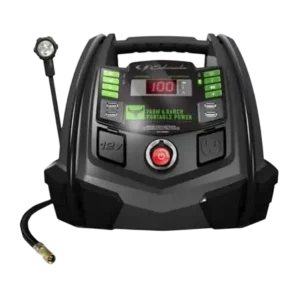
The Schumacher FR01337 Jump Starter and DC Power Source is a portable power station designed for jump-starting vehicles with 12V battery systems, powering compatible electrical devices, inflating tires, and providing work or emergency lighting. The Farm & Ranch portable power unit combines a 1200 peak amp jump starter, a 12V DC power outlet, a built-in AC power converter, four USB ports, a 100 PSI air compressor, and a flexible work light.
The FR01337 contains a sealed, maintenance-free AGM lead-acid battery. Its digital display shows the internal battery charge percentage and vehicle battery voltage during jump-starting operations.
The unit supports 12V vehicle battery systems and provides portable electrical power through its USB, DC, and AC outlets. Proper charging, battery clamp connections, operating limits, and regular maintenance are essential for safe operation.
Product Features
The Schumacher FR01337 includes the following features:
- 1200 peak amp jump-starting capability.
- Support for vehicles with 12V DC battery systems.
- Sealed, maintenance-free AGM lead-acid internal battery.
- Digital display with internal battery charge percentage.
- Vehicle battery voltage display.
- Reverse-polarity audio warning.
- Four USB charging ports with 5V DC output.
- 12V DC accessory power outlet rated at 20A.
- Built-in AC power converter with 200W continuous output and 400W peak output.
- Modified sine wave AC power output.
- Built-in air compressor rated for a maximum of 100 PSI.
- Adjustable compressor pressure with automatic shutoff.
- Flexible LED work and emergency light.
- Internal battery charging through a 120V AC connection.
- Optional charging through a vehicle’s 12V accessory outlet using a separate charging cable.
- Automatic battery maintenance during AC charging.
- Compressor overheat protection.
- Portable power for compatible electrical accessories.
Technical Specifications
| Specification | Details |
| Brand | Schumacher Electric |
| Product Line | Farm & Ranch |
| Model Number | FR01337 |
| Product Type | Jump Starter and DC Power Source |
| Internal Battery Type | Sealed, Maintenance-Free AGM Lead-Acid |
| Internal Battery Voltage | 12V DC |
| Peak Starting Current | 1200A |
| DC Power Output | 12V DC, 20A |
| AC Converter Output | 120V AC, 60Hz |
| Continuous AC Power | 200W |
| Peak AC Power | 400W |
| AC Converter Waveform | Modified Sine Wave |
| AC Outlet Type | 3-Prong NEMA 5-15 |
| USB Ports | 4 |
| USB Output Voltage | 5V DC |
| USB Current | 2A Per Side, 4A Total |
| Air Compressor Maximum Pressure | 100 PSI |
| Maximum Continuous Compressor Operation | 10 Minutes |
| Compressor Cooling Time | 10 Minutes |
| Internal Battery Charging Input | 120V AC |
| Maximum Internal Battery Charging Time | Up to 72 Hours |
| Jump Starter Warranty | 1-Year Limited Warranty |
| Internal Battery Warranty | 90 Days |
Parts and Components
The Schumacher FR01337 includes several operating controls and electrical connections.
Main Parts and Controls
| No. | Component | Function |
| 1 | USB Ports Optimized for Android (2) | Supply USB power to compatible devices |
| 2 | Pressure Decrease (–) Button | Reduces the selected compressor pressure |
| 3 | Pressure Increase (+) Button | Increases the selected compressor pressure |
| 4 | Set Pressure Button | Confirms the selected compressor pressure |
| 5 | Compressor Mode Button | Activates the air compressor controls |
| 6 | Flex Light | Provides work and emergency lighting |
| 7 | Digital Display | Shows battery information and operating values |
| 8 | Display LED Indicators | Indicate selected functions and operating status |
| 9 | Converter Button | Activates the AC power converter |
| 10 | USB Button | Turns USB power output on or off |
| 11 | Battery % Button | Displays the internal battery charge percentage |
| 12 | Flex Light ON/OFF Button | Controls the work and emergency light |
| 13 | USB Ports Optimized for Apple (2) | Supply USB power to compatible devices |
| 14 | Battery Cables with Clamps | Connect the jump starter to a vehicle battery |
| 15 | AC Household Power Outlet | Supplies power to compatible AC devices |
| 16 | Jump Starter ON/OFF Switch | Enables or disables jump-starting output |
| 17 | 12V DC Power Outlet | Supplies power to compatible 12V accessories |
| 18 | Air Compressor Hose | Connects the compressor to an inflation valve |
| 19 | Inflation Adapters | Connect the compressor hose to compatible inflatable items |
Control Panel and Digital Display Guide
The FR01337 uses a digital display and dedicated buttons for battery monitoring, jump-starting, USB power, inflation, lighting, and AC power.
Battery % Button
The Battery % button displays the charge remaining in the internal battery.
When the button is pressed, the digital display shows the battery’s charge percentage.
The internal battery should be recharged if the display indicates less than 100%.
The battery percentage reading is most accurate after the unit has been disconnected from electrical devices and charging sources for several hours.
Jump Starter ON/OFF Switch
The Jump Starter ON/OFF switch controls the jump-starting function.
The switch must remain OFF while the battery clamps are being connected.
After correct connections have been made, the switch can be turned ON to begin jump-starting.
Converter Button
The Converter button activates the built-in AC power converter for powering compatible AC electrical devices.
USB Button
The USB button activates and deactivates the four USB charging ports.
Compressor Button
The Compressor button activates the air compressor control system.
The + and – buttons adjust the selected pressure, while the SET button confirms the pressure setting.
Flex Light Button
The Flex Light button controls the work and emergency light.
The light has three operating states:
| Button Operation | Light Behavior |
| First Press | Light turns on |
| Second Press | Light flashes |
| Third Press | Light turns off |
Digital Display During Jump-Starting
| Operating Condition | Display Information |
| Battery % Button Pressed | Internal battery charge percentage |
| Connected to Vehicle, Jump Starter OFF | Vehicle battery voltage |
| Connected to Vehicle, Jump Starter ON | Equalized voltage between the vehicle battery and internal battery |
| AC Charging in Progress | Moving dashes |
| Internal Battery Fully Charged | Small pulsing ioo display |
| Converter Fault | err |
Important Safety Instructions
WARNING: Risk of explosive gases, electric shock, fire, and serious personal injury.
Lead-acid batteries produce explosive gases during normal operation. Proper precautions must be followed whenever the FR01337 is connected to a vehicle battery.
General Safety Precautions
- Keep the portable power unit away from children.
- Do not disassemble the unit.
- Have maintenance and repairs performed by qualified service personnel.
- Do not operate the unit if it is damaged.
- Do not expose the unit to rain or snow.
- Do not recharge the unit with a damaged extension cord.
- Do not place the unit on flammable materials such as carpeting, upholstery, paper, or cardboard.
- Allow proper ventilation while the internal battery is charging.
- Never place the portable power unit directly above the battery being jump-started.
- Position the unit as far from the battery as the cables allow.
- Never allow the battery clamps to touch each other or the same metal surface.
- Use only accessories recommended or sold by Schumacher Electric Corporation.
Vehicle Battery Restrictions
The jump-starting feature must only be used on vehicles, boats, and garden tractors equipped with a 12V DC battery system.
The FR01337 is intended for jump-starting lead-acid batteries.
Do not use the jump-starting function with household dry-cell batteries.
The portable power unit is not designed to replace a vehicle battery.
IMPORTANT: Do not use the jump starter on a vehicle that does not have a battery installed. Doing so can damage the vehicle’s electrical system.
Jump-Starting Safety
- Never use the jump starter while its internal battery is charging.
- Keep the cables away from fan blades, belts, pulleys, and moving engine components.
- Do not allow sparks or flames near a vehicle battery.
- Do not smoke near the battery or engine.
- Disconnect the unit if the engine does not start after the recommended attempts.
- Investigate other possible vehicle problems rather than continuing repeated jump-starting attempts.
Personal Safety Precautions
When working near lead-acid batteries:
- Wear complete eye protection.
- Wear protective clothing.
- Have another person nearby who can provide assistance.
- Keep clean water, soap, and baking soda available.
- Remove rings, bracelets, necklaces, watches, and other metal jewelry.
- Keep sparks and open flames away from the battery.
Battery Acid Safety
Battery acid can cause severe burns and eye injuries.
If battery acid contacts the skin or clothing, wash immediately with soap and water and obtain medical assistance.
If battery acid enters the eyes, flush immediately with water for at least 10 minutes and obtain medical attention.
Battery acid spills should be thoroughly neutralized with baking soda before cleanup.
Electrical Converter Safety
The built-in AC converter produces electrical power capable of causing serious electric shock.
- Keep the portable power unit dry.
- Do not operate the converter on wet surfaces.
- Never operate the unit while hands or equipment are wet.
- Keep the unit away from rain and moisture.
- Do not modify the AC outlet.
- Maintain sufficient ventilation.
- Keep the unit away from heat sources and flammable fumes.
- Do not exceed the converter’s 200W continuous power limit.
Life Support Equipment Restriction
The FR01337 must not be used to power life support devices or systems.
A failure of the converter could affect the safety or operation of such equipment.
Before First Use
The FR01337 must be charged before use to prepare its internal battery.
Initial Preparation
- Place the portable power unit on a stable, nonflammable surface.
- Inspect the power station for damage.
- Make sure the battery clamps are securely stored.
- Check the condition of the charging connection.
- Charge the internal battery completely.
- Press the Battery % button to verify the charge level.
- Disconnect the charging connection before using the jump-starting function.
IMPORTANT: Charge the internal battery immediately after purchase, after every use, and every 30 days while the unit is not in use.
This charging schedule helps keep the internal battery fully charged and prolong its service life.
How to Check the Internal Battery Charge Level
The digital display shows the percentage of charge remaining in the internal battery.
Checking Battery Percentage
- Disconnect the unit from connected electrical devices and charging sources.
- Press the Battery % button.
- Read the battery charge percentage shown on the digital display.
- Recharge the internal battery if the displayed charge is below 100%.
For the most accurate battery percentage reading, allow the unit to remain disconnected from devices and charging sources for a few hours before checking.
How to Charge the Internal Battery Using AC Power
The internal battery can be charged through the AC charging connection on the back of the unit.
An extension cord is required for this charging method.
Required Charging Equipment
| Item | Requirement |
| Charging Source | 120V AC Electrical Outlet |
| Extension Cord | 18 AWG or Larger |
| Charging Connection | Rear AC Charging Connector |
| Maximum Charging Duration | Up to 72 Hours |
| Charging Control | Automatic Maintain Mode |
AC Charging Instructions
- Locate the AC charging connector on the back of the unit.
- Flip the connector downward.
- Connect an 18 AWG or larger extension cord to the charging connector.
- Plug the extension cord into a 120V AC wall outlet.
- Watch the digital display for moving dashes that indicate charging.
- Allow the internal battery to charge completely.
- When charging is complete, the display shows a smaller pulsing ioo indication.
- The charger automatically switches to Maintain mode after the internal battery is fully charged.
Complete charging may take up to 72 hours.
Automatic Maintain Mode
Once the internal battery is fully charged, the charging system automatically switches to Maintain mode.
During Maintain mode:
- The internal battery remains at full charge.
- The Battery % LED pulses while AC power remains connected.
- The charging system maintains the battery without damaging it.
Recharge the FR01337 as soon as possible after use.
How to Charge the Internal Battery While Driving
The FR01337 can also be charged from a vehicle’s 12V accessory outlet while driving.
This method requires an optional 12V port charging cable.
Required Accessory
| Accessory | Part Number |
| 12V Port Charging Cable | 94500109 |
Important Charging Warning
WARNING: Do not charge the internal battery using the 12V port charging cable for more than 30 minutes. Never leave the battery unattended during this charging method.
Charging for too long may cause the battery to overcharge and could result in an explosion, property damage, or personal injury.
Vehicle Charging Instructions
- Make sure the vehicle engine is running.
- Connect one end of the 12V port charging cable to the portable power unit’s 12V DC power outlet.
- Connect the other end to the vehicle’s 12V accessory outlet or cigarette lighter socket.
- Monitor the internal battery charge percentage using the Battery % button.
- Disconnect the charging cable when the internal battery is fully charged or before the 30-minute limit is reached.
- Remove the charging cable from the portable power unit first.
- Disconnect the cable from the vehicle accessory outlet.
Vehicle Charging Limitations
- The Battery % LED does not operate during this charging method.
- Automatic Maintain mode is bypassed.
- The internal battery can become overcharged.
- The charging cable must be disconnected completely when the vehicle engine is not running.
How to Jump Start a Vehicle
The FR01337 provides up to 1200 peak amps for jump-starting compatible 12V vehicle battery systems.
WARNING: The jump-starting feature must not be used while the internal battery is charging.
Before Jump-Starting
- Make sure the vehicle uses a 12V DC battery system.
- Confirm that a battery is installed in the vehicle.
- Turn the vehicle ignition OFF.
- Keep the jump starter ON/OFF switch in the OFF position.
- Position the cables away from fan blades, belts, pulleys, and other moving parts.
- Determine whether the vehicle uses a negative-ground or positive-ground electrical system.
Connecting to a Negative-Ground Vehicle
Most vehicles use a negative-ground electrical system.
- Connect the red positive clamp to the positive (+) battery terminal.
- Connect the black negative clamp to the vehicle chassis or engine block away from the battery.
- Make sure the clamps are securely attached.
Connecting to a Positive-Ground Vehicle
For a positive-ground electrical system:
- Connect the black negative clamp to the negative (–) battery terminal.
- Connect the red positive clamp to the vehicle chassis or engine block away from the battery.
- Confirm that the connections are secure.
Reverse-Polarity Audio Alarm
If the battery clamps are connected with reversed polarity, an audible alarm sounds.
Do not turn the jump starter switch ON while the reverse-polarity alarm is sounding.
Incorrect connections may seriously damage the vehicle or jump starter.
Disconnect the unit and correct the clamp connections. The alarm stops when the connections are corrected.
Starting the Engine
- After making the correct battery connections, turn the jump starter switch to ON.
- Attempt to start the engine.
- Crank the engine for no more than 8 seconds.
- If the engine does not start, wait 2 minutes before trying again.
- When the engine starts, turn the jump starter switch to OFF.
- Disconnect the portable power unit from the vehicle battery.
- Recharge the FR01337 after use.
If the engine does not start after the recommended attempts, disconnect the jump starter and check for other problems that may need correction.
How to Use the Flexible Work and Emergency Light
The FR01337 includes a flexible work light that can provide steady or flashing illumination.
Work Light Instructions
- Place the portable power unit on a flat, stable surface near the work area.
- Make sure the battery clamps are securely attached to their storage holders.
- Remove the flexible work light from its storage clip on the side of the unit.
- Point the light toward the intended area.
- Press the Flex Light button once to turn the light on.
- Press the button again to activate the flashing mode.
- Press the button a third time to turn the light off.
- Return the light to its storage clip after use.
- Recharge the portable power unit as soon as possible after using the light.
Important: Do not use the flexible light to lift or carry the power station.
Automatic Light Shutoff
The flexible work light automatically turns off after 24 hours.
How to Use the USB Charging Ports
The FR01337 has four USB ports for powering compatible USB devices.
Two ports on the left are optimized for Android devices, and two ports on the right are optimized for Apple devices.
USB Output Specifications
| Specification | Details |
| Total USB Ports | 4 |
| Left USB Ports | 2, Optimized for Android |
| Right USB Ports | 2, Optimized for Apple |
| USB Output Voltage | 5V DC |
| Maximum Output Per Side | 2A |
| Maximum Combined Output | 4A |
USB Charging Instructions
- Make sure the battery clamps are securely clipped onto their storage holders.
- Connect the device to one of the four USB ports.
- Press the USB ON/OFF button.
- Turn on the connected USB device.
- When finished, press the USB button again to turn off the USB output.
- Recharge the portable power station as soon as possible after USB use.
USB Low-Battery Protection
The USB output automatically shuts off when the internal battery voltage becomes low.
This feature protects connected electronic devices.
How to Power a 12V DC Device
The FR01337 includes a 12V DC accessory power outlet rated for a maximum current of 20A.
It can supply power to compatible 12V accessories equipped with a standard 12V accessory plug.
12V DC Operating Instructions
- Make sure the connected 12V device is turned OFF.
- Check that the jump starter clamps are securely stored on their holders.
- Open the protective cover of the 12V DC outlet.
- Insert the device’s 12V accessory plug into the outlet.
- Turn on the connected 12V device if required.
- When finished, turn off the connected device.
- Remove the accessory plug from the DC outlet.
- Recharge the portable power unit immediately after use.
12V DC Power Limitations
CAUTION: Do not connect appliances that draw more than 20A DC.
Do not power a 12V DC accessory from the unit while the internal battery is charging.
Extended operation of 12V devices may significantly discharge the internal battery.
Estimated 12V DC Device Run Times
The following table provides estimated operating times based on a fully charged internal battery.
| Device Type | Estimated Power Consumption | Estimated Run Time |
| Cell Phone | 4W | 54 Hours |
| Fluorescent Light | 4W | 54 Hours |
| Radio or Fan | 9W | 24 Hours |
| Depth Finder | 9W | 24 Hours |
| Camcorder | 15W | 14.4 Hours |
| Electrical Tool | 24W | 9 Hours |
| Electric Cooler | 48W | 4.5 Hours |
| Car Vacuum or Air Compressor | 80W | 2.7 Hours |
These values are estimates based on a fully charged internal battery.
Actual operating time may vary.
How to Use the Air Compressor
The Schumacher FR01337 includes an air compressor with a maximum pressure rating of 100 PSI.
The compressor uses adjustable pressure controls and automatically stops when the selected pressure is reached.
Air Compressor Safety
WARNING: Read the inflation instructions for the item being inflated. Never exceed the manufacturer’s recommended pressure.
- Do not overinflate tires or other inflatable items.
- Do not leave the compressor unattended during use.
- Do not exceed 100 PSI.
- Do not operate the compressor for more than 10 continuous minutes.
- Allow the unit to cool for 10 minutes before using the compressor again.
Air Compressor Operating Instructions
- Remove the air compressor hose from the storage compartment at the back of the unit.
- Connect the hose adapter to the valve stem by threading it onto the valve.
- Use an additional inflation adapter if necessary.
- Press the Compressor button.
- Press the + or – buttons to select the desired pressure in PSI.
- Press the SET button to confirm the pressure setting.
- Allow the compressor to inflate the item.
- The compressor automatically stops when the selected pressure is reached.
- Unscrew the connector from the valve stem.
- Press the Compressor button again to turn off the display and LEDs.
- Return the compressor hose to the rear storage compartment.
- Allow the unit to cool.
- Recharge the unit before storing it.
Estimated Inflation Times
| Item | Estimated Inflation Time |
| Vehicle Tires, 13–16 Inches | 6–24 Minutes |
| Bicycle Tires | 1–3 Minutes |
| Sports Balls | Approximately 30 Seconds |
These times are approximate. The compressor pressure gauge should be used to check that the correct pressure has been reached.
Compressor Operating Time Limit
The compressor must not run for more than 10 minutes continuously.
After 10 minutes of operation, allow the unit to cool for 10 minutes before using it again.
Compressor Overheat Protection
The air compressor includes built-in thermal protection.
If the compressor becomes too hot, the protection system shuts it off automatically.
After cooling for a few minutes, the compressor may restart automatically.
Automatic Compressor Shutoff
When the compressor is not in use, it automatically shuts off after approximately 2 minutes.
Before Using the AC Power Converter
The FR01337 includes a built-in power converter for operating compatible household AC devices.
AC Converter Specifications
| Specification | Details |
| Rated AC Output | 120V AC, 60Hz |
| Continuous Power | 200W |
| Peak Power | 400W |
| Output Waveform | Modified Sine Wave |
| AC Outlet | 3-Prong NEMA 5-15 |
| Recommended Maximum Device Load | 200W Continuous |
The operating instructions refer to the household outlet as 110V AC, while the technical specifications identify its nominal rating as 120V AC.
Converter Safety Precautions
Before using the converter:
- Keep several inches of clearance around the top and sides of the unit.
- Do not block the ventilation openings at the back.
- Keep the unit away from flammable fumes and materials.
- Protect the unit from rain and moisture.
- Do not operate the converter on wet surfaces.
- Keep the unit away from heating vents, radiators, and other heat sources.
- Avoid direct sunlight.
- Do not operate the converter near an open engine compartment where fumes may accumulate.
- Do not modify the AC receptacle.
The recommended operating air temperature is 50°F to 80°F.
AC Power Converter Limits and Compatibility
The built-in converter is designed for devices drawing 200W or less of continuous power.
If the device does not display a wattage rating, the manual instructs using only devices drawing less than 1.7A of AC current.
Starting and Peak Power
Some appliances, such as fans, televisions, and electrical motors, require additional power during startup.
Even if a device is rated below 200W during normal operation, its starting current may exceed the converter’s surge capability.
This can cause the converter to shut down automatically.
Modified Sine Wave Compatibility
The FR01337 uses a modified sine wave converter.
Its output waveform is different from standard utility-supplied AC power.
The manufacturer recommends checking compatibility before operating the following devices:
- Switch-mode power supplies.
- Linear power supplies.
- Class 2 transformers.
- Line filter capacitors.
- Shaded-pole motors.
- Fan motors.
- Fluorescent and high-intensity lamps with ballasts.
- Transformerless battery chargers.
Some devices may operate at higher temperatures or overheat when powered by the converter.
Using Battery Chargers with the Converter
If a battery charger is powered through the FR01337 AC outlet:
- Monitor the battery charger’s temperature for approximately 10 minutes.
- If the battery charger becomes unusually warm, disconnect it from the converter immediately.
Extension Cord Requirements for the AC Converter
An extension cord can be connected between the converter outlet and the electrical device.
For best results, the extension cord should meet the following specifications:
| Requirement | Specification |
| Minimum Wire Size | 16 AWG |
| Maximum Length | 50 Feet |
How to Power an AC Device
The FR01337 can supply AC power to compatible electrical devices through its built-in converter.
AC Power Operating Instructions
- Make sure the battery clamps are securely stored on their holders.
- Open the protective cover of the AC outlet on the front panel.
- Make sure the connected AC device is turned OFF.
- Connect the device’s plug to the AC outlet.
- Press the Converter button.
- Turn on the connected electrical device.
- Recharge the portable power unit as soon as possible after use.
Important AC Power Limit
Do not connect appliances that draw more than 200W of continuous power.
Exceeding this limit may damage the converter or the connected device.
Automatic Overload Protection
If the connected device draws excessive power, the converter is designed to shut down automatically.
This prevents damage during overload conditions.
The converter may also display err when the internal battery is not fully charged or the connected device exceeds the supported power limit or has a short circuit.
Digital Display Messages and Operating Indicators
The FR01337 uses its digital display, LED indicators, and audible alarm to communicate operating conditions.
Display and Indicator Meanings
| Display or Indicator | Meaning | Recommended Action |
| Battery Percentage | Internal battery charge level | Recharge if below 100% |
| Moving Dashes | Internal battery charging through AC power | Allow charging to continue |
| Small Pulsing ioo | Internal battery fully charged | Automatic Maintain mode begins |
| Battery % LED Pulsing | AC charging system is in Maintain mode | Normal operation |
| Vehicle Battery Voltage | Jump starter connected with switch OFF | Vehicle battery voltage is being displayed |
| Equalized Voltage | Jump starter connected with switch ON | Displays equalized voltage |
| Reverse-Polarity Audio Alarm | Battery clamps connected incorrectly | Keep switch OFF and correct connections |
| err | Converter fault involving battery charge, overload, or short circuit | Recharge the unit or check the connected device |
Maintenance and Cleaning Instructions
Regular maintenance helps protect the unit’s electrical connections and internal battery.
Cleaning the Battery Clamps
After using the jump starter:
- Make sure the jump-starting function is switched OFF.
- Disconnect the clamps from the vehicle.
- Clean the clamps.
- Return the clamps to their storage holders.
Cleaning the Housing
Clean the portable power unit’s housing after use.
Battery Maintenance
The internal battery should be kept charged.
- Recharge immediately after purchase.
- Recharge after every use.
- Recharge every 30 days when the unit is not being used.
- Never allow the internal battery to become completely discharged.
Battery Clamp Storage
Store the battery clamps on their support posts.
This prevents the clamps from contacting each other or another metal surface.
Storage Instructions
The FR01337 should be stored with its internal battery charged and its accessories properly secured.
Storage Procedure
- Recharge the internal battery.
- Clean the housing and battery clamps.
- Return the clamps to their storage holders.
- Return the compressor hose to its rear storage compartment.
- Return the flexible work light to its storage clip.
- Keep the unit protected from moisture and excessive heat.
- Recharge the unit every 30 days while it is stored.
Never completely discharge the internal battery.
Troubleshooting Guide
The Schumacher FR01337 troubleshooting instructions cover jump-starting problems, 12V accessory power failures, compressor shutdowns, battery charging problems, reverse-polarity alarms, and converter errors.
Schumacher FR01337 Troubleshooting Table
| Problem | Possible Cause | Recommended Solution |
| Jump starter will not start the vehicle | Clamps are not making proper contact | Check connections to the battery and vehicle frame; clean the connection points |
| Jump starter will not start the vehicle | Battery clamp connections are reversed | Disconnect the unit and correct the connections |
| Jump starter will not start the vehicle | Internal battery is not charged | Check the charge level using the Battery % button |
| Jump starter will not start the vehicle | Vehicle battery is defective | Have the vehicle battery checked |
| Jump starter will not start the vehicle | Jump starter switch is OFF | Turn the switch ON after making correct connections |
| 12V DC device does not operate | Connected device is OFF | Turn on the connected device |
| 12V DC device does not operate | Internal battery is discharged | Check the internal battery charge level |
| 12V DC device does not operate | Device draws more than 20A, has a short circuit, or internal fuse has blown | Disconnect the device; have the internal 20A fuse replaced by qualified service personnel if necessary |
| Internal battery will not hold a charge | Internal battery is defective | Have the battery checked |
| Air compressor stops | Compressor overheated | Allow the compressor to cool for a few minutes |
| Audio alarm sounds | Battery clamps are connected with reversed polarity | Disconnect the unit and correct the clamp connections |
| Converter displays err | Internal battery is not fully charged | Recharge the portable power unit |
| Converter displays err | Connected device draws more than 200W or has a short circuit | Use a device drawing less than 1.7A AC current and within the converter’s power rating |
FR01337 Will Not Jump Start a Vehicle
If the jump starter does not start the engine, several conditions may need to be checked.
Poor Battery Clamp Connections
Check the clamps connected to the vehicle battery and chassis.
Make sure both connection points are clean and the clamps are secure.
Reversed Battery Clamp Connections
If the clamps are connected incorrectly, disconnect the jump starter and reverse the connections.
Low Internal Battery Charge
Press the Battery % button to check the internal battery.
Recharge the unit if necessary.
Defective Vehicle Battery
If the battery connections and internal battery charge are correct, have the vehicle battery checked.
Jump Starter Switch OFF
The ON/OFF switch must be in the ON position during the jump-starting attempt.
The switch should only be turned ON after the battery clamps are correctly connected.
FR01337 Will Not Power a 12V Device
If the connected 12V device does not operate:
- Check whether the connected device is switched ON.
- Check the internal battery charge level.
- Confirm that the connected device does not exceed 20A.
- Disconnect the device if an overload or short circuit is suspected.
If the internal 20A fuse has blown, it must be replaced by a qualified service professional.
FR01337 Internal Battery Will Not Hold a Charge
If the internal battery does not retain its charge, it may be defective or unable to accept charging current.
Have the internal battery checked.
FR01337 Air Compressor Keeps Shutting Off
The compressor includes thermal protection that automatically shuts off the motor if it overheats.
Allow the compressor to cool for a few minutes before trying again.
The compressor should not be operated for more than 10 minutes continuously. Allow 10 minutes of cooling time between operating periods.
FR01337 Reverse-Polarity Alarm Is Sounding
An audible alarm indicates reversed battery clamp connections.
Correcting the Connections
- Keep the jump starter ON/OFF switch in the OFF position.
- Disconnect the jump starter from the vehicle battery.
- Correct the clamp connections.
- Confirm that the alarm has stopped before operating the jump starter.
Do not switch the jump starter ON while the reverse-polarity alarm is active.
FR01337 Converter Shows ERR
The digital display may show err while the AC converter is activated.
Possible Causes
- The internal battery is not fully charged.
- The connected AC device draws more than 200W.
- The connected device has a short circuit.
Troubleshooting Steps
- Recharge the internal battery.
- Check the connected device’s power requirements.
- Use only compatible devices within the converter’s 200W continuous power limit.
- If the device does not have a wattage rating, use only devices drawing less than 1.7A of AC current.
Accessories and Replacement Parts
Schumacher identifies the following accessory and replacement part numbers for the FR01337.
Accessories
| Accessory | Part Number |
| 12V Port Charging Cable | 94500109 |
The 12V charging cable is an optional accessory and is not included with the portable power unit.
Replacement Parts
| Replacement Part | Part Number |
| Air Compressor Accessory Kit – 3 Hose Adapters with Bag | 2299001425Z |
| Battery Clamp Replacement Kit – 1 Red Positive Clamp and 1 Black Negative Clamp | 2299002837Z |
Internal Battery Disposal
The Schumacher FR01337 contains a sealed, non-spillable lead-acid battery.
The battery must be disposed of properly.
Battery acid can cause severe burns and blindness, and the battery presents a potential explosion hazard.
Keep the battery and power station away from children.
Limited Warranty
Schumacher Electric Corporation provides separate warranty coverage for the FR01337 portable power unit and its internal battery.
Warranty Coverage
| Warranty Detail | Information |
| Manufacturer | Schumacher Electric Corporation |
| Product Warranty | 1 Year |
| Internal Battery Warranty | 90 Days |
| Warranty Start Date | Date of Retail Purchase |
| Eligible Purchaser | Original Retail Purchaser |
| Transferability | Not Transferable |
| Covered Defects | Defective Materials or Workmanship Under Normal Use and Care |
Warranty Repair or Replacement
If the product develops a covered defect during the warranty period, Schumacher may repair or replace it with a new or reconditioned unit.
The manufacturer determines whether repair or replacement is appropriate.
The purchaser must provide proof of purchase and pay the shipping charges in advance when sending the product to Schumacher or its authorized representatives.
Warranty Exclusions
The limited warranty may be void if the product:
- Is misused.
- Is handled carelessly.
- Is repaired or modified by someone other than the manufacturer.
- Is resold through an unauthorized retailer.
- Has a warranty label removed when the manufacturer determines that its removal voids coverage.
Accessories not manufactured and approved by Schumacher Electric Corporation are excluded from warranty coverage.
The warranty also contains limitations relating to other warranties and incidental or consequential damages. Applicable rights may vary by state.
Warranty Registration
Warranty registration is available through:
The warranty registration card should be submitted within 30 days of purchase.
The original retail receipt must be retained for warranty claims.
Customer Support and Repair Information
Schumacher Electric Corporation provides customer support for operating problems, troubleshooting, repairs, and product returns.
Customer Support Details
| Service | Contact Information |
| Manufacturer | Schumacher Electric Corporation |
| Support Phone | 1-800-621-5485 |
| Support Email | services@schumacherelectric.com |
| Website Listed in Manual | www.batterychargers.com |
| Support Hours Listed in Manual | Monday–Friday, 7:00 AM–5:00 PM CST |
| Manufacturer Address | 801 Business Center Drive, Mount Prospect, IL 60056-2179 |
Repair and Return Instructions
- Review the troubleshooting instructions.
- Contact Schumacher Customer Service if the issue continues.
- Describe the operating problem.
- Follow the manufacturer’s support instructions.
- Request a Return Merchandise Authorization (RMA) number if repair or return is required.
- Do not ship the unit until Schumacher has issued an RMA number.
Important: Do not send the portable power unit to the warranty registration address for repairs.
Frequently Asked Questions
1. How do I charge the Schumacher FR01337 jump starter?
The FR01337 internal battery is charged through the rear AC charging connector using an 18 AWG or larger extension cord connected to a 120V AC outlet. Moving dashes appear on the digital display during charging, and a small pulsing ioo appears when the battery is fully charged. Complete charging may take up to 72 hours.
2. How many amps does the Schumacher FR01337 provide for jump-starting?
The Schumacher FR01337 provides 1200 peak amps for jump-starting compatible vehicles with 12V DC lead-acid battery systems. It must not be used without a battery installed in the vehicle.
3. How do I jump start a car with the Schumacher FR01337?
With the jump starter switch OFF, connect the battery clamps using the correct vehicle grounding procedure. Turn the jump starter ON and crank the engine for no more than 8 seconds. If the engine does not start, wait 2 minutes before trying again. After starting, turn the unit OFF, disconnect the clamps, and recharge the portable power station.
4. How often should the Schumacher FR01337 be charged?
The FR01337 should be charged immediately after purchase, after every use, and every 30 days when it is not being used. The internal AGM lead-acid battery should never be allowed to become completely discharged.
5. What is the maximum air pressure of the Schumacher FR01337 compressor?
The built-in air compressor has a maximum pressure rating of 100 PSI. The desired pressure can be selected using the + and – buttons and confirmed with SET. The compressor automatically stops when the selected pressure is reached. It must not run for more than 10 minutes continuously, followed by 10 minutes of cooling.
6. Can the Schumacher FR01337 power household electrical devices?
Yes. The FR01337 includes a modified sine wave AC converter rated for 200W continuous power and 400W peak power. Connected devices must be compatible with modified sine wave output and remain within the converter’s power limits.
7. Why does the Schumacher FR01337 display ERR?
The err display indicates a converter problem that may be caused by a low internal battery charge, a connected device drawing more than 200W, or a short circuit in the connected device. Recharge the unit and check the device’s power requirements before further use.
8. What does the alarm mean on the Schumacher FR01337?
The audible alarm indicates that the jump-starting clamps are connected with reversed polarity. Keep the jump starter switch OFF, disconnect the clamps, and correct the connections. The alarm stops when the connections are corrected.