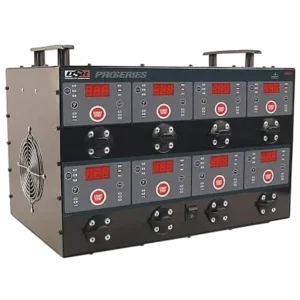
| Field | Details |
| Document Title | DSR127 Automatic Battery Charging Station |
| Document Type | Owner’s Manual |
| Brand Name | DSR ProSeries (Powered by Schumacher) |
| Product Name | Automatic Battery Charging Station |
| Model Number(s) | DSR127 |
| PDF File Size | 494.33 KB |
| Number of Pages | 36 |
| Languages | English, Spanish, French |
DSR ProSeries Battery Charging Station DSR127
The DSR ProSeries DSR127 Automatic Battery Charging Station, powered by Schumacher, is an eight-bank battery charging system designed to charge and maintain multiple compatible batteries through independent charging outlets.
The DSR127 supports 6V and 12V lead-acid batteries, including standard (STD), Absorbed Glass Mat (AGM), and GEL batteries. It also supports 12V lithium iron phosphate (LiFePO4) rechargeable batteries.
Each charging station includes controls for battery voltage, battery type, charging status, and digital display readings. The charger automatically adjusts charging current, monitors charging progress, and switches to Maintain mode when a battery is fully charged.
The charging station also includes a built-in voltmeter, a Recovery setting for compatible 12V non-lithium batteries, automatic sulfation detection, cooling fans, and a shared power management system that controls the output of all eight charging stations.
Product Features
The Schumacher DSR127 includes the following features:
- Eight independent battery charging outlets.
- Charging support for 6V and 12V batteries.
- Compatibility with STD, AGM, and GEL lead-acid batteries.
- Charging support for 12V LiFePO4 batteries.
- Individual charging controls for each station.
- Digital displays showing battery voltage, amperage, and estimated charge percentage.
- Battery Voltage selection controls.
- Battery Type selection controls.
- START/STOP buttons for individual charging stations.
- Automatic charging current adjustment up to 12A per station.
- Automatic battery charging and maintenance.
- Recovery setting for compatible 12V non-lithium batteries.
- Automatic sulfation detection.
- Built-in battery voltage testing.
- Charging, Charged/Maintaining, and Reversed Clamps LED indicators.
- Automatic charging fault detection.
- F01–F10 diagnostic error codes.
- Shared power monitoring and current adjustment.
- Temperature-controlled cooling fans.
- Float Mode Monitoring for maintaining charged batteries.
Technical Specifications
| Specification | Details |
| Brand | DSR ProSeries, Powered by Schumacher |
| Model Number | DSR127 |
| Product Type | Automatic Battery Charging Station |
| Number of Charging Stations | 8 |
| AC Input Voltage | 120V AC |
| AC Input Frequency | 60Hz |
| Required AC Circuit | Dedicated 15A Circuit |
| Supported Battery Voltages | 6V and 12V |
| Supported Battery Chemistry | Lead-Acid and Lithium Iron Phosphate |
| Lead-Acid Battery Types | STD, AGM, GEL |
| Lithium Battery Type | 12V LiFePO4 Only |
| Maximum Automatic Charge Current | Up to 12A Per Station |
| Published 12V Output Ratings | 12A/120 seconds, 4A/120 seconds, 7A continuous |
| Battery Voltage Display | Yes |
| Battery Percentage Display | Yes |
| Charging Current Display | Yes |
| Recovery Mode | 12V Non-Lithium Batteries |
| Automatic Maintain Mode | Yes |
| Power Management Threshold | 850W |
| Power Restoration Threshold | Below 600W for 1 Hour |
| Cooling System | Chassis-Mounted and Board-Mounted Fans |
| Limited Warranty | 1 Year |
The electrical specification includes separate 12V output ratings. The charger’s operating instructions describe automatic current selection up to 12A and current adjustments when multiple charging stations are operating.
Battery Compatibility
The DSR127 is designed for charging compatible 6V and 12V rechargeable batteries.
Supported Battery Types
| Battery Type | Supported Voltage | Battery Type Setting |
| Standard Lead-Acid (STD) | 6V / 12V | STD |
| Absorbed Glass Mat (AGM) | 6V / 12V | AGM |
| GEL Lead-Acid | 6V / 12V | AGM |
| Deep-Cycle Lead-Acid | 6V / 12V | AGM |
| Lithium Iron Phosphate (LiFePO4) | 12V Only | LITH |
Standard (STD) Batteries
Standard lead-acid batteries are commonly used in cars, trucks, and motorcycles.
They may have vent caps and are often marked as low-maintenance or maintenance-free.
These batteries are designed to deliver short bursts of energy for engine starting.
Select the STD battery setting when charging a compatible standard lead-acid battery.
AGM Batteries
AGM stands for Absorbed Glass Mat.
AGM batteries hold the electrolyte within absorbent glass mat material positioned near the battery plates.
They are a type of sealed valve-regulated lead-acid battery.
Common applications include:
- High-performance engine starting.
- Powersports vehicles.
- Deep-cycle applications.
- Solar energy systems.
- Battery storage systems.
Select the AGM setting when charging a compatible AGM battery.
Deep-Cycle Batteries
Deep-cycle batteries are commonly marked Deep-Cycle or Marine.
These batteries generally have thicker plates and are designed to tolerate repeated discharge cycles.
Select the AGM setting for compatible deep-cycle batteries, as directed by the charging station’s battery type instructions.
GEL Batteries
GEL batteries contain an electrolyte that is thickened with a silica additive.
They require suitable charging voltage to avoid damage from overcharging.
Select the AGM battery setting when charging a compatible GEL battery.
Lithium Iron Phosphate (LiFePO4) Batteries
The DSR127 supports 12V lithium iron phosphate rechargeable batteries.
LiFePO4 batteries have a relatively stable discharge voltage and are used in applications such as automotive and solar energy systems.
Select the LITH battery setting.
When LITH is selected, the charger automatically uses the 12V voltage setting. The 6V option is not available.
WARNING: The DSR127 must not be used to charge lithium-ion batteries other than lithium iron phosphate (LiFePO4).
Other lithium-ion battery types may be overcharged or insufficiently charged, creating a risk of fire, battery rupture, injury, or property damage.
Battery Types That Must Not Be Charged
- Household dry-cell batteries.
- Frozen batteries.
- Lithium-ion batteries other than compatible LiFePO4 types.
Parts and Components
The DSR127 has eight charging stations built into a single chassis.
Each station has its own charging connection and control panel.
Main Components
| Component | Function |
| Main Charging Station Housing | Holds the charging boards and electrical components |
| Eight Charging Outlets | Provide individual battery charging connections |
| Digital Displays | Show charging current, voltage, and battery percentage |
| Display Mode Buttons | Select the information displayed |
| Battery Voltage Buttons | Select 6V, 12V, or Recovery |
| Battery Type Buttons | Select STD, AGM, or LITH |
| START/STOP Buttons | Start or stop charging for individual outlets |
| Charging LEDs | Indicate active charging |
| Charged/Maintaining LEDs | Indicate completed charging and Maintain mode |
| Reversed Clamps LEDs | Indicate incorrect battery connections |
| Charging Clamps | Connect the charger to the battery |
| Main Cooling Fan | Provides cooling based on overall power and board temperatures |
| Board-Mounted Fans | Provide cooling based on individual charging board temperatures |
| AC Power Cord | Connects the station to a grounded electrical outlet |
Control Panel and Button Functions
The DSR127 has individual controls for each charging station.
Display Mode Button
The Display Mode button selects the information shown on the digital display.
| Display Setting | Function |
| % (Battery %) | Displays estimated battery charge percentage |
| A (Amperage) | Displays charging current in DC amperes |
| V (Voltage) | Displays voltage at the battery clamps in DC volts |
Battery Voltage Button
The Battery Voltage button selects the battery voltage or Recovery setting.
| Setting | Function |
| 12V | Charges a compatible 12V battery |
| 6V | Charges a compatible 6V battery |
| Recovery (REC) | Uses a recovery charging process for compatible 12V non-lithium batteries |
CAUTION: Never select the 12V setting for a 6V battery.
Doing so can overcharge the battery and cause it to rupture, resulting in injury or property damage.
Battery Type Button
The Battery Type button selects the appropriate battery chemistry.
| Setting | Battery Type |
| STD | Standard Lead-Acid |
| AGM | AGM, GEL, and compatible Deep-Cycle Lead-Acid |
| LITH | 12V LiFePO4 |
The battery type should be identified from the battery’s markings or the equipment manufacturer’s instructions.
START/STOP Button
The START/STOP button controls charging for the selected outlet.
After the battery has been connected and the appropriate voltage and battery type have been selected, press START/STOP to begin charging.
If the battery voltage is greater than 0.2V, the display briefly shows:
ON
Charging then begins.
Pressing START/STOP again after charging has started causes the display to briefly show:
OFF
Charging stops.
If the connected battery voltage is 0.2V or lower, pressing START/STOP displays OFF and charging does not begin.
LED Indicator Guide
Each charging station has LED indicators for charging, completed charging, and reversed battery connections.
LED Indicator Meanings
| LED Indicator | Status | Meaning |
| Charging (Yellow/Orange) | Solid | Battery is actively charging |
| Charged/Maintaining (Green) | Solid | Battery is fully charged and Maintain mode is active |
| Reversed Clamps (Red) | Flashing | Battery connections are reversed |
Yellow/Orange Charging LED
The Charging LED illuminates when charging begins.
The charger supplies current according to the selected battery settings and automatic charging process.
Green Charged/Maintaining LED
The green LED illuminates when the battery reaches full charge.
The charger then switches to Maintain mode and supplies small amounts of current when needed.
Red Reversed Clamps LED
A flashing red LED indicates that the positive and negative battery connections are reversed.
Disconnect the charger from AC power before correcting the battery clamps.
Important Safety Instructions
WARNING: Risk of explosive gases, fire, electric shock, or serious injury.
Lead-acid batteries generate explosive gases during normal operation. Follow the battery charger, battery manufacturer, and vehicle manufacturer safety instructions.
General Safety Precautions
- Keep the charging station out of reach of children.
- Do not expose the charger to rain or snow.
- Use only attachments recommended or sold by the manufacturer.
- Disconnect the charger by pulling the AC plug rather than the cord.
- Do not operate the charger with a damaged cord or plug.
- Do not operate the charger if it has been dropped, struck, or otherwise damaged.
- Do not disassemble the charging station.
- Have repairs performed by qualified service personnel.
- Disconnect the charger from AC power before cleaning or maintenance.
- Avoid using extension cords unless necessary.
- Never charge a frozen battery.
Battery Explosion Prevention
- Never smoke near a battery or engine.
- Keep sparks and flames away from batteries.
- Do not allow battery clamps to touch each other.
- Avoid dropping metal tools onto batteries.
- Maintain proper ventilation around the batteries.
- Follow all warnings provided by the battery manufacturer.
Personal Safety
Another person should be nearby to provide assistance when working near a lead-acid battery.
Wear complete eye protection and protective clothing.
Remove rings, bracelets, necklaces, watches, and other metal jewelry before working near battery terminals.
Battery Acid Safety
If battery acid contacts skin or clothing, immediately wash the affected area with soap and water.
If battery acid enters the eyes, flush with cold running water for at least 10 minutes and obtain immediate medical attention.
Lithium Battery Safety
Use the LITH setting only for compatible 12V LiFePO4 batteries.
Do not use Recovery mode for lithium-ion batteries.
Do not attempt to charge other lithium-ion battery chemistries.
Preparing Batteries for Charging
Prepare each battery before connecting it to a charging outlet.
Battery Preparation Instructions
- Turn off all vehicle electrical accessories.
- If the battery must be removed from the vehicle, disconnect the grounded battery terminal first.
- Make sure the battery charging area is well ventilated.
- Clean the battery terminals.
- Prevent battery corrosion from contacting the eyes.
- For lead-acid batteries with removable cell caps, add distilled water to the level recommended by the manufacturer.
- Do not overfill battery cells.
- Follow the battery manufacturer’s charging instructions for sealed batteries.
- Confirm whether the battery is rated for 6V or 12V.
- Identify the battery chemistry.
- Follow the recommended charging precautions.
Charger Placement Instructions
The DSR127 must be positioned safely before operation.
Proper Charger Placement
- Place the charging station as far from the batteries as the DC cables allow.
- Never place the charger directly above a battery.
- Do not allow battery acid to drip onto the charger.
- Do not operate the charger in an enclosed area without adequate ventilation.
- Keep ventilation openings unobstructed.
- Never place a battery on top of the charging station.
AC Power and Grounding Requirements
The DSR127 operates from a nominal 120V AC electrical circuit.
The manufacturer specifies a dedicated 15A circuit.
Grounding Instructions
- Connect the charger to a properly installed and grounded electrical outlet.
- Make sure the AC plug fits the outlet correctly.
- Do not modify the power cord or plug.
- Do not connect the charger to an ungrounded electrical system.
- If the plug does not fit, have a suitable grounded outlet installed by a qualified electrician.
Adapter Plug Restrictions
The use of an adapter plug is not permitted in Canada under the regulations identified in the manual.
Adapter plugs are not recommended for use with this charger in the United States.
Using an Extension Cord
An extension cord should be used only when necessary.
It must be properly wired, in good electrical condition, and adequately rated for the charging station.
Extension Cord Requirements
| Extension Cord Length | Minimum Wire Gauge |
| 25 feet | 16 AWG |
| 50 feet | 12 AWG |
| 100 feet | 10 AWG |
| 150 feet | 8 AWG |
The extension cord plug must have pins matching the charger’s plug in number, size, and shape.
Before First Use
The DSR127 requires minimal assembly before operation.
Initial Setup Instructions
- Remove all cord wraps.
- Uncoil the AC power cord.
- Uncoil the DC charging cables.
- Inspect the charger and cables for damage.
- Position the charging station in a well-ventilated area.
- Identify the charging outlet to be used.
- Make sure the selected outlet is not already in use.
- Prepare the battery for charging.
- Connect the battery clamps according to the applicable battery connection procedure while AC power is disconnected.
- Connect the charging station to a grounded 120V AC outlet.
- Select the correct battery voltage and type.
- Press START/STOP for the selected outlet.
The charger begins charging when it detects a battery voltage greater than 0.2V.
Connecting a Battery Installed in a Vehicle
WARNING: A spark near a battery can cause an explosion.
Determine whether the vehicle uses a negative-ground or positive-ground electrical system before connecting the battery clamps.
Connecting to a Negative-Ground Vehicle
Most vehicles use a negative-ground electrical system.
- Turn off the ignition and all electrical accessories.
- Make sure the charging station is disconnected from AC power.
- Connect the red positive (+) clamp to the positive battery terminal.
- Connect the black negative (-) clamp to a heavy-gauge metal part of the vehicle chassis or engine block away from the battery.
- Keep the clamp away from fuel lines, carburetors, and sheet-metal body panels.
- Make sure the connections are secure.
Connecting to a Positive-Ground Vehicle
For vehicles with a positive-ground electrical system:
- Make sure the charging station is disconnected from AC power.
- Connect the black negative (-) clamp to the negative battery terminal.
- Connect the red positive (+) clamp to a heavy-gauge metal part of the chassis or engine block away from the battery.
- Make sure both connections are secure.
Disconnecting the Charger from a Vehicle
When charging is complete:
- Press START/STOP to stop charging if necessary.
- Disconnect the AC power cord.
- Remove the clamp attached to the vehicle chassis or engine block.
- Remove the clamp attached to the battery terminal.
Connecting a Battery Outside the Vehicle
When charging a battery outside the vehicle, use an additional insulated negative battery cable to reduce the risk of sparks near the battery.
Required Battery Cable
| Requirement | Specification |
| Minimum Cable Length | 24 Inches |
| Minimum Cable Size | 6 AWG |
| Connection | Negative Battery Terminal |
Connection Instructions
- Place the battery in a well-ventilated area.
- Identify the positive and negative battery terminals.
- Attach a minimum 24-inch-long, 6 AWG insulated battery cable to the negative battery terminal.
- Connect the red positive charger clamp to the positive battery terminal.
- Position the free end of the insulated negative cable as far from the battery as practical.
- Connect the black negative charger clamp to the free end of the insulated cable.
- Do not face the battery while making the final connection.
Disconnecting the Charger
Disconnect AC power first.
Remove the charging connections in the reverse order, making the first disconnection as far from the battery as practical.
Marine Battery Charging
A marine battery must be removed from the boat and charged on shore.
Charging aboard a boat requires equipment specifically designed for marine use.
How to Charge a Battery Using the DSR127
The DSR127 allows a compatible battery to be charged through any available charging station.
Battery Charging Instructions
- Prepare the battery and charging area.
- Select an unused charging outlet.
- Make sure AC power is disconnected before attaching the battery clamps.
- Connect the battery using the applicable connection procedure.
- Connect the station to a grounded 120V AC outlet.
- Select the required Battery Voltage setting.
- Select the correct Battery Type setting.
- Press START/STOP for the connected charging outlet.
- If the battery voltage is greater than 0.2V, the digital display briefly shows ON.
- The yellow/orange Charging LED illuminates when charging begins.
- Use the Display Mode button to monitor charging voltage, current, or estimated battery percentage.
- Allow the charger to operate automatically.
- When charging is complete, the green Charged/Maintaining LED illuminates.
- The charger switches to Maintain mode.
How to Charge Multiple Batteries Simultaneously
The DSR127 includes eight independent charging outlets for charging multiple batteries.
Multiple Battery Charging Instructions
- Select an available charging outlet for each battery.
- With the charging station disconnected from AC power, connect each battery to its selected outlet using the appropriate connection procedure.
- Connect the station to the grounded AC outlet.
- Select the correct voltage and battery type for each connected battery.
- Press START/STOP on the corresponding charging station.
- Monitor charging progress using each station’s digital display and LED indicators.
- Allow the shared power management system to adjust charging current as required.
- When a battery is fully charged, its green Charged/Maintaining LED illuminates.
Each charging station operates with its own selected battery settings.
The total charging current is managed automatically to limit the charging station’s AC power consumption.
Automatic Charging Mode
The DSR127 automatically adjusts its charging current while charging a compatible battery.
How Automatic Charging Works
After charging has started:
- The charger checks the connected battery.
- It begins delivering charging current.
- The digital display shows charging progress.
- Charging current is reduced in a controlled manner as the battery approaches full charge.
- The yellow/orange Charging LED remains illuminated during charging.
- When charging is complete, the green Charged/Maintaining LED illuminates.
- The charger automatically switches to Maintain mode.
Changing Settings During Charging
If the Battery Voltage or Battery Type setting is changed after charging has started, the charging process stops and automatically starts again using the new selection.
The displayed voltage during charging is normally higher than the battery’s resting voltage.
Recovery Mode (REC)
The DSR127 includes a Recovery setting designed for compatible sulfated 12V non-lithium batteries.
What Is Recovery Mode?
A lead-acid battery left discharged for an extended period may become sulfated and unable to accept a normal charge.
Recovery mode uses a special charging process intended to restore the battery’s ability to accept a charge.
How to Select Recovery Mode
- Connect the compatible 12V non-lithium battery.
- Connect the charger to AC power.
- Use the Battery Voltage button to select Recovery.
- Confirm that the display shows REC.
- Press START/STOP to begin the recovery and charging process.
The display continues showing REC during the recovery, charging, and maintenance cycle until the setting is deselected.
Battery percentage, amperage, and voltage readings are not displayed while the Recovery setting is active.
Recovery Mode Battery Compatibility
| Battery Type | Recovery Setting |
| 12V Non-Lithium Battery | Supported |
| 6V Battery | Not Supported |
| 12V LiFePO4 Battery | Not Supported |
CAUTION: Recovery mode must not be selected for a 6V battery.
The Recovery setting automatically uses 12V output. Applying this setting to a 6V battery can cause dangerous overcharging.
Automatic Sulfation Recovery
The DSR127 can detect a sulfated non-lithium battery during charging and automatically enter its recovery process.
Automatic Recovery Operation
- The charger detects that the battery is sulfated.
- It enters automatic Recovery mode.
- The display shows BAD BATT REC.
- The charger attempts to recover the battery.
- If recovery succeeds, normal charging resumes.
- If recovery fails, charging stops.
Recovery Duration
The automatic Recovery process may take up to 10 hours.
Recovery Failure
If the charger cannot recover the battery, the display shows:
BAD BAT F02
The battery should be checked or replaced.
Maintain Mode (Float Mode Monitoring)
The DSR127 automatically enters Maintain mode after a battery is fully charged.
Maintain Mode Indicators
| Indicator | Status |
| Green Charged/Maintaining LED | Solid |
| Charging Operation | Maintain Mode |
| Charging Current | Small maintenance current supplied as needed |
How Maintain Mode Works
Maintain mode keeps the battery fully charged by supplying a small amount of current when necessary.
The maintenance voltage depends on the selected battery type.
This operating mode is also called Float Mode Monitoring.
Long-Term Battery Maintenance
The DSR127 can maintain compatible batteries after charging is complete.
The green Charged/Maintaining LED indicates that the corresponding station is in Maintain mode.
Shared Power Management System
The DSR127 includes a power control system designed to prevent excessive input current when multiple charging stations are operating.
All eight charging stations communicate through an internal I2C communication bus.
One station collects power information from the other stations and adjusts available charging current when necessary.
Power Management Operation
The charging station monitors total power consumption and changes the maximum output current according to the following conditions.
| Total Power Condition | Automatic Action |
| Normal operation | Maximum charging current up to 12A per station |
| Total power exceeds 850W | Maximum current at all stations reduces to 7A |
| Total power remains above 850W for 2 minutes | Maximum current reduces to 4A |
| Total power remains above 850W for another 2 minutes | All charging stations switch off |
| After a current reduction, total power remains below 600W for 1 hour | Maximum current returns to 12A per station |
The automatic return to 12A applies after current reductions that do not result in a complete shutdown.
850W Power Threshold
When total power consumption exceeds 850W, approximately corresponding to a 15A AC input current, the charging station reduces the maximum output current of all outlets from 12A to 7A.
Further Power Reduction
If total power remains above 850W for two minutes, the maximum current is reduced to 4A.
Automatic Shutdown
If power consumption remains above 850W for another two minutes, all charging stations switch off.
Automatic Current Restoration
After a current reduction, if total power remains below 600W for one hour, the maximum charging current returns to 12A.
Cooling Fan Operation
The DSR127 includes a large chassis-mounted cooling fan and board-mounted cooling fans.
Main Cooling Fan
The main fan operates according to the temperatures of the individual charging boards and the total power supplied by the charging station.
Board-Mounted Fans
The fans mounted on the charging boards operate according to the temperature of their corresponding boards.
Cooling and Ventilation
Keep the side and rear ventilation openings clear.
If the charger detects excessive internal temperature, it may reduce charging current or shut down.
Do not operate the charging station in direct sunlight when overheating occurs.
Using the Built-In Voltmeter
The DSR127 includes a built-in voltmeter for checking battery voltage and estimating battery charge condition.
The voltmeter is designed for 6V and 12V batteries.
It is not a load tester.
How to Check Battery Voltage
- Connect the battery clamps using the appropriate connection procedure.
- Connect the charging station to a grounded 120V AC outlet.
- Select the appropriate battery voltage and type.
- Read the battery voltage on the digital display.
- Press the Display Mode button to select V (Voltage) if necessary.
How to Check Battery Charge Percentage
- Connect the battery to an available charging outlet.
- Connect the charging station to AC power.
- Use the Display Mode button to select % (Battery %).
- Read the estimated battery charge percentage.
Tester Mode
When a charging station is first powered on, it operates as a battery tester rather than a charger.
The station remains in Tester mode until START/STOP is pressed.
Switching from Tester Mode to Charger Mode
Press START/STOP to begin charging.
The station then switches from Tester mode to Charger mode.
Switching Back to Tester Mode
Press START/STOP again to stop charging and return to Tester mode.
Battery Surface Charge and Voltage Readings
A recently charged battery may show temporarily elevated voltage because of surface charge.
This can cause the voltmeter or estimated battery percentage to display inconsistent values.
Removing Surface Charge
For a more accurate reading:
- Temporarily apply an electrical load to the battery by turning on the vehicle headlights or other accessories.
- Allow the surface charge to decrease.
- Turn off the electrical accessories.
- Check the battery voltage again.
The voltmeter is intended for testing batteries with relatively stable voltage.
Testing devices with rapidly changing voltage can produce inaccurate readings.
Battery Percentage and Charging Time
Charging time depends on battery condition, battery rating, and battery size.
The charger automatically adjusts the charging current and charging duration.
Factors Affecting Charging Time
| Factor | Effect on Charging Time |
| Battery State of Charge | A deeply discharged battery normally requires longer charging |
| Battery Rating | Higher-capacity batteries generally require more time under similar conditions |
| Battery Size | Larger batteries generally require longer charging |
| Charging Current | The charger automatically adjusts charging current during the charging process |
| Charging Progress | Charging normally slows as the battery approaches full charge |
Battery Condition
A battery that has been only slightly discharged may recharge in less than a few hours.
The same battery may require up to 10 hours when very weak.
Battery Rating
Batteries may be rated using:
- Ampere-Hours (Ah).
- Reserve Capacity (RC).
- Cold Cranking Amps (CCA).
A battery with a higher rating generally requires longer charging under similar conditions.
Charging Current Adjustment
The charging station automatically selects a charging current up to 12A.
It reduces charging current in a controlled manner as the battery approaches full charge.
Battery Percentage During Charging
The percentage shown in Charger mode represents estimated charging progress.
A higher percentage generally indicates less charging time remaining.
77% Battery Charge Reading
The owner’s manual identifies 77% charge as a level at which the battery has generally received enough charge to start most vehicles.
Difference Between Tester and Charger Percentage
| Display Mode | Percentage Meaning |
| Tester Mode | Estimated battery charge based on battery voltage and a Battery Council International reference scale |
| Charger Mode | Estimated charging progress relative to completion of the charging process |
The two readings represent different estimates and should not be interpreted as identical measurements.
Why Charging Slows Near Full Charge
A deeply discharged battery generally accepts charging current faster at the beginning of the process.
As the battery approaches full charge, it takes longer to accept the remaining charge.
This means the last few percentage points may take longer than the first several percentage points.
Aborted Charging
The DSR127 automatically stops charging if a battery cannot be charged normally.
What Happens When Charging Is Aborted?
- The charging outlet stops supplying current.
- The display shows BAD BAT and an error code.
- The charging process is stopped.
Resetting an Aborted Charge
Press START/STOP for the affected charging outlet to turn it off and reset the charger.
Check the error code and the corresponding battery condition before attempting another charge.
Error Codes and Fault Messages
The DSR127 uses diagnostic error codes F01 through F10.
DSR127 Error Code Table
| Error Code | Meaning | Recommended Action |
| F01 | Battery voltage remains below 10V for a 12V battery or below 5V for a 6V battery after two hours of charging | Have the battery checked or replaced |
| F02 | Charger cannot desulfate the battery | Have the battery checked or replaced |
| F03 | Battery cannot reach full-charge voltage | Have the battery checked or replaced |
| F04 | Battery connections are reversed or incorrectly arranged | Disconnect AC power and correct the battery connections |
| F05 | Battery cannot remain fully charged in Maintain mode | Remove electrical loads; have the battery checked or replaced if necessary |
| F06 | Charger detects possible battery thermal runaway | Charging output stops; have the battery checked or replaced |
| F07 | Charger internal temperature exceeds the operating limit | Clear ventilation openings and move the charger out of direct sunlight |
| F08 | Battery voltage falls too low during Maintain mode | Remove battery loads and have the battery checked or replaced if necessary |
| F09 | LiFePO4 battery continues reading 0V and cannot be charged | Have the battery checked or replaced |
| F10 | LiFePO4 battery voltage exceeds the safe limit | Charger stops automatically; have the battery checked or replaced |
F01 – Battery Voltage Too Low
The charger displays F01 when battery voltage remains below the required level after two hours of charging.
| Battery Voltage | Fault Condition |
| 12V Battery | Voltage remains below 10V after two hours |
| 6V Battery | Voltage remains below 5V after two hours |
The battery may be defective.
Have it checked or replaced.
F02 – Battery Desulfation Failed
F02 indicates that the charger could not desulfate the battery.
The battery may be unable to accept a normal charge.
Have the battery checked or replaced.
F03 – Full-Charge Voltage Not Reached
F03 indicates that the battery did not reach the required full-charge voltage.
Have the battery checked or replaced.
F04 – Reversed or Incorrect Battery Connections
F04 indicates that battery connections are reversed or incorrectly arranged.
This may also occur when multiple batteries are connected incorrectly.
Disconnect the charger from AC power and correct the connections.
F05 – Battery Cannot Stay Charged in Maintain Mode
F05 indicates that the charger could not keep the battery fully charged during Maintain mode.
Possible causes include:
- An electrical load draining the battery.
- A defective battery.
Remove connected electrical loads.
If the fault continues without an electrical load, have the battery checked or replaced.
F06 – Battery Thermal Runaway
F06 indicates that the charger has detected a possible battery overheating condition.
The charger automatically stops supplying current.
Have the battery checked or replaced.
F07 – Charger Overheating
F07 indicates that the charger’s internal temperature has exceeded its operating limit.
Correcting F07
- Check the side ventilation openings.
- Remove any obstructions.
- Move the charging station out of direct sunlight.
- Place it in a shaded, properly ventilated location.
F08 – Battery Voltage Too Low During Maintain Mode
F08 indicates that battery voltage dropped excessively during Maintain mode.
Remove any electrical loads draining the battery.
If there are no loads or the fault continues, have the battery checked or replaced.
F09 – LiFePO4 Battery Reads 0V
F09 indicates that the connected LiFePO4 battery continues reading 0V and cannot be charged.
The battery may be defective.
Have it checked or replaced.
F10 – LiFePO4 Battery Voltage Above Safe Limit
F10 indicates that a LiFePO4 battery has exceeded the charger’s safe voltage limit.
The charger automatically shuts off.
Have the battery checked or replaced.
Troubleshooting Guide
The following troubleshooting procedures cover charging problems, unusual LED behavior, error messages, low current readings, and battery percentage issues.
Schumacher DSR127 Troubleshooting Table
| Problem | Possible Cause | Recommended Solution |
| Battery is connected and charger is on, but not charging | Charging outlet is not in Charger mode | Press START/STOP for the connected battery |
| Indicator lights behave erratically | A button may have been pressed while AC power was connected | Remove objects touching the control panel, unplug the station, and reconnect it |
| Display shows BAD BAT and an error code | Charging was aborted | Check the error code and press START/STOP to reset the affected outlet |
| Charger makes an audible clicking noise | Internal relay switches current on and off | Normal operation |
| Measured charging current is lower than expected | Charger has reached maximum voltage and is reducing current | Normal operation |
| Measured charging current is lower than expected | Charger detected excessive temperature | Clear side and rear ventilation openings; move the charger into shade |
| Battery percentage remains at a value such as below 65% | Charging percentage does not always increase at a constant rate | Do not unplug or change settings; allow charging to continue |
| Battery percentage suddenly increases or reaches 100% after settings change | Temporary surface charge affects voltage readings | Allow voltage to settle or use vehicle lights to remove surface charge |
Battery Is Connected but Not Charging
If a battery is connected and the charger is powered on but charging does not begin, the selected charging outlet may still be in Tester mode.
Troubleshooting Steps
- Identify the outlet connected to the battery.
- Check the selected battery voltage and type.
- Press START/STOP for that outlet.
- Confirm that charging begins.
Indicator Lights Behave Erratically
Unusual indicator behavior may occur if a control button was pressed while the charging station was being plugged in.
Troubleshooting Steps
- Make sure no object is touching the control panel.
- Unplug the charging station.
- Reconnect the power cord.
Display Shows BAD BAT and an Error Code
A BAD BAT message and error code indicate that the charger could not complete the charging process.
Troubleshooting Steps
- Read the displayed error code.
- Identify the problem using the error code table.
- Press START/STOP for the affected charging outlet to turn it off and reset it.
- Follow the recommended action for the displayed error.
Charger Makes a Clicking Sound
An audible clicking sound may be heard during operation.
The charger uses an internal relay to switch current to the battery on and off.
This is normal operation.
Charging Current Is Lower Than Expected
The charger may reduce charging current for two reasons.
Battery Approaching Maximum Charging Voltage
As the battery approaches its maximum charging voltage, the charger reduces current automatically.
This is normal.
Charger Temperature Is Too High
If the charger detects excessive temperature, it may reduce charging current to allow cooling.
Check the side and rear ventilation openings and move the charger out of direct sunlight.
Battery Percentage Remains Unchanged
The battery percentage may remain at a particular reading, such as below 65%, during charging.
Charging progress does not always increase at a constant rate.
Do not unplug the charger or change its settings solely because the percentage remains unchanged.
Allow the charging process to continue normally.
Battery Percentage Jumps to 100%
A battery percentage reading may suddenly increase or reach 100% when the charger is unplugged or its settings are changed.
This can occur because the battery voltage remains temporarily elevated from a partial charge.
Allow the voltage to settle before resuming charging.
Vehicle lights can be used to remove surface charge before checking the battery again.
Maintenance and Cleaning Instructions
The DSR127 requires basic cleaning and proper cable care.
Cleaning the Battery Clamps
After each charging session:
- Disconnect the charging station from AC power before handling the clamps.
- Disconnect the battery clamps.
- Wipe away any battery fluid or residue from the clamps.
- Clean the clamps to prevent corrosion.
Cleaning the Charger Housing
Occasionally clean the outer housing using a soft cloth.
This helps maintain the finish and prevent corrosion.
Cable Maintenance
Coil the AC power cord and charging cables neatly when storing the unit.
This helps prevent accidental damage to the cables and charger.
Ventilation Maintenance
Keep the side and rear ventilation openings unobstructed.
Restricted airflow can cause reduced charging current or an overheating shutdown.
Storage Instructions
The DSR127 should be stored indoors in a cool, dry location.
Proper Storage Procedure
- Stop active charging.
- Disconnect the charging station from AC power.
- Disconnect the batteries.
- Clean the charger and clamps.
- Coil the power and charging cables neatly.
- Store the charging station in an upright position.
- Keep the unit in a cool, dry indoor location.
Battery Clamp Storage Precautions
Do not store the clamps:
- Attached to the charger handle.
- Clipped together.
- Attached to metal objects.
- Clipped around electrical cables.
One-Year Limited Warranty
The Schumacher DSR127 is covered by a one-year limited warranty.
Warranty Coverage
| Warranty Detail | Information |
| Manufacturer | Schumacher Electric Corporation |
| Warranty Type | Limited Warranty |
| Warranty Period | 1 Year |
| Warranty Start Date | Date of Retail Purchase |
| Eligible Purchaser | Original Retail Purchaser |
| Transferability | Not Transferable |
| Covered Defects | Defective Materials or Workmanship Under Normal Use and Care |
| Geographic Exclusion | Warranty Not Valid in Mexico |
Warranty Repair or Replacement
If the charging station has a covered defect, Schumacher may repair the unit or replace it with a new or reconditioned unit.
The manufacturer determines whether repair or replacement is appropriate.
The purchaser must provide proof of purchase and pay shipping charges in advance when sending the unit for warranty service.
Warranty Exclusions
The limited warranty may be void if the charger:
- Is misused.
- Is handled carelessly.
- Is repaired or modified by an unauthorized person.
- Is resold through an unauthorized retailer.
- Has a warranty label removed when the manufacturer determines that removal voids coverage.
Accessories not manufactured and approved by Schumacher Electric Corporation are not covered by the limited warranty.
Warranty Registration
Warranty registration is available at:
The warranty registration card should be submitted within 30 days of purchase.
Keep the original retail purchase receipt because it is required for warranty claims.
Customer Support and Repair Information
Schumacher Electric Corporation provides customer assistance for troubleshooting, repair, and product returns.
Customer Support Details
| Service | Contact Information |
| Manufacturer | Schumacher Electric Corporation |
| Customer Support Phone | 1-800-621-5485 |
| Customer Support Email | services@schumacherelectric.com |
| Website Listed in Manual | www.batterychargers.com |
| Support Hours Listed in Manual | Monday–Friday, 7:00 AM–5:00 PM CST |
| Manufacturer Address | 801 Business Center Drive, Mount Prospect, IL 60056-2179 |
Repair and Return Procedure
- Review the operating and troubleshooting instructions.
- Contact Schumacher Customer Service if the problem continues.
- Describe the charging or operating problem.
- Follow the troubleshooting assistance provided.
- Request a Return Merchandise Authorization (RMA) number if repair or return is required.
- Do not ship the charging station until Schumacher has issued an RMA number.
The warranty registration mailing address must not be used for repair shipments.
Frequently Asked Questions
1. How many batteries can the Schumacher DSR127 charge at the same time?
The Schumacher DSR127 has eight independent charging outlets, allowing up to eight compatible batteries to be connected and charged simultaneously. Each charging station has its own battery voltage, battery type, charging status, and START/STOP controls. The shared power management system automatically adjusts output current when total power demand becomes excessive.
2. What battery types can the Schumacher DSR127 charge?
The DSR127 supports 6V and 12V STD, AGM, and GEL lead-acid batteries, along with compatible 12V LiFePO4 batteries. Deep-cycle and GEL lead-acid batteries use the AGM setting. Only the 12V setting is available when LITH is selected.
3. How many amps does the Schumacher DSR127 provide?
The DSR127 automatically selects charging current up to 12A per station. When total power demand exceeds 850W, the charger reduces the maximum current of all outlets to 7A, then 4A if demand remains high. Continued excessive demand causes the charging stations to shut off.
4. How do I start charging a battery with the Schumacher DSR127?
Connect the battery to an unused charging outlet using the proper battery connection procedure. Connect the charging station to a grounded 120V AC outlet, select the correct Battery Voltage and Battery Type, and press START/STOP for that outlet. If the battery voltage is greater than 0.2V, the display briefly shows ON and charging begins.
5. What is Recovery mode on the Schumacher DSR127?
Recovery mode is designed for compatible 12V non-lithium batteries that have become sulfated after being left discharged for an extended period. The charger uses a special process to attempt battery recovery. Recovery can take up to 10 hours. It must not be used with 6V or LiFePO4 batteries.
6. What does BAD BAT F02 mean on the Schumacher DSR127?
BAD BAT F02 indicates that the charger could not desulfate the connected battery. The charging process has been aborted. The battery should be checked or replaced.
7. Why does the Schumacher DSR127 reduce charging current?
The DSR127 automatically reduces charging current when a battery approaches its maximum charging voltage, when the charger temperature becomes excessive, or when total power demand across the eight stations exceeds the power management threshold. These adjustments help the unit operate within its specified limits.
8. Can the Schumacher DSR127 maintain batteries after charging is complete?
Yes. When a battery becomes fully charged, the corresponding green Charged/Maintaining LED illuminates and the station automatically enters Maintain mode. This mode, also called Float Mode Monitoring, supplies a small amount of current when necessary to keep the battery fully charged.