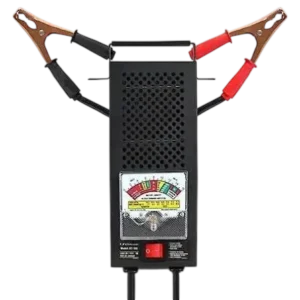
| Field | Details |
| Document Title | Battery Load Tester/Charging System Analyzer for 6 and 12 Volt Batteries |
| Document Type | Owner’s Manual |
| Brand Name | Schumacher Electric |
| Product Name | Battery Load Tester/Charging System Analyzer |
| Model Number(s) | BT-100 |
| PDF File Size | 152.31 KB |
| Total Number of Pages | 2 |
| Languages Covered in the Document | English |
Schumacher Battery Load Tester BT-100
The Schumacher BT-100 Battery Load Tester/Charging System Analyzer is designed to test 6V and 12V lead-acid batteries, evaluate battery condition under load, check a vehicle’s charging system, and identify possible excessive starter motor current draw.
The BT-100 uses an analog meter with separate testing scales for 6V batteries, 12V batteries, cold cranking amps (CCA), charging system performance, and starter motor voltage. Its load switch applies an electrical load to the connected battery, allowing the battery’s performance to be evaluated while current is being drawn.
The tester connects directly to the battery terminals using red and black clamps. Battery load tests must be limited to a maximum of 10 seconds, followed by a five-minute cooling period before another load test.
The BT-100 can also check a vehicle’s charging system while the engine is running and compare starter cranking voltage against the manufacturer’s reference values.
Product Features
The Schumacher BT-100 includes the following features:
- Battery load testing for 6V and 12V batteries.
- Analog needle meter.
- Separate 6V and 12V battery load test scales.
- Cold cranking amps (CCA) reference range.
- Battery condition indication.
- Vehicle charging system analysis.
- Starter motor voltage testing.
- Starter current draw evaluation.
- Integrated load test switch.
- Positive and negative battery clamps.
- Charging system OK indicator range.
- Starter test voltage reference scale.
- Carrying handle.
Technical Specifications
| Specification | Details |
| Brand | Schumacher Electric |
| Model Number | BT-100 |
| Product Type | Battery Load Tester/Charging System Analyzer |
| Supported Battery Voltages | 6V and 12V |
| Battery Chemistry | Lead-Acid |
| Display Type | Analog Needle Meter |
| Battery Test Method | Load Testing |
| Maximum Continuous Load Test Duration | 10 Seconds |
| Minimum Cooling Time Between Load Tests | 5 Minutes |
| Charging System Test Engine Speed | 1200–1500 RPM |
| Recommended Starter Cranking Test Duration | 2–5 Seconds |
| Battery Connection | Red Positive and Black Negative Clamps |
| Charging System Testing | Yes |
| Starter Motor Testing | Yes |
| Warranty | 6-Month Limited Warranty |
Parts and Components
The BT-100 has a metal housing, analog meter, load switch, battery clamps, test cables, and carrying handle.
Main Components
| Component | Function |
| Analog Meter | Displays battery voltage, battery condition, and charging system readings |
| Meter Needle | Moves across the appropriate scale during testing |
| Load Switch | Applies an electrical load to the connected battery |
| Red Battery Clamp | Connects to the positive battery terminal |
| Black Battery Clamp | Connects to the negative battery terminal |
| Battery Test Cables | Connect the tester to the battery |
| Metal Housing | Encloses the tester components |
| Carrying Handle | Allows the tester to be carried without touching the hot housing |
Analog Meter and Scale Guide
The Schumacher BT-100 uses a multi-scale analog meter to display battery test results.
The meter contains six labeled testing and reference areas.
Meter Scale Identification
| No. | Meter Scale | Function |
| 1 | 6V Battery Load Test Range | Indicates 6V battery condition during a load test |
| 2 | 12V Battery Load Test Range | Indicates 12V battery condition during a load test |
| 3 | Cold Cranking Amps (CCA) Range | Provides reference ranges for evaluating 12V batteries according to their CCA rating |
| 4 | Charging System Test Range | Shows whether the vehicle’s charging system is operating within the indicated OK range |
| 5 | Voltage Scale | Displays battery voltage |
| 6 | Starter Test Voltage Table | Provides reference values for evaluating starter motor cranking voltage |
6V Battery Load Test Scale
The 6V testing scale includes a green OK area.
A battery should show a reading in the green area before the load test.
When the load switch is pressed, the needle should remain in the green area.
A reading outside the green area during the load test indicates a weak or bad battery.
12V Battery Load Test Scale
The 12V testing scale is used together with the battery’s Cold Cranking Amps (CCA) rating.
The appropriate CCA range must be identified before applying the load.
The meter reading is evaluated while the load switch remains pressed.
Cold Cranking Amps Range
The CCA range provides reference markings for batteries with different cold cranking amp ratings.
During a 12V battery load test, the range corresponding to the battery’s CCA rating is used to evaluate its condition.
Charging System Test Range
The charging system scale includes a green OK band.
A reading within this band indicates satisfactory charging system operation during the specified test.
A reading in the red band or outside the charging system zone indicates a possible charging system problem.
Voltage Scale
The voltage scale displays the battery voltage during testing.
It is also used when evaluating starter motor cranking voltage.
Starter Test Voltage Table
The meter includes a starter test voltage reference table.
This table is used to compare battery voltage under load with the minimum acceptable voltage during engine cranking.
Important Safety Instructions
WARNING: Working near lead-acid batteries is dangerous because they generate explosive gases during normal operation.
Read and follow all safety instructions before connecting or operating the Schumacher BT-100.
General Safety Precautions
- Read the entire operating manual before using the tester.
- Use the tester in a well-ventilated area.
- Keep the tester out of reach of children.
- Do not expose the tester to rain or snow.
- Do not use the tester if it has been dropped, struck, or otherwise damaged.
- Inspect the battery before testing.
- Do not test a battery with a cracked or broken case or cover.
- Do not disassemble the tester.
- Have repairs performed by qualified service personnel.
- Follow the safety instructions provided by the battery and vehicle manufacturers.
- Observe all warning labels on the battery, vehicle, and nearby equipment.
Personal Safety Precautions
When working near a lead-acid battery:
- Wear complete eye protection.
- Wear protective clothing.
- Have another person nearby who can provide assistance.
- Keep fresh water, soap, and baking soda available.
- Remove rings, watches, bracelets, necklaces, and other metal jewelry.
- Keep cigarettes, open flames, and sparks away from the battery and engine.
Lead-acid batteries can produce enough short-circuit current to heat or weld metal jewelry, causing severe burns.
Battery Acid Safety
Battery acid can cause serious injuries.
If battery acid contacts the skin or clothing, wash the affected area immediately with soap and water and seek medical attention.
If battery acid enters the eyes, flush them with water for at least 10 minutes and obtain medical attention.
Neutralize battery acid spills thoroughly with baking soda before attempting cleanup.
Hot Surface Warning
CAUTION: The BT-100 metal housing becomes hot during normal operation and can cause burns or property damage.
Carry the tester using its handle.
Avoid touching the metal housing immediately after a load test.
Load Testing Time Limit
The load switch must not be held ON for more than 10 seconds during a battery load test.
Allow the tester to cool for five minutes before performing another load test.
This cooling period helps prevent overheating.
California Proposition 65 Warning
The manufacturer states that this product contains chemicals known to the State of California to cause cancer, birth defects, or other reproductive harm.
Wash hands after handling the product.
Before First Use
Before using the Schumacher BT-100, prepare the battery and inspect the tester.
Preparing the Battery Tester
- Read the safety and operating instructions.
- Inspect the tester for physical damage.
- Check the battery clamps and test cables.
- Make sure the battery case and cover are not cracked or broken.
- Position the tester in a well-ventilated area.
- Locate the positive and negative battery terminals.
- Clean the battery terminals.
- Turn off the vehicle ignition and electrical accessories before performing a battery load test.
First-Use Smoke and Burning Smell
During the first use of the BT-100, a small amount of smoke or a burning smell may be noticed.
The manufacturer identifies this as normal during the initial burn-in period.
The smoke or smell should stop after a short period.
This initial condition does not affect the tester’s performance.
Metal Housing Temperature
The metal housing becomes hot during regular testing.
The housing may become hot enough to burn skin or damage nearby materials.
Always use the carrying handle when moving the tester.
How to Connect the Schumacher BT-100 to a Battery
The BT-100 connects directly to the battery terminals using two clamps.
Battery Terminal Identification
| Clamp | Battery Terminal |
| Red Clamp | Positive (POS, P, +) |
| Black Clamp | Negative (NEG, N, -) |
Battery Connection Instructions
- Turn off the vehicle ignition.
- Switch off all electrical accessories and other connected loads.
- Clean the battery terminals.
- Attach the red clamp to the positive battery terminal.
- Attach the black clamp to the negative battery terminal.
- Read the appropriate battery voltage scale before beginning the load test.
The tester is ready for the applicable battery test after the connections have been made.
How to Test a 6V Battery Using the Schumacher BT-100
The BT-100 includes a dedicated 6V battery load testing scale.
6V Battery Load Test Instructions
- Turn off the ignition and all electrical accessories.
- Clean the battery terminals.
- Connect the red clamp to the positive battery terminal.
- Connect the black clamp to the negative battery terminal.
- Read the analog meter.
- Confirm that the battery voltage is within the green OK area.
- Press and hold the load switch in the ON position.
- Keep the load switch pressed for no more than 10 seconds.
- Observe the meter while the load is applied.
- Release the load switch.
Interpreting 6V Battery Load Test Results
| Meter Reading | Battery Condition |
| Needle remains in green OK area | Battery passes the load test |
| Needle moves outside the green area | Battery is weak or bad |
If another test is required, allow the tester to cool for five minutes before pressing the load switch again.
How to Test a 12V Battery Using the Schumacher BT-100
The BT-100 evaluates 12V batteries using the meter’s Cold Cranking Amps (CCA) reference range.
12V Battery Load Test Instructions
- Turn off the vehicle ignition and electrical accessories.
- Clean the battery terminals.
- Connect the red clamp to the positive battery terminal.
- Connect the black clamp to the negative battery terminal.
- Find the Cold Cranking Amps range on the meter that matches the battery’s CCA rating.
- Press and hold the load switch in the ON position.
- Keep the load applied for no more than 10 seconds.
- Read the meter while the load switch is still pressed.
- Release the load switch.
- Compare the reading with the battery condition table.
CAUTION: Allow the tester to cool for five minutes before performing another load test.
Battery Load Test Results and Interpretation
The BT-100 provides three main battery condition results.
Battery Condition Table
| Load Test Result | Battery Condition | Recommended Action |
| Good (Green) | Battery capacity is satisfactory, but the battery may not be fully charged | Check specific gravity, possible electrical drain, or charging system problems; recharge fully |
| Weak or Bad, Needle Remains Steady (Yellow or Red) | Battery capacity is unsatisfactory; battery may be defective or not fully charged | Check specific gravity and charge the battery; replace it if it cannot reach full charge |
| Weak or Bad, Needle Continues Falling (Yellow or Red) | Battery may be defective or severely discharged | Release the load switch and observe voltage recovery to distinguish the conditions |
Good Battery – Green Area
A green load test reading indicates that battery capacity is satisfactory.
However, the battery may or may not be fully charged.
The manufacturer recommends checking the battery’s specific gravity to determine its charge condition.
The vehicle should also be checked for possible electrical drain or charging system problems.
Recharge the battery to full charge as needed.
Weak or Bad Battery – Steady Yellow or Red Reading
If the meter needle remains steady in the yellow or red area while the load is applied, the battery capacity is not satisfactory.
The battery may be:
- Defective.
- Not fully charged.
Check the battery’s specific gravity to determine its condition.
If charging does not restore the specific gravity to the full-charge level, the battery should be replaced.
Weak or Bad Battery – Falling Needle
If the meter needle continues to fall while the load is applied, the battery may be defective or severely discharged.
Release the load switch and observe how quickly the voltage recovers.
The manufacturer’s test chart identifies the following results:
| Voltage Recovery | Interpretation |
| Voltage recovers to 12V or higher within a few seconds | Defective battery |
| Voltage recovers slowly | Run-down or discharged battery |
For the best evaluation, check the battery’s specific gravity.
How to Test a Vehicle Charging System Using the Schumacher BT-100
The BT-100 includes a charging system analyzer for checking the vehicle’s charging performance.
The test is performed with the engine running.
Charging System Test Instructions
- Connect the battery tester to the battery.
- Start the vehicle engine.
- Run the engine at 1200–1500 RPM.
- Keep clear of moving engine components.
- Turn off all electrical accessories.
- Observe the meter reading in the Charging System scale.
- Confirm that the needle is within the green OK band.
- Turn on the headlights.
- Set the blower motor to its highest setting.
- Observe the Charging System scale again.
- Confirm that the needle remains within the green OK band.
Charging System Test Results
| Meter Reading | Charging System Condition |
| Green OK band with accessories off | Charging system is operating within the indicated range |
| Green OK band with headlights and blower motor operating | Charging system maintains the indicated range under the specified electrical load |
| Red band or outside the charging system zone | Charging system problem indicated; alternator may be defective |
Charging System Warning
CAUTION: Stay clear of fan blades, belts, pulleys, and other moving engine components while testing the charging system.
If the Charging System Test Fails
If the meter moves into the red band or outside the charging system range, the manufacturer identifies a possible charging system problem, most likely a defective alternator.
The charging system should be checked before the vehicle is returned to normal operation.
How to Test a Starter Motor Using the Schumacher BT-100
The BT-100 includes a starter motor test designed to identify excessive starter current draw.
Excessive current draw can make engine starting difficult and reduce battery life.
Before Performing the Starter Motor Test
The battery must pass the basic battery load test before the starter motor is tested.
Do not perform the starter motor test if the battery tests weak or bad.
The engine must be at normal operating temperature.
Starter Motor Test Instructions
- Perform a basic battery load test.
- Confirm that the battery is in good condition.
- Record the exact battery voltage while the load switch is ON.
- Use the recorded load voltage to find the corresponding minimum cranking voltage in the starter test table.
- If the engine displacement is less than 200 cubic inches (CID), use the next higher minimum cranking voltage in the table.
- If possible, disable the vehicle ignition system so the engine will not start.
- Crank the engine for approximately 2–5 seconds.
- Observe the voltage during engine cranking.
- Compare the cranking voltage with the minimum value from the reference table.
Starter Motor Test Voltage Table
| Battery Load Voltage | Minimum Cranking Voltage |
| 10.2V | 7.7V |
| 10.4V | 8.2V |
| 10.6V | 8.7V |
| 10.8V | 9.2V |
| 11.0V | 9.7V |
| 11.2V | 10.2V |
| 11.4V | 10.6V |
Starter Motor Test for Engines Smaller Than 200 CID
For engines with a displacement below 200 CID, the next higher minimum cranking voltage must be used.
For example, if the battery’s load voltage is 11.0V, the standard minimum cranking voltage is 9.7V.
For an engine smaller than 200 CID, use 10.2V as the minimum cranking voltage instead.
Interpreting Starter Motor Test Results
| Test Condition | Interpretation |
| Cranking voltage meets or exceeds the applicable minimum | Excessive starter draw is not indicated by this comparison |
| Cranking voltage is below the applicable minimum | Starter current draw is excessive |
| Starter cranks slowly | Check for high resistance or poor electrical connections |
Excessive Starter Current Draw
If the voltage during engine cranking is below the minimum value listed in the starter test table, the tester indicates excessive starter current draw.
Slow Starter Cranking
If the starter motor cranks slowly, check for high resistance or poor electrical connections.
Operating Time Limits and Cooling Requirements
The Schumacher BT-100 must be operated within its specified load testing limits.
Testing Time Limits
| Operating Requirement | Limit |
| Maximum Battery Load Test | 10 Seconds |
| Cooling Time Between Load Tests | 5 Minutes |
| Charging System Test Engine Speed | 1200–1500 RPM |
| Recommended Starter Cranking Test | 2–5 Seconds |
Preventing Tester Overheating
The metal housing becomes hot when the load switch is used.
The tester must be allowed to cool for at least five minutes before another load test.
Use the carrying handle when moving the unit.
Troubleshooting Guide
The following troubleshooting information helps interpret battery load test readings, charging system results, and starter motor test conditions.
Schumacher BT-100 Troubleshooting Table
| Problem or Test Result | Possible Cause | Recommended Action |
| Battery load test reading is in the green area | Battery capacity is satisfactory | Check charge condition and recharge fully if necessary |
| Needle remains steady in the yellow or red area | Battery may be defective or insufficiently charged | Check specific gravity and battery charge |
| Battery cannot reach full specific gravity after charging | Battery may be defective | Replace the battery |
| Needle continues falling during load test | Battery may be defective or severely discharged | Release the load switch and observe voltage recovery |
| Charging system meter reads in red area | Charging system fault, possibly alternator-related | Have the charging system checked |
| Starter cranking voltage is below the table minimum | Excessive starter current draw | Check the starting system |
| Starter cranks slowly | High electrical resistance or poor connections | Check the electrical connections |
| Tester becomes hot during use | Heat generated during normal load testing | Carry by the handle and allow five minutes of cooling before another load test |
| Slight smoke or burning smell during initial use | Initial burn-in period | This is normal during first use and should stop after a short period |
Battery Tests Weak or Bad
If the meter indicates a weak or bad battery, check whether the needle remains steady or continues falling.
A steady yellow or red reading indicates unsatisfactory capacity. The battery may be defective or insufficiently charged.
A falling needle requires observing the voltage recovery after releasing the load switch.
Battery Does Not Reach Full Charge
If charging does not restore the battery’s specific gravity to the full-charge level, the manufacturer recommends replacing the battery.
Charging System Reads Outside the Green OK Area
If the charging system meter reads in the red band or outside the charging system zone, the vehicle may have a charging system problem.
The alternator is identified as a likely source.
Starter Cranking Voltage Is Too Low
If the starter cranking voltage is below the applicable minimum voltage in the starter test table, starter current draw is excessive.
The starting system should be checked.
Starter Cranks Slowly
Slow starter cranking may be caused by high resistance or poor electrical connections.
Check the starting system connections.
Tester Housing Becomes Hot
The tester’s metal housing becomes hot during normal operation.
Use the carrying handle and allow the tester to cool before performing another load test.
Smoke or Burning Smell During First Use
A small amount of smoke or a burning smell during the initial burn-in period is normal.
The condition should stop after a short period.
Six-Month Limited Warranty
The Schumacher BT-100 is covered by a six-month limited warranty provided by Schumacher Electric Corporation.
Warranty Coverage
| Warranty Detail | Information |
| Manufacturer | Schumacher Electric Corporation |
| Warranty Type | Limited Warranty |
| Warranty Period | 6 Months |
| Warranty Start Date | Date of Retail Purchase |
| Eligible Purchaser | Original Retail Purchaser |
| Transferability | Not Transferable |
| Covered Defects | Defective Materials or Workmanship Under Normal Use and Care |
Warranty Repair or Replacement
If the tester develops a covered defect during the warranty period, Schumacher may repair the product or replace it with a new or reconditioned unit.
The manufacturer determines whether repair or replacement is appropriate.
The purchaser must provide proof of purchase and pay shipping charges in advance when sending the tester for warranty service.
Warranty Exclusions
The warranty may be void if the product:
- Is misused.
- Is handled carelessly.
- Is repaired or modified by an unauthorized person.
- Is resold through an unauthorized retailer.
Accessories not manufactured and approved by Schumacher Electric Corporation are not covered by the limited warranty.
The warranty also contains limitations on certain implied warranties and incidental or consequential damages. Applicable legal rights may vary by state.
Warranty Registration
The BT-100 can be registered online at:
The warranty registration card should be submitted within 30 days of purchase.
Keep the original retail receipt because it is required for warranty claims.
Customer Support and Repair Information
Schumacher Electric Corporation provides customer assistance for operating problems, troubleshooting, repairs, and returns.
Customer Support Details
| Service | Contact Information |
| Manufacturer | Schumacher Electric Corporation |
| Customer Support Phone | 1-800-621-5485 |
| Customer Support Email | services@schumacherelectric.com |
| Website Listed in Manual | www.batterychargers.com |
| Support Hours Listed in Manual | Monday–Friday, 7:00 AM–5:00 PM CST |
| Manufacturer Address | 801 Business Center Drive, Mount Prospect, IL 60056-2179 |
Repair and Return Procedure
- Review the operating and troubleshooting instructions.
- Contact Schumacher Customer Service if the problem continues.
- Describe the tester’s operating problem.
- Follow the troubleshooting assistance provided.
- Request a Return Merchandise Authorization (RMA) number if repair or return is required.
- Do not ship the tester until Schumacher has issued an RMA number.
Important: Do not send the tester to the warranty registration mailing address for repair.
Frequently Asked Questions
1. What batteries can the Schumacher BT-100 test?
The Schumacher BT-100 is designed to test 6V and 12V lead-acid batteries. It includes separate 6V and 12V load testing ranges, an analog meter, and a Cold Cranking Amps reference scale for evaluating 12V battery performance.
2. How long should the load switch be held on the Schumacher BT-100?
The load switch must be held ON for no more than 10 seconds during a battery load test. After each test, allow the tester to cool for at least five minutes before applying another load.
3. What does a green reading mean on the Schumacher BT-100?
A green load test reading indicates satisfactory battery capacity. The battery may still require charging, so the manufacturer recommends checking the battery’s specific gravity and charge condition. During a charging system test, a green OK reading indicates that the charging system is operating within the meter’s indicated range.
4. What does a yellow or red battery load test reading mean?
A yellow or red load test reading indicates that battery capacity is unsatisfactory. If the needle remains steady, the battery may be defective or not fully charged. If the needle continues falling, the battery may be defective or severely discharged. The manufacturer’s instructions recommend checking specific gravity and voltage recovery to evaluate the condition.
5. Can the Schumacher BT-100 test a vehicle alternator?
Yes. The BT-100 includes a charging system analyzer. With the tester connected, run the vehicle engine at 1200–1500 RPM and check the charging system scale. The meter should remain in the green OK band with electrical accessories off and again with the headlights and blower motor operating on high. A reading outside the charging system zone indicates a possible charging system problem, most likely a defective alternator.
6. How do I test a starter motor using the Schumacher BT-100?
First perform a battery load test and confirm that the battery is in good condition. Record the battery voltage under load, then find the corresponding minimum cranking voltage in the starter test table. With the engine at normal operating temperature, crank it for approximately 2–5 seconds and compare the cranking voltage with the minimum. A reading below the specified minimum indicates excessive starter current draw.
7. Why does the Schumacher BT-100 get hot during testing?
The metal housing becomes hot during normal load testing and may become hot enough to burn skin or damage nearby materials. The tester should be carried by its handle and allowed to cool for at least five minutes between load tests.
8. Is it normal for the Schumacher BT-100 to smoke during first use?
A small amount of smoke or a burning smell during the first use is normal, according to the manufacturer. This occurs during the initial burn-in period and should stop after a short time. It does not affect the tester’s performance.