| Field | Details |
| Document Title | Automatic Battery Maintainer |
| Document Type | Owner’s Manual |
| Brand Name | Schumacher |
| Product Name | Automatic Battery Maintainer |
| Model Number(s) | SC1343 |
| PDF File Size | 579.77 KB |
| Total Number of Pages | 43 |
| Languages Covered in the Document | English, Spanish, French |
Schumacher Automatic Battery Maintainer SC1343
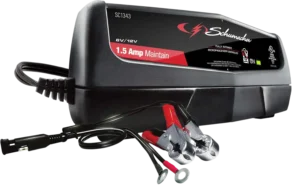
The Schumacher SC1343 Automatic Battery Maintainer is a 1.5-amp battery charger and maintainer designed for compatible 6V and 12V lead-acid batteries. It provides automatic battery charging and long-term charge maintenance for standard (STD) and AGM rechargeable batteries.
The SC1343 uses automatic voltage detection to identify whether a connected battery is 6V or 12V. Once charging is complete, the charger automatically switches to maintain mode, supplying a small amount of current when needed to keep the battery fully charged.
The unit includes quick-connect battery clamps, ring terminal connectors, and LED indicators for charging status, maintenance operation, reversed connections, and battery faults.
The charger operates from a grounded 120V AC electrical outlet and provides a charging output of 1.5A at either 6V or 12V.
Product Features
The Schumacher SC1343 includes the following features:
- Automatic 6V and 12V battery voltage detection.
- 1.5A charging output for both supported voltages.
- Support for standard (STD) and AGM lead-acid batteries.
- Automatic charging operation.
- Automatic maintain mode.
- Float mode monitoring.
- Desulfation mode.
- Automatic charging abort protection.
- Quick-connect battery clamps.
- Quick-connect ring terminal connectors.
- Battery charging status LEDs.
- Reversed-polarity indication.
- Bad battery detection.
- Auto-start charging function.
- Support for maintaining compatible batteries over extended periods.
Technical Specifications
| Specification | Details |
| Brand | Schumacher |
| Model Number | SC1343 |
| Product Type | Automatic Battery Maintainer |
| Input Voltage | 120V AC |
| Input Frequency | 60Hz |
| Input Current | 0.4A |
| Output Voltage | 6V or 12V |
| Output Current | 1.5A |
| Voltage Selection | Automatic Voltage Detection |
| Supported Battery Chemistry | Lead-Acid |
| Supported Battery Types | Standard (STD) and AGM |
| Recommended 6V Battery Capacity | 12Ah |
| Recommended 12V Battery Capacity | 5–33Ah |
| Charging Mode | Automatic |
| Maintenance Mode | Automatic Float Mode Monitoring |
| Battery Connections | Quick-Connect Clamps and Ring Connectors |
| Charging Indicators | Red, Yellow/Orange, Green LEDs |
| Limited Warranty | 2 Years |
Parts and Components
The Schumacher SC1343 has a compact charger housing with built-in charging status indicators and interchangeable quick-connect battery cables.
Main Components
| No. | Component | Function |
| 1 | Battery Status LEDs | Show charging, maintenance, reverse-polarity, and battery fault conditions |
| 2 | Battery Clamps (Quick-Connect) | Connect the charger to the battery or vehicle chassis |
| 3 | Ring Connectors (Quick-Connect) | Provide a connection that can remain attached to compatible battery terminals |
Quick-Connect Battery Clamps
The quick-connect battery clamp cable allows the charger to be connected to a battery during normal charging.
The red clamp connects to the positive battery terminal, while the black clamp connects to the negative terminal or the appropriate vehicle grounding point, depending on the charging arrangement.
Ring Terminal Connectors
The quick-connect ring terminal cable provides a connection that can remain attached to battery terminals.
The red ring connector is attached to the positive battery terminal, and the black ring connector is attached to the negative terminal.
The ring connectors can be secured using the existing battery terminal nuts.
Control Panel and LED Indicator Guide
The SC1343 uses three colored LED indicators to show the current charging condition.
LED Indicator Meanings
| LED Indicator | LED Status | Meaning |
| Clamps Reversed/Bad Battery (Red) | Flashing | Battery connections are reversed |
| Clamps Reversed/Bad Battery (Red) | Solid | Charger has detected a battery problem |
| Charging (Yellow/Orange) | Solid | Battery is being charged |
| Charged/Maintaining (Green) | Solid | Battery is fully charged and the charger is in maintain mode |
Flashing Red LED – Reversed Connections
A flashing red Clamps Reversed/Bad Battery LED indicates that the charger has detected reversed battery connections.
The charger must be disconnected from AC power before correcting the battery connections.
Solid Red LED – Bad Battery or Charging Fault
A solid red Clamps Reversed/Bad Battery LED indicates that the charger has detected a battery problem or has stopped charging because charging cannot be completed normally.
The battery may require inspection or replacement.
Yellow/Orange LED – Charging
When the yellow/orange LED is illuminated, the charger is actively charging the connected battery.
Green LED – Charged/Maintaining
When the green Charged/Maintaining LED is illuminated, the battery has reached full charge, and the charger has entered maintain mode.
The charger supplies a small amount of current when necessary to keep the battery charged.
All Three LEDs Illuminate Briefly
When the charger is connected to an AC electrical outlet, all three LEDs may illuminate for approximately two seconds and then turn off.
This is normal startup behavior.
Battery Compatibility
The Schumacher SC1343 is intended for charging compatible 6V and 12V rechargeable lead-acid batteries.
Supported Battery Types and Capacities
| Battery Voltage | Supported Battery Type | Recommended Capacity |
| 6V | Standard (STD) or AGM Lead-Acid | 12Ah |
| 12V | Standard (STD) or AGM Lead-Acid | 5–33Ah |
The charger automatically detects the connected battery voltage.
Battery Types That Must Not Be Charged
The SC1343 must not be used to charge dry-cell batteries commonly used in household appliances.
These batteries may burst during charging and cause injuries or property damage.
Never charge a frozen battery.
Important Safety Instructions
WARNING: Risk of explosive gases, electrical shock, fire, or serious injury.
Lead-acid batteries produce explosive gases during normal operation. Follow the battery manufacturer’s instructions and all charger safety precautions before beginning charging.
General Electrical Safety
- Keep the charger away from children.
- Do not expose the charger to rain or snow.
- Use only attachments recommended or sold by Schumacher Electric Corporation.
- Disconnect the charger by pulling the plug rather than the power cord.
- Do not use a damaged power cord or plug.
- Do not operate the charger if it has been dropped, struck, or otherwise damaged.
- Do not disassemble the charger.
- Have repairs performed by qualified service personnel.
- Disconnect the charger from the AC outlet before cleaning or maintenance.
- Do not use an unsuitable extension cord.
Battery Safety Precautions
- Never charge a frozen battery.
- Keep cigarettes, sparks, and open flames away from the battery.
- Do not allow battery clamps to touch each other.
- Keep metal tools away from battery terminals.
- Wear protective clothing and complete eye protection.
- Remove metal jewelry before working near a battery.
- Make sure the charging area is properly ventilated.
- Follow all battery manufacturer charging instructions.
Personal Safety
Another person should be close enough to provide assistance when working near a lead-acid battery.
Keep fresh water and soap available in case battery acid contacts skin, clothing, or eyes.
If acid contacts skin or clothing, wash the affected area immediately with soap and water.
If battery acid enters an eye, flush the eye with cold running water for at least 10 minutes and obtain immediate medical attention.
Avoiding Battery Sparks
A spark near a lead-acid battery can cause an explosion.
Before attaching or removing battery clamps:
- Disconnect the charger from the AC electrical outlet.
- Check the battery terminal polarity.
- Connect the clamps in the correct sequence.
- Keep the clamps away from each other.
- Keep sparks and flames away from the battery.
Preparing the Battery for Charging
The battery and charging area must be prepared before connecting the Schumacher SC1343.
Battery Preparation Instructions
- Switch off all vehicle electrical accessories.
- If the battery must be removed from the vehicle, disconnect its grounded terminal first.
- Make sure the battery charging area has adequate ventilation.
- Clean the battery terminals.
- Prevent battery corrosion from contacting the eyes.
- For batteries with removable cell caps, add distilled water as directed by the battery manufacturer.
- Do not overfill battery cells.
- For batteries without removable cell caps, follow the battery manufacturer’s charging instructions.
- Confirm the battery’s rated voltage.
- Check the battery manufacturer’s recommended charging requirements.
Battery Terminal Polarity
Battery terminals are identified by positive and negative symbols.
| Terminal | Identification |
| Positive | POS, P, + |
| Negative | NEG, N, – |
The positive terminal generally has a larger diameter than the negative terminal.
Where to Position the Battery Charger
Proper charger placement helps reduce the risk of corrosion, electrical damage, and battery-related accidents.
Charger Placement Instructions
- Position the charger as far from the battery as the DC cable permits.
- Never place the charger directly above the battery.
- Do not allow battery acid to drip onto the charger.
- Do not operate the charger in an enclosed area without adequate ventilation.
- Do not obstruct ventilation around the charger.
- Never place a battery on top of the charger.
AC Power Connection and Grounding
The Schumacher SC1343 is designed for use with a nominal 120V AC electrical circuit.
The charger must be connected to a properly installed and grounded outlet.
Grounding Requirements
- Use a properly grounded 120V AC outlet.
- Make sure the plug fits the outlet correctly.
- Do not modify the supplied AC plug.
- Do not use the charger with an ungrounded electrical system.
- If the plug does not fit, have a suitable grounded outlet installed by a qualified electrician.
An improper electrical connection can cause electric shock or electrocution.
The manufacturer does not recommend using an adapter plug in the United States. Adapter plugs are not permitted in Canada under the regulations identified in the manual.
Using an Extension Cord
Using an extension cord is not recommended unless absolutely necessary.
If an extension cord is required, it must be properly wired, in good condition, and have the correct wire gauge.
Extension Cord Requirements
| Extension Cord Length | Minimum Wire Gauge |
| 25 feet | 18 AWG |
| 50 feet | 18 AWG |
| 100 feet | 18 AWG |
| 150 feet | 16 AWG |
The extension cord plug must have pins matching the charger’s plug in number, size, and shape.
Do not use damaged or incorrectly wired extension cords.
Setup and Assembly Instructions
The SC1343 requires minimal preparation before operation.
Preparing the Charger
- Remove the cord wraps.
- Uncoil the AC power cord.
- Uncoil the output charging cable.
- Select the quick-connect battery clamps or ring terminal cable.
- Inspect the cables and connectors for damage.
- Place the charger on a dry, non-flammable surface.
- Connect the selected output cable to the charger.
- Connect the charger to the battery following the correct procedure.
- Connect the charger to a grounded AC electrical outlet.
The charger begins operation automatically when the battery is properly connected and AC power is supplied.
How to Charge a Battery Installed in a Vehicle
The SC1343 can charge a compatible battery while it remains installed in the vehicle.
Important: Do not start the vehicle while the charger is connected to the AC electrical outlet. Doing so may damage the vehicle and charger.
Before Connecting the Charger
- Turn off all vehicle electrical accessories.
- Keep the vehicle hood open.
- Clean the battery terminals.
- Place the charger on a dry, non-flammable surface.
- Position the charging cables away from fan blades, belts, pulleys, and other moving engine components.
- Identify whether the vehicle uses a negative-ground or positive-ground electrical system.
Connecting to a Negative-Ground Vehicle
Most vehicles use a negative-ground electrical system.
- Connect the red positive (+) clamp to the positive battery terminal.
- Connect the black negative (-) clamp to a heavy-gauge metal part of the vehicle chassis or engine block away from the battery.
- Make sure both connections are secure.
- Connect the charger to the grounded 120V AC electrical outlet.
Do not attach the chassis clamp to carburetors, fuel lines, or thin sheet-metal body panels.
Connecting to a Positive-Ground Vehicle
For vehicles with a positive-ground electrical system:
- Connect the black negative (-) clamp to the negative battery terminal.
- Connect the red positive (+) clamp to a heavy-gauge metal part of the chassis or engine block away from the battery.
- Make sure the connections are secure.
- Connect the charger to the grounded AC outlet.
Charging the Battery
Once the charger is connected to AC power and the battery, the automatic charging process begins.
The yellow/orange LED illuminates while the battery is charging.
When charging is complete, the green Charged/Maintaining LED illuminates, and the unit switches to maintain mode.
Disconnecting the Charger
When charging is complete:
- Disconnect the charger from the AC outlet.
- Remove the clamp attached to the vehicle chassis or engine block.
- Remove the clamp attached to the battery terminal.
- Store the charger and charging cables properly.
How to Charge a Battery Outside the Vehicle
The SC1343 can also charge a battery that has been removed from a vehicle.
Warning: Connecting a charger to a battery outside the vehicle requires an additional insulated battery cable to reduce the risk of sparks near the battery.
Required Battery Cable
Use an insulated battery cable with the following specifications:
| Requirement | Specification |
| Minimum Cable Length | 24 inches |
| Wire Gauge | 6 AWG |
| Connection | Negative Battery Terminal |
Charging Instructions
- Place the battery in a well-ventilated area.
- Clean the battery terminals.
- Identify the positive and negative battery terminals.
- Attach a 24-inch or longer, 6 AWG insulated battery cable to the negative battery terminal.
- Connect the red positive charger clamp to the positive battery terminal.
- Position the free end of the insulated negative cable as far from the battery as practical.
- Connect the black negative charger clamp to the free end of that cable.
- Do not face the battery while making the final connection.
- Plug the charger into a grounded AC electrical outlet.
- Allow the battery to charge automatically.
Disconnecting the Charger
When charging is complete:
- Disconnect the charger from the AC electrical outlet.
- Disconnect the black negative charger clamp from the insulated cable while remaining as far from the battery as practical.
- Disconnect the red positive clamp.
- Remove the additional negative battery cable as appropriate.
Charging Marine Batteries
A marine or boat battery must be removed from the boat and charged on shore.
Charging a battery while installed aboard a boat requires equipment specifically designed for marine use.
Using the Quick-Connect Battery Clamps
The Schumacher SC1343 includes a quick-connect battery clamp cable.
Battery Clamp Connection Instructions
- Disconnect the charger from AC power.
- Connect the charger output cable to the quick-connect battery clamp cable.
- Make sure the connection is secure.
- Attach the battery clamps according to the required battery connection procedure.
- Connect the charger to a grounded AC outlet.
- Allow charging to begin automatically.
The battery clamps are identified in the manual as 50A clamps. The charger’s actual charging output is 1.5A, not 50A.
Using the Quick-Connect Ring Connectors
The ring terminal connectors are designed to remain attached to compatible battery terminals.
Ring Connector Installation Instructions
- Disconnect the charger from AC power.
- Locate the positive and negative battery terminals.
- Loosen and remove the nuts from the battery terminal bolts.
- Attach the red positive ring connector to the positive battery terminal.
- Attach the black negative ring connector to the negative battery terminal.
- Replace the battery terminal nuts.
- Tighten the nuts to secure the ring connectors.
- Connect the ring terminal cable to the charger’s quick-connect output cable.
- Keep the cable and plug away from metal surfaces and moving parts.
- Connect the charger to a grounded electrical outlet.
Quick-Connect Safety Warning
Never connect the battery clamp cable and ring terminal cable to each other for unrelated charging applications or to extend the charger output cable.
Doing so may cause reverse-polarity or overcharging conditions.
Automatic Charging Mode
The Schumacher SC1343 automatically charges compatible 6V and 12V lead-acid batteries.
How Automatic Charging Works
- The charger detects the battery connection.
- It automatically identifies the battery voltage.
- The charger begins supplying charging current.
- The yellow/orange Charging LED illuminates.
- When charging is complete, the charger switches to maintain mode.
- The green Charged/Maintaining LED illuminates.
The SC1343 does not require manual selection between 6V and 12V charging.
Automatic Voltage Detection
The SC1343 automatically detects the voltage of a properly connected battery.
Supported Voltage Settings
| Battery Voltage | Detection Method | Charging Output |
| 6V | Automatic | 1.5A |
| 12V | Automatic | 1.5A |
There is no need to select a battery voltage manually.
Desulfation Mode
The SC1343 includes a desulfation process as part of its charging operation.
Desulfation Duration
The desulfation process may take approximately 8–10 hours.
If desulfation is unsuccessful, the charger stops charging and illuminates the red Clamps Reversed/Bad Battery LED.
The battery may be defective and should be checked or replaced.
Charge Completion
When the charging process finishes successfully, the green Charged/Maintaining LED illuminates.
This indicates that:
- The connected battery is fully charged.
- The charger has entered maintain mode.
- The battery is being maintained at full charge.
Maintain Mode and Float Mode Monitoring
The SC1343 automatically enters maintain mode after charging is completed.
Maintain mode is designed to keep a healthy battery fully charged over an extended period.
How Maintain Mode Works
When the green Charged/Maintaining LED is illuminated, the charger monitors the connected battery.
A small charging current is supplied when necessary to maintain the battery’s full charge.
Maintaining 6V and 12V Batteries
The SC1343 supports maintenance of both 6V and 12V batteries.
The charger automatically monitors and maintains the charge level after the initial charging process is complete.
Maintain Mode Precautions
Although the charger can maintain a healthy battery for extended periods, the battery and charging process should still be checked periodically.
Battery defects, electrical problems in the vehicle, improper connections, or excessive current draw can affect maintenance charging.
Maintain Mode Abort Condition
If the charger must provide its maximum maintenance current continuously for 12 hours, it enters abort mode.
This condition may be caused by an electrical load connected to the battery or a defective battery.
If charging is aborted:
- Check whether electrical loads are connected to the battery.
- Remove any such loads.
- Have the battery checked if the problem continues.
- Replace the battery if required.
Aborted Charge Mode
If the SC1343 cannot complete charging normally, the automatic charging process is aborted.
What Happens When Charging Is Aborted?
- The charger stops supplying charging current.
- The red Clamps Reversed/Bad Battery LED illuminates.
- Charging does not continue normally.
What to Do After Charging Is Aborted
Do not continue attempting to charge the same battery.
Have the battery inspected and replace it if necessary.
Charging Status and Warning Conditions
The LED indicators provide information about charging progress and problems detected by the charger.
Battery Charging Status Table
| Charger Condition | Indicator | Required Action |
| Battery charging | Yellow/Orange LED solid | Allow charging to continue |
| Battery fully charged | Green LED solid | Battery has entered maintain mode |
| Connections reversed | Red LED flashing | Disconnect AC power and correct connections |
| Battery problem detected | Red LED solid | Check the battery and troubleshooting conditions |
| Charging aborted | Red LED solid | Stop charging and inspect the battery |
| Desulfation unsuccessful | Red LED solid | Have the battery checked or replaced |
Troubleshooting Guide
The following troubleshooting procedures cover power problems, charging faults, battery detection, and LED warning conditions.
Schumacher SC1343 Troubleshooting Table
| Problem | Possible Cause | Recommended Solution |
| Charger clamps do not spark when touched together | Auto-start protection prevents current output until a battery is correctly connected | Normal operation; no repair required |
| All three LEDs turn on for two seconds and then turn off | Charger has been connected to AC power | Normal startup behavior |
| Charger does not turn on | AC outlet has no power | Check the fuse or circuit breaker supplying the outlet |
| Charger does not turn on | Poor electrical connection | Check the power cord and extension cord connections |
| Charger does not operate correctly | Battery is defective | Have the battery checked |
| Cannot select 6V or 12V | Automatic Voltage Detection is active | Normal operation; voltage selection is automatic |
| Red LED remains illuminated | Battery problem or aborted charging condition | Check the battery and connected electrical loads |
| Red LED flashes | Battery connections are reversed | Disconnect AC power and correct the connections |
| Desulfation fails | Battery may be defective | Have the battery checked or replaced |
| Battery will not maintain charge | Battery drain or defective battery | Remove connected loads and have the battery checked |
Charger Will Not Turn On
If the Schumacher SC1343 does not operate when connected:
Check the Electrical Outlet
- Confirm that the charger is connected to a grounded AC outlet.
- Check whether the outlet has power.
- Inspect the fuse or circuit breaker supplying the outlet.
Check the Power Cord
Check the power cord and extension cord for loose-fitting electrical connections.
Do not operate the charger with a damaged power cord or plug.
Check the Battery
If the charger does not operate correctly despite proper connections, have the battery checked for defects.
Battery Clamps Do Not Spark
The SC1343 includes an automatic startup protection feature.
The charger does not supply current to the clamps until a battery is properly connected.
The absence of sparks when the clamps touch is normal behavior, not a charging failure.
The clamps should still never be intentionally touched together.
All Three LEDs Illuminate and Turn Off
When the charger is connected to an AC outlet, all three LEDs may illuminate for approximately two seconds before switching off.
This is a normal startup condition.
Cannot Select 6V or 12V Charging
The SC1343 uses Automatic Voltage Detection.
It automatically identifies whether a properly connected battery is 6V or 12V.
Manual voltage selection is not required.
Red LED Remains Illuminated
A solid red Clamps Reversed/Bad Battery LED indicates a detected battery problem.
Several charging conditions can cause this indicator to illuminate.
Battery Voltage Remains Too Low
The charger may indicate a battery fault when:
| Battery Type | Condition |
| 12V Battery | Voltage remains below 10V after 2 hours of charging |
| 6V Battery | Voltage remains below 5V after 2 hours of charging |
The battery may be defective.
Remove any electrical loads connected to the battery and have the battery checked or replaced if necessary.
Excessive Current During Maintain Mode
The troubleshooting section also identifies a fault condition in which maintain-mode output current exceeds 2.0A continuously for 12 hours.
Check for electrical loads draining the battery.
If no such loads are present, the battery may be defective.
Unsuccessful Desulfation
If the desulfation process fails, the red LED illuminates.
The battery should be checked or replaced.
Charging Makes Insufficient Progress
The charger may indicate a fault if charging progress is inadequate and the battery voltage remains below:
| Battery Type | Voltage |
| 12V Battery | 14.2V |
| 6V Battery | 7.1V |
The battery may be overheated, too large for the charger, or affected by a short circuit.
If the battery is overheated, allow it to cool.
Have the battery checked or replaced if necessary.
Battery Capacity Is Too Low or Battery Is Too Old
A battery fault may occur when the initial battery voltage is below:
| Battery Type | Initial Voltage |
| 12V Battery | 12.2V |
| 6V Battery | 6.1V |
This condition is identified in the troubleshooting instructions when the total charging input is less than 1.5Ah.
The battery may have insufficient capacity or may be too old.
Have it inspected or replaced.
Battery Voltage Drops During Maintain Mode
The charger may indicate a battery problem when the voltage drops below:
| Battery Type | Voltage During Maintain Mode |
| 12V Battery | 12.2V |
| 6V Battery | 6.1V |
The battery may not be retaining its charge.
Check for electrical loads connected to the battery.
If no loads are present, have the battery checked or replaced.
Maintenance and Cleaning Instructions
Regular cleaning and proper storage help maintain the battery charger’s condition.
Cleaning the Battery Clamps
After each charging session:
- Disconnect the charger from the AC outlet.
- Disconnect the charger from the battery.
- Wipe the clamps to remove any battery fluid.
- Remove corrosion from the clamps.
- Keep the clamps clean before storage.
Cleaning the Charger Housing
Clean the charger housing occasionally using a soft cloth.
This helps maintain the outer finish and prevent corrosion.
Inspecting and Storing the Cables
Coil the input and output cables neatly after use.
Avoid tight bends and positioning that could damage the cables or charger connections.
Storage Instructions
The SC1343 should be stored indoors in a cool, dry location.
Proper Storage Procedure
- Disconnect the charger from the AC power outlet.
- Disconnect all battery connections.
- Clean the charger clamps.
- Coil the power cord and output cable.
- Store the charger in an upright position.
- Keep the charger in a cool, dry indoor location.
Battery Clamp Storage Precautions
Do not store the clamps:
- Attached to the charger handle.
- Clipped together.
- Attached to or around metal objects.
- Clipped to the charger cables.
Replacement Parts and Accessories
The SC1343 uses replaceable quick-connect battery connection accessories.
Replacement Parts
| Replacement Part | Part Number |
| Ring Connectors (Quick-Connect) | 2299001950Z |
| Battery Clamps (Quick-Connect) | 3899001404Z |
Use replacement components approved for the Schumacher SC1343.
Limited Warranty
The Schumacher SC1343 Automatic Battery Maintainer includes a two-year limited warranty.
Warranty Coverage
| Warranty Detail | Information |
| Manufacturer | Schumacher Electric Corporation |
| Warranty Type | Limited Warranty |
| Warranty Period | 2 Years |
| Coverage Start Date | Date of Retail Purchase |
| Eligible Purchaser | Original Retail Purchaser |
| Transferability | Not Transferable |
| Coverage | Defects in Materials or Workmanship Under Normal Use and Care |
Warranty Repair or Replacement
If a covered defect occurs, Schumacher may repair the charger or replace it with a new or reconditioned unit.
The manufacturer determines whether repair or replacement is appropriate.
The purchaser must provide proof of purchase and pay shipping charges in advance when sending the unit for warranty service.
Warranty Exclusions
The limited warranty may be void if the charger:
- Is misused.
- Is handled carelessly.
- Is repaired or modified by an unauthorized person.
- Is resold through an unauthorized retailer.
- Has a warranty label removed where applicable.
Accessories that are not manufactured and approved by Schumacher Electric Corporation are not covered by this warranty.
Warranty Registration
The charger can be registered online at:
The warranty registration card should be submitted within 30 days of purchase.
Keep the original purchase receipt because it is required for warranty claims.
Customer Support and Repair Information
Schumacher Electric Corporation provides customer support for troubleshooting, repairs, and returns.
Customer Support Details
| Service | Contact Information |
| Manufacturer | Schumacher Electric Corporation |
| Customer Support Phone | 1-800-621-5485 |
| Customer Support Email | services@schumacherelectric.com |
| Website Listed in Manual | www.batterychargers.com |
| Support Hours Listed in Manual | Monday–Friday, 7:00 AM–5:00 PM CST |
| Manufacturer Address | 801 E. Business Center Drive, Mount Prospect, IL 60056-2179 |
Repair and Return Procedure
- Contact Schumacher Customer Service at 1-800-621-5485.
- Describe the problem and follow the troubleshooting assistance provided.
- Request a Return Merchandise Authorization (RMA) number if the unit requires repair or return.
- Do not ship the charger until an RMA number has been issued.
The warranty registration address should not be used to send the charger for repairs.
Frequently Asked Questions
1. What batteries can the Schumacher SC1343 charge?
The Schumacher SC1343 can charge compatible 6V and 12V standard (STD) or AGM lead-acid rechargeable batteries. The manufacturer recommends a 12Ah capacity for 6V batteries and 5–33Ah for 12V batteries. It must not be used to charge household dry-cell batteries or frozen batteries.
2. How many amps does the Schumacher SC1343 provide?
The SC1343 provides a 1.5A charging output at both 6V and 12V. It automatically detects the connected battery voltage and begins charging when the battery is correctly connected and the charger is supplied with AC power.
3. How do I know when the Schumacher SC1343 battery is fully charged?
The green Charged/Maintaining LED illuminates when the connected battery is fully charged. The charger automatically switches to maintain mode and supplies a small charging current when necessary to keep the battery charged.
4. What does the red light mean on a Schumacher SC1343?
A flashing red Clamps Reversed/Bad Battery LED indicates reversed battery connections. A solid red LED indicates that the charger has detected a battery problem or an aborted charging condition. The battery and charger connections should be checked according to the troubleshooting instructions.
5. Can the Schumacher SC1343 stay connected to a battery for long-term maintenance?
Yes. The SC1343 has an automatic maintain mode designed to keep a healthy 6V or 12V battery fully charged over extended periods. The manufacturer still recommends periodically checking the battery and charging process because battery defects, electrical loads, and connection problems can affect operation.
6. Why does the Schumacher SC1343 stop charging?
The SC1343 may stop charging when it detects a battery fault, unsuccessful desulfation, lack of charging progress, or an abnormal condition during maintain mode. When charging is aborted, the red Clamps Reversed/Bad Battery LED illuminates. Do not continue trying to charge that battery; have it checked and replaced if necessary.
7. Does the Schumacher SC1343 automatically detect 6V and 12V batteries?
Yes. The SC1343 uses Automatic Voltage Detection, so it identifies the connected battery voltage without requiring manual selection. The charger supports compatible 6V and 12V standard or AGM lead-acid batteries.
8. What is the desulfation mode on the Schumacher SC1343?
The SC1343 includes a desulfation process that may take approximately 8–10 hours. If desulfation is unsuccessful, charging stops and the red Clamps Reversed/Bad Battery LED illuminates. The battery should then be checked or replaced.