| Field | Details |
| Document Title | Heatmiser DS1-L V2 Dial Thermostat Installation and Operating Instructions |
| Document Type | Installation and Operating Guide |
| Brand Name | Heatmiser |
| Product Name | Manual Dial Thermostat |
| Model Number(s) | DS1-L V2 (also identified as DS1-L within the wiring diagrams) |
| PDF File Size | 159.2 KB |
| Total Number of Pages | 2 |
| Languages Covered | English |
Heatmiser Manual Dial Thermostat DS1-L V2
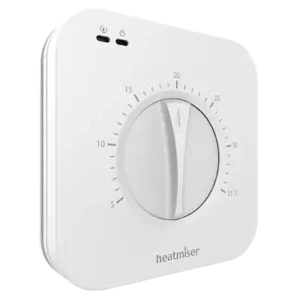
The Heatmiser DS1-L V2 is a manual dial room thermostat designed for controlling heating in conventional and combination boiler systems. It provides temperature adjustment through a rotary dial and displays the current room temperature on a digital LCD screen.
The thermostat uses a 230V AC power supply and provides a volt-free switching output rated at a maximum of 3A. Its adjustable switching differential allows heating to activate when the room temperature falls 1°C, 2°C, or 3°C below the selected temperature.
The DS1-L V2 also supports an optional remote temperature sensor. When a compatible sensor is connected, the thermostat automatically uses the remote sensor instead of its internal temperature sensor. This allows room temperature to be measured in a different location from where the thermostat is installed.The thermostat can be connected using either the 230V switching or volt-free boiler wiring arrangement shown in the manufacturer’s diagrams.
Product Overview and Technical Specifications
The Heatmiser DS1-L V2 is a dial-operated thermostat that maintains the selected room temperature by switching the connected heating system on or off.
| Specification | Details |
| Brand | Heatmiser |
| Model | DS1-L V2 |
| Product Type | Manual Dial Room Thermostat |
| Compatible Heating Systems | Conventional and combi-boiler systems |
| Input Voltage | 230V AC |
| Supply Frequency | 50/60 Hz |
| Output Type | Volt-Free Switching |
| Maximum Switching Rating | 230V AC, 3A |
| IP Rating | IP20 |
| Temperature Control | Rotary adjustment dial |
| Display | Digital LCD |
| Displayed Temperature | Ambient room temperature |
| Switching Differential | 1°C, 2°C, or 3°C |
| Switching Differential Adjustment | DIP switches |
| Temperature Sensor | Internal sensor |
| Optional Remote Sensor | Supported |
| Remote Sensor Terminals | RT– and RT+ |
| Installation Type | Flush-mounted |
| Electrical Terminals | L, N, A1, A2, RT–, RT+ |
| Wiring Arrangements | 230V Switching and Volt-Free Switching |
Parts, Components, and Controls
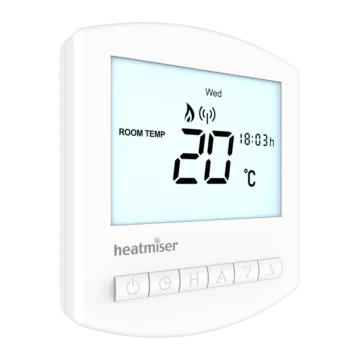
The DS1-L V2 features a rotary temperature adjustment dial on the front panel, with a digital LCD positioned above the dial.
The rear of the thermostat contains the electrical connection terminals and DIP switches used to configure the switching differential.
Main Components
| Component | Function |
| Temperature Adjustment Dial | Sets the required room temperature. |
| Digital LCD | Displays the current ambient temperature. |
| Heating ON Indicator | Appears when the thermostat enables the boiler. |
| Internal Temperature Sensor | Measures room temperature during normal operation. |
| DIP Switches | Configure the switching differential. |
| Back Plate | Secures the thermostat to the wall back box. |
| Front Panel | Contains the adjustment dial and LCD. |
| Retaining Screw | Secures the front panel to the back plate. |
| Electrical Terminals | Connect the power supply, switching output, and optional sensor. |
| Remote Sensor Terminals | Allow a compatible external temperature sensor to be connected. |
Temperature Adjustment Dial
The rotary dial is the main control for setting the required room temperature.
The temperature scale shown around the dial ranges from 5°C to 35°C.
Rotating the dial changes the selected temperature.
The thermostat then controls the connected heating system according to the selected temperature and switching differential.
Digital LCD Display
The LCD displays the current ambient room temperature.
When the dial is rotated, the display continues to show the measured temperature rather than the temperature selected on the dial.
Heating ON Indicator
The thermostat displays a flame-shaped Heating ON symbol when it enables the boiler.
The indicator identifies when the thermostat is requesting heating through its switching output.
Safety Instructions
The DS1-L V2 operates using a 230V AC electrical supply.
Warning: To avoid the risk of electric shock, turn off the power to the heating system before installation.
Installation Precautions
- Disconnect the heating system power before opening or installing the thermostat.
- Follow the appropriate manufacturer’s wiring diagram.
- Use the correct electrical connections for the installed boiler or heating system.
- Secure the thermostat back plate properly inside the wall back box.
- Reattach the front panel and secure it using the retaining screw.
The thermostat provides both 230V switching and volt-free switching arrangements. The correct connection method must match the heating system.
Installing the Heatmiser DS1-L V2 Thermostat
The DS1-L V2 is designed for flush mounting into a wall back box.
The front section must be separated from the back plate before the electrical connections can be completed.
Step 1: Turn Off the Heating System Power
Switch off the power supply to the heating system before starting installation.
This precaution is required to reduce the risk of electric shock.
Step 2: Remove the Thermostat Front Panel
- Locate the securing screws on the bottom face of the thermostat.
- Unscrew the securing screws.
- Carefully separate the front section of the thermostat from the back plate.
Step 3: Connect the Electrical Wiring
- Identify the wiring arrangement required by the heating system.
- Connect the thermostat according to the manufacturer’s appropriate wiring diagram.
- Use the 230V switching diagram for a switched-live connection.
- Use the volt-free switching diagram for a boiler requiring volt-free control.
The electrical connections must correspond to the terminal labels on the rear of the thermostat.
Step 4: Mount the Back Plate
- Position the thermostat back plate inside the wall back box.
- Align the fixing points.
- Screw the back plate securely into the back box.
Step 5: Reattach the Front Panel
- Position the thermostat front section against the mounted back plate.
- Carefully clip the front section into place.
- Secure it using the retaining screw.
The thermostat is now mechanically installed.
Setting the Room Temperature
The Heatmiser DS1-L V2 uses a rotary dial to set the desired room temperature.
The LCD continues to display the measured ambient temperature.
How to Adjust the Temperature
- Locate the large temperature adjustment dial on the front of the thermostat.
- Rotate the dial until its pointer aligns with the required temperature.
- Leave the dial at the selected setting.
The thermostat controls heating according to the selected temperature and configured switching differential.
Understanding the Set Temperature and Displayed Temperature
The temperature selected using the dial is the target temperature.
The temperature displayed on the LCD is the current ambient temperature measured by the active temperature sensor.
These temperatures may differ while the room is warming up or cooling down.
How Heating Is Activated
When the measured temperature falls below the target temperature by the configured switching differential, the thermostat activates the heating output.
Heating stops when the selected target temperature is reached.
For example, with a target temperature of 20°C and a switching differential of 1°C, heating activates at 19°C and stops when the room reaches 20°C.
Understanding the Switching Differential
The DS1-L V2 provides three selectable switching differential settings:
- 1°C
- 2°C
- 3°C
The switching differential determines how far the measured temperature must fall below the selected target temperature before heating is activated.
The setting is configured using DIP switches on the rear of the thermostat.
1°C Switching Differential
With a 1°C switching differential, heating starts when the measured temperature is 1°C below the selected target.
For example:
| Setting | Temperature |
| Selected Temperature | 20°C |
| Heating Switches ON | 19°C |
| Heating Switches OFF | 20°C |
2°C Switching Differential
With a 2°C switching differential, heating starts when the room temperature falls 2°C below the selected target.
For example:
| Setting | Temperature |
| Selected Temperature | 20°C |
| Heating Switches ON | 18°C |
| Heating Switches OFF | 20°C |
3°C Switching Differential
With a 3°C switching differential, heating starts when the room temperature falls 3°C below the selected target.
For example:
| Setting | Temperature |
| Selected Temperature | 20°C |
| Heating Switches ON | 17°C |
| Heating Switches OFF | 20°C |
Switching Differential Comparison
| Differential | Heating ON With a 20°C Setpoint | Heating OFF |
| 1°C | 19°C | 20°C |
| 2°C | 18°C | 20°C |
| 3°C | 17°C | 20°C |
A smaller differential causes heating to begin closer to the selected temperature.
A larger differential allows the room temperature to fall further before heating is activated.
Configuring the DIP Switches
The switching differential is selected using DIP switches located on the rear of the DS1-L V2.
DIP Switch Settings
| Switching Differential | DIP Switch 1 | DIP Switch 2 |
| 1°C | OFF | OFF |
| 2°C | ON | OFF |
| 3°C | OFF | ON |
How to Change the Switching Differential
- Turn off the power to the heating system.
- Access the rear of the thermostat where the DIP switches are located.
- Identify DIP switches 1 and 2.
- Set the switches to the required positions according to the table.
- Reassemble and secure the thermostat after completing the adjustment.
The thermostat then uses the selected switching differential.
DIP Switch Positions
For a 1°C differential, both switches must be OFF.
For a 2°C differential, Switch 1 must be ON and Switch 2 must be OFF.
For a 3°C differential, Switch 1 must be OFF and Switch 2 must be ON.
Remote Temperature Sensor
The DS1-L V2 supports an optional remote temperature sensor.
When a compatible remote sensor is connected, the thermostat automatically switches from its built-in temperature sensor to the remote sensor.
The remote sensor is then used to measure the temperature for heating control.
When to Use a Remote Sensor
A remote sensor is useful when the thermostat is installed in a different location from the area whose temperature needs to be controlled.
The manufacturer identifies bathrooms as one example of an application where remote sensing may be useful.
Heatmiser Thimble Sensor
The manufacturer identifies the Heatmiser Thimble Sensor as a compatible external sensor option.
The Heatmiser Thimble Sensor is not included with the thermostat.
Remote Sensor Terminals
The thermostat has two terminals for the optional remote temperature sensor.
| Terminal | Function |
| RT– | Remote temperature sensor connection |
| RT+ | Remote temperature sensor connection |
The two remote sensor connections are located on the rear terminal block.
Automatic Sensor Selection
When a compatible remote sensor is connected, the DS1-L automatically uses its reading instead of the internal sensor reading.
The temperature displayed on the LCD therefore corresponds to the active sensor measurement.
Electrical Wiring Connections
The DS1-L V2 supports 230V switching and volt-free switching arrangements.
The electrical connection diagram must be selected according to the requirements of the connected heating system.
Terminal Identification
The rear terminal block has six labeled terminals.
| Terminal | Function |
| L | Live supply |
| N | Neutral supply |
| A1 | Switching contact terminal |
| A2 | Switching contact terminal |
| RT– | Remote sensor terminal |
| RT+ | Remote sensor terminal |
Electrical Ratings
| Specification | Rating |
| Input | 230V AC, 50/60 Hz |
| Switching Output | Volt-free contact |
| Maximum Switching Rating | 230V AC, 3A |
| IP Rating | IP20 |
230V Switching Mode Wiring
The manufacturer’s 230V switching diagram shows the DS1-L V2 connected to a live and neutral supply, with a switched-live output used for boiler enable.
The diagram identifies the following connections:
- Live supply.
- Neutral supply.
- Live feed to the switching contact.
- Switched live return to the boiler.
- Earth conductor in the installation.
- Optional remote sensor.
230V Switching Connections
| Connection | Description |
| L | Receives the live supply. |
| N | Receives the neutral supply. |
| A1 | Receives the live feed for the switching circuit, as shown by the link in the diagram. |
| A2 | Provides the switched-live return to boiler enable (LR). |
| RT– / RT+ | Connect the optional remote temperature sensor. |
The wiring illustration shows a live link between the supply and the switching circuit.
It also shows the switched output connected to the boiler’s LR terminal.
The manufacturer’s original 230V switching diagram must be followed when making the electrical connections.
Volt-Free Switching Mode Wiring
The DS1-L V2 can also operate using a volt-free switching connection.
This arrangement is illustrated for a boiler with separate room thermostat control connections.
The thermostat still receives its operating supply through L and N, while the switching contacts connect separately to the boiler control terminals.
Volt-Free Wiring Connections
| Connection | Description |
| L | Live mains supply |
| N | Neutral mains supply |
| A1 | Volt-free switching connection to boiler terminal LS |
| A2 | Volt-free switching connection to boiler terminal LR |
| RT– / RT+ | Optional remote sensor connection |
Boiler Control Terminals
The manufacturer’s volt-free diagram identifies the boiler control connections as:
- LS: Boiler control connection shown connected to A1.
- LR: Boiler enable return shown connected to A2.
The volt-free wiring arrangement keeps the boiler switching connection separate from the thermostat’s mains supply.
The exact connection requirements must match the connected boiler’s electrical control arrangement.
Comparing the Wiring Modes
| Feature | 230V Switching Mode | Volt-Free Switching Mode |
| Thermostat Supply | 230V AC | 230V AC |
| Thermostat Supply Terminals | L and N | L and N |
| Switching Contact Terminals | A1 and A2 | A1 and A2 |
| Switching Arrangement | Live feed linked into the switching circuit | Separate switching connections to boiler control terminals |
| Boiler Connection | Switched live return (LR) | LS and LR |
| Remote Sensor | Supported | Supported |
The correct wiring arrangement must be selected for the heating system.
Customer Support and Manufacturer Information
Heatmiser provides technical assistance and additional product information through its official support channels.
| Information | Details |
| Manufacturer | Heatmiser UK Ltd |
| Support Telephone | +44 (0)1254 669090 |
| Official Website | https://www.heatmiser.com |
| Address | 1–5 Hurstwood Court, Mercer Way, Shadsworth Business Park, Blackburn, Lancashire, BB1 2QU, England |
Technical specifications and product information are available through the manufacturer’s official website.
Frequently Asked Questions
1. How is the temperature adjusted on the Heatmiser DS1-L V2?
Rotate the temperature adjustment dial until the pointer aligns with the desired temperature.
The thermostat controls heating according to that setting and the configured switching differential.
The LCD continues to show the current ambient temperature.
2. Why does the LCD show a different temperature from the dial setting?
The dial shows the selected target temperature, while the LCD displays the measured ambient temperature.
The two values can differ when the room temperature has not yet reached the selected target.
3. How is the switching differential changed on the DS1-L V2?
The switching differential is selected using DIP switches on the back of the thermostat.
For 1°C, both Switch 1 and Switch 2 are OFF.
For 2°C, Switch 1 is ON and Switch 2 is OFF.
For 3°C, Switch 1 is OFF and Switch 2 is ON.
The heating system power must be turned off before accessing the thermostat.
4. What does the flame symbol mean on the Heatmiser DS1-L V2?
The flame symbol is the Heating ON indicator.
It appears when the thermostat enables the boiler.
5. Can the DS1-L V2 use a remote temperature sensor?
Yes. The DS1-L V2 supports an optional compatible remote temperature sensor.
When connected, the thermostat automatically uses the remote sensor instead of its internal sensor.
The manufacturer identifies the Heatmiser Thimble Sensor as an accessory, which is not included with the thermostat.
6. Does the Heatmiser DS1-L V2 work with combi boilers?
Yes. The manufacturer specifies that the DS1-L dial thermostat is suitable for conventional and combination boiler systems.
The thermostat includes 230V switching and volt-free wiring diagrams for compatible boiler control arrangements.
7. What is the maximum switching rating of the DS1-L V2?
The thermostat’s switching output is rated at a maximum of 3A at 230V AC.
Its operating supply is 230V AC, 50/60 Hz.
8. What is the difference between 230V switching and volt-free switching on the DS1-L V2?
In 230V Switching Mode, the diagram shows a live feed linked to the switching circuit, with a switched-live return to the boiler.
In Volt-Free Switching Mode, the thermostat receives its own mains power through L and N, while A1 and A2 provide separate switching connections to the boiler’s LS and LR terminals.
The correct arrangement depends on the connected heating system.