| Field | Details |
| Document Title | Heatmiser Slimline-RF V3 Wireless Thermostat User Manual |
| Document Type | User Manual |
| Brand Name | Heatmiser |
| Product Name | Wireless Programmable Room Thermostat |
| Model Number(s) | Slimline-RF V3 |
| PDF File Size | 427.6 KB |
| Total Number of Pages | 40 |
| Languages Covered | English |
Heatmiser Wireless Room Thermostat Slimline-RF V3
The Heatmiser Slimline-RF V3 is a battery-powered wireless programmable room thermostat designed to control heating systems through a compatible Heatmiser radio-frequency receiver. It combines room temperature regulation, programmable heating schedules, wireless communication, and optional hot water timing functions.
The Slimline-RF V3 measures room temperature and sends wireless signals to a paired receiver, which operates the connected heating equipment. Compatible receivers include the UH8-RF V2, UH8-RF, RF-Switch V2, RF-Switch, and RF-Switch 16 Amp.
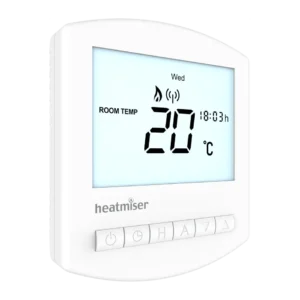
The thermostat operates using two AAA batteries and features a digital LCD, six physical control buttons, a wireless communication indicator, and programmable comfort levels.
Three thermostat operating configurations are available:
- Manual Mode: Maintains a selected temperature without following a timed heating schedule.
- Programmable Mode: Controls heating according to four scheduled comfort levels.
- Programmable Heating and Hot Water Mode: Provides scheduled heating temperature control together with hot water ON/OFF timing through a compatible receiver.
The Slimline-RF V3 supports Weekday/Weekend (5/2 Day), 7 Day, and 24 Hour programming. Additional functions include Temperature Hold, Holiday Mode, Frost Protection, keypad locking, Optimum Start, temperature recalibration, and wireless receiver fail-safe operation.
An optional wired remote air temperature sensor can also be connected when temperature needs to be measured away from the thermostat’s mounting position.
Product Overview and Technical Specifications
The Slimline-RF V3 belongs to the Heatmiser Wireless Series and provides temperature control without requiring a mains power connection at the thermostat itself.
| Specification | Details |
| Brand | Heatmiser |
| Model | Slimline-RF V3 |
| Product Series | Wireless Series |
| Product Type | Wireless Programmable Room Thermostat |
| Power Supply | 2 AAA batteries |
| Battery Type | AAA alkaline batteries |
| Rechargeable Batteries | Not permitted |
| Display | Digital LCD |
| Control Interface | Six physical buttons |
| Installation Method | Surface-mounted |
| Wireless Communication | Radio-frequency communication with compatible receivers |
| Compatible Receivers | UH8-RF V2, UH8-RF, RF-Switch V2, RF-Switch, RF-Switch 16 Amp |
| Thermostat Operating Modes | Manual, Programmable, Programmable with Hot Water |
| Heating Programs | 5/2 Day, 7 Day, 24 Hour |
| Default Programming Mode | 5/2 Day |
| Heating Comfort Levels | Four |
| Temperature Units | Celsius (°C) or Fahrenheit (°F) |
| Temperature Sensor | Built-in air temperature sensor |
| Optional Remote Sensor | Supported |
| Remote Sensor Selection | Built-in Air or Remote Air |
| Switching Differential | 1–3°C |
| Default Switching Differential | 1°C |
| Frost Protection Temperature | Adjustable from 7–17°C |
| Output Delay | 0–15 minutes |
| Default Output Delay | 0 minutes |
| Temperature Adjustment Limit | 0–10°C |
| Optimum Start / Preheat | 0–3 hours |
| Temperature Hold | Supported |
| Holiday Mode | Supported |
| Hot Water Timing | Available in operating configuration 02 |
| Hot Water Override | Supported in hot water control configuration |
| Keypad Lock | Supported |
| Wireless Receiver Fail-Safe | Supported |
| Receiver Signal Timeout | 40 minutes |
| Fail-Safe Heating Cycle | 12 minutes every hour |
What’s Included With the Thermostat
The Slimline-RF V3 is supplied with two AAA batteries for powering the thermostat.
| Component | Description |
| Slimline-RF V3 Thermostat | Wireless room thermostat with LCD and control buttons |
| 2 AAA Batteries | Power the thermostat |
The thermostat operates through wireless communication with a compatible Heatmiser receiver. The receiver type determines the available heating and hot water switching arrangement.
How the Wireless Thermostat Works
The Slimline-RF V3 measures room temperature and compares it with the selected target temperature.
When the measured temperature falls below the target by the configured switching differential, the thermostat requests heating.
The request is transmitted wirelessly to the paired receiver, which controls the connected heating output.
When the selected temperature has been reached, the thermostat stops requesting heating.
Understanding Room Temperature Control
The thermostat combines two functions:
- A room thermostat that measures temperature and controls heating demand.
- A programmer that changes the required temperature according to a heating schedule.
This arrangement allows different temperatures to be maintained throughout the day.
Understanding Temperature Settings
Increasing the set temperature does not cause a room to heat faster.
The heating rate depends on the design and size of the heating system.
A higher temperature setting keeps the heating system operating until the higher target is reached.
Similarly, reducing the target temperature does not cause the room to cool faster. It changes the temperature that the heating system is instructed to maintain.
Choosing a Comfortable Temperature
A practical way to establish a comfortable temperature is to begin with a relatively low setting and increase it gradually until the desired room temperature is reached.
Once suitable temperatures have been established for different times of day, the thermostat can maintain them automatically using its programmed comfort levels.
Thermostat Position and Airflow
The thermostat requires unrestricted airflow to measure room temperature correctly.
Avoid placing furniture directly in front of the thermostat or covering it with curtains.
Nearby electric heaters, televisions, and wall or table lamps can affect temperature measurements.
Parts, Components, and Control Buttons
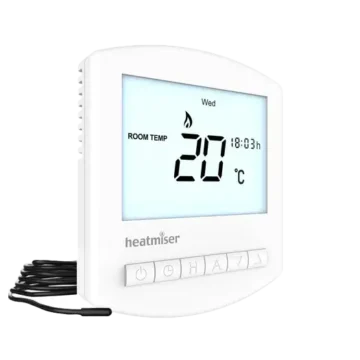
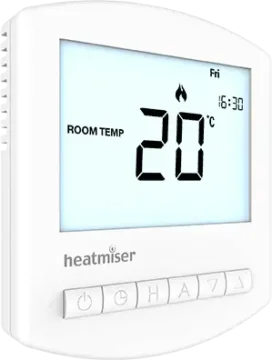
The Slimline-RF V3 has a digital LCD above six physical buttons.
The thermostat consists of a removable front section, a wall-mounted back plate, an internal battery compartment, and connections for an optional remote air sensor.
Main Components
| Component | Function |
| LCD Display | Shows room temperature, time, heating status, and programming information |
| Power Button | Controls thermostat power and Frost Protection |
| Clock Button | Opens clock, scheduling, and optional feature settings |
| H Button | Activates Temperature Hold and Holiday functions |
| A Button | Confirms settings and provides hot water override control |
| Down Button | Decreases temperature, time, and setting values |
| Up Button | Increases temperature, time, and setting values |
| Battery Holder | Holds the two AAA batteries |
| Battery Compartment Door | Provides access to the battery holder |
| Front Panel | Contains the LCD and operating controls |
| Back Plate | Secures the thermostat to the wall |
| Remote Sensor Terminals | Allow an optional wired remote air probe to be connected |
Control Button Functions
| Button | Function |
| Power | Switches the thermostat on or off and activates Frost Protection |
| Clock | Opens heating schedules, clock settings, and optional features |
| H | Controls Temperature Hold, Holiday Mode, and receiver pairing menus |
| A | Confirms settings and overrides hot water output when enabled |
| Down (▼) | Decreases adjustable values |
| Up (▲) | Increases adjustable values |
Some functions require a button to be pressed multiple times or held together with another button.
Understanding the LCD Display
The Slimline-RF V3 LCD displays the current temperature, clock, wireless communication activity, and heating status.
The information shown depends on the configured operating mode.
LCD Indicators and Symbols
| Indicator | Meaning |
| RF Symbol | Flashes when the thermostat communicates with the receiver |
| Day Indicator | Shows the current day of the week |
| Frost Protection Symbol | Appears when Frost Protection is active |
| Flame Symbol | Indicates that the thermostat is requesting heating |
| Flashing Flame Symbol | Indicates that Optimum Start is operating |
| HOLD FOR | Appears during a Temperature Hold |
| ROOM TEMP | Identifies the current measured room temperature |
| SET | Indicates that the selected temperature or another setting is being adjusted |
| Temperature Display | Shows the current sensor temperature or selected setting |
| Program Indicators | Identify WAKE, LEAVE, RETURN, and SLEEP during programming |
| Holiday Symbol | Appears when Holiday Mode is active |
| Battery Symbol | Flashes when the thermostat batteries need replacement |
| Keypad Lock Symbol | Indicates that the keypad is locked |
| TIMER ON / TIMER OFF | Shows the hot water timed output status |
| °C / °F | Identifies the temperature unit |
| Clock | Displays time in 24-hour format |
RF Communication Indicator
The RF symbol flashes when the thermostat transmits a wireless signal to its paired receiver.
The same symbol flashes during the receiver pairing countdown.
Heating Indicator
The flame symbol appears when the thermostat requests heating.
When the flame symbol is absent, heating is not currently required to maintain the selected temperature.
The flame symbol flashes while Optimum Start is active.
Battery Warning Indicator
The battery symbol flashes when the thermostat batteries need replacement.
The batteries should be replaced promptly to maintain normal operation.
Hot Water Timer Indicator
When hot water control is enabled, TIMER ON or TIMER OFF indicates the current state of the hot water timed output.
Installation Requirements and Precautions
The Slimline-RF V3 is designed for surface mounting on a wall.
The thermostat itself is battery-powered and communicates wirelessly with its receiver.
Important Installation Precautions
- Mount the thermostat at eye level.
- Do not install it near a direct heat source.
- Do not cover the thermostat with curtains.
- Avoid obstructing airflow with furniture.
- Keep the thermostat away from nearby equipment that could affect its temperature reading.
- Do not press forcefully against the LCD screen because permanent damage may occur.
- Use the thermostat’s back plate as the wall-mounting template.
Battery Safety
Do not use rechargeable batteries with the Slimline-RF V3.
The thermostat is designed to operate using two AAA batteries supplied with the unit.
The correct battery polarity must be observed during installation.
Installing the Slimline-RF V3 Thermostat
The Slimline-RF V3 is installed directly onto the wall using its mounting back plate.
Step 1: Remove the Front Panel
- Locate the slots on the bottom face of the thermostat.
- Insert a small flat-head terminal screwdriver into the slots.
- Carefully separate the front section from the back plate.
Step 2: Mark the Mounting Holes
- Position the back plate at the required wall location.
- Use the back plate as a positioning template.
- Mark the two fixing-hole positions on the wall.
- Drill the marked positions.
- Insert a wall plug into each hole.
Step 3: Mount the Back Plate
- Position the back plate against the prepared wall.
- Align the back plate with the fixing holes.
- Screw the back plate securely into place.
Step 4: Reattach the Front Panel
- Position the front section against the mounted back plate.
- Carefully clip the front panel into place.
The thermostat is now mounted and ready for battery installation and receiver pairing.
Installing the AAA Batteries
The Slimline-RF V3 uses two AAA batteries.
The battery holder is accessed through a compartment door located on the bottom face of the thermostat.
How to Install the Batteries
- Locate the battery compartment door.
- Push and release the door to open the battery holder.
- Remove the battery holder.
- Insert two AAA batteries.
- Match each battery with the positive (+) and negative (–) markings in the holder.
- Push the battery holder back into the thermostat.
- Continue until it is secured in the closed position.
The thermostat can then operate using its battery supply.
Battery Polarity
The two batteries must be inserted in the orientations marked inside the holder.
Incorrect polarity must be avoided.
Rechargeable Battery Restriction
The manufacturer explicitly states that rechargeable batteries must not be used with the Slimline-RF V3.
Replacing the Thermostat Batteries
The thermostat displays a flashing battery symbol when the batteries need replacement.
When to Replace the Batteries
Replace the batteries when the battery warning symbol appears.
The warning indicates that the battery power is becoming low.
How to Replace the Batteries
- Open the battery compartment door on the bottom of the thermostat.
- Remove the battery holder.
- Remove the old batteries.
- Insert two replacement AAA batteries using the correct polarity.
- Return the holder to the thermostat.
- Push the holder into its closed position.
Important: Complete Battery Replacement Within One Minute
The batteries must be replaced within one minute of removal to retain the current clock and comfort level settings.
If the batteries remain removed for longer, the clock and programmed heating settings may need to be configured again.
Compatible Wireless Receivers
The Slimline-RF V3 communicates wirelessly with a compatible Heatmiser receiver.
The receiver switches the connected heating or hot water equipment according to the thermostat’s transmitted control signals.
Receiver Compatibility
| Receiver | Pairing Method |
| UH8-RF V2 Wiring Centre | P1 pairing countdown |
| UH8-RF Wiring Centre | P2 receiver address and zone configuration |
| RF-Switch V2 | P1 pairing countdown |
| RF-Switch | P1 pairing countdown |
| RF-Switch 16 Amp | P1 pairing countdown |
The receiver type must be selected before the pairing process begins.
Heating-Only Configuration
For heating-only control, Feature 10 must be configured as either:
- 00 – Manual.
- 01 – Programmable.
Heating and Hot Water Configuration
For combined heating and hot water control, Feature 10 must be configured as:
- 02 – Programmable with Hot Water.
Important: Feature 10 Mode 02 is not suitable for the RF-Switch 16 Amp receiver.
Understanding the Receiver Pairing Menu
The thermostat includes three receiver-related settings.
| Feature | Function | Setting |
| P1 | Pairs with UH8-RF V2 and compatible RF-Switch receivers | 99-second countdown |
| P2 | Configures UH8-RF receiver address, zone number, and zone type | Receiver-specific configuration |
| P3 | Configures receiver fail-safe operation | 00 = Disabled; 01 = Enabled |
The factory default for P3 is Enabled.
How to Open the Pairing Menu
- Press and hold Power for 3 seconds to switch off the thermostat.
- Press and hold H for 3 seconds.
- P1 appears in the upper-right corner of the display.
- Press Clock repeatedly to move between P1, P2, and P3.
Select the required pairing or configuration feature for the connected receiver.
Pairing With the UH8-RF V2 Wiring Centre
The Slimline-RF V3 can pair with the Heatmiser UH8-RF V2 wiring center.
The thermostat can be paired with multiple channels on the UH8-RF V2.
Step 1: Activate Pairing on the UH8-RF V2
- Locate the required channel on the wiring center.
- Press and hold that channel’s pairing button.
- Continue until its output LED begins flashing.
The UH8-RF V2 is now in pairing mode.
Step 2: Activate Pairing on the Thermostat
- Press and hold Power for 3 seconds to switch off the thermostat.
- Press and hold H for 3 seconds until P1 appears.
- Press H once.
- The thermostat starts a 99-second countdown.
- The RF symbol flashes while the thermostat transmits its pairing signal.
Step 3: Confirm Pairing
When pairing is successful:
- The UH8-RF V2 output LED turns off.
- The thermostat countdown changes immediately to 00.
- The thermostat display then becomes blank.
Step 4: Turn the Thermostat On
Press Power once to turn the thermostat back on.
Hot Water Pairing
When the thermostat is configured with Feature 10 set to 02, the hot water timer is automatically paired with the HW channel.
If Pairing Is Unsuccessful
Move the thermostat closer to the receiver and repeat the pairing procedure.
This helps eliminate a possible wireless signal issue.
Pairing With the UH8-RF Wiring Centre
The earlier UH8-RF wiring center uses receiver identification numbers configured by rotary switches.
Each UH8-RF installed in the system must have a different receiver ID.
Step 1: Identify the UH8-RF Receiver Address
- Locate the rotary switches inside the UH8-RF receiver.
- Record the selected ID number.
- The available receiver ID range is 01–99.
The first UH8-RF in a system can be assigned ID 01.
Step 2: Open the P2 Menu
- Press and hold Power for 3 seconds to switch off the thermostat.
- Press and hold H for 3 seconds until P1 appears.
- Press Clock once to change the display to P2.
- Press H to open the P2 settings.
Step 3: Enter the Receiver Address
- Use Up and Down to change the large digits.
- Enter the number matching the rotary switch setting on the UH8-RF.
- Press H to confirm.
Step 4: Select the Zone
- Use Up and Down to change the smaller digits in the upper-right section.
- Select the required UH8-RF zone number.
- Press H.
Step 5: Select the Zone Type
Use Up and Down to select the required zone type.
| Setting | Zone Type |
| rA | Radiator zone |
| UF | Underfloor heating zone |
Press A to save the configuration.
Step 6: Turn the Thermostat On
Press Power once to return to normal operation.
Hot Water Channel
When Feature 10 is configured as Mode 02, the hot water timer is automatically paired with the HW channel.
Pairing With the RF-Switch V2
The RF-Switch V2 provides separate channel pairing through CH1 and CH2.
Step 1: Activate Pairing on the Receiver
- Locate the CH1 or CH2 button on the RF-Switch V2.
- Press and hold the required channel button for 5 seconds.
- The corresponding channel LED begins flashing.
The receiver is ready to detect the thermostat signal.
Step 2: Activate Pairing on the Thermostat
- Hold Power for 3 seconds to turn off the thermostat.
- Hold H for 3 seconds until P1 appears.
- Press H once to start the 99-second pairing countdown.
The RF icon flashes while the thermostat sends its signal.
Step 3: Confirm Pairing
When pairing succeeds, the receiver channel LED turns off.
The thermostat countdown changes to 00 and the display becomes blank.
Press Power to turn the thermostat on.
Hot Water Channel
When Feature 10 is set to 02, the hot water timer is automatically paired with the HW channel.
Pairing Problems
If the pairing attempt fails, move the thermostat closer to the receiver and repeat the procedure.
Pairing With the RF-Switch
The RF-Switch uses its CH1 button for pairing.
Step 1: Activate Receiver Pairing
- Press and hold CH1 on the RF-Switch for 5 seconds.
- Wait until the CH1 LED begins flashing.
Step 2: Start Thermostat Pairing
- Switch off the thermostat by holding Power for 3 seconds.
- Hold H for 3 seconds until P1 appears.
- Press H once to begin the 99-second countdown.
Step 3: Confirm Pairing
When the receiver detects the pairing signal, the CH1 LED turns off.
The thermostat countdown moves to 00, followed by a blank display.
Press Power once to turn the thermostat on.
Hot Water Pairing
When Feature 10 is configured to 02, the hot water timer is automatically paired with the HW channel.
Pairing With the RF-Switch 16 Amp
The Slimline-RF V3 can pair with the Heatmiser RF-Switch 16 Amp receiver.
Feature 10 Mode 02, Programmable with Hot Water, must not be used with the RF-Switch 16 Amp.
Step 1: Activate Receiver Pairing
- Locate the Pair button on the RF-Switch 16 Amp.
- Press and hold Pair for 5 seconds.
- The Pair LED begins flashing.
Step 2: Start Thermostat Pairing
- Press and hold Power for 3 seconds to turn off the thermostat.
- Press and hold H for 3 seconds until P1 appears.
- Press H once to begin the 99-second countdown.
The RF icon flashes while the thermostat transmits the pairing signal.
Step 3: Confirm Pairing
When pairing succeeds:
- The receiver’s Pair LED turns off.
- The thermostat countdown changes to 00.
- The thermostat display becomes blank.
Press Power to turn the thermostat back on.
Pairing Problems
Move the thermostat closer to the RF-Switch 16 Amp receiver and repeat the pairing procedure if the first attempt is unsuccessful.
Wireless Receiver Fail-Safe Operation
The Slimline-RF V3 supports a receiver fail-safe function.
This setting is configured through pairing Feature P3.
How Fail-Safe Works
If the receiver does not receive a signal from the thermostat for 40 minutes, fail-safe operation becomes active.
When enabled, the receiver switches its output on for 12 minutes every hour.
This cycle continues until communication with the thermostat is restored.
Fail-Safe Settings
| Setting | Function |
| 00 | Fail-safe disabled |
| 01 | Fail-safe enabled (Default) |
Fail-Safe Operation Summary
| Condition | Receiver Behavior |
| Communication is normal | Responds to thermostat control signals |
| No signal for 40 minutes | Fail-safe activates when enabled |
| Fail-safe active | Output operates for 12 minutes every hour |
| Communication restored | Receiver returns to normal thermostat communication |
Changing the Fail-Safe Setting
- Turn off the thermostat.
- Hold H to enter the pairing menu.
- Press Clock until P3 appears.
- Select the required fail-safe setting.
Fail-safe can be enabled or disabled according to the system configuration.
Setting the Clock
The Slimline-RF V3 includes a clock used for scheduled heating and hot water operation.
How to Set the Time
- Make sure the thermostat is turned on.
- Press Clock twice.
- Use Up and Down to set the hours.
- Press H to confirm.
- Use Up and Down to set the minutes.
- Press H.
- Use Up and Down to select the current day of the week.
- Press A to save the settings.
The clock uses a 24-hour time format.
Clock Setting With Hot Water Control Enabled
When Feature 10 is configured as 02 for Programmable with Hot Water, press Clock three times to access the clock setting screen.
The hours, minutes, and day can then be configured using the same procedure.
Understanding the Temperature Display
The Slimline-RF V3 displays the current measured temperature during normal operation.
The selected target temperature is shown when the temperature adjustment controls are used.
Room Temperature
ROOM TEMP identifies the current temperature measured by the active sensor.
For example, a displayed room temperature of 20°C indicates the temperature currently measured by the thermostat.
Set Temperature
SET identifies the target temperature that the thermostat is instructed to maintain.
For example, a set temperature of 21°C means that the thermostat is configured to maintain 21°C.
Difference Between Measured and Set Temperature
| Display | Meaning |
| ROOM TEMP | Current measured temperature |
| SET | Required target temperature |
The two values may differ while the heating system is warming the room.
Heating Programs and Comfort Levels
The Slimline-RF V3 supports Weekday/Weekend, 7 Day, and 24 Hour programming.
The thermostat uses four programmed comfort levels.
Default Heating Schedule
| Comfort Period | Starting Time | Temperature |
| WAKE | 08:00 | 21°C |
| LEAVE | 09:30 | 16°C |
| RETURN | 16:30 | 22°C |
| SLEEP | 23:00 | 17°C |
These are the factory-programmed heating settings.
Each comfort level establishes the target temperature from its starting time until the next programmed period.
Weekday/Weekend Programming
In 5/2 Day Mode, the same comfort levels apply from Monday through Friday.
A separate set of comfort levels can be configured for Saturday and Sunday.
7 Day Programming
In 7 Day Mode, every day can have its own four comfort levels.
24 Hour Programming
In 24 Hour Mode, the same four comfort levels repeat each day.
Programming the Heating Comfort Levels
The heating schedule can be changed using the Clock, H, A, and Up/Down buttons.
How to Set the Heating Schedule
- Press Clock once.
- The first comfort period appears.
- Use Up and Down to select the required WAKE starting time.
- Press H to confirm.
- Use Up and Down to select the WAKE temperature.
- Press H again.
- LEAVE appears.
- Repeat the time and temperature settings for LEAVE.
- Continue through RETURN and SLEEP.
- Press A to save the schedule and return to the main display.
Weekday/Weekend Programming
When Weekday/Weekend programming is selected, Monday through Friday appear together during weekday programming.
After the weekday schedule is configured, Saturday and Sunday appear.
The weekend schedule can then be programmed separately.
7 Day Programming
In 7 Day Mode, only Monday appears when programming begins.
The comfort levels can be configured for each day independently.
Disabling Unused Comfort Periods
An unused comfort period can be disabled by setting its time to –.–.
The thermostat ignores the disabled period.
For example, if only two heating periods are required, the remaining periods can be disabled.
Adjusting the Set Temperature
The target temperature can be changed directly using Up and Down.
How to Change the Temperature
- Press Up or Down.
- SET appears with the selected target temperature.
- Use Up and Down to choose the required temperature.
- Press A to confirm.
The thermostat returns to its main display.
Duration of a Manual Temperature Override
During programmed operation, the selected temperature override remains active until the next programmed comfort level begins.
The thermostat then returns to the programmed temperature.
Temperature Hold Function
Temperature Hold temporarily overrides the scheduled heating temperature for a selected period.
How to Activate Temperature Hold
- Press H.
- Use Up and Down to select the required hold duration.
- Press H to confirm.
- Use Up and Down to select the required hold temperature.
- Press A to confirm.
HOLD FOR appears on the screen together with the remaining duration.
When the countdown reaches zero, the thermostat returns to normal programmed operation.
How to Cancel Temperature Hold
- Press H to open the Temperature Hold settings.
- Reduce the hold duration to 00:00.
- Confirm the setting.
The temporary hold is canceled.
Setting Hot Water Switching Times
The Slimline-RF V3 can provide hot water timing when Feature 10 is configured to 02.
This setting enables Programmable Heating with Hot Water.
The hot water schedule is configured separately from the heating comfort levels.
How to Program Hot Water Times
- Press Clock twice.
- The selected day or day group appears.
- Use Up and Down to set the start time for Hot Water Period 1.
- Press H to confirm.
- Use Up and Down to set the end time for Hot Water Period 1.
- Press H again.
- Repeat the procedure for the remaining switching periods.
- Set unused periods to –.–.
Weekday/Weekend Hot Water Programming
When Weekday/Weekend Mode is selected, Monday through Friday appear together.
The weekend schedule can be configured separately.
7 Day Hot Water Programming
When 7 Day Mode is selected, Monday appears first.
The switching periods can be configured independently for each day.
Hot Water Control Requirement
Hot water timing is available only when Feature 10 is configured as 02.
This configuration is not suitable for the RF-Switch 16 Amp receiver.
Hot Water Override
The Hot Water Override function changes the current hot water output state until the next programmed switching time.
How to Turn Hot Water On Temporarily
When the hot water timed output is OFF:
- Press A.
- The hot water output switches ON.
- TIMER ON flashes to indicate the override.
How to Turn Hot Water Off Temporarily
When the hot water timed output is ON:
- Press A.
- The hot water output switches OFF.
- TIMER OFF flashes to indicate the override.
Override Duration
The override remains active until the next programmed hot water switching period.
At that time, the normal hot water schedule resumes.
Holiday Mode
Holiday Mode temporarily reduces the heating target to the Frost Protection temperature.
The thermostat maintains the reduced temperature throughout the holiday period and automatically returns to the programmed schedule afterward.
How to Activate Holiday Mode
- Press H three times.
- Continue until the suitcase symbol appears.
- Use Up and Down to select the required number of holiday days.
- Press A to confirm.
The suitcase indicator remains visible while Holiday Mode is active.
When Does Holiday Mode Begin?
The holiday period begins at 00:00 on the following day, rather than immediately.
For example, if a two-day holiday is configured on Friday:
- Saturday is counted as the first holiday day.
- Sunday is counted as the second holiday day.
- Normal programmed heating resumes at 00:00 on Monday.
How to Cancel Holiday Mode
- Press H three times to open the holiday setting.
- Reduce the holiday duration to 00 days.
- Press A to confirm.
Holiday Mode is canceled.
Frost Protection Mode
Frost Protection maintains a reduced temperature when ordinary heating is not required.
How to Activate Frost Protection
- Press Power once.
- The frost protection symbol appears.
The thermostat requests heating only when the measured room temperature falls below the selected frost temperature.
When heating becomes active, the flame symbol appears.
How to Adjust the Frost Temperature
- Press Power once to enter Frost Protection.
- Use Up and Down to select the required temperature.
- Press A to save the setting.
Frost Protection Temperature Range
| Setting | Temperature |
| Minimum | 7°C |
| Maximum | 17°C |
How to Cancel Frost Protection
Press Power once again.
The frost protection symbol disappears.
Turning the Thermostat On and Off
The Slimline-RF V3 has a Power button for normal operation and Frost Protection.
How to Turn the Thermostat Off
- Press and hold Power.
- Continue until the thermostat display switches off.
The display and heating output switch off completely when Frost Protection is disabled.
How to Turn the Thermostat On
Press Power once.
The thermostat returns to its normal operating display.
Frost Protection While the Thermostat Is Off
Feature 03 determines whether Frost Protection remains enabled when the display is turned off.
The factory default keeps Frost Protection enabled.
Therefore, switching off the display does not necessarily disable frost protection heating.
Locking and Unlocking the Thermostat
The Slimline-RF V3 includes a keypad lock.
How to Lock the Keypad
- Press and hold A and Down together.
- Continue holding for 10 seconds.
- The keypad lock symbol appears.
The keypad is locked.
How to Unlock the Keypad
- Press and hold A and Down together again.
- Continue holding for 10 seconds.
- The keypad lock symbol disappears.
The keypad is unlocked.
The lock symbol is displayed only while the keypad lock is active.
Advanced Thermostat Settings
The Slimline-RF V3 includes optional settings for temperature measurement, heating response, Frost Protection, programming, and hot water control.
How to Open the Optional Settings
- Press and hold Power to turn off the thermostat.
- Press and hold Clock until the feature setting screen appears.
- Use Clock to move through the available features.
- Use Up and Down to change a selected setting.
- Press A to save the settings.
- Press Power to turn the thermostat on.
Optional Features Reference Table
| Feature | Description | Available Settings |
| 01 | Temperature Format | 00 = °C (Default); 01 = °F |
| 02 | Switching Differential | 1–3°C; Default: 1°C |
| 03 | Frost Protection When Display Is Off | 00 = Disabled; 01 = Enabled (Default) |
| 04 | Output Delay | 0–15 minutes; Default: 0 |
| 05 | Temperature Adjustment Limit | 0–10°C; Default: 0 |
| 06 | Sensor Selection | 00 = Built-in Air; 01 = Remote Air |
| 07 | Optimum Start / Preheat | 0–3 hours; Default: 0 |
| 08 | Rate of Change | Calculated minutes required for a 1°C temperature rise |
| 09 | Programming Mode | 00 = 5/2 Day (Default); 01 = 7 Day; 02 = 24 Hour |
| 10 | Thermostat Mode | 00 = Manual; 01 = Programmable; 02 = Programmable with Hot Water |
Feature 01: Temperature Format
This setting changes the temperature display between Celsius and Fahrenheit.
| Setting | Temperature Unit |
| 00 | Celsius (Default) |
| 01 | Fahrenheit |
Feature 02: Switching Differential
Switching Differential determines how far the measured temperature must fall below the selected target before the heating starts.
For example, with a target temperature of 20°C:
- A 1°C differential activates heating at 19°C and stops it at 20°C.
- A 2°C differential activates heating at 18°C and stops it at 20°C.
The adjustable range is 1–3°C.
The factory default is 1°C.
Feature 03: Frost Protection
This feature determines whether the thermostat maintains Frost Protection while the display is switched off.
| Setting | Function |
| 00 | Disabled |
| 01 | Enabled (Default) |
Feature 04: Output Delay
Output Delay helps prevent rapid switching of the heating output.
The adjustable range is 0–15 minutes.
The factory default is 0, meaning no additional delay is applied.
Feature 05: Temperature Adjustment Limit
This feature restricts the amount of temperature adjustment available through Up and Down.
The restriction also applies while the keypad is locked, allowing limited temperature control.
The range is 0–10°C.
Feature 06: Sensor Selection
The Slimline-RF V3 can use its built-in air temperature sensor or a compatible remote air sensor.
| Setting | Sensor |
| 00 | Built-in Air Sensor |
| 01 | Remote Air Sensor |
When the remote sensor is selected, the thermostat uses the remote measurement for temperature control.
Feature 07: Optimum Start / Preheat
Optimum Start calculates when heating should begin so that the programmed temperature is reached at the required time.
The thermostat uses its calculated Rate of Change to estimate the necessary warm-up duration.
| Setting | Preheat Duration |
| 00 | Disabled (Default) |
| 01 | 1 Hour |
| 02 | 2 Hours |
| 03 | 3 Hours |
Feature 08: Rate of Change
Rate of Change represents the number of minutes the thermostat calculates are required to increase the measured temperature by 1°C.
For example, a value of 20 represents an estimated 20 minutes for a 1°C increase.
This feature provides information used by Optimum Start.
Feature 09: Programming Mode
| Setting | Mode |
| 00 | 5/2 Day (Default) |
| 01 | 7 Day |
| 02 | 24 Hour |
Feature 10: Thermostat Operating Mode
Feature 10 determines how the thermostat controls heating and hot water.
| Setting | Operating Mode |
| 00 | Manual |
| 01 | Programmable |
| 02 | Programmable with Hot Water |
Manual Mode
Manual Mode maintains a selected temperature without following a timed heating schedule.
Programmable Mode
Programmable Mode uses scheduled comfort levels to control heating.
Programmable With Hot Water
This mode provides scheduled heating temperature control together with separate hot water ON/OFF timing.
It must not be selected when using the RF-Switch 16 Amp receiver.
Optional Remote Air Temperature Sensor
The Slimline-RF V3 supports an optional wired remote air sensor.
The sensor allows temperature to be measured away from the thermostat’s normal wall position.
Selecting the Remote Air Sensor
The sensor type is selected through Feature 06.
To activate the remote air sensor:
- Open the optional settings menu.
- Select Feature 06.
- Change the value to 01.
- Save the setting using A.
- Return to normal operation.
Remote Sensor Terminal Connections
The manufacturer’s remote sensor diagram shows the following connections:
| Terminal | Function |
| RT2 | Remote air sensor connection |
| – | Remote sensor common connection |
The remote air probe connects across RT2 and the common terminal.
Remote Sensor Wiring Diagram
The remote sensor wiring diagram is shown on PDF page 36 (printed manual page 35).
It illustrates the remote air probe connected to the thermostat’s sensor terminals.
The diagram also shows the two AAA batteries in their battery holder.
The connections must follow the manufacturer’s original wiring arrangement.
Recalibrating the Thermostat
The Slimline-RF V3 includes a temperature recalibration function.
How to Recalibrate the Temperature
- Press and hold Power to turn off the thermostat.
- Press and hold Power and Down together.
- Continue until the temperature appears on the display.
- Use Up and Down to select the required temperature value.
- Press A to confirm.
- Press Power to turn the thermostat back on.
The thermostat uses the adjusted calibration setting.
Factory Reset Instructions
The Slimline-RF V3 includes a factory reset function that restores its default settings.
How to Factory Reset the Slimline-RF V3
- Press and hold Power to turn off the thermostat.
- Press and hold Power and Up together.
- Continue until the LCD powers up.
- All display icons appear.
- Wait until the icons disappear.
- The factory reset is complete.
- Press Power once to turn the thermostat back on.
Previously customized settings are restored to their factory defaults.
The required operating configuration, heating schedules, and receiver settings should be checked after resetting.
Troubleshooting Guide
The following checks correspond to operating functions and indicators described in the manufacturer’s instructions.
| Problem or Indicator | Meaning or Recommended Action |
| Thermostat cannot control heating | Check that the thermostat is paired with the correct receiver |
| Receiver pairing is unsuccessful | Move the thermostat closer to the receiver and repeat pairing |
| RF icon flashes | The thermostat is communicating or transmitting a pairing signal |
| Flame icon is displayed | The thermostat is requesting heating |
| Flame icon flashes | Optimum Start is operating |
| Heating does not follow the expected schedule | Review comfort levels and the selected programming mode |
| HOLD FOR appears | Temperature Hold is active |
| Suitcase symbol appears | Holiday Mode is active |
| Frost symbol appears | Frost Protection is active |
| Lock symbol appears | The keypad is locked |
| Battery symbol flashes | Replace the thermostat batteries |
| TIMER ON or TIMER OFF flashes | Hot water output has been manually overridden |
| Receiver loses communication for 40 minutes | The enabled fail-safe setting activates the receiver’s hourly heating cycle |
Thermostat Does Not Pair With the Receiver
If pairing is unsuccessful:
- Confirm the receiver model.
- Select the matching pairing procedure.
- Check that pairing mode has been activated on the receiver.
- Move the thermostat closer to the receiver.
- Repeat the pairing sequence.
Heating Does Not Follow the Programmed Schedule
If heating operates at unexpected times:
- Check the current clock and day settings.
- Confirm the selected programming mode.
- Review the comfort periods.
- Check whether Temperature Hold is active.
- Check whether Holiday Mode or Frost Protection is active.
- Confirm the thermostat operating mode under Feature 10.
Hot Water Timing Does Not Operate
If hot water timing does not follow the expected schedule:
- Check that Feature 10 is set to 02.
- Verify the connected receiver supports this configuration.
- Review the programmed hot water ON and OFF periods.
- Check whether a hot water override is active.
Low Battery Warning
When the battery icon flashes:
- Open the battery compartment.
- Replace both AAA batteries.
- Observe the correct polarity.
- Complete the replacement within one minute to retain the clock and comfort levels.
Thermostat Display Is Off but Heating Remains Active
Feature 03 determines whether Frost Protection remains enabled with the display switched off.
The factory default is Enabled.
This means the thermostat may still request heating to maintain Frost Protection while the normal display is off.
Heating Operates Periodically During Lost Communication
If receiver fail-safe is enabled and the receiver does not receive a thermostat signal for 40 minutes, the receiver operates its output for 12 minutes every hour.
Normal communication must be restored to end fail-safe operation.
Maintenance and Battery Care
The Slimline-RF V3 requires occasional battery replacement.
Battery Maintenance
- Replace batteries when the low-battery symbol appears.
- Use two AAA batteries.
- Do not use rechargeable batteries.
- Insert batteries using the correct polarity.
- Replace batteries within one minute of removal to retain clock and heating schedules.
Checking Wireless Communication
When the thermostat has difficulty communicating with its receiver, the receiver pairing procedure can be repeated.
Moving the thermostat closer to the receiver may help eliminate signal-related pairing problems.
Checking Heating Programs
The programmed heating times and temperatures can be reviewed through the Clock programming function.
The clock should also be checked following any interruption that causes the existing time or comfort settings to be lost.
Customer Support Information
Heatmiser provides product information and technical assistance through its official support channels.
| Information | Details |
| Manufacturer | Heatmiser |
| Support Telephone | +44 (0)1254 669090 |
| Official Website | https://www.heatmiser.com |
| facebook.com/thermostats |
Additional technical specifications and product information are available through the Heatmiser website.
Frequently Asked Questions
1. How is the Heatmiser Slimline-RF V3 paired with a receiver?
The pairing procedure depends on the receiver model.
For compatible P1 receivers, activate pairing on the receiver, turn off the thermostat, hold H until P1 appears, and press H again to begin the 99-second countdown.
When pairing is successful, the countdown changes to 00 and the receiver’s pairing LED turns off.
The UH8-RF wiring center uses the P2 address and zone configuration procedure instead.
2. How is the Slimline-RF V3 factory reset?
Press and hold Power to turn off the thermostat.
Then press and hold Power and Up together until the LCD powers on and all icons appear.
When the icons disappear, the reset is complete.
Press Power to turn the thermostat back on.
3. What batteries does the Heatmiser Slimline-RF V3 use?
The thermostat uses two AAA batteries.
The manufacturer supplies two AAA batteries with the thermostat and explicitly states that rechargeable batteries must not be used.
The batteries should be replaced when the battery warning symbol appears.
4. How are the batteries replaced without losing the heating schedule?
Open the battery compartment, remove the existing batteries, and install two replacement AAA batteries using the correct polarity.
The batteries must be replaced within one minute of removal to retain the existing clock and comfort level settings.
5. How is the Slimline-RF V3 thermostat programmed?
Press Clock once to open comfort level programming.
Set the starting time and temperature for WAKE, then press H to confirm each setting.
Repeat the process for LEAVE, RETURN, and SLEEP.
Press A to save the schedule.
The thermostat supports 5/2 Day, 7 Day, and 24 Hour programming.
6. Can the Slimline-RF V3 control both heating and hot water?
Yes. The thermostat supports Programmable Heating with Hot Water when Feature 10 is set to 02 and a compatible receiver is used.
Hot water ON and OFF periods can be programmed separately from heating comfort levels.
Feature 10 Mode 02 is not suitable for the RF-Switch 16 Amp receiver.
7. How is the keypad unlocked on the Slimline-RF V3?
Press and hold A and Down together for 10 seconds.
The keypad lock symbol disappears when the keypad is unlocked.
The same button combination is used to activate the lock.
8. What happens if the Slimline-RF V3 loses communication with its receiver?
When fail-safe is enabled, the receiver activates its fail-safe behavior if no signal is received from the thermostat for 40 minutes.
The receiver then switches its output on for 12 minutes every hour.
This cycle continues until communication with the thermostat is restored.