
This detailed Schumacher SL1653 manual explains everything users need to know about the product, including setup, charging procedures, jump-starting instructions, USB charging, work light operation, maintenance, troubleshooting, specifications, warranty information, and customer support details.
Product Overview
The Schumacher SL1653 is designed to provide emergency starting power for vehicles equipped with 12-volt lead-acid batteries. Unlike traditional jump starters that use large lead-acid batteries, this model uses modern lithium-ion polymer battery technology, allowing it to deliver high peak current while remaining compact and portable.
The unit is intended for:
- Cars
- SUVs
- Pickup trucks
- Boats
- Garden tractors
- Recreational vehicles with 12V battery systems
The jump starter is not designed to replace a vehicle battery. Instead, it provides temporary starting assistance when a vehicle battery becomes discharged. The manufacturer recommends using the unit only with 12V lead-acid battery systems and not with dry-cell household batteries.
Besides vehicle starting, the SL1653 includes a USB charging port for phones, tablets, and portable electronics, as well as a built-in LED work light that can be used during roadside emergencies or low-light situations.
What’s Included in the Box
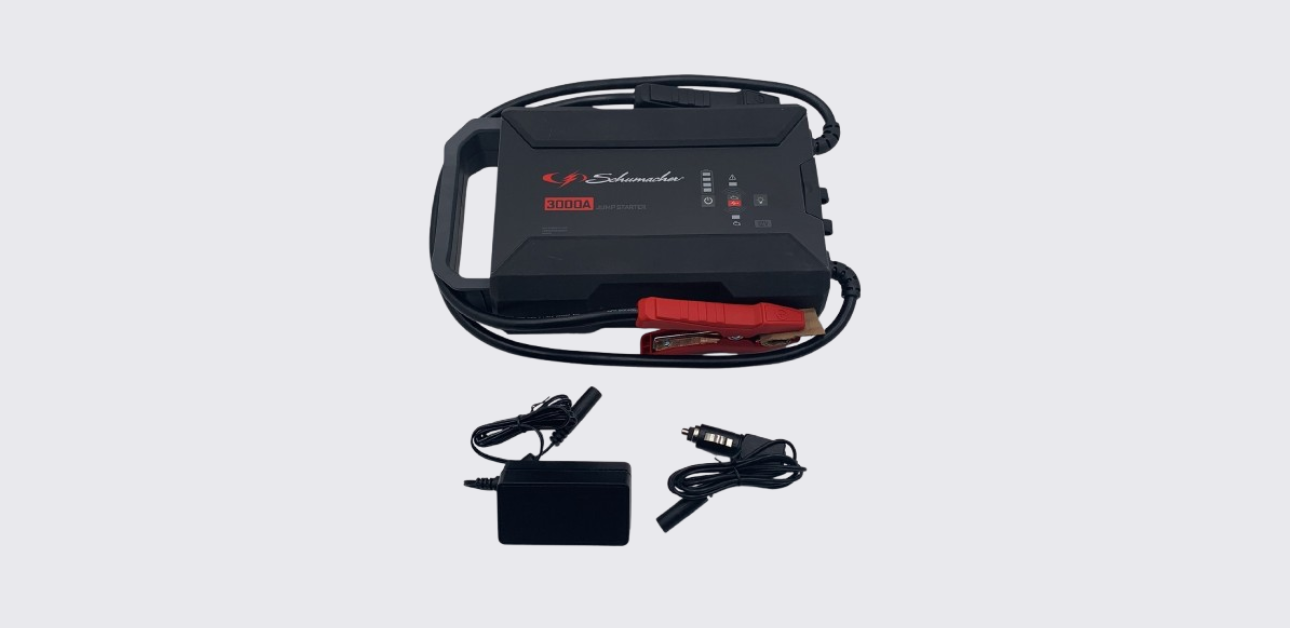
The Schumacher SL1653 package includes the equipment required for charging and operation.
Package Contents
| Item | Description |
| Schumacher SL1653 Jump Starter | Main unit |
| Battery Clamps | Vehicle battery connection |
| 12V DC Car Charger | Vehicle charging cable |
| 100V-240V AC Wall Charger | Fast charging adapter |
| Owner’s Manual | Product instructions |
These accessories allow users to charge the unit at home or while traveling and ensure the jump starter remains ready for emergency use.
Parts and Features
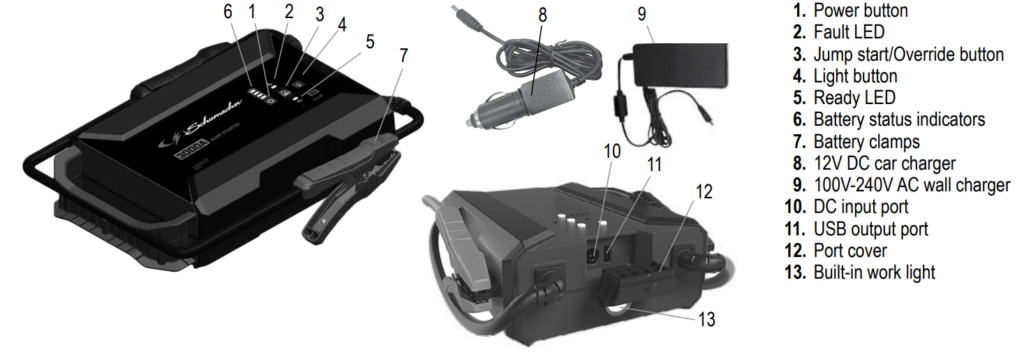
Understanding the controls and indicators makes operation easier and safer.
Main Components
| Part | Function |
| Power Button | Turns power on and checks battery level |
| Fault LED | Indicates errors or incorrect connections |
| Jump Start/Override Button | Enables jump-starting functions |
| Light Button | Controls work light modes |
| Ready LED | Indicates jump-start readiness |
| Battery Status LEDs | Displays charge level |
| Battery Clamps | Connect to vehicle battery |
| 12V DC Car Charger | Charges unit from vehicle |
| AC Wall Charger | Charges unit from household outlet |
| DC Input Port | Charging connection |
| USB Output Port | Powers electronic devices |
| Port Cover | Protects charging ports |
| Built-In Work Light | Emergency lighting system |
These controls and indicators allow users to monitor battery status, charge devices, and safely jump start vehicles.
Important Safety Information
Before using the Schumacher SL1653, users should carefully review all safety instructions.
Battery Safety
Lead-acid batteries generate explosive gases during normal operation. Sparks, flames, or incorrect connections can cause serious injury, battery damage, or explosions.
Important safety rules include:
- Never smoke near a battery.
- Keep sparks and flames away.
- Never attempt to jump start a frozen battery.
- Never place the jump starter directly on top of a vehicle battery.
- Keep clamps from touching each other.
- Work in a well-ventilated area.
The manufacturer emphasizes following these precautions every time the jump starter is used.
Personal Protection
When working around batteries:
- Wear eye protection.
- Wear protective clothing.
- Remove jewelry and metal accessories.
- Keep fresh water and soap nearby.
- Have another person nearby when possible.
Battery acid can cause severe burns. Immediate washing and medical attention are required if acid contacts skin or eyes.
Lithium Battery Safety
The SL1653 contains a lithium-ion battery pack.
Do not:
- Disassemble the unit.
- Modify the battery pack.
- Expose the unit to temperatures above 265°F (130°C).
- Attempt repairs without professional assistance.
Improper handling may result in fire, explosion, or injury.
Understanding the Control Panel
The Schumacher SL1653 uses LED indicators and simple controls to communicate operating status.
Battery Status Indicators
The four battery LEDs display charge level.
| LEDs Illuminated | Charge Level |
| Four LEDs | 100% |
| Three LEDs | 75% |
| Two LEDs | 50% |
| One LED | 25% |
The manufacturer recommends charging the unit whenever the battery level drops below 75%.
Ready LED Functions
| Indicator | Meaning |
| Green Solid | Ready to jump start |
| Green Flashing | Override mode active |
The Ready LED provides confirmation that the jump starter is prepared for operation.
Fault LED Functions
| Indicator | Meaning |
| Red Solid | Reverse polarity or short circuit |
| Red Flashing | Temperature protection activated |
The Fault LED alerts users to connection errors or operating conditions requiring attention.
Charging the Schumacher SL1653
Proper charging is one of the most important aspects of jump starter ownership.
When to Charge
The manufacturer recommends charging:
- Immediately after purchase
- After every use
- Every 30 days during storage
Following this schedule helps maintain battery health and ensures the unit remains ready for emergencies.
Checking Battery Level
To check battery charge:
- Press the Power button.
- Observe the battery LEDs.
- Compare illuminated LEDs with the charge level chart.
Recharge the unit if fewer than three LEDs are illuminated.
Charging with the AC Wall Charger
The included AC wall charger provides the fastest charging method.
Charging Procedure
- Connect the wall charger to the DC input port.
- Plug the charger into a live AC outlet.
- Observe the battery LEDs during charging.
- Allow charging to continue until complete.
When charging finishes:
- All four green LEDs illuminate briefly.
- The LEDs then turn off.
Charging Time
| Charging Method | Approximate Time |
| AC Wall Charger (15V 3A) | 3.5–4.5 Hours |
Using a charger rated below 3 amps increases charging time.
Charging While Driving
The SL1653 can also recharge from a vehicle’s accessory outlet.
Charging Procedure
- Start the vehicle engine.
- Connect the 12V DC car charger to the jump starter.
- Connect the opposite end to the vehicle’s accessory outlet.
- Allow charging to continue until complete.
- Disconnect when charging finishes.
Vehicle Charging Time
| Charging Method | Approximate Time |
| 12V Vehicle Charger | 5.5–6.5 Hours |
Always disconnect the charging cable when the vehicle engine is not running.
How to Jump Start a Vehicle
The Schumacher SL1653 delivers up to 3000 peak amps, providing substantial starting power for many vehicle types.
Before Jump Starting
Make sure:
- Vehicle ignition is OFF.
- All electrical accessories are OFF.
- The jump starter is adequately charged.
- Clamps are in good condition.
Never attempt to jump start a vehicle without its battery installed. Doing so may damage the vehicle’s electrical system.
Connecting to a Negative-Ground Vehicle
Most modern vehicles use negative-ground systems.
- Connect the red clamp to the positive battery terminal.
- Connect the black clamp to the vehicle frame or engine block.
- Keep clamps away from moving engine parts.
Connecting to a Positive-Ground Vehicle
- Connect the black clamp to the negative battery terminal.
- Connect the red clamp to the vehicle chassis or engine block.
- Verify all connections are secure.
Starting Procedure
- Press the Jump Start/Override button.
- Verify the Ready LED illuminates.
- Wait approximately 30 seconds.
- Crank the engine for up to 5 seconds.
- If the engine does not start, wait 30 seconds before trying again.
After the vehicle starts:
- Turn off the jump starter.
- Remove the black clamp.
- Remove the red clamp.
- Recharge the unit immediately.
Using Override Mode for Low-Voltage Batteries
Some discharged batteries have voltage levels too low for automatic detection.
The SL1653 includes an override mode for these situations.
Override Procedure
- Connect the clamps correctly.
- Press the Jump Start/Override button once.
- Press and hold the button for 5 seconds.
- Wait for the Ready LED to flash.
- Attempt to start the vehicle.
Important Warning
Override mode bypasses certain safety protections.
Incorrect connections during override mode may cause:
- Sparks
- Battery damage
- Vehicle electrical damage
- Jump starter damage
Always confirm correct polarity before enabling override mode.
Using the USB Charging Port
The SL1653 functions as a portable power bank for electronic devices.
USB Output Specifications
| Specification | Value |
| Output Voltage | 5V DC |
| Maximum Output | 2.4A |
This output is suitable for:
- Smartphones
- Tablets
- Bluetooth accessories
- Portable electronics
- USB-powered devices
Charging a Device
- Secure battery clamps on storage holders.
- Press the Power button.
- Connect the device to the USB port.
- Allow charging to begin.
- Disconnect when charging completes.
Recharge the jump starter after extended USB use.
Using the Built-In Work Light
The Schumacher SL1653 includes an integrated work light designed for roadside emergencies and low-light environments.
Available Light Modes
| Mode | Purpose |
| Steady Light | General illumination |
| SOS Flash | Emergency signaling |
| Strobe Flash | Visibility and warning |
Operating the Work Light
- Place the unit on a stable surface.
- Press and hold the Light button for approximately 0.75 seconds.
- Cycle through available modes.
- Press and hold again to turn the light off.
The work light is useful for nighttime battery service, roadside emergencies, and camping situations.
Maintenance Instructions
Routine maintenance helps ensure reliable operation.
Cleaning
After each use:
- Wipe the housing clean.
- Clean battery clamps.
- Remove dirt and corrosion.
- Inspect cables and ports.
Regular cleaning improves performance and helps prevent poor electrical connections.
Battery Care
To maximize battery life:
- Charge after every use.
- Never leave the battery completely discharged.
- Recharge monthly during storage.
- Store fully charged whenever possible.
Proper battery maintenance significantly extends service life.
Storage Guidelines
Correct storage conditions help protect the lithium-ion battery.
Recommended Storage Conditions
| Condition | Recommendation |
| Storage Temperature | 14°F to 113°F (-10°C to 45°C) |
| Charge Level | Fully charged |
| Maintenance Charging | Every month |
Storage Best Practices
Always:
- Store indoors.
- Store in a dry location.
- Protect from moisture.
- Keep clamps on storage posts.
- Prevent contact with metal surfaces.
These practices help prevent accidental short circuits and battery deterioration.
Troubleshooting
Jump Starter Will Not Start Vehicle
Possible causes:
- Poor battery connection
- Reversed clamp connections
- Low internal battery charge
- Defective vehicle battery
- Jump starter not activated
Solutions:
- Clean battery terminals.
- Verify clamp polarity.
- Check battery charge status.
- Press the Jump Start button.
- Test vehicle battery condition.
Jump Starter Will Not Operate
Possible cause:
- Internal battery voltage too low
Solution:
- Recharge using the wall charger or car charger.
Battery Will Not Hold a Charge
Possible cause:
- Internal battery failure
Solution:
- Have the battery inspected or replaced.
LED Diagnostic
Ready/Fault LED Behavior
| Indicator | Meaning |
| Green Solid | Ready to jump start |
| Green Flashing | Ready for override mode |
| Red Solid + Continuous Buzzer | Reverse polarity or short circuit |
| No LEDs or Buzzer | Battery exhausted |
| Red Flashing + Beep Every Second | Temperature protection |
Battery Status LED Behavior
| Indicator Pattern | Meaning |
| Four Green LEDs Flash Together | Temperature protection activated |
These indicators help users quickly identify operating conditions and connection issues.
Replacement Parts
Genuine Schumacher replacement parts help maintain proper operation.
| Part | Part Number |
| 12V DC Car Charger | 2299003640Z |
| 100V-240V AC Wall Charger | 930261016Z |
Always use approved replacement parts to ensure compatibility and safety.
Technical Specifications
| Specification | Value |
| Battery Type | Lithium-Ion Polymer |
| Battery Capacity | 99.16 Wh |
| Peak Jump Current | 3000A |
| USB Output | 5V DC, 2.4A |
| DC Input | 15V DC 2A / 12V DC 2A |
| Charging Temperature | 32°F to 113°F |
| Discharge Temperature | -4°F to 140°F |
| Storage Temperature | 14°F to 113°F |
These specifications provide strong jump-starting capability while maintaining portability and convenience.
Warranty and Customer Support
Schumacher Electric provides a one-year limited warranty for the SL1653 Lithium-Ion Jump Starter. Warranty coverage details are available directly from Schumacher Electric.
Repairs and Returns
Repairs and warranty returns:
Customer Support
Phone: 1-800-621-5485
Website: schumacherelectric.com
Keeping the model number available when contacting customer support helps speed up service requests and warranty claims.