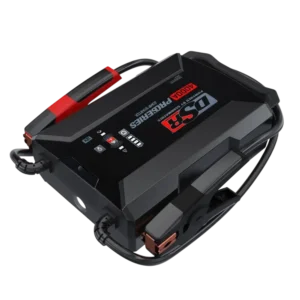
| Field | Details |
| Document Title | Lithium Ion Jump Starter and USB Power Source |
| Document Type | Owner’s Manual |
| Brand Name | Schumacher |
| Product Name | Lithium Ion Jump Starter and USB Power Source |
| Model Number(s) | DSR164 |
| PDF File Size | 596.48 KB |
| Total Number of Pages | 11 |
| Languages Covered in the Document | English, French |
Schumacher Lithium Ion Jump Starter DSR164
The Schumacher DSR164 Lithium Ion Jump Starter and USB Power Source is a portable battery-powered device designed to assist in starting vehicles with a weak 12V lead-acid battery. It features a built-in 26,800mAh lithium-ion polymer battery, provides up to 4000A peak cranking current, and includes a USB power output and an integrated work light.
The DSR164 is designed for use with vehicles, boats, and garden tractors equipped with a 12V DC battery system. Its battery clamps connect to the vehicle battery and chassis to provide jump-start assistance without requiring a separate electrical outlet during operation.
The unit also includes a low-voltage override function for batteries whose voltage is too low for normal connection detection. A set of LED indicators displays the internal battery charge level, jump-start readiness, fault conditions, and temperature protection status.
The internal battery can be charged using the included AC wall charger or 12V DC vehicle charger.
Product Features
The Schumacher DSR164 includes the following features:
- Lithium-ion polymer rechargeable battery.
- 26,800mAh internal battery capacity.
- 4000A peak cranking current.
- 12V DC vehicle jump-start assistance.
- Low-voltage override function.
- USB output for compatible devices.
- 5V DC, 2.4A USB charging output.
- Built-in LED work light.
- Continuous illumination mode.
- SOS flashing light mode.
- Strobe light mode.
- Four battery capacity indicators.
- Green Ready LED.
- Red Fault LED.
- Reverse-polarity protection.
- Short-circuit protection.
- Temperature protection.
- Automatic power-off after 30 seconds of inactivity.
- AC wall charging.
- Charging through a vehicle’s 12V accessory outlet.
- Battery clamps with storage holders.
Technical Specifications
| Specification | Details |
| Brand | Schumacher |
| Model Number | DSR164 |
| Product Type | Lithium Ion Jump Starter and USB Power Source |
| Internal Battery Type | Lithium Ion Polymer |
| Battery Capacity | 26,800mAh |
| Peak Cranking Current | 4000A |
| Vehicle Battery System | 12V DC |
| Supported Jump-Start Battery Type | Lead-acid |
| USB Output | 5V DC, 2.4A |
| DC Input | 15V DC, 2A / 12V DC, 2A |
| AC Wall Charger Input | 100V–240V AC |
| AC Charging Time | Approximately 3.5–4.5 hours with a 15V/3A charger, as stated in the charging instructions |
| Vehicle DC Charging Time | Approximately 5.5–6.5 hours |
| Charging Temperature | 32°F–113°F (0°C–45°C) |
| Discharging Temperature | -14°F–113°F (-10°C–45°C) |
| Storage Temperature | -4°F–113°F (-20°C–45°C) |
| USB Power Output | Yes |
| Built-In Work Light | Yes |
| Light Modes | Steady, SOS, Strobe |
| Automatic Power-Off | After 30 seconds of inactivity |
| Warranty | One-Year Limited Warranty |
What’s Included in the Box
The DSR164 includes the jump starter and its charging accessories.
| Item | Description |
| Jump Starter | Main unit with rechargeable lithium-ion battery |
| Battery Clamps | Positive and negative clamps for vehicle battery connections |
| AC Wall Charger | 100V–240V AC charger |
| 12V DC Car Charger | Adapter for charging from a vehicle accessory outlet |
Parts and Components
The Schumacher DSR164 has a control panel on the main housing, built-in battery clamps, charging ports, and an integrated work light.
Component Identification
| No. | Component | Function |
| 1 | Power Button | Turns on the unit and checks the internal battery status |
| 2 | Fault LED | Indicates a short circuit, reversed clamps, or protection condition |
| 3 | Jump Start/Override Button | Activates jump starting and low-voltage override |
| 4 | Light Button | Controls the built-in work light |
| 5 | Ready LED | Indicates jump-start readiness or override mode |
| 6 | Battery Status Indicators | Show the remaining internal battery charge |
| 7 | Battery Clamps | Connect the jump starter to the vehicle battery and chassis |
| 8 | 12V DC Car Charger | Charges the unit from a vehicle accessory outlet |
| 9 | 100V–240V AC Wall Charger | Charges the internal battery from an AC electrical outlet |
| 10 | DC Input Port | Receives the charging adapter connection |
| 11 | USB Output Port | Supplies USB power to a compatible device |
| 12 | Port Cover | Covers the charging and USB connections |
| 13 | Built-In Work Light | Provides normal and emergency illumination |
Control Panel and Button Functions
The control panel includes three main buttons and several LED indicators.
Power Button
Press the Power button to turn on the unit and view the remaining internal battery charge.
The manual also identifies a long press of the Power button as a way to activate the work light.
The jump starter automatically turns off after approximately 30 seconds of inactivity.
Jump Start/Override Button
The Jump Start/Override button controls the jump-start function.
- Press the button to activate normal jump starting.
- When the vehicle battery voltage is too low to be detected, press the button once and then press and hold it for 5 seconds to activate override mode.
The green Ready LED indicates which function is active.
Light Button
The Light button operates the built-in work light.
Holding the button for approximately 0.75 seconds cycles through the available light modes.
LED Indicator Guide
The jump starter uses green and red LED indicators to display battery and operating status.
Main LED Indicators
| Indicator | LED Behavior | Meaning |
| Battery Status LED | Flashing Green | Internal battery is charging |
| Ready LED | Solid Green | Unit is ready to jump-start a vehicle |
| Ready LED | Flashing Green | Low-voltage override mode is ready |
| Fault LED | Solid Red | Short circuit or reversed battery clamps |
| Fault LED | Flashing Red with buzzer every second | Temperature protection activated |
| Battery Status LEDs | All four flashing together | Temperature protection activated |
Ready LED
A solid green Ready LED indicates that the jump starter is ready for normal engine starting.
A flashing green Ready LED indicates that low-voltage override mode has been activated.
Fault LED
A solid red Fault LED indicates a short circuit or reversed battery-clamp connections.
A flashing red Fault LED accompanied by a buzzer sounding every second indicates that temperature protection has activated.
Battery Status Indicators
The DSR164 uses four green LEDs to show the estimated charge level of its internal battery.
Battery Capacity Display
| Green LEDs Illuminated | Battery Charge Level |
| 4 LEDs | 100% |
| 3 LEDs | 75% |
| 2 LEDs | 50% |
| 1 LED | 25% |
How to Check the Battery Level
- Locate the Power button on the front of the jump starter.
- Press the Power button.
- Observe the illuminated green battery status LEDs.
- Compare the number of LEDs with the battery capacity table.
Recharge the internal battery when the indicators show less than 75% charge.
If all battery status LEDs are off, recharge the unit.
Important Safety Instructions
Warning: Risk of explosive gases, electrical shock, fire, and personal injury.
Working near a lead-acid battery can be dangerous because batteries generate explosive gases during normal operation.
Follow all safety instructions before using the jump starter.
General Safety Precautions
- Keep the jump starter out of reach of children.
- Do not disassemble or modify the unit.
- Have repairs performed by qualified service personnel.
- Never attempt to jump-start a vehicle while the jump starter’s internal battery is being charged.
- Do not recharge the unit using a damaged charging cable.
- Allow adequate ventilation while charging.
- Do not place the jump starter on flammable materials such as carpeting, upholstery, paper, or cardboard.
- Position the unit as far from the vehicle battery as the cables allow.
- Do not expose the unit to rain or snow.
- Never attempt to jump-start a frozen battery.
- Do not place the jump starter directly above the vehicle battery.
- Never allow the clamps to touch each other or contact the same metal object.
- Do not use a damaged jump starter or battery pack.
- Use only accessories recommended or sold by the manufacturer.
- Do not use the jump starter as a replacement for a vehicle battery.
Battery Compatibility and Safety
The DSR164 is designed to jump-start 12V DC lead-acid battery systems.
It is intended for compatible vehicles, boats, and garden tractors.
Do not use it to jump-start household dry-cell batteries or equipment with an incompatible electrical system.
Fire and Explosion Prevention
- Never smoke near the battery or engine.
- Keep sparks and open flames away from the battery.
- Remove rings, watches, necklaces, bracelets, and other metal jewelry before working near a battery.
- Keep the clamps from contacting each other.
- Never attempt to start a frozen battery.
Personal Safety Precautions
Wear complete eye protection and protective clothing when working near a lead-acid battery.
Keep another person nearby who can provide assistance if needed.
Keep water, soap, and baking soda available when working around batteries.
If battery acid contacts the skin or clothing, wash immediately with soap and water and seek medical attention.
If battery acid enters the eyes, flush them immediately with water and obtain medical assistance.
Battery acid spills should be neutralized thoroughly with baking soda before cleanup.
Internal Lithium-Ion Battery Safety
The DSR164 contains a lithium-ion battery.
- Do not use a damaged or modified battery pack.
- Do not expose the jump starter to fire.
- Do not expose it to temperatures above 265°F (130°C).
- Avoid contact with liquid expelled from a damaged battery.
- If battery liquid contacts the skin, rinse with water.
- If battery liquid contacts the eyes, obtain medical assistance.
If the lithium-ion battery catches fire, the manual identifies water, foam extinguishers, Halon, CO₂, ABC dry chemical, powdered graphite, copper powder, and sodium carbonate as extinguishing options.
After the fire is extinguished, the product must be cooled with water or another specified nonalcoholic extinguishing liquid to prevent reignition.
Never attempt to lift or move a product that is hot, smoking, or burning.
Outdoor Use Precautions
Temporary outdoor use is permitted only when the unit is protected from weather exposure.
The jump starter must:
- Be stored indoors.
- Remain protected from rain, snow, sleet, and other weather conditions.
- Not be charged outdoors.
Before First Use
The internal battery must be charged immediately after purchase.
Preparing the Jump Starter
- Remove the jump starter and its accessories from the packaging.
- Inspect the unit, charging cables, and battery clamps for damage.
- Place the unit on a stable, non-flammable surface.
- Connect the appropriate charging adapter.
- Charge the internal battery fully before use.
- Check the battery capacity indicators.
- Store the charging accessories when charging is complete.
Recommended Battery Charging Schedule
| Situation | Charging Requirement |
| Immediately after purchase | Charge fully |
| After each use | Recharge as soon as possible |
| Every 30 days | Recharge to maintain battery condition |
| Battery level below 75% | Recharge |
| Before long-term storage | Charge fully |
The internal battery should never be allowed to discharge completely.
How to Charge the Schumacher DSR164 Using AC Power
The jump starter can be charged using its AC wall charger.
A full charge takes approximately 3.5–4.5 hours with a 15V/3A charger, according to the charging instructions. The specifications section separately lists the DC input as 15V/2A or 12V/2A, so the correct replacement charger rating should be confirmed with Schumacher.
AC Charging Instructions
- Locate the DC input port on the jump starter.
- Connect the wall charger’s output cable to the DC input port.
- Plug the AC wall charger into a live electrical outlet.
- Allow the internal battery to charge.
- The green battery status indicators flash during charging.
- When fully charged, all four green LEDs remain solid briefly before switching off.
- Disconnect the wall charger from the AC outlet.
- Remove the charging cable from the jump starter.
AC Charger Information
| Specification | Details |
| Wall Charger AC Input | 100V–240V AC |
| Charging Time | Approximately 3.5–4.5 hours with the 15V/3A charger identified in the charging instructions |
| Full-Charge Indication | Four green LEDs illuminate briefly, then turn off |
Using a charger rated below 3A increases the charging time, according to the charging instructions.
How to Charge the Schumacher DSR164 Using a Car Charger
The included 12V DC car charger allows the jump starter to be recharged while driving.
The vehicle engine must be running during this process.
12V DC Charging Instructions
- Start the vehicle engine.
- Connect the 12V DC charging cable to the jump starter’s input socket.
- Insert the other end of the cable into the vehicle’s 12V accessory outlet.
- Allow the internal battery to charge.
- When charging is complete, all four green LEDs illuminate briefly and then switch off.
- Disconnect the charging adapter from the vehicle power source.
- Disconnect the charging cable from the jump starter.
Charging Time Using a Vehicle
The DSR164 takes approximately 5.5–6.5 hours to charge fully using the included 12V DC car charger.
Important: Disconnect the charging cable completely when the vehicle engine is not running.
How to Jump-Start a Vehicle Using the Schumacher DSR164
The Schumacher DSR164 supplies jump-start assistance to vehicles equipped with a compatible 12V lead-acid battery.
Warning: Using the jump starter without a battery installed in the vehicle will damage the vehicle’s electrical system.
Before Connecting the Battery Clamps
- Turn the vehicle ignition off.
- Make sure all vehicle electrical accessories are switched off.
- Position the DC cables away from fan blades, belts, pulleys, and other moving engine parts.
- Identify the positive and negative battery terminals.
- Determine whether the vehicle uses a negative-ground or positive-ground system.
Connecting the Clamps to a Negative-Ground Vehicle
Most vehicles use a negative-ground electrical system.
- Connect the red positive (+) clamp to the battery’s positive terminal.
- Connect the black negative (-) clamp to the vehicle chassis or engine block, away from the battery.
- Make sure both clamps have secure connections.
Connecting the Clamps to a Positive-Ground Vehicle
For a positive-ground vehicle:
- Connect the black negative (-) clamp to the battery’s negative terminal.
- Connect the red positive (+) clamp to the vehicle chassis or engine block, away from the battery.
- Confirm that the clamps are securely attached.
Starting the Vehicle
- Press the Jump Start/Override button to activate the jump starter.
- Confirm that the green Ready LED illuminates.
- Wait approximately 30 seconds after connecting the clamps before attempting to start the engine.
- Crank the engine for no more than 5 seconds.
- If the engine does not start, wait 30 seconds before trying again.
- When the engine starts, press the Jump Start/Override button to switch off the jump starter.
- Disconnect the clamps following the specified shutdown procedure.
- Recharge the jump starter as soon as possible after use.
The manual specifies removing the black negative clamp before the red positive clamp after normal jump starting.
Engine Starting Time Limits
| Operating Action | Time |
| Recommended Wait After Connecting Clamps | 30 seconds |
| Maximum Cranking Duration | 5 seconds |
| Wait Between Starting Attempts | 30 seconds |
If the engine does not start after the recommended attempts, disconnect the jump starter and investigate other possible vehicle problems.
Using Low-Voltage Override Mode
The DSR164 includes an override feature for vehicles whose battery voltage is too low for the jump starter to detect the battery-clamp connection.
This function manually activates the jump-start output.
How to Activate Override Mode
- Verify that the positive and negative clamps are connected correctly.
- Press the Jump Start/Override button once.
- Press and hold the same button for 5 seconds.
- The green Ready LED begins flashing.
- Override mode is now active for jump-start assistance.
Low-Voltage Override Warning
Warning: Override mode bypasses a safety feature.
Activating override mode energizes the battery clamps.
If the clamps touch each other, sparking can occur.
Incorrect clamp connections, reversed polarity, or short circuits can damage:
- The jump starter.
- The vehicle battery.
- The vehicle’s electrical system.
Clamp polarity and connection security must be verified before activating override mode.
Using the USB Power Output
The DSR164 includes a USB output that supplies up to 5V DC, 2.4A.
The USB port can supply power to compatible USB devices.
USB Output Specifications
| Specification | Details |
| Output Voltage | 5V DC |
| Maximum Output Current | 2.4A |
| Connection | USB Output Port |
How to Power a USB Device
- Make sure the battery clamps are secured to their storage holders.
- Press the Power button to turn on the jump starter.
- Connect the USB device to the USB output port.
- Turn on the connected device if necessary.
- Allow the device to operate or charge.
- When finished, turn off the connected device if required.
- Disconnect the USB cable.
- Recharge the jump starter as soon as possible after use.
Recharge the unit if all battery status LEDs are off.
Using the Built-In Work Light
The Schumacher DSR164 has an integrated work light.
The light offers three operating modes.
Work Light Modes
| Mode | Function |
| Steady Glow | Continuous illumination |
| SOS | Flashing SOS signal |
| Strobe | Repeated flashing light |
Turning On the Work Light
- Place the jump starter on a stable, flat surface near the work area.
- Make sure the battery clamps are secured to their storage holders.
- Locate the Light button on the front of the unit.
- Press and hold the Light button for approximately 0.75 seconds.
Changing the Light Mode
Use the Light button to cycle through:
- Steady illumination.
- SOS flashing.
- Strobe flashing.
Turning Off the Work Light
Press and hold the Light button for approximately 0.75 seconds to switch off the work light.
Recharge the internal battery after using the light.
Fault Indicators and Warning Lights
The DSR164 uses the Ready LED, Fault LED, battery status LEDs, and audible warning buzzer to identify operating conditions.
Ready and Fault Indicator Table
| Indicator Behavior | Meaning |
| Solid Green Ready LED | Ready for jump starting |
| Flashing Green Ready LED | Override mode ready |
| Solid Red Fault LED with Continuous Buzzer | Short-circuit or reversed-polarity protection |
| No LED and No Buzzer | Internal battery exhausted |
| Flashing Red LED with Buzzer Once Per Second | Temperature protection activated |
| All Four Green Battery LEDs Flash Simultaneously | Temperature protection activated |
Solid Green Ready LED
A solid green Ready LED means the jump starter is ready to assist with starting the vehicle.
Flashing Green Ready LED
A flashing green Ready LED indicates that low-voltage override mode is active.
The clamps are energized in this mode.
Solid Red Fault LED and Continuous Buzzer
A solid red Fault LED accompanied by a continuous buzzer indicates a short circuit or reversed battery-clamp connections.
Disconnect the jump starter and correct the connections before attempting another start.
No LEDs and No Buzzer
If no LEDs illuminate and no buzzer sounds, the manual identifies the internal battery as exhausted.
The unit should be recharged using the appropriate charging adapter.
Flashing Red LED and Repeated Buzzer
A red LED that flashes while the buzzer sounds once every second indicates temperature protection.
Four Green LEDs Flashing Together
If all four battery status LEDs flash simultaneously, the unit has entered temperature protection.
Troubleshooting Guide
The following troubleshooting procedures address jump-start failures, reversed connections, internal battery problems, and charging faults.
Schumacher DSR164 Troubleshooting Table
| Problem | Possible Cause | Recommended Solution |
| Jump starter will not start the vehicle | Poor battery-clamp connection | Check the battery and chassis connection points; make sure they are clean |
| Jump starter will not start the vehicle | Battery clamps connected in reverse | Disconnect the unit and correct the clamp connections |
| Jump starter will not start the vehicle | Internal battery is discharged | Press the Power button and check battery status LEDs; recharge if needed |
| Jump starter will not start the vehicle | Vehicle battery is defective | Have the vehicle battery checked |
| Jump starter will not start the vehicle | Jump starter is not switched on | Press the Jump Start/Override button |
| Jump starter does not operate | Internal battery voltage is too low | Use the wall charger or vehicle charger to recharge and reactivate the unit |
| Internal battery will not hold charge | Internal battery is defective | Have the internal battery checked |
| Solid red LED and continuous buzzer | Short circuit or reverse polarity | Disconnect the jump starter and check clamp connections |
| No LED and no buzzer | Internal battery exhausted | Recharge the internal battery |
| Red LED flashes with buzzer every second | Temperature protection activated | Stop operation while temperature protection is active |
| Four green battery LEDs flash simultaneously | Temperature protection activated | Stop operation while temperature protection is active |
Jump Starter Will Not Start the Vehicle
If the DSR164 fails to start a vehicle, several conditions should be checked.
Check the Battery Clamp Connections
- Check that the red and black clamps are correctly connected.
- Make sure the battery and chassis connection points are clean.
- Confirm the clamps have secure contact.
Check the Internal Battery Level
- Press the Power button.
- Observe the green battery status LEDs.
- Recharge the jump starter if the battery charge is low.
Check the Vehicle Battery
A defective vehicle battery may prevent successful jump starting.
Have the battery inspected if the jump starter is operating correctly but the engine does not start.
Confirm Jump Starter Activation
Press the Jump Start/Override button.
The green Ready LED should illuminate when the unit is ready.
Jump Starter Will Not Turn On
A low internal battery voltage can prevent the unit from operating.
Use the AC wall charger or the included 12V DC vehicle charger to recharge and reactivate the jump starter.
Internal Battery Will Not Hold a Charge
If the internal battery does not accept or retain a charge, the battery may be defective.
Have the battery checked by qualified service personnel.
Red Fault LED and Continuous Buzzer
A solid red Fault LED with a continuous audible alarm indicates reversed polarity or a short circuit.
Disconnect the jump starter and inspect the battery-clamp connections.
Do not activate low-voltage override while the clamps are reversed or shorted.
Temperature Protection Warning
The DSR164 indicates a temperature protection condition through either:
- A flashing red LED with the buzzer sounding once per second.
- Four green battery status LEDs flashing simultaneously.
Stop operating the unit while its temperature protection is active.
Maintenance and Cleaning
The DSR164 requires regular care to maintain its battery and electrical connections.
Cleaning the Battery Clamps and Housing
Clean the battery clamps and outer housing after each use.
Make sure the charging adapters are disconnected before performing maintenance.
Battery Maintenance
To help maintain the internal lithium-ion battery:
- Charge the battery completely before storage.
- Recharge immediately after each use.
- Never completely discharge the internal battery.
- Recharge at least every 30 days when the unit is not used frequently.
Storage Instructions
The jump starter must be stored with its internal battery fully charged.
Storage Temperature
| Condition | Temperature |
| Minimum Storage Temperature | -4°F (-20°C) |
| Maximum Storage Temperature | 113°F (45°C) |
Storing the Battery Clamps
Return the battery clamps to their designated storage holders.
Keep the clamps away from metal surfaces and prevent them from contacting each other.
Battery Storage Maintenance
Recharge the jump starter at least once every month when not in frequent use.
This prevents excessive discharge of the internal battery.
Replacement Parts and Accessories
The Schumacher DSR164 has replacement charging accessories identified by manufacturer part numbers.
Replacement Parts
| Replacement Part | Part Number |
| 12V DC Car Charger | 2299003640Z |
| 100V–240V AC Wall Charger | 930261016Z in the English section; 9302610164Z in the French section |
The two language sections print different part numbers for the AC wall charger. Confirm the correct replacement charger with Schumacher before ordering.
Replacement parts are available through schumacherelectric.com.
FCC Compliance Information
The DSR164 has been tested for compliance with the limits for a Class B digital device under Part 15 of the FCC Rules.
The device can generate, use, and radiate radio-frequency energy.
If interference occurs with radio or television reception, the following steps may help:
- Reorient or relocate the receiving antenna.
- Increase the distance between the jump starter and the affected equipment.
- Connect the equipment to a different electrical circuit.
- Contact the dealer or an experienced radio/television technician.
One-Year Limited Warranty
The Schumacher DSR164 is covered by a one-year limited warranty.
Additional warranty details are available from Schumacher Electric Corporation.
Warranty Information
| Field | Details |
| Manufacturer | Schumacher Electric Corporation |
| Warranty Type | Limited Warranty |
| Warranty Period | One Year |
| Warranty Information | schumacherelectric.com |
| Customer Support | 1-800-621-5485 |
| Product Registration | schumacherelectric.com |
The product can be registered online through the Schumacher website.
Customer Support and Repair Information
Schumacher provides support for repairs, returns, warranty inquiries, and replacement parts.
Customer Support Details
| Service | Contact |
| Manufacturer | Schumacher Electric Corporation |
| Official Website | schumacherelectric.com |
| Customer Support Phone | 1-800-621-5485 |
| Repairs and Returns | 365rma.com |
| Replacement Parts | schumacherelectric.com |
| Product Registration | schumacherelectric.com |
| Warranty Information | schumacherelectric.com |
For product repairs or returns, visit 365rma.com.
For replacement accessories and warranty information, visit schumacherelectric.com.
Frequently Asked Questions
1. How many amps does the Schumacher DSR164 jump starter provide?
The Schumacher DSR164 provides up to 4000A peak cranking current for jump-starting compatible vehicles equipped with a 12V DC lead-acid battery system. It has an internal 26,800mAh lithium-ion polymer battery.
2. How long does it take to charge the Schumacher DSR164?
The manual specifies approximately 3.5–4.5 hours with a 15V/3A charger. Charging with the included 12V DC car charger takes approximately 5.5–6.5 hours. The charger rating should be confirmed against the unit’s input specifications when obtaining a replacement.
3. How do I know when the Schumacher DSR164 is fully charged?
When the internal battery is fully charged, all four green battery status LEDs illuminate continuously for a short period before switching off. Four illuminated green LEDs indicate 100% battery capacity when checking the charge level.
4. How do I jump-start a vehicle with the Schumacher DSR164?
Turn off the vehicle ignition and electrical accessories. Connect the red clamp to the positive battery terminal and the black clamp to the chassis or engine block for a negative-ground vehicle. Press the Jump Start/Override button and check that the green Ready LED is solid. Wait approximately 30 seconds after connecting the clamps, then crank the engine for up to 5 seconds. After the engine starts, turn off the jump starter and disconnect the clamps according to the operating instructions.
5. What does a flashing green Ready LED mean on the Schumacher DSR164?
A flashing green Ready LED indicates that low-voltage override mode has been activated. This function is used when the vehicle battery voltage is too low for normal connection detection. Override mode bypasses a safety feature and energizes the clamps, so clamp connections must be correct before activation.
6. Why is the Schumacher DSR164 showing a red light and making a beeping sound?
A solid red Fault LED with a continuous buzzer indicates short-circuit or reversed-polarity protection. A flashing red LED with a buzzer sounding once every second indicates temperature protection. The LED behavior identifies the condition that needs attention.
7. Can the Schumacher DSR164 charge a phone through USB?
The DSR164 includes a 5V DC, 2.4A USB output for powering compatible USB devices. Secure the battery clamps on their storage holders, press the Power button, and connect the device to the USB port. Disconnect the device after use and recharge the jump starter as needed.
8. How often should the Schumacher DSR164 be charged during storage?
The manufacturer recommends charging the internal battery immediately after purchase, after every use, and at least once every 30 days when not used frequently. The unit should be fully charged before storage and kept between -4°F and 113°F (-20°C and 45°C).