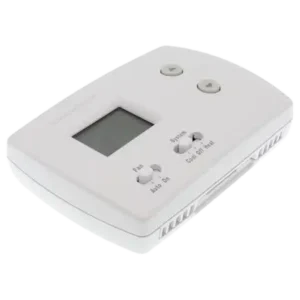
| Document Detail | Information |
| Document Title | PRO 3000 Series Non-Programmable Digital Thermostat Installation Instructions |
| Document Type | Installation Instructions |
| Brand Name | Honeywell Home |
| Product Name | PRO 3000 Non-Programmable Digital Thermostat |
| Model Number(s) | TH3110D1008, TH3210D1004 |
| PDF File Size | 993 KB |
| Number of Pages | 24 |
| Languages | English, French, Spanish |
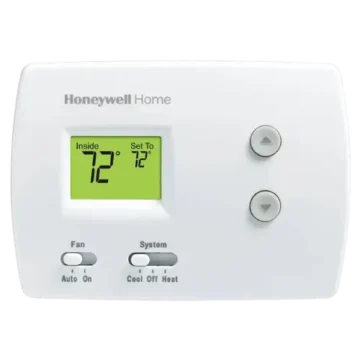
Honeywell Home PRO 3000 TH3110D1008
The Honeywell Home PRO 3000 Series is a line of non-programmable digital thermostats designed to control compatible heating and cooling systems. The installation instructions cover models TH3110D1008 and TH3210D1004, including wallplate mounting, electrical wiring, power options, installer settings, system testing, and troubleshooting.
The TH3110D1008 supports single-stage heating and cooling configurations, including compatible 1H/1C heat pump systems. The TH3210D1004 is designed for 2H/1C heat pump installations with auxiliary and emergency heating controls.
Both thermostats provide digital temperature adjustment, heating and cooling operation, and compressor protection. The devices can use AA alkaline batteries for primary or backup power, with an optional 24 VAC common-wire connection.
Important: Disconnect electrical power before installing or wiring the thermostat. Incorrect electrical connections may cause electric shock or equipment damage. Installation and system configuration should be completed by a qualified HVAC technician.
Product Overview
The Honeywell PRO 3000 Series provides direct temperature control without requiring a programmable heating or cooling schedule.
Users can select the desired operating mode using the System switch and change the temperature setting using the Up and Down buttons.
The thermostat also includes installer configuration functions that allow its heating cycle rate, compressor cycle rate, temperature display, and compressor protection settings to be matched to the connected equipment.
Main Features
- Non-programmable temperature control: Adjusts heating and cooling setpoints manually.
- Digital temperature display: Shows indoor temperature and operating status.
- Heat and Cool operation: Controls compatible heating and cooling equipment.
- Emergency Heat: Available on the TH3210D model.
- Fan control: Provides automatic and continuous fan operation.
- Multiple power options: Supports AA alkaline batteries and 24 VAC common-wire power.
- Single-transformer and two-transformer wiring: Supported on the TH3110D.
- Heat pump compatibility: Supports the heat pump configurations specified for each model.
- Adjustable heating cycle rate: Configures heating cycles per hour.
- Compressor cycle rate: Provides multiple cycle-rate options.
- Fahrenheit and Celsius: Allows the temperature display unit to be selected.
- Compressor protection: Delays compressor restarting to help prevent equipment damage.
- Installer system test: Allows heating, cooling, and emergency heat operation to be checked.
- Troubleshooting indicators: Displays Heat On and Cool On messages during operating conditions.
Honeywell PRO 3000 Models
The installation instructions cover two models with different heating capabilities and terminal configurations.
| Feature | TH3110D1008 | TH3210D1004 |
| Thermostat Type | Non-Programmable Digital | Non-Programmable Digital |
| Single-Stage Heating and Cooling | Supported | Heat Pump Configuration |
| Heat Pump Configuration | 1 Heat / 1 Cool | 2 Heat / 1 Cool |
| Auxiliary Heat Control | — | Supported |
| Emergency Heat Control | — | Supported |
| System Type Configuration | Available | Heat Pump Configuration |
| Heating Cycle Rate Setup | Supported | Auxiliary Heat Cycle Rate |
| Emergency Heat Cycle Rate | — | Supported |
| Compressor Cycle Rate | Supported | Supported |
| Temperature Display Selection | Fahrenheit / Celsius | Fahrenheit / Celsius |
| Compressor Protection | Supported | Supported |
| AA Battery Power | Supported | Supported |
| Optional 24 VAC Common Wire | Supported | Supported |
TH3110D1008
The TH3110D1008 supports these wiring configurations:
- 1H/1C conventional heating and cooling with one transformer.
- 1H/1C conventional heating and cooling with two transformers.
- 1H/1C heat pump.
- Heat-only.
- Heat-only with fan.
- Cool-only.
TH3210D1004
The TH3210D1004 supports a 2H/1C heat pump system.
Its additional terminals provide connections for auxiliary heat, emergency heat, and an emergency heat output.
Technical Specifications
| Specification | Details |
| Brand | Honeywell Home |
| Product Series | PRO 3000 |
| Model Numbers | TH3110D1008, TH3210D1004 |
| Product Type | Non-Programmable Digital Thermostat |
| Rated Input | 24 VAC, 60 Hz, 1.0 A |
| Heating Control Voltage | 20–30 VAC |
| Heating Running Current | 0.02–1.0 A |
| Cooling Control Voltage | 20–30 VAC |
| Cooling Running Current | 0.02–1.0 A |
| Powerpile Rating | 750 mV DC, 100 mA DC |
| Emergency Heat Control Voltage | 20–30 VAC |
| Emergency Heat Running Current | 0.02–1.0 A |
| Auxiliary Heat Control Voltage | 20–30 VAC |
| Auxiliary Heat Running Current | 0.02–1.0 A |
| Power Options | AA Batteries, 24 VAC Common Wire |
| Battery Type | AA Alkaline |
| Heating Temperature Range | 40°F–90°F (4.5°C–32°C) |
| Cooling Temperature Range | 50°F–99°F (10°C–37°C) |
| Operating Ambient Temperature | 32°F–120°F (0°C–48.9°C) |
| Shipping Temperature | -20°F–120°F (-28.9°C–48.9°C) |
| Operating Relative Humidity | 5%–90%, Non-Condensing |
| Dimensions (H × W × D) | 3-13/16 × 5-3/8 × 1-1/4 Inches |
| Metric Dimensions | 97 × 137 × 32 mm |
| Recommended Thermostat Wire | 18–22 Gauge |
| Shielded Cable | Not Required |
| Default Compressor Cycle Rate | 3 CPH |
| Default Compressor Protection | 5 Minutes |
Parts and Components
The Honeywell PRO 3000 thermostat consists of a thermostat body, digital display, temperature adjustment buttons, System and Fan switches, and a removable wallplate with electrical terminals.
| Component | Function |
| Digital Display | Shows indoor temperature, selected settings, and system messages |
| Up Button | Increases the selected temperature and advances installer setup functions |
| Down Button | Decreases the selected temperature and changes installer settings |
| System Switch | Selects heating, cooling, or off |
| Fan Switch | Selects automatic or continuous fan operation |
| Wallplate | Provides wall mounting and electrical connections |
| Wiring Terminals | Connect the thermostat to the HVAC system |
| Battery Compartment | Holds AA alkaline batteries |
| Factory R/Rc Jumper | Connects the power terminals in compatible single-transformer systems |
| Fan Operation Switch | Sets fan control for gas/oil or electric/heat pump systems on TH3110D |
| Wallplate Mounting Tabs | Secure the thermostat body to its wallplate |
Digital Display
The thermostat display shows indoor temperature information and heating or cooling status.
During installer setup, the screen displays a function number and its selected setting.
During system testing, it displays the test number and system status.
Temperature Adjustment Buttons
The Up and Down buttons are used to change the selected temperature.
They are also used to enter Installer Setup, change configuration values, and test the connected equipment.
System Switch
The System switch selects the operating mode.
The TH3210D includes an additional Emergency Heat position.
Fan Switch
The Fan switch provides two standard operating settings:
- Auto: The fan operates according to the connected heating or cooling equipment.
- On: The fan runs continuously.
Thermostat Controls and Display Guide
System Switch Settings
| Setting | Function | Model |
| Heat | Selects heating operation | Both |
| Off | Turns heating and cooling control off | Both |
| Cool | Selects cooling operation | Both |
| Em Heat | Selects emergency heat operation | TH3210D |
Fan Switch Settings
| Setting | Function |
| Auto | Fan operates according to the HVAC system’s heating or cooling operation |
| On | Fan runs continuously |
Temperature Adjustment Buttons
| Button | Normal Function | Installer Setup Function |
| Up (▲) | Increase Temperature | Advance to Next Function |
| Down (▼) | Decrease Temperature | Change Selected Setting |
| Up + Down | — | Enter, Save, or Exit Installer Setup |
Display Messages
| Display Message | Meaning |
| Inside | Current indoor temperature |
| Heat On | Heating operation is being requested |
| Cool On | Cooling operation is being requested |
| Flashing Cool On | Compressor protection delay is active |
| Flashing Heat On | Compressor protection delay is active on a heat pump |
| Setup | Installer configuration is open |
| Test | Installer system test is active |
Important Safety Instructions
The thermostat controls electrical heating and cooling equipment. Installation and testing must follow the manufacturer’s electrical and equipment precautions.
Electrical Safety
Caution: Electrical hazard.
Electrical contact during installation may cause shock or equipment damage.
- Disconnect power before beginning installation.
- Do not work on energized thermostat wiring.
- Follow the electrical ratings for the connected equipment.
- Provide the required electrical disconnect and overload protection.
- Use the terminal connections specified for the HVAC configuration.
- Do not remove the factory R/Rc jumper unless installing a two-transformer system.
- Use the correct common-wire connection when installing a two-transformer system.
- Secure the wiring connections before mounting the thermostat.
- Have electrical installation and equipment testing performed by a qualified technician.
Compressor Protection Warning
Caution: Equipment damage hazard.
Compressor protection is bypassed during installer system testing.
Rapidly switching the compressor on and off may damage the equipment.
Avoid repeated compressor cycling while testing heating or cooling operation.
Mercury Disposal Notice
If the thermostat replaces an older control containing mercury in a sealed tube, the old thermostat must not be placed in ordinary household trash.
Contact the local waste management authority for recycling and disposal instructions.
Electronic Waste Disposal
The thermostat must not be disposed of with ordinary household waste.
Use an authorized collection center or electronics recycler when the product reaches the end of its usable life.
Before Installation
Before mounting the Honeywell PRO 3000 thermostat, identify the HVAC equipment, existing thermostat wiring, and required power connection.
Installation Preparation
- Turn off electrical power to the heating and cooling equipment.
- Identify the thermostat model being installed.
- Determine whether the equipment uses conventional heating and cooling or a heat pump.
- Identify the number of transformers in the system.
- Identify the thermostat wires and their required terminal connections.
- Determine whether battery or 24 VAC common-wire power will be used.
- Prepare the wallplate and mounting hardware.
- Confirm the required fan operation setting.
- Keep the appropriate wiring configuration available for reference during installation.
Thermostat Wire Requirements
Use 18- to 22-gauge thermostat wire.
Shielded cable is not required.
Wallplate Installation Instructions
The thermostat body must be separated from its wallplate before installation.
Step 1: Remove the Wallplate
- Hold the thermostat securely.
- Locate the bottom of the wallplate.
- Pull the wallplate away from the thermostat body from the bottom.
- Separate the wallplate.
Step 2: Position the Wallplate
- Pull the thermostat wires through the wallplate’s central opening.
- Position the wallplate against the wall.
- Level the wallplate.
- Mark the mounting hole positions with a pencil.
Step 3: Drill the Mounting Holes
Use the drill bit size appropriate for the wall material.
| Wall Material | Drill Hole Size |
| Drywall | 3/16 Inch |
| Plaster | 7/32 Inch |
Drill the marked holes.- Insert the supplied wall anchors.
- Tap the anchors into position.
Step 4: Secure the Wallplate
- Position the wallplate over the wall anchors.
- Insert the mounting screws.
- Tighten the screws.
- Check that the wallplate is properly secured.
The thermostat wiring can now be connected.
Power Options and Battery Installation
The Honeywell PRO 3000 thermostat supports battery power and a 24 VAC common-wire connection.
Available Power Methods
| Power Method | Description |
| AA Battery Power | Batteries provide primary power |
| 24 VAC Common-Wire Power | C terminal provides primary AC power |
| AC Power With Batteries | Batteries provide backup power |
How to Install AA Batteries
- Separate the thermostat body from the wallplate.
- Locate the battery compartment on the back of the thermostat.
- Insert fresh AA alkaline batteries.
- Follow the polarity markings in the compartment.
- Check that the batteries are correctly seated.
The installation guide identifies AA alkaline batteries for primary or backup power.
Using the C Terminal for AC Power
The C terminal provides a 24 VAC common-wire connection.
This connection is optional when batteries are installed.
For a two-transformer TH3110D system, the common connection must come from the cooling transformer.
R and Rc Jumper
The TH3110D has a factory-installed jumper between the R and Rc terminals.
| Configuration | Jumper Requirement |
| Single Transformer | Leave R and Rc Connected |
| Two Transformers | Remove Factory Jumper |
Important: Remove the factory-installed jumper only for a two-transformer system.
Honeywell TH3110D1008 Wiring Instructions
The TH3110D1008 uses eight thermostat terminals for supported heating, cooling, fan, and heat pump connections.
TH3110D Wiring Terminal Designations
| Terminal | Function |
| C | 24 VAC Common |
| B | Changeover Valve Energized in Heating |
| R | 24 VAC Power From Heating Transformer |
| Rc | 24 VAC Power From Cooling Transformer |
| O | Changeover Valve Energized in Cooling |
| G | Fan Relay |
| Y | Compressor Contactor |
| W | Heat Relay |
TH3110D 1H/1C Conventional System With One Transformer
A single-transformer heating and cooling system uses the following terminals.
| Terminal | Connection |
| C | Optional 24 VAC Common |
| R | Connected to Rc Through Jumper |
| Rc | Power |
| G | Fan Relay |
| Y | Compressor Contactor |
| W | Heat Relay |
The factory R/Rc jumper remains installed.
TH3110D 1H/1C Conventional System With Two Transformers
For separate heating and cooling transformers:
| Terminal | Connection |
| C | Common From Cooling Transformer |
| R | Heating Transformer Power |
| Rc | Cooling Transformer Power |
| G | Fan Relay |
| Y | Compressor Contactor |
| W | Heat Relay |
Important: Remove the R/Rc jumper when using two transformers.
The optional C terminal connection must come from the cooling transformer.
TH3110D 1H/1C Heat Pump System
The TH3110D also supports a single-stage heat pump.
| Terminal | Connection |
| C | Optional 24 VAC Common |
| R | Connected to Rc Through Jumper |
| Rc | Power |
| O | Changeover Valve Energized in Cooling |
| B | Changeover Valve Energized in Heating |
| G | Fan Relay |
| Y | Compressor Contactor |
| W | Connected to Y With Jumper |
Use either O or B according to the heat pump’s changeover valve requirements.
A short wire, not supplied, must connect the W and Y terminals.
The installer must also:
- Set the fan operation switch to Electric or Heat Pump.
- Configure Installer Setup Function 1 for a heat pump.
TH3110D Heat-Only System
| Terminal | Connection |
| C | Optional 24 VAC Common |
| R | Connected to Rc Through Jumper |
| Rc | Power |
| W | Heat Relay |
TH3110D Heat-Only System With Fan
| Terminal | Connection |
| C | Optional 24 VAC Common |
| R | Connected to Rc Through Jumper |
| Rc | Power |
| G | Fan Relay |
| W | Heat Relay |
TH3110D Cool-Only System
| Terminal | Connection |
| C | Optional 24 VAC Common |
| R | Connected to Rc Through Jumper |
| Rc | Power |
| G | Fan Relay |
| Y | Compressor Contactor |
Honeywell TH3210D1004 Wiring Instructions
The TH3210D1004 supports a two-heat, one-cool heat pump system with auxiliary and emergency heat connections.
TH3210D Wiring Terminals
| Terminal | Function |
| C | 24 VAC Common |
| B | Changeover Valve Energized in Heating |
| R | 24 VAC Power |
| L | Sends Output When Set to Emergency Heat |
| O | Changeover Valve Energized in Cooling |
| G | Fan Relay |
| Y | Compressor Contactor |
| Aux | Auxiliary Heat Relay |
| E | Emergency Heat Relay |
TH3210D 2H/1C Heat Pump Configuration
The wiring arrangement includes:
- R for the power supply.
- C for the optional 24 VAC common connection.
- G for the fan relay.
- Y for the compressor contactor.
- O or B for the changeover valve.
- Aux for auxiliary heat.
- E for emergency heat.
- L for the emergency heat output signal.
TH3210D Heat Pump Wiring Notes
Changeover Valve: Use either O or B according to the connected equipment.
L Terminal: Sends a continuous output when the thermostat is set to Emergency Heat. The output can be connected to compatible Honeywell Home zoning panels to switch the panel to Emergency Heat.
Aux and E Terminals: Install a field jumper between Aux and E if the system has no emergency heat relay.
Electrical Protection: Provide the required disconnect means and overload protection for the power supply.
These terminal arrangements must match the actual heat pump and heating equipment.
TH3110D Fan Operation Switch Settings
The TH3110D has an internal fan operation switch.
This switch determines whether the heating equipment or thermostat controls the fan during a heating call.
Gas or Oil Heating
For gas or oil systems:
- Leave the fan operation switch in the factory-set Gas or Oil position.
This setting is intended for heating equipment that controls the fan during a call for heat.
Electric Heating or Heat Pump
For electric heating or heat pump systems:
- Locate the fan operation switch.
- Set it to Electric or Heat Pump.
- Confirm that the system has the appropriate fan connection to the G terminal.
This setting is intended for systems that allow the thermostat to control the fan during heating.
Fan Operation Settings Summary
| Heating System | Fan Operation Switch |
| Gas Furnace | Gas or Oil |
| Oil Furnace | Gas or Oil |
| Electric Heating | Electric or Heat Pump |
| Heat Pump | Electric or Heat Pump |
Mounting the Thermostat
After wiring and fan configuration are complete, attach the thermostat body to the installed wallplate.
Installation Steps
- Identify the four tabs on the wallplate.
- Align them with the matching slots on the back of the thermostat.
- Push the thermostat gently until it snaps into place.
- Push excess wiring back into the wall opening.
- Plug the wall opening using nonflammable insulation.
The thermostat must be securely attached before proceeding with system configuration and testing.
Installer Setup Instructions
The Installer Setup menu allows the thermostat to be configured according to the connected HVAC equipment.
How to Enter Installer Setup
- Locate the Up and Down temperature buttons.
- Press and hold both buttons simultaneously.
- Continue holding until the display changes.
- The screen will show a function number and selected setting.
Installer Setup Button Functions
| Button Operation | Function |
| Press and Hold Up + Down | Enter Installer Setup |
| Press Down (▼) | Change the Selected Setting |
| Press Up (▲) | Advance to the Next Function |
| Press and Hold Up + Down | Exit and Save Settings |
Installer Setup Function 1: System Type
Applicable model: TH3110D1008.
Function 1 selects the HVAC system type.
| Setting | System Type |
| 0 | Gas, Oil, or Electric Heat With Air Conditioning |
| 1 | Heat Pump |
Selecting Heat Pump provides a five-minute compressor off time during heating and cooling.
Installer Setup Function 5: Heating Cycle Rate
Applicable model: TH3110D1008.
Function 5 controls heating cycles per hour.
CPH means cycles per hour.
| Setting | Heating System |
| 5 | Gas or Oil Furnaces Below 90% Efficiency |
| 1 | Steam or Gravity Systems |
| 3 | Hot Water Systems and Furnaces Above 90% Efficiency |
| 9 | Electric Furnaces |
Additional selectable values include:
2, 4, 6, 7, 8, 10, 11, and 12 CPH.
The setting should match the heating equipment.
Installer Setup Function 6: Auxiliary Heat Cycle Rate
Applicable model: TH3210D1004.
Function 6 controls auxiliary heating cycles per hour.
| Setting | Heating Equipment |
| 5 | Gas or Oil Furnaces Below 90% Efficiency |
| 1 | Steam or Gravity Systems |
| 3 | Hot Water Systems and Furnaces Above 90% Efficiency |
| 9 | Electric Furnaces |
Additional settings include:
2, 4, 6, 7, 8, 10, 11, and 12 CPH.
Installer Setup Function 8: Emergency Heat Cycle Rate
Applicable model: TH3210D1004.
Function 8 controls emergency heating cycles per hour.
| Setting | Heating Equipment |
| 9 | Electric Emergency Heat |
| 1 | Steam or Gravity Systems |
| 3 | Hot Water Systems and Furnaces Above 90% Efficiency |
| 5 | Gas or Oil Furnaces Below 90% Efficiency |
Additional settings include:
2, 4, 6, 7, 8, 10, 11, and 12 CPH.
Installer Setup Function 9: Compressor Cycle Rate
Function 9 controls the compressor cycle rate.
| Setting | Description |
| 3 | Recommended for Most Compressors |
Other available settings:
1, 2, 4, 5, and 6 CPH.
The recommended setting for most compressors is 3 cycles per hour.
Installer Setup Function 14: Temperature Display
Function 14 changes the thermostat temperature display between Fahrenheit and Celsius.
| Setting | Temperature Display |
| 0 | Fahrenheit |
| 1 | Celsius |
How to Change Fahrenheit to Celsius
- Enter Installer Setup.
- Advance to Function 14 using the Up button.
- Press the Down button to select 1.
- Press and hold both temperature buttons to save and exit.
To return to Fahrenheit, select setting 0.
Installer Setup Function 15: Compressor Protection
Function 15 controls the minimum time that the compressor must remain off before restarting.
The feature helps prevent damage from rapid restarting.
| Setting | Compressor Off Time |
| 5 | 5 Minutes |
| 0 | 0 Minutes |
| 1 | 1 Minute |
| 2 | 2 Minutes |
| 3 | 3 Minutes |
| 4 | 4 Minutes |
The factory setting is 5 minutes.
How Compressor Protection Works
When the compressor shuts down, the thermostat may delay restarting it.
During the waiting period:
- Cool On flashes for cooling operation.
- Heat On may flash for heat pump operation.
- The compressor remains off until the protection interval ends.
Once the delay finishes, the system can restart.
Why Cool On or Heat On Flashes
A flashing message usually indicates compressor protection is active.
When the five-minute protection setting is used, wait five minutes before expecting the compressor to restart.
Do not repeatedly cycle the system to bypass the delay.
Installer System Test
The Installer System Test verifies that the thermostat is controlling the connected heating and cooling equipment correctly.
Caution: Compressor protection is bypassed during testing. Avoid rapid compressor cycling.
How to Run the Installer Test
- Set the System switch to Heat.
- Use the Down button to activate the system test.
- Check the heating operation.
- Press Down until the system turns off.
- For TH3210D, move the System switch to Em Heat and repeat the test.
- Set the System switch to Cool.
- Repeat the test procedure for cooling.
- Press and hold the Up and Down buttons together to terminate the test.
Heating System Test Codes
System Test 10
| Status | Function |
| 0 | Heat and Fan Off |
| 1 | Heat On |
| 2 | Auxiliary Heat On, TH3210D Only |
Emergency Heat System Test Codes
System Test 20
Applicable model: TH3210D1004.
| Status | Function |
| 0 | Heat and Fan Off |
| 1 | Heat and Fan On |
| 2 | Auxiliary Heat On |
Cooling System Test Codes
System Test 30
| Status | Function |
| 0 | Compressor and Fan Off |
| 1 | Compressor and Fan On |
Thermostat Information Codes
System Test 70
Test 70 displays thermostat information for reference.
| Code | Information |
| 71 | Software Revision Number, Major |
| 72 | Software Revision Number, Minor |
| 73 | Configuration Identification Code, Major |
| 74 | Configuration Identification Code, Minor |
| 75 | Production Configuration Date, Week |
| 76 | Production Configuration Date, Year |
These values identify the thermostat’s software and configuration information.
Operating Instructions
After installation and testing are complete, the thermostat can be used to control the connected system.
How to Turn On Heating
- Move the System switch to Heat.
- Use the Up button to select a temperature higher than the current indoor temperature.
- Allow the heating system to respond.
How to Turn On Cooling
- Move the System switch to Cool.
- Use the Down button to select a temperature lower than the current indoor temperature.
- Allow the cooling system to respond.
The equipment may require several minutes to respond because of compressor protection.
How to Turn Off Heating and Cooling
Move the System switch to Off.
How to Use Emergency Heat
Applicable model: TH3210D1004.
Move the System switch to Em Heat to select emergency heat operation.
The emergency heat wiring and installer configuration must match the connected equipment.
How to Run the Fan Continuously
Move the Fan switch to On.
How to Use Automatic Fan Operation
Move the Fan switch to Auto.
The connected equipment will control fan operation according to its heating or cooling requirements.
Heating and Cooling Temperature Settings
The Honeywell PRO 3000 has separate permitted temperature ranges for heating and cooling.
| Operating Mode | Temperature Range |
| Heat | 40°F–90°F (4.5°C–32°C) |
| Cool | 50°F–99°F (10°C–37°C) |
Adjusting the Heating Temperature
- Set the System switch to Heat.
- Press Up or Down.
- Select a temperature within the heating range.
Adjusting the Cooling Temperature
- Set the System switch to Cool.
- Press Up or Down.
- Select a temperature within the cooling range.
If the selected setting does not change, check that it is within the allowed temperature range.
Battery Maintenance
The thermostat uses AA alkaline batteries for primary or backup power.
Battery Replacement
- Disconnect power before removing the thermostat for installation or servicing work.
- Pull the bottom of the thermostat away from the wallplate.
- Locate the battery compartment on the back.
- Remove the used batteries.
- Insert fresh AA alkaline batteries.
- Check the battery polarity.
- Reattach the thermostat to the wallplate.
Battery Installation Checks
If the display is blank, confirm that fresh AA alkaline batteries are installed correctly.
Also check the circuit breaker, heating and cooling equipment power switch, and furnace door.
Troubleshooting Guide
The following problems and corrective actions are provided for the Honeywell PRO 3000 thermostats.
| Problem | Possible Cause or Condition | Recommended Solution |
| Display Is Blank | Circuit breaker may have tripped | Check the breaker and reset if necessary |
| Display Is Blank | Heating or cooling equipment power is off | Turn on the equipment power switch |
| Display Is Blank | Furnace door is open | Close the furnace door securely |
| Display Is Blank | AA batteries are depleted or incorrectly installed | Install fresh AA alkaline batteries correctly |
| Heating Does Not Respond | System setting or temperature is incorrect | Select Heat and set temperature above indoor temperature |
| Cooling Does Not Respond | System setting or temperature is incorrect | Select Cool and set temperature below indoor temperature |
| Heating or Cooling Does Not Respond Immediately | Equipment response or compressor delay | Wait 5 minutes |
| Temperature Setting Will Not Change | Requested temperature is outside allowed range | Use the permitted heating or cooling range |
| Cool On Is Flashing | Compressor protection is active | Wait 5 minutes |
| Heat On Is Flashing | Heat pump compressor protection is active | Wait 5 minutes |
| Heat On Does Not Appear | Heating is not being requested | Select Heat and set temperature above indoor temperature |
| Cool On Does Not Appear | Cooling is not being requested | Select Cool and set temperature below indoor temperature |
Honeywell TH3110D1008 Blank Display
If the thermostat display is blank:
- Check the circuit breaker.
- Reset the breaker if necessary.
- Confirm that the heating and cooling equipment power switch is on.
- Make sure the furnace door is securely closed.
- Check that fresh AA alkaline batteries are installed correctly.
Honeywell PRO 3000 Heat Not Working
If the heating system does not respond:
- Move the System switch to Heat.
- Check the Inside temperature displayed by the thermostat.
- Set the desired temperature higher than the current indoor temperature.
- Wait five minutes for the system to respond.
If the equipment still does not operate, have the connected system and installation inspected by a qualified technician.
Honeywell PRO 3000 Cooling Not Working
If the cooling system does not respond:
- Set the System switch to Cool.
- Check the current indoor temperature.
- Select a cooling temperature lower than the current indoor temperature.
- Wait five minutes.
The compressor protection feature may delay cooling operation.
Honeywell Thermostat Temperature Not Changing
If the temperature setting cannot be adjusted, verify that the requested value is within the allowed range.
| Mode | Allowed Temperature Range |
| Heat | 40°F–90°F |
| Cool | 50°F–99°F |
The thermostat does not permit settings outside these ranges.
Honeywell Thermostat Cool On Flashing
A flashing Cool On message indicates that compressor protection is active.
The recommended protection interval is five minutes.
Wait for the delay to finish before expecting the compressor to restart.
Honeywell Thermostat Heat On Flashing
On a heat pump system, a flashing Heat On message may indicate compressor protection.
Wait five minutes when the factory protection setting is used.
The compressor is allowed to restart after the waiting period ends.
Honeywell Thermostat Heat On Not Displayed
If Heat On does not appear:
- Set the System switch to Heat.
- Set the desired temperature above the current indoor temperature.
Honeywell Thermostat Cool On Not Displayed
If Cool On does not appear:
- Set the System switch to Cool.
- Set the desired temperature below the current indoor temperature.
Model Number and Date Code Identification
The model number and date code are located on the back of the thermostat.
How to Find the Model Number
- Disconnect power before removing the thermostat for service.
- Pull the bottom of the thermostat away from the wallplate.
- Turn the thermostat over.
- Locate the model number and date code on the back.
The information can be used when contacting customer support or arranging service.
Customer Support Information
The Honeywell Home PRO 3000 Series is manufactured by Resideo Technologies, Inc. and its affiliates under license from Honeywell International Inc.
| Contact Detail | Information |
| Brand | Honeywell Home |
| Manufacturer | Resideo Technologies, Inc. |
| Customer Support Website | https://customer.resideo.com |
| Official Website | https://www.resideo.com |
| Customer Care Phone | 1-800-468-1502 |
| Company Address | 1985 Douglas Drive North, Golden Valley, MN 55422 |
For assistance with thermostat operation, installation questions, or unresolved system problems, contact Resideo Customer Care.
Frequently Asked Questions
How do I install the Honeywell TH3110D1008 thermostat?
Disconnect electrical power before installation. Remove the thermostat from its wallplate, pull the thermostat wires through the mounting opening, level and secure the wallplate, and connect the wires according to the HVAC system. Set the internal fan operation switch, install batteries if required, attach the thermostat, and complete installer setup and system testing. Electrical wiring and testing should be performed by a qualified HVAC technician.
What is the Honeywell TH3110D1008 wiring diagram?
The TH3110D1008 uses C, B, R, Rc, O, G, Y, and W terminals. It supports conventional 1H/1C systems with one or two transformers, 1H/1C heat pumps, heat-only systems, heat-only systems with a fan, and cool-only systems. The exact connections depend on the equipment. The R/Rc jumper is removed only for two-transformer systems.
How do I change the Honeywell PRO 3000 from Fahrenheit to Celsius?
Press and hold the Up and Down temperature buttons to enter Installer Setup. Advance to Function 14 using the Up button. Press Down to select setting 1 for Celsius or setting 0 for Fahrenheit. Press and hold both buttons to save and exit.
Why is Cool On flashing on my Honeywell TH3110D1008?
Cool On flashes when compressor protection is active. The thermostat delays restarting the compressor to prevent equipment damage. The factory setting is five minutes, so the system may require approximately five minutes before cooling resumes.
What batteries does the Honeywell PRO 3000 thermostat use?
The thermostat uses AA alkaline batteries. They can provide primary power or backup power when a 24 VAC common-wire connection is installed. If the display becomes blank, check that fresh batteries are installed correctly.
Why is my Honeywell PRO 3000 thermostat not heating?
Check that the System switch is set to Heat and the selected temperature is higher than the current indoor temperature. Wait five minutes for the system to respond. If heating still does not operate, the connected HVAC equipment should be inspected by a qualified technician.
What is the difference between Honeywell TH3110D1008 and TH3210D1004?
The TH3110D1008 supports single-stage heating and cooling configurations, including a compatible 1H/1C heat pump. The TH3210D1004 supports a 2H/1C heat pump with auxiliary and emergency heat controls. The TH3210D includes Aux, E, and L terminals for these additional functions.