
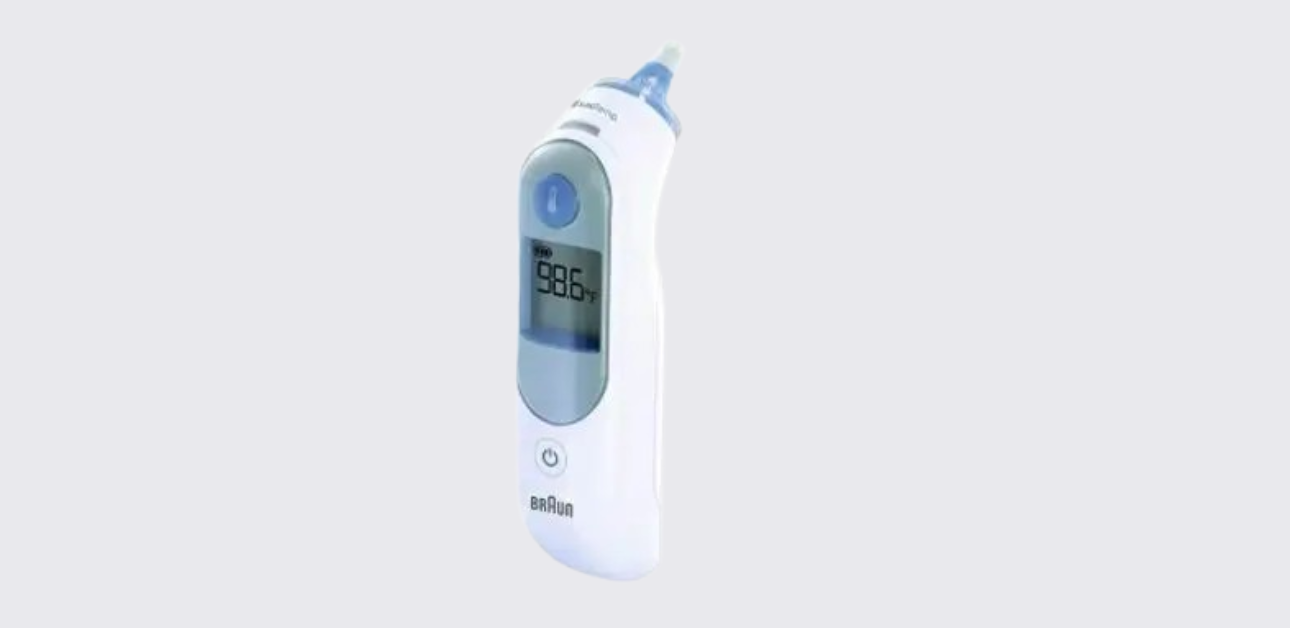
The Braun ThermoScan® ear thermometer IRT6030CA is made for quick ear temperature checks at home. It works for babies, children, and adults.
Product Overview
The Braun ear thermometer is a household ear thermometer designed for intermittent human body temperature measurement for people of all ages.
In simple words, it helps families check temperature quickly at home without the long wait that often comes with some other thermometer types. It is designed for home use, not for hospital diagnosis or disease diagnosis by itself.
It is a screening and monitoring tool. That means it helps the user notice a temperature change, but it does not replace medical advice when symptoms are serious.
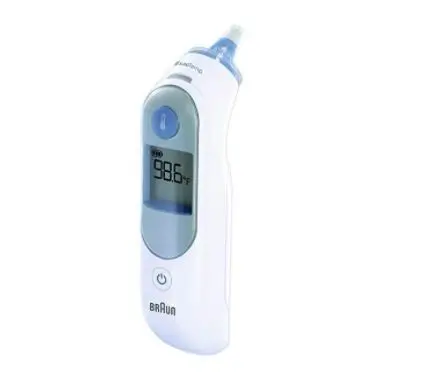
One of the most important things about this thermometer is that it requires a Braun ThermoScan lens filter for use. It is not optional. The thermometer will not work without a filter attached.
The manual makes this clear because the filter supports both hygiene and accuracy. The correct filter type is LF40. Using a new, clean filter each time helps protect the sensor area and keeps one person’s reading from being affected by residue from a previous reading.
This model also includes a few extra user-friendly features:
- ExacTemp® guidance light
- memory for the last reading
- night light for low-light use
- automatic shutoff
- easy change between Celsius and Fahrenheit
Together, those features make it practical for home use, especially at night when someone wants a quick temperature check without turning on bright room lights.
What’s in the Box
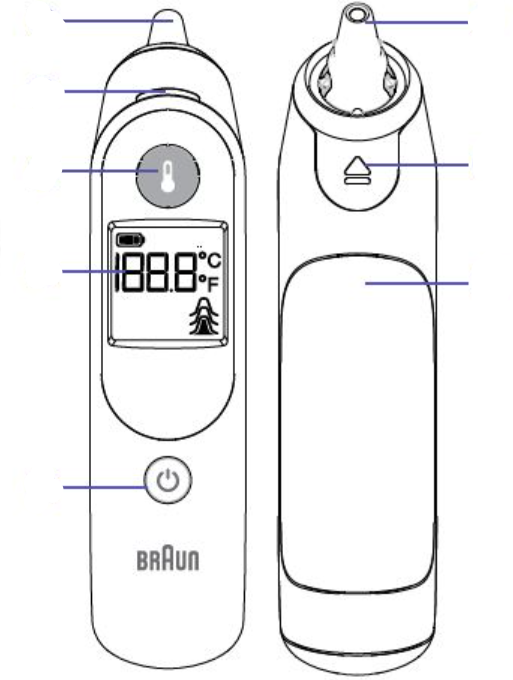
The ThermoScan® ear thermometer includes the thermometer body and several built-in parts that the user should know before taking a reading.
The official manual identifies these main parts:
- probe tip
- probe
- ExacTemp® light
- lens filter ejector
- display
- power button
- start button
- battery door
- protective cap
Each part plays a role in daily use. The probe tip goes into the ear canal, so it must stay clean and protected. The protective cap helps keep the probe clean during storage.
The display shows the reading and error messages. The power and start buttons handle basic operation. The lens filter ejector helps remove a used lens filter quickly without touching it by hand.
The most important accessory is not built into the thermometer. It is the Braun ThermoScan lens filter, model LF40. The manual makes it very clear that the thermometer requires a filter to work. A new, clean filter should be attached before every reading.
This helps in two ways. First, it keeps the reading area clean and hygienic. Second, it helps the thermometer measure properly. If the sensor area becomes dirty or scratched, results may become less reliable.
A smart home setup is to keep:
- the thermometer
- the protective cap
- a box of fresh LF40 lens filters
- spare batteries
How it Works
The Braun ear thermometer IRT6030CA measures temperature by detecting infrared heat from the eardrum and surrounding tissues. That is the heart of the device. It does not need to stay in place for a long time because it reads heat quickly.
The manual explains that the thermometer captures heat from the inside of the ear and uses that information to produce a body temperature reading.
The device also uses a pre-warmed probe tip design. In everyday language, that means the thermometer tries to keep the sensing area closer to body conditions, which helps improve comfort and accuracy. Cold sensors can disturb readings, so this design helps reduce that issue.
The thermometer does not simply guess when it has enough information. It uses the ExacTemp® system to show whether the reading was taken in a stable position. During the reading, the ExacTemp light pulses.
When the thermometer captures a stable reading, it gives a long beep and the light stays solid for a short time. If the thermometer detects poor positioning, it gives short beeps and shows POS on the screen. That tells the user to try again with better probe placement.
This matters because ear thermometers depend heavily on proper positioning. If the probe does not sit snugly enough in the ear canal, the device may read the wrong heat pattern. That is why the thermometer includes position guidance instead of just displaying a number no matter what.
Another important working rule is this: the thermometer will not work without a lens filter attached. The filter protects the probe and supports accurate temperature capture.
Using a used, dirty, or missing filter can cause unreliable operation or stop the thermometer from working entirely.
So, in simple terms, the thermometer works by:
- powering on,
- using a clean lens filter,
- fitting snugly in the ear,
- measuring infrared heat, and
- confirming reading quality through light and beep signals.
That process makes the reading quick, but only if the user follows the correct steps.
Before the First Use
Before using the Braun ear thermometer for the first time, the user should take a few minutes to prepare it properly. That short setup helps avoid avoidable errors later.
First, remove the thermometer from packaging and identify the main parts: the probe, display, buttons, battery door, and protective cap. Make sure the probe area looks clean and the protective cap fits properly.
Next, check the battery condition. The thermometer usually comes ready for basic use, but it is still a good idea to confirm the display powers on normally. If the battery icon appears right away, replace the batteries before regular use.
The most important first-use step is to make sure there are genuine Braun ThermoScan lens filters (LF40) available. The thermometer will not work without a filter attached.
A lot of first-time confusion comes from people trying to test the unit without a lens filter. The thermometer is designed to stop that from happening.
A good first-use routine looks like this:
- Remove the protective cap.
- Press the power button.
- Attach a new, clean lens filter.
- Practice holding the thermometer comfortably before using it on a person.
- If needed, decide whether you want the display in Celsius or Fahrenheit.
The manual also explains that the temperature scale can be changed while the thermometer is off by holding the power button for about three seconds until the desired scale appears. That means the user can pick their preferred format before the first reading.
If this thermometer will be used for a child, it also helps to make sure the child is calm and still before the first real reading.
The thermometer is fast, but a steady fit in the ear still matters. Starting with a calm, prepared setup makes the whole experience feel easier and more reliable.
How to Take a Temperature Reading
Taking a reading with the Braun ear thermometer is quick once the user knows the exact order. The key is not speed. The key is doing the right steps in the right order.
Reading Process
- Remove the protective cap.
This exposes the probe tip so the lens filter can be attached. - Press the Power button.
The thermometer turns on and becomes ready for use. - Attach a new, clean lens filter.
This step is required. The thermometer will not work without a lens filter attached. - Place the probe snugly into the ear canal.
The fit matters. The probe should sit securely, not loosely. - Press and release the Start button.
The thermometer begins the reading process. - Watch and listen for the signal.
During the reading, the ExacTemp light pulses. When the reading is complete and stable, the thermometer gives a long beep and the ExacTemp light stays solid for a short time. - Read the result on the display.
Remove the thermometer after the reading appears.
This process is simple, but the “snug fit” part does most of the heavy lifting. If the probe is loose or angled badly, the thermometer may show POS, which means it could not get a stable reading.
In that case, the user should reposition the thermometer and try again.
ExacTemp® Light, Beeps, and Screen
The ThermoScan® ear thermometer gives feedback in three ways:
- the screen,
- the ExacTemp® light,
- and beep sounds.
Once the user learns those signals, operation becomes much easier.
ExacTemp® light behavior
The ExacTemp light is a guide to probe position and reading success.
- Pulsing light: the thermometer is still taking the reading.
- Solid light for about 3 seconds: the reading was completed successfully in a stable position.
That solid light is the “good reading” sign.
Beep sounds
The thermometer uses different beep patterns:
- Long beep: the thermometer completed a proper reading.
- Short beeps: the thermometer detected unstable placement, and the reading was not accepted correctly.
If short beeps happen and the display shows POS, the user should try again with a better probe fit in the ear.
Screen messages
The screen normally shows the measured temperature. It also handles memory, battery status, and error warnings. A few important screen behaviors include:
- It shows the last stored reading for 5 seconds when the thermometer powers on.
- It can show POS for positioning problems.
- It can show HI or LO if the reading falls outside the displayed body temperature range.
- It can show battery icons when power runs low.
These signals keep the thermometer from feeling like a “black box.” The device actively tells the user if the placement was poor or if the reading completed correctly.
That helps the user trust good readings and repeat weak ones rather than guessing.
Best Practices for Accurate Readings
Accuracy with the Braun ear thermometer depends as much on technique as on the device itself. The official manual gives several tips that are easy to overlook but extremely helpful.
Always use the same ear
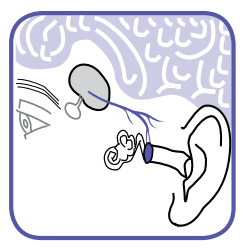
The guide explains that the right and left ear may produce different readings. To compare temperatures over time, use the same ear each time. This is one of the easiest ways to make readings more consistent.
Wait after certain conditions
The manual says to wait 20 minutes before measuring if the person:
- came from a very hot or very cold room,
- wore a hearing aid,
- or was lying on a pillow.
Those situations can temporarily change ear temperature. Waiting helps the ear return to a more natural reading condition.
Use the untreated ear
If ear drops or other medication were placed in one ear, use the other ear. Medication can affect the local reading and make comparison less reliable.
Watch for earwax or obstruction
Heavy earwax or blockage can interfere with the sensor’s view of the correct area. The user should avoid taking readings in an obstructed ear if possible.
Use a new lens filter every time
A new filter helps both hygiene and measurement performance. A used or dirty filter can affect the probe area.
Keep the probe snug
A secure fit in the ear canal matters. The ExacTemp light and POS warning help here, but careful placement still matters most.
These are not “extra” tips. They are the small habits that help the thermometer work as designed.
When people complain that ear thermometers “always give different readings,” the cause is often one of these simple technique issues, not the device itself.
Memory Mode and Night Light
The ear thermometer IRT6030CA includes two convenience features that make everyday use easier: memory mode and night light.
Memory mode
The thermometer stores the last temperature reading. The next time the user powers the device on, that last reading shows on the display for about 5 seconds.
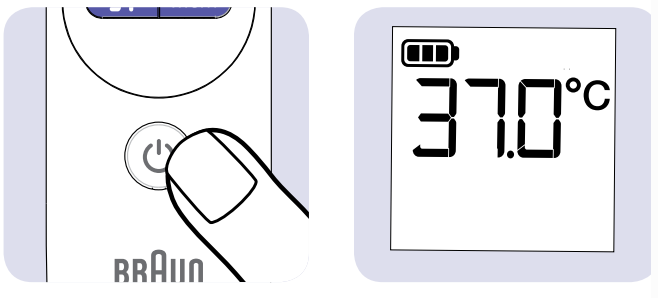
After that, the unit moves into normal use mode.
This memory feature helps in several real-life situations:
- checking whether a fever is rising or falling,
- comparing a child’s late-night reading with the previous one,
- or reminding the user of the last recorded result before a new reading begins.
It is simple, but useful. The user does not have to write down every reading immediately just to remember the last one.
Night light
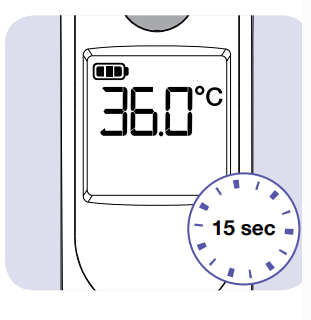
The thermometer also includes a built-in night light. When the user presses a button, the light turns on and can stay on for up to 15 seconds.
This helps with nighttime readings without the need to turn on bright room lights.
That is especially helpful for:
- sleeping children,
- overnight fever checks,
- and dark bedrooms where a full light would wake everyone up.
These features do not change how the thermometer measures temperature, but they make the experience much more practical. A good home thermometer should not only be accurate.
It should also be easy to use when people are tired, rushed, or checking a sick child in the middle of the night. Memory mode and night light both support that goal.
Changing Between Celsius and Fahrenheit
Some users prefer Celsius. Others use Fahrenheit. The Braun ThermoScan® ear thermometer allows either format, and changing the scale is simple.
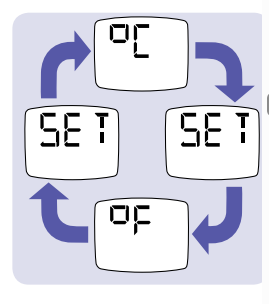
How to switch the temperature scale
The thermometer must be off first.
Then follow these steps:
- Hold the Power button for about 3 seconds.
- Watch the display.
- Release the button when the desired scale appears.
That’s it. The thermometer will then use the selected scale for future readings.
This feature matters more than it may seem. Many families compare readings with doctor instructions, school guidelines, or personal habits that use one scale or the other. If the display does not match what the user expects, confusion can happen fast.
A reading of 38.0°C may mean a lot to one person and almost nothing to another who only uses Fahrenheit. So setting the preferred scale ahead of time helps prevent stress during a fever check.
A smart household habit is to choose one scale and stay with it. That way, repeated readings remain easy to compare.
If the family doctor or local clinic usually speaks in Celsius, use Celsius. If everyone in the home uses Fahrenheit, set the unit that way and leave it there.
This scale setting is not something users need to change often. Once it is set, most people keep it the same for daily use.
Cleaning and Daily Care
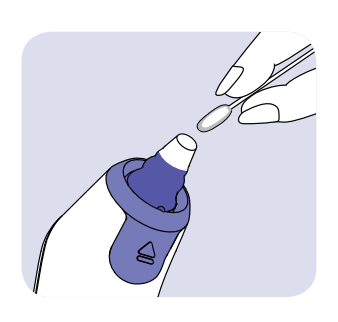
The Braun ear thermometer needs gentle care. The most delicate part is the probe tip. The manual makes this point very clear. A scratched, dirty, or damaged probe tip can affect performance.
Everyday care
The best daily care routine is simple:
- Keep the thermometer dry.
- Store it with the protective cap on.
- Keep it away from dust and direct sunlight.
- Always use a clean lens filter.
Since the lens filter covers the probe during use, normal cleaning needs stay light.
If the thermometer was used without a filter
This is the most important cleaning situation. If someone accidentally uses the thermometer without a lens filter, the manual says to clean the probe tip gently with:
- a cotton swab, or
- a soft cloth moistened with alcohol.
After cleaning, let the probe dry completely before using the thermometer again.
Exterior cleaning
The outside of the thermometer should be cleaned with a soft, dry cloth only. The manual says not to use water immersion and not to submerge the thermometer in liquid.
That means:
- no rinsing under a faucet,
- no soaking,
- no putting it in water.
Storage
The thermometer should be stored:
- in a dry place,
- out of direct sunlight,
- protected from dust.
Good care does not take much time. In fact, the best protection comes from using a clean lens filter every time and keeping the probe cap on during storage.
That simple habit prevents most dirt and damage before they start.
Battery Replacement and Power Use
The Braun ear thermometer (IRT6030CA) runs on batteries, so battery condition matters for reliable readings. The manual states that battery life is about 2 years or 350 measurements under normal use. That gives the user a good rough idea of when replacement might be needed.
Low battery signs
The display shows battery symbols when battery power begins to run low. When that happens, the user should replace the batteries soon.
Weak batteries can affect reliability and convenience, so it is better not to wait until the device is completely dead.
How to replace the batteries
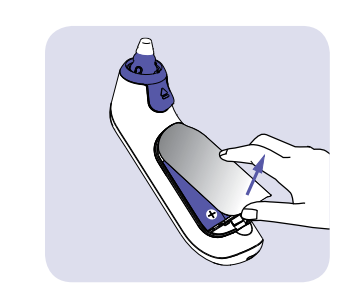
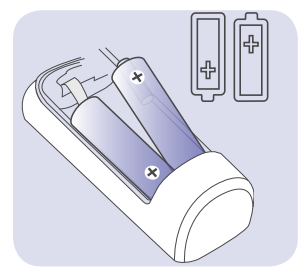
The battery replacement process is simple:
- Open the battery compartment.
- Remove the old batteries.
- Insert new batteries in the correct polarity direction.
- Close the battery door securely.
The manual does not ask for a complicated reset process after normal battery replacement. Once new batteries are in place, the thermometer should return to normal use.
Good battery habits
A few simple habits help:
- Keep a fresh spare set nearby.
- Replace batteries as soon as low battery warnings appear.
- Remove and reinstall batteries if a system error appears and the manual suggests a reset.
The thermometer also powers off automatically after 60 seconds of inactivity, which helps save battery life. The user can also turn it off manually by holding the power button for about 3 seconds.
A battery-powered thermometer works best when the household treats batteries as part of regular maintenance rather than an emergency problem.
Error Messages and Troubleshooting
The Braun ear thermometer includes several built-in error messages. That is actually helpful, because the thermometer tells the user what went wrong instead of simply failing silently.
Common error conditions
No lens filter
- The thermometer will not work without a lens filter attached.
- Fix: attach a new genuine Braun ThermoScan lens filter (LF40).
POS
- This means the probe was not positioned securely or steadily in the ear.
- Fix: reposition the thermometer so it fits snugly, then try again.
Ambient temperature warning
- The surrounding room temperature is outside the allowed operating range.
- The operating range is 10°C to 40°C (50°F to 104°F).
- Fix: move to a proper room environment and try again.
HI
- The temperature is above the displayed measurement range.
- Fix: confirm the reading conditions and follow medical guidance if needed.
LO
- The temperature is below the displayed measurement range.
- Fix: check placement and conditions, then repeat.
System/self-check error
- The device detected an internal problem.
- Fix:
- Wait 1 minute for auto shutoff.
- Turn it on again.
- If needed, remove and reinstall batteries.
- If the problem continues, contact support.
Best troubleshooting habit
Most thermometer problems come from one of these:
- no lens filter,
- poor ear placement,
- measuring too soon after environmental changes,
- or low battery.
Start there first. In many cases, the fix is simple and quick.
Product Specifications
The Braun ear thermometer includes clear technical limits and ranges. These numbers help the user know what the thermometer is designed to do.
| Specification | Value |
| Displayed temperature range | 34–42.2°C (93.2–108°F) |
| Operating temperature | 10–40°C (50–104°F) |
| Storage temperature | -25–55°C (-13–131°F) |
| Accuracy from 35–42°C | ±0.2°C |
| Accuracy outside that range | ±0.3°C |
| Clinical repeatability | ±0.14°C |
| Battery life | About 2 years / 350 measurements |
| Service life | 5 years |
| Protection rating | IP22 |
These values show that the thermometer is built for normal household use, not for extreme conditions. It should be used indoors and stored properly.
What these numbers mean
- The thermometer is designed for normal body temperature checking.
- It should not be used in rooms that are too hot or too cold.
- It should be stored safely, not in a car dashboard or direct sun.
- It is accurate when used within the intended range and with correct technique.
The IP22 rating means basic protection from fingers and certain drips, but it does not mean waterproof. That matches the manual’s warning to never submerge the thermometer in water.
These specs help users understand both the strengths and limits of the product. A home thermometer works best when used in the right environment and cared for properly.
@gigi70289 Braun thermoScan HI error, any ideas💡 #momsoftiktok ♬ original sound – Gigi
Support, Warranty, and Contact Information
The official manual includes brand support details, which are very useful when troubleshooting steps do not solve the problem.
Consumer support
- Phone: 1-800-477-0457
- Email: consumerrelations@kaz.com
The manual lists the product as manufactured for Kaz USA, Inc. and imported by Kaz Canada, Inc. These are the consumer support contacts associated with the product documentation.
Warranty
The Braun ear thermometer IRT6030CA includes a limited 3-year warranty. That warranty gives users added confidence, especially since a thermometer is something families rely on during stressful moments like fever checks at night or during illness.
When to contact support
The user should contact support if:
- system errors continue after battery reset,
- the thermometer does not work even with fresh batteries and new filters,
- the display behaves abnormally,
- or the unit appears damaged.
A good support request should include:
- the model number (IRT6030CA),
- a description of the problem,
- what error message appears,
- and whether fresh batteries and a new lens filter were used.
Glossary
Ear canal: The path inside the outer ear where the thermometer probe is placed.
Eardrum: The part inside the ear that helps reflect core body temperature because it shares blood supply with the body’s temperature control center.
Infrared heat: Heat energy that the thermometer detects without needing direct contact with body fluids.
Lens filter: The small disposable Braun ThermoScan cover placed over the probe tip before every reading. The IRT6030CA requires a new, clean filter for use.
ExacTemp® light: The position guidance light that pulses during a reading and turns solid after a stable reading.
POS: A position error message. It means the probe was not placed securely enough for a proper reading.
HI / LO: Readings outside the displayed body temperature range.
Memory mode: The feature that shows the last temperature reading for five seconds at the next power-on.
Night light: The built-in light that turns on when a button is pressed and stays on briefly for easier nighttime use.IP22: A basic protection rating. It does not mean the thermometer is waterproof.