
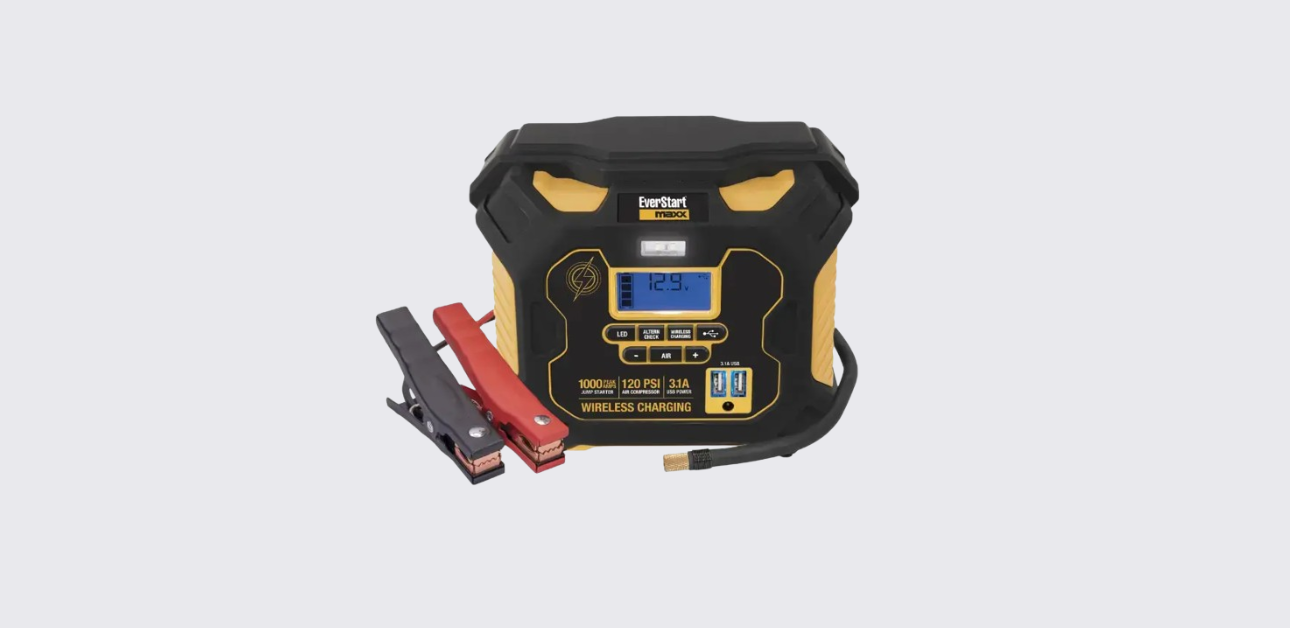
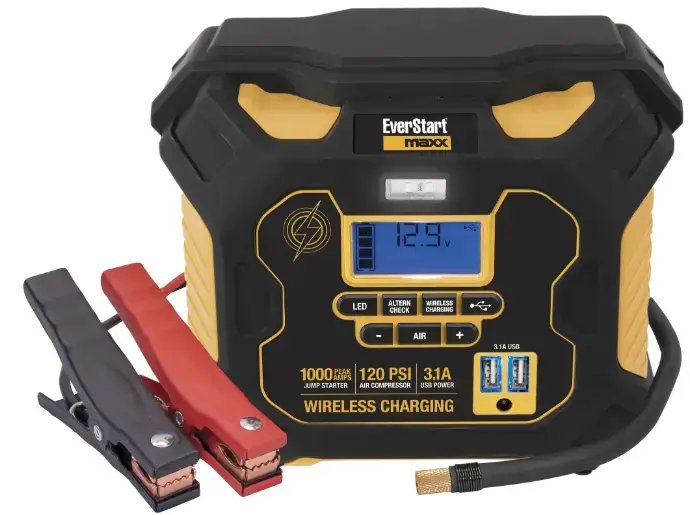
The EverStart Maxx battery jump-starter is more than a jump box. It works as a portable power station with jump-start support, a built-in air compressor, USB charging ports, a wireless charging pad, an LED light, and an alternator check feature.
Product Overview
The EverStart Maxx 1000 Amp battery jump-starter is a portable emergency power unit designed for drivers who want backup support in one compact device. It is built around a sealed lead-acid battery and is made for 12V DC vehicle systems.
The unit can help start a car with a weak battery, inflate tires and small inflatables, charge phones and devices through USB, and even provide wireless charging for compatible devices. It also includes a built-in work light and a system check for alternator performance.
This model is useful because it combines several tools into one product. Instead of carrying a jump starter, a tire inflator, a flashlight, and a phone charger separately, the user gets them in one unit.
That makes it practical for the trunk, garage, or work vehicle. The product is especially useful in colder months, road trip situations, and times when a car battery drains unexpectedly.
The unit is not a replacement for proper vehicle maintenance. It is an emergency support tool. That matters because some users expect it to solve any battery problem.
If a battery is deeply damaged, frozen, or the vehicle has another mechanical issue, a jump-start may not solve the problem.
This model is often identified as PPS1CWE. It includes:
- 1000A peak jump-start support
- 350A instant starting boost
- 120 PSI compressor
- 15W wireless charging pad
- dual USB power ports
- LED work light
- alternator check feature
What the Jump-Starter Can Do
The battery jump-starter is designed as a multi-function unit. Each feature solves a different roadside or garage need.
Jump-start support
Its main job is helping start a vehicle with a weak 12V battery. The unit provides up to 1000A peak and 350A instant starting support. That is enough for many common vehicle emergencies, as long as the battery is not frozen and the system uses 12V DC.
Portable compressor
The built-in compressor can inflate tires, sports gear, and many small inflatables. It supports pressure settings from 3 PSI to 120 PSI, and it can stop automatically once the target pressure is reached. This is helpful because users do not need to guess when to stop inflating.
Wireless charging pad
The unit includes a 15W max wireless charging pad for compatible phones and devices. This gives users a cable-free charging option when power is needed away from a wall outlet.
USB charging ports
There are two USB power ports with a combined maximum output of 3.1A. These ports charge phones, small tablets, Bluetooth devices, and other USB-powered electronics. They do not transfer data.
Alternator check
The alternator check feature helps users test whether the vehicle charging system appears to be working normally. It runs a no-load and loaded check and displays whether the alternator output looks good.
LED area light
The built-in light adds practical value during night roadside use, garage work, or low-light emergencies.
This mix of features makes the unit more than a seasonal jump starter. It becomes a general-purpose emergency tool.
Still, the user gets the best results when they understand the rules for each feature instead of guessing.
That is where the rest of this manual helps.
Important Safety Rules Before Use
The EverStart jump starter deals with vehicle batteries, electricity, compressed air, and portable charging. That means safety matters.
A few simple rules prevent most serious problems.
Use it only for the right system
This unit is designed for 12V DC lead-acid vehicle battery systems only.
It should not be used with:
- 6V systems
- 24V systems
- watercraft
- dry-cell household batteries
Using the wrong system can damage the unit or create a dangerous situation.
Never jump-start a frozen battery
A frozen battery can crack or explode when current is applied. If the battery looks swollen, frozen, or damaged, do not use the jump-starter.
Keep sparks and flames away
Vehicle batteries can release explosive gas. The user should never smoke near the battery and should keep flames and sparks away from the area.
Keep the unit upright
The manual says this clearly: use the jump-starter only in the upright position during jump-starting. This is not optional. It is part of safe operation.
Use it in a safe location
In a garage or enclosed area, the manual says to keep the unit at least 18 inches above the floor because internal parts may spark. That is a detail many people miss, but it matters.
Don’t use damaged equipment
If the clamps, cables, housing, or connectors look damaged, stop and inspect the unit. If the sound is distorted, the display behaves oddly, or the unit smells wrong, do not continue using it.
Respect heat limits
The compressor should not run continuously for more than 10 minutes. After that, it needs about 30 minutes to cool down.
A good user keeps these rules in mind before touching the battery clamps. That small pause lowers risk and makes every function more reliable.
First Charge and Battery Care
Before using the EverStart battery jump starter for the first time, the user should fully charge it. This first charge is one of the most important steps in the whole manual.
First-time charging
The unit ships partially charged, not fully ready. The manual instructs users to charge it for 20 hours before first use using the included AC charger.
That long first charge helps condition the internal sealed lead-acid battery and prepares it for full jump-start performance.
Regular recharge schedule
Battery care does not stop after the first use. The manual says to recharge the unit:
- after every use
- and at least once every 30 days when it is not used often
That rule matters because sealed lead-acid batteries weaken when left discharged too long. A unit stored in the trunk for months without recharging may not deliver full power when needed.
Charging habits that help
A simple routine keeps the jump-starter healthy:
- Charge it fully before storing.
- Check charge status once a month.
- Recharge after any jump-start, compressor session, or long USB charging session.
Low battery meaning
The LCD battery icon helps show remaining charge. One bar means low charge and the unit should be recharged soon.
Empty bars mean the battery is critically low and low-voltage protection may shut the unit down.
The jump-starter works best when the user treats charging as regular maintenance, not as something to think about only after an emergency. A jump-starter that sits empty is not really emergency-ready.
Display, Icons, and What They Mean
The LCD display on the jump starter gives helpful status feedback. When the user understands the screen, operation becomes much easier.
Battery status icons
The battery icon uses bars:
- 4 solid bars = full charge
- 2–3 bars = partial charge
- 1 bar = low, recharge soon
- 4 empty bars = recharge immediately
This display helps the user judge whether the unit is ready for a jump-start or just enough for light charging tasks.
Function icons
The screen can show icons for:
- battery status
- voltage
- clamp connection
- reverse polarity
- alarm/fault
- compressor
- USB
- wireless charging
- alternator check
These icons let the user know what feature is active and whether a warning is present.
Alarm behavior
The jump-starter uses sounds as well as screen warnings.
- A continuous alarm often means reverse polarity.
- A repeated warning may happen if clamps touch each other.
- Fault conditions may also appear with flashing icons.
Why these warnings matter
Some users ignore display messages and go straight to trying the engine. That is risky. The screen is there to help the user stop, check, and correct the setup before damage happens.
A smart habit is to glance at the screen before every major action:
- before cranking
- before inflating
- before using USB power
- before using wireless charging
That quick check prevents many avoidable mistakes.
How to Jump-Start a Vehicle
This is the main reason many people buy the EverStart battery jump starter. The process is straightforward when followed in order.
Before starting
- Make sure the unit is charged.
- Place the jump-starter upright.
- Turn off the vehicle and all accessories.
- Confirm the vehicle uses a 12V DC negative-ground system unless the manual for the vehicle says otherwise.
Standard negative-ground jump-start steps
- Plug the boost cable connector into the jump-starter.
- Connect the red clamp to the vehicle battery’s positive (+) terminal.
- Connect the black clamp to a solid metal vehicle ground point or chassis, away from the battery.
- Check the display for warning icons or alarms.
- If there is no reverse polarity warning, attempt to start the vehicle.
- Crank in 5–6 second bursts only.
- Once the engine starts, remove the black clamp first, then the red clamp.
If the engine does not start
Do not keep cranking over and over. Repeated long cranking can damage the starter motor. If the vehicle does not start after the recommended attempts, stop and inspect for other issues.
Reverse polarity warning
If clamps are connected backward:
- the unit warns with a continuous alarm
- reverse polarity icons appear
Do not continue. Disconnect and reconnect correctly.
Overheat protection
If the unit overheats, thermal protection can activate. The user should wait about 10–30 minutes before trying again.
Jump-starting becomes much less stressful when users slow down and follow the cable order carefully: red first, black second. That single habit prevents many errors.
Alternator Check Function
The alternator check on the jump-starter helps users get a basic idea of whether the vehicle’s charging system is working as expected. It is not a full shop diagnosis, but it is useful.
What the alternator does
The alternator charges the vehicle battery while the engine runs. If the alternator is weak, the car battery may keep going flat even after a successful jump-start.
How the test works
The manual describes two testing stages:
- No-load test – with vehicle accessories off
- Under-load test – with many accessories turned on, except A/C and defrost
This comparison helps the unit judge whether charging voltage stays in a normal range.
Result meanings
- ALT GOOD = charging output appears normal
- ALT with a flashing fault icon = output appears outside the expected range
A failed alternator check does not always mean the alternator itself is dead. Wiring, battery condition, or other system issues can affect the result.
Still, if the jump-starter says the alternator result looks bad, the user should take the vehicle for further inspection.
How to Use the Air Compressor
The built-in compressor turns the battery jump-starter into a useful tire and inflatable support tool.
Pressure range and cutoff
The compressor supports pressure settings from 3 PSI to 120 PSI. The user can set a target pressure, and the compressor stops automatically when it reaches that value.
Basic inflation steps
- Connect the air hose securely to the tire valve or nozzle.
- Set the target pressure.
- Turn on the compressor.
- Watch the display while it inflates.
- Let the compressor stop automatically or stop it manually if needed.
Time limit
The manual warns not to run the compressor continuously for more than 10 minutes. After that, the unit needs a 30-minute cool-down period. This protects the motor and internal components.
Good use habits
- Check the tire’s recommended PSI before inflating.
- Do not guess pressure based on appearance.
- Make sure the hose fits tightly to avoid air leaks.
- Do not leave the unit running unattended.
The compressor is excellent for topping off tires, bike tires, and small inflatables.
It is not meant to replace a shop compressor for heavy-duty, nonstop use. Used correctly, it is one of the most practical features on the unit.
Wireless Charging Pad
The jump-starter includes a 15W max wireless charging pad for compatible phones and devices.
This feature gives the unit more day-to-day value, even when the jump-start and compressor functions are not needed.
How to use wireless charging
- Press the wireless charging button.
- Place the compatible device in the center of the charging pad.
- Check the display or charging icon response.
- Leave the device in place while it charges.
Important rules
- Do not use the compressor while using wireless charging.
- Do not use the jump-starter while wireless charging is active.
- If no charging device is detected for 3 minutes, wireless charging shuts off automatically.
These limits matter because wireless charging creates heat, and the jump-start or compressor functions create much more. The unit separates these functions for safety and performance.
Best results
- Remove thick metal or incompatible cases from the phone if charging does not begin.
- Keep the phone centered on the pad.
- Use this feature when the unit has good battery charge, not when the battery icon is already low.
Wireless charging is a convenience feature, but it is still useful. During road trips or power outages, it can help keep a phone alive without needing a cable.
USB Charging Ports
The EverStart jump-starter includes two USB charging ports. These are useful for phones, Bluetooth devices, GPS units, and small electronics.
Power output
The USB ports provide 5V DC, with a combined maximum output of 3.1A total. The ports are for charging only. They do not transfer data.
How to use the USB ports
- Plug in a USB charging cable.
- Connect the phone or device.
- Watch for charging activity on the device.
- Unplug once charging is complete.
USB fault behavior
The jump-starter monitors the USB ports for:
- overload
- short circuit
- low battery voltage
If there is a problem, the blue USB fault indicators can flash and the USB ports may shut down. This is a protection feature, not always a defect.
The user should disconnect the device, check the cable, and make sure the jump-starter battery is not too low.
USB charging may seem like a basic add-on, but it gives this product extra value during camping, travel, or emergency situations. It is especially useful when wall outlets are not available.
LED Area Light
The built-in LED area light adds simple but real value. It helps during:
- night jump-starts
- dark garages
- roadside tire inflation
- power outages
The light is straightforward to use and does not need much explanation. Still, users should remember that every active feature draws power from the internal battery.
So if the unit already has a low battery and the user expects a jump-start soon, they should use the light carefully.
The area light is not the main reason to buy the jump-starter, but it becomes one of those features people appreciate most when they suddenly need it.
Cleaning, Storage, and Long-Term Care
Good care keeps the jump-starter ready for emergencies.
Cleaning
- Wipe the outer housing with a soft cloth.
- Keep the clamps clean and dry.
- Do not soak the unit or expose it to heavy moisture.
- Keep charging ports and air hose connections free of dirt.
Storage
- Store the unit in a cool, dry place.
- Recharge it every 30 days if not in regular use.
- Keep it upright when possible.
- Avoid extreme heat, especially in summer vehicle trunks for very long periods.
Long-term battery care
The internal sealed lead-acid battery is not user-replaceable. That makes proper charging even more important. If the user keeps the unit discharged for long periods, battery life will drop faster.
A good emergency tool is only useful when it is maintained. Monthly recharging and quick visual checks turn this from a forgotten gadget into something truly dependable.
Troubleshooting Common Problems
The unit will not charge a phone
Possible causes:
- jump-starter battery too low
- USB overload or fault
- bad charging cable
Fix:
- recharge the jump-starter
- disconnect and reconnect the cable
- try another cable or device
Wireless charging does not start
Possible causes:
- phone not centered
- phone case too thick or incompatible
- wireless charging not enabled
- no device detected within 3 minutes
Fix:
- center the device
- remove case if needed
- try a compatible wireless charging device
Vehicle will not start
Possible causes:
- wrong clamp connection
- reverse polarity
- dead or damaged vehicle battery
- another vehicle problem
- jump-starter battery too low
Fix:
- reconnect clamps in correct order
- check for alarms and icons
- recharge the unit if low
- stop after recommended crank attempts
Compressor stops
Possible causes:
- reached preset pressure
- overheated after long use
Fix:
- check target pressure
- allow 30 minutes cool-down if used near the 10-minute limit
Alternator check shows fault
Possible causes:
- alternator problem
- battery or wiring issue
- unusual electrical load
Fix:
- repeat the test correctly
- seek full vehicle diagnosis if fault remains
Most problems become manageable once the user reads the display and respects the built-in protection features.
Support, Warranty, and Service Details
For official support, the manual lists:
- Customer Service / Technical Support: 1-877-571-2391
- Website: www.Baccusglobal.com
- Importer: Baccus Global LLC, Boca Raton, FL
- Warranty: Two-year limited warranty
These support details make it easier for users to get help when the basic troubleshooting steps do not solve the issue.
When contacting support, it helps to share:
- model number (PPS1CWE)
- what function was being used (jump-start, compressor, USB, wireless charging)
- what the display showed
- whether alarms sounded
- whether the unit had been fully charged recently
That information can speed up service and reduce back-and-forth.
Glossary
Alternator: The part of the vehicle that charges the battery while the engine runs.
Chassis ground: A solid metal vehicle ground point used for the black clamp.
Compressor protection: A cool-down rule that prevents damage after long compressor use.
Reverse polarity: Battery clamps connected backward.
Sealed lead-acid battery: The internal rechargeable battery type used in the jump-starter.
Wireless charging pad: The top charging area that powers compatible devices without a cable.
How to Use EverStart Battery Jump-Starter
Charge the unit for 20 hours before first use, keep it upright during jump-starting, connect red clamp first and then black, crank the engine in 5–6 second bursts, and recharge the jump-starter after every use and at least once every 30 days.
The compressor can inflate up to 120 PSI, the USB ports provide up to 3.1A total, and the wireless charging pad supports up to 15W max. The unit is for 12V DC vehicle systems only. It should never be used on frozen batteries or in the wrong voltage system.