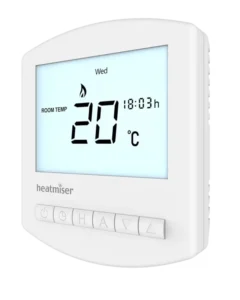
| Field | Details |
| Document Title | Heatmiser Slimline-B V3 Programmable Room Thermostat User Manual |
| Document Type | User Manual |
| Brand Name | Heatmiser |
| Product Name | Programmable Room Thermostat |
| Model Number(s) | Slimline-B V3 |
| PDF File Size | 424.8 KiB |
| Total Number of Pages | 32 |
| Languages Covered | English |
Heatmiser Room Thermostat Slimline-B V3
The Heatmiser Slimline-B V3 is a battery-powered programmable room thermostat designed to control a home’s heating system according to selected temperatures and daily schedules. It combines room temperature monitoring with programmable heating periods, allowing different comfort temperatures to be maintained throughout the day.
The thermostat operates using two AAA batteries and includes an LCD display, six control buttons, programmable comfort levels, temperature adjustment, temperature hold, holiday programming, frost protection, and keypad locking.
The Slimline-B V3 supports Weekday/Weekend, 7 Day, and 24 Hour heating schedules. It also provides optional settings for switching differential, output delay, Optimum Start, temperature adjustment limits, and thermostat operating mode.
The thermostat can be connected to compatible boiler and heating control systems using the switched-live or volt-free wiring arrangements illustrated in the manufacturer’s manual.
Product Overview and Technical Specifications
The Slimline-B V3 is part of the Heatmiser Battery Series. It is designed for surface mounting and operates independently of a mains supply for its own electronic controls.
| Specification | Details |
| Brand | Heatmiser |
| Model | Slimline-B V3 |
| Product Series | Battery Series |
| Product Type | Programmable Room Thermostat |
| Power Source | 2 × AAA batteries |
| Display | LCD |
| Installation Method | Surface-mounted |
| Temperature Sensor | Room temperature sensor |
| Temperature Units | Celsius (°C) or Fahrenheit (°F) |
| Clock Format | 24-hour |
| Heating Programs | Weekday/Weekend, 7 Day, 24 Hour |
| Default Programming Mode | 5/2 Day (Weekday/Weekend) |
| Comfort Levels | Four per programmed day or day group |
| Thermostat Modes | Manual, Programmable; the feature description also identifies a hot-water time clock option |
| Temperature Hold | Supported |
| Holiday Mode | Supported |
| Frost Protection | Supported |
| Keypad Lock | Supported |
| Switching Differential | 1–3°C |
| Default Switching Differential | 1°C |
| Output Delay | 0–15 minutes |
| Default Output Delay | 0 minutes |
| Temperature Up/Down Limit | 0–10°C |
| Optimum Start | 0–3 hours |
| Wiring Terminals | NC, C, NO |
| Heating Connections | Switched-live and volt-free arrangements |
| Factory Reset | Supported |
How the Programmable Room Thermostat Works
The Slimline-B V3 combines a room thermostat with a heating programmer.
The room thermostat measures the surrounding air temperature and requests heating when the temperature drops below the required setting. Once the selected temperature is reached, the thermostat stops requesting heat.
The programming function allows different target temperatures to be selected for different times and days.
Understanding Temperature Settings
Increasing the thermostat’s target temperature does not make the room warm up faster. The time needed to heat the room depends on the heating system’s design and performance.
A higher target temperature causes heating to continue until the higher temperature is reached.
Similarly, lowering the target temperature does not make the room cool faster. It changes the temperature the thermostat will maintain.
Selecting a Comfortable Temperature
A practical starting point is to set the thermostat to approximately 18°C and increase the setting gradually by 1°C each day until a comfortable temperature is reached.
Once a suitable temperature has been established, it can be maintained through the heating schedule.
Avoiding unnecessarily high temperature settings can reduce heating energy consumption.
Thermostat Position and Temperature Accuracy
Room thermostats need unobstructed airflow to measure temperature accurately.
The thermostat should not be covered by curtains or blocked by furniture.
Nearby heat-producing equipment, including electrical heaters, televisions, and lamps, can also affect the temperature reading.
Using the Thermostat With Radiators
In a typical boiler and radiator system, one programmable room thermostat may control heating for the home.
Where thermostatic radiator valves (TRVs) are installed, individual radiator temperatures can be adjusted separately.
The main thermostat should be configured to maintain a suitable overall temperature, while TRVs can be used to reduce unnecessary heating in individual rooms.
Parts, Buttons, and LCD Display
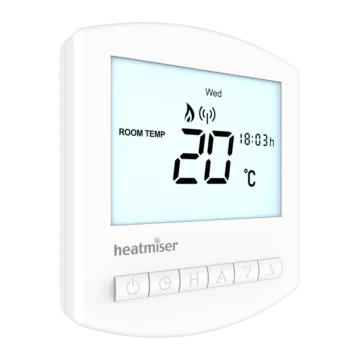
The Slimline-B V3 has a front LCD display and six buttons positioned along the lower part of the thermostat.
The back of the thermostat contains the mounting arrangement and electrical switching terminals.
A removable battery holder is accessed through the bottom of the unit.
Thermostat Control Buttons
| Button | Function |
| Power | Activates or cancels frost protection with a short press and switches the thermostat display off when held. |
| Clock | Opens the heating program or clock settings and provides access to optional features. |
| H | Used to enter Temperature Hold and Holiday Mode and confirm certain settings. |
| A | Confirms settings and returns to the main display. |
| Down (▼) | Decreases temperatures, times, and adjustable values. |
| Up (▲) | Increases temperatures, times, and adjustable values. |
Some functions require a button to be held or two buttons to be pressed together.
Understanding the LCD Display
The LCD displays current room temperature, time, day, heating demand, and other operating indicators.
LCD Symbols and Their Meanings
| Display Indicator | Meaning |
| ROOM TEMP | Identifies the room temperature reading. |
| Day Indicator | Shows the current day of the week. |
| Frost Icon | Indicates that Frost Protection Mode is active. |
| Flame Icon | Indicates that the thermostat is requesting heating. |
| Flashing Flame Icon | Indicates that Optimum Start is operating. |
| HOLD FOR | Shows that a temporary temperature hold is active. |
| Hold Time | Displays the remaining hold duration. |
| SET | Appears while changing a program or target temperature. |
| Suitcase Icon | Indicates Holiday Mode. |
| Current Temperature | Displays the measured room temperature. |
| WAKE / LEAVE / RETURN / SLEEP | Identifies the comfort period being programmed. |
| Battery Icon | Indicates that the batteries need replacing. |
| Keypad Lock Icon | Indicates that the keypad is locked. |
| °C / °F | Shows the selected temperature unit. |
| Clock | Displays the time in 24-hour format. |
Flame Indicator
The flame icon appears when the thermostat calls for heating.
When the flame icon is absent, the thermostat does not currently require heating to maintain the selected temperature.
The flame icon flashes while the Optimum Start feature is operating.
Battery Indicator
The battery icon flashes when the batteries need replacing.
To preserve the current time and programmed comfort settings, replacement batteries must be installed within one minute of removing the existing batteries.
Installation Instructions
The Slimline-B V3 is designed for surface mounting on a wall.
Its installation involves separating the front panel, mounting the back plate, connecting the heating control wires, and reattaching the front panel.
Electrical wiring must be completed by a qualified electrician and comply with local installation regulations.
Important Installation Precautions
- Mount the thermostat at eye level.
- Avoid locations close to direct heat sources.
- Do not apply excessive pressure to the LCD screen.
- Position the thermostat where normal room air can circulate freely.
- Follow the correct wiring diagram for the connected boiler or valve system.
Step 1: Separate the Front Panel
- Locate the slots on the bottom edge of the thermostat.
- Insert a small flat-head terminal screwdriver into the slots.
- Carefully separate the front section from the back plate.
- Place the front panel somewhere safe.
Step 2: Mark and Prepare the Mounting Holes
- Position the back plate against the selected wall location.
- Use the back plate as a template to mark two mounting holes.
- Drill holes at the marked positions.
- Insert a wall plug into each hole.
Step 3: Connect the Heating Control Wiring
The electrical connections must follow the appropriate manufacturer’s wiring diagram.
The Slimline-B V3 includes diagrams for:
- Switched-live boiler and valve systems.
- Volt-free and combination boiler connections.
Once the electrical connections have been completed, the terminal cover should be fitted.
Step 4: Secure the Back Plate
- Position the back plate against the wall.
- Align the fixing holes.
- Screw the back plate securely into position.
- Fit the terminal cover.
Step 5: Reattach the Thermostat
- Position the thermostat front panel against the mounted back plate.
- Carefully clip the front section into place.
The illustrated mounting procedure is shown on PDF page 7.
Installing the AAA Batteries
The Slimline-B V3 operates using two AAA batteries, which are supplied with the thermostat.
The batteries are fitted into a removable holder accessed through the bottom of the unit.
How to Install the Batteries
- Locate the battery compartment door on the bottom edge of the thermostat.
- Push and release the compartment door.
- Remove the battery holder.
- Insert two AAA batteries into the holder.
- Position each battery according to the marked positive (+) and negative (–) polarity.
- Slide the battery holder back into the thermostat.
- Push the holder inward until it is secured in the closed position.
The battery orientation is illustrated in the original manual on PDF page 9.
Replacing the Thermostat Batteries
The Slimline-B V3 displays a flashing battery icon when the batteries require replacement.
Batteries have a limited operating life and must be replaced periodically for the thermostat to continue operating correctly.
How to Replace the Batteries
- Locate the battery compartment on the bottom of the thermostat.
- Push and release the compartment door.
- Remove the battery holder.
- Remove the existing batteries.
- Insert two replacement AAA batteries in the correct orientation.
- Push the battery holder back into the thermostat until it is secured.
Important Battery Replacement Time Limit
The batteries must be replaced within one minute of removal to retain the current clock and programmed comfort level settings.
If the replacement takes longer, the clock and comfort settings may need to be configured again.
Setting the Clock and Day
The thermostat uses a 24-hour clock for its heating schedules.
The correct time and day should be set before programming the comfort levels.
How to Set the Clock
- Make sure the thermostat is switched on.
- Press the Clock button twice.
- Use Up and Down to select the correct hour.
- Press H to confirm.
- Use Up and Down to select the minutes.
- Press H to confirm.
- Use Up and Down to select the current day of the week.
- Press A to save the settings and return to the main display.
The thermostat will display the selected day and time.
Room Temperature and Set Temperature
The Slimline-B V3 uses the measured room temperature and the selected target temperature to control heating.
Room Temperature
The ROOM TEMP display shows the temperature currently measured by the thermostat.
For example, a displayed temperature of 20°C indicates the current measured room temperature.
Set Temperature
The SET display shows the temperature the thermostat is instructed to maintain.
For example, if the current room temperature is 20°C and the target temperature is set to 21°C, the thermostat may request heating according to its switching settings.
Heating Programs and Comfort Levels
The Slimline-B V3 supports programmed temperature changes throughout the day.
Four comfort periods are available:
- WAKE
- LEAVE
- RETURN
- SLEEP
Each comfort period has a starting time and a target temperature.
Available Programming Modes
| Programming Mode | Description |
| Weekday/Weekend (5/2 Day) | One set of four comfort levels for Monday–Friday and another for Saturday–Sunday. |
| 7 Day | Four independently configurable comfort levels for each day. |
| 24 Hour | The same four comfort levels apply every day. |
The default programming mode is 5/2 Day.
Default Heating Schedule
The Slimline-B V3 is supplied with the following programmed comfort levels.
| Comfort Period | Default Time | Default Temperature |
| WAKE | 08:00 | 21°C |
| LEAVE | 09:30 | 16°C |
| RETURN | 16:30 | 22°C |
| SLEEP | 23:00 | 17°C |
These settings can be changed to suit the required heating schedule.
How to Program the Comfort Levels
- Press the Clock button once.
- The thermostat displays the day or group of days being programmed.
- Use Up and Down to select the required WAKE time.
- Press H to confirm.
- Use Up and Down to select the required WAKE temperature.
- Press H to confirm.
- LEAVE appears on the screen.
- Repeat the time and temperature settings for LEAVE.
- Continue through RETURN and SLEEP.
- Complete the additional day or day-group settings required by the selected programming mode.
- Press A to save the program and return to the main display.
Weekday/Weekend Programming
In 5/2 Day Mode, the thermostat first displays Monday through Friday.
The four comfort levels entered apply to the weekdays.
After the weekday schedule has been completed, Saturday and Sunday appear for separate weekend programming.
7 Day Programming
In 7 Day Mode, each day can have its own four comfort levels.
The thermostat begins with Monday and allows each following day to be programmed independently.
24 Hour Programming
In 24 Hour Mode, the same comfort levels are used every day.
All days are displayed during programming.
Skipping an Unused Comfort Period
An unused comfort period can be disabled by setting its time to –.–.
The thermostat will ignore the unused period.
For example, if only two comfort periods are required, the remaining periods can be disabled using this setting.
Changing the Set Temperature
The set temperature can be adjusted directly using the Up and Down buttons.
How to Adjust the Temperature
- Press Up or Down.
- SET appears with the current target temperature.
- Use Up and Down to select the required temperature.
- Press A to confirm and return to the main display.
How Long Does the Adjustment Last?
When the thermostat is following a programmed heating schedule, the manually selected temperature remains active until the next programmed comfort period.
At that point, the thermostat returns to the programmed temperature.
Temperature Hold Function
Temperature Hold temporarily replaces the normal programmed temperature with a different target temperature for a selected duration.
This function allows the heating program to be overridden without permanently changing the comfort schedule.
How to Set Temperature Hold
- Press H to open Temperature Hold.
- Use Up and Down to select the required hold duration.
- Press H to confirm the duration.
- Use Up and Down to select the required hold temperature.
- Press A to save the settings and return to the main display.
The LCD shows HOLD FOR together with the remaining hold time.
The duration counts down while the selected temperature is maintained.
When the hold period ends, the thermostat automatically returns to the normal heating program.
How to Cancel Temperature Hold
- Open Temperature Hold using H.
- Reduce the hold duration to 00:00.
- Complete the setting procedure.
The temperature hold is canceled.
Locking and Unlocking the Thermostat
The Slimline-B V3 includes a keypad lock to prevent unwanted adjustments.
How to Lock the Keypad
- Press and hold A and Down together.
- Continue holding for 10 seconds.
- The keypad lock symbol appears on the display.
The displayed lock symbol indicates that the keypad lock is active.
How to Unlock the Keypad
- Press and hold A and Down together for 10 seconds.
- Continue until the lock symbol disappears.
The keypad lock indicator is displayed only while the keypad is locked.
Holiday Mode
Holiday Mode maintains the frost protection temperature for a selected number of days.
The thermostat returns to the normal programmed heating schedule when the holiday period ends.
How to Activate Holiday Mode
- Press H three times until the suitcase icon appears.
- Use Up and Down to select the number of holiday days.
- Press A to confirm the setting and return to the main display.
The suitcase symbol indicates that Holiday Mode is active.
When Does Holiday Mode Start?
A holiday period begins at 00:00 on the day after it is configured.
For example, if a two-day holiday is configured on Friday:
- Saturday is counted as the first holiday day.
- Sunday is counted as the second holiday day.
- Normal programmed operation resumes at 00:00 on Monday.
How to Cancel Holiday Mode
- Open the Holiday setting by pressing H three times.
- Reduce the holiday duration to 00 days.
- Press A to confirm.
The holiday function is canceled.
Frost Protection Mode
Frost Protection allows the thermostat to request heating only when the measured room temperature falls below the configured frost temperature.
This function can be used when normal heating operation is not required.
How to Activate Frost Protection
- Press Power once.
- The frost protection icon appears on the display.
- The thermostat operates according to its frost protection setting.
When the room temperature falls below the frost temperature, heating is requested.
The flame icon appears if heating is activated while Frost Protection Mode is active.
How to Cancel Frost Protection
Press Power once again.
The thermostat leaves Frost Protection Mode.
Turning the Thermostat On and Off
The Power button can be used to switch the thermostat display off and on.
How to Turn the Thermostat Off
- Press and hold Power.
- The display switches off.
The thermostat’s heating output is affected by the optional Frost Mode setting.
How to Turn the Thermostat On
Press Power once.
The thermostat returns to its normal operating display.
Frost Protection While the Display Is Off
Optional Feature 03 determines whether frost protection remains enabled when the thermostat display is turned off.
Frost protection while the display is off is enabled by default.
| Feature 03 Setting | Function |
| 00 | Frost protection disabled while the display is off |
| 01 | Frost protection enabled while the display is off (Default) |
The setting should be considered when the thermostat is switched off.
Advanced Thermostat Settings
The Slimline-B V3 includes optional configuration settings for temperature display, heating response, programming, and thermostat operating mode.
Most optional settings do not require adjustment during normal use.
How to Access Optional Features
- Press and hold Power to switch the thermostat display off.
- Press and hold Clock until the optional settings screen appears.
- The LCD displays a feature number and its current setting.
- Press Clock to move through the available features.
- Use Up and Down to change the selected value.
- Press A to confirm the settings.
- Press Power to switch the thermostat back on.
Optional Settings Reference Table
| Feature | Description | Settings |
| 01 | Temperature Format | 00 = °C; 01 = °F. Default: °C |
| 02 | Switching Differential | 1–3°C. Default: 1°C |
| 03 | Frost Mode | 00 = Disabled; 01 = Enabled. Default: Enabled |
| 04 | Output Delay | 0–15 minutes. Default: 0 |
| 05 | Up/Down Temperature Limit | 0–10°C. Default: 0 |
| 06 | Not Used | — |
| 07 | Optimum Start | 0–3 hours. Default: 0 |
| 08 | Rate of Change | Minutes required to raise temperature by 1°C |
| 09 | Programming Mode | 00 = 5/2 Day (Default); 01 = 7 Day; 02 = 24 Hour |
| 10 | Thermostat Mode | 00 = Manual; 01 = Programmable; a programmable mode with hot water time clock is also described |
Feature 01: Temperature Format
This feature changes the temperature display between Celsius and Fahrenheit.
- 00: Celsius
- 01: Fahrenheit
Celsius is the default.
Feature 02: Switching Differential
The switching differential determines how far the room temperature must fall below the target temperature before heating is activated.
For example, with a target temperature of 20°C:
- A 1°C differential activates heating at 19°C and stops it at 20°C.
- A 2°C differential activates heating at 18°C and stops it at 20°C.
The available differential setting is 1–3°C.
The factory default is 1°C.
Feature 03: Frost Mode
This feature determines whether the thermostat maintains frost protection while the display is off.
The factory setting is Enabled.
Feature 04: Output Delay
Output Delay prevents rapid switching of the heating output.
The setting can be adjusted between 0 and 15 minutes.
The default is 0 minutes, meaning no delay is applied.
Feature 05: Temperature Up/Down Limit
This feature restricts the amount of temperature adjustment available through the Up and Down buttons.
The limit also applies while the keypad is locked, allowing restricted temperature adjustments.
The setting range is 0–10°C.
The default is 0.
Feature 07: Optimum Start
Optimum Start calculates when heating should begin so that the programmed target temperature can be reached at the required time.
The thermostat uses the calculated temperature increase rate to estimate how long the heating system needs to warm the room.
For example, a Rate of Change value of 20 represents an estimated 20 minutes to raise the temperature by 1°C.
Optimum Start uses this information to determine the heating start time.
The setting range is 0–3 hours.
The default is 0.
Feature 08: Rate of Change
Rate of Change represents the number of minutes required to increase the temperature by 1°C.
The manufacturer identifies this as an information-only feature.
Feature 09: Programming Mode
Feature 09 selects the heating schedule arrangement.
| Setting | Programming Mode |
| 00 | 5/2 Day (Default) |
| 01 | 7 Day |
| 02 | 24 Hour |
Feature 10: Thermostat Mode
Feature 10 determines the thermostat’s operating arrangement.
The manual identifies the following modes:
- Manual / Non-Programmable
- Programmable
- Programmable with Hot Water Time Clock
The feature table identifies 00 for Manual and 01 for Programmable operation.
Recalibrating the Thermostat Temperature
The Slimline-B V3 includes a temperature recalibration procedure.
How to Recalibrate the Temperature
- Press and hold Power to turn off the thermostat.
- Press and hold Power and Down together.
- Continue holding until the temperature appears on the display.
- Use Up and Down to select the new calibration temperature.
- Press A to confirm.
- Press Power once to turn the thermostat back on.
The calibration screen displays the temperature together with SET.
Factory Reset Instructions
The Slimline-B V3 can be reset to its original factory settings.
How to Factory Reset the Slimline-B V3
- Press and hold Power to turn the thermostat off.
- Press and hold Power and Up together.
- Continue holding until the LCD switches on.
- All display icons appear at the same time.
- Wait until the icons disappear.
- The factory reset is complete when the icons have disappeared.
- Press Power once to switch the thermostat back on.
The thermostat’s settings are restored to their factory defaults.
Slimline-B V3 Wiring Diagrams
The Slimline-B V3 includes electrical switching terminals for connection to compatible heating control equipment.
The manufacturer provides two wiring diagrams:
- Switched-live and valve systems.
- Volt-free and combination boiler systems.
The thermostat must only be installed by a qualified electrician in accordance with local electrical installation regulations.
Wiring Terminal Identification
The wiring diagrams show three switching terminals:
| Terminal | Description |
| NC | Normally Closed |
| C | Common |
| NO | Normally Open |
The diagrams also show the separate AAA battery holder.
Switched-Live Boiler and Valve Wiring
The switched-live diagram illustrates the connections used to switch a live supply to a boiler or valve.
The diagram identifies:
- Permanent live from the boiler or fused spur connected to C.
- Switched live to the boiler or valve connected to NO.
The NC terminal is shown as an available terminal but is not connected in this illustrated arrangement.
Valve Auxiliary Switch
When connecting the thermostat to a valve, the manufacturer specifies that the valve’s auxiliary switch is used to enable the boiler.
The exact boiler and valve wiring must follow the installation requirements for the connected equipment.
Original diagram: PDF page 30.
Volt-Free and Combination Boiler Wiring
The second wiring diagram shows the thermostat connected to the boiler’s room thermostat terminals.
The boiler connections are labeled LS and LR in the illustration.
The diagram shows LS connected to C and LR connected to NO.
The manufacturer notes that LS and LR may have different labels on some boilers.
The boiler’s own wiring diagram must be checked to confirm the final connection arrangement.
Original diagram: PDF page 31.
Wiring Arrangement Comparison
| Arrangement | Connection Type | Manufacturer Diagram |
| Switched-Live / Valve | Permanent live and switched-live control | PDF page 30 |
| Volt-Free / Combi Boiler | Boiler room thermostat connections | PDF page 31 |
Troubleshooting Guide
The following operating checks use the display indicators and procedures described in this manual.
| Symptom | Meaning or Recommended Action |
| Battery icon is flashing | Replace the two AAA batteries. |
| Clock or comfort settings are not retained after battery replacement | Replacement batteries must be fitted within one minute of removing the old batteries to retain these settings. |
| Keypad lock symbol is displayed | Hold A and Down together for 10 seconds to unlock the keypad. |
| Frost symbol is displayed | Frost Protection Mode is active. Press Power once to cancel it. |
| Flame symbol is absent | There is no current heating demand to reach the selected temperature. |
| Flame symbol is flashing | Optimum Start is operating. |
| HOLD FOR is displayed | Temperature Hold is active. Set the hold duration to 00:00 to cancel it. |
| Suitcase symbol is displayed | Holiday Mode is active. Set the holiday duration to 00 days to cancel. |
| Heating output behavior changes when the display is switched off | Check Feature 03, which controls frost protection while the display is off. |
| Heating schedule needs to be changed | Press Clock once to edit the comfort levels. |
Checking the Heating Schedule
When the current target temperature does not match the expected schedule, check the selected comfort period and the programmed temperature.
A manual temperature override remains active until the next comfort period.
A Temperature Hold operates for the selected hold duration before returning to normal programming.
Checking Battery Status
When the battery icon appears, the batteries require replacement.
The new batteries must be inserted with the correct polarity and within the one-minute replacement window to preserve the clock and comfort settings.
Customer Support and Manufacturer Information
Heatmiser provides technical assistance and product information through its official support channels.
| Information | Details |
| Manufacturer | Heatmiser UK Ltd |
| Support Telephone | +44 (0)1254 669090 |
| Official Website | https://www.heatmiser.com |
| Address | Units 1–5 Hurstwood Court, Mercer Way, Shadsworth Business Park, Blackburn, Lancashire, BB1 2QU, United Kingdom |
| facebook.com/thermostats |
Additional product information and technical specifications are available through the manufacturer’s website.
Frequently Asked Questions
1. What batteries does the Heatmiser Slimline-B V3 use?
The Slimline-B V3 uses two AAA batteries.
The battery holder is accessed through the compartment on the bottom edge of the thermostat.
Batteries must be inserted according to the positive and negative polarity markings.
2. How is the Heatmiser Slimline-B V3 thermostat programmed?
Press Clock once to enter comfort level programming.
Set the starting time and required temperature for WAKE, LEAVE, RETURN, and SLEEP using Up and Down, confirming each setting with H.
Press A to save the completed program.
3. How is the Slimline-B V3 factory reset?
Switch the thermostat off by holding Power.
Then press and hold Power and Up together until the LCD powers on and displays all icons.
When the icons disappear, the reset is complete. Press Power once to turn the thermostat back on.
4. How is the Slimline-B V3 keypad unlocked?
Press and hold A and Down together for 10 seconds.
The lock symbol disappears when the keypad is unlocked.
5. How is the temperature changed on the Slimline-B V3?
Press Up or Down to display the SET temperature.
Use the same buttons to select the required target temperature and press A to confirm.
In programmable operation, the adjustment lasts until the next comfort period.
6. How is Temperature Hold canceled?
Open Temperature Hold using H and reduce the hold duration to 00:00.
Complete the setting procedure to cancel the temporary hold.
7. How long can the batteries be removed without losing the clock and comfort settings?
The manufacturer specifies that replacement batteries must be fitted within one minute of removing the existing batteries.
This allows the current clock and comfort settings to be retained.
8. Does the Slimline-B V3 support volt-free boiler connections?
Yes. The manufacturer includes a wiring diagram for volt-free and combination boiler systems.
The diagram shows connections to the boiler’s room thermostat terminals, identified as LS and LR.
The boiler wiring diagram must be checked for the correct terminal identification and final connection arrangement.