
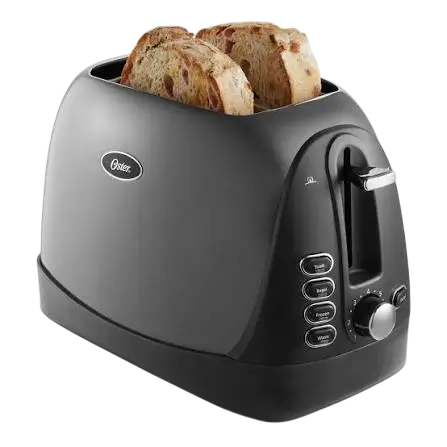
The Oster 6594 is a household 2-slice toaster with extra-wide bread slots measuring 1.3 inches, seven adjustable browning levels, and stainless steel bread guides. It accommodates regular bread, bagels, thickly sliced homemade bread, English muffins, and other suitable pastries.
The toaster includes dedicated Toast, Bagel, Frozen, and Warm functions. You can toast fresh bread, defrost frozen bagels before toasting them, or reheat previously toasted food. The Toast Lift helps retrieve smaller items, while the removable crumb tray and built-in cord storage simplify cleaning and countertop organization.
The Oster 6594 user manual also covers model TSSTJC5BBK.
Product Specifications
| Specification | Details |
|---|---|
| Product Type | Pop-up toaster |
| Toasting Capacity | 2 slices |
| Power Supply | 120 V AC |
| Frequency | 60 Hz |
| Bread Slot Width | 1.3 inches (3.3 cm) |
| Browning Settings | 1–7 |
| Food Selection Modes | Toast, Bagel |
| Additional Functions | Frozen, Warm, Cancel |
| Bread Guides | Dual, auto-adjusting stainless steel |
| Toast Lift | Yes |
| Crumb Tray | Fully removable |
| Cord Storage | Under the toaster base |
| Intended Use | Household use only |
| Warranty | One-year limited warranty |
The original user manual does not specify wattage, overall dimensions, product weight, or exact toasting times.
Parts and Controls
The product and control panel diagrams on PDF pages 1–2 identify the main operating controls and bread-handling components.
| Part or Control | Function |
|---|---|
| Lighter/Darker Knob | Adjusts browning from setting 1 to 7. |
| Warm Button | Reheats previously toasted food. |
| Frozen Button | Defrosts frozen food before toasting. |
| Bagel Button | Adjusts toasting time for bagels according to the selected shade. |
| Toast Button | Selects regular bread toasting. |
| Cancel Button | Stops the active cycle and raises the food. |
| Extra-Wide Bread Slots | Accommodate different bread and pastry thicknesses. |
| Stainless Steel Bread Guides | Automatically adjust to bread thickness and center the food. |
| Bread Carriage Lever | Lowers the food and starts toasting. |
| Toast Lift | Raises smaller toasted items for easier removal. |
| Power Cord | Connects the toaster to the electrical outlet. |
| Removable Crumb Tray | Collects crumbs during toasting. |
| Cord Storage | Holds excess power cord underneath the toaster. |
The Warm, Frozen, Bagel, and Toast buttons have indicator lights that confirm their selection.
Important Safety Instructions
Read the operating instructions and safety warnings before using the toaster.
- Unplug the appliance when not in use and before cleaning.
- Allow it to cool before installing or removing parts.
- Avoid touching hot metal surfaces. Use the handles and controls instead.
- Never leave the toaster unattended during operation.
- Do not immerse the toaster, power cord, or plug in water or other liquids.
- Never insert oversized food, utensils, or food wrapped in aluminum foil.
- Do not insert fingers or metal utensils into the bread slots.
- Avoid foods with coatings or fillings that may drip when heated.
- Never operate the toaster without the crumb tray correctly installed.
- Keep the appliance uncovered and away from flammable materials.
- Do not place it near hot burners or inside a heated oven or microwave.
- Do not use the toaster outdoors, commercially, or with attachments not recommended by the manufacturer.
Young children and incapacitated persons should not operate the appliance. Closely supervise older children.
Stop using the toaster if it malfunctions, has been dropped, or has a damaged cord or plug. Contact an authorized service center for examination or repair.
See PDF page 1, English-1, for the manufacturer’s safety precautions.
Power Cord and Electrical Safety
The toaster has a short power cord to reduce entanglement and tripping hazards.
If an extension cord is necessary, its electrical rating must be at least equal to that of the appliance. Position it where children cannot pull it and where it will not create a tripping hazard.
Products purchased in the United States have a polarized plug with one blade wider than the other. The French safety instructions also identify this plug for Canadian purchases.
If the plug does not fit completely into the outlet, reverse it. If it still does not fit, contact a qualified electrician. Never modify the plug.
Do not pull, twist, or expose the cord to hot surfaces. Press Cancel and make sure the carriage lever is raised before connecting or disconnecting the plug.
Setting Up the Oster 6594 Toaster
Choosing a Safe Location
Place the toaster on a flat, heat-resistant, non-flammable surface near an electrical outlet.
Maintain the following minimum clearances:
| Surrounding Object | Minimum Clearance |
|---|---|
| Walls or back of countertops | 3 inches |
| Overhead cabinets or shelving | 1 foot |
Keep the toaster away from curtains, wall fabrics, gas flames, and electric heating elements.
These placement requirements are specified on PDF page 1, English-3.
Preparing the Toaster for First Use
Before toasting food for the first time:
- Remove any stickers from the toaster’s exterior.
- Wipe the outside with a damp cloth.
- Install the removable crumb tray.
- Make sure the bread carriage lever is fully raised.
- Position the toaster in a suitable location.
- Plug the power cord into a 120 V, 60 Hz AC outlet.
- Leave both bread slots empty.
- Push the carriage lever down until it locks.
- Allow the initial heating cycle to finish.
The first empty cycle heats the new elements and burns off dust that may have accumulated during manufacturing or storage. An odor during this initial cycle is normal.
The toaster is ready for regular use afterward.
Adjusting the Power Cord Length
Wrap excess power cord around the storage posts underneath the toaster until the exposed cord is the appropriate length.
Never wrap the power cord around the main body of the toaster during or after use.
How to Use the Oster 6594 Toaster
Choose bread or pastries that fit comfortably inside the slots without becoming trapped. When toasting two slices, use bread of equal size and freshness for more consistent browning.
Adjusting the Browning Level
Turn the Lighter/Darker Knob on the front control panel to select your preferred shade.
| Setting | Browning Level |
|---|---|
| 1 | Lightest |
| 2–6 | Intermediate browning levels |
| 7 | Darkest |
The toaster adjusts its operating time according to the selected shade and food type.
Toasting Regular Bread
- Place the bread in the slots.
- Select your preferred browning level.
- Push the bread carriage lever down until it locks.
- Press the Toast button if you want to select regular toasting explicitly.
- Wait for the cycle to finish.
- Carefully remove the toasted bread.
Toast is the default setting when no food or additional function button is selected.
When the cycle finishes, the food pops up automatically, the carriage lever returns to its original position, and the indicator lights turn off.
Using the Bagel Function
The Bagel function adjusts the toasting time according to your selected browning level.
- Insert the bagel into the bread slots.
- Select your preferred browning level.
- Push the carriage lever down.
- Press the Bagel button.
- Check that the Bagel indicator light illuminates.
- Allow the cycle to finish before removing the bagel.
The manual does not specify a particular cut-side orientation for bagels or confirm single-sided heating.
Toasting Frozen Bread and Bagels
The Frozen function automatically defrosts food before toasting it.
- Insert the frozen food into the bread slots.
- Press the bread carriage lever down.
- Press the Frozen button.
- Select Toast or Bagel according to the food type.
- Turn the Lighter/Darker Knob to your desired setting.
If no food type is selected, the toaster uses Toast mode.
This function allows you to prepare frozen bread or bagels without defrosting them separately.
Using the Warm Function to Reheat Toast
The Warm function reheats previously toasted food that has cooled before you are ready to eat it.
- Place the previously toasted food in the slots.
- Press the bread carriage lever down.
- Press the Warm button.
- Select a food type if desired.
The Warm indicator light illuminates, and the toaster reheats the food. If no food type is selected, the appliance operates in Toast mode.
Warm is documented as a reheating function rather than a continuous keep-warm mode.
Canceling a Toasting Cycle
Press the Cancel button to stop the active toasting cycle immediately. The food will pop up automatically.
Using the Toast Lift
Push upward on the bread carriage lever to raise smaller toasted items farther out of the slots.
Handle toasted food carefully because it may be very hot. Never insert forks, knives, or fingers into the bread slots to retrieve food.
Cleaning and Maintenance
Warning: Unplug the toaster and allow it to cool before cleaning. Never immerse the appliance in water or other liquids.
Cleaning the Exterior
Wipe the toaster’s exterior with a damp cloth, then dry it using a separate cloth or paper towel.
Clean the surface surrounding the bread slots in the same way.
Avoid abrasive cleaners because they can damage the finish. Do not use pointed or sharp objects to clean the toaster’s interior.
Cleaning the Removable Crumb Tray
- Unplug the toaster and wait for it to cool.
- Lightly tap the sides to loosen crumbs trapped inside the toasting chamber.
- Remove the crumb tray.
- Empty the accumulated crumbs.
- Wipe the tray with a damp cloth or wash it on the top rack of a dishwasher.
- Reinstall the crumb tray before using the toaster again.
Empty the crumb tray frequently. Accumulated crumbs can catch fire if they are not removed periodically.
See PDF page 1, English-5, for cleaning instructions and fire prevention warnings.
Troubleshooting Common Toaster Problems
| Problem | Recommended Action |
|---|---|
| Carriage lever will not stay down | Check that the toaster is connected to a power source. |
| Toast is too dark | Turn the browning knob toward setting 1. |
| Toast is too light | Turn the browning knob toward setting 7. |
| Bread browns unevenly | Use slices of equal size and freshness, centered in the slots. |
| Frozen bread does not toast as expected | Select Frozen together with the appropriate food type. |
| Previously toasted bread has cooled | Use the Warm function to reheat it. |
| Heating elements glow at different intensities | Differences in brightness are normal during operation. |
| Odor occurs during first use | The initial heating cycle may be burning off accumulated dust. |
| Food becomes trapped | Unplug the toaster and allow it to cool before removing the food. |
| Toaster malfunctions | Discontinue use and contact an authorized service center. |
Removing Jammed Bread Safely
If bread or another food item becomes stuck inside the toaster:
- Press the Cancel button.
- Unplug the power cord from the electrical outlet.
- Wait until the toaster has cooled.
- Carefully remove the trapped food.
Never attempt to clear a blockage while the appliance is connected to electrical power. Do not insert fingers or metal utensils into the slots.
See PDF page 1, English-1 and English-4, for the relevant safety warnings.
Warranty and Customer Support
The Oster 6594 is covered under the original manufacturer’s one-year limited warranty against defects in materials and workmanship from the date of purchase.
Jarden Consumer Solutions (JCS) may repair or replace defective products or components under the warranty terms. Coverage applies to the original retail purchaser, is non-transferable, and requires proof of purchase.
The warranty excludes normal wear, misuse, incorrect voltage or current, unauthorized repairs, operation contrary to instructions, and damage caused by natural disasters.
Attempting to repair or adjust the toaster’s electrical or mechanical functions yourself voids the warranty.
The original 2009 manufacturer document lists these customer service contacts:
| Region | Customer Service Number |
|---|---|
| United States | 1-800-334-0759 |
| Canada | 1-800-667-8623 |
Manufacturer Website: www.oster.com
Confirm current contact details and service arrangements with Oster before requesting assistance.
If you own a different model, we also listed the Oster TSSTTR6329 toaster user manual.
Frequently Asked Questions
Why won’t my Oster 6594 toaster lever stay down?
The bread carriage lever requires electrical power to lock into position. Check that the toaster is plugged into a suitable outlet. If the problem persists, contact an authorized service center.
What does the Warm button do on the Oster 6594?
The Warm button reheats previously toasted food. Lower the carriage lever, press Warm, and select a food type if desired. The indicator light confirms that the reheating function is active.
How wide are the Oster 6594 toaster slots?
The extra-wide slots measure 1.3 inches (3.3 cm). They accommodate bagels, thickly sliced bread, and English muffins, provided the food fits without becoming jammed.
Can I toast frozen bagels in the Oster 6594?
Yes. Insert the frozen bagel, lower the carriage lever, press Frozen, select Bagel, and adjust the browning level. The toaster automatically defrosts and then toasts the bagel.
Can I toast just one slice of bread?
Yes. Place a single slice in the center of either bread slot and operate the toaster normally.
Is the Oster 6594 crumb tray dishwasher safe?
Yes. The removable crumb tray can be washed on the top rack of a dishwasher or wiped clean with a damp cloth. Reinstall it before operating the toaster.
Why do the heating elements glow unevenly?
Some heating elements may glow more brightly than others during operation. This is normal behavior and does not, by itself, indicate a malfunction.
Can I use the Oster 6594 with a 220–240 V outlet?
The manufacturer specifies a 120 V, 60 Hz AC power supply. Operation at 220–240 V is not authorized in the supplied user manual.
Does the Oster 6594 toaster have a reset button?
The user manual does not identify a dedicated reset button or reset procedure. The Cancel button stops an active cycle but is not documented as a reset control.