
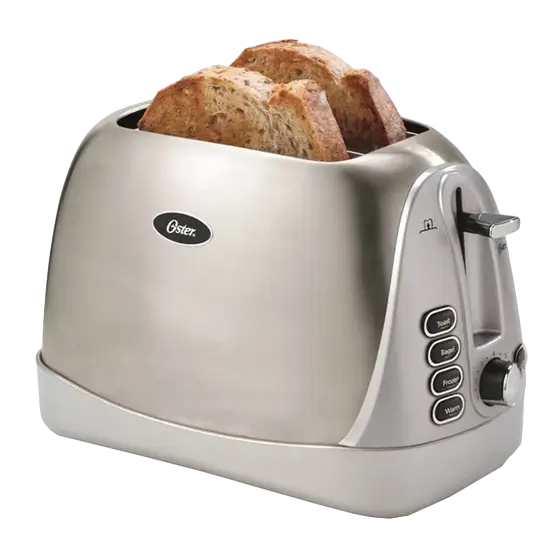
The Oster TSSTTR6329 is a household toaster with extra-wide bread slots and dual, auto-adjusting bread guides that center food for even browning. A Lighter/Darker knob sets toast color from 1 (lightest) to 7 (darkest).
Beyond plain toasting, it has Bagel, Frozen (defrost) and Warm (reheat) functions, a Cancel button that stops toasting at once, a Toast Lift for retrieving small items, and a fully removable crumb tray. It runs on a 120 volt, 60 Hz AC outlet. The same manual covers models TSSTTR6329, TSSTTR6307 and TSSTTR6330.
Controls, Parts and Specifications
Lighter/Darker Knob
Turn the knob to choose how dark the food is toasted. The scale runs from 1 to 7, where 1 is lightest and 7 is darkest.
Function Buttons and Indicator Lights
Each function has its own indicator light. The panel has buttons for Toast, Bagel, Frozen and Warm, plus a Cancel button. The panel diagram shows these as icon buttons beside the knob.
| Control | What it does |
|---|---|
| Toast | Default setting. Its light comes on when you lower the bread carriage lever. |
| Bagel | Use for bagels. The Bagel light comes on when selected. |
| Frozen | Defrosts food, then toasts it. The Frozen light comes on when selected. |
| Warm | Reheats food. The Warm light comes on when selected. |
| Cancel | Stops toasting immediately, and the food pops up. |
Bread Slots, Guides, Lever and Toast Lift
- Extra-wide bread slots: Accept bagels, tea cakes, thickly sliced bread and English muffins, as long as the food does not jam the slots.
- Dual, auto-adjusting bread guides: Center the food automatically for even browning.
- Bread carriage lever: Press down until it locks to start toasting. It returns to the up position when toasting finishes.
- Toast Lift: Press up on the bread carriage lever to raise food out of the slots. This is a convenient and safe way to retrieve the smallest toasted items.
Fully Removable Crumb Tray
The crumb tray slides out for emptying and cleaning. The toaster must not be operated without it in its correct position.
Key Specifications
| Item | Detail |
|---|---|
| Covered models | TSSTTR6329, TSSTTR6307, TSSTTR6330 |
| Power | 120 Volt, 60 Hz AC outlet |
| Darkness settings | 1 (lightest) to 7 (darkest) |
| Functions | Toast (default), Bagel, Frozen, Warm, Cancel |
| Plug | Polarized (one blade wider than the other), for products purchased in the United States and Canada |
| Cord | Short power-supply cord |
| Intended use | Household use only |
| Limited warranty | One year from date of purchase |
Important Safety Instructions
Read all instructions, product labels and warnings before using the toaster, and keep them for later.
Electrical Safety
- Unplug the toaster when it is not in use and before cleaning. Let it cool before putting on or taking off parts.
- Do not immerse the cord, plug or toaster in water or other liquids.
- Do not let the cord hang over the edge of a table or counter or touch hot surfaces.
- Do not operate the toaster with a damaged cord or plug, or after it has malfunctioned or been damaged in any manner. Return it to the nearest authorized service facility for examination, repair or adjustment.
- To connect or disconnect the toaster, press the Cancel button. The toast lift lever must be in the normal up position before you attach or disconnect the plug at the wall outlet.
- The plug is polarized. It fits a polarized outlet only one way. If it does not fit fully, reverse the plug. If it still does not fit, contact a qualified electrician, and do not modify the plug in any way.
- A short cord is supplied to reduce the risk of tangling or tripping. An extension cord may be used with care, but its electrical rating must be at least as great as the appliance’s rating, and it must not drape over the countertop or tabletop where it could be pulled on by children or tripped over.
Placement and Fire Safety
- Do not operate or place the toaster on non-heat-resistant or flammable surfaces, on or near a hot gas or electric burner, or in a heated oven or microwave oven.
- A fire may occur if the toaster is covered or touching flammable material, including curtains, draperies and walls, while in operation.
- Never leave the toaster unattended when in use.
- Do not use it outdoors or for commercial purposes.
- Empty the crumb tray frequently. Crumbs can catch fire if the tray is not emptied periodically.
Food and Bread Slot Safety
- Do not insert utensils, foil-covered foods or oversized foods into the toaster.
- Never insert fingers or metallic utensils into the slots while the toaster is plugged in.
- Do not try to dislodge food while the toaster is plugged in.
- Do not use foods that drip coatings or fillings when heated. Buildup inside the toaster is unsanitary and can cause a fire or malfunction.
- Do not place food on top of the toaster while it is warming.
- Toasted food can be very hot. Handle it with care. Metal parts can also become hot, so use handles or knobs.
Children and Attachments
Young children or incapacitated persons should not use the toaster, and older children must be supervised closely. Do not use attachments that the manufacturer does not recommend, because they may cause injury.
Before You Use the Toaster for the First Time
- Remove any stickers from the surface of the toaster and wipe the outside with a damp cloth.
- Insert the removable crumb tray into the crumb tray slot.
- Make sure the bread carriage lever is in the uppermost position before you plug in the power cord.
- Choose a location that is a flat, heat-resistant, non-flammable surface; at least three inches from walls or the back of countertops; at least one foot from any cabinet or shelving above the toaster; away from flammable materials such as curtains and wall fabric; and away from a gas stove flame or electric element.
- Plug the power cord into a 120 Volt, 60 Hz AC outlet.
- With no food in the slots, push the bread carriage lever all the way down until it locks. The carriage will not lock if the toaster is not plugged into a power source.
This first toasting cycle preheats the new elements and burns off dust that may have collected during manufacturing or storage. Some odor during this burn-off is normal.
Everyday Toasting
Choosing and Loading Food
Most breads and pastries can be toasted, including bagels, tea cakes, thickly sliced bread and English muffins, provided the slices are not thick enough to jam the slots. When toasting two slices at once, use slices of equal size and freshness so they toast evenly, and place one slice in the center of each slot. For a single slice, place it in the center of either slot. Set the Lighter/Darker knob before you start.
Toast
- Insert the food into the bread slots.
- Press the bread carriage lever until it locks.
- Confirm the Toast light is on.
- When the selected darkness is reached, the food pops up automatically, the lever returns to the up position and the indicator lights turn off.
- Carefully remove the toasted food.
Toast is the default setting if you choose no food or function button.
Bagel
- Insert the bagel into the bread slots.
- Press the bread carriage lever until it locks.
- Press the Bagel button. The Bagel light comes on.
- When the selected darkness is reached, the bagel pops up, the lever returns up and the lights turn off.
- Carefully remove the toasted bagel.
Defrost Frozen Food
- Insert the food into the bread slots.
- Press the bread carriage lever until it locks.
- Press the Frozen button. The Frozen light comes on. If you like, also press a food select button (Toast or Bagel). If you choose none, the toaster operates in Toast mode.
- The toaster defrosts the food and then toasts it. When the selected darkness is reached, the food pops up and the lights turn off.
- Carefully remove the toasted food.
Reheat Food
- Insert the food into the bread slots.
- Press the bread carriage lever until it locks.
- Press the Warm button. The Warm light comes on. If you like, also press Toast or Bagel. If you choose none, the toaster operates in Toast mode.
- The toaster reheats the food. Carefully remove it when it pops up.
Stopping Early with Cancel
Press the Cancel button. Toasting stops immediately and the food pops up automatically.
Retrieving Food and General Notes
- Use the Toast Lift (press up on the bread carriage lever) to raise small items out of the slots.
- Some heating elements inside may glow more brightly than others during use. This is part of normal operation, because the toaster is designed for optimum toast balance.
- To remove jammed food, unplug the toaster and take the food out only after the toaster has cooled down.
Cleaning and Care
Unplug the power cord from the outlet after use and before cleaning, and wait for the toaster to cool.
- Wipe the outside with a damp cloth, then dry it with another cloth or paper towel. Do not use abrasive cleaners, which damage the finish.
- Lightly tap the sides of the toaster to dislodge crumbs caught in the toast chamber.
- Remove the crumb tray and empty it. Wipe it clean with a damp cloth, or place it in the top rack of your dishwasher.
- Put the crumb tray back in the toaster before using it again.
- Wipe the surface on top of the bread slots with a damp cloth and dry it with another cloth or paper towel.
Do not immerse the toaster in liquid. Empty the crumb tray frequently.
Warranty and Support
The toaster has a one year limited warranty from the date of purchase against defects in material and workmanship. The company will, at its option, repair or replace the product or a defective component. The warranty is valid for the original retail purchaser only, is not transferable, and requires proof of purchase, so keep the original sales receipt. Do not attempt to repair or adjust any electrical or mechanical function of the product, because doing so voids the warranty. The warranty also does not cover normal wear of parts, misuse, use on improper voltage or current, use contrary to the operating instructions, or disassembly, repair or alteration by anyone other than the manufacturer or an authorized service center.
For product questions or warranty service, call 1.800.334.0759 in the U.S.A. or 1.800.667.8623 in Canada to receive a convenient service center address. Do not return the product to the company addresses listed in the warranty or to the place of purchase. More product information is available at www.oster.ca.
Frequently Asked Questions
What do the numbers 1 to 7 on the Oster TSSTTR6329 knob mean?
They set how dark the food is toasted. Setting 1 is the lightest and setting 7 is the darkest, so turn the Lighter/Darker knob toward 7 for a darker result and toward 1 for a lighter one before you press the bread carriage lever.
How do I toast bread in the Oster TSSTTR6329?
Set the Lighter/Darker knob, put the bread in the slots and press the bread carriage lever down until it locks. The Toast light comes on, and the toaster pops the bread up when the selected darkness is reached. Toast is the default, so you do not need to press a function button for plain toast. For two slices, use slices of the same size and freshness and put one in the center of each slot. For one slice, use the center of either slot.
How do I toast a bagel?
Put the bagel in the slots, press the bread carriage lever until it locks, then press the Bagel button. The Bagel light shows your selection. When the toasting level you set is reached, the bagel pops up, the lever returns to the up position and the lights turn off. Remove it carefully because toasted food can be very hot.
How do I defrost frozen bread or a frozen bagel?
Load the food, lock the bread carriage lever down and press the Frozen button. You can also press Toast or Bagel to match the food. If you pick neither, the toaster uses Toast mode. It defrosts the food first and then toasts it to the darkness you set, so you do not need a separate defrost cycle.
How do I reheat toast or other food with the Warm button?
Insert the food, press the bread carriage lever until it locks, and press the Warm button. The Warm light comes on and the toaster reheats the food. As with the other functions, you can also press Toast or Bagel, and Toast mode is used if you do not.
How do I stop toasting before the cycle ends?
Press the Cancel button. Toasting stops immediately and the food pops up on its own, so you do not need to pull the lever.
Why won’t the bread carriage lever stay down?
The carriage locks only when the toaster is plugged into a working power source. Check that the cord is fully plugged into a 120 Volt, 60 Hz AC outlet, with the lever in the up position when you plug it in, and then press the lever down again until it locks.
Is it normal for a new toaster to smell the first time I use it?
Yes. On first use, run one cycle with no food in the slots. That first toasting cycle preheats the new elements and burns off dust that may have collected during manufacturing or storage, and some odor is normal during this burn-off.
What should I do if food gets stuck in the toaster?
Unplug the toaster first, then wait until it has cooled down before removing the food. Never push your fingers or metal utensils into the slots, and do not try to dislodge food while the toaster is plugged in. To avoid jams, do not toast slices thick enough to wedge in the slots.
How do I clean the toaster and empty the crumb tray?
Unplug the toaster and let it cool. Lightly tap the sides to loosen crumbs, slide out the crumb tray and empty it, then wipe it with a damp cloth or put it on the top rack of the dishwasher. Wipe the outside and the surface on top of the slots with a damp cloth and dry them, using no abrasive cleaners. Put the tray back before the next use, and empty it often because crumbs can catch fire if they build up. Never immerse the toaster in liquid.
How much space does the toaster need around it?
Place it on a flat, heat-resistant, non-flammable surface at least three inches from walls or the back of the countertop and at least one foot below any cabinet or shelf. Keep it away from curtains and wall fabric, and from a gas flame or electric element. Do not use it in or on a heated oven or microwave, and do not leave it covered or touching flammable material while it is running.
What foods should I keep out of the toaster?
Skip foil-covered or oversized foods, and foods whose coatings or fillings drip when heated, since the buildup inside is unsanitary and can cause a fire or malfunction. Keep utensils out of the slots entirely. Most breads and pastries are fine, including bagels, tea cakes, thick slices and English muffins, as long as they do not jam the slots.