
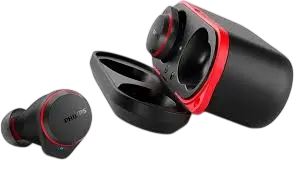
The Philips TAA7507 is a pair of true wireless sports earbuds from the 7000 Series. They connect over Bluetooth 5.2 for handsfree calls and wireless music, with active noise cancelation (ANC), an awareness mode, and touch controls on each earpiece. A charging box stores the earpieces and doubles as a portable battery. It recharges the earpieces fully three times. The headphones can pair with two devices at once, and the Philips Headphones app lets you customize the sound.
What’s in the Box
- Philips TAA7507 true wireless earpieces
- Six stabilizers and six ear tips
- Lanyard
- USB-C charging cable (for charging only)
- Quick start guide, warranty, and safety leaflet
You also need a Bluetooth-capable phone or other compatible device, such as a tablet, notebook, or MP3 player.
Product Specifications
| Feature | Detail |
| Bluetooth version | 5.2 |
| Profiles | HFP, A2DP, AVRCP |
| Audio codecs | LDAC, AAC, SBC |
| Music play time, ANC on | 7 + 21 hours |
| Music play time, ANC off | 8 + 24 hours |
| Standby time | 200 hours |
| Charging time | 2 hours |
| Battery | 55 mAh lithium-ion per earpiece; 500 mAh lithium-ion in the charging box |
| Operating range | Up to 10 meters (33 feet) |
| Frequency range | 2.402–2.480 GHz |
| Transmitter power | Under 10 dBm |
| Charging | USB-C and wireless charging |
| Extras | Auto power off, low battery warning |
The play-time figures are given as the earpieces plus the extra time from the charging box. Specifications may change without notice (p. 12).
Charging
- Put the earpieces in the charging box.
- Plug the USB-C cable into the box, then plug the other end into a power source.
- The earpieces start charging and the blue LED lights. When they are fully charged, the blue light goes off.
Charge for 2 hours before first use for the best battery capacity and lifetime. A full charge of the earpieces or the box takes about 2 hours by USB cable. Use only the original USB-C cable. Charging powers the earpieces off, so finish any call first (p. 6).
Fit and Wearing
Three sizes of silicone ear tips and stabilizers come in the box: large, medium, and small. Try each combination to find the best sound and comfort, because a tight, secure fit gives the best sound quality and noise cancelation. Check which earpiece is left and which is right, insert it, and twist slightly until it sits securely (p. 7).
Pairing
First-Time Pairing
- Make sure the earpieces are fully charged and powered off.
- Open the charging box cover. The earpieces enter pairing mode, and their LEDs flash white and blue alternately.
- Turn on Bluetooth on your phone or other device and select Philips TAA7507.
- If prompted for a password, enter 0000. Devices with Bluetooth 3.0 or higher don’t ask for one.
If the earpieces can’t find a previously connected device after powering on, they switch to pairing mode on their own.
Pairing Another Device
Put both earpieces in the box with the cover open and hold the button on the box for 3 seconds. Then pair from the second device as usual. The earpieces remember 4 devices. Pairing a fifth replaces the earliest one (p. 8).
Using Two Devices
You can connect two devices at once, such as a phone and a notebook. Music plays from only one at a time, and the other is kept available for calls. If a call arrives on Device 2 while Device 1 is streaming, Device 1 pauses and the call goes to the headphones. Playback resumes when the call ends.
Single Earpiece (Mono) Use
Take either earpiece out of the box and it powers on automatically with a “Power on” voice prompt. Taking out the second one pairs the two together automatically.
Powering On, Off, and Reconnecting
- On: Take the earpieces out of the charging box.
- Off: Put the earpieces back in the box.
After power-on, the blue LED flashes and the earpieces reconnect to the last connected device. If that device isn’t available, they try the second-to-last. If you turned Bluetooth on after the earpieces, connect manually from your device’s Bluetooth menu.
To save battery, the earpieces turn off after 3 minutes with no connection, or after 60 minutes with no music or call signal. Removing them from your ears activates sleep mode, and they return to active mode when you put them back (p. 9).
Touch Controls
The multi-function touch (MFT) area on each earpiece controls music, calls, noise cancelation, and your voice assistant.
| Task | Control |
| Play or pause music | Tap and hold the right earpiece for 1 second |
| Next track | Triple-tap the right earpiece |
| Volume up/down | Use your phone’s volume controls |
| Answer a call or switch callers | Tap and hold the right earpiece for 1 second |
| Hang up or reject a call | Double-tap the right earpiece |
| Start voice assistant (Siri/Google) | Tap and hold the left earpiece for 2 seconds |
| Stop voice assistant | Single tap on the left earpiece |
Noise Cancelation and Awareness Mode
ANC turns on automatically when you put the earpieces in your ears. Double-tap the right earpiece to switch to awareness mode, and double-tap again to turn ANC off. The manual also lists a “quick awareness” action: continue touching the right earpiece after the beep (p. 9).
LED Indicators
Earpieces
| Status | Indicator |
| Connected to a device | Blue LED blinks twice every 5 seconds |
| Ready for pairing | Flashes blue and white alternately |
| On but not connected | White LED blinks every second (turns off after 3 minutes) |
| Low battery | White LED blinks every 5 seconds |
Charging Box
When charging, a low battery shows one LED color and a relatively adequate battery shows another. The manual lists white and amber lights, but the table layout in the PDF doesn’t make clear which color matches which level. Check the original PDF on page 11 before publishing. When the box is in use with the cover open, amber blinks slowly for four cycles.
Resetting the Earpieces
If you have pairing or connection problems, reset to factory defaults:
- On your Bluetooth device, remove Philips TAA7507 from the device list.
- Turn off Bluetooth on the device.
- Put the earpieces back in the charging box and open the lid.
- Press the button on the box twice.
- Reconnect as described in the connection steps above.
- Pair the earpieces with your device again and select Philips TAA7507.
If the earpieces don’t respond at all, tap and hold the multi-function touch area for 10 seconds to reset the hardware (p. 12).
Safety Instructions
Hearing Safety
- Listen at reasonable volumes for reasonable periods. Excessive sound pressure can cause hearing loss, and the louder the volume, the shorter the safe listening time.
- Don’t keep turning the volume up as your hearing adapts.
- Don’t set the volume so high that you can’t hear your surroundings, and use caution in hazardous situations.
- Wearing headphones over both ears while driving isn’t recommended and may be illegal in some areas.
Care and Battery Warnings
- Keep the headphones away from excessive heat, don’t drop them, and don’t submerge them in water. They must not be exposed to dripping or splashing beyond their IP rating.
- The charging slot cover must be closed to achieve the product’s IP rating. The manual doesn’t state the rating itself.
- Don’t charge when the connector or socket is wet.
- Don’t expose the battery to sunshine, fire, or similar heat. Don’t crush or cut it or put it in a fire or hot oven. There is a danger of explosion if the battery is replaced with the wrong type (p. 2).
- Store between -20°C and 50°C (-4°F to 122°F) and operate between 0°C and 45°C (32°F to 113°F), both with up to 90% relative humidity. Battery life may be shorter in high or low temperatures (p. 3).
- Charge the battery fully at least once every three months if you don’t use the headphones for a long time.
Cleaning and Maintenance
Clean the headphones regularly with a clean, damp cloth, paying attention to the sound conduits and microphone holes. This prevents buildup of sweat or earwax. Don’t use cleaning agents containing alcohol, ammonia, benzene, or abrasives, and avoid disposable alcohol pads.
Sweat or water left in the sound conduits, air holes, or microphone holes can make the sound drop or cut out for a while. That isn’t a malfunction. Dry the earpieces with a soft, damp cloth. You can also remove the ear tips, point the sound conduits downward, and tap the earpieces gently about five times on a dry cloth. Make sure they’re completely dry before charging or using them.
Troubleshooting
Earpieces won’t turn on. The battery is low. Charge them.
Can’t pair. Make sure Bluetooth is enabled on your device and turned on before you turn on the earpieces. If pairing still fails, put both earpieces in the charging box, disable Bluetooth on any previously connected devices, delete “Philips TAA7507” from your device’s Bluetooth list, and pair again.
Device can’t find the earpieces. They may be connected to a previously paired device. Turn that device off or move it out of range. Pairing may also have been reset, so pair again.
Music plays only from the phone speaker. Select the earpieces as the audio output in your phone’s settings.
Crackling or poor audio. The device may be out of range. Move closer, remove obstacles, or charge the earpieces.
Slow or failed streaming. Your phone needs to support A2DP as well as mono HFP, and be Bluetooth 4.0x or higher (p. 17).
Frequently Asked Questions
How long should I charge the earpieces before first use?
Charge them in the box for 2 hours for the best battery capacity and lifetime. The charging box also takes about 2 hours to charge fully.
How many times can the charging box recharge the earpieces?
A fully charged box recharges the earpieces fully 3 times.
How do I switch between ANC and awareness mode?
Double-tap the right earpiece. ANC turns on automatically when you wear them, the first double-tap switches to awareness mode, and the next turns ANC off.
Can I use just one earpiece?
Yes. Take either earpiece out of the box and it powers on by itself for mono use.
Can I connect to two devices at the same time?
Yes. You can pair with two devices, such as a phone and a notebook. Audio plays from one device at a time, and an incoming call on the other pauses the music and plays through the headphones.
Why did the earpieces turn off by themselves?
They turn off after 3 minutes without a Bluetooth connection, or after 60 minutes without music or call audio.
Can I use the earpieces while they charge?
No. Connecting them to charge powers them off, so finish calls first.
How do I make the earpieces last when stored?
Fully charge them at least once every three months if they go unused for a long time. Keep storage between -20°C and 50°C (-4°F to 122°F).