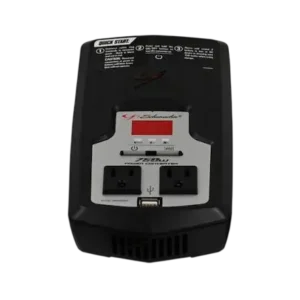
| Field | Details |
| Document Title | XI75DU Power Converter |
| Document Type | Owner’s Manual |
| Brand Name | Schumacher Electric |
| Product Name | Power Converter |
| Model Number(s) | XI75DU |
| PDF File Size | 299 KB |
| Number of Pages | 24 |
| Languages | English, Spanish |
Schumacher Power Converter XI75DU
The Schumacher XI75DU is a 750-watt power converter designed to convert 12V DC battery power into 120V AC household electricity. It allows compatible household electrical devices and equipment to operate from a 12V vehicle battery or other suitable 12V DC power source.
The XI75DU provides a maximum continuous output of 750 watts and a surge capacity of 1,500 watts for 0.1 seconds. It includes two AC outlets, a USB charging port, a digital display, and protection against excessive loads, low battery voltage, high input voltage, short circuits, and overheating.
The converter can be connected through a vehicle’s 12V accessory outlet for lower-power applications or directly to a 12V battery for higher-power operation. The 12V accessory outlet connection is limited to a maximum of 100 watts, while direct battery connection is required to access the converter’s full rated output.
The XI75DU uses a modified sine wave output and includes an audible warning system and digital error codes for identifying operating problems.
Product Features
The Schumacher XI75DU includes the following features:
- Converts 12V DC battery power into 120V AC household power.
- Maximum continuous AC output of 750 watts.
- Surge capacity of 1,500 watts for 0.1 seconds.
- Two 120V AC outlets.
- USB port with 5V DC, 2A output.
- Digital display for monitoring input voltage, output voltage, and wattage.
- ON/OFF power button.
- Display selection button.
- Modified sine wave output.
- Direct 12V battery connection using battery clamps.
- 12V vehicle accessory outlet connection.
- Automatic shutdown during excessive loads.
- Low battery voltage protection.
- High input voltage protection.
- Overheating protection with automatic restart after cooling.
- Short-circuit and power surge protection.
- Audible warning alarms.
- Low no-load current consumption.
Technical Specifications
| Specification | Details |
| Brand | Schumacher Electric |
| Model Number | XI75DU |
| Product Type | DC-to-AC Power Converter |
| Input Power Source | 12V DC Battery or 12V Accessory Outlet |
| Input Voltage Range | 10.5–15.5V DC |
| AC Output Voltage | 120V AC ±5% |
| Maximum Continuous Output | 750 Watts |
| Surge Capacity | 1,500 Watts for 0.1 Seconds |
| Output Waveform | Modified Sine Wave |
| Optimum Efficiency | 85% |
| No-Load Current Draw | Less Than 0.5A |
| USB Output | 5V DC, Up to 2A |
| AC Outlets | 2 |
| Vehicle Accessory Outlet Output | 60–70W with Engine Off; Up to 100W with Engine Running |
| Recommended Battery | 12V Deep-Cycle Battery |
| Maximum Recommended Battery Size | Group 31, 130Ah or Smaller |
| Recommended Operating Air Temperature | 50–80°F (10–27°C) |
| Digital Display | Yes |
| Audible Alarm | Yes |
| Warranty | 2-Year Limited Warranty |
The converter must only be connected to a compatible 12V DC power source. Connecting it to an AC supply or an unsuitable battery voltage may damage the converter.
Parts and Components
The Schumacher XI75DU includes electrical outlets, a USB connection, a digital display, power controls, and DC input terminals.
Main Components and Functions
| Component | Function |
| Converter Housing | Contains the DC-to-AC conversion system |
| AC Outlets | Supply 120V AC power to compatible devices |
| USB Port | Supplies up to 5V DC at 2A |
| Digital Display | Shows operating measurements and error codes |
| ON/OFF Button | Turns the converter on and off |
| Display Button | Changes the measurement shown on the display |
| Volts In Indicator | Identifies the DC input voltage measurement |
| Volts Out Indicator | Identifies the AC output voltage measurement |
| Wattage Out Indicator | Identifies the connected device’s power consumption |
| Positive DC Terminal | Connection for the red positive cable |
| Negative DC Terminal | Connection for the black negative cable |
| 12V Accessory Plug Cable | Connects the converter to a vehicle’s 12V accessory outlet |
| Battery Clamp Cables | Connect the converter directly to a 12V battery |
| Ventilation Openings | Allow air circulation around internal components |
| Internal Speaker | Produces operating beeps and warning alarms |
Control Panel and Digital Display Guide
The XI75DU includes an ON/OFF button, a Display button, and a digital display.
ON/OFF Button
The ON/OFF button controls the converter’s power.
Press and hold the button to switch the converter on.
A brief beep sounds when the converter starts. This is normal operation.
The button also allows the converter to be switched off when necessary.
When an audible fault alarm is active, pressing ON/OFF stops the alarm.
Display Button
The Display button changes the information shown on the digital display.
The available measurements are:
- Volts In.
- Volts Out.
- Wattage Out.
Digital Display Indicators
| Indicator | Meaning |
| VOLTS IN | Shows the voltage supplied by the connected 12V battery or DC power source |
| VOLTS OUT | Shows the AC output voltage supplied through the converter’s AC receptacles |
| WATTAGE OUT | Shows the power consumed by the connected electrical device |
Volts In
The VOLTS IN setting displays the voltage of the connected vehicle battery, portable power jump starter, or other compatible DC source.
Volts Out
The VOLTS OUT setting displays the AC voltage supplied to devices connected to the converter.
Wattage Out
The WATTAGE OUT setting displays the total wattage being used by the connected device.
This measurement helps determine whether the electrical load is within the converter’s operating limits.
Important Safety Instructions
WARNING: The Schumacher XI75DU produces 120V AC power. Its output can cause electrical shock or electrocution, just like an ordinary household electrical outlet.
All operating and safety instructions must be followed before connecting or using the converter.
General Electrical Safety
- Do not cover or obstruct the converter’s ventilation openings.
- Use the converter in a well-ventilated area.
- Keep the converter away from children.
- Do not expose the converter to rain or snow.
- Position the converter away from areas where people regularly walk or work.
- Use only accessories recommended or sold by the manufacturer.
- Do not use damaged or undersized electrical wiring.
- Do not operate the converter if it has been dropped, struck, or otherwise damaged.
- Do not disassemble the converter.
- Repairs must be performed by qualified service personnel.
- Keep the converter away from flammable fumes, gases, and clothing.
- Do not place the converter in battery compartments or engine compartments where gases may accumulate.
- Disconnect both AC and DC power before cleaning the converter.
Water and Moisture Safety
Do not operate the converter when any of the following are wet:
- The operator.
- The converter.
- The connected electrical device.
- Surfaces that may contact the electrical power source.
Water and many other liquids conduct electricity and may cause serious injury or death.
Ventilation and Temperature Safety
The converter must have adequate ventilation during operation.
Do not cover the ventilation openings or position the unit where airflow is restricted.
Keep the converter out of direct sunlight.
The recommended ambient operating temperature is 50–80°F (10–27°C).
Battery Connection Safety
Only connect the XI75DU to a 12V battery or suitable 12V accessory outlet.
Do not connect it to:
- An AC electrical outlet as an input power source.
- An unsuitable DC power source.
- A battery with an incompatible voltage.
Do not modify the converter’s AC outlets or USB port.
Do not extend or alter the attached 12V power cord.
Personal Safety Near Batteries
When working near lead-acid batteries:
- Wear complete eye protection.
- Wear protective clothing.
- Keep another person nearby who can provide assistance.
- Remove rings, bracelets, necklaces, watches, and other metal jewelry.
- Keep sparks and open flames away from the battery.
- Never smoke near the battery or engine.
A lead-acid battery can produce enough short-circuit current to weld metal objects and cause severe burns.
Life Support Equipment Restriction
The XI75DU must not be used with life support devices or systems.
A converter failure could cause the connected life support equipment to stop working or affect its safety and effectiveness.
Ground Fault Protection
The XI75DU does not contain an internal Ground Fault Circuit Interrupter (GFCI).
For GFCI protection, the manual specifies the Coleman Cable 02822 GFCI outlet.
California Proposition 65 Warning
This product contains one or more chemicals identified by the State of California as causing cancer, birth defects, or other reproductive harm.
Before First Use
Before operating the Schumacher XI75DU, inspect the converter, select a suitable 12V power source, and determine the power requirements of the connected device.
Initial Preparation
- Inspect the converter housing for visible damage.
- Check the DC input cables and battery clamps.
- Inspect the AC outlets and USB port.
- Place the converter in a dry, well-ventilated area.
- Keep the ventilation openings unobstructed.
- Confirm that the power source is 12V DC.
- Check the connected device’s power requirements.
- Keep the converter switched off while making the power connections.
Selecting a Suitable 12V Power Source
The XI75DU is designed for use with a single 12V battery up to Group 31 size, with a capacity of 130Ah or smaller.
Recommended Battery Types
A 12V deep-cycle battery is recommended because of its higher reserve capacity.
An automotive battery may also be used, but the manual recommends automotive batteries for short operating periods of approximately one hour or less.
Battery Power Source Recommendations
| Power Source | Recommended Application |
| 12V Deep-Cycle Battery | Preferred power source for extended operation |
| 12V Automotive Battery | Short-duration use |
| Vehicle 12V Accessory Outlet | Lower-power electrical devices |
| Direct 12V Battery Connection | Higher-power applications up to the converter’s rated capacity |
Single Battery Requirement
The converter is designed for use with a single battery of Group 31 size or smaller, with a maximum recommended capacity of 130Ah.
Understanding Device Wattage Requirements
The XI75DU must not be used with equipment that requires more power than the converter can supply.
Motor-driven devices may consume significantly more electricity during startup than during normal operation.
Starting Load and Continuous Load
Motor-driven equipment generally has two operating stages.
| Stage | Description |
| Starting Load | Initial surge of power required when the device starts |
| Continuous Load | Power required after the device reaches normal operation |
How to Calculate Device Wattage
The power consumption of a device can be estimated using:
Wattage = Amps × 120V
For example, the calculation uses the device’s AC current rating multiplied by the converter’s nominal AC output voltage.
The device’s wattage or current rating is normally printed on its label or provided in its owner’s manual.
Estimating Starting Load
The manual provides the following general estimate:
Starting Load = 2 × Device Wattage
The starting load helps determine whether the converter can start the connected equipment.
Actual startup requirements depend on the device.
Testing Device Compatibility
Before relying on the converter with a particular device:
- Check the device’s rated power consumption.
- Determine its startup power requirements.
- Confirm that the device is compatible with a modified sine wave power source.
- Connect and test the device.
- Observe the converter’s display and warning indicators.
The converter automatically shuts down when certain overload conditions occur.
Connecting Through a Vehicle’s 12V Accessory Outlet
The XI75DU can operate from a vehicle’s 12V accessory outlet for lower-power applications.
Accessory Outlet Power Limits
| Vehicle Condition | Available Power |
| Engine Off | Approximately 60–70W |
| Engine Running | Up to 100W |
| Direct Battery Connection | Up to 750W Continuous |
Important: The 750W output rating does not apply when the converter is connected through the vehicle’s 12V accessory outlet.
The 100W accessory outlet limit helps accommodate vehicle fuse ratings.
How to Connect the 12V Accessory Plug
- Make sure the converter and connected equipment are switched off.
- Remove the cigarette lighter from the vehicle’s accessory outlet, if installed.
- Insert the converter’s 12V power plug firmly into the outlet.
- Check that the connection is secure.
Accessory Outlet Fuse Protection
Some vehicles may permit different accessory outlet power levels.
If the vehicle fuse blows when a connected device is switched on, use a lower-power device or connect the converter directly to the vehicle battery.
Do not exceed the electrical limits of the vehicle’s accessory outlet.
How to Connect the Converter Cables
The converter and DC power source must be switched off before the cables are connected.
Connecting Cables to the Converter
- Locate the positive and negative plastic terminals on the rear of the converter.
- Remove the terminal caps completely.
- Install the red cable’s ring terminal onto the positive red terminal screw.
- Install the black cable’s ring terminal onto the negative black terminal screw.
- Tighten both connections so the cables cannot become loose.
Connecting Directly to a 12V Battery
- Keep hands, hair, clothing, and jewelry away from the battery terminals.
- Wear protective clothing and eye protection.
- Connect the positive red converter cable to the battery’s positive (+) terminal.
- Check that the positive connection is secure.
- Connect the negative black converter cable to the battery’s negative (–) terminal.
- Check that the negative connection is secure.
A brief beep may sound when the converter is connected to or disconnected from the 12V power source. This is normal.
Disconnecting the Battery Cables
To disconnect the converter, reverse the connection procedure.
- Switch off the connected device and converter.
- Disconnect the negative black cable.
- Disconnect the positive red cable.
CAUTION: Incorrect cable connections can blow the converter’s fuses and cause permanent damage.
How to Operate the Schumacher XI75DU
Once the converter is correctly connected to a 12V power source, it can supply AC power to compatible electrical equipment.
Starting the Converter
- Connect the converter to a suitable 12V power source.
- Confirm that the device to be powered is switched off.
- Plug the device into one of the converter’s AC outlets.
- Press and hold the converter’s ON/OFF button.
- A brief beep sounds.
- The WATTAGE OUT indicator illuminates.
- The digital display initially shows zero.
- Switch on the connected device.
- The display shows the total wattage used by the device.
- Press the Display button to view other available measurements.
Turning Off the Converter
- Switch off the connected electrical device.
- Turn off the converter.
- Disconnect the device from the AC outlet.
- Disconnect the converter from the 12V power source when it is no longer required.
Operating Multiple Devices
The converter can supply power to more than one compatible device, subject to its output limits.
When connecting multiple devices, start them one at a time.
This reduces the risk of simultaneous startup surges and overloading the converter.
The total continuous load must remain within the converter’s rated output.
The manual also warns that the surge demand of individual devices must remain within the specified operating limits.
Using the USB Port
The XI75DU has a USB power output for compatible USB-powered devices.
USB Output Specifications
| Specification | Details |
| Output Voltage | 5V DC |
| Maximum Output Current | 2A |
USB Operating Instructions
- Connect the USB device to the converter’s USB port.
- Press and hold the ON/OFF button to switch on the converter.
- A brief beep sounds.
- Switch on the USB device, if necessary.
- When finished, switch off the device and converter.
- Disconnect the USB device.
Using the Converter With a Television
The XI75DU includes shielding and filtering to reduce electrical signal interference.
However, some television picture interference may still occur, especially when reception is weak.
Reducing Television Interference
If interference occurs:
- Change the position of the converter, antenna cables, and television power cord.
- Use an extension cord between the converter and television to separate the television’s power cord and antenna cables from the 12V DC power source.
- Try coiling the television power cord and the DC input cables.
- Attach one or more ferrite data line filters to the television power cord.
Ferrite data line filters are available from electronics supply stores.
Using the Converter With Audio Equipment
Some inexpensive sound systems may produce a buzzing sound when powered by the converter.
This can occur because of ineffective filtering in the sound system’s power supply.
The manual identifies a higher-quality power supply or improved filtering as the solution.
Modified Sine Wave Output
The XI75DU produces a modified sine wave rather than the pure sine wave typically supplied by a household electrical outlet.
Some electrical equipment may not operate correctly from modified sine wave power.
Equipment Requiring Compatibility Checks
The manual advises checking compatibility before operating equipment that uses:
- Switch-mode power supplies.
- Linear power supplies.
- Class 2 transformers.
- Line filter capacitors.
- Shaded-pole motors.
- Fan motors.
- Microwave ovens.
- Fluorescent lamps and high-intensity lamps with ballasts.
- Transformerless battery chargers.
These devices may run warmer than normal or overheat when powered by the converter.
Check the connected device’s owner’s manual or contact its manufacturer to confirm compatibility.
Using the Converter With Battery Chargers
When the converter powers a battery charger, monitor the battery charger’s temperature for approximately 10 minutes.
If the battery charger becomes unusually warm, disconnect it from the converter immediately.
Using an AC Extension Cord
An extension cord may be connected between the converter and an electrical device without significantly reducing the available power.
For best operating results, the manual recommends an extension cord no longer than 50 feet.
Power Source and Battery Runtime
The operating time of the XI75DU depends on the battery’s condition, capacity, and the connected electrical load.
Estimated Operating Time
The manual states that an average fully charged automotive or marine battery can provide approximately 3 hours of operation while the vehicle engine is off.
This is a general estimate rather than a guaranteed runtime.
Actual runtime depends on:
- Battery age.
- Battery condition.
- Battery charge level.
- Power consumption of the connected device.
Operating With the Vehicle Engine Off
When using the converter with the engine switched off, the manual recommends periodically recharging the battery.
It advises starting the engine every 2–3 hours and allowing it to run for approximately 10 minutes to recharge the battery.
Before starting the engine, switch off the connected device and disconnect the converter’s plug from the 12V accessory outlet.
The converter may briefly stop operating during engine starting because battery voltage decreases.
Preventing Battery Drain
The converter draws a small amount of current even when it is not actively supplying power.
Disconnect it when it is not in use to help prevent unnecessary battery discharge.
How the XI75DU Converts DC Power to AC Power
The XI75DU converts 12V DC battery power into 120V AC electricity using a two-stage process.
Stage 1: DC Voltage Conversion
The converter uses a DC-to-DC transformer to increase the 12V DC input to approximately 145V DC.
Stage 2: AC Output Conversion
The converter uses MOSFET transistors in a full-bridge configuration to convert the 145V DC into 120V AC.
This process generates a modified sine wave output.
Automatic Protection Features
The XI75DU monitors operating conditions and automatically responds to certain electrical faults.
Protection Functions
| Protection | Function |
| Short-Circuit Protection | Stops operation when a short circuit is detected |
| Power Surge Protection | Responds to excessive startup demand |
| Continuous Overload Protection | Stops operation when the connected load exceeds the power rating |
| Low Input Voltage Protection | Shuts down when battery voltage reaches the low-voltage limit |
| High Input Voltage Protection | Stops operation when input voltage becomes excessive |
| Overheating Protection | Temporarily shuts down the converter until it cools |
Short-Circuit Protection
If the connected device has a short circuit or requires excessive starting power, the display shows SC and an audible alarm sounds.
Press ON/OFF to stop the alarm.
If the problem continues, check the connected device and its power requirements.
Short-Circuit Cooldown Period
After two SC fault events, the converter enters a mandatory 10-second cooldown period before it can be turned on again.
Overheating Protection
If the converter overheats, it automatically shuts down for approximately 1–3 minutes.
It restarts automatically after cooling.
Keep the ventilation openings clear and reduce the connected electrical load if overheating occurs.
Schumacher XI75DU Error Codes and Display Messages
The XI75DU uses its digital display and audible alarm to identify operating faults.
Error Code Reference
| Display Code | Meaning | Recommended Action |
| bAd | Converter is not functional | Contact qualified service personnel |
| Hib | Input battery voltage exceeds 15.5V | Check the 12V power source and vehicle charging system |
| HiP | Connected device exceeds the converter’s continuous output rating | Use a lower-power device or a higher-capacity converter |
| Hot | Converter has overheated | Improve ventilation, reduce the load, and allow cooling |
| Lob | Battery input voltage is below 10.5V | Recharge or replace the battery |
| SC | Short circuit, power surge, or device overload | Check the device and reduce the load |
The display characters may appear in segmented lettering.
An audible alarm sounds when these fault codes appear. Press ON/OFF to stop the alarm.
bAd Error Code
The bAd message indicates that the converter is not functional.
The unit should be inspected by qualified service personnel.
Hib Error Code — High Battery Voltage
The Hib message appears when the input voltage exceeds 15.5V.
The converter automatically restarts after input voltage falls below 15.0V.
If the converter is connected to a vehicle, check the alternator or charging system and use a properly rated 12V battery.
HiP Error Code — Excessive Power Demand
The HiP message indicates that the connected device requires more continuous power than the converter can supply.
Switch the converter off and back on.
If the problem continues, use a lower-power device or a converter with a higher continuous output rating.
Hot Error Code — Overheating
The Hot message indicates excessive converter temperature.
The unit shuts down for approximately 1–3 minutes and automatically restarts after cooling.
Improve ventilation, move the converter to a cooler location, and reduce the connected load.
Lob Error Code — Low Battery Voltage
The Lob message indicates that the connected battery voltage is below 10.5V.
Recharge or replace the battery.
SC Error Code — Short Circuit or Power Surge
The SC message indicates a short circuit, excessive startup demand, or overload.
Switch the converter off and back on.
If the problem persists, disconnect the defective device or use equipment with lower power requirements.
Troubleshooting Guide
The following troubleshooting procedures address the operating problems identified for the Schumacher XI75DU.
Schumacher XI75DU Troubleshooting Table
| Problem | Possible Cause | Recommended Solution |
| Alarm Sounds and Display Shows SC | Device has a short circuit or requires excessive startup power | Switch the converter off and on; remove defective equipment or use a smaller device |
| Display Shows Lob | Battery voltage is too low | Recharge or replace the battery |
| Battery Voltage Shows 10.5–11.0V | Battery is becoming discharged | Recharge or replace the battery |
| Display Shows Hib | Input voltage is too high | Check the alternator or charging system and use a suitable 12V battery |
| Display Shows HiP | Device exceeds the converter’s continuous output rating | Reduce the load or use a higher-capacity converter |
| Display Shows Hot | Converter is overheating | Improve ventilation and reduce power consumption |
| Converter Does Not Turn On | Poor contact at the battery or power source | Clean and check the electrical connections |
| Converter Does Not Turn On | Blown fuse | Have the fuse inspected and replaced by qualified service personnel |
| Television Picture Has Interference | Electrical signal interference | Reposition cables and use ferrite filters |
| Audio Device Produces Buzzing | Insufficient filtering in the audio equipment | Use an audio system with a better power supply or filter |
Schumacher XI75DU Alarm Keeps Sounding
The audible alarm indicates that the converter has detected an operating problem.
Check the error code shown on the display.
SC Alarm
An SC alarm indicates a short circuit or excessive startup power demand.
- Switch the converter off.
- Disconnect the connected device.
- Check the device’s power requirements.
- Restart the converter.
- Use a lower-power device if necessary.
If repeated SC errors occur, the connected device may be defective or may require more startup power than the converter can provide.
Low Battery Alarm
If the display shows Lob, the battery voltage is too low.
Recharge or replace the battery.
Schumacher XI75DU Not Turning On
If the XI75DU does not turn on, check the battery connections and fuses.
Poor Battery Connection
Poor contact at the battery terminals or DC power source may prevent operation.
- Check the positive and negative cable connections.
- Make sure the connection points are clean.
- Check that the clamps are securely attached.
- Move the clamps slightly back and forth to improve contact.
Blown Fuse
A blown fuse may prevent the converter from turning on.
The manual identifies reversed polarity or a short circuit as common causes.
A qualified service technician must replace damaged fuses with the correct replacement parts.
Schumacher XI75DU Shuts Off Automatically
Automatic shutdown can occur when the converter detects an overload, short circuit, excessive input voltage, low battery voltage, or overheating.
The error code identifies the reason for the shutdown.
Low Battery Shutdown
The converter automatically shuts down when the battery voltage reaches approximately 10.5V.
Recharge or replace the battery.
Overload Shutdown
If the connected device exceeds the converter’s continuous power rating, the display may show HiP.
Reduce the power demand or use a converter with a higher capacity.
Overheating Shutdown
If the display shows Hot, improve airflow, reduce electrical load, and allow the converter to cool.
The converter automatically restarts after cooling.
Schumacher XI75DU Shows SC
The SC error indicates a short circuit, power surge, or overload.
Corrective Action
- Turn off the converter.
- Disconnect the connected equipment.
- Check the equipment for defects or excessive startup demand.
- Restart the converter.
- Connect a suitable lower-power device if necessary.
After two SC events, the converter enters a 10-second cooldown period before restarting.
Schumacher XI75DU Shows Hib
The Hib error appears when the input voltage exceeds 15.5V.
Corrective Action
- Check the connected 12V battery.
- If connected to a vehicle, check the alternator and charging system.
- Use a properly rated 12V battery.
The converter automatically restarts after input voltage falls below 15.0V.
Schumacher XI75DU Shows Lob
The Lob error indicates battery voltage below 10.5V.
Recharge or replace the battery before using the converter again.
Schumacher XI75DU Shows HiP
The HiP error indicates excessive continuous power demand.
Corrective Action
- Switch the converter off.
- Reduce the connected electrical load.
- Restart the converter.
- Use a higher-capacity converter if the equipment requires more power.
Schumacher XI75DU Shows Hot
The Hot error indicates that the converter has overheated.
Corrective Action
- Improve ventilation around the converter.
- Move the converter to a cooler area.
- Reduce the connected device’s power consumption.
- Allow the converter to complete its automatic cooling period.
The converter automatically resets after cooling.
Replacement Parts
Schumacher Electric Corporation identifies the following replacement cable assemblies for the XI75DU.
| Replacement Part | Part Number |
| 12V Accessory Plug With Cables | 3899003535Z |
| Battery Cable With Red and Black Clamps | 3899003534Z |
Damaged electrical parts and internal fuses must be serviced by qualified personnel.
Limited Warranty
Schumacher Electric Corporation provides a two-year limited warranty for the XI75DU Power Converter.
Warranty Information
| Warranty Detail | Information |
| Manufacturer | Schumacher Electric Corporation |
| Product | XI75DU Power Converter |
| Warranty Type | Limited Warranty |
| Warranty Duration | 2 Years |
| Warranty Start Date | Original Retail Purchase Date |
| Eligible Purchaser | Original Retail Purchaser |
| Transferability | Nontransferable |
| Covered Defects | Defective Materials or Workmanship Under Normal Use and Care |
| Warranty Remedy | Repair or Replacement at Manufacturer’s Discretion |
Warranty Repair or Replacement
If the converter develops a covered defect during the warranty period, Schumacher Electric Corporation may repair it or replace it with a new or reconditioned unit.
The manufacturer determines whether repair or replacement is appropriate.
For warranty service, the purchaser must provide proof of purchase and send the product to the manufacturer or an authorized representative with prepaid shipping charges.
Warranty Exclusions
The limited warranty may be void if the converter:
- Is misused.
- Is handled carelessly.
- Is repaired by anyone other than the manufacturer.
- Is modified by unauthorized personnel.
- Is resold through an unauthorized retailer.
Accessories not manufactured and approved by Schumacher Electric Corporation are excluded from the manufacturer’s warranty coverage.
The warranty includes limitations on other warranties and certain types of damages. Applicable legal rights may vary by state.
Warranty Registration
Warranty registration is available at:
The warranty registration card should be submitted within 30 days of purchase.
Keep the original purchase receipt because it is required for warranty claims.
Customer Support Information
Schumacher Electric Corporation provides assistance with power converter problems, troubleshooting, warranty service, repairs, and returns.
Customer Support Details
| Service | Contact Information |
| Manufacturer | Schumacher Electric Corporation |
| Customer Support Phone | 1-800-621-5485 |
| Customer Support Email | services@schumacherelectric.com |
| Customer Support Website | www.batterychargers.com |
| Support Days | Monday–Friday |
| Support Hours | 7:00 AM–5:00 PM CST |
| Manufacturer Address | 801 E. Business Center Drive, Mount Prospect, IL 60056-2179, USA |
Repair and Return Instructions
- Review the troubleshooting instructions.
- Contact Schumacher customer service if the operating problem continues.
- Request repair or return assistance.
- Obtain a Return Merchandise Authorization (RMA) number.
- Follow the manufacturer’s return instructions.
Important: Do not ship the converter until Schumacher Electric Corporation Customer Service provides an RMA number.
Frequently Asked Questions
1. How many watts does the Schumacher XI75DU power converter provide?
The Schumacher XI75DU provides a maximum continuous output of 750 watts and a surge capacity of 1,500 watts for 0.1 seconds. The full rated output requires a direct connection to a suitable 12V battery. When connected through a vehicle’s 12V accessory outlet, the output is limited to a maximum of 100 watts.
2. Can the Schumacher XI75DU run from a vehicle’s cigarette lighter outlet?
Yes. The XI75DU can operate from a vehicle’s 12V accessory outlet. It can supply approximately 60–70 watts with the engine off and up to 100 watts with the engine running. Higher-power devices require a direct battery connection.
3. What does the SC error mean on the Schumacher XI75DU?
The SC error indicates a short circuit, excessive power surge, or overload in the connected device. Switch the converter off, inspect the connected equipment, and restart the converter. After two SC fault events, the converter enters a mandatory 10-second cooldown period.
4. Why does the Schumacher XI75DU keep beeping?
The audible alarm sounds when the converter detects an operating problem. Possible causes include low battery voltage (Lob), excessive input voltage (Hib), overload (HiP), overheating (Hot), or a short circuit (SC). Check the displayed error code to identify the problem.
5. Can the Schumacher XI75DU charge a device through USB?
Yes. The XI75DU includes a USB port that supplies 5V DC at up to 2A. Connect a compatible USB device to the port and press and hold the converter’s ON/OFF button to activate power.
6. Why does the Schumacher XI75DU shut off automatically?
The XI75DU automatically shuts down when it detects certain electrical faults. These include battery voltage falling to approximately 10.5V, excessive input voltage, an overloaded output, short circuits, or overheating. The digital display shows an error code identifying the condition.
7. Can the Schumacher XI75DU power a microwave or other motor-driven appliance?
The XI75DU uses a modified sine wave output. The manufacturer advises checking compatibility before operating equipment such as microwave ovens, fan motors, certain power supplies, and battery chargers. These devices may operate at higher temperatures or overheat. Their power requirements must also remain within the converter’s output limits.
8. How long can the Schumacher XI75DU run from a 12V battery?
The manual estimates approximately 3 hours from an average fully charged automotive or marine battery when the engine is off. Actual runtime depends on battery age, condition, capacity, and the power required by connected equipment. A 12V deep-cycle battery is recommended for longer-duration operation.