
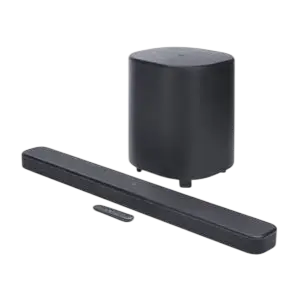
The JBL Bar 500MK2 is a 5.1-channel soundbar system with a slim soundbar and a separate wireless subwoofer that pairs automatically. It has virtual Dolby Atmos height effects, room calibration through a built-in microphone, and HDMI eARC with HDR10+ and Dolby Vision passthrough. Beyond the TV, it plays audio over Bluetooth 5.3 and over Wi-Fi through Google Cast, AirPlay, Spotify Connect and the JBL One app. The app also handles setup, audio settings and software updates.
Product Specifications
| Specification | Details |
| Models | BAR 500MK2 (soundbar), BAR 500MK2 SUB (subwoofer) |
| Sound system | 5.1 channel |
| Power supply | 100–240 V AC, 50/60 Hz |
| Total max power (THD 1%) | 750 W (375 W RMS) |
| Soundbar / subwoofer max power | 450 W (225 W RMS) / 300 W (150 W RMS) |
| Soundbar drivers | 5 x (42 x 80) mm racetrack drivers, 4 x 0.75″ (20 mm) tweeters |
| Subwoofer driver | 10″ (260 mm) |
| Frequency response | 40 Hz – 20 kHz (-6 dB) |
| HDMI | 1 input, 1 output with eARC; HDCP 2.3; HDR10+ and Dolby Vision passthrough |
| Other inputs | Optical, Bluetooth, USB (playback on US version only) |
| Bluetooth | v5.3, A2DP v1.3, AVRCP v1.5 |
| Wi-Fi | IEEE 802.11 a/b/g/n/ac/ax, 2.4 GHz / 5 GHz |
| Networked standby power | <2.0 W |
| Operating temperature | 0 °C – 45 °C |
| Soundbar size / weight | 940 x 50.5 x 104 mm (37″ x 2.0″ x 4.1″), 2.9 kg (6.5 lbs) |
| Subwoofer size / weight | 325 x 400 x 325 mm (12.8″ x 15.7″ x 12.8″), 8.1 kg (17.8 lbs) |
What’s in the Box
- Soundbar
- Subwoofer
- Remote control with 2 AAA batteries
- HDMI cable (1.2 m / 3.9 ft)
- Wall-mounting kit
- Product information and wall-mounting template
- Power cords (quantity and plug type vary by region)
If any part is damaged or missing, don’t use it. Contact your retailer or JBL customer service instead.
Parts and Controls
The top panel has three buttons:
- Volume – / + switches the soundbar on and changes the volume. Press both together to mute, or hold both for more than 10 seconds to enter Wi-Fi setup mode.
- Source switches the soundbar on and cycles through TV, Bluetooth and HDMI IN. Hold it for more than 3 seconds to start Bluetooth pairing.
On the back you’ll find:
- the power connector
- a USB port (for software service on all versions, and for MP3 playback on US versions only)
- HDMI IN for a source device
- HDMI OUT (eARC/ARC) for your TV
- an optical input
The remote has power and mute, direct source buttons, and Dolby Atmos, bass and CALIBR buttons. Its Moment button opens the playlist or settings you’ve saved in the JBL One app.
Status Indicator Lights
| Light | Meaning |
| Regular pulsing white | System startup |
| Fast pulsing white | Software update in progress |
| Solid amber | Restoring factory settings |
| Slow pulsing white | Wi-Fi setup mode or network disconnected |
| Solid white | Network connected |
| Solid yellow | Weak Wi-Fi connection |
The subwoofer has its own light:
- Solid white: connected
- Fast-flashing white: pairing mode
- Regular-flashing white: reconnecting
- Solid amber: standby
Placement and Wall-Mounting
Set the soundbar on a flat, stable surface and don’t put anything on top of it. The placement diagram (p. 8) suggests these distances:
- subwoofer at least 10 cm (4″) from the wall
- subwoofer 1–6 m (3–20 ft) from the soundbar
- your seat about 2.5–3.0 m (8.2–9.8 ft) from the soundbar
To wall-mount:
- Stick the supplied template to the wall with adhesive tape. Mark the screw holder locations with the tip of a ballpoint pen, then remove the template.
- Drill a 4 mm (0.16″) hole at each mark and install the bracket supports. The mounting points are 600 mm (23.6″) apart.
- Screw the wall-mounting brackets onto the bottom of the soundbar.
- Mount the soundbar.
Before you mount it (p. 9):
- Unplug the soundbar, or you could get an electric shock.
- Use only a vertical wall that can hold the soundbar’s weight.
- Avoid hot or humid spots.
- Make sure your cables will reach.
Connecting to Your TV and Devices
HDMI is the best connection because one cable carries both audio and video. If both HDMI and optical are connected for TV audio, HDMI takes priority.
HDMI eARC (Recommended)
- Connect the soundbar’s HDMI OUT to your TV’s HDMI IN (eARC) port with the supplied cable. Then turn on HDMI-CEC and eARC in the TV’s settings.
- Connect your streaming device, set-top box, Blu-ray player or console to the TV with an HDMI cable (V2.0 or later). Turn on HDMI-CEC on that device.
- On the TV and the source device, set the audio output to “Bitstream” or “Raw data” for the best Dolby Atmos results.
To hear devices that are plugged into your TV, select the TV source.
HDMI ARC
If your TV only supports ARC, plug your source device into the soundbar’s HDMI IN port instead of the TV. Otherwise, Dolby Atmos information can’t pass through the ARC connection. Select the HDMI IN source to play that device.
Optical
Connect the soundbar to your TV with an optical cable (sold separately) and select the TV source.
Power On
Finish all other connections first. Then plug in the soundbar with the supplied cord. The display shows “LOAD” and then “HELLO.” Next, plug in the subwoofer. It connects automatically, and its light turns solid white.
Bluetooth and Wi-Fi Setup
Pairing a Bluetooth Device
- Press Source on the soundbar or the Bluetooth button on the remote. “BT PAIRING” appears.
- On your phone, tablet or laptop, search for “JBL BAR 500MK2” within three minutes. “BT CONNECTED” appears and a tone plays when the connection is made.
The last paired device reconnects automatically. To pair a different one, hold Source or the remote’s Bluetooth button for 3 seconds until “BT PAIRING” appears. If the device was paired before, unpair “JBL BAR 500MK2” on it first.
The connection drops beyond 10 m (33 ft). Microwaves and wireless LAN devices nearby can also cause interference.
Connecting to Wi-Fi
- Wake the soundbar. If it has never been on a network, it shows “HELLO” and then “SETUP WIFI.”
- Connect your Android or iOS device to your home Wi-Fi and download the JBL One app.
- Open the app and follow its instructions to finish setup.
Once it’s connected, you can stream with the JBL One app, Google Cast, AirPlay or Spotify Connect. The soundbar streams audio only, not video.
For multi-room playback, you have two options:
- Google Cast: group speakers in the Google Home app. You can stream to up to 6 speakers, depending on your network bandwidth.
- AirPlay: select several speakers in Control Center on your iPhone or iPad.
Sound Settings
- Calibration: Press CALIBR on the remote. When “PRESS AGAIN TO CONFIRM” appears, press it again. A countdown and a test tone follow, and “DONE” appears when it’s finished. The other remote buttons don’t work during calibration.
- Dolby Atmos: Press the Atmos button to turn height effects on or off (default: on). Height effects only work with Dolby Atmos content from the TV or HDMI IN source.
- Bass: Press the bass button to pick LVL1 through LVL5 (default: LVL3).
- Audio sync: On the remote, hold TV for more than 3 seconds and press +. Within 5 seconds, press + or – to adjust the delay. You can also adjust the delay in the JBL One app.
Using Your TV Remote
If your TV supports HDMI-CEC, its remote can control the soundbar’s volume, mute and power.
If your TV doesn’t support HDMI-CEC, use IR learning:
- On the soundbar, hold Source and + until “LEARNING” appears.
- Point your TV remote at the soundbar. When “POWER,” “VOL+,” “VOL–” or “MUTE” appears, press the matching button on your TV remote. “DONE” confirms each one.
Learning mode ends after 30 seconds without any input, and the learned commands are lost. IR learning doesn’t work with Bluetooth TV remotes.
Power, Updates, and Reset
After more than 10 minutes without use, the soundbar goes into standby and shows “STDBY.” It wakes up automatically in three cases:
- your TV is switched on (with an HDMI eARC/ARC connection)
- a source device connected over HDMI is switched on
- audio is streamed to it over your home network
When the soundbar is online, software updates install automatically. The display shows “WAIT” during the update and “DONE” when it’s complete.
To restore factory settings, hold Source, + and – on the soundbar for more than 5 seconds. “RESET” appears, and the soundbar restarts when the reset is complete.
Re-Pairing the Subwoofer
- Hold the button on the back of the subwoofer until its light flashes white quickly.
- On the remote, hold the bass button for more than 3 seconds, then press –. “SUB PAIRING” appears, followed by “SUB PAIRED.”
If pairing isn’t completed within 3 minutes, the subwoofer goes back to standby.
Safety Instructions
- Use the soundbar only on 100–240 V, 50/60 Hz AC power. Other voltages can create a safety and fire hazard and may damage the unit.
- Use only the supplied power cord. Extension cords aren’t recommended. Don’t run cords under rugs or put heavy objects on them.
- Have a damaged power cord replaced right away by an authorized service center.
- Unplug by pulling the plug, not the cord. Unplug the soundbar if you won’t use it for a long time.
- Don’t open the cabinet. There are no parts you can service inside, and any modification voids the warranty.
- If water gets inside, unplug the unit right away and contact an authorized service center.
Troubleshooting
| Problem | What to Try |
| Won’t turn on | Check that the power cord is plugged into both the outlet and the soundbar. |
| Buttons don’t respond | Restore factory settings. |
| No sound | Check that it isn’t muted, select the correct source, check the connections, or restore factory settings. |
| Distorted sound or echo | Mute the TV or turn off its built-in speakers. |
| Audio and video out of sync | Use the audio sync setting. |
| No Dolby Atmos height effects | With an ARC-only TV, plug the source device into the soundbar’s HDMI IN. Atmos isn’t supported over Bluetooth, Google Cast or AirPlay. |
| Bluetooth won’t connect | Turn on Bluetooth on the device. If it was paired before, unpair “JBL BAR 500MK2” on the device, put the soundbar back in pairing mode and pair again. |
| Poor or dropping Bluetooth audio | Move the device closer or remove anything blocking it. |
| Wi-Fi fails | Check the network name and password, router range, and that the router’s security type is WPA2 or auto. To restart Wi-Fi setup, hold – and + until “SETUP WIFI” appears. |
| AirPlay can’t find the soundbar | Update your Apple device to iOS 13.4 or later, macOS 10.15.4 or later, or tvOS 14.3. Make sure it’s on the same network as the soundbar. |
| Remote doesn’t work | Replace the batteries, or move closer to the soundbar and point the remote more directly at it. |
Frequently Asked Questions
Does the JBL Bar 500MK2 subwoofer need a cable to the soundbar?
No. The subwoofer is paired with the soundbar at the factory and connects wirelessly once both are plugged in. It still needs its own power cord.
Why am I not hearing Dolby Atmos height effects?
Height effects only work with Dolby Atmos content from the TV or HDMI IN source, and Atmos must be turned on. With an ARC-only TV, plug your source device directly into the soundbar’s HDMI IN port. Setting your devices to “Bitstream” or “Raw data” also helps.
Can I play music from a USB drive?
Only on the US version, which plays MP3 files from a USB drive with a Type A connector. On other versions, the USB port is for service only.
How far can my phone be from the soundbar over Bluetooth?
Up to 10 m (33 ft). Beyond that the connection drops, and obstacles or nearby devices like microwaves can lower the sound quality.
Can I control the soundbar with my TV remote?
Yes. With HDMI-CEC, your TV remote can control volume, mute and power. If your TV doesn’t support HDMI-CEC, IR learning can teach the soundbar those commands from an infrared remote.
How do I update the software?
Connect the soundbar to your home network. Updates install automatically whenever they’re available.
Can I use the Bar 500MK2 in a multi-room setup?
Yes. You can group it with other Google Cast speakers in the Google Home app, as long as they’re on the same network and use the same Google account. You can also select several AirPlay speakers from an iPhone or iPad.