| Field | Details |
| Document Title | Stack & Store Waffle Maker Instruction Manual |
| Document Type | Instruction Manual |
| Brand Name | BELLA |
| Product Name | Stack & Store Waffle Maker |
| Model Number(s) | 35116, 35160, 35161, 35162, 35223 |
| PDF File Size | 376 KB |
| Number of Pages | 16 |
| Languages | English, Spanish |
BELLA Stack & Store Waffle Maker 35116
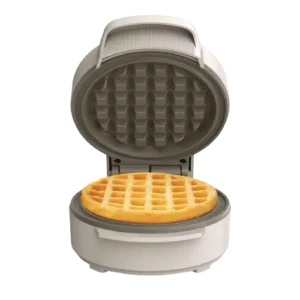
The BELLA Stack & Store Waffle Maker is a compact electric kitchen appliance designed for preparing individual waffles using heated ceramic nonstick cooking plates. It features an orange power indicator light, a hinged upper lid, and a handle for opening and closing the appliance.
The waffle maker operates from a standard 120 V AC electrical outlet. Once connected, the cooking plates begin heating. The orange indicator light signals when the appliance reaches its cooking temperature and cycles on and off as heat is maintained.
Waffles generally cook in approximately 2–3 minutes, depending on the batter and desired browning. Additional cooking time can be added in short intervals for a darker finish.
These instructions cover first-time preparation, waffle cooking, indicator light operation, ceramic nonstick plate care, cleaning, reheating, freezing, safety precautions, troubleshooting, and warranty service.
Product Overview and Technical Specifications
The BELLA Stack & Store Waffle Maker is intended for indoor household use. Its upper and lower ceramic nonstick plates cook waffle batter between two heated surfaces.
The appliance uses an orange power indicator to communicate heating status. It does not require a separate start button during normal operation. Heating begins when the power cord is connected to a suitable electrical outlet.
| Specification | Details |
| Brand | BELLA |
| Product Name | Stack & Store Waffle Maker |
| Product Type | Electric waffle maker |
| Electrical Supply | 120 V AC |
| Power Plug | Polarized plug |
| Cooking Surface | Ceramic nonstick waffle plates |
| Cooking Plates | Upper and lower |
| Power Indicator | Orange indicator light |
| Lid | Hinged upper lid |
| Handle | Integrated lid handle |
| Approximate Cooking Time | 2–3 minutes |
| Additional Cooking Intervals | 20 seconds |
| Reheating Time | Approximately 1 minute |
| Cooking Temperature | Automatically regulated |
| Intended Use | Indoor household use only |
Main Features
The waffle maker provides the following features:
- Ceramic nonstick cooking plates: Help waffles release from the heated surfaces and make cleaning easier.
- Orange indicator light: Shows heating and temperature-maintenance status.
- Hinged lid: Opens to allow batter to be added and cooked waffles to be removed.
- Integrated handle: Provides a designated grip for opening and closing the appliance.
- Automatic heating: Begins when the appliance is connected to electricity.
- Short cooking cycle: Prepares waffles in approximately 2–3 minutes, depending on the recipe.
- Waffle reheating: Allows previously cooked waffles to be warmed directly on the cooking plates.
Parts and Components
The BELLA Stack & Store Waffle Maker has three main components identified in the product illustration.
| Part | Description and Function |
| Waffle Plates | Upper and lower ceramic nonstick heating surfaces that cook waffle batter. |
| Orange Power Light | Indicates heating status and cycles as the appliance maintains cooking temperature. |
| Handle | Allows the upper lid to be opened and closed. |
Ceramic Nonstick Waffle Plates
The upper and lower waffle plates contain a ceramic nonstick coating.
The plates are designed to cook batter evenly between the two heated surfaces.
For initial cooking, a light coating of vegetable oil, olive oil, or canola oil can be applied to the plates.
Important: Do not use aerosol cooking sprays. They can leave residue on the plates and affect the ceramic nonstick coating’s performance.
Orange Power Indicator Light
The orange indicator light provides information about the heating process.
In the English operating instructions, the light turns off when the waffle maker reaches its proper cooking temperature.
During baking, the light may switch on and off as the appliance maintains heat.
Handle and Hinged Lid
The integrated handle is used to lift or lower the upper cooking plate.
The lid must be handled carefully during operation because the cooking surfaces become very hot.
Use oven mitts when opening the waffle maker during or immediately after cooking.
Orange Power Light and Heating Guide
The waffle maker regulates its cooking temperature automatically.
The orange power light is the main operating indicator.
| Indicator Status | Meaning | Action |
| Initial heating | Cooking plates are heating after connection to power. | Keep the lid closed while the appliance heats. |
| Orange light turns OFF | The cooking temperature has been reached, according to the English operating instructions. | Open the lid carefully and prepare the plates for batter. |
| Orange light cycles ON and OFF | The appliance is maintaining its cooking temperature. | Continue cooking as directed. |
| Orange light turns OFF during cooking | The heating cycle has reached its regulated temperature. | Check the waffle’s progress using oven mitts. |
How to Know When the Waffle Maker Is Ready
- Connect the power cord to a 120 V AC electrical outlet.
- Allow the cooking plates to heat.
- Watch the orange power indicator.
- When the light turns off, the appliance has reached the cooking temperature described in the English operating instructions.
- Open the lid using the handle and appropriate heat protection.
Once the appliance has heated, subsequent ready times may be shorter.
Why the Orange Light Turns On and Off
The orange light may cycle during cooking because the appliance automatically maintains its heating temperature.
This is a normal part of operation.
The waffle maker remains powered whenever it is plugged into an electrical outlet.
Important: Unplug the waffle maker after use. The appliance remains ON unless disconnected from electricity.
Important Safety Instructions
The BELLA Stack & Store Waffle Maker generates high temperatures during operation. Its cooking plates and surrounding components can remain hot after the power cord is disconnected.
Proper safety precautions are necessary to prevent burns, fire, electrical shock, and damage to the appliance.
Electrical Safety
- Connect the appliance only to a 120 V AC electrical wall outlet.
- Never immerse or partially immerse the waffle maker, power cord, or plug in water or another liquid.
- Disconnect the appliance whenever it is not in use.
- Unplug the waffle maker before cleaning.
- Allow the appliance to cool before cleaning or storage.
- Never pull the power cord to disconnect the appliance. Hold the plug and remove it from the outlet.
- Do not use the waffle maker if the cord or plug is damaged.
- Do not operate the appliance after it malfunctions, falls, or becomes damaged.
- Keep the electrical cord away from hot surfaces.
- Do not allow the cord to hang over the edge of a table or countertop.
- Do not place the appliance on or near a hot gas burner, electric burner, or inside a heated oven.
- Do not use attachments that are not recommended by the manufacturer.
Warning: The waffle maker remains powered while connected to electricity. Always unplug it after use.
Hot Surface and Burn Prevention
The waffle maker becomes hot during baking and retains heat after it has been unplugged.
- Do not touch the hot cooking plates.
- Use the integrated handle to open or close the lid.
- Wear oven mitts when handling hot components or removing waffles.
- Allow metal parts to cool before cleaning.
- Do not place objects on top of the appliance while it is operating or remains hot.
- Avoid moving the appliance while it contains hot food, water, oil, or other hot liquids.
Caution: The ceramic cooking plates remain hot after baking. Do not touch them until the appliance has cooled sufficiently.
Safe Placement and Ventilation
Use the waffle maker only on a flat, level, heat-resistant surface.
During operation:
- Provide adequate ventilation above and around the appliance.
- Keep the appliance away from curtains, clothing, dish towels, wall coverings, and other flammable materials.
- Do not allow the waffle maker to touch combustible surfaces.
- Do not place objects on top of the appliance while it is hot.
- Never leave the appliance running unattended.
- Do not use the waffle maker outdoors.
- Do not use the appliance for commercial purposes.
Child Safety
Close supervision is required when the waffle maker is used by or near children.
The appliance is not intended for individuals, including children, with reduced physical, sensory, or mental capabilities or insufficient experience unless they receive appropriate supervision or instruction from a responsible person.
Children must not be allowed to play with the appliance.
Polarized Plug Instructions
The waffle maker includes a polarized electrical plug with one blade wider than the other.
The plug fits into a polarized outlet in only one direction.
If the plug does not fit:
- Remove it from the outlet.
- Reverse its orientation.
- Try inserting it again.
- If it still does not fit, contact a qualified electrician.
Never modify the polarized plug.
Power Cord and Extension Cord Safety
The waffle maker has a short power cord to reduce the possibility of entanglement or tripping.
If a longer detachable cord or extension cord is used:
- Its electrical rating must be at least equal to the electrical rating of the appliance.
- If the appliance is grounded, the extension cord must be a grounding-type three-wire cord.
- The cord must be positioned so that it does not hang over a countertop or table where children could pull it or someone could trip over it.
Countertop Protection
Certain countertop or furniture finishes may be affected by heat or plasticizers.
The manual recommends placing nonplastic coasters or place mats between the appliance and the finished surface.
This helps protect the surface from darkening, stains, and permanent marks.
Electrical Circuit Requirements
An overloaded electrical circuit may prevent the waffle maker from operating properly.
The appliance should be operated on a separate electrical circuit from other appliances.
Damaged Appliance Safety
Do not use the waffle maker if it is damaged, has been dropped, or begins malfunctioning.
Disconnect it from the outlet and have it examined by a qualified service agent for repair or electrical or mechanical adjustment.
Do not attempt to repair the appliance yourself.
Before First Use
Before preparing the first waffle, unpack and clean the appliance.
A small amount of smoke or odor may occur during initial operation.
First-Time Preparation
- Remove the waffle maker and all included components from the packaging.
- Remove the packaging materials.
- Clean the appliance according to the cleaning and maintenance instructions.
- Make sure the cooking plates and accessible surfaces are dry.
- Place the waffle maker on a flat, stable, heat-resistant surface.
- Keep the area around the appliance clear of flammable materials.
- Connect the power cord to a 120 V AC electrical outlet when ready to begin baking.
Important: Never immerse the waffle maker in water or place it in a dishwasher.
Initial Smoke or Odor
The appliance may produce a small amount of smoke or odor during its first use.
The manual describes this as normal and harmless.
However, it recommends not eating the first waffle prepared in the appliance.
How to Use the BELLA Stack & Store Waffle Maker
The waffle maker begins heating when connected to power.
Once the cooking plates reach the required temperature, waffle batter can be added and the lid closed.
Step-by-Step Waffle Making Instructions
- Position the appliance. Place the waffle maker on a flat, level, heat-resistant surface.
- Connect the power. Plug the cord into a 120 V AC wall outlet.
- Allow preheating. Wait for the appliance to reach its cooking temperature.
- Check the indicator. When the orange power light turns off, the waffle maker is ready according to the English operating instructions.
- Open the lid. Use the handle and appropriate heat protection to raise the upper plate.
- Apply oil. Lightly coat the cooking plates with vegetable oil, olive oil, or canola oil.
- Add batter. Pour waffle batter onto the lower plate.
- Spread evenly. Add enough batter to fill the lower plate and cover the raised grid areas.
- Close the lid. Lower the upper plate using the handle.
- Bake the waffle. Allow approximately 2–3 minutes, depending on the recipe.
- Check the waffle. Wearing oven mitts, gently lift the lid after the cooking period.
- Continue if necessary. If the lid resists opening, continue cooking for another 30 seconds before checking again.
- Adjust browning. If a darker waffle is desired, close the lid and continue baking in 20-second intervals.
- Remove the waffle. Use a wooden or heat-resistant plastic spatula.
- Prepare another batch. Close the lid and allow the appliance to return to cooking temperature before adding more batter.
- Disconnect after use. When cooking is finished, unplug the waffle maker.
Warning: Do not use metal, sharp, or pointed utensils on the ceramic nonstick plates.
How Much Batter to Use
The amount of waffle batter depends on the recipe and the consistency of the mixture.
The lower cooking plate should be filled sufficiently to cover the raised grid areas.
Use the same ladle or measuring cup each time to determine a suitable amount.
Avoid adding more batter than necessary to cover the lower plate.
How Long Does a Waffle Take to Cook?
The English operating instructions specify an approximate baking time of 2–3 minutes, depending on the recipe.
Additional baking time may be required for a darker result.
| Cooking Stage | Time |
| Initial Waffle Baking | Approximately 2–3 minutes |
| If the Lid Resists Opening | Add 30 seconds |
| Additional Browning | Add 20-second intervals |
| Reheating a Cooked Waffle | Approximately 1 minute, checking every 30 seconds |
Cooking results depend on the batter and the desired waffle texture.
How to Make Waffles Darker
If the waffle is lighter than desired:
- Close the lid.
- Continue baking for 20 seconds.
- Open the lid carefully and check the color.
- Repeat in 20-second intervals until the desired finish is reached.
Do not leave the waffle maker unattended while cooking.
How to Remove Waffles Safely
The waffle should be removed using a nonmetallic utensil.
Suitable utensils include:
- Wooden spatulas.
- Heat-resistant plastic spatulas.
Always use oven mitts when handling the hot waffle maker.
Do not use forks, knives, sharp objects, or metal utensils on the ceramic nonstick plates.
How to Make Multiple Batches
- Remove the finished waffle.
- Close the lid.
- Allow the appliance to return to the ready heating condition.
- Open the lid carefully.
- Add the next portion of batter.
- Repeat the normal baking procedure.
Once the appliance has heated, the waiting time between batches may be shorter.
How to Turn Off the Waffle Maker
The appliance must be disconnected from electricity after use.
- Finish the baking cycle.
- Remove the cooked waffle.
- Unplug the power cord from the wall outlet.
- Allow the waffle maker to cool before cleaning or storage.
Tips for Perfectly Baked Waffles
The consistency of the batter and the way the finished waffle is handled can affect its texture and appearance.
Avoid Overmixing Waffle Batter
Mix the waffle batter only until the large lumps of dry ingredients have dissolved.
Overmixing may cause the finished waffles to become hard.
Use a Consistent Batter Quantity
The amount of batter required depends on the recipe and its consistency.
Using the same ladle or measuring cup for each waffle helps produce consistent portions.
The batter should cover the lower plate and its raised grid areas.
Handle Soft Waffles Carefully
Soft waffles may break when removed from the cooking plates.
For easier handling:
- Allow the waffle to finish cooking.
- Carefully open the lid.
- Cut the waffle into halves or quarters if needed.
- Support it from underneath with a spatula.
- Lift it gently from the plate.
Prevent Waffles From Becoming Moist
Freshly cooked waffles can lose some crispness if moisture collects underneath them.
Place finished waffles on a wire cooling rack.
The rack allows air to circulate around the waffle and helps maintain its crisp texture.
How to Keep Waffles Warm and Crispy
When preparing multiple waffles to serve together, finished waffles can be kept warm in an oven.
Keeping Waffles Warm
- Preheat an oven to 200°F.
- Place the cooked waffles inside.
- Keep them warm while preparing additional batches.
- Use oven mitts when removing the waffles for serving.
A wire cooling rack can also be used to prevent moisture from collecting underneath freshly baked waffles.
How to Reheat Waffles
Previously cooked waffles can be reheated directly in the BELLA Stack & Store Waffle Maker.
Reheating Instructions
- Connect the waffle maker to a 120 V AC outlet.
- Allow the cooking plates to preheat.
- Open the lid using the handle.
- Place the cooked waffle onto the lower plate.
- Align the waffle with the grooves in the plate.
- Close the lid.
- Heat for approximately 1 minute.
- Check every 30 seconds to prevent burning.
- Carefully remove the reheated waffle using a nonmetallic utensil.
Always unplug the appliance after reheating.
How to Freeze Waffles
Cooked waffles can be frozen for later use.
Freezing Instructions
- Allow freshly cooked waffles to cool completely.
- Prepare a covered freezer container or plastic freezer bag.
- Place the waffles inside.
- Separate individual waffles with sheets of wax paper.
- Store the container or bag in the freezer.
The wax paper helps prevent individual waffles from sticking together.
How to Reheat Frozen Waffles
Frozen waffles may be reheated using:
- A preheated oven.
- A toaster oven.
- A toaster.
Heat until the waffles are hot.
Waffle Batter and Ingredient Tips
The instruction manual includes ingredient substitution suggestions for preparing waffles with different nutritional characteristics.
Lower-Sugar Waffles and Toppings
The following ingredients may be used when preparing lower-sugar waffles or toppings:
- Sugar substitutes.
- Organic agave nectar.
- Low-sugar preserves, marmalades, or jellies.
- Macerated dried fruits such as figs, dates, and prunes.
- Apple or mango sauce.
- Sugar-free maple syrup.
Lower-Fat, Lower-Cholesterol Waffles
The manual suggests adapting waffle recipes with the following ingredients:
- Skim milk.
- Almond milk.
- Coconut milk.
- Soy milk.
- Recipes prepared without egg yolks.
- Liquid vegetable oils such as canola, corn, or sunflower oil instead of butter.
Higher-Fiber Waffles
For higher-fiber waffle recipes, the manual suggests:
- Replacing half the white flour in a recipe with whole-wheat flour.
- Replacing one-quarter of the white flour with wheat or oat bran.
- Adding macerated high-fiber dried fruits such as figs, dates, or prunes.
The amounts and combinations depend on the waffle recipe.
Cleaning and Maintenance Instructions
The BELLA Stack & Store Waffle Maker requires routine cleaning of its cooking plates and exterior surfaces.
The appliance does not need to be disassembled for normal cleaning.
How to Clean the Waffle Maker
- Unplug the power cord from the electrical outlet.
- Allow the appliance to cool completely.
- Open the lid using the handle.
- Remove loose crumbs and excess cooking oil.
- Wipe the ceramic nonstick cooking plates with a soft cloth.
- Clean the exterior as appropriate.
- Allow all cleaned surfaces to dry before the next use.
Important: Never immerse the waffle maker in water or place it in a dishwasher.
Cleaning the Ceramic Nonstick Plates
The ceramic cooking surfaces should be cleaned gently.
Use a soft cloth to remove crumbs, cooking oil, and other residue.
Avoid using:
- Steel wool.
- Abrasive scouring pads.
- Metal utensils.
- Sharp cleaning tools.
Metal objects can damage the ceramic nonstick coating.
How to Remove Hardened Batter
If batter becomes hardened on the cooking plates:
- Unplug the appliance.
- Allow the waffle maker to cool.
- Apply a small amount of oil to the hardened batter.
- Leave the oil on the affected area for approximately 5–7 minutes.
- Wipe away the softened residue using a paper towel.
Avoid scraping the cooking plates with sharp or metal objects.
Cleaning the Exterior
The exterior housing can be cleaned using an appropriate soft cloth.
The manual also permits occasional use of a metal polish intended for stainless steel on applicable outer housing surfaces.
Do not use metal polish on the ceramic nonstick cooking plates.
Never use steel wool or abrasive scouring pads.
Protecting the Ceramic Nonstick Coating
Proper handling and cleaning help preserve the ceramic cooking surface.
Avoid Cooking Sprays
Do not use aerosol cooking sprays on the plates.
The sprays can create residue buildup and affect nonstick performance.
Instead, the operating instructions specify a light coating of vegetable oil, olive oil, or canola oil.
Use Nonmetallic Utensils
When removing waffles, use wooden or heat-resistant plastic utensils.
Never use metal, sharp, or pointed objects on the cooking plates.
Clean After Cooling
Allow the appliance to cool before cleaning.
Do not attempt to remove hardened batter while the cooking plates are hot.
Use the oil-softening method for stubborn batter residue.
Routine Maintenance
The waffle maker requires little maintenance beyond regular cleaning and safe handling.
| Maintenance Task | Instructions |
| Cooking Plate Cleaning | Remove crumbs and excess oil after the appliance cools. |
| Hardened Batter Removal | Apply a little oil, wait 5–7 minutes, and wipe away residue. |
| Ceramic Coating Care | Avoid aerosol cooking sprays, metal utensils, and abrasive cleaners. |
| Exterior Cleaning | Wipe with a soft cloth. |
| Power Cord Inspection | Do not use the appliance if the cord or plug is damaged. |
| Storage Preparation | Unplug and allow the appliance to cool completely. |
| Internal Repairs | Refer servicing to a qualified appliance repair technician. |
The waffle maker contains no user-serviceable internal components.
Do not attempt to disassemble or repair the appliance.
Troubleshooting Guide
The following table covers operating conditions and corrective actions supported by the waffle maker’s instructions.
| Problem or Situation | Possible Cause or Explanation | Recommended Action |
| Orange power light switches on and off | The appliance is maintaining its cooking temperature. | This is normal during baking. |
| Waffle sticks when the lid is lifted | The waffle may need additional cooking time. | Continue baking for 30 seconds before checking again. |
| Waffle is lighter than desired | Additional baking time is needed. | Continue cooking in 20-second intervals. |
| Waffle is hard | Batter may have been overmixed. | Mix only until large lumps of dry ingredients dissolve. |
| Soft waffle breaks during removal | Softer waffles can be delicate. | Cut into halves or quarters and support with a spatula. |
| Waffle becomes moist underneath | Moisture can collect as the waffle cools. | Place the finished waffle on a wire cooling rack. |
| Hardened batter sticks to the plates | Cooked batter residue has attached to the surface. | Apply a little oil, wait 5–7 minutes, and wipe clean. |
| Appliance emits smoke or odor during first use | An initial small amount of smoke or odor may occur. | The manual describes this as normal and recommends not eating the first waffle. |
| Waffle maker does not operate properly on a shared circuit | The electrical circuit may be overloaded. | Use a separate electrical circuit. |
| Appliance malfunctions or becomes damaged | An electrical or mechanical fault may have occurred. | Unplug the appliance, discontinue use, and contact a qualified service agent. |
Waffle Maker Orange Light Keeps Turning On and Off
The orange indicator light may turn on and off while the appliance is cooking.
This happens as the waffle maker maintains its operating temperature.
The English instructions identify the light turning off as the ready condition.
Waffle Sticking to the Upper Plate
If the waffle resists when the upper lid is lifted, it may require additional cooking time.
Close the lid and continue baking for approximately 30 seconds before testing again.
Do not pull the waffle apart or use metal utensils to force it away from the plate.
Waffle Not Brown Enough
If a darker waffle is preferred:
- Close the upper lid.
- Continue baking for 20 seconds.
- Carefully open and check the waffle.
- Repeat in 20-second intervals as needed.
Waffles Becoming Hard
Overmixing the batter can cause waffles to become hard.
Mix only until the large lumps of dry ingredients have dissolved.
Waffles Breaking During Removal
Soft waffles can break when lifted.
Cut the cooked waffle into halves or quarters if necessary and support it underneath using a spatula.
Cooking Plates Have Hardened Batter
If cooked batter has become attached to the ceramic plates, use the cleaning method described in the manual.
Apply a little oil, wait approximately 5–7 minutes, then wipe the residue away with a paper towel.
Do not scrape the plates with metal objects.
Waffle Maker Producing Smoke During First Use
A small amount of smoke or odor may occur during initial use.
The manual describes this as normal and harmless.
However, the first waffle should not be eaten.
Waffle Maker Not Working Properly
If the appliance does not operate properly when other appliances share the same electrical circuit, the circuit may be overloaded.
The manual recommends operating the waffle maker on a separate circuit.
If the appliance malfunctions, falls, or becomes damaged, unplug it and discontinue use.
Do not attempt internal repairs.
Storage Instructions
The waffle maker must be disconnected and allowed to cool before storage.
Preparing the Waffle Maker for Storage
- Remove the power plug from the wall outlet.
- Allow the appliance and its cooking plates to cool completely.
- Remove loose crumbs and excess oil.
- Wipe the cooking plates clean.
- Allow the cleaned surfaces to dry before storage.
Do not place objects on top of the appliance while it is operating or remains hot.
Warranty Information
The BELLA Stack & Store Waffle Maker includes a limited two-year warranty provided by SENSIO Inc.
The warranty begins on the date of purchase and applies to the original retail purchaser.
Limited Warranty Coverage
| Warranty Detail | Coverage |
| Warranty Provider | SENSIO Inc. |
| Mechanical Defects | 2 years from the purchase date |
| Non-Mechanical Parts | 90 days |
| Warranty Start Date | Original retail purchase date |
| Eligible Purchaser | Original retail purchaser |
| Transferability | Non-transferable |
| Proof of Purchase | Original sales receipt required |
| Available Remedies | Repair, replacement, or refund at SENSIO Inc.’s discretion |
The two-year limited warranty covers mechanical defects in materials and workmanship.
Non-mechanical parts are covered for 90 days.
During the warranty period, SENSIO Inc. may repair or replace a defective appliance or issue a refund.
Warranty Exclusions
The limited warranty does not cover normal wear or damage caused by:
- Negligent product use.
- Incorrect electrical voltage or current.
- Improper routine maintenance.
- Operation contrary to the instructions.
- Unauthorized disassembly.
- Repairs or modifications by anyone other than qualified SENSIO Inc. personnel.
- Natural disasters, including fires, floods, hurricanes, and tornadoes.
The warranty also includes limitations relating to incidental and consequential damages and implied warranties.
Some limitations may not apply in every state, province, or jurisdiction. Specific legal rights may vary.
How to Request Warranty Service
- Contact Customer Service at 1-866-832-4843.
- Describe the problem with the waffle maker.
- Follow the assistance provided by the customer service representative.
- If the problem cannot be resolved by telephone, obtain a case number and return instructions.
- Prepare a tag containing the purchaser’s name, address, daytime telephone number, case number, and description of the problem.
- Include a copy of the original sales receipt.
- Carefully package the appliance with the required documentation.
- Return it according to the instructions, with shipping and insurance prepaid.
SENSIO Inc. does not accept responsibility or liability for the returned product while it is in transit to its customer service center.
Customer Support and Contact Information
BELLA provides customer service for product questions, operating problems, and warranty assistance.
| Contact Type | Details |
| Brand | BELLA |
| Warranty Provider | SENSIO Inc. |
| Company | SENSIO Inc. dba Made by Gather |
| Customer Service Phone | 1-866-832-4843 |
| Customer Service Email | help@bellahousewares.com |
| Website | https://bellakitchenware.com |
| Company Location | New York, NY 10016, USA |
Product Registration
The instruction manual provides a product registration option through the BELLA website.
Registration can be accessed at https://bellakitchenware.com.
Keep the original sales receipt because proof of purchase is required for warranty validation.
Frequently Asked Questions
How do you use the BELLA Stack & Store Waffle Maker?
Place the appliance on a flat, heat-resistant surface and connect it to a 120 V AC outlet. Wait until the orange indicator light turns off, then open the lid and apply a light coating of vegetable, olive, or canola oil to the cooking plates. Add waffle batter, close the lid, and bake for approximately 2–3 minutes. Remove the waffle using a wooden or heat-resistant plastic spatula. Unplug the appliance after use.
What does the orange light mean on the BELLA Stack & Store Waffle Maker?
The orange light indicates the waffle maker’s heating status. The English operating instructions specify that it turns off when the appliance reaches its cooking temperature. During baking, the light cycles on and off as the appliance maintains heat.
How long does it take to cook a waffle in the BELLA mini waffle maker?
The English instructions give an approximate cooking time of 2–3 minutes, depending on the recipe. If the waffle sticks when the lid is lifted, continue baking for another 30 seconds. For additional browning, cook in 20-second intervals until the desired color is reached.
Why does the BELLA waffle maker smell or smoke during first use?
A small amount of smoke or odor may occur during initial operation. The instruction manual describes this as normal and harmless but recommends not eating the first waffle prepared in the appliance.
How do you clean the BELLA Stack & Store Waffle Maker?
Unplug the appliance and allow it to cool completely. Remove crumbs and excess cooking oil, then wipe the ceramic nonstick plates with a soft cloth. If batter has hardened, apply a small amount of oil, leave it for 5–7 minutes, and wipe it away with a paper towel. Never immerse the appliance in water or place it in a dishwasher.
Can waffles be reheated in the BELLA Stack & Store Waffle Maker?
Yes. Preheat the waffle maker, place the cooked waffle on the lower plate so it fits the grooves, and close the lid. Reheat for approximately one minute, checking every 30 seconds to prevent burning.
Can waffles be frozen and reheated later?
Yes. Allow the cooked waffles to cool completely, then place them in a covered freezer container or freezer bag with wax paper between each waffle. Frozen waffles can be reheated in a preheated oven, toaster oven, or toaster until hot.
What is the warranty on the BELLA Stack & Store Waffle Maker?
The waffle maker includes a limited two-year warranty for mechanical defects in materials and workmanship and 90 days of coverage for non-mechanical parts. The warranty begins on the original retail purchase date and requires proof of purchase. For warranty assistance, contact Customer Service at 1-866-832-4843 or help@bellahousewares.com.