| Field | Details |
| Document Title | Heatmiser RF-Switch 16A Instruction Manual |
| Document Type | Instruction Manual |
| Brand Name | Heatmiser |
| Product Name | RF-Switch Wireless Heating Receiver |
| Model Number(s) | RF-Switch 16A |
| PDF File Size | 81.8 KB |
| Number of Pages | 2 |
| Languages Covered | English |
Heatmiser RF-Switch 16A Wireless Heating Receiver
The Heatmiser RF-Switch 16A is a wireless-controlled heating switch designed to operate a connected heater using a wireless thermostat. It provides an electrical switching output that can be controlled through thermostat pairing or manually using the pairing/override button on the front panel.
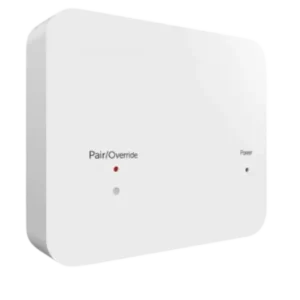
The RF-Switch 16A operates with a 230V AC mains supply and supports a maximum connected heater load of 16 amps. Its front panel includes a power status LED, an output status LED, and a pairing/override button for controlling the output, entering pairing mode, and performing a factory reset.
This instruction manual covers the RF-Switch 16A installation procedure, electrical connections, LED indications, manual output override, wireless thermostat pairing, and factory reset procedure.
Important: The Heatmiser RF-Switch 16A must not be used to control electric underfloor heating.
Product Overview
The following table summarizes the operating information and specifications provided for the Heatmiser RF-Switch 16A.
| Specification | Details |
| Brand | Heatmiser |
| Model | RF-Switch 16A |
| Product Type | Wireless heating receiver/switch |
| Power Supply | 230V AC |
| Maximum Heater Load | 16 amps |
| Control Method | Wireless thermostat and manual override |
| Pairing Control | Pairing/override button |
| Pairing Activation Time | 3 seconds |
| Factory Reset Activation Time | 10 seconds |
| Power Indicator | Power status LED |
| Output Indicator | Output status LED |
| Installation Method | Back plate mounted to a wall back box |
| Heating Restriction | Not for controlling electric underfloor heating |
Parts, Buttons, and LED Indicators
The RF-Switch 16A has a front panel containing the indicators and control button required for normal operation, wireless pairing, and manual output control.
Front Panel Components
| Component | Function |
| Power Status LED | Illuminates when the power supply is switched on. |
| Output Status LED | Indicates that the switching output is active when illuminated. |
| Pairing/Override Button | Used to turn the output on or off manually, activate pairing mode, and perform a factory reset. |
| Retaining Screw | Located at the base of the unit and secures the front panel to the back plate. |
| Back Plate | Mounting section attached to the wall back box. |
Power Status LED
The power status LED is positioned on the right side of the front panel.
When the electrical supply is switched on after installation, this indicator illuminates to show that power is reaching the RF-Switch.
Output Status LED
The output status LED is located toward the left side of the front panel, near the pairing/override control.
When the output is activated, the indicator illuminates.
When the output is manually switched off, the indicator turns off.
The indicator associated with the pairing/override control also provides flashing and steady-light indications during pairing and factory reset operations.
Pairing/Override Button
The pairing/override button performs three main functions depending on how long it is pressed.
| Button Action | Function |
| Press once | Toggles the output on or off. |
| Press and hold for 3 seconds | Activates wireless pairing mode. |
| Press and hold for 10 seconds | Initiates the factory reset procedure. |
The button is used for both manual switching and wireless setup. The correct press duration is therefore important.
Important Installation and Electrical Information
The RF-Switch 16A uses a 230V AC mains power supply and controls a connected heater with a maximum load of 16 amps.
Before installation, the following restrictions and connection requirements must be observed:
- The maximum connected heater load is 16 amps.
- The wiring arrangement must follow the RF-Switch 16A wiring diagram.
- The RF-Switch must not be used to control electric underfloor heating.
- The back plate is designed to attach to a wall back box.
- The front panel must be secured to the back plate using the retaining screw.
The wiring diagram on page 2 of the manual identifies the mains supply connections and the output connections to the heater.
Because these connections involve 230V mains electricity, the original diagram should be followed by a suitably qualified installer rather than relying on a written terminal summary alone.
How to Install the Heatmiser RF-Switch 16A
The RF-Switch 16A consists of a front panel and a back plate. The back plate is mounted to the wall back box, while the front panel is fitted after the electrical connections have been completed.
Step 1: Loosen the Retaining Screw
- Locate the retaining screw at the base of the RF-Switch 16A.
- Use a small screwdriver to loosen the screw slightly.
- Carefully separate the front panel from the back plate.
Step 2: Mount the Back Plate
- Position the RF-Switch back plate against the back box installed in the wall.
- Align the mounting points.
- Secure the back plate using the screws provided.
The back plate should be fixed in position before the front panel is reattached.
Step 3: Connect the Electrical Cables
Terminate the electrical cables at the RF-Switch terminals according to the manufacturer’s wiring diagram in Section 6 of the instruction manual.
The diagram identifies the heater output connections, live and neutral connections, and earth terminal.
The supply voltage and maximum connected load must correspond to the values shown in the manual.
Step 4: Reattach the Front Panel
- Position the RF-Switch front panel onto the mounted back plate.
- Fit the front panel into place.
- Tighten the retaining screw at the base to secure the assembly.
Step 5: Switch On the Power Supply
Once installation has been completed:
- Switch on the electrical supply.
- Check the power status LED on the front panel.
- The power LED should illuminate when the RF-Switch receives power.
The RF-Switch can then be paired with the wireless thermostat using the pairing procedure.
Heatmiser RF-Switch 16A Wiring Diagram
The RF-Switch 16A wiring diagram is provided in Section 6 on page 2 of the original instruction manual.
The diagram illustrates a 230V AC mains connection and a switched output for a connected heater.
Wiring Terminal Identification
The labeled terminals in the wiring diagram are arranged as follows:
| Terminal | Connection Shown in Wiring Diagram |
| LOAD | Switched output connection to the heater |
| L | Live connection from the mains supply |
| N (first) | Neutral connection to the heater |
| N (second) | Neutral connection from the mains supply |
| E | Earth connection from the mains supply |
The diagram identifies the mains supply connections as L, E, and N, with a 230V supply.
The heater is connected through the load output and neutral connection shown in the diagram.
Maximum Connected Heater Load
The RF-Switch 16A has a maximum heater load rating of 16 amps.
The connected heater load must not exceed this maximum.
Electric Underfloor Heating Restriction
The Heatmiser RF-Switch 16A must not be used to control electric underfloor heating.
This restriction applies even though the device provides an electrical switching output for a heater.
Refer to the original wiring diagram on page 2 for the exact arrangement of terminal connections.
How to Manually Override the RF-Switch 16A Output
The RF-Switch 16A includes a manual override function that allows the switching output to be turned on or off using the pairing/override button.
This operation is performed directly on the receiver.
Turning the Output On
To activate the output manually:
- Locate the pairing/override button on the front panel.
- Press the button once.
- The switching output will activate.
- The output status LED will illuminate.
The illuminated output LED indicates that the RF-Switch output is active.
Turning the Output Off
To deactivate the output manually:
- Press the pairing/override button once again.
- The switching output will turn off.
- The output status LED will also turn off.
The button therefore toggles the output between its on and off states.
Manual Override LED Indication
| Output Status | Output LED |
| Output active | Illuminated |
| Output inactive | Off |
The LED provides a visual indication of the switching output state.
How to Pair the Heatmiser RF-Switch 16A With a Wireless Thermostat
The RF-Switch 16A can be paired with a wireless thermostat.
The receiver must first be placed into pairing mode before the pairing procedure is completed using the thermostat.
Step 1: Activate Pairing Mode
- Locate the pairing/override button on the RF-Switch.
- Press and hold the button for 3 seconds.
- Observe the pairing/override LED.
- The LED will begin flashing.
The flashing LED indicates that pairing mode has been activated.
Step 2: Complete Pairing Using the Wireless Thermostat
Once the RF-Switch is in pairing mode, the remaining pairing procedure must be completed using the wireless thermostat.
The exact pairing method depends on the thermostat model being used.
Follow the pairing instructions provided in the instruction manual for that wireless thermostat.
Pairing LED Indication
| LED Behavior | Meaning |
| Flashing after holding the button for 3 seconds | Pairing mode is active |
The RF-Switch enters pairing mode using the same front-panel button that controls the manual output override.
How to Factory Reset the Heatmiser RF-Switch 16A
The RF-Switch 16A includes a factory reset procedure operated through the pairing/override button.
A reset is initiated by holding the button for 10 seconds.
Factory Reset Instructions
- Locate the pairing/override button on the front panel.
- Press and hold the button continuously for 10 seconds.
- While the button is held, the RF-Switch LED will flash.
- After 10 seconds, the LED will stop flashing and remain continuously illuminated.
- Release the pairing/override button.
- The factory reset procedure is complete.
Factory Reset LED Sequence
| Reset Stage | LED Behavior |
| Button held during the reset process | LED flashes |
| After 10 seconds | LED remains continuously illuminated |
| Button released | Factory reset procedure is completed |
The reset procedure should be performed using the full 10-second button hold described above.
LED Status and Indicator Guide
The RF-Switch 16A uses front-panel LED indications to communicate its power status, output status, pairing mode, and reset procedure.
The meaning of an LED indication depends on the operation being performed.
| LED / Indicator Behavior | Meaning or Action |
| Power status LED illuminated | Power supply is switched on. |
| Output status LED illuminated during normal operation | Switching output is active. |
| Output status LED off after manually disabling the output | Switching output has been turned off. |
| Pairing/override LED flashing after a 3-second hold | Pairing mode is active. |
| LED flashing during a 10-second button hold | Factory reset sequence is in progress. |
| LED continuously illuminated after a 10-second reset hold | Release the button to complete the reset. |
The output indicator also communicates pairing and reset activity, so the button action and duration should be considered when interpreting its behavior.
Troubleshooting Guide
The following operating checks use the button procedures and indicator behavior described in the instruction manual.
| Problem or Symptom | Recommended Check or Action |
| Power LED is not illuminated | The power LED should illuminate when the power supply is switched on. Check the supply status without accessing live electrical connections. |
| Switching output is inactive | When the output is off, press the pairing/override button once to activate it. The output LED should illuminate. |
| Output needs to be switched off manually | Press the pairing/override button once when the output is active. The output LED should turn off. |
| Receiver needs to enter pairing mode | Press and hold the pairing/override button for 3 seconds until the LED flashes. |
| Wireless thermostat pairing needs to be completed | Follow the pairing procedure in the instruction manual for the specific wireless thermostat model. |
| Factory reset is required | Hold the pairing/override button for 10 seconds. Release it after the LED changes from flashing to continuously illuminated. |
For electrical faults or issues that remain unresolved, Heatmiser provides technical support through its official support contact information.
Customer Support
Heatmiser provides customer and technical support for questions about the RF-Switch 16A.
| Support Channel | Contact Information |
| Manufacturer | Heatmiser |
| Technical Support Phone | +44 (0)1254 669090 |
| Official Website | www.heatmiser.com |
| Twitter / X | @heatmiseruk |
| facebook.com/thermostats |
The Heatmiser website is also identified in the instruction manual as a source for technical specifications and further product information.
Frequently Asked Questions
1. What is the Heatmiser RF-Switch 16A used for?
The Heatmiser RF-Switch 16A is a wireless-controlled electrical switch used to operate a connected heater through a wireless thermostat. It also provides a pairing/override button for manual output switching.
It is designed for a 230V AC supply and a maximum connected heater load of 16 amps.
2. How is the Heatmiser RF-Switch 16A paired with a thermostat?
Press and hold the pairing/override button on the RF-Switch for 3 seconds. The LED will flash to indicate that pairing mode is active.
Complete the remaining pairing steps using the instructions for the wireless thermostat model being connected.
3. How can the RF-Switch 16A output be turned on or off manually?
Press the pairing/override button once to toggle the switching output.
When the output turns on, the output LED illuminates. Pressing the button again switches the output off and turns off the LED.
4. How is the Heatmiser RF-Switch 16A factory reset?
Press and hold the pairing/override button for 10 seconds.
During this period, the LED flashes. After 10 seconds, the LED remains continuously illuminated. Release the button to complete the factory reset.
5. What does the flashing LED on the Heatmiser RF-Switch 16A mean?
A flashing LED indicates different operations depending on the button press.
A 3-second press activates pairing mode and causes the LED to flash.
During the 10-second factory reset procedure, the LED also flashes before becoming continuously illuminated.
6. What is the maximum load supported by the Heatmiser RF-Switch 16A?
The maximum connected heater load is 16 amps.
The RF-Switch wiring diagram specifies a 230V AC mains supply and a maximum heater load of 16 amps.
7. Can the Heatmiser RF-Switch 16A control electric underfloor heating?
No. The manufacturer’s instruction manual explicitly prohibits using the RF-Switch 16A to control electric underfloor heating.
8. Where is the Heatmiser RF-Switch 16A wiring diagram located?
The wiring diagram is located in Section 6 on page 2 of the original instruction manual.
It shows the 230V mains supply terminals and the connections for the heater, along with the maximum load rating and the electric underfloor heating restriction.