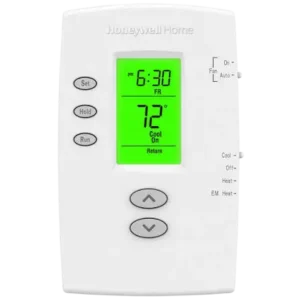
| Field | Details |
| Document Title | Honeywell Home PRO 2000 Series Programmable Thermostat Operating Manual |
| Document Type | Operating Manual |
| Brand Name | Honeywell Home |
| Product Name | PRO 2000 Series Programmable Thermostat |
| Model Number(s) | TH2110DH, TH2210DH |
| PDF File Size | 622 KB |
| Total Number of Pages | 72 |
| Languages Covered | English, French, Spanish |
Honeywell Home PRO 2000 Series Programmable Thermostat
The Honeywell Home PRO 2000 Series is a programmable thermostat designed to provide reliable heating and cooling control through simple push-button operation. It features an easy-to-read backlit display, preset temperature schedules, manual temperature adjustments, and built-in compressor protection.
The thermostat automatically displays the current room temperature and allows users to check or change the desired temperature with the Up and Down buttons. Its programmable schedule supports four daily periods: Wake, Leave, Return, and Sleep. Separate schedules can be configured for weekdays and weekends to match household routines.
The PRO 2000 Series includes two models:
- TH2110DH: Designed for single-stage heating and cooling systems with 1 Heat/1 Cool control.
- TH2210DH: Designed specifically for heat pump systems with 2 Heat/1 Cool control, including supported emergency and auxiliary heating functions.
The thermostat comes with preset energy-saving schedules. After setting the correct time and day, the system and fan settings can be selected, and the programmed temperatures can be adjusted as needed.
Product Features
The PRO 2000 Series provides straightforward temperature control without complicated operation.
| Feature | Description |
| Programmable Scheduling | Four temperature periods per day |
| Weekday and Weekend Programming | Separate Monday–Friday and Saturday–Sunday schedules |
| Backlit Display | Screen illuminates for 12 seconds after a button is pressed |
| Room Temperature Display | Shows the measured indoor temperature |
| One-Touch Temperature Adjustment | Allows immediate changes using Up and Down buttons |
| Temporary Override | Changes the temperature until the next scheduled period |
| Permanent Hold | Maintains a selected temperature continuously |
| Early Start | Starts heating or cooling early to reach the scheduled temperature |
| Compressor Protection | Provides a five-minute compressor restart delay |
| Fan Control | Auto and On settings |
| Battery Warning | Displays a low-battery notification |
| Preset Programs | Includes factory-programmed energy-saving temperatures |
Technical Specifications
| Specification | Details |
| Product Series | PRO 2000 |
| Product Type | Programmable Thermostat |
| Model TH2110DH | 1 Heat/1 Cool systems |
| Model TH2210DH | 2 Heat/1 Cool heat pump systems only |
| Display Type | Backlit digital display |
| Display Backlight Duration | 12 seconds after a button press |
| Temperature Display | Current room temperature and setpoint |
| Setpoint Display Duration | 5 seconds after pressing Up or Down once |
| Heating Temperature Range | 40–90°F (4.5–32°C) |
| Cooling Temperature Range | 50–99°F (10–37°C) |
| Scheduling | Four periods daily |
| Programming Format | Weekday and weekend schedules |
| System Modes | Heat, Off, Cool, and Em Heat on select models |
| Fan Modes | Auto and On |
| Compressor Protection Delay | 5 minutes |
| Battery Type | AAA alkaline |
| Battery Quantity | 2 |
| Recommended Battery Replacement | Once per year |
| Warranty | 2-year limited warranty |
TH2110DH and TH2210DH Model Differences
| Model | Compatible System | Heating and Cooling Control |
| TH2110DH | Conventional single-stage heating and cooling | 1 Heat/1 Cool |
| TH2210DH | Heat pump systems only | 2 Heat/1 Cool |
The TH2210DH supports emergency and auxiliary heating functions where the connected heat pump system provides those capabilities.
How to Identify the Thermostat Model
The model number and date code are located on the back of the thermostat.
- Hold the thermostat securely.
- Pull gently from the bottom to remove it from the wallplate.
- Turn the thermostat over.
- Locate the model number and date code on the rear label.
- Reattach the thermostat to the wallplate.
Thermostat Parts and Controls
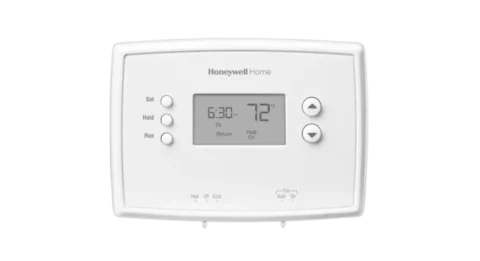
The PRO 2000 Series uses three push buttons on the left side, two temperature adjustment buttons on the right, and two sliding switches along the bottom.
Control Button Functions
| Control | Function |
| SET | Sets the time, day, and programmed schedule |
| HOLD | Overrides the programmed temperature schedule |
| RUN | Returns the thermostat to its programmed schedule |
| Up (▲) | Increases the temperature or adjusts the selected setting |
| Down (▼) | Decreases the temperature or adjusts the selected setting |
| SYSTEM Switch | Selects heating, cooling, off, or emergency heating |
| FAN Switch | Selects automatic or continuous fan operation |
SET Button
The SET button is used when changing the clock, day, or heating and cooling schedule.
Repeatedly pressing SET moves through the available programming settings.
HOLD Button
The HOLD button allows the thermostat to maintain a selected temperature instead of following its programmed schedule.
The selected temperature remains active until it is manually changed or the RUN button is pressed.
RUN Button
The RUN button saves settings and returns the thermostat to normal scheduled operation.
It also cancels temporary and permanent temperature overrides.
Temperature Adjustment Buttons
The Up and Down buttons adjust the desired temperature.
Pressing either button once displays the current setpoint for five seconds.
Thermostat Display and Indicator Guide
The thermostat display shows room temperature, time, day, schedule period, and heating or cooling status.
Display Symbols and Messages
| Display Message | Meaning |
| Set | The displayed temperature is the selected setpoint |
| Wake | Morning program period |
| Leave | Away-from-home program period |
| Return | Evening program period |
| Sleep | Overnight program period |
| Heat On | Heating system is operating |
| Cool On | Cooling system is operating |
| Aux On | Auxiliary heating is operating on supported systems |
| Temporary | Temporary temperature override is active |
| Hold | Permanent temperature hold is active |
| Lo Batt | Batteries require replacement |
| Flashing Heat On | Compressor restart protection is active on a heat pump |
| Flashing Cool On | Compressor restart protection is active |
| Flashing Clock | Time and day need to be reset |
Room Temperature and Setpoint Temperature
During normal operation, the display shows the measured indoor temperature.
To check the selected temperature:
- Press the Up or Down button once.
- The thermostat displays the setpoint temperature.
- The setpoint remains visible for approximately five seconds.
- The normal room temperature display returns.
Display Backlight
Pressing any thermostat button activates the backlight for approximately 12 seconds.
Important Safety Instructions
Compressor Protection Warning
CAUTION: EQUIPMENT DAMAGE HAZARD
Do not operate the cooling system when the outdoor temperature is below 50°F (10°C).
Operating the cooling system below this temperature may damage the compressor.
Battery Replacement Safety
Before removing or replacing the batteries, move the SYSTEM switch to Off.
If the batteries are removed without first selecting Off, the heating or cooling system could remain activated.
Heating and Cooling Operation
The SYSTEM switch should match the required operating mode.
- Select Heat when heating is needed.
- Select Cool when cooling is needed.
- Select Off when heating and cooling are not required.
- Select Em Heat only when using a compatible system with emergency heating capability.
Before First Use
The PRO 2000 Series thermostat is supplied with preset temperature schedules.
Before regular operation:
- Set the correct time.
- Set the current day.
- Select the required heating or cooling system mode.
- Select the fan setting.
- Review the programmed temperature schedule.
- Adjust the schedule if needed.
Factory Default Settings
| Setting | Factory Default |
| System | Off |
| Fan | Auto |
| Heating Schedule | Preset energy-saving program |
| Cooling Schedule | Preset energy-saving program |
| Daily Program Periods | Wake, Leave, Return, Sleep |
The time and day must be configured for the thermostat to follow the schedule correctly.
Setting the Time and Day
The thermostat uses the time and day to determine when programmed temperature changes should occur.
How to Set the Time
- Press SET.
- The display shows Set Time.
- Press ▲ or ▼ to adjust the clock.
- Continue until the correct time appears.
How to Set the Day
- Press SET again.
- The display shows Set Day.
- Press ▲ or ▼ to select the correct day of the week.
- Press RUN to save the settings and exit.
What Happens if the Clock Is Flashing?
A flashing clock indicates that the time and day need to be configured.
Until the clock is reset, the thermostat follows the programmed settings for the Monday Wake period.
Selecting the Heating or Cooling Mode
The SYSTEM switch controls the heating and cooling operating mode.
SYSTEM Switch Settings
| Mode | Function |
| Heat | Operates the heating system |
| Off | Turns off heating and cooling |
| Cool | Operates the cooling system |
| Em Heat | Operates emergency and auxiliary heating on select models while locking out the compressor |
How to Turn On Heating
- Move the SYSTEM switch to Heat.
- Press ▲ or ▼ to select the desired temperature.
- Set the temperature above the current room temperature when heating is required.
- The thermostat displays Heat On when the heating system operates.
How to Turn On Cooling
- Move the SYSTEM switch to Cool.
- Use ▲ or ▼ to select the desired temperature.
- Set the temperature below the current room temperature when cooling is required.
- The display shows Cool On when the cooling system operates.
Do not operate cooling when the outdoor temperature is below 50°F (10°C).
How to Turn Off Heating and Cooling
Move the SYSTEM switch to Off.
Heating and cooling operation will be turned off.
Emergency Heat Mode
The Em Heat position controls emergency and auxiliary heating on supported systems.
When Em Heat is selected, the compressor is locked out.
This setting applies to compatible heat pump configurations, such as those supported by the TH2210DH.
Selecting the Fan Setting
The FAN switch provides two operating modes.
| Fan Setting | Operation |
| Auto | Fan operates only when the heating or cooling system is running |
| On | Fan operates continuously |
Auto Fan Mode
Move the FAN switch to Auto.
This is the most commonly used fan setting. The fan runs when the heating or cooling system operates.
Continuous Fan Mode
Move the FAN switch to On.
The fan runs continuously instead of operating only during heating or cooling cycles.
Understanding the Programmable Schedule
The PRO 2000 thermostat supports four daily program periods.
Separate schedules can be configured for weekdays and weekends.
Four Daily Program Periods
| Period | Purpose | Default Time |
| Wake | Morning temperature setting | 6:00 AM |
| Leave | Temperature while away from home | 8:00 AM |
| Return | Evening temperature setting | 6:00 PM |
| Sleep | Overnight temperature setting | 10:00 PM |
Wake Period
Wake determines the temperature used during the morning after the household wakes up.
Leave Period
Leave provides a temperature setting for periods when the house is unoccupied.
The factory program uses energy-saving temperatures during this period.
Return Period
Return determines the evening temperature when occupants return home.
Sleep Period
Sleep controls the overnight temperature.
The factory program uses a lower heating temperature and a higher cooling temperature during sleeping hours.
Factory-Programmed Heating and Cooling Schedule
The thermostat is preset with energy-saving temperature settings.
Default Schedule
| Program Period | Time | Weekday Heat | Weekday Cool | Weekend Heat | Weekend Cool |
| Wake | 6:00 AM | 70°F | 78°F | 70°F | 78°F |
| Leave | 8:00 AM | 62°F | 85°F | 62°F | 85°F |
| Return | 6:00 PM | 70°F | 78°F | 70°F | 78°F |
| Sleep | 10:00 PM | 62°F | 82°F | 62°F | 82°F |
Heating Schedule
The factory heating schedule maintains 70°F during the Wake and Return periods.
During Leave and Sleep, the thermostat reduces the heating setpoint to 62°F.
Cooling Schedule
The factory cooling schedule maintains 78°F during Wake and Return.
During Leave, the cooling setpoint increases to 85°F.
During Sleep, the cooling setpoint is 82°F.
These settings can be changed to match the household’s routine and comfort preferences.
How to Program the Thermostat Schedule
The thermostat allows the time and temperature for each program period to be adjusted.
Heating and cooling schedules are programmed separately.
Programming the Weekday Schedule
- Move the SYSTEM switch to Heat or Cool, depending on the schedule being programmed.
- Press SET until Set Schedule appears.
- The display shows the weekday Wake period for Monday through Friday.
- Press ▲ or ▼ to set the Wake start time.
- Press SET.
- Use ▲ or ▼ to set the desired Wake temperature.
- Press SET to continue to the Leave period.
- Set the Leave start time and temperature.
- Repeat the process for Return and Sleep.
Programming the Weekend Schedule
After completing the weekday program:
- Continue pressing SET to reach the Saturday and Sunday schedule.
- Set the Wake start time and temperature.
- Continue through Leave, Return, and Sleep.
- Adjust the time and temperature for each period.
- Press RUN to save the complete schedule and exit.
Programming Heating and Cooling Separately
The thermostat must be set to the system being programmed.
To change the heating schedule, select Heat before entering the programming menu.
To change the cooling schedule, select Cool before entering the programming menu.
Temporarily Changing the Temperature
The temporary override function changes the temperature without permanently changing the programmed schedule.
How to Set a Temporary Temperature Override
- Make sure the SYSTEM switch is set to Heat or Cool.
- Press ▲ or ▼ to select the desired temperature.
- The display shows Temporary.
- The current program period flashes.
The thermostat maintains the selected temperature until the next programmed period begins.
Cancelling a Temporary Override
Press RUN.
The thermostat immediately returns to its programmed temperature schedule.
Example of Temporary Override
If the thermostat is currently following the Wake program, the temperature can be adjusted manually.
The thermostat maintains the new temperature until the Leave program begins.
At that point, the thermostat automatically resumes the scheduled temperature.
Permanently Holding a Temperature
The HOLD function allows the thermostat to maintain a manually selected temperature without following the programmed schedule.
How to Activate Permanent Hold
- Make sure the thermostat is set to the required heating or cooling mode.
- Press HOLD.
- Adjust the temperature using ▲ or ▼.
- The display shows Hold.
The selected temperature remains active continuously.
How Long Does Hold Last?
The Hold setting remains active 24 hours a day until the temperature is changed manually or Hold is cancelled.
How to Cancel Hold
Press RUN.
The thermostat cancels the permanent override and resumes its normal programmed schedule.
Built-In Compressor Protection
The PRO 2000 Series includes a compressor protection feature designed to prevent damage caused by restarting a compressor too soon after shutdown.
How Compressor Protection Works
After the compressor stops, the thermostat enforces a five-minute waiting period before allowing another compressor start.
This delay helps protect air conditioning and heat pump equipment.
Cool On Flashing
When Cool On flashes:
- Compressor protection is active.
- The thermostat is delaying compressor operation.
- The system will restart after the required waiting period.
Heat On Flashing
On a heat pump system, Heat On may flash while compressor protection is active.
What to Do
Allow five minutes for the compressor protection delay to finish.
After the safe waiting period has elapsed, the flashing message stops and the compressor can operate.
Early Start Feature
Early Start allows the thermostat to begin heating or cooling before a programmed start time.
The purpose is to reach the selected temperature by the scheduled time rather than beginning to heat or cool only at that time.
How Early Start Works
For example:
- Wake period begins at 6:00 AM.
- The Wake heating temperature is set to 70°F.
- The thermostat starts heating before 6:00 AM.
- The desired temperature is reached by the programmed Wake time.
When Early Start activates the system before the scheduled period, the display shows the upcoming program period.
Temperature Adjustment Limits
The thermostat only accepts temperatures within its supported heating and cooling ranges.
| Mode | Minimum Temperature | Maximum Temperature |
| Heat | 40°F (4.5°C) | 90°F (32°C) |
| Cool | 50°F (10°C) | 99°F (37°C) |
If the selected temperature cannot be increased or decreased, check whether the setting has reached the appropriate limit.
Battery Replacement and Maintenance
The thermostat uses two AAA alkaline batteries.
When to Replace the Batteries
Replace the batteries:
- When Lo Batt flashes on the display.
- At least once each year.
- Before leaving home for more than one month.
The Lo Batt warning appears approximately 60 days before the batteries become depleted.
How to Replace the Batteries
- Move the SYSTEM switch to Off.
- Hold the thermostat securely.
- Pull gently from the bottom to detach the thermostat from the wallplate.
- Turn the thermostat over.
- Remove the old batteries.
- Install two fresh AAA alkaline batteries, observing the polarity markings.
- Reattach the thermostat to the wallplate.
- Set the clock and day if necessary.
Do Programmed Settings Reset After Battery Replacement?
Most thermostat settings are stored in nonvolatile memory and remain saved after battery replacement.
The time and day must be set again after replacing the batteries.
Battery Replacement Precaution
Always place the SYSTEM switch in Off before removing the batteries.
Otherwise, the heating or cooling system could remain activated after battery removal.
Troubleshooting Guide
The following troubleshooting instructions cover the operating issues described in the thermostat manual.
Common Problems and Solutions
| Problem | Possible Cause | Recommended Solution |
| Display is blank | Power supply or battery issue | Check circuit breaker, HVAC power switch, furnace door, and AAA batteries |
| Heating does not start | Incorrect system mode or temperature setting | Select Heat and set the temperature above room temperature |
| Cooling does not start | Incorrect system mode or temperature setting | Select Cool and set the temperature below room temperature |
| Heating or cooling does not respond | Compressor protection delay | Wait five minutes |
| Temperature cannot be adjusted further | Temperature range limit | Check supported Heat and Cool temperature limits |
| Cool On flashes | Compressor protection active | Wait five minutes |
| Heat On flashes | Compressor protection active on supported heat pump systems | Wait five minutes |
| Heat On does not appear | Heating conditions have not been selected | Select Heat and increase the setpoint above room temperature |
| Cool On does not appear | Cooling conditions have not been selected | Select Cool and reduce the setpoint below room temperature |
Thermostat Display Is Blank
If the thermostat screen is blank:
- Check the circuit breaker and reset it if necessary.
- Make sure the heating and cooling system power switch is on.
- Check that the furnace door is securely closed.
- Verify that fresh AAA alkaline batteries are installed correctly.
Heating System Does Not Respond
- Move the SYSTEM switch to Heat.
- Press ▲ to set the desired temperature above the current room temperature.
- Wait five minutes for the system to respond.
Cooling System Does Not Respond
- Move the SYSTEM switch to Cool.
- Press ▼ to set the desired temperature below the current room temperature.
- Wait five minutes for the system to respond.
Do not operate the cooling system when the outdoor temperature is below 50°F (10°C).
Temperature Setting Will Not Change
If the thermostat does not allow the temperature to be adjusted, check the operating range.
- Heating must remain between 40°F and 90°F.
- Cooling must remain between 50°F and 99°F.
Cool On Keeps Flashing
Flashing Cool On indicates that the built-in compressor protection delay is active.
Wait five minutes.
The message stops flashing when the safe restart delay finishes.
Heat On Keeps Flashing
On supported heat pump systems, flashing Heat On indicates compressor protection.
Wait five minutes for the compressor restart delay.
Heat On Does Not Appear
- Move the SYSTEM switch to Heat.
- Set the temperature above the current room temperature.
- Check the display again.
Cool On Does Not Appear
- Move the SYSTEM switch to Cool.
- Set the temperature below the current room temperature.
- Check the display again.
Display Messages and Indicator Meanings
| Display Message | Explanation | Required Action |
| Lo Batt | Battery power is low | Replace both AAA alkaline batteries |
| Temporary | Temporary temperature override active | Press RUN to resume the schedule if desired |
| Hold | Permanent temperature hold active | Press RUN to cancel |
| Heat On | Heating system operating | Normal heating status |
| Cool On | Cooling system operating | Normal cooling status |
| Aux On | Auxiliary heating operating | Normal status on supported systems |
| Flashing Heat On | Compressor protection delay | Wait five minutes |
| Flashing Cool On | Compressor protection delay | Wait five minutes |
| Flashing Clock | Time and day require adjustment | Reset the time and day |
Customer Support Information
For assistance with the PRO 2000 Series thermostat, Resideo provides customer support and product information.
Support Contact Details
| Support Information | Details |
| Brand | Honeywell Home |
| Manufacturer | Resideo Technologies, Inc. |
| Customer Support Website | http://customer.resideo.com |
| Manufacturer Website | www.resideo.com |
| Customer Care Phone | 1-800-468-1502 |
| Customer Care Address | 1985 Douglas Dr., Golden Valley, MN 55422 |
| Return Goods Address | Resideo Return Goods, 1985 Douglas Dr. N., Golden Valley, MN 55422 |
Information Needed Before Contacting Support
Before requesting assistance, locate the thermostat’s:
- Model number
- Date code
Both can be found on the rear of the thermostat after removing it from the wallplate.
Warranty Information
The PRO 2000 Series thermostat includes a two-year limited warranty from Resideo.
Warranty Coverage
| Warranty Detail | Information |
| Warranty Provider | Resideo |
| Warranty Duration | 2 years |
| Coverage Begins | Date of first purchase by the original purchaser |
| Covered Defects | Defects in materials or workmanship under normal use and service |
| Warranty Remedy | Repair or replacement at Resideo’s discretion |
| Battery Coverage | Batteries excluded |
| Removal and Reinstallation Costs | Not covered |
How to Request Warranty Service
If the thermostat is defective during the warranty period:
- Return the thermostat to the original place of purchase with a dated proof of purchase; or
- Contact Resideo Customer Care at 1-800-468-1502.
Customer Care will determine whether the thermostat should be returned to Resideo or whether a replacement can be provided.
Warranty Exclusions
The warranty does not cover:
- Batteries
- Removal or reinstallation costs
- Damage that occurred while the product was in the consumer’s possession
The warranty provides specific legal rights, and additional rights may vary by jurisdiction.
Frequently Asked Questions
1. How do I program a Honeywell PRO 2000 thermostat?
Move the SYSTEM switch to Heat or Cool, then press SET until Set Schedule appears. Use the Up and Down buttons to configure the Wake time and temperature, then repeat for Leave, Return, and Sleep. Continue through the weekday and weekend programs, then press RUN to save the schedule.
2. How do I set the time and day on the Honeywell TH2110DH or TH2210DH?
Press SET and use the Up or Down button to adjust the time. Press SET again to select the day of the week, then press RUN to save the settings.
3. What does Hold mean on the Honeywell PRO 2000 thermostat?
Hold means the thermostat is maintaining a manually selected temperature instead of following the programmed schedule. The temperature remains active until it is changed manually or RUN is pressed to resume scheduled operation.
4. Why is Cool On flashing on my Honeywell thermostat?
Flashing Cool On indicates that the compressor protection feature is active. The thermostat delays compressor restarting for five minutes to help prevent equipment damage. Wait for the delay to finish.
5. What is the difference between Fan Auto and Fan On?
In Auto mode, the fan operates only when heating or cooling is running. In On mode, the fan runs continuously.
6. How do I replace the batteries in the Honeywell PRO 2000 thermostat?
Move the SYSTEM switch to Off, pull the thermostat from the bottom to remove it from the wallplate, and turn it over. Replace the two AAA alkaline batteries, reinstall the thermostat, and reset the time and day if needed.
7. What is the difference between the TH2110DH and TH2210DH thermostats?
The TH2110DH is designed for 1 Heat/1 Cool systems. The TH2210DH is designed for 2 Heat/1 Cool heat pump systems and supports emergency and auxiliary heating functions where available.
8. Why is the Honeywell PRO 2000 thermostat screen blank?
A blank display may result from a power or battery problem. Check the circuit breaker, confirm that the heating and cooling system power switch is on, make sure the furnace door is closed securely, and check that fresh AAA alkaline batteries are installed correctly.