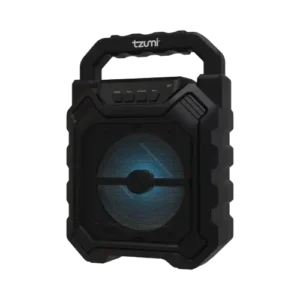
| Document Detail | Information |
| Document Type | User Guide |
| Brand Name | Tzumi |
| Product Name | SoundBoost Speaker |
| Model Number(s) | 8488 |
| PDF File Size | 167.2 KB |
| Number of Pages | 1 |
| Languages Covered | English |
Tzumi SoundBoost Speaker
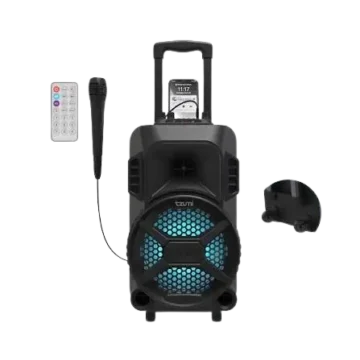
The Tzumi SoundBoost Speaker is a portable wireless mini speaker designed to play audio through Bluetooth, AUX, USB flash drives, and TF/MicroSD cards. It includes built-in playback controls, RGB LED lighting, a carrying handle, and a rechargeable 1200 mAh lithium-ion battery.
When the speaker is first switched on, it starts in Bluetooth mode. Other playback modes can activate automatically when a compatible audio source such as a USB drive, MicroSD card, or AUX cable is connected. The speaker provides up to four hours of runtime and a Bluetooth operating range of approximately 33 feet (10 meters).
What’s Included
The package contains:
- SoundBoost Speaker
- Micro-USB charging cable
- User Guide
Product Features
The SoundBoost Speaker supports several audio sources and portable-use features:
- Bluetooth wireless playback
- AUX audio input
- USB flash-drive playback
- TF/MicroSD card playback
- On-device music controls
- RGB LED lighting
- Built-in carrying handle
- Rechargeable lithium-ion battery
- Clear bass and audio playback
- Automatic switching to connected playback sources where supported
Buttons, Ports, and Controls
The button diagram identifies the speaker’s primary controls and connection points.
| Control or Port | Function |
| Mode Button | Switches among Bluetooth, USB, MicroSD, and AUX modes |
| Vol – / Previous Song | Press for the previous track; press and hold to lower volume |
| Vol + / Next Song | Press for the next track; press and hold to raise volume |
| Play/Pause | Starts or pauses audio |
| USB Port | Accepts a USB flash drive for stored music playback |
| TF/MicroSD Card Slot | Accepts a MicroSD card |
| Power ON/OFF Switch | Turns the SoundBoost on or off |
| AUX Line In | Connects a device using a 3.5 mm AUX cable |
| Micro-USB Port | Used for charging |
Technical Specifications
| Specification | Value |
| Dimensions | 6.3 × 3.7 × 9.1 in. |
| Bluetooth Version | 5.0 |
| Bluetooth Range | 33 ft. (10 m) |
| Power Input | 5V / 1A |
| Speaker Output | 5W |
| Sensitivity | 85 dB |
| Frequency Range | 150 Hz–20 kHz |
| Battery Type | Rechargeable Li-ion battery |
| Battery Capacity | 1200 mAh |
| Charging Time | 1–2 hours |
| Runtime | Up to 4 hours |
How to Set Up the SoundBoost Speaker
Turn the Speaker On
- Slide the Power switch to the ON position.
- When first powered on, the SoundBoost starts in Bluetooth Mode.
- A voice prompt confirms Bluetooth mode.
The guide states that other playback modes change automatically when their respective audio sources are connected.
How to Pair the SoundBoost With Bluetooth
Bluetooth Pairing Instructions
- Turn the SoundBoost on.
- Open the Bluetooth settings on the phone, tablet, computer, or other device being connected.
- Search the available Bluetooth devices.
- Select “Tzumi SoundBoost.”
- Follow any on-screen pairing instructions.
- After the connection is established, select music on the connected device to begin playback through the speaker.
Turn the Speaker Off
Slide the Power switch to the OFF position.
Music Controls
The speaker’s physical buttons can control music playback and volume.
Mode Button
Press the Mode button to switch between:
- Bluetooth
- USB
- MicroSD
- AUX
Previous Song and Volume Down
The Previous/V- button has two functions:
- Press once to return to the previous song.
- Press and hold to lower the speaker volume.
Play and Pause
Press the Play/Pause button to play or pause the current audio.
Next Song and Volume Up
The Next/V+ button also has two functions:
- Press once to move to the next song.
- Press and hold to increase the volume.
Using a MicroSD Card
The SoundBoost can play music stored on a MicroSD card.
MicroSD Card Playback
- Insert a MicroSD card into the speaker’s TF card slot.
- The SoundBoost automatically searches for music stored on the card.
- Playback begins automatically.
- The speaker’s music-control buttons can be used to play, pause, and skip stored audio.
Using a USB Flash Drive
Music can also be played directly from a USB flash drive.
USB Playback
- Insert a USB flash drive into the USB port.
- The SoundBoost automatically searches the drive.
- Stored music begins playing automatically.
Using AUX Mode
The AUX input allows a compatible audio device to connect through a 3.5 mm cable.
AUX Connection Instructions
- Connect one end of a 3.5 mm AUX cable to the AUX port on the SoundBoost.
- Connect the opposite end to the AUX port on the audio device.
- The SoundBoost automatically switches into AUX mode.
- The voice prompt “AUX input mode” confirms that the speaker is ready.
- Music playback controls must be operated from the connected source device while AUX mode is active.
Charging the SoundBoost Speaker
The SoundBoost uses the supplied Micro-USB cable for charging.
Low-Battery Notification
When the battery becomes low, the speaker announces “Battery low.”
Charging Instructions
- Insert the Micro-USB end of the charging cable into the SoundBoost charging port.
- Connect the USB end to a USB power source.
- Charging begins automatically.
- A red LED indicator located behind the /V+ button illuminates while the battery is charging.
- When charging is complete, the red indicator turns off.
The listed full charging time is approximately 1–2 hours.
Battery and Runtime
The SoundBoost uses a 1200 mAh rechargeable lithium-ion battery.
The manual lists:
- Charging time: 1–2 hours
- Runtime: up to 4 hours
Actual operating time can vary according to how the speaker is being used.
Playback Mode Guide
| Mode | How It Is Activated | Playback Control |
| Bluetooth | Default mode when first powered on, or selected through Mode | Speaker controls and connected device |
| USB | Insert a USB flash drive | Speaker controls |
| MicroSD | Insert a MicroSD card | Speaker controls |
| AUX | Connect a 3.5 mm AUX cable | Connected device controls music |
| Mode Selection | Press Mode button | Cycles Bluetooth, USB, MicroSD, and AUX |
Important Safety Warnings
The SoundBoost should be handled according to the warnings supplied in the user guide.
- Prolonged listening at high volume should be avoided because it may cause hearing damage.
- The speaker should be handled carefully and should not be dropped.
- Heavy objects should not be placed on the speaker.
- The product should be kept away from children.
- The speaker should be kept away from liquids.
- It should not be operated after exposure to liquids.
- The SoundBoost should not be operated with wet hands.
FCC and Regulatory Information
The manual states that the SoundBoost complies with Part 15 of the FCC Rules and applicable Industry Canada license-exempt RSS standards.
Operation is subject to two conditions:
- The device may not cause harmful interference.
- The device must accept received interference, including interference that may cause undesired operation.
The guide also states that unauthorized changes or modifications may void the user’s authority to operate the equipment.
If the speaker causes harmful interference to radio or television reception, the manual recommends:
- Reorienting or relocating the receiving antenna.
- Increasing the separation between the equipment and receiver.
- Connecting the equipment to an outlet on a different circuit from the receiver.
- Consulting the dealer or an experienced radio/TV technician.
Customer Support
Tzumi provides the following customer support information for SoundBoost owners:
| Support Method | Contact Information |
| Phone | 1-855-GO-TZUMI |
| support@tzumi.com |
The guide states that customer support can assist with questions about using the product.
Product Information
The manual identifies the speaker as SoundBoost Item No. 8488.
It is distributed by Tzumi Inc., New York, NY 10016, carries a © 2022 Tzumi Inc. copyright notice, and states that the product was made in China.
Frequently Asked Questions
How is the Tzumi SoundBoost paired with a phone?
The speaker should be switched on, after which Bluetooth settings should be opened on the phone. Tzumi SoundBoost should then be selected from the available Bluetooth devices.
What Bluetooth version does the SoundBoost use?
The specification table lists Bluetooth 5.0.
What is the Bluetooth range of the SoundBoost?
The manual lists a wireless range of approximately 33 feet (10 meters).
How long does the SoundBoost battery last?
The listed runtime is up to 4 hours on a full charge.
How long does the SoundBoost take to charge?
The manual specifies a charging time of approximately 1–2 hours.
Can the SoundBoost play music from a MicroSD card?
Yes. A MicroSD card can be inserted into the TF card slot. The speaker automatically searches for and plays compatible music stored on the card.
Can the SoundBoost play music from a USB flash drive?
Yes. Inserting a USB flash drive into the USB port causes the speaker to automatically search the drive and begin playing stored music.
What does the red charging light mean?
The red LED behind the /V+ button indicates that the SoundBoost is charging. The light turns off when charging is complete.