| Document Detail | Information |
| Document Type | User Guide |
| Brand Name | Tzumi |
| Product Name | Megabass LED Jobsite Speaker |
| PDF File Size | 1.96 MB |
| Total Number of Pages | 1 |
| Languages Covered | English |
Tzumi Megabass LED Jobsite Speaker
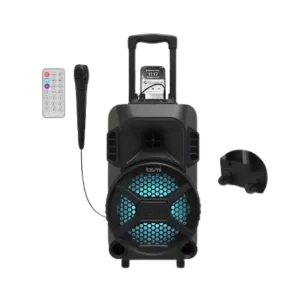
The Tzumi Megabass LED Jobsite Speaker is a portable Bluetooth speaker designed for indoor and outdoor use, including gatherings, jobsite use, and karaoke. It combines an 8-inch subwoofer and 2-inch tweeter, a built-in rechargeable battery, colorful LED lighting, a wired microphone, FM radio, USB and MicroSD playback, and a 3.5 mm AUX input.
The speaker includes a carry handle and wheels for transport. Its onboard controls provide microphone volume, echo adjustment, track selection, play/pause, source selection, lighting control, and master volume. A supplied remote control adds direct access to playback, source, volume, mute, repeat, and equalizer functions.
What’s Included
The package contains:
- BT speaker
- Charging cable
- Remote control
- Wired microphone
- User guide
Product Features
The manual describes the Megabass as a portable speaker suitable for music playback, parties, outdoor use, and karaoke.
Key features include:
- Bluetooth wireless audio
- Built-in rechargeable battery
- Wired microphone
- LED speaker lighting
- USB playback
- TF/MicroSD playback
- FM radio
- AUX input
- Built-in carry handle
- Wheels for transport
- Microphone volume control
- Echo control
- Master volume control
- Remote control
Parts, Controls, and Ports
The product diagram identifies the following controls and connections.
| Control or Port | Function |
| USB Port | Accepts a USB storage device |
| TF Card Slot | Accepts a TF/MicroSD card |
| AUX Port | Connects a compatible external audio source |
| Mic Port | Connects the supplied wired microphone |
| Mic Volume | Adjusts microphone volume |
| Echo Control | Adjusts microphone echo |
| Previous | Selects the previous track |
| Pause / Play | Pauses or resumes playback |
| Next | Selects the next track |
| Mode / Light On-Off | Changes source mode and controls speaker lighting |
| DC / 5V Input | Charging connection |
| On / Off Master Volume | Turns the speaker on or off and adjusts main volume |
| Carry Handle | Used for transporting the speaker |
| Wheels | Allow the speaker to roll during transport |
Wired Microphone Control
The included microphone has an On/Off switch on its body.
Remote Control Guide
The supplied remote provides the following functions:
| Remote Control | Function |
| Power | Turns speaker power on or off |
| Play / Pause | Starts or pauses playback |
| Equalizer | Changes the equalizer setting where supported |
| Direct Access Buttons | Numeric direct-access buttons |
| Mode | Changes playback source |
| Mute | Mutes the speaker |
| Previous Track | Moves to the previous track |
| Next Track | Moves to the next track |
| Volume Down | Lowers the speaker volume |
| Volume Up | Raises the speaker volume |
| Repeat | Activates repeat playback |
| USB / SD Access | Accesses USB or SD playback |
The manual notes that the Equalizer function works only in USB and TF/MicroSD modes.
Technical Specifications
| Specification | Value |
| Speaker Type | 8″ subwoofer + 2″ tweeter |
| Maximum Output Power | 20W |
| Bluetooth Version | 5.0 |
| Signal-to-Noise Ratio | 80 dB |
| Battery Capacity | 4000 mAh |
| Display | LED display |
| Connections | Bluetooth / MicroSD / USB / FM / AUX |
| Measurements | 586 × 546 × 510 |
| Weight | 15.8 kg |
Before First Use
The speaker’s internal rechargeable battery should be fully charged before initial use.
The manual lists an approximate charging time of 4–5 hours.
Charging the Megabass Speaker
The speaker contains an internal rechargeable battery.
How to Charge the Speaker
- Connect the Micro-USB end of the charging cable to the speaker’s charging input.
- Connect the opposite end to a USB power source.
- The power indicator lights red while the battery is charging.
- Continue charging until the battery is full.
- The indicator light turns off when charging is complete.
Charging takes approximately 4–5 hours.
Low-Battery Warning
When the built-in battery voltage becomes low, the speaker produces a low-power alarm.
If the battery level becomes critically low, the speaker automatically shuts down.
How to Pair the Megabass Speaker With Bluetooth
The Megabass supports Bluetooth 5.0 wireless playback.
Bluetooth Pairing Instructions
- Make sure Bluetooth is enabled on the phone, tablet, computer, or other source device.
- Turn the speaker on by rotating the Master Volume control knob.
- During first-time pairing, keep the phone and speaker within approximately 3 feet of one another.
- Open the Bluetooth settings on the source device.
- Search for nearby Bluetooth devices.
- Select “Tzumi Mega Bass.”
- Follow any pairing prompts shown on the source device.
- A tone sounds after pairing is completed successfully.
After the first successful connection, the speaker and device remember each other, so normal pairing should not be required again each time they are used together.
How to Play Music From a TF/MicroSD Card
The speaker automatically recognizes an inserted MicroSD card.
TF/MicroSD Card Instructions
- Load compatible music onto a MicroSD card.
- Insert the card into the TF/MicroSD slot.
- The speaker automatically enters card mode.
- Stored music begins playing.
- The display shows playback time.
- A pause symbol appears on the display when playback is paused.
How to Play Music From a USB Drive
The Megabass includes a USB port for compatible USB storage media.
The remote also provides a dedicated USB/SD Access function.
When using stored music, the manual’s troubleshooting instructions specify that music should be in MP3 format.
How to Use AUX Mode
The speaker supports a wired 3.5 mm AUX connection.
AUX Connection Instructions
- Connect one end of a 3.5 mm audio cable to the speaker’s AUX jack.
- Connect the opposite end to the audio output of a phone, computer, or other compatible source.
- The speaker automatically detects the AUX connection and enters AUX mode.
- Press Play/Pause to start or pause music.
The manual does not list a 3.5 mm AUX cable among the included package contents.
How to Use FM Radio
The Megabass includes an internal FM radio and does not require an external antenna.
Enter FM Mode
Press the Mode button until FM mode is selected.
FM Frequency Range
The speaker supports:
87.5 MHz–108.0 MHz
Search for Stations
- Enter FM mode.
- Press and hold the Play/Pause button.
- The speaker automatically searches for available stations.
Select a Station
Press Play/Pause to select a station as described in the guide.
The internal antenna allows FM reception without connecting an external antenna.
Controlling the Speaker Lights
The Megabass includes LED speaker lighting.
To turn the lights on or off:
- Locate the Mode/Light button.
- Press and hold the button.
- The speaker lights switch ON or OFF.
Using the Wired Microphone
A wired microphone is included for karaoke and voice use.
To use it:
- Connect the microphone to the speaker’s Mic input.
- Use the microphone’s On/Off switch as needed.
- Adjust the Mic Volume control on the speaker.
- Use the Echo Control to change the microphone echo level.
Troubleshooting Guide
The manual provides several troubleshooting checks for common operating problems.
| Problem | What to Check |
| Music will not play from a MicroSD card | Make sure the music is in MP3 format and that the SD card was formatted before use |
| Speaker will not turn on | Check whether the battery charge level is low |
| Poor FM reception | Move the speaker to another location |
| USB, TF, or AUX mode does not appear on the display | These modes appear only when a USB device, TF card, or AUX connection is inserted |
Important Safety Instructions
The Megabass should only be used for its intended purpose.
The guide provides the following safeguards:
- Keep the speaker away from heat sources and direct sunlight.
- Keep it away from humidity, water, and other liquids.
- Avoid extremely high or low temperatures because they may damage the battery.
- Do not operate the speaker if it becomes wet or moist.
- Using the unit while wet may create a risk of electric shock, injury, or product damage.
- Do not use the speaker if it has been dropped or damaged.
- Electrical repairs should only be performed by a qualified electrician.
- Improper repairs may expose the user to serious risk.
- Keep the speaker out of the reach of children.
- The product is not a toy.
Battery Disposal
The Megabass contains a lithium-polymer battery.
The guide states that lithium-polymer batteries are environmentally safe when fully discharged. The product should not be disposed of with regular household waste.
Instead, it should be taken to an appropriate:
- Hazardous-waste collection site
- Recycling facility
- Electronics retailer that recycles batteries or electronics
Applicable local or state disposal requirements should be followed.
FCC Information
The guide states that the speaker complies with Part 15 of the FCC Rules and applicable Industry Canada license-exempt RSS standards.
Operation is subject to two conditions:
- The device may not cause harmful interference.
- The device must accept interference received, including interference that may cause undesired operation.
Unauthorized changes or modifications may void the user’s authority to operate the equipment.
The guide also states that the speaker has been tested against the limits for a Class B digital device.
If harmful interference occurs, the manual recommends:
- Reorienting or relocating the receiving antenna.
- Increasing the distance between the speaker and receiver.
- Connecting the equipment to an outlet on a different circuit.
- Consulting the dealer or an experienced radio/TV technician.
Frequently Asked Questions
How is the Tzumi Megabass paired with a phone?
Turn the speaker on using the master volume knob, keep the phone within approximately 3 feet during initial pairing, open Bluetooth settings, and select “Tzumi Mega Bass.” A tone confirms successful pairing.
How long does the Megabass take to charge?
The guide lists an approximate charging time of 4–5 hours.
What does the red indicator mean while charging?
A red power indicator means the internal battery is charging. The light turns off when the battery is fully charged.
Can the Megabass play music from a MicroSD card?
Yes. Insert a MicroSD card containing compatible music into the TF/MicroSD slot. The speaker automatically enters card mode and begins playback.
What audio formats should be used on a MicroSD card?
The troubleshooting section specifically instructs users to make sure the music is in MP3 format.
What FM frequencies does the Megabass support?
The built-in FM radio covers 87.5 MHz to 108.0 MHz.
Why does USB, TF, or AUX mode not appear on the display?
The guide states that these source modes appear only when the related USB device, TF card, or AUX connection is physically inserted.
How are the LED speaker lights turned off?
Press and hold the Mode/Light button to switch the speaker lighting on or off.