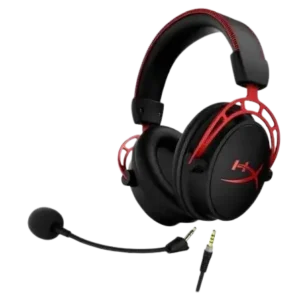
| Document Detail | Information |
| Document Type | User Manual |
| Brand Name | Alpha Gaming by Tzumi |
| Product Name | RGB Hi-Fi Stereo Gaming Headset |
| PDF File Size | 324 KB |
| Number of Pages | 2 |
| Languages Covered | English |
Alpha Gaming RGB Hi-Fi Stereo Gaming Headset
The Alpha Gaming RGB Hi-Fi Stereo Gaming Headset is a wired gaming headset designed for computer and gaming-console use. It combines 50 mm speakers with a flexible omnidirectional microphone, an integrated volume knob, RGB LED lighting, separate audio and microphone plugs, and a USB connection used specifically to power the headset’s lighting.
The manual describes the headset as designed for extended gaming comfort and lists true stereo sound 2.1 channel and a high-sensitivity flexible microphone among its primary features. A 3.5 mm male-to-female Y-splitter cable adapter is also shown for use where the connected device requires it.
Main Features
The manual highlights three main product features:
- Designed for extended gaming comfort.
- True stereo sound, listed as 2.1 channel.
- High-sensitivity flexible microphone.
The headset also includes RGB LED lighting and an onboard volume knob.
Parts and Components
The parts diagram on page 2 identifies eight main components.
| No. | Part | Purpose |
| 1 | Audio Plug | Connects the headset audio output to a compatible device |
| 2 | Microphone Plug | Connects the headset microphone input |
| 3 | USB Connector | Powers the headset’s LED lights |
| 4 | Microphone | Flexible microphone used for voice communication |
| 5 | LED Lights | RGB lighting built into the headset |
| 6 | Speaker | Provides headset audio |
| 7 | Volume Knob | Adjusts headset listening volume |
| 8 | 3.5mm Male-to-Female Y-Splitter Cable Adapter | Used when the connected source requires the included adapter |
Connection and Control Guide
Audio Plug
The audio plug carries the headset’s listening audio connection.
Microphone Plug
The microphone plug provides the connection for the flexible headset microphone.
USB Connector
The USB connector is used only to activate the LED display.
Connecting or disconnecting USB power does not affect the headset’s audio or microphone operation. This means the headset can still perform its normal audio functions without the RGB lighting being powered.
Volume Knob
The built-in volume knob provides direct control over headset listening volume.
Flexible Microphone
The headset includes a flexible microphone. Its technical specifications identify it as an omnidirectional microphone.
Gaming Headset Setup
The manual provides a three-step connection process.
1. Connect the Headset to the Audio Source
Connect the headset to the intended source, such as a:
- Computer.
- Gaming console.
- Other compatible audio source.
Use the included 3.5 mm male-to-female Y-splitter cable adapter when the connected device requires it.
2. Connect USB Power for the RGB LEDs
Insert the headset’s USB connector into an available USB port.
This step is optional and is used only to activate the LED display.
The USB connection does not affect the headset’s normal audio or microphone functionality.
3. Configure the Audio Device
Once connected, the headset is ready for use.
For a computer, open the system’s sound settings and adjust the headset configuration as required.
Some gaming consoles require audio to be routed to the headset through the console’s main audio settings. The manual directs users to the instructions for their specific console when this is necessary.
Connecting the Headset to a Computer
For computer use:
- Connect the headset’s audio and microphone plugs to the appropriate connections on the computer, using the included Y-splitter adapter if necessary.
- Connect the USB plug to an available USB port if RGB lighting is desired.
- Open the computer’s sound settings.
- Adjust the headset and microphone settings as needed.
The USB connection can be omitted when only audio and microphone operation are required.
Gaming Console Connection
The manual indicates that the headset can be connected to gaming consoles and notes that an adapter is included for PS4, Xbox One, and Nintendo Switch.
The connection procedure may depend on the console’s audio configuration. Some consoles require the user to select or route headset audio through the console’s main sound settings.
Xbox One Controller Note
The manual states that the headset works with Xbox One controllers equipped with a 3.5 mm headset jack.
Other Xbox One controllers require the Headset Audio Controller, which is sold separately.
RGB LED Lighting
The Alpha Gaming headset includes built-in LED lights.
The LEDs receive power through the separate USB connector. To activate them:
- Connect the normal headset audio and microphone connections.
- Insert the USB connector into an available USB port.
- The headset’s LED display can then operate.
The USB plug is not required for headset audio. Its function is limited to the LED lighting system.
Microphone
The headset uses a flexible microphone designed for voice communication during gaming or other compatible applications.
According to the technical specifications:
- Microphone dimensions are 6.0 × 2.7 mm.
- Microphone sensitivity is -38 dB ± 3 dB.
- Microphone impedance is 2.2 Ω as printed in the manual.
- Directivity is omnidirectional.
The microphone connects through the headset’s dedicated microphone plug.
Speaker and Audio Specifications
The headset uses 50 mm speakers and has a listed frequency range of 20 Hz to 20,000 Hz.
| Audio Specification | Value |
| Speaker Diameter | 50 mm |
| Impedance | 21 Ω ± 15% |
| Sensitivity | 98 dB ± 3 dB |
| Frequency Range | 20–20,000 Hz |
Technical Specifications
The manual lists the following complete technical specifications.
| Specification | Value |
| Speaker Diameter | 50 mm |
| Impedance | 21 Ω ± 15% |
| Sensitivity | 98 dB ± 3 dB |
| Frequency | 20–20,000 Hz |
| Microphone Dimensions | 6.0 × 2.7 mm |
| Microphone Sensitivity | -38 dB ± 3 dB |
| Microphone Impedance | 2.2 Ω |
| Microphone Directivity | Omnidirectional |
| LED Working Voltage | DC 5V ± 15% |
| LED Working Current | 30 mA |
| Headset Interface | USB + 2 × 3.5 mm jack |
| Cable Length | 2 m ± 0.3 m |
Cleaning and Care
The headset should be cleaned with a soft, dry cloth.
The manual specifically warns against using:
- Abrasive cleaning agents.
- Chemical cleaners.
These products may damage the headset.
Frequently Asked Questions
Does the Alpha Gaming headset need USB for audio?
No. The USB connection is optional and is used only to power the LED display. The manual states that USB power does not affect normal headset audio or microphone functionality.
What connections does the Alpha Gaming gaming headset use?
The headset interface consists of USB plus two 3.5 mm jacks. The separate jacks are used for audio and microphone connections, while USB supplies power to the LEDs.
How are the RGB lights turned on?
Connect the headset’s USB plug to an available USB port. The USB connection supplies power to the LED display.
What size speakers are used in the headset?
The headset uses 50 mm speakers.
What is the headset’s frequency range?
The manual lists a frequency response of 20 Hz to 20,000 Hz.
Does the headset work with Xbox One controllers?
It works with Xbox One controllers that have a 3.5 mm headset jack. Controllers without that jack require the separately sold Headset Audio Controller.
How should the gaming headset be cleaned?
Use a soft, dry cloth. Abrasive cleaning products and chemical cleaners should not be used because they may damage the headset.
What should be done if a gaming console does not send audio to the headset?
The manual states that some consoles require headset audio to be selected or routed through the console’s main audio settings. The console’s own instructions should be followed for the required sound configuration.