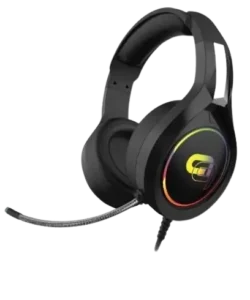
| Document Detail | Information |
| Document Type | User Manual |
| Brand Name | Alpha Gaming |
| Product Name | RGB Hi-Fi Stereo Gaming Headset |
| PDF File Size | 95.6 KB |
| Number of Pages | 2 |
| Languages Covered | English |
Alpha Gaming RGB Hi-Fi Stereo Gaming Headset
The Alpha Gaming RGB Hi-Fi Stereo Gaming Headset is a wired gaming headset designed for use with computers and compatible gaming consoles. It combines 40 mm speakers, a flexible omnidirectional microphone, an integrated volume knob, RGB LED lighting, separate audio and microphone connections, and a USB connection dedicated to powering the LED display.
The manual describes the headset as designed for extended gaming comfort and highlights true stereo sound 2.1 channel and a high-sensitivity flexible microphone. An included 3.5 mm male-to-female Y-splitter cable adapter allows the headset to connect to devices that require a combined audio connection. The cover also references adapter use with PS4, Xbox One, and Nintendo Switch systems.
Main Features
The manual highlights the following features:
- Designed for extended gaming comfort.
- True stereo sound with a stated 2.1-channel configuration.
- High-sensitivity flexible microphone.
- RGB LED display.
- Separate audio and microphone connections.
- Integrated volume control.
- Included 3.5 mm male-to-female Y-splitter cable adapter.
- USB connection for LED illumination.
Parts and Controls
The headset diagram identifies eight components.
| No. | Part | Function |
| 1 | Audio Plug | Carries headset audio from the connected source |
| 2 | Microphone Plug | Connects the headset microphone |
| 3 | USB Connector | Powers the LED display |
| 4 | Microphone | Provides voice input |
| 5 | LED Display | Provides RGB lighting |
| 6 | Speaker | Produces headset audio |
| 7 | Volume Knob | Adjusts listening volume |
| 8 | 3.5mm Male-to-Female Y-Splitter Cable Adapter | Used when the connected device requires the included adapter |
Technical Specifications
The Alpha Gaming headset specifications listed in the manual are shown below.
| Specification | Value |
| Speaker Diameter | 40 mm |
| Impedance | 32 Ω ±15% |
| Sensitivity | 100 dB ±5 dB |
| Frequency Range | 20–20,000 Hz |
| Microphone Dimensions | 6.0 × 2.7 mm |
| Microphone Sensitivity | -54 dB ±3 dB |
| Microphone Impedance | 2.2 Ω |
| Microphone Directivity | Omnidirectional |
| LED Working Voltage | 3V |
| LED Working Current | 20 mA |
| Headset Interface | USB + 2 × 3.5 mm AUX |
| Cable Length | 2 m ±0.1 m |
Gaming Headset Setup
The headset uses separate connections for normal audio and microphone operation, while the USB connector is used only for the RGB LED display.
1. Connect the Headset to the Audio Source
The headset should first be connected to the intended source, such as:
- A computer.
- A compatible gaming console.
- Another supported audio device.
The included 3.5 mm male-to-female Y-splitter cable adapter should be used when the connected device requires it.
2. Connect USB Power for the RGB Lighting
The USB connector can be plugged into any available USB port.
This connection is optional. Its purpose is only to activate the headset’s LED display.
The manual specifically states that the USB connection does not affect the headset’s overall audio or microphone operation.
3. Adjust the Audio Settings
After the physical connections are made, the headset is ready for use.
On a computer, the system’s sound settings can be opened to adjust the headset configuration.
Some gaming consoles require audio to be routed to the headset through the console’s main audio settings. In those cases, the console’s own instructions should be followed for the required audio-routing procedure.
Connecting the Headset to a Computer
For computer use:
- Connect the headset’s audio plug to the appropriate audio connection.
- Connect the microphone plug to the appropriate microphone connection.
- Use the included Y-splitter adapter if the computer requires a combined headset connection.
- Connect the USB plug to an available USB port if the RGB LED display is required.
- Open the computer’s sound settings.
- Adjust the headset output and microphone input settings as needed.
Because USB power is dedicated to the LEDs, normal headset audio does not depend on the USB connection.
Audio and Microphone Connections
The headset uses two 3.5 mm AUX connections as part of its interface.
Audio Plug
The audio plug carries sound from the connected computer, console, or other compatible source to the headset speakers.
Microphone Plug
The microphone plug provides the headset’s voice-input connection.
Y-Splitter Cable Adapter
The included 3.5 mm male-to-female Y-splitter cable adapter can be used when the source device requires a different headset connection arrangement.
The manual instructs users to use the adapter when necessary rather than treating it as a required component for every setup.
RGB LED Display
The headset includes an RGB LED display built into the earcup area.
The LED system operates separately from the headset’s audio functions.
To activate the LEDs:
- Complete the required audio and microphone connections.
- Insert the USB connector into an available USB port.
- The USB connection supplies power to the LED display.
The LED system operates at 3V with a listed working current of 20 mA.
Volume Control
The headset includes a built-in volume knob.
This control is identified in the product diagram and allows listening volume to be adjusted directly from the headset.
Microphone
The Alpha Gaming headset uses a flexible microphone for voice communication.
Its documented specifications are:
| Microphone Specification | Value |
| Dimensions | 6.0 × 2.7 mm |
| Sensitivity | -54 dB ±3 dB |
| Impedance | 2.2 Ω |
| Directivity | Omnidirectional |
The microphone is listed as a high-sensitivity flexible microphone and connects through the headset’s dedicated microphone plug.
Speaker and Audio Specifications
The headset uses 40 mm speakers.
The documented audio specifications include:
- 32 Ω ±15% impedance.
- 100 dB ±5 dB sensitivity.
- 20 Hz to 20,000 Hz frequency range.
The manual also describes the headset as providing true stereo sound in a 2.1-channel configuration.
Gaming Console Setup
The headset can be connected to compatible gaming consoles.
The manual references use with:
- PS4.
- Xbox One.
- Nintendo Switch.
The included adapter can be used when required by the console or controller connection.
Some consoles may also require the headset output to be selected through the console’s main audio settings.
Xbox One Controller Compatibility
The manual includes an important Xbox One connection note.
The headset works with Xbox One controllers that have a 3.5 mm headset jack.
Xbox One controllers without that connection require the Headset Audio Controller, which is sold separately.
Cleaning and Care
The gaming headset should be cleaned using a soft, dry cloth.
Abrasive cleaning agents and chemical cleaners should not be used because they may damage the headset.
Recommended Cleaning Method
- Disconnect the headset from the connected equipment before handling it for cleaning.
- Wipe the external headset surfaces with a soft, dry cloth.
- Avoid abrasive cleaning products and chemical cleaners.
The manual does not prescribe liquid cleaning or washing, so the documented dry-cloth method should be followed.
Product and Distribution Information
The manual identifies the product under the Alpha Gaming brand and states that it is distributed by Tzumi Inc., New York, NY 10016.
The document carries a © 2021 Tzumi Inc. notice, states that Alpha Gaming is a registered trademark of Tzumi Inc., and identifies the product as made in China.
Frequently Asked Questions
Does the Alpha Gaming RGB headset need USB for audio?
No. The USB connection is optional and is used only to activate the LED display. Audio and microphone operation do not depend on the USB connection.
What connections does the Alpha Gaming headset use?
The manual lists the interface as USB plus two 3.5 mm AUX connections. The 3.5 mm connections handle headset audio and microphone input, while USB powers the LED display.
What size speakers are used in the headset?
The headset uses 40 mm speakers with a listed impedance of 32 Ω ±15%.
What is the headset’s frequency range?
The manual specifies a frequency range of 20 Hz to 20,000 Hz.
How is the RGB LED display turned on?
The USB connector should be plugged into an available USB port. USB power is used specifically for the LED display.
Does the headset work with Xbox One?
Yes, the manual states that it works with Xbox One controllers equipped with a 3.5 mm headset jack. Other Xbox One controllers require the separately sold Headset Audio Controller.
How should the Alpha Gaming headset be cleaned?
The headset should be wiped with a soft, dry cloth. Abrasive cleaning agents and chemical cleaners should not be used because they may damage the product.
What should be checked if a console does not send sound to the headset?
The console’s main audio settings should be checked. The manual notes that some gaming consoles require users to route audio to the headset through those settings. The console’s own instructions should be followed for the exact configuration.