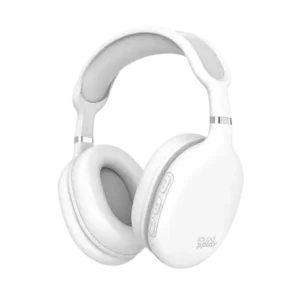
| Document Detail | Information |
| Document Type | User Guide |
| Brand Name | Tzumi |
| Product Name | SoundPlay Wireless Headphones |
| Model Number(s) | 9063 |
| PDF File Size | 684.3 KB |
| Number of Pages | 1 |
| Languages Covered | English |
Tzumi SoundPlay Wireless Headphones
The Tzumi SoundPlay Wireless Headphones are foldable Bluetooth 5.3 headphones designed for wireless music playback, phone calls, and wired listening through a 3.5 mm AUX connection. The headphones include built-in controls for volume, track selection, play/pause, power, and call handling, along with a built-in microphone.
The rechargeable 300 mAh lithium battery provides up to 20 hours of music playback or 20 hours of talk time, with up to 60 hours of standby time. A folding hinge allows the headphones to collapse for easier storage, while the supplied USB-C charging cable is used to recharge the battery.
Main Features
The user guide lists the following features:
- Foldable wireless design.
- Up to 20 hours of playback time.
- Multifunction onboard controls.
- Soft cushioning for the ears and head.
- Bluetooth connectivity.
- 3.5 mm AUX compatibility for wired listening.
- Built-in microphone for calls.
- Folding hinges for compact storage.
What’s Included in the Package
The package contains:
- SoundPlay Wireless Headphones
- USB-C charging cable
- 3.5 mm AUX cable
- User Guide
Parts and Controls
The product diagram identifies eight main controls and components.
| No. | Part or Control | Function |
| 1 | Volume Up / Next Song | Raises volume with a press; selects the next track when pressed and held |
| 2 | Power ON/OFF / Multi-Function | Handles power, calls, redial, hang-up, and play/pause |
| 3 | Volume Down / Previous Song | Lowers volume with a press; selects the previous track when pressed and held |
| 4 | Indicator Light | Shows charging and connection status |
| 5 | Charging Port | USB-C charging connection |
| 6 | Built-in Microphone | Used for phone calls |
| 7 | Line-In | 3.5 mm AUX input |
| 8 | Folding Hinge | Allows the headphones to fold for storage |
Technical Specifications
| Specification | Value |
| Input | 5V / 0.2A |
| Battery | Rechargeable 300 mAh lithium battery |
| Standby Time | Up to 60 hours |
| Charging Time | Approximately 3 hours |
| Music Play Time | Up to 20 hours |
| Talk Time | Up to 20 hours |
| Bluetooth Version | 5.3 |
| Size | 7.2 × 7.7 × 3.2 in. |
| Product Identifier | Item No. 9063 |
Before First Use
The headphones should be fully charged before they are used for the first time.
The manual states that the headphones cannot be used while they are charging. A full charge takes approximately 3 hours.
Charging the SoundPlay Headphones
The SoundPlay headphones recharge through the supplied USB-C charging cable.
Charging Indicator Lights
| Indicator | Meaning |
| Red light on | Headphones are charging |
| Blue light on | Headphones are fully charged |
Charging With an AC Wall Adapter
- Insert the USB-C end of the supplied charging cable into the headphones.
- Connect the USB end of the cable to the USB port on an AC wall adapter.
- Allow the headphones to charge.
- The red indicator remains on while charging.
- When charging is complete, the indicator turns blue.
Charging From a USB Power Source
- Connect the supplied charging cable to the headphones.
- Connect the opposite end to a USB power source.
- Leave the headphones connected until the blue fully charged indicator appears.
The headphones should not be used while connected for charging.
How to Pair the SoundPlay Headphones With Bluetooth
The headphones automatically enter pairing mode after being powered on.
Bluetooth Pairing Instructions
- Keep the headphones and the Bluetooth device within approximately 3 feet of one another.
- Press and hold the Power / Multi-Function button for 2 seconds.
- Wait for the “Power ON” voice prompt.
- The headphones automatically enter pairing mode.
- The user will hear “Pairing”, and the blue and red indicator lights will flash alternately.
- Open the Bluetooth settings on the phone, tablet, computer, or other compatible device.
- Search the available Bluetooth devices.
- Select “Tzumi SoundPlay.”
- When pairing succeeds, the headphones announce “Connected.”
- The headphones are then ready for wireless use.
Power Controls
Turn the Headphones On
Press and hold the Power / Multi-Function button for approximately 2 seconds.
The “Power ON” prompt confirms startup.
Turn the Headphones Off
Press and hold the Power / Multi-Function button.
The guide identifies the same multifunction control for power on and off, although it does not state a separate power-off hold duration.
Music Controls
The headphones provide direct control over playback, track selection, and volume.
| Function | Control |
| Play/Pause | Press the Multi-Function button |
| Next Song | Press and hold Volume Up / Next |
| Previous Song | Press and hold Volume Down / Previous |
| Volume Up | Press Volume Up / Next |
| Volume Down | Press Volume Down / Previous |
| Power ON/OFF | Press and hold the Multi-Function button |
Adjusting the Volume
Increase Volume
Press the Volume Up / Next Song button.
Decrease Volume
Press the Volume Down / Previous Song button.
A short press changes the volume, while a press-and-hold command is used for changing tracks.
Phone Call Controls
The built-in microphone and multifunction button allow the headphones to handle phone calls.
| Call Function | Control |
| Answer a Call | Press the Multi-Function button during an incoming call |
| End a Call | Press the Multi-Function button during a call |
| Redial Last Number | Press the Multi-Function button twice |
| Reject a Call | Press and hold the Multi-Function button during an incoming call |
Using the 3.5 mm AUX Line-In
The SoundPlay headphones can also be used through a wired 3.5 mm connection.
The manual states that the headphones should be fully charged before line-in use.
AUX Connection Instructions
- Insert one end of the included 3.5 mm AUX cable into the headphones’ Line-In port.
- Connect the opposite end to the audio output on the source device.
- Audio can then be played through the wired connection.
Bluetooth and AUX Listening Options
The headphones support two documented listening methods:
| Listening Method | Connection |
| Bluetooth | Bluetooth 5.3 wireless connection |
| Line-In | Included 3.5 mm AUX cable |
This allows the SoundPlay headphones to be used wirelessly or through a physical audio cable.
Folding the Headphones
The product includes folding hinges that allow the earcups to fold inward.
The foldable design reduces the space required for storage or transport. The manual’s product diagram specifically identifies the folding hinge as one of the headphone components.
Indicator and Voice Prompt Guide
| Indicator or Prompt | Meaning |
| “Power ON” | Headphones have powered on |
| “Pairing” | Bluetooth pairing mode is active |
| Red and blue lights flashing alternately | Headphones are searching for a Bluetooth connection |
| “Connected” | Bluetooth pairing succeeded |
| Red charging light | Battery is charging |
| Blue charging light | Battery is fully charged |
Troubleshooting Guide
The supplied user guide provides troubleshooting guidance for two common problems.
| Problem | What the User Should Check |
| Headphones will not turn on | Fully charge the headphones before first use. The headphones may not turn on when the battery level is very low. |
| No sound during playback | Check the connection between the headphones and source device. If there is no connection, reconnect the headphones and adjust the volume to a suitable level. |
Important Safety Instructions
The SoundPlay headphones should be used according to the safeguards listed in the guide.
- Do not listen at high volume for long periods.
- Use the headphones only for their intended purpose.
- Keep the headphones away from heat sources and direct sunlight.
- Keep them away from humidity, water, and other liquids.
- Do not operate the headphones after exposure to water or moisture.
- Using wet headphones may create a risk of electric shock, injury, or product damage.
- Do not use the headphones if they appear damaged.
- Electrical repairs should only be performed by a qualified electrician.
- Improper repair work may create serious risk.
- Keep the headphones out of the reach of children.
- The headphones are not a toy.
Customer Support
Tzumi provides the following support contacts for the SoundPlay Wireless Headphones:
| Support Method | Contact Information |
| support@tzumi.com | |
| Phone | 1-855-GO-TZUMI |
Product and Distribution Information
The guide identifies the headphones as:
SoundPlay Wireless Headphones — Item No. 9063
The product is distributed by Tzumi Inc., New York, NY 10016. The document carries a © 2023 notice and states that the headphones are made in China.
Frequently Asked Questions
How are the Tzumi SoundPlay headphones paired with a phone?
Press and hold the Power button for about 2 seconds until “Power ON” is heard. The headphones automatically enter pairing mode and announce “Pairing.” Open the phone’s Bluetooth settings and select Tzumi SoundPlay. A “Connected” prompt confirms successful pairing.
How long do the SoundPlay headphones take to charge?
The manual lists an approximate charging time of 3 hours.
How long does the battery last?
The headphones provide up to 20 hours of music playback and up to 20 hours of talk time. Standby time is listed at up to 60 hours.
Why will the SoundPlay headphones not turn on?
The battery may be too low. The manual recommends fully charging the headphones before first use and notes that they may not turn on when the battery level is very low.
Why is there no sound from the headphones?
The connection between the headphones and source device should be checked. If the connection has been lost, reconnect the headphones and adjust the volume to an appropriate level.
Can the SoundPlay headphones be used with an AUX cable?
Yes. The supplied 3.5 mm AUX cable can be connected to the headphone Line-In port and the source device. The manual instructs users to fully charge the headphones before using line-in mode.
What does the red charging light mean?
A red indicator means the headphones are currently charging. A blue light indicates that charging is complete.
How is the last phone number redialed?
Press the Power / Multi-Function button twice to redial the last number.